Essentials: 1.1.0 causes error when building iOS azure pipeline
Bug report best practices: Submitting Issues
Description
When building an application (iOS only) in AzureDevops using xamarin essentials 1.1.0 I get an error
as follows
(_CompileToNative target) ->
MTOUCH : error MT2101: Can't resolve the reference 'System.String System.String::TrimStart(System.Char)',
referenced from the method 'System.String Xamarin.Essentials.FileBase::PlatformGetContentType(System.String)' in 'mscorlib, Version=2.0.5.0, Culture=neutral, PublicKeyToken=7cec85d7bea7798e'
Steps to Reproduce
- Build an application using Xamarin essentials (iOS) 1.10 using azure devops .Works with android
- you get an error as described above
Expected Behavior
Should not error . Works fine when reverted to 1.01.
Actual Behavior
(_CompileToNative target) ->
MTOUCH : error MT2101: Can't resolve the reference 'System.String System.String::TrimStart(System.Char)',
referenced from the method 'System.String Xamarin.Essentials.FileBase::PlatformGetContentType(System.String)' in 'mscorlib, Version=2.0.5.0, Culture=neutral, PublicKeyToken=7cec85d7bea7798e'
I hope the above is enough info to get you going.
Many thanks for providing this "essential" library.
 developer9969
All 22 comments
Are you positive that you updated your NuGets on all projects?
I am building fine on my CI: https://dev.azure.com/jamesmontemagno/Hanselman.Forms/_build/results?buildId=665
We also build the source in Azure DevOps including our samples.
 jamesmontemagno
on 23 Mar 2019
jamesmontemagno
on 23 Mar 2019
@jamesmontemagno thanks for your time in replying. I cannot explain it . I have double checked and all the projects have latest xamarin essential nuget. We have been using xamarin essentials in pipelines since prerelease without any problems
now we get : MTOUCH : error MT2101: Can't resolve the reference 'System.String System.String::TrimStart(System.Char)', referenced from the method 'System.String Xamarin.Essentials.FileBase::PlatformGetContentType(System.String)' in 'mscorlib, Version=2.0.5.0,
Culture=neutral, PublicKeyToken=7cec85d7bea7798e'.
1 Error(s)
I reverted again because people depend on the build. I need to create another project "dummy" one and see if happens.
developer9969
on 25 Mar 2019
Are you running on cloud build hosts or personal on premium build machine?
Also did you try to do a clean on the project in devops?
jamesmontemagno
on 26 Mar 2019
Hey there, i got the same problem - same error while tryiing to build in AppCenter (iOS project).
 Robiwahn23
on 1 Apr 2019
Robiwahn23
on 1 Apr 2019
What version of mono? Maybe we are using a newer method or something...
 mattleibow
on 7 Apr 2019
mattleibow
on 7 Apr 2019
Ensure that you have At minimum Xamarin.iOS 12.2 and Mono5.12, which is what we build against currently
jamesmontemagno
on 18 Apr 2019
Hi I am using vs2019
Xamarin.iOS and Xamarin.Mac SDK 12.8.0.0 (0aa8452) (visual studio help)
Mono Debugging for Visual Studio 16.0.300 (573eda3) (visual studio help)
is the above what you are after?
Pity you cant reproduce? what info would help you?
many thanks
developer9969
on 18 Apr 2019
Same problem when using this Email functionality. The build on the hosted agent failed when including this code into the shared project.
 rdeveen
on 10 May 2019
rdeveen
on 10 May 2019
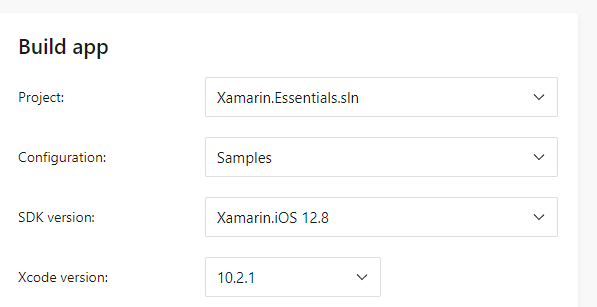
I just did an App Center build of our Sample app which uses all of the APIs and built successful.... Can someone post a full build log in a Gist:
jamesmontemagno
on 14 May 2019
Updating the SDK version in AppCenter fixed this for me. Thanks @jamesmontemagno.
 james-alt
on 30 May 2019
james-alt
on 30 May 2019
@jamesmontemagno @james-alt I am using azure pipelines no appcenter . not sure and might be missing the obvious but I cannot find where I set the SDK version in azure devops (which task)
many thanks for any input
developer9969
on 30 May 2019
I assume you are just using:
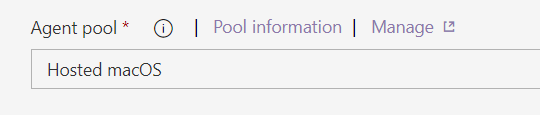
?
jamesmontemagno
on 31 May 2019
@developer9969 Are you still having the issue with building on azure pipelines
 newky2k
on 4 Jun 2019
newky2k
on 4 Jun 2019
@newky2k Hi I am planning to test it tomorrow or after tomorrow, unfortunately we use xamarin essentials in a core part of our mobile framework that is shared by 5 different apps and its wrapped up by interfaces , so i cannot easily change and test as I am affecting others. If i can I will tomorrow. and many thanks @jamesmontemagno for his suggestions! I feel confident it will work I never paid attention at the "hosted macOS" as i was using the default settings as below(planning to change as suggested) and they always worked.
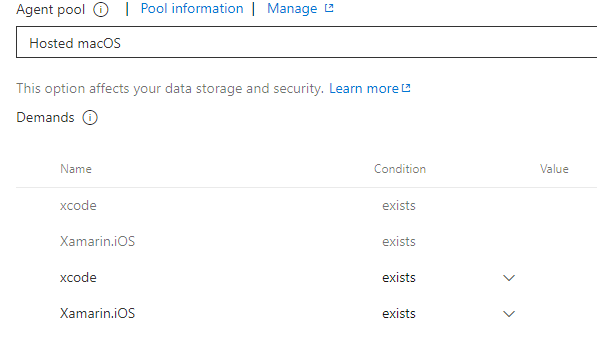
developer9969
on 4 Jun 2019
Not sure why I get this error

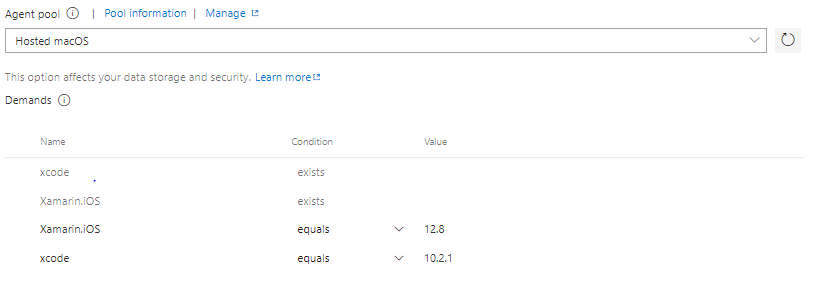
Any ideas?
thanks
developer9969
on 6 Jun 2019
@jamesmontemagno any ideas?
newky2k
on 6 Jun 2019
I have never set any of those to be honest... probably need to ask the DevOps team?
jamesmontemagno
on 6 Jun 2019
@jamesmontemagno @newky2k I have never set those either since I started using devops to build xamarin ios. Did it because it was suggested for appcenter and I had nothing to lose...
Again I have been using xamarin essentials in devops successfully since preview and never a problem, since the latest version.
I am going to try again the following:
- reference again xamarin essentials 1.1.0
- clean the build and just hope it does not throw me the error.
just noticed that I was cleaning anyway by default

I will give an update tomorrow and post the log if I am allowed..
By the way huge thanks for replying.
developer9969
on 6 Jun 2019
Guys
Sorry to say but I have tried once again and I still get below error:
MTOUCH : error MT2101: Can't resolve the reference 'System.String System.String::TrimStart(System.Char)',
referenced from the method 'System.String Xamarin.Essentials.FileBase::PlatformGetContentType(System.String)'
in 'mscorlib, Version=2.0.5.0, Culture=neutral, PublicKeyToken=7cec85d7bea7798e'.
I know it might be an edge case and unfortunately none of the people that reported the problem used devops but AppCenter, clearly there is an issue ,and luckily for those appcenter users @jamesmontemagno suggestion of updating sdk fixed it.
Is it possibly a Devops issue? What version of iOS and xcode are they using? when I tried to specify explicitly it I got the error as in previous message.
I totally understand that if you cannot replicate you cannot fix it.
I hope that next version of xamarin essentials for whatever the reason has not got this problem.
Reverted back to 1.0.1 and all happy again
developer9969
on 8 Jun 2019
This looks like a mono issue, very similar to this: https://github.com/AzureAD/microsoft-authentication-library-for-dotnet/issues/852. If you use Mono 5.16+ you shouldn't have any problems.
Here's how to force a Mono version on your hosted agent: https://github.com/AzureAD/microsoft-authentication-library-for-dotnet/issues/852#issuecomment-472114057
Just changing the demands doesn't guarantee you are using the wanted version, as hosted agents provide several versions for you.
 akamud
on 10 Jun 2019
akamud
on 10 Jun 2019
@developer9969 This looks like a mono issue and can be resolved by following the instructions provided by @akamud
Can you try those instructions and we can reopen if neccesary
Regards
newky2k
on 24 Jun 2019
@akamud HUGE THANKS!!! All good now once i run that script in the pipeline!
developer9969
on 10 Jul 2019
Related issues
 tomas-dainovec
·
4Comments
tomas-dainovec
·
4Comments
 Agredo
·
3Comments
Agredo
·
3Comments
 JohnGalt1717
·
4Comments
JohnGalt1717
·
4Comments
 Tommigun1980
·
3Comments
Tommigun1980
·
3Comments
 RogerSchmidlin
·
4Comments
RogerSchmidlin
·
4Comments