Essentials: await Geolocation.GetLocationAsync() never returns
Description
Works fine on Android emulator, but on the iPhone emulator the method never returns. It does not throw any exceptions either.
If I instead try to call await Geolocation.GetLatestKnownLocationAsync() I at least get an exception on the iphone simulator.
Seems very straight forward to do this. Followed the steps in the documentation: https://docs.microsoft.com/en-us/xamarin/essentials/geolocation?context=xamarin%2Fxamarin-forms&tabs=ios
Steps to Reproduce
Never returns
var request = new GeolocationRequest();
var location = await Geolocation.GetLocationAsync(request);
Throws Exception
var location = await Geolocation.GetLastKnownLocationAsync();
Expected Behavior
Should return location, or throw an exception
Actual Behavior
Does nothing
Basic Information
- Version with issue:
- iOS: 11.4
- Nuget Packages:
Xamarin.Essentials v0.6.0-preview
Xamarin.Forms v3.0.0.550146 - Affected Devices:
iOS simulator
Exception
{System.NullReferenceException: Object reference not set to an instance of an object
  at Xamarin.Essentials.LocationExtensions.ToLocation (CoreLocation.CLLocation location) [0x00005] in <717f96720e9544d29cd74351077724c5>:0
  at Xamarin.Essentials.Geolocation+<PlatformLastKnownLocationAsync>d__6.MoveNext () [0x0006c] in <717f96720e9544d29cd74351077724c5>:0
--- End of stack trace from previous location where exception was thrown ---
  at System.Runtime.ExceptionServices.ExceptionDispatchInfo.Throw () [0x0000c] in /Library/Frameworks/Xamarin.iOS.framework/Versions/11.12.0.4/src/Xamarin.iOS/mcs/class/referencesource/mscorlib/system/runtime/exceptionservices/exceptionservicescommon.cs:152
  at System.Runtime.CompilerServices.TaskAwaiter.ThrowForNonSuccess (System.Threading.Tasks.Task task) [0x00037] in /Library/Frameworks/Xamarin.iOS.framework/Versions/11.12.0.4/src/Xamarin.iOS/mcs/class/referencesource/mscorlib/system/runtime/compilerservices/TaskAwaiter.cs:187
  at System.Runtime.CompilerServices.TaskAwaiter.HandleNonSuccessAndDebuggerNotification (System.Threading.Tasks.Task task) [0x00028] in /Library/Frameworks/Xamarin.iOS.framework/Versions/11.12.0.4/src/Xamarin.iOS/mcs/class/referencesource/mscorlib/system/runtime/compilerservices/TaskAwaiter.cs:156
  at System.Runtime.CompilerServices.TaskAwaiter.ValidateEnd (System.Threading.Tasks.Task task) [0x00008] in /Library/Frameworks/Xamarin.iOS.framework/Versions/11.12.0.4/src/Xamarin.iOS/mcs/class/referencesource/mscorlib/system/runtime/compilerservices/TaskAwaiter.cs:128
  at System.Runtime.CompilerServices.TaskAwaiter`1[TResult].GetResult () [0x00000] in /Library/Frameworks/Xamarin.iOS.framework/Versions/11.12.0.4/src/Xamarin.iOS/mcs/class/referencesource/mscorlib/system/runtime/compilerservices/TaskAwaiter.cs:357
  at Email.GeoLocationService+<CheckLocationStatus>d__1.MoveNext () [0x00044] in C:\Users\kriber\source\repos\xamdemo\Email\Email\Email\GeoLocationService.cs:55 }
 KristofferBerge
All 25 comments
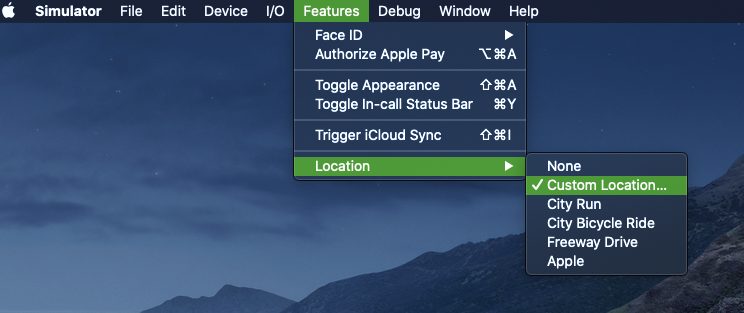
The iOS Simulator doesn't have a Geolocation by default which might be the cause of the exception. After launching the iOS Simulator look for an option to change the location. Look here for more details.
 AmrAlSayed0
on 7 Jun 2018
AmrAlSayed0
on 7 Jun 2018
We have fixed the GetLastKnownLocationAsync issue already in #272
As @AmrAlSayed0 said you must set the location in the simulator :( it is a pain :(
 jamesmontemagno
on 7 Jun 2018
jamesmontemagno
on 7 Jun 2018
Also thank you so much for the great bug report <3 makes me happy.
jamesmontemagno
on 7 Jun 2018
Ok, but not released yet?
Is it possible to make GetLocationAsync throw an exception like not supported? Not sure how to handle this case when running on a simulator since I never get a return value or an exception.
Keep up the good work! Xamarin.Essentials looks awesome so far 🥇
KristofferBerge
on 8 Jun 2018
You can add the development nuget feed for the latest fixes :)
jamesmontemagno
on 8 Jun 2018
The rest is a simulator issue: https://stackoverflow.com/questions/24842594/ios-simulator-location-not-working
You have to set it when you start the simulator. :(
jamesmontemagno
on 8 Jun 2018
I am having the same issue on an actual iOS device, where this never returns:
var request = new GeolocationRequest(GeolocationAccuracy.Medium);
var myLocation = await Geolocation.GetLocationAsync(request);
Is there a solution?
 stesvis
on 6 Dec 2018
stesvis
on 6 Dec 2018
you need to add timeout like this
var request = new GeolocationRequest(GeolocationAccuracy.Medium,new TimeSpan(0,0,3));
var myLocation = await Geolocation.GetLocationAsync(request);
that will work
cheers :)
 karant0007
on 6 Dec 2018
karant0007
on 6 Dec 2018
I'm still experiencing the exact same issue if i deny access to my location on Android 9.0 API 28, physical device.
var getLocation = await Xamarin.Essentials.Geolocation.GetLocationAsync(new GeolocationRequest() { DesiredAccuracy = GeolocationAccuracy.Medium, Timeout = TimeSpan.FromSeconds(2) });
GetLocationAsync never returns a value, and neither throws an exception. I'm using Xamarin Forms and i have Xamarin.Essentials V1.1.0 both in Mobile and Android projects. Again, this only happens if i deny access to my location.
 RicardoMoraisPOR
on 16 Apr 2019
RicardoMoraisPOR
on 16 Apr 2019
i am facing this same isssue even now i was trying out the geolocation functionality in vs2019 with a hyper v adnroid emulator but on invocation this method returns nothing and neither does it error out. any help would be much appreciated.
 pachumon
on 29 Apr 2019
pachumon
on 29 Apr 2019
In case no-one can get it fixed with the fix above please try to confirm that the location mode on the android device is set to high Accuracy.
I had it in "Device Only" and the GetLocationAsynch was always timing out.
On Lenovo Android device go to Settings -> Security&Location -> Location -> Mode and set it to "High Accuracy"
 fmcgitadmin
on 3 May 2019
fmcgitadmin
on 3 May 2019
@fmcgitadmin the exact same "solution" i gave on this issue here, despite not being a solution at all because we should get an exception if exceeds the given timeout, but for debugging our application that's the only temporary solution i know of
RicardoMoraisPOR
on 3 May 2019
I'm had the exact same issue this morning. I tried the above solutions and also creating a new project with the GeolocationRequest but it's the same issue. I ended up switching to use Xam.Plugin.Geolocator (works like charm)
 anassbenayed
on 8 Nov 2019
anassbenayed
on 8 Nov 2019
There must be some workaround or I imagine there would be a lot more comments. I added a timeout of 3 seconds as suggested, but it still hangs. Is there some configuration in which this actually works?
var req = new GeolocationRequest(GeolocationAccuracy.High, new TimeSpan(0, 0, 3));
var location = await Geolocation.GetLocationAsync(req);
 tbrentlong
on 17 Dec 2019
tbrentlong
on 17 Dec 2019
Same issue,
try
{
var request = new GeolocationRequest(GeolocationAccuracy.Medium, TimeSpan.FromSeconds(5));
//var test = await Xamarin.Essentials.Geolocation.GetLastKnownLocationAsync(); //this return an old value (time==past)
var test = await Xamarin.Essentials.Geolocation.GetLocationAsync(request);//this never retuns
if (test != null)
{
Longitude = Convert.ToDouble(test.Longitude);
Latitude = Convert.ToDouble(test.Latitude);
Altitude = Convert.ToDouble(test.Altitude);
Speed = Convert.ToDouble(test.Speed);
}
}
catch (Exception ex)
{
}
 TomLaperre
on 18 Dec 2019
TomLaperre
on 18 Dec 2019
The reason of my problem was, I was in een loop outside of my try-catch so the
var test = await Xamarin.Essentials.Geolocation.GetLocationAsync(request);//this never retuns
was called over and over again. =>
async void getLocation() {
//This works for the plugin.Geolocator
//try
//{
// var cgl = CrossGeolocator.Current;
// cgl.DesiredAccuracy = 50;
// var result = await cgl.GetPositionAsync(TimeSpan.FromSeconds(3));
// if (result != null)
// {
// //Longitude = result.Latitude;
// }
//}
//catch (Exception ex)
//{
        //    throw;
        //}

        //This also works
        try
        {
            while (Active == true)
            {
                var request = new GeolocationRequest(GeolocationAccuracy.Medium, TimeSpan.FromSeconds(5));
                //var test = await Xamarin.Essentials.Geolocation.GetLastKnownLocationAsync(); //this return an old value (time==past)
                var test = await Xamarin.Essentials.Geolocation.GetLocationAsync(request);//this never retuns
                if (test != null)
                {
                    Longitude = Convert.ToDouble(test.Longitude);
                    Latitude = Convert.ToDouble(test.Latitude);
                    Altitude = Convert.ToDouble(test.Altitude);
                    Speed = Convert.ToDouble(test.Speed);
                }
            }
        }
        catch (Exception ex)
        {


        }
    }
Why is this closed?
 Tommigun1980
on 13 May 2020
Tommigun1980
on 13 May 2020
I am running into the same issue on UWP.
GetLastKnownLocationAsync works fine, but GetLastKnownLocation seems to hang iindefinitely
I explicitly went into my App's settings in Windows and turned on Location Permissions and added DeviceCapability Location to the appxmanifest file.
if I place a breakpoint on line 22 (the if statement) it will never get hit. Instead the app will kill the thread after 2 minutes saying there was a deadlock.
Any help would be greatly appreciated.
public async Task<Location> GetLocation(GeolocationAccuracy accuracy = GeolocationAccuracy.Default, int timeoutSeconds = 10)
{
    Location loc = null;
    try
    {
        // Get last known location as backup
        loc = await Xamarin.Essentials.Geolocation.GetLastKnownLocationAsync();

        // Create the TimeSpan for the timeout
        var timeout = TimeSpan.FromSeconds(timeoutSeconds);

        // Create the Geolocation Request object
        var locationRequestData = new GeolocationRequest(accuracy, timeout);

        // Call GetLocationAsync
        var currentLocation = await Xamarin.Essentials.Geolocation.GetLocationAsync(locationRequestData);

        // This didn't work either...
        // var ct = new CancellationToken();
        // var currentLocation = await Xamarin.Essentials.Geolocation.GetLocationAsync(locationRequestData, ct);

        if (currentLocation != null)
        {
            loc = currentLocation;
        }
    }

    catch (FeatureNotSupportedException fnsEx)
    {
        // Handle not supported on device exception_log
        await _log.LogError(fnsEx);
    }
    catch (FeatureNotEnabledException fneEx)
    {
        // Handle not enabled on device exception
        await _log.LogError(fneEx);
    }
    catch (PermissionException pEx)
    {
        // Handle permission exception
        await _log.LogError(pEx);
    }
    catch (Exception ex)
    {
        // Unable to get location
        await _log.LogError(ex);
    }

    return loc;
}
 jermoe1
on 18 May 2020
jermoe1
on 18 May 2020
How are you calling this API?
I ran the sample from the repo and was working well there on my desktop.
jamesmontemagno
on 18 May 2020
How are you calling this API?
I ran the sample from the repo and was working well there on my desktop.
It didn't occur to me to look for an active sample in this repo, my apologies. I'll run that on this computer and reconfirm. I'll let you know if I run into any issues there and, if not, I'll be sure to give a more complete run down of how I'm calling it. Thanks!
jermoe1
on 19 May 2020
We have fixed the
GetLastKnownLocationAsyncissue already in #272As @AmrAlSayed0 said you must set the location in the simulator :( it is a pain :(
 J35u527
on 19 May 2020
J35u527
on 19 May 2020
Not sure why this bug is closed? I still get no response for getting the location. Testing this on an iPhone 11 pro device with iOS 14. When persmission is Unknown I get a dialog asking for permissions and after setting this enable I still don't get any response or exception.
var request = new GeolocationRequest(GeolocationAccuracy.Medium, TimeSpan.FromSeconds(10));
SelectedLocation = await _geoLocation.GetLocationAsync(request);
 sikkemap
on 22 Oct 2020
sikkemap
on 22 Oct 2020
Not sure why this bug is closed? I still get no response for getting the location. Testing this on an iPhone 11 pro device with iOS 14. When persmission is Unknown I get a dialog asking for permissions and after setting this enable I still don't get any response or exception.
var request = new GeolocationRequest(GeolocationAccuracy.Medium, TimeSpan.FromSeconds(10));
SelectedLocation = await _geoLocation.GetLocationAsync(request);
I can recreate this. iPhone XS Max with iOS 14.1. It appears this issue has resurfaced with the latest iOS update.
It occurs when you deny the location permission.
 lobbo232
on 2 Nov 2020
lobbo232
on 2 Nov 2020
I've created a new issue with a repro example here: https://github.com/xamarin/Essentials/issues/1488
lobbo232
on 2 Nov 2020
@lobbo232 this is a duplicate of https://github.com/xamarin/Essentials/issues/1390 and was fixed just now with https://github.com/xamarin/Essentials/pull/1487
You can test the fix in the nuget from the preview feed: https://aka.ms/xamarin-essentials-ci/index.json
 mattleibow
on 6 Nov 2020
mattleibow
on 6 Nov 2020
Related issues
 gabry90
·
3Comments
gabry90
·
3Comments
 euquiq
·
3Comments
euquiq
·
3Comments
 noxe
·
3Comments
noxe
·
3Comments
 TedMobile
·
3Comments
TedMobile
·
3Comments
 Howell1618
·
4Comments
Howell1618
·
4Comments
Most helpful comment
you need to add timeout like this
that will work
cheers :)