Espurna: Info on new devices (this is not an issue)
*not affiliate links
while i was buying the KMC plugs, i also bought the following;
power plugs:
Maxcio 15A Wifi Socket Outlet
HEYGO Wifi Smart Plug Mini Outlet
YiDian Wifi Smart Plug
Lingan SWA1
power strip:
Tonbux Wifi Smart Power Strip
i can confirm all of the above have TYWE3S , TYWE2S or similar. the ones with power meter have HLW8012. TYWE*S Data Sheets
KMC is easy to open, just one screw.
- Lingan SWA1 is easy to open.
Tonbux Power Strip is also easy to open.
But rest of the devices are glued shut. You can use gasoline, wd40 or other chemical of your choice to open. After you open the cases, the power socket pins keeps the circuit in place and there is no easy way to access to esp chip. you have to desolder the power pins or just heat the power pins and wiggle them :)
i flashed some of them with espurna and will test them. (i do not recommend the glued ones if you don't want to waste your time)
 gn0st1c
All 11 comments
Thank you. Please share your findings, you can do a PR with the devices you manage to get working.
 xoseperez
on 11 Mar 2018
xoseperez
on 11 Mar 2018
That's really good info. It is interesting to me that the three pack of KMC switches cost $26 when I bought my first set a couple of weeks ago, but now the same pack of three switches is $35. That's almost a 40% increase in price over the course of a couple weeks. I think Amazon is selling a lot of them to Tasmota and Espurna users.
 WayneManion
on 12 Mar 2018
WayneManion
on 12 Mar 2018
i'll hopefully finalize my tests this weekend but so far;
`
// -----------------------------------------------------------------------------
// Lingan SWA1
// -----------------------------------------------------------------------------
elif defined(LINGAN_SWA1)
// Info
#define MANUFACTURER        "LINGAN"
#define DEVICE              "SWA1"

// Buttons
#define BUTTON1_PIN         13
#define BUTTON1_MODE        BUTTON_PUSHBUTTON | BUTTON_DEFAULT_HIGH
#define BUTTON1_RELAY       1

// Relays
#define RELAY1_PIN          5
#define RELAY1_TYPE         RELAY_TYPE_NORMAL

// LEDs
#define LED1_PIN            4
#define LED1_PIN_INVERSE    1
// -----------------------------------------------------------------------------
// HEYGO HY02
// -----------------------------------------------------------------------------
elif defined(HEYGO_HY02)
// Info
#define MANUFACTURER        "HEYGO"
#define DEVICE              "HY02"

// Buttons
#define BUTTON1_PIN         13
#define BUTTON1_MODE        BUTTON_PUSHBUTTON | BUTTON_DEFAULT_HIGH
#define BUTTON1_RELAY       1

// Relays
#define RELAY1_PIN          12
#define RELAY1_TYPE         RELAY_TYPE_NORMAL

// LEDs
#define LED1_PIN            4
#define LED1_PIN_INVERSE    0
// -----------------------------------------------------------------------------
// Maxcio W-US002S
// -----------------------------------------------------------------------------
elif defined(MAXCIO_WUS002S)
// Info
#define MANUFACTURER        "Maxcio"
#define DEVICE              "W-US002S"

// Buttons
#define BUTTON1_PIN         2
#define BUTTON1_MODE        BUTTON_PUSHBUTTON | BUTTON_DEFAULT_HIGH
#define BUTTON1_RELAY       1

// Relays
#define RELAY1_PIN          13
#define RELAY1_TYPE         RELAY_TYPE_NORMAL

// LEDs
#define LED1_PIN            3
#define LED1_PIN_INVERSE    0

// HLW8012
#ifndef HLW8012_SUPPORT
#define HLW8012_SUPPORT     1
#endif
#define HLW8012_SEL_PIN     12
#define HLW8012_CF1_PIN     5
#define HLW8012_CF_PIN      4
// -----------------------------------------------------------------------------
// YiDian XS-SSA05
// -----------------------------------------------------------------------------
elif defined(YIDIAN_XSSSA05)
// Info
#define MANUFACTURER        "YiDian"
#define DEVICE              "XS-SSA05"

// Buttons
#define BUTTON1_PIN         13
#define BUTTON1_MODE        BUTTON_PUSHBUTTON | BUTTON_DEFAULT_HIGH
#define BUTTON1_RELAY       1

// Relays
#define RELAY1_PIN          12
#define RELAY1_TYPE         RELAY_TYPE_NORMAL

// LEDs
#define LED1_PIN            0
#define LED1_PIN_INVERSE    0
#define LED2_PIN            15
#define LED2_PIN_INVERSE    0

// HLW8012
#ifndef HLW8012_SUPPORT
#define HLW8012_SUPPORT     1
#endif
#define HLW8012_SEL_PIN     3
#define HLW8012_CF1_PIN     14
#define HLW8012_CF_PIN      5
// -----------------------------------------------------------------------------
// Tonbux Powerstrip02
// -----------------------------------------------------------------------------
elif defined(TONBUX_POWERSTRIP02)
// Info
#define MANUFACTURER        "Tonbux"
#define DEVICE              "Powerstrip02"`
On tricky thing about ESPurna (hopefully I'll get rid of it someday): the concatenation of MANUFACTURER_DEVICE must match the DEVICE, case sensitive. So it should be:
#elif defined(TONBUX_POWERSTRIP02)

// Info
#define MANUFACTURER        "TONBUX"
#define DEVICE              "POWERSTRIP02"
This is required for the ESPurna OTA Manager. Fixed it in your PR. Maybe you can fix it for new ones.
:smile:
xoseperez
on 15 Mar 2018
I noticed that there is a small typo in platformio.ini. "Tonbux" is mistakenly spelled as "Tunbox".
 lopsided98
on 16 Mar 2018
lopsided98
on 16 Mar 2018
@lopsided98 : fixed in new PR. thank you :)
gn0st1c
on 16 Mar 2018
out of curiosity i bought a bunch of power outlets from aliexpress.
as expected a lot of rebranding.
e.g.:
- i ordered tonbux sp04, received mxq sp04 but it's the same circuit of lingan swa1
(even it's box says Type: SWA1)
tonbux smart plug, there is no model on box or device. i haven't opened it yet but it seems same as heygo hy02
tonbux colorful led ring smart plug, XS-SSA06. i haven't opened it yet.
gn0st1c
on 21 Mar 2018
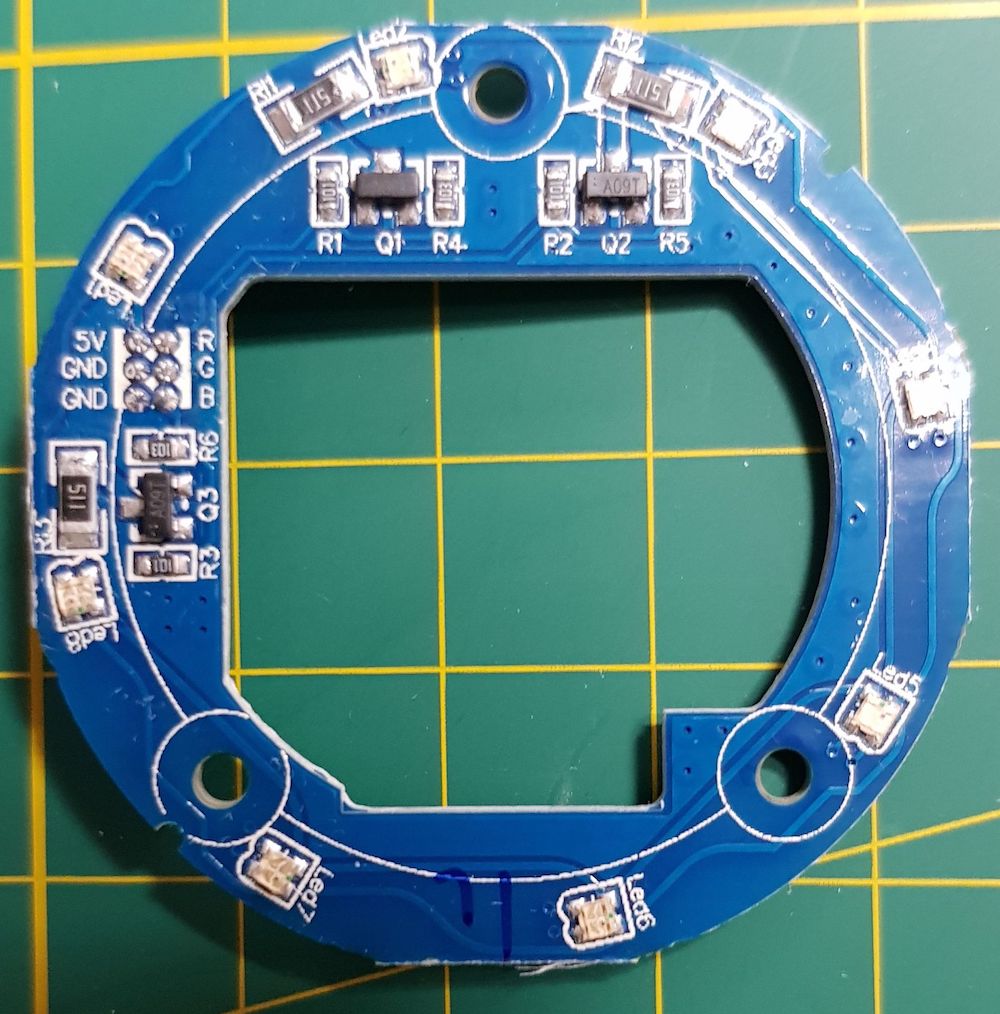
ok, i opened up xs-ssa06 and it is esp and has 8 rgb leds.
    // LEDs
    #define LED1_PIN            0   // R - 8 rgb led ring
    #define LED1_PIN_INVERSE    0
    #define LED2_PIN            5   // G
    #define LED2_PIN_INVERSE    0
    #define LED3_PIN            2   // B
    #define LED3_PIN_INVERSE    0
any suggestions for LED MODES?
gn0st1c
on 22 Mar 2018
merged
gn0st1c
on 11 May 2018
Anyone by chance can tell me how to open the HEYGO HY02 case without damaging it?
 AlphaDE
on 17 Jan 2019
AlphaDE
on 17 Jan 2019
Question regarding the S05. I've flashed one Tasmota, but the voltage is reading ver high (303) volts. Should be 110-120.
 DavinKD
on 23 Feb 2019
DavinKD
on 23 Feb 2019
Related issues
 namezero
·
7Comments
namezero
·
7Comments
 prankousky
·
3Comments
prankousky
·
3Comments
 pascal1404
·
7Comments
pascal1404
·
7Comments
 BakaOsaka
·
10Comments
BakaOsaka
·
10Comments
 Cabalist
·
8Comments
Cabalist
·
8Comments