Espurna: TH10 unable to read from AM2301 sensor
Originally reported by: Bradley Gamble (Bitbucket: BakaOsaka, GitHub: BakaOsaka)
I have a Sonoff TH10 that I have successfully flashed with the firmware binary espurna-1.12.0-itead-sonoff-th.bin.
I attached my Asair AM2301 Temperature/Humidity sensor to it, expecting to see values in the web interface. However, the device reported "Timeout".
Upon connecting via telnet, I see the following message printed periodically:
[SENSOR] Error reading data from DHT22 @ GPIO14 (error: 3)
I believe error 3 refers to the following definition:
#define SENSOR_ERROR_TIMEOUT 3 // Response from sensor timed out
As far as I am aware, the AM2301 is a DHT21 as opposed to DHT22, however the protocol is compatible.
 xoseperez
All 22 comments
The code for the DHT21 and DHT22 is the same. The only difference is with the DHT11. The image for the TH10 assumes the sensor is connected to GPIO14, which is the GPIO available in the mini-jack connector. Itead sells AM2301 sensors with that type of connection. If you are connecting your sensor somewhere else you should change your GPIO settings in the hardware.h file, build and flash the image again.
xoseperez
on 21 Jan 2018
@BakaOsaka any update on this?
xoseperez
on 25 Jan 2018
I have returned the sensor to the distributor under the assumption that it was faulty - I am happy for this issue to be closed until I can prove that it occurs with new hardware.
 BakaOsaka
on 25 Jan 2018
BakaOsaka
on 25 Jan 2018
Closing then. Feel free to reopen it if you are still having trouble with the new sensor.
xoseperez
on 26 Jan 2018
I have same error with same device (Sonoff TH10 + AM2301)
 s4lva2
on 20 Apr 2018
s4lva2
on 20 Apr 2018
I have the same error too, tbe sensor was working with the original sonoff fitmware.
 jirisemecky
on 20 May 2018
jirisemecky
on 20 May 2018
I'm also having this issue, but it is intermittent. As I go into the th10 panel it shows the values, then Timeout and after a couple of seconds I get the reading again.
There's no issue for me, as it works perfect over mqtt but it might have something to do.
If I can provide some log or info, it'll be a pleasesure to help
 Pijuli
on 22 May 2018
Pijuli
on 22 May 2018
Hi,
Sorry for reopen this topic. I have the same error with my TH16 and the Si7021 TH sensor. And i have also to downgrade but that doesn't fix it. I have also not after a short time the values. Nothing,
In my log i read this:
[683568] [SENSOR] Error reading data from DHT22 @ GPIO14 (error: 3)
[689326] [SENSOR] Error reading data from DHT22 @ GPIO14 (error: 3)
[695329] [SENSOR] Error reading data from DHT22 @ GPIO14 (error: 3)
[701336] [SENSOR] Error reading data from DHT22 @ GPIO14 (error: 3)
[707340] [SENSOR] Error reading data from DHT22 @ GPIO14 (error: 3)
[713340] [SENSOR] Error reading data from DHT22 @ GPIO14 (error: 3)
[719591] [SENSOR] Error reading data from DHT22 @ GPIO14 (error: 3)
[725349] [SENSOR] Error reading data from DHT22 @ GPIO14 (error: 3)
[731351] [SENSOR] Error reading data from DHT22 @ GPIO14 (error: 3)
[737354] [SENSOR] Error reading data from DHT22 @ GPIO14 (error: 3)
[743363] [SENSOR] Error reading data from DHT22 @ GPIO14 (error: 3)
[749373] [SENSOR] Error reading data from DHT22 @ GPIO14 (error: 3)
[755624] [SENSOR] Error reading data from DHT22 @ GPIO14 (error: 3)
Booting says:
[[005208] [WEBSOCKET] #1 connected, ip: 192.168.2.24, url: /ws
[005719] [MQTT] MQTT brokers found: 0
[005724] [MQTT] Connecting to broker at 192.168.2.248:1883
[005725] [MQTT] Client ID: ESPURNA_4E6E62
[005726] [MQTT] QoS: 0
[005726] [MQTT] Retain flag: 1
[005727] [MQTT] Keepalive time: 30s
[005730] [MQTT] Will topic: SONOFF_TH16/status
[005780] [MQTT] Connected!
[005782] [MQTT] Unsubscribing to # (PID 1)
[005784] [MQTT] Subscribing to SONOFF_TH16/relay/+/set (PID 2)
[005785] [MQTT] Subscribing to SONOFF_TH16/led/+/set (PID 3)
[005786] [MQTT] Subscribing to SONOFF_TH16/action/set (PID 4)
[005792] [MQTT] Subscribing to domoticz/out (PID 5)
[005806] [MQTT] Sending SONOFF_TH16/status => 1 (PID 1)
[005810] [MQTT] Subscribe ACK for PID 2
[005811] [MQTT] Subscribe ACK for PID 3
[005812] [MQTT] Subscribe ACK for PID 4
[005813] [MQTT] Subscribe ACK for PID 5
[005980] [MQTT] Sending SONOFF_TH16/data => {"app":"ESPURNA","version":"1.12.6","board":"ITEAD_SONOFF_TH","host":"SONOFF_TH16","ip":"192.168.2.42","mac":"2C:3A:E8:4E:6E:62","rssi":"-36","uptime":"5","freeheap":"20040","relay/0":"0","vcc":"3160","loadavg":"100","id":12001} (PID 1)
[006751] [NTP] UTC Time  : 2018-06-21 21:13:37
[006752] [NTP] Local Time: 2018-06-21 23:13:37
 henkiejan1
on 21 Jun 2018
henkiejan1
on 21 Jun 2018
@xoseperez thank you for reopen this. I hope that i could give you enough information. If not please ask. :) I am new here so maybe i have something not correct.
henkiejan1
on 22 Jun 2018
I have just tested it and it worked :disappointed: (I prefer to be able to reproduce bad behaviors...).
Error 3 means TIMEOUT. It could be a sensor failure or a wiring failure. Assuming nothing has changed in the wiring, do you have the chance to test the sensor with another device?
xoseperez
on 25 Jun 2018
[Solved, for me] I have been having this same issue, and tried the latest version (1.13.0) on a second unit. At first I didn't get any sensor reading (same error - 3). Then I saw a bit of silver showing between the plug and the socket so I pressed the sensor plug in firmly and got another click. Sensor started working. I had the cover off, so I could easily see that I had completely inserted it.
I went back to my original unit and tried again (1.12.6) making sure to plug the sensor in all the way, but it still didn't work. This one still had the cover on. I pushed even harder to get a good connection and finally got the sensor to work on 1.12.6.
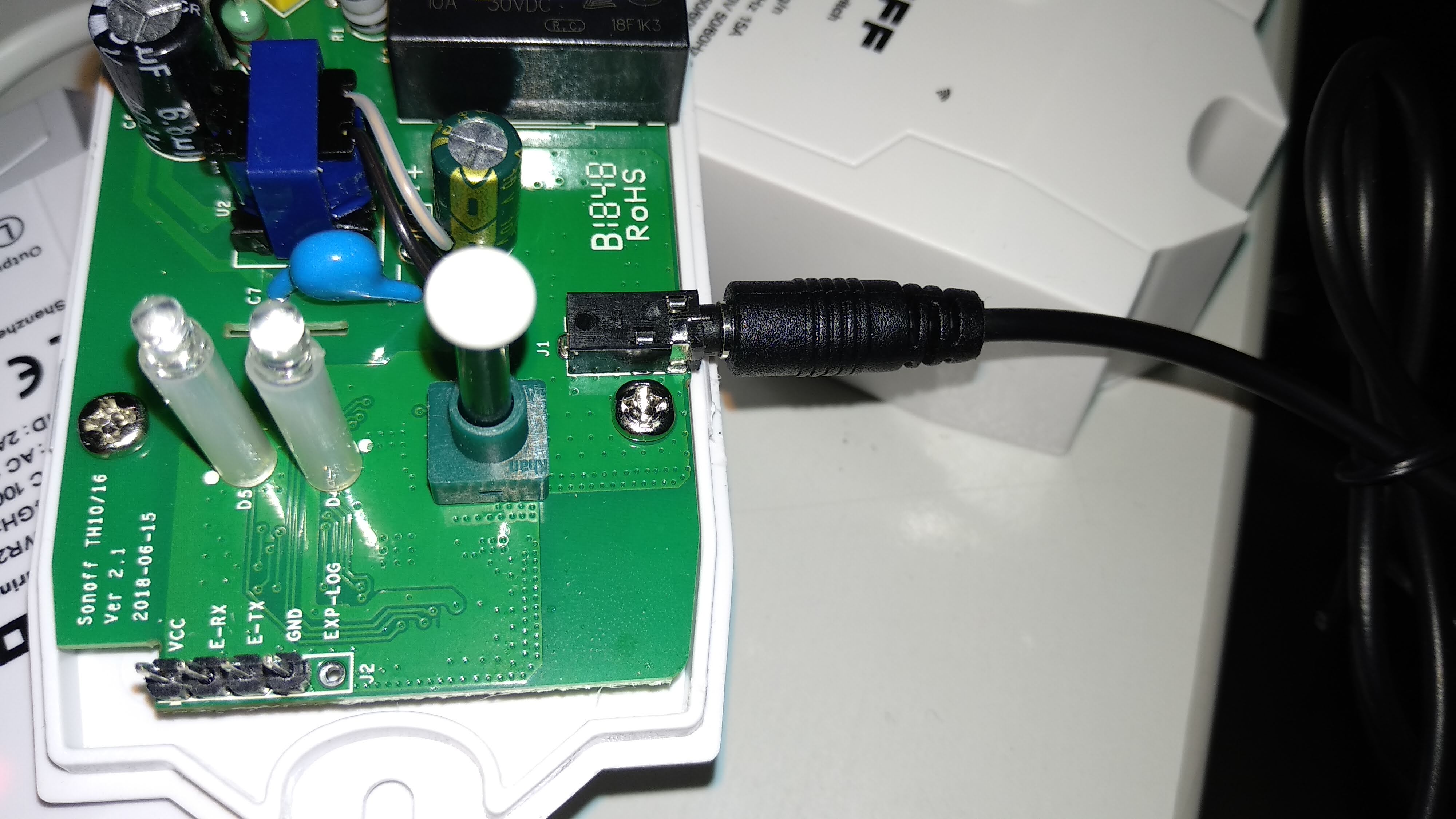
So, for me, this is a hardware issue - the jack requires a lot of pressure to seat fully, and the cover doesn't seem to have enough clearance to allow for this without a lot of effort. I'll be expanding the hole around that jack to make it easier in the future and more reliable that it will stay completely plugged in.
Image showing the plug up close:

 mattster98
on 25 Jun 2018
mattster98
on 25 Jun 2018
Thank you @mattster98, I hope you don't mind I have added your picture to the wiki (of course, with proper attribution).
xoseperez
on 26 Jun 2018
wow, my problem is the same, a connection jack issue. the problem was solved after following @mattster98's advise
Thanks!
s4lva2
on 26 Jun 2018
Oh i go checking this! You hear from me! :)
henkiejan1
on 3 Jul 2018
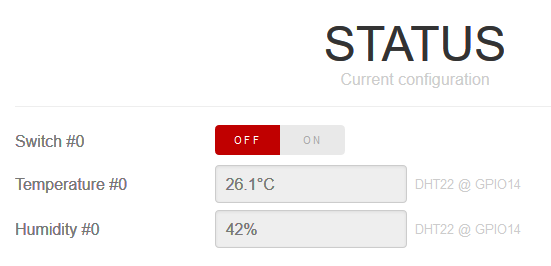
Mines goes to the end in the connector but when i push the connector a little bit to above i get this results! It works. I go try to fix it. So it's not a firmware issue!. Thank you all for your help!! :)
henkiejan1
on 3 Jul 2018
Closing then!
xoseperez
on 3 Jul 2018
Hi i have th10 and si07 sensor, 2 actualy and both not working. Looks like they work first 10 seconds and when humidity gets 98% they both start to show "m0%" wtf is this im piised off they show only temperature
 Normalus10
on 6 Apr 2019
Normalus10
on 6 Apr 2019
@normalus10 it might be better to open a new issue for this. Remember to provide as much detail about the devices as possible - use the template.
 ColinShorts
on 6 Apr 2019
ColinShorts
on 6 Apr 2019
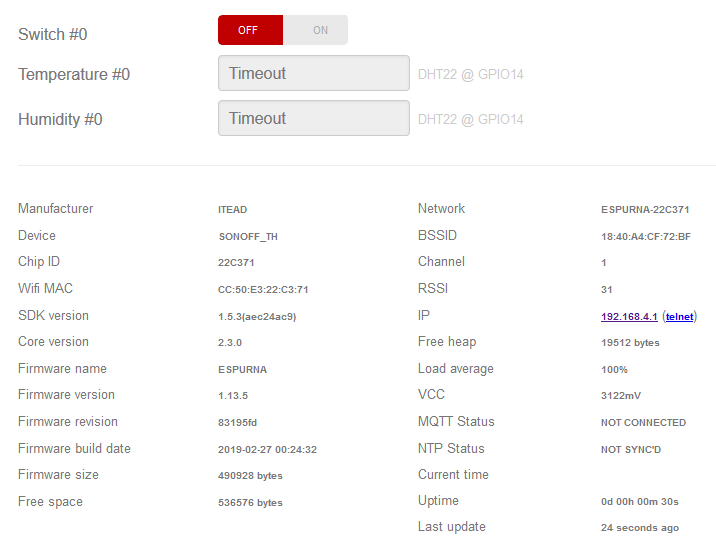
hi all, i have same problem, this is a new, sonoff TH with AM2301, but i cannot read it!

 connected201
on 27 Sep 2019
connected201
on 27 Sep 2019
Anything in the debug output?
mattster98
on 27 Sep 2019
Anything in the debug output?
Error reading data from DHT22 @ GPIO14 (error: 3)
connected201
on 27 Sep 2019
Only a few possibilities in my mind.
- Plug is still not fully inserted.. really twist and push on it to see if that helps.
- Sensor is bad in some way (miswired, broken wire, broken)
- Board is a newer rev and that plug is connected to a different gpio
mattster98
on 27 Sep 2019
Related issues
 eercanayar
·
3Comments
eercanayar
·
3Comments
 germaguire
·
7Comments
germaguire
·
7Comments
 HugoMSMartins
·
10Comments
HugoMSMartins
·
10Comments
 vaidyasr
·
10Comments
vaidyasr
·
10Comments
 fernando-p-jesus
·
6Comments
fernando-p-jesus
·
6Comments
Most helpful comment
[Solved, for me] I have been having this same issue, and tried the latest version (1.13.0) on a second unit. At first I didn't get any sensor reading (same error - 3). Then I saw a bit of silver showing between the plug and the socket so I pressed the sensor plug in firmly and got another click. Sensor started working. I had the cover off, so I could easily see that I had completely inserted it.
I went back to my original unit and tried again (1.12.6) making sure to plug the sensor in all the way, but it still didn't work. This one still had the cover on. I pushed even harder to get a good connection and finally got the sensor to work on 1.12.6.
So, for me, this is a hardware issue - the jack requires a lot of pressure to seat fully, and the cover doesn't seem to have enough clearance to allow for this without a lot of effort. I'll be expanding the hole around that jack to make it easier in the future and more reliable that it will stay completely plugged in.
Image showing the plug up close:
