Espeasy: MQTT Import: CPU 100% if broker is down
Hi,
during the upgrade of my Raspberry (that hosts Mosquitto), I just found out that if the MQTT broker is down, then the MQTT Import Plugin uses 100% of the CPU.
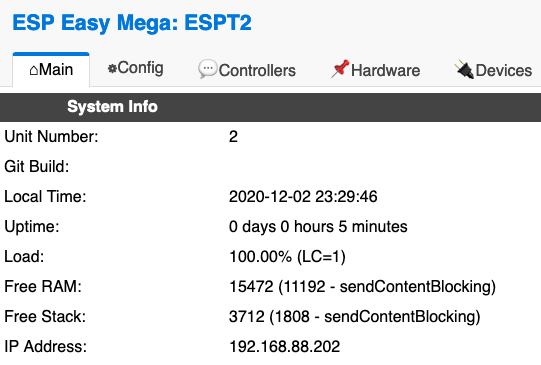

Is there a way to reduce CPU usage if the broker is down?
Maybe to inform the Plugin that the broker is down, so it doesn't wait for an answer?
 giig1967g
All 24 comments
I'm working on the MQTT Import plugin (adding value-mapping and json parsing & filtering), so I'll see what I can do here. I might need a few pointers, as I'm not really experienced in using MQTT yet.
 tonhuisman
on 3 Dec 2020
tonhuisman
on 3 Dec 2020
This also happens when only using a MQTT controller, so I guess we should have a look at the timing interval for the MQTT timer.
This one has a variable interval (timermqtt_interval) which can be set at a much higher interval if there is no connection.
It is now at max 30 sec:
  if (!MQTTclient_connected) {
    // As suggested here: https://github.com/letscontrolit/ESPEasy/issues/1356
    if (timermqtt_interval < 30000) {
      timermqtt_interval += 5000;
    }
  } else {
    timermqtt_interval = 250;
  }
  Scheduler.setIntervalTimer(ESPEasy_Scheduler::IntervalTimer_e::TIMER_MQTT);
But maybe it should be allowed to go higher, as timeouts during connection attempt are blocking.
One other thing that may be useful to test right now is to see if it already helps to lower the controller setting for timeout.
Often MQTT broker is local, so no need to have it at a very long timeout.
 TD-er
on 3 Dec 2020
TD-er
on 3 Dec 2020
Found a possible reason for the high load...
processMQTTdelayQueue() does not check if there is a connection to the broker, so it does prepare all data for publishing it over and over again.
Suggestion for change: (adding || !MQTTclient_connected)
void processMQTTdelayQueue() {
  if (MQTTDelayHandler == nullptr || !MQTTclient_connected) {
    return;
  }
Edit:
See newer test builds below
TD-er
on 3 Dec 2020
With the new version, the unit still responds slowIy, CPU usage 100%
1 per second loop is slightly better from previous version, but stll high.

giig1967g
on 3 Dec 2020
OK, thanks for testing... will dive into it.
TD-er
on 3 Dec 2020
What do you do for testing it?
Was it connected once and you simply disconnect the broker?
Or does the controller point to a host where no broker was ever running?
Or is it only with the MQTT import ?
TD-er
on 3 Dec 2020
I'm working on the MQTT Import plugin (adding value-mapping and json parsing & filtering), so I'll see what I can do here. I might need a few pointers, as I'm not really experienced in using MQTT yet.
Just FYI:
I'm now looking into the P037_MQTTimport plugin and I just decided to go for the needed change that's bugging me for a long time with this plugin.
It is creating its own MQTT client for just the import plugin while still using the same credentials as the MQTT controller that has to be active anyway.
So I will change this plugin to no longer have its own MQTT client (taking way over a kB of RAM) and start sharing the existing MQTT client.
I will try not to touch the part of the PLUGIN_IMPORT, which is probably where you're poking around.
TD-er
on 4 Dec 2020
I will try not to touch the part of the PLUGIN_IMPORT, which is probably where you're poking around.
Ok, but I've already added P037_data_struc stuff like other plugins, so maybe you can go easy on that?
I have also re-done WEBFORM_LOAD and WEBFORM_SAVE (moved most of it to the plugin struct)
tonhuisman
on 4 Dec 2020
Not sure if that is needed anymore.
I will create a commit so you can see what's changed.
The import plugin has been stripped of a lot of code.
TD-er
on 4 Dec 2020
Just pushed a commit to this PR for the changes in that plugin.
It is not yet tested, just "it compiles".
TD-er
on 4 Dec 2020
As you may see, there are no longer task specific variables needed.
Or do you store the decoded topics in a P037_data_struct?
If so, then I guess it is still relatively easy to merge as I hardly touched those parts of the code.
TD-er
on 4 Dec 2020
Looked at the code quickly, looking just fine I must say, but it is best if I wait for that PR to be merged before I paste in my changes. 👍
tonhuisman
on 4 Dec 2020
Yep I think so.
Before I merge it, I will add a slight modification as it is now receiving all published messages from the broker, which may already be subscribed to a topic, so you are flooded with error messages.
TD-er
on 4 Dec 2020
Test build:
There are still loose ends, but would be nice to know if the high CPU load is resolved by this.
TD-er
on 4 Dec 2020
this PR solves the issue:

giig1967g
on 4 Dec 2020
Thanks for testing :)
TD-er
on 4 Dec 2020
Looked at the code quickly, looking just fine I must say, but it is best if I wait for that PR to be merged before I paste in my changes. 👍
Your turn :)
TD-er
on 5 Dec 2020
Hi @TD-er
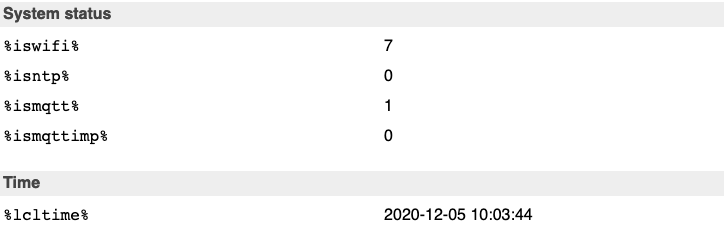
I just noticed a side effect of your latest test-build:
System variables %isntp% and %ismqttimp% are always 0 despite the fact that NPT is fine and MQTT is connected.
giig1967g
on 5 Dec 2020
%ismqttimp% is indeed something I can confirm.
But %isntp% is something I cannot see why that may have been changed by this.
Maybe it was broken by another change?
TD-er
on 5 Dec 2020
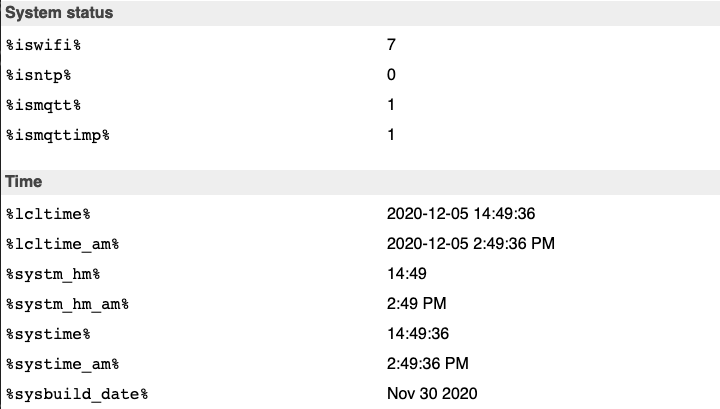
I looked more deeply, and also in 20201130 there is the %isntp% problem:
giig1967g
on 5 Dec 2020
Found the bug in the %isntp%
case ISNTP: value = String(statusNTPInitialized ? 0 : 1); break;
@tonhuisman I will add a fix for the %ismqttimp%, in such a way you can easlily copy it into your work.
Or did you already fix that part?
TD-er
on 6 Dec 2020
@tonhuisman I will add a fix for the
%ismqttimp%, in such a way you can easlily copy it into your work.
Or did you already fix that part?
I'm still working on the main features, and haven't merged it in yet, though I had that planned for today. I can postpone that until you merge these fixes I guess, lots of stuff to test here 😆
tonhuisman
on 6 Dec 2020
It has been tested and merged :)
TD-er
on 6 Dec 2020
Related issues
 clumsy-stefan
·
195Comments
clumsy-stefan
·
195Comments
 ferazambuja
·
129Comments
ferazambuja
·
129Comments
 ymoona
·
103Comments
TD-er
·
198Comments
ymoona
·
103Comments
TD-er
·
198Comments
 Oxyandy
·
180Comments
Oxyandy
·
180Comments