Espeasy: GPIO handling via MQTT commands seems broken
I updated some nodes to the latest self compiled code.
When I send to the node the mqtt ESP_Easy/Bathroom_pir_env/GPIO/14 with data 0 or 1
The log on the node sais : GPIO : port#0: set to 0 no matter if I send 0 or 1
And I get a reply on mqtt ESP_Easy/Bathroom_pir_env/%tskname%/%valname% with data ok
 jimmys01
All 31 comments
emphasis on GPIO : port#0 when it should be port#14
jimmys01
on 27 Oct 2020
Hi @jimmys01
I will have a look at this.
 giig1967g
on 27 Oct 2020
giig1967g
on 27 Oct 2020
Hi @jimmys01
which controller are you using?
giig1967g
on 27 Oct 2020
Can you test this test build ?
I think it was already solved in PR #3334, which is not yet included in a nightly build.
 TD-er
on 27 Oct 2020
TD-er
on 27 Oct 2020
Hi @jimmys01
which controller are you using?
The openhab controller
jimmys01
on 27 Oct 2020
Can you test this test build ?
I think it was already solved in PR#3334, which is not yet included in a nightly build.
Unfortunately this does not fix it. it has the same behavior
edit: I am compiling from the latest git clone
jimmys01
on 27 Oct 2020
Hi @jimmys01
the issue you are experiencing is when you read a state from openhab?
So in openhab you are using a similar configuration in ITEMS file:
Contact cESPT3_R1 (gESPRelay,gCloud,gESPT3) {mqtt="<[mqtt_broker:ESPT3/Relay/r1:state:default]"}
giig1967g
on 27 Oct 2020
Hi @jimmys01
the issue you are experiencing is when you read a state from openhab?
So in openhab you are using a similar configuration in ITEMS file:
Contact cESPT3_R1 (gESPRelay,gCloud,gESPT3) {mqtt="<[mqtt_broker:ESPT3/Relay/r1:state:default]"}
Hi.
No it is not. I just updated the nodes, GPIO commands from mqtt stop working.
jimmys01
on 27 Oct 2020
Hi @jimmys01
so something like this:
Switch sESPT2_R2b "Switch (ESPT2-R2)" (gESPT2) {mqtt=">[mqtt_broker:ESPT2/cmd:command:ON:gpio,12,0],>[mqtt_broker:ESPT2/cmd:command:OFF:gpio,12,1]"}
giig1967g
on 27 Oct 2020
I am using the MQTT 2.0 binding
The .thing setup is like this
  Thing mqtt:topic:BathroomNode "Bathroom Node" (mqtt:broker:myMQTTBroker) @ "Bathroom" {
    Channels:
        Type switch : PowerSwitch1 [commandTopic="ESP_Easy/Bathroom_pir_env/GPIO/14", on="0", off="1"]
      }
and the .items is
Switch BathroomNode_Switch "Bathroom Night Leds" <light> (gLights,gBathRoom) ["Switchable"] {channel="mqtt:topic:BathroomNode:PowerSwitch1"}
This was working and I believe that this is irrelevant. It has something to do with ESP not changing the state of the GPIO ot not parsing the MQTT command right
jimmys01
on 27 Oct 2020
Working on it, I will make a test build soon.
What flavor build do you need?
TD-er
on 27 Oct 2020
Working on it, I will make a test build soon.
What flavor build do you need?
normal ESP8266_4M1M should be fine for testing
jimmys01
on 27 Oct 2020
Just a first hunch on the call filtering for receiving commands in the controllers.
TD-er
on 27 Oct 2020
Just looked a bit more at the code and your initial post.
I know it will not (yet) work.
But at least now I understand WHY it did not work anymore :)
TD-er
on 27 Oct 2020
unfortunately this did not work. same behavior
jimmys01
on 27 Oct 2020
Working on it, with Stefano ( @giig1967g ) in the Slack chat.
Sadly it does take a bit more thinking and tweaking then expected, so it may take at least 2 cups of coffee longer to fix.
TD-er
on 27 Oct 2020
Can you test this test build (same URL, new file, build timestamp a few minutes ago)
If it doesn't work right away, please check "Tolerant last parameter:" on Tools => Advanced
And let me know if that's needed.
TD-er
on 27 Oct 2020
Can you test this test build (same URL, new file, build timestamp a few minutes ago)
If it doesn't work right away, please check "Tolerant last parameter:" on Tools => Advanced
And let me know if that's needed.
@TD-er Dropbox URL not working
This item was deleted
You might be able to find it in your deleted files. If it's not there, try asking the person who shared it with you.
jimmys01
on 27 Oct 2020
Hmm sounds like "eventually consistent" behavior of DropBox.
TD-er
on 27 Oct 2020
@TD-er it Works, thanks!!
For what ever reason the node replies via mqtt "ESP_Easy/Bathroom_pir_env/%tskname%/%valname%"
I believe it supposed to be "ESP_Easy/Bathroom_pir_env/GPIO/14". I personaly dont use this functionality, just reporting it.
jimmys01
on 27 Oct 2020
OK, so the returned value should also be parsed?
Where is this replied? Is it a publish topic in the controller settings?
TD-er
on 27 Oct 2020
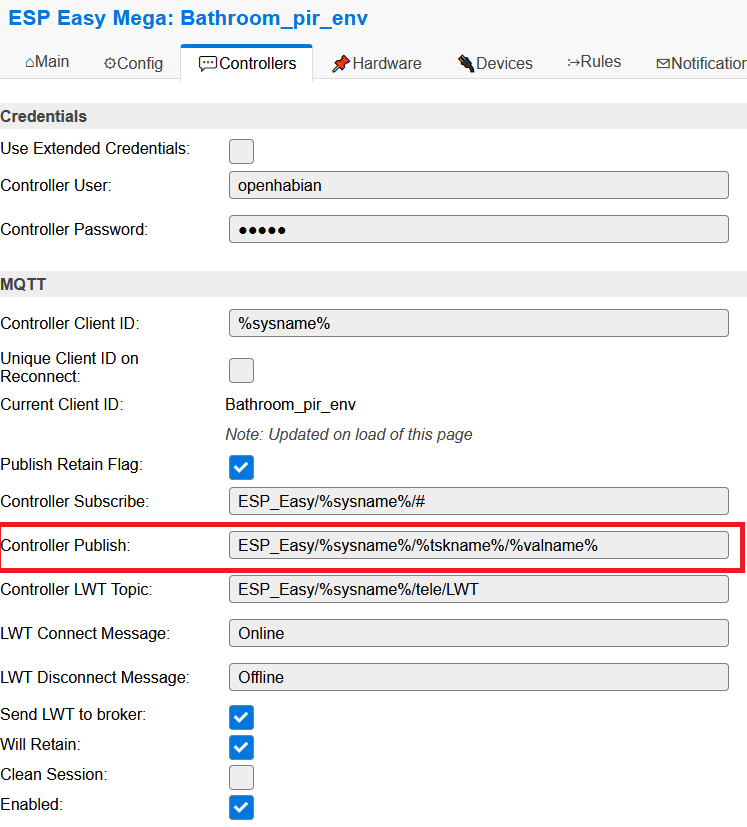
Is it a publish topic in the controller settings?
I believe it has to do with this setting in the controller.
jimmys01
on 27 Oct 2020
Hmm the gpio command is now an internal command, so it has no taskIndex and thus also no taskname and value name.
Not sure if this is an issue.
What should be sent here?
Did a gpio command previously publish the result to the MQTT broker?
And does OpenHAB (or any other) expect the command to be published?
TD-er
on 27 Oct 2020
Also what exactly is published there?
Just "OK" ?
Or a JSON text indicating the new GPIO state?
TD-er
on 27 Oct 2020
Just "OK" ?
this is what it is sending now.
Or a JSON text indicating the new GPIO state?
This would be actually really nice to have.
I will explain the logic I believe this has from the view point of the tasmota user.
For various reasons the command may fail. So there is a command topic and a state topic.
So I may send a command and the esp will reply with a state that I do not expect ,I can deduce that something is not right.
For example I can send ESPeasy/cmnd with data do something and so happens that this command is not supported.
So I will get a reply at the state topic bad command
For my ESPeasy nodes I do not use this functionality myself because I rarely use ESPeasy to do proactive things. I use it for gathering sensor data, so I do not care for this functionality myself.
jimmys01
on 27 Oct 2020
I'm still wondering about the returned message from commands received from MQTT.
The publish topic has a template based on taskname and value name, but since an internal command simply doesn't have those, I wonder what to do with it.
Should these be replaced by some default string, or not replaced as they are now?
Or should there be a default tyopic for command replies?
I guess that's probably a new topic, but I feel the move of GPIO command to be an internal command is making clear we have some unforeseen consequences in the way commands are dealt with in controllers.
TD-er
on 30 Oct 2020
@TD-er
We should disable reply messages for internal commands.
The controller should not respond to a command publishing something, otherwise we risk a loop...
Either do not send anything or just return "OK".
Also a JSON confirming the execution of the command would be nice.
The fact that for internal commands there are no taskname and value name is correct.
Even before moving the GPIO commands as internal commands we could send GPIO,12,0 even if it was not defined in any task. And in that case there was no reply from the controller, if I am not mistaken.
giig1967g
on 30 Oct 2020
@giig1967g You are absolutely correct in stating the command was sending bogus values before as it would match the 1st task acting on the gpio command.
Differentiating the status update per receiving end does sound like a bad idea, but maybe it is the only correct way.
Maybe the controller should decide what to reply, but I think this is going to open a new can of worms.
TD-er
on 30 Oct 2020
If I send a command like "Toggle this switch" I would like to know the state of the switch after the command was sent. "On" "OFF" or "bad state" or whatever.
Having said that I know this is a hard thing to implement for all those plugins. That is why sending String replys back was important for me, not just for the serial plug in but also for the IR RX plugin and now this case also has poped up its head.
jimmys01
on 30 Oct 2020
OK, I understand why it can be useful.
But this does raise the question, where to send it to if we can't send it to a taskindex based topic if the command has no task index?
Should we send it to a standard topic (taskindex set to invalid) and if so, what syntax to use for such a topic?
TD-er
on 30 Oct 2020
OK, I understand why it can be useful.
But this does raise the question, where to send it to if we can't send it to a taskindex based topic if the command has no task index?Should we send it to a standard topic (taskindex set to invalid) and if so, what syntax to use for such a topic?
It could be sent to a standard topic like OpenHAB does:
%sysname%/status/%command%/new_state
i.e. sending gpio,12,1 will return:
ESPEASY1/status/gpio,12,1/1
giig1967g
on 30 Oct 2020
Related issues
 ymoona
·
103Comments
ymoona
·
103Comments
 micropet
·
199Comments
micropet
·
199Comments
 Budman1758
·
90Comments
micropet
·
78Comments
Budman1758
·
90Comments
micropet
·
78Comments
 pwassink
·
96Comments
pwassink
·
96Comments