Espeasy: random on/off relay if wifi is off
Hi!
I use an openwrt wifi router with the mosquitto broker installed on it. Also I use sonoff ch4 r2 with ESPEasy firmware.
If I reboot my router (wifi signal temporarily disappears) then I have relays on my sonoff device turned on or off at random. I can see wifi point the sonoff also.
Build:⋄
20111 - Mega
System Libraries:⋄
ESP82xx Core 2843a5ac, NONOS SDK 2.2.2-dev(38a443e), LWIP: 2.1.2 PUYA support
Git Build:⋄
Plugin Count:⋄
46 [Normal]
Build Time:⋄
Oct 9 2020 21:22:46
Binary Filename:⋄
ESP_Easy_mega_20201009_normal_ESP8285_1M
Build Platform:⋄
Linux-4.19.104-microsoft-standard-x86_64-with-glibc2.29
Git HEAD:⋄
mega-20201009_092798a
My rules:
on Button1#State=1 do
  if [Relay1#State]=0
    gpio,12,1
  else
    gpio,12,0
  endif
endon

on Button2#State=1 do
  if [Relay2#State]=0
    gpio,5,1
  else
    gpio,5,0
  endif
endon

on Button3#State=1 do
  if [Relay3#State]=0
    gpio,4,1
  else
    gpio,4,0
  endif
endon

on Button4#State=1 do
  if [Relay4#State]=0
    gpio,15,1
  else
    gpio,15,0
  endif
endon

on Relays#GPIO12 do
  if [Relays#GPIO12]=1
    gpio,12,1
  endif
  if [Relays#GPIO12]=0
    gpio,12,0
  endif
endon

on Relays#GPIO5 do
  if [Relays#GPIO5]=1
    gpio,5,1
  endif
  if [Relays#GPIO5]=0
    gpio,5,0
  endif
endon

on Relays#GPIO4 do
  if [Relays#GPIO4]=1
    gpio,4,1
  endif
  if [Relays#GPIO4]=0
    gpio,4,0
  endif
endon

on Relays#GPIO15 do
  if [Relays#GPIO15]=1
    gpio,15,1
  endif
  if [Relays#GPIO15]=0
    gpio,15,0
  endif
endon
 userosos
All 17 comments
hi,
are the units rebooting when there is no wifi?
Also, why are you activating the rule on state=1? on Button1#State=1 do
Shouldn't you check if state=0 to activate the rule?
Finally you can show us the screenshot of the DEVICES tab?
 giig1967g
on 16 Oct 2020
giig1967g
on 16 Oct 2020
are the units rebooting when there is no wifi?
I dont know. I think that it not rebooting. Led wifi was blinking.
Also, why are you activating the rule on state=1?
on Button1#State=1 do
I dont know. But it works ok (if wifi work).
Shouldn't you check if state=0 to activate the rule?
Ok i will test it.
Finally you can show us the screenshot of the DEVICES tab?
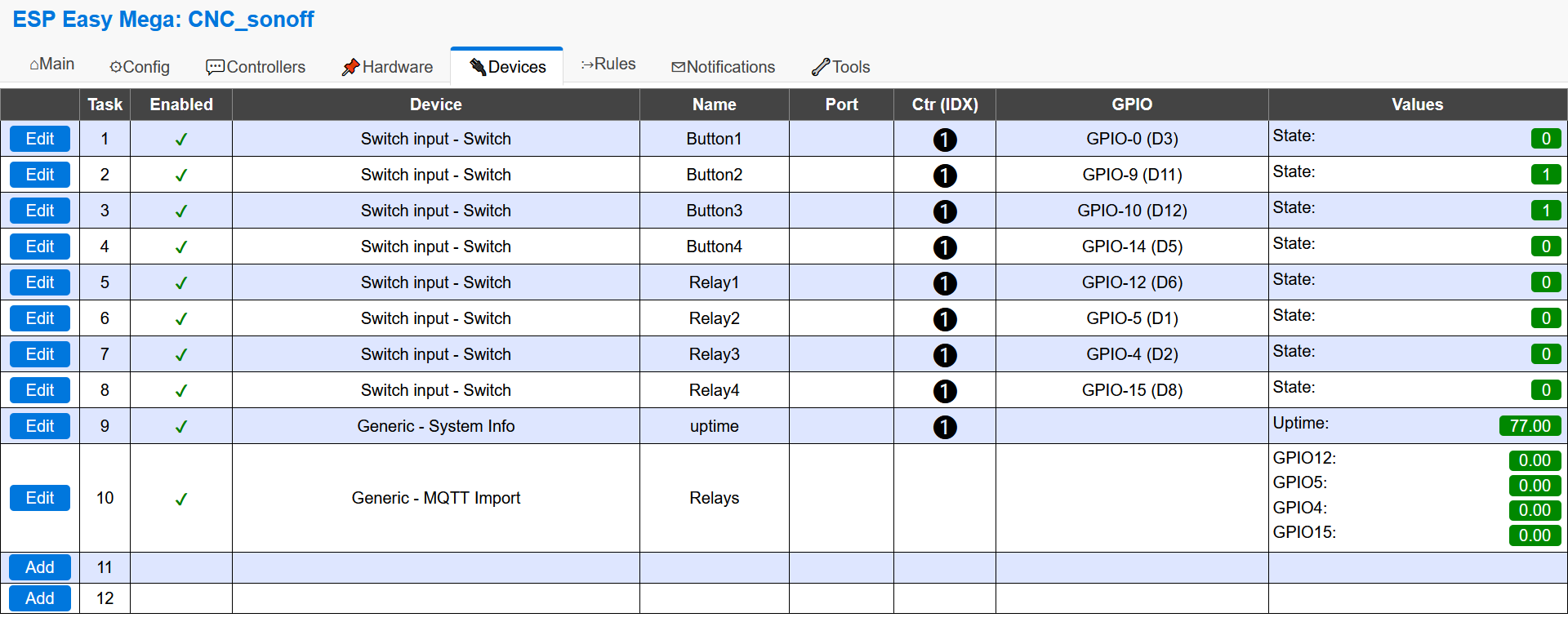
userosos
on 16 Oct 2020
you can check in the MAIN page the UPTIME and compare it against last time you reboot the router. I See that your uptime (task 9) is 77. Hours? Minutes?
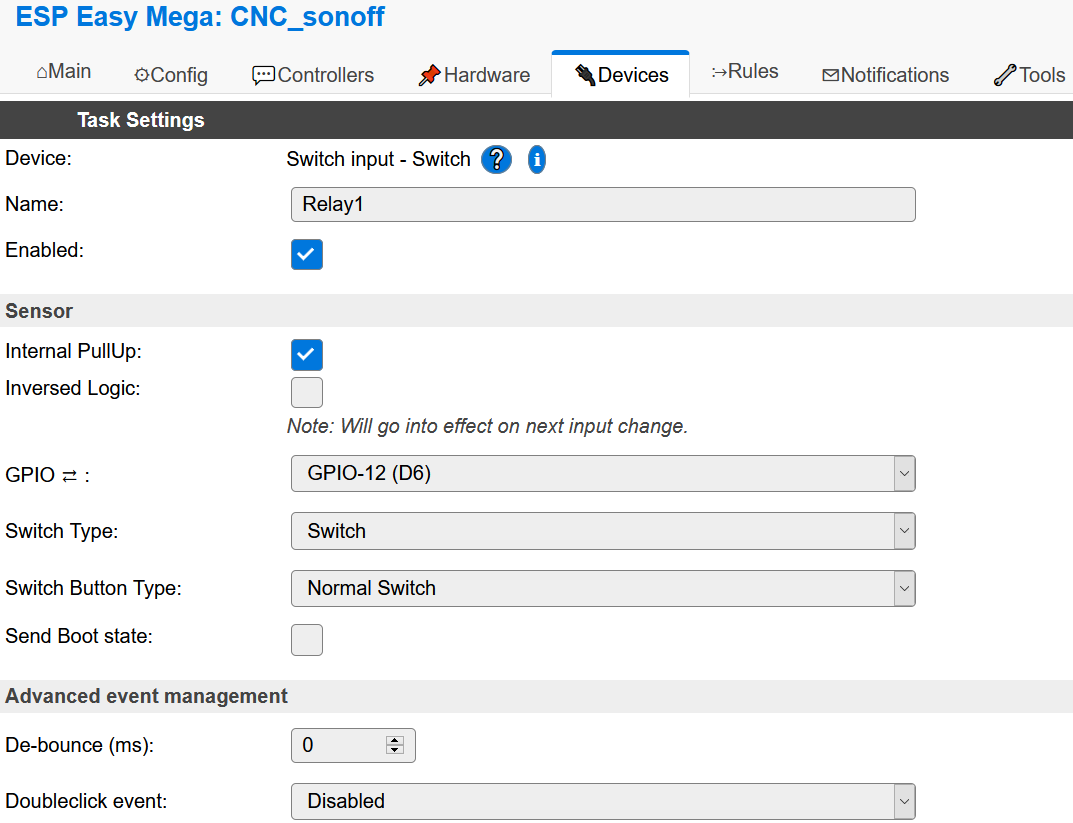
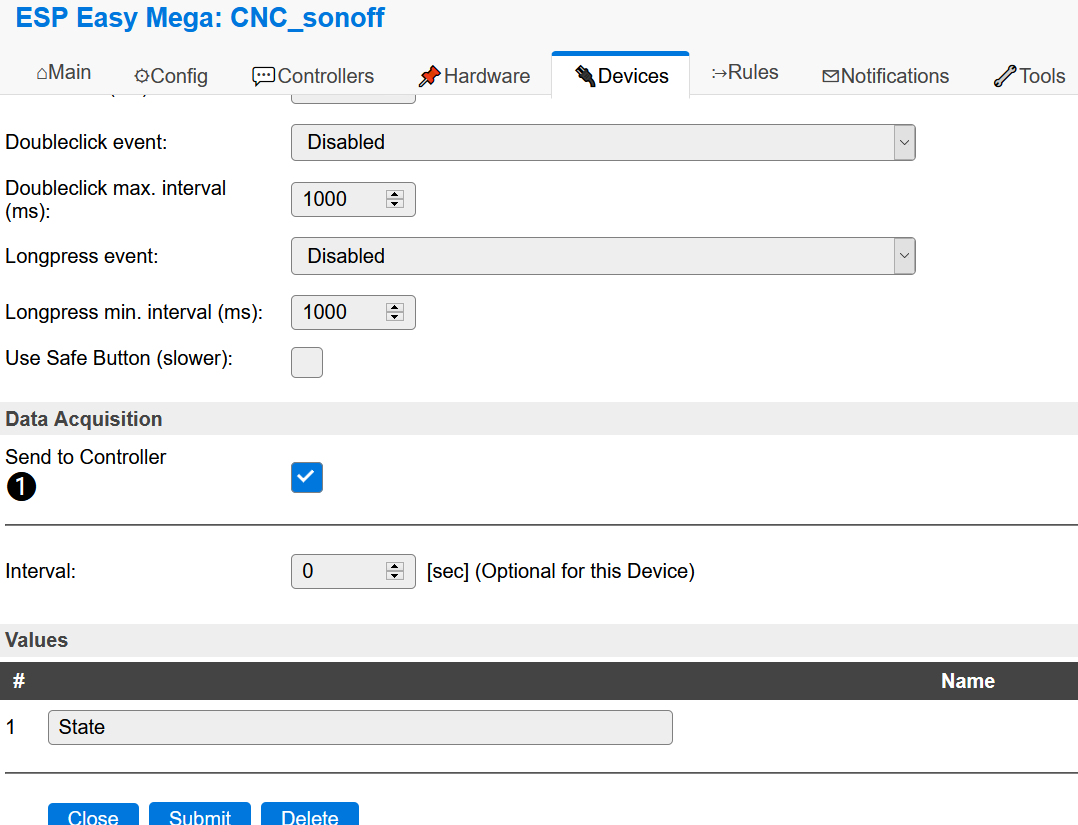
Also, can you post the Button1 and Relay1 configuration page screenshot?
giig1967g
on 16 Oct 2020
you can check in the MAIN page the UPTIME and compare it against last time you reboot the router. I See that your uptime (task 9) is 77. Hours? Minutes?
I can check now but I'm afraid that sonoff will make his wifi hotspot and I can't go into the ESPEasy settings.
What do I need to configure so that ESPEasy doesn't make its wifi point for a long time (I need at least 1 minute to reboot the main wifi point)?
Also, can you post the Button1 and Relay1 configuration page screenshot?
Button1
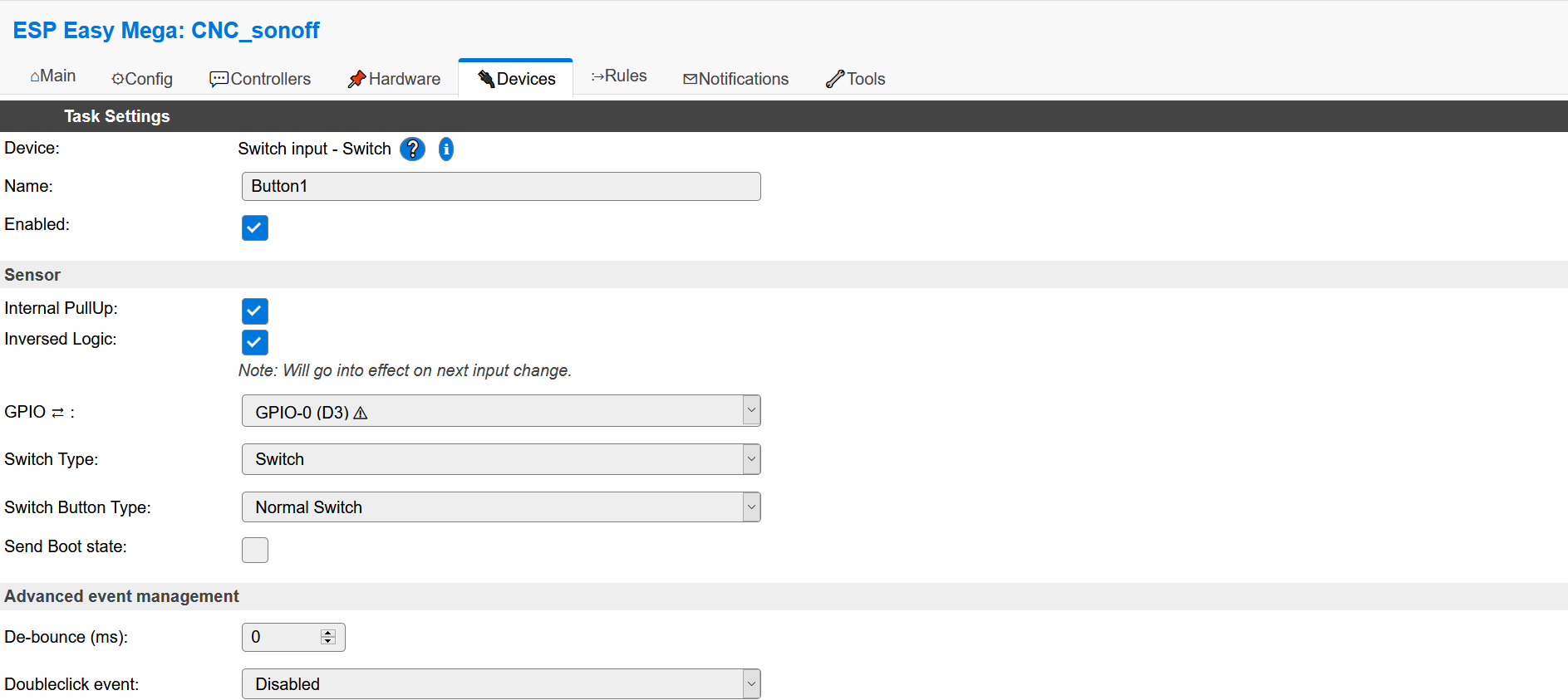
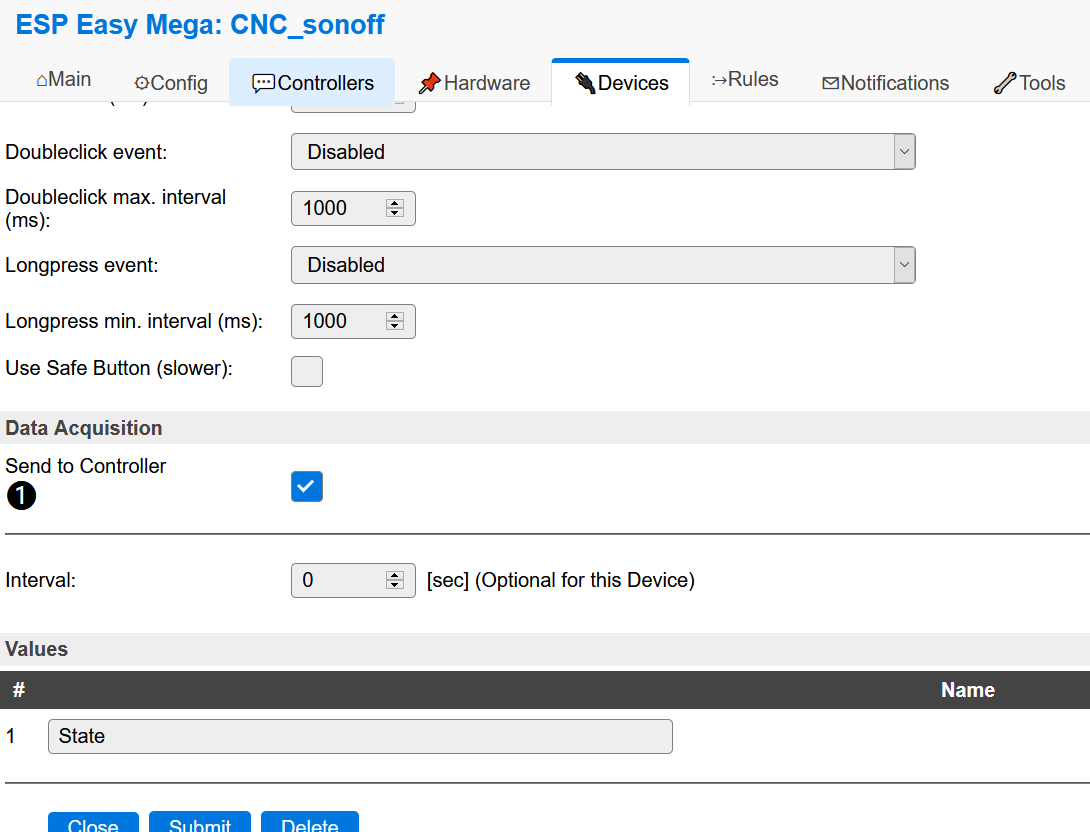
Relay1
userosos
on 16 Oct 2020
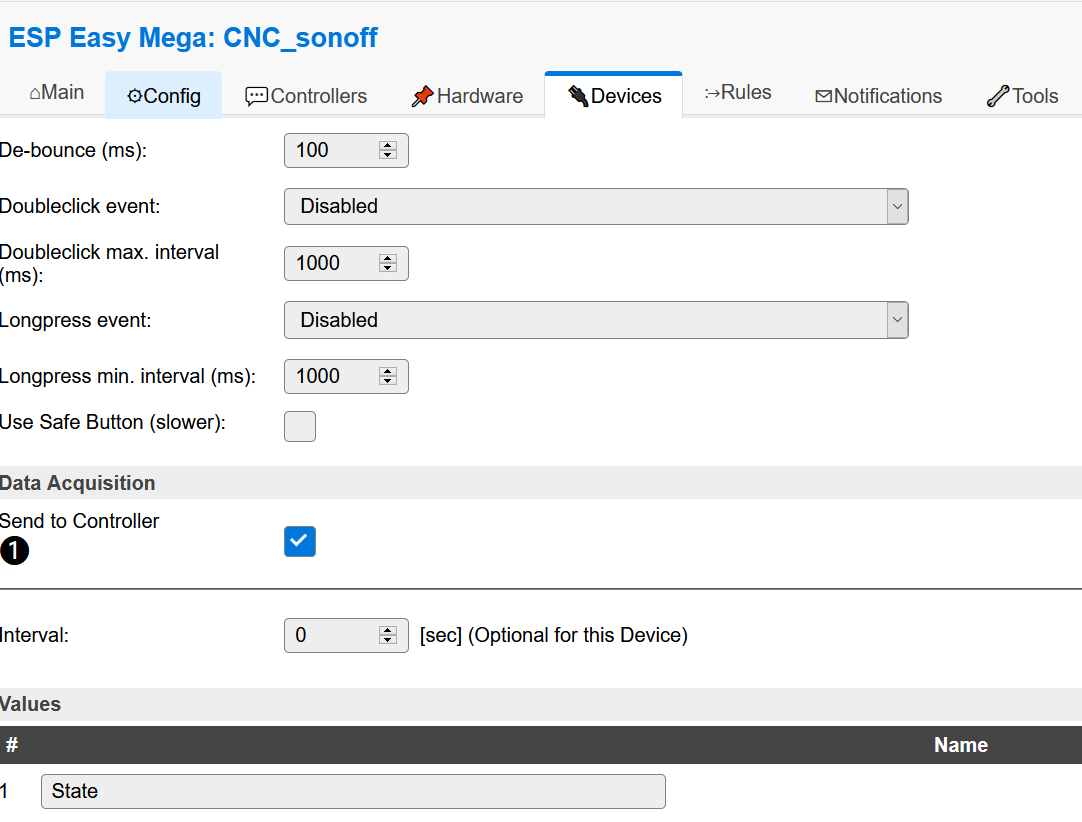
The absent WiFi access point may cause a lot of (high-energy) activity in the WiFi adapter, causing the power to the ESP to be unstable. Unstable power can cause spurious triggering (spikes) on the switch inputs. As you don't have a de-bounce setting configured, setting that to a value of around 50 to 100msec (or even up to 200msec) could help in avoiding undesired switching when WiFi isn't connected.
 tonhuisman
on 16 Oct 2020
tonhuisman
on 16 Oct 2020
do the following: enter now your sonoff and read the uptime.
Then reboot your wifi router and make sure the relays are randomly activated.
Then when the router is up again, reenter your sonoff and read the uptime again.
If the uptime has increased then there has not been a sonoff reboot.
Clear?
giig1967g
on 16 Oct 2020
The absent WiFi access point may cause a lot of (high-energy) activity in the WiFi adapter, causing the power to the ESP to be unstable. Unstable power can cause spurious triggering (spikes) on the switch inputs. As you don't have a de-bounce setting configured, setting that to a value of around 50 to 100msec (or even up to 200msec) could help in avoiding undesired switching when WiFi isn't connected.
Thx! I will set it and test.
UPD. It work! Great thx! I set de-bounce to 100. All of them buttons and Ralays.
userosos
on 16 Oct 2020
do the following: enter now your sonoff and read the uptime.
Then reboot your wifi router and make sure the relays are randomly activated.
Then when the router is up again, reenter your sonoff and read the uptime again.
If the uptime has increased then there has not been a sonoff reboot.
Clear?
After i set de-bounce to 100 it work ok! Ahd sonoff have noreboot!
userosos
on 16 Oct 2020
All of them buttons and Ralays.
The de-bounce setting is only effective/useful for inputs, it's the time the changed input-signal has to be stable before it is accepted as the new value, so won't do anything for the relay.
tonhuisman
on 16 Oct 2020
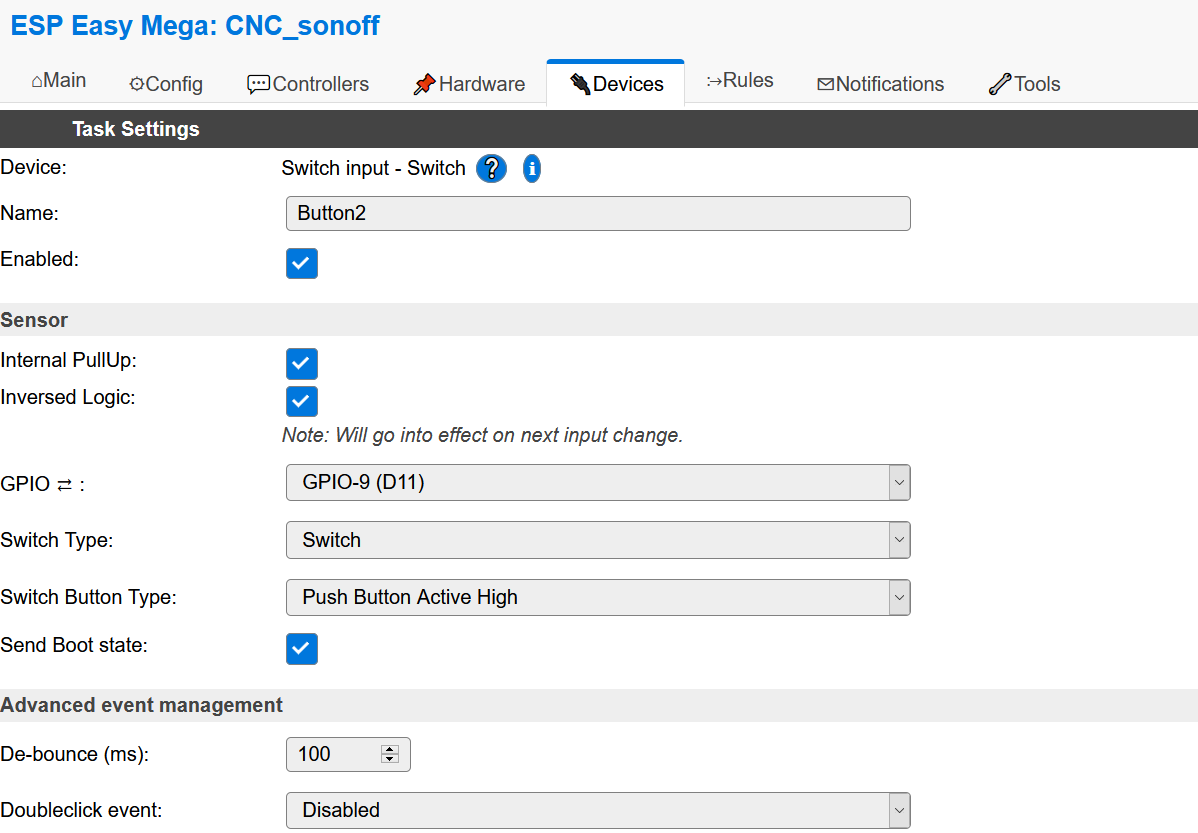
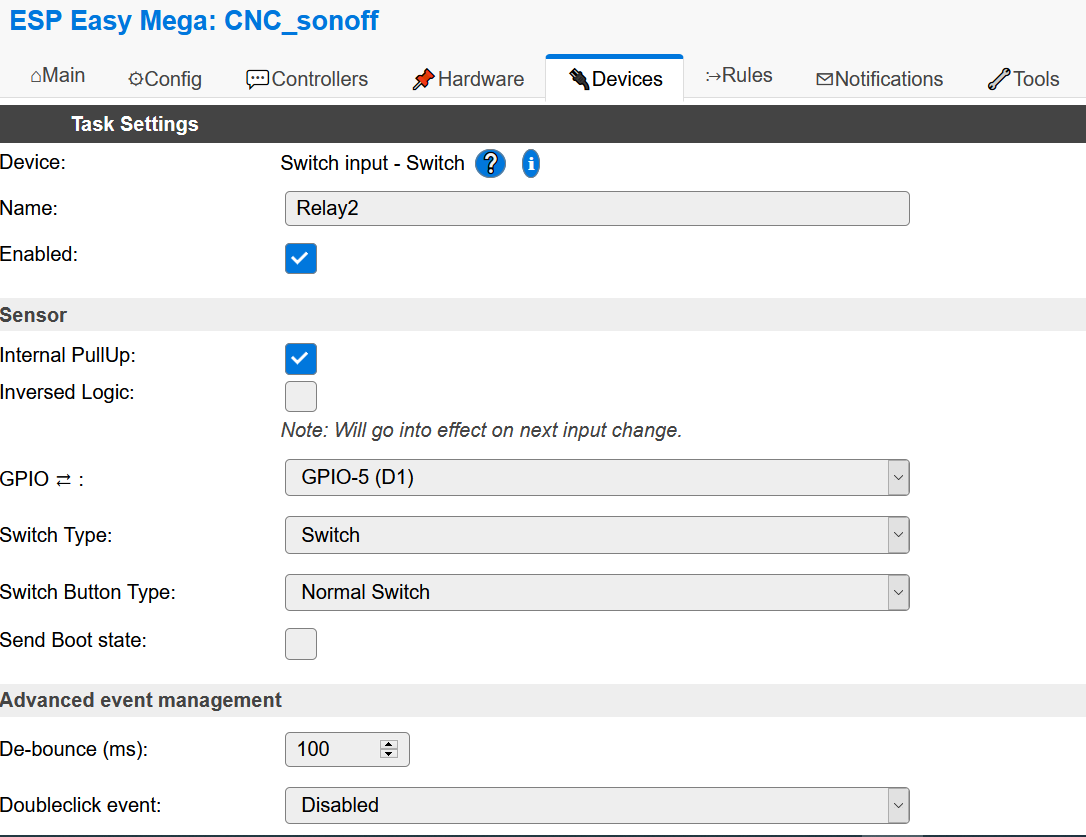
Today i tested it.
- I press on the sonoff ch4 r2 the button2. The Relay2 was on.
- I rebooted the wifi point
- I can see that sonoff lose the wifi point (Blinks blue led)
- Sonoff connected to the wifi point (blinks off blue led)
- I can goto web settings the sonoff.
- Sonoff poweroff the Relay2
Sonoff have noreboot in tthe time.
I repeated reboot the wifi point.
Ralay2 was poweron after connect to the wifipoint.
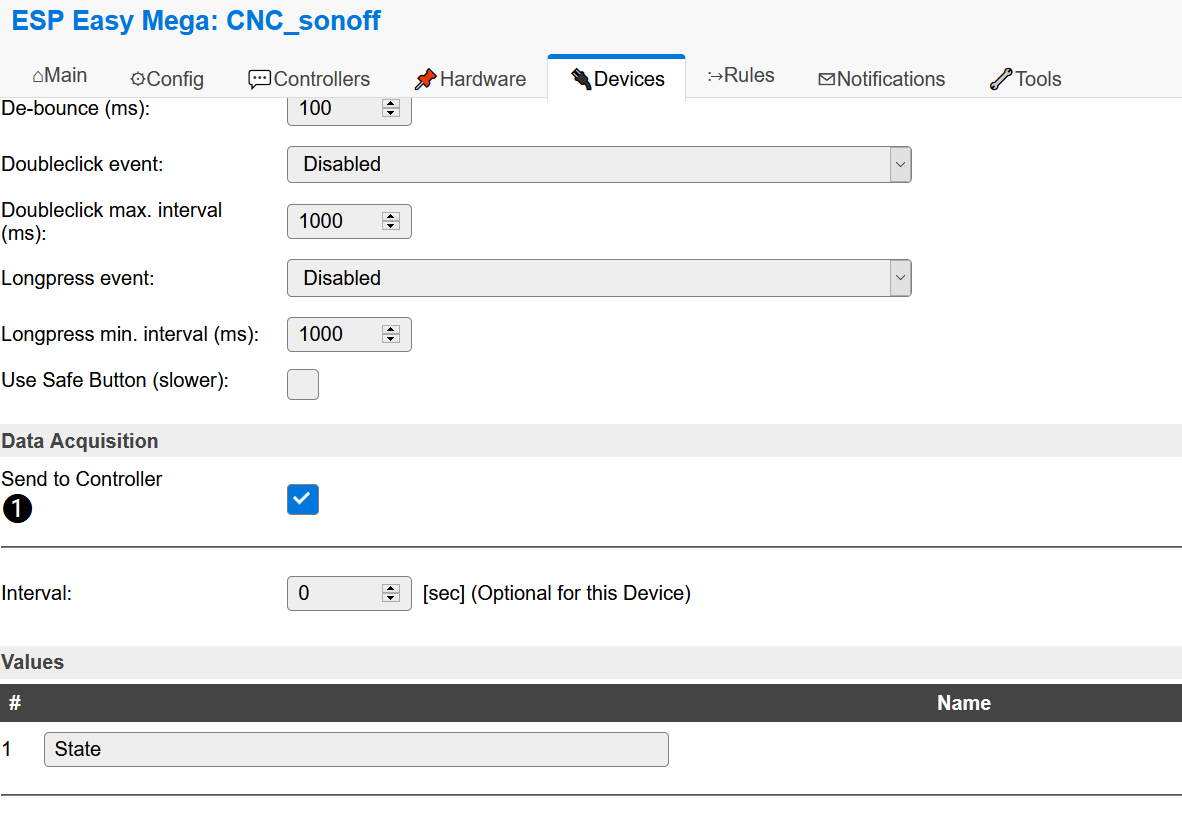
Button2:
Relay2:
userosos
on 18 Oct 2020
- I can goto web settings the sonoff.
- Sonoff poweroff the Relay2
When you save the settings using the Submit button, the task instance is destroyed and re-created. Combined with the 'Send Boot state' enabled setting will cause it to propagate its state, flipping the relay per your rule.
tonhuisman
on 18 Oct 2020
- I can goto web settings the sonoff.
- Sonoff poweroff the Relay2
When you save the settings using the Submit button, the task instance is destroyed and re-created. Combined with the 'Send Boot state' enabled setting will cause it to propagate its state, flipping the relay per your rule.
Ok. I set Switch Button Type to normal switch - it work ok i think.
userosos
on 18 Oct 2020
Hi.
I have a similar problem.
1.The same software version installed on esp8285 ("Wall Touch Switch 2 Gang"). (ESP_Easy_mega_20201022_normal_ESP8285_1M.bin)
2.Set de-bunce max 250ms.
- Controlled via Domoticz http
First problem:
When "Send Boot state" is checked, after performing a reset from the "Tools" tab or after a power failure, the control relays start turning on and off randomly with a frequency of about 2 Hz. The situation settles down spontaneously after 2-3 minutes.
The problem does not occur if I uncheck "Send Boot state" or disable Domoticz on raspberry ????
Second problem:
If I quickly press the touch button twice, the relay turns on and off with a frequency of about 2Hz as before and stops by itself after some time.
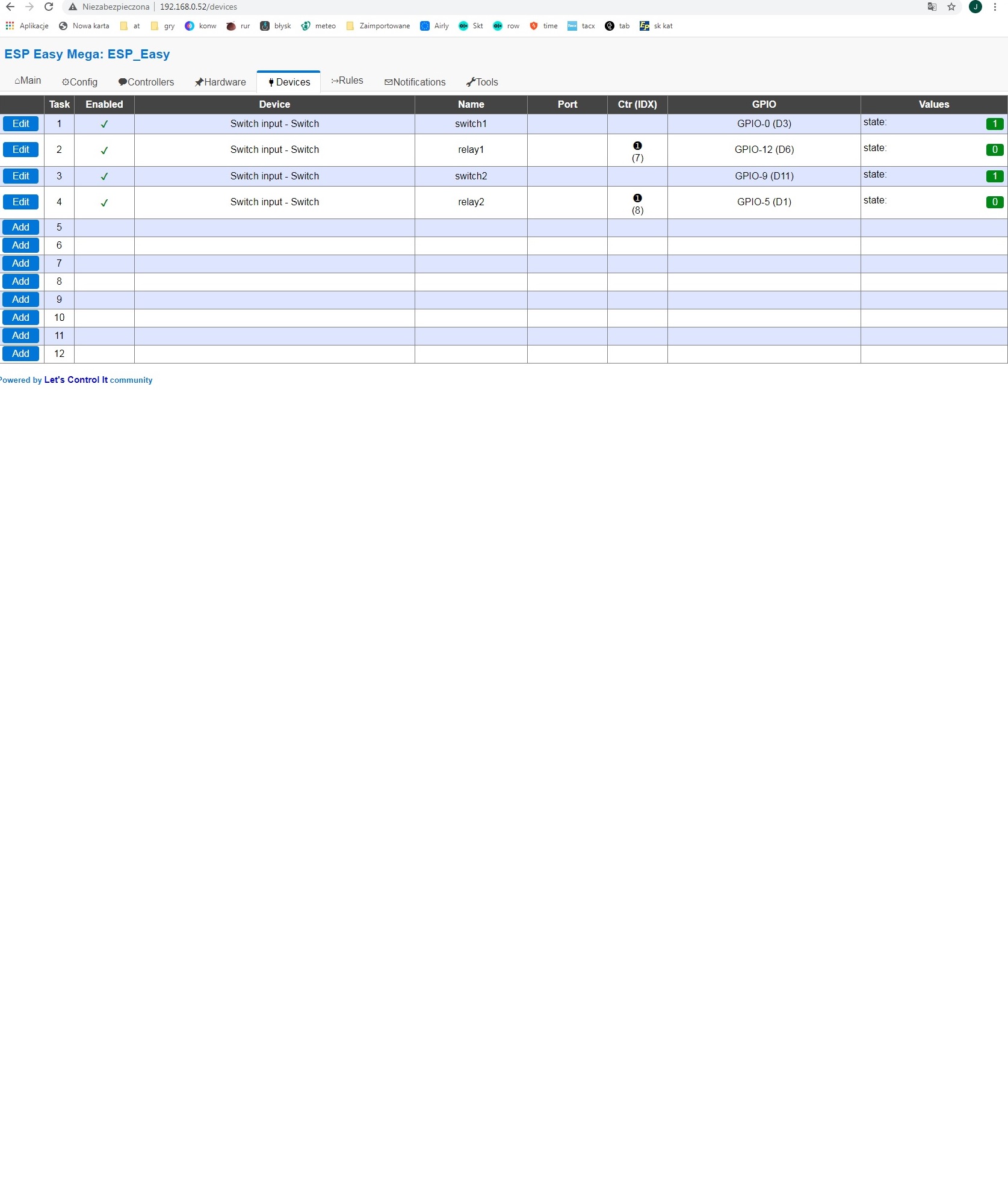
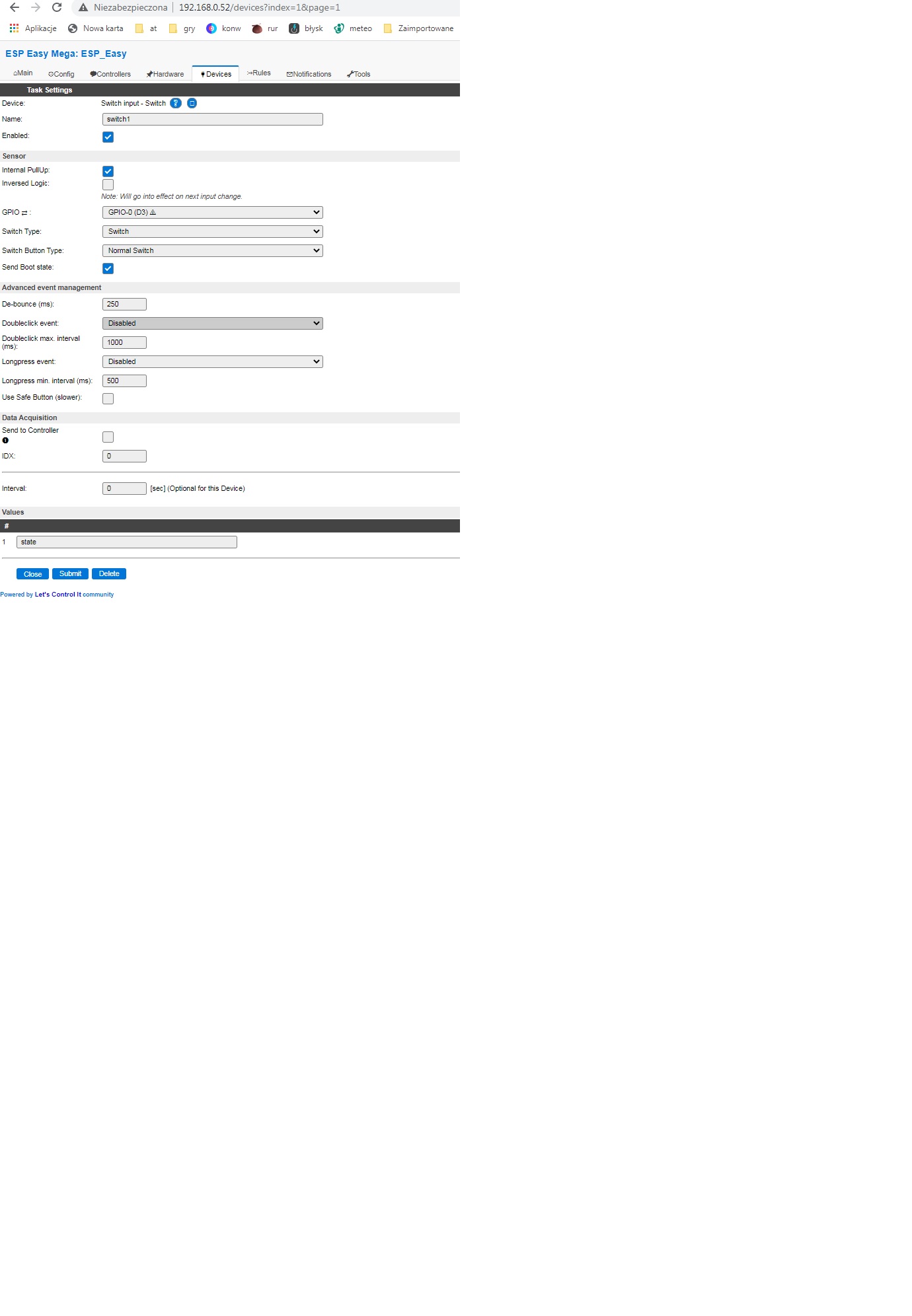
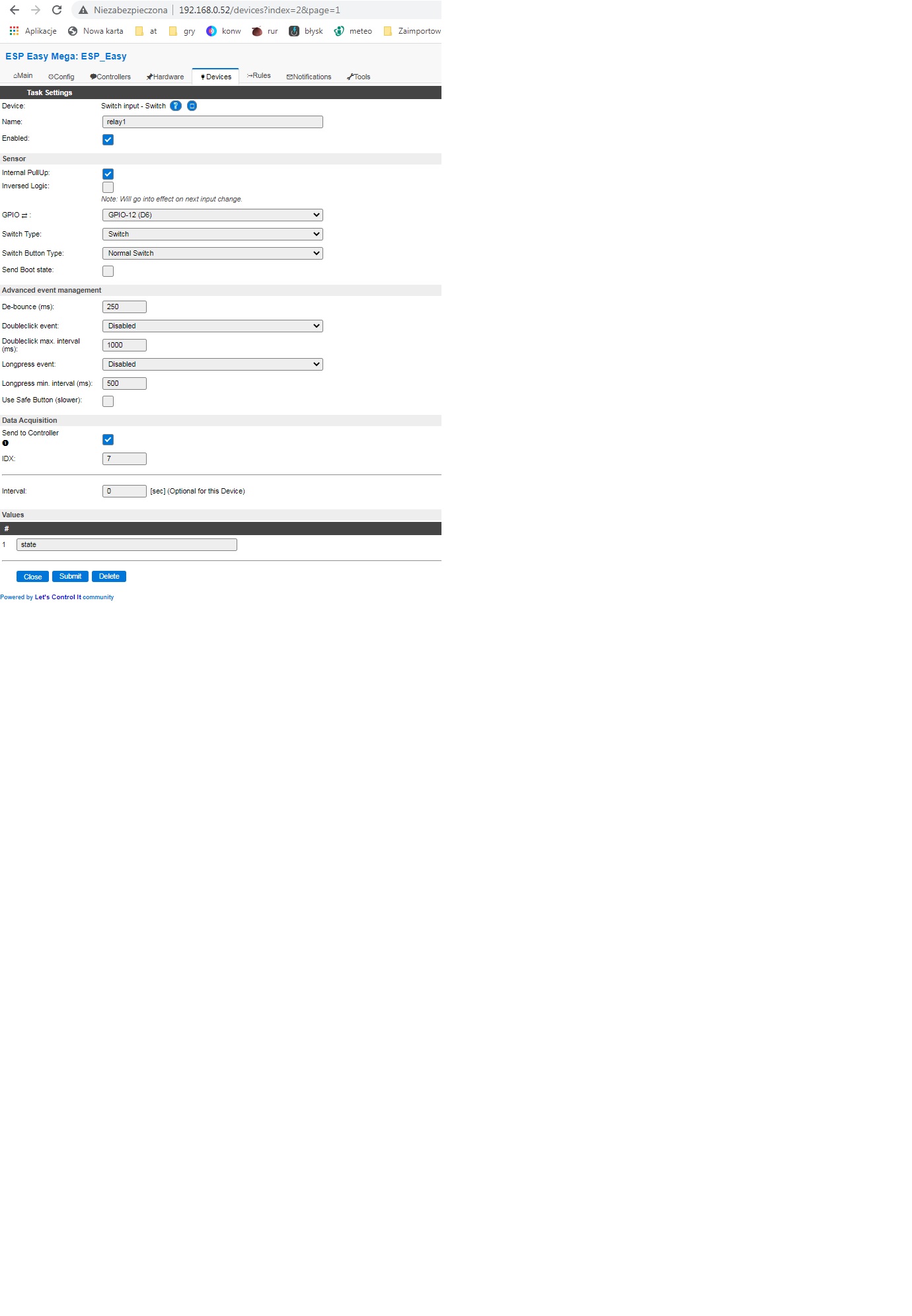

Please help.
Can I upload the last stable version?
What is the stable version for esp8285 ?
 harrry111
on 23 Dec 2020
harrry111
on 23 Dec 2020
I can advice you to first try what is described here ReadTheDocs - Domoticz MQTT helper
The code for this on the ESP hasn't really changed a lot in the last few months, so I guess the version you're running should also be able to handle it when used as described there.
 TD-er
on 23 Dec 2020
TD-er
on 23 Dec 2020
@harrry111 Do you have Domoticz configured to send (http) commands to the Sonoff when activated?

tonhuisman
on 23 Dec 2020
Thanks for the answers.
@tonhuisman screen with Domoticz:
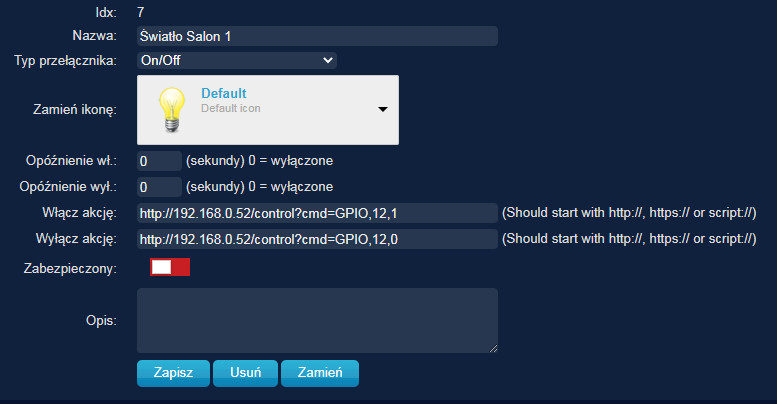
@TD-er
It is likely that changing http to mqtt will solve the problem. I will try, however, with http. I have already encountered the problem on the web (forum "Elektroda.pl") and it appeared there for ESP8266 and software 4M from 2019. The case was resolved by returning to the R120 version. Unfortunately, it does not work on ESP8285. I tried to upload but the switch does not respond.
harrry111
on 23 Dec 2020
If you are following the guide that TD-er mentioned, then you'll have to set up a MQTT server on your Raspberry Pi (assuming that you use that, as 98% of Domoticz seems to run on a RPi), you'll end up with Mosquitto, and that is absolutely stable and working just perfect over here (more stable than Domoticz...).
In that case you must remove those On/Off actions in Domoticz though, as that's the cause of the relay flip-flopping for a time, as ESPEasy is flipping the state in Domoticz, causing Domoticz to flip the state in ESPEasy, etc.,...
Using the Domoticz Helper and Domoticz MQTT Controller makes it work rock-solid, I've been running this setup for over 6 months now, on many recent ESPEasy releases, on my (6) Sonoff S20's and Shelly 1PM, no complaints from the family anymore since I 'switched'. 😄
tonhuisman
on 23 Dec 2020
Related issues
 s0170071
·
3Comments
s0170071
·
3Comments
 ronnythomas
·
3Comments
ronnythomas
·
3Comments
 MarceloProjetos
·
4Comments
MarceloProjetos
·
4Comments
 uzi18
·
5Comments
uzi18
·
5Comments
 jobst
·
5Comments
jobst
·
5Comments
Most helpful comment
The absent WiFi access point may cause a lot of (high-energy) activity in the WiFi adapter, causing the power to the ESP to be unstable. Unstable power can cause spurious triggering (spikes) on the switch inputs. As you don't have a de-bounce setting configured, setting that to a value of around 50 to 100msec (or even up to 200msec) could help in avoiding undesired switching when WiFi isn't connected.