As a lot of users are running into problems when upgrading their build environments to Python 3.8, I felt the need to give some tips and clues to make the upgrade a lot less painful.
Recently the ESPEasy build process has been upgraded to use PlatformIO + Python scripts to make the builds a lot more flexible and better maintainable.
Why 'suddenly' the need for Python 3?
For this, I also added an extra package pygit2.
This package does require Python 3.6+.
It is currently only used for generating a mainly diagnostic line describing the Git branch name in the sysinfo page.
This made me doubt whether to keep this package as it resulted in a lot of issues where people are forced to upgrade their Python environments.
But I decided to keep it as I do have plans for future enhancements in the build process which also need packages that cannot be run under Python 2.7.
Also Python 2.7 is no longer supported since begin of 2020 and Python 3 is already available since December 2008.
Also by enforcing to use the same environment everywhere, I really hope we don't have to doubt the used build environment when someone reports an issue that no-one else can reproduce.
How to upgrade?
On Ubuntu 18.04: (Ubuntu 20.04 does seem to have Python 3.8)
First install the Python 3.8 binaries:
sudo apt install -y software-properties-common
sudo add-apt-repository ppa:deadsnakes/ppa
sudo apt install -y python3.8
Continue below to the common section for all operating systems
Windows:
Download a Python installer from here
I myself used the "executable installer", but there does seem to be a "web-based installer". Not sure if that's simpler to use or not.
Make sure to check if there is some checkbox in the installer screens to add Python3 to your path environment setup. If there is, make sure to check it.
In the 3.7.0 and 3.8.0 installers you had to check it yourself, in later installers I thought the default was better chosen.
Just make sure to check it. (pun intended)
Check what Python environment is used where
Python has a very nice feature, to create several virtual environments.
This allows you to have one set of Python version + libraries for each application.
So an upgrade of a library in one environment doesn't break compatibility in another virtual environment.
Sadly this also makes it less clear whether you're using a single environment or multiple.
A number of users have reported they ran into issues when upgrading the libraries in one place while PlatformIO was still unable to build the current mega branch of ESPEasy.
In VS-code and Atom, with the PlatformIO extension installed, you can open a terminal in the IDE itself.
For example in VS-code:
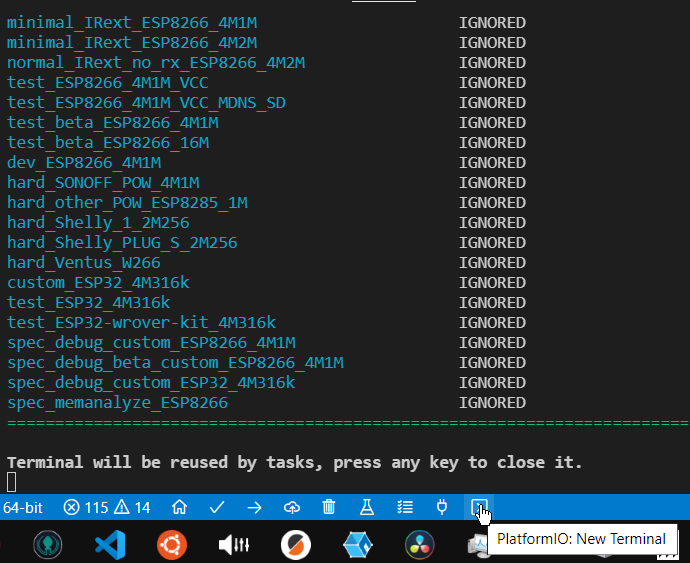
After pressing this button, a new terminal is opened and as can be seen, the Python virtual environment used by PlatformIO is activated.
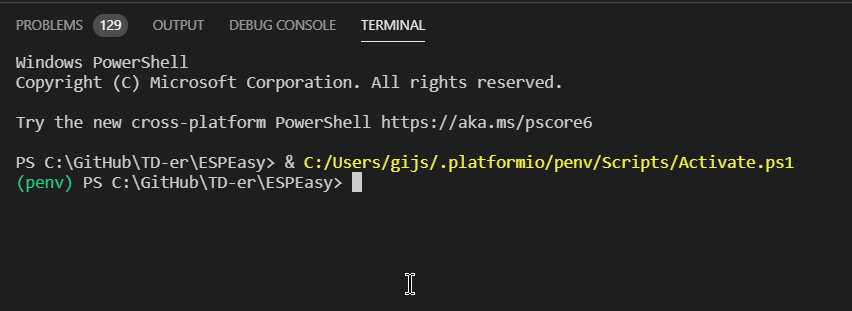
With this virtual environment active, you will see (penv) in front of the prompt.
In this environment, you must run:
pip install -r .\requirements.txt
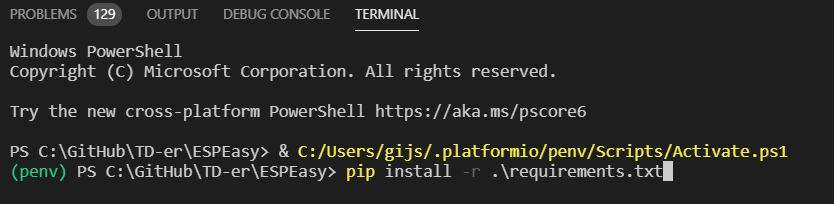
This will install all needed packages (with their specific versions) in the environment needed by PlatformIO.
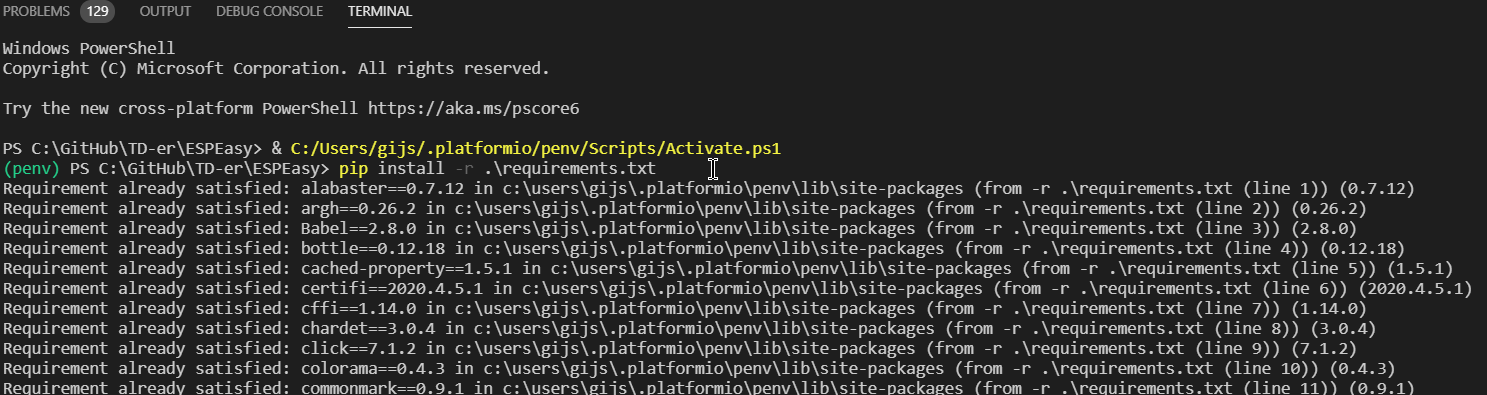
If you are also building ESPEasy outside your IDE, you have to make sure that environment is also up-to-date with the needed packages and Python version.
According to @stefbo27, this documentation is also quite useful.
TL;DR;
- Upgrade to Python 3.8
- Activate your virtual environment
- Run
pip install -r .\requirements.txtusing the requirements file in the same directory where also theplatformio.inifile is located (root of the repository) - Happy building!
 TD-er
TD-er
All 30 comments
Thank you for putting this info together.
found that "pip install -r .\requirements.txt" does not work in windows.
it is either "Run pip install -r ./requirements.txt" or just "Run pip install -r requirements.txt"
 fmuntean
on 7 May 2020
fmuntean
on 7 May 2020
If you are in the python environment you should be able to run pip
If not, then you don't know for sure which environment is active and then you will run into issues like "I updated the packages, but
or "Now my other program doesn't work anymore"
So you should activate the needed virtual environment as is also shown in the screenshots where I start a terminal in VS-code.
In the Linux build script I create an environment in ~/.venv/
So in Linux it does look like this:
gijs@nuc:~$ source ~/.venv/python3.8/bin/activate
(python3.8) gijs@nuc:~$
Step-by-Step instruction for installing pygit2 in Atom (PlatformIO) environment under Windows
- close Atom
- download the latest python version from https://www.python.org/downloads/
- install python
- locate the python folder for PlatformIO, e.g.
%USERPROFILE%\.platformio\python27\ - delete all files and directories within the folder
python27but not the folder itself - locate the default installation folder of python e.g.
%USERPROFILE%\AppData\Local\Programs\Python\Python38-32\ - copy all files and folders from this python folder into the folder
%USERPROFILE%\.platformio\python27\ - open Atom
- open a terminal in Atom via PlatformIO->Terminal->New terminal
- if the terminal shows just a blank window as it was in my atom installation uninstall _Platformio Ide Terminal_ and re-install it afterwards (via PlatformIO->Settings->Platformio Ide Terminal)
- enter
pip install pygit2in the terminal - the pygit2 installation will start and download all necessary files
 uwekaditz
on 7 May 2020
uwekaditz
on 7 May 2020
just tested on vscode upgrade to python 3.7
- close vscode
- in windows explorer go to path:
%UserProfile%/.platformio - delete folders: penv and python27 (eventually second one you can leave so IDE will ask you to install version 3 later)
- install python (use checkbox to add python to PATH)
- launch vscode
- wait for complete platform.io installation
- open espeasy project workspace
- open terminal with menu Terminal->New Termial
- execute:
pip install -r requirements.txt
this should be applicable also for Atom
 uzi18
on 7 May 2020
uzi18
on 7 May 2020
Tried everything including numerous complete reinstalls of Pio core. Clean and only installation of Python 3.8.2, requirements initialized. Still getting errors like these:

 chemmex
on 20 May 2020
chemmex
on 20 May 2020
You need to fork and download the complete GitHub repository!
The pre- compiling phase is looking for the .git folder in your working directory.
uwekaditz
on 20 May 2020
Thanks @uwekaditz , everything is Ok now. But does that mean we couldn't build from static sources anymore?
chemmex
on 21 May 2020
Thanks @uwekaditz , everything is Ok now. But does that mean we couldn't build from static sources anymore?
Right now it sadly is indeed required, but I plan to take away this forced requirement ASAP as it was for sure never my intention to enforce this.
TD-er
on 21 May 2020
Is there another solution to simply flash a esp32? i have here one esp32 but can´t get platformio working. I know there is some esp32 tool gui for windows but it need a lot of files where i don´t know to get is... And the esp32 is crashed so the bulb where i has built in is dark now lol.
 henkiejan1
on 23 May 2020
henkiejan1
on 23 May 2020
after more than 6 hrs spending to find the files for flashing with esp32 flash tool here https://github.com/letscontrolit/ESPEasy/issues/2486#issuecomment-559405770 flash would work and it looks like it boot. But sadly it hangs on Start network scan. So there is what it looks like no way to flash without platformio a esp32
henkiejan1
on 23 May 2020
Please try the files in the nightly build with "-factory" in the name.
Those include all separate bin files, so you only need that file and flash start from byte 0.
For later OTA files you can use the ESP32 bin files without "-factory" in the name.
Not 100% sure about the best flash tool, but Espressif has a Flash Download Tools for download.
TD-er
on 23 May 2020
Yeah it works like a charm. You rescued my humour. ;) It works great. Indeed the file with ´-factory´ and the start byte 0x00000 (5 times zero) as described here. http://domoticx.com/esp32-firmware-flashen/ ¨Ps. Heb je een “heel” firmware bestand (met bootloader, instellingen, e.d.) begin dan bij adres (offset) 0x00000.¨ ¨when you got a complete firmware file (with bootloaders, settings etc) start with adress (offset) 0x00000.´
henkiejan1
on 23 May 2020
I am using the Vagrant for making ESP Easy Mega custom builds, always starting with a fresh Vagrant VM and using a Custom.h file.
Now the fresh build process does not work, even without Custom.h, stopping with error message "ModuleNotFoundError: No module named 'pygit2':"
Based on the instructions above and my experiments, it looks these instructions needs to be run inside the Vagrant VM:
sudo add-apt-repository ppa:deadsnakes/ppa
cd ~/GitHub/letscontrolit/ESPEasy
source ~/.venv/python3.8/bin/activate
pip install -r requirements.txt
Then the repeated 'Vagrant up' works fine and the build is completed.
 ghtester
on 25 May 2020
ghtester
on 25 May 2020
Have you "destroyed" the vagrant box and created a new one via vagrant up ?
I've seen similar issues, where I could not update it, but a destroy of the box and a new up was enough to make it work again.
TD-er
on 25 May 2020
Yes, I am always using 'vagrant halt' and 'vagrant destroy' commands but this does not work anymore.
So what I have to do now is to keep the Vagrant VM running (after the fresh VM is built, following previous destroy ), connect it through SSH, run the above commands and then 'vagrant up' on the parent machine again. It reports that VM is already provisioned and the build works.
The another issue is missing Notifications tab (ESP/notifications webpage is inaccessible ) on my several recent ESP Easy custom builds (even created before move to Python 3.8) but it's another story.
ghtester
on 25 May 2020
What do you use as virtualization platform?
Virtualbox?
TD-er
on 25 May 2020
Yes on Ubuntu 18.04 LTS.
Could you please try to update sources, perhaps bootstrap.sh or build_ESPeasy.sh
, in bottom of section ' Activate Python virtual environment and install/upgrade packages'
with equivalent of these commands (with proper paths)?
sudo add-apt-repository ppa:deadsnakes/ppa -y
cd ~/GitHub/letscontrolit/ESPEasy
source ~/.venv/python3.8/bin/activate
pip install -r requirements.txt
As it is automatically downloading the fresh source tree and I don't know how to easily update it accordingly on first Vagrant VM run, it would be great if the source could be modified.
ghtester
on 25 May 2020
Hmm, that should be updated in the latest sources...
I will have a look as those lines look awfully familiar to me.
Edit:
See here in the VagrantFile:
https://github.com/letscontrolit/ESPEasy/blob/9fe0bccc78c102706ad9ed5ca8c740c0151120b4/tools/vagrant/Vagrantfile#L70-L77
It is adding the ppa in the provision section.
I did try to build it myself in Vagrant, so I'm a bit surprised it doesn't work on your machine.
Edit2:
I am now testing using this:
PS C:\GitHub\TD-er\ESPEasy\tools\vagrant> vagrant destroy
==> vagrant: A new version of Vagrant is available: 2.2.9 (installed version: 2.2.5)!
==> vagrant: To upgrade visit: https://www.vagrantup.com/downloads.html

    default: Are you sure you want to destroy the 'default' VM? [y/N] y
==> default: Destroying VM and associated drives...
PS C:\GitHub\TD-er\ESPEasy\tools\vagrant> vagrant up
Thanks a lot. I don't know what's the difference, perhaps the box version?
vagrant box list
bento/ubuntu-18.04 (virtualbox, 0)
I have recently installed the updates to parent machine.
Just started the fresh compilation, struggling with Custom.h which currently fails (Custom.h created from the modified fresh template), default compilation (without Custom.h) worked (after second vagrant up when the above commands inside Vagrant VM were applied). But the Notification tab is missing in this firmware...
Build:⋄ 20107 - Mega
System Libraries:⋄ ESP82xx Core 52b3e5b7, NONOS SDK 2.2.2-dev(a58da79), LWIP: 2.1.2 PUYA support
Git Build:⋄
Plugin Count:⋄ 14 [Normal]
Build Origin: Vagrant
Build Time:⋄ May 25 2020 20:41:17
Binary Filename:⋄ ESP_Easy_mega_20200525_custom_beta_ESP8266_4M1M
Build Platform:⋄ Linux-4.15.0-51-generic-x86_64-with-glibc2.27
Git HEAD:⋄ mega
ghtester
on 25 May 2020
OK, not sure what's changed , but also here in my Vagrant the build is failing.
    default:  -------------------------------
    default: ModuleNotFoundError: No module named 'pygit2':
    default:   File "/home/vagrant/.venv/python3.8/lib/python3.8/site-packages/platformio/builder/main.py", line 166:
    default:     env.SConscript(item, exports="env")
    default:   File "/home/vagrant/.platformio/packages/tool-scons/script/../engine/SCons/Script/SConscript.py", line 597:
    default:     return _SConscript(self.fs, *files, **subst_kw)
    default:   File "/home/vagrant/.platformio/packages/tool-scons/script/../engine/SCons/Script/SConscript.py", line 286:
    default:     exec(compile(scriptdata, scriptname, 'exec'), call_stack[-1].globals)
    default:   File "/home/vagrant/GitHub/letscontrolit/ESPEasy/tools/pio/generate-compiletime-defines.py", line 7:
    default:     from pygit2 import Repository
    default: ========================= [FAILED] Took 36.03 seconds =========================
Well, I have found my Vagrant version is 2.0.2 which seems to be a bit old. Despite it probably won't help, I am going to try upgrading to latest 2.2.9..
ghtester
on 26 May 2020
I don't think Vagrant itself is the issue here.
It might be some update on the Bento Vagrant box. or some update of Ubuntu which has changed....
Or (highly unlikely, but for the sake of completeness) I may have mixed up some commits....
TD-er
on 26 May 2020
I agree but when I checked the Vagrant release notes, I thought it deserved the upgrade already... :-)
Yeah perhaps the box... It was working fine for a long time, now it looks that compilation becomes a big magic... :-/
Edit: As expected, the same issue after Vagrant upgrade to 2.2.9. But FYI some of current error messages:
default: APIRequestError: [API] Could not connect to PlatformIO API Service. Please try later.:
default: File "/home/vagrant/.venv/python3.8/lib/python3.8/site-packages/platformio/builder/main.py", line 168:
ghtester
on 26 May 2020
BTW. when I ran the build_ESPeasy.sh script inside the Vagrant VM (after my last attempt with Custom.h from parent machine failed (after second 'vagrant up' when the Vagrant VM was manually updated )), following files were created:
-rw-rw-r-- 1 vagrant vagrant 859760 May 26 01:18 ESP_Easy_mega_20200526_normal_ESP8266_16M.bin
-rw-rw-r-- 1 vagrant vagrant 858128 May 26 01:24 ESP_Easy_mega_20200526_normal_ESP8266_1M.bin
-rw-rw-r-- 1 vagrant vagrant 858464 May 26 01:30 ESP_Easy_mega_20200526_normal_ESP8266_1M_VCC.bin
-rw-rw-r-- 1 vagrant vagrant 859760 May 26 01:35 ESP_Easy_mega_20200526_normal_ESP8266_4M1M.bin
-rw-rw-r-- 1 vagrant vagrant 858112 May 26 01:41 ESP_Easy_mega_20200526_normal_ESP8285_1M.bin
-rw-rw-r-- 1 vagrant vagrant 964816 May 26 01:49 ESP_Easy_mega_20200526_normal_IRext_no_rx_ESP8266_4M2M.bin
-rw-rw-r-- 1 vagrant vagrant 859760 May 26 01:55 ESP_Easy_mega_20200526_normal_WROOM02_2M.bin
-rw-rw-r-- 1 vagrant vagrant 859776 May 26 02:00 ESP_Easy_mega_20200526_normal_WROOM02_2M256.bin
-rw-rw-r-- 1 vagrant vagrant 858848 May 26 02:06 ESP_Easy_mega_20200526_normal_sdk3_ESP8266_1M.bin
-rw-rw-r-- 1 vagrant vagrant 1864304 May 26 02:23 ESP_Easy_mega_20200526_test_ESP32-wrover-kit_4M316k-factory.bin
-rw-rw-r-- 1 vagrant vagrant 1798768 May 26 02:23 ESP_Easy_mega_20200526_test_ESP32-wrover-kit_4M316k.bin
-rw-rw-r-- 1 vagrant vagrant 1864304 May 26 02:40 ESP_Easy_mega_20200526_test_ESP32_4M316k-factory.bin
-rw-rw-r-- 1 vagrant vagrant 1798768 May 26 02:40 ESP_Easy_mega_20200526_test_ESP32_4M316k.bin
-rw-rw-r-- 1 vagrant vagrant 1030608 May 26 02:46 ESP_Easy_mega_20200526_test_ESP8266_4M1M_VCC.bin
-rw-rw-r-- 1 vagrant vagrant 1032592 May 26 02:59 ESP_Easy_mega_20200526_test_beta_ESP8266_16M.bin
-rw-rw-r-- 1 vagrant vagrant 1032592 May 26 03:05 ESP_Easy_mega_20200526_test_beta_ESP8266_4M1M.bin
Tried to install this one to my test node, the Notifications tab was back:
Firmware
Build:⋄ 20107 - Mega
System Libraries:⋄ ESP82xx Core 52b3e5b7, NONOS SDK 2.2.2-dev(a58da79), LWIP: 2.1.2 PUYA support
Git Build:⋄
Plugin Count:⋄ 83 [Normal] [Testing]
Build Origin: Travis
Build Time:⋄ May 26 2020 03:04:08
Binary Filename:⋄ ESP_Easy_mega_20200526_test_beta_ESP8266_4M1M
Build Platform:⋄ Linux-4.15.0-51-generic-x86_64-with-glibc2.27
Git HEAD:⋄ mega
ghtester
on 26 May 2020
Tried to install this one to my test node, the Notifications tab was back:
Maybe that was fixed by this recent commit: https://github.com/letscontrolit/ESPEasy/commit/129db324271b913e0607db54c8505d9e7e6f25ec
TD-er
on 26 May 2020
Yeah committed 4 days ago but it's strange that even yesterday some compilation from the same sources had the Notifications tab missing.
It's not easy for me to understand the build process in Vagrant environment but hopefully some day it will work again as couple weeks ago, the possibility to select plugins to ESP firmware build through Custom.h was great.
ghtester
on 26 May 2020
Well, although I am able to compile the custom ESP Easy firmwares using Vagrant with an obstacles mentioned above, there's still missing Notifications tab in home webpage (if Build Origin = Vagrant).
If Build Origin = Travis, Notifications tab is present...
ghtester
on 4 Jun 2020
If Build Origin = Travis, Notifications tab is present...
And that's one thing I find strange.
Anyway, I've been way too busy last week, but I plan to give the build scripts some TLC this evening.
The Travis build (the one generating a binary) is also failing, so that one and the Vagrant build scripts should be looked into.
TD-er
on 4 Jun 2020
Great job, thanks for your effort, Vagrant now works again. But I am still missing the Notificatons tab in my custom builds.
ghtester
on 6 Jun 2020
But I am still missing the Notificatons tab in my custom builds.
Good to know, I have not tested it yet.
TD-er
on 6 Jun 2020
Related issues
TD-er
·
198Comments
 ymoona
·
103Comments
ymoona
·
103Comments
 TheAppService
·
105Comments
TheAppService
·
105Comments
 kristi5
·
111Comments
kristi5
·
111Comments
 micropet
·
199Comments
micropet
·
199Comments
Most helpful comment
Please try the files in the nightly build with "-factory" in the name.
Those include all separate bin files, so you only need that file and flash start from byte 0.
For later OTA files you can use the ESP32 bin files without "-factory" in the name.
Not 100% sure about the best flash tool, but Espressif has a Flash Download Tools for download.