Espeasy: Build in Platformio doesn't work anymore since today(tested on clean clone from repo)
The follwing error occurs:
Executing task: C:\Users\Peter.platformio\penv\Scripts\platformio.exe run --environment custom_ESP8266_4M1M
Processing custom_ESP8266_4M1M (platform: [email protected]; board: esp12e; framework: arduino)
Verbose mode can be enabled via -v, --verbose option
Custom PIO configuration check
CPPDEFINES: [['BUILD_GIT', '""'], 'NDEBUG', 'VTABLES_IN_FLASH', 'PIO_FRAMEWORK_ARDUINO_LWIP2_HIGHER_BANDWIDTH_LOW_FLASH', ['PUYA_SUPPORT', '1'], 'CORE_POST_2_5_0', 'BEARSSL_SSL_BASIC', 'CORE_POST_2_6_0', 'PIO_FRAMEWORK_ARDUINO_ESPRESSIF_SDK22x_190703', ['MQTT_MAX_PACKET_SIZE', '1024'], ['HTTPCLIENT_1_1_COMPATIBLE', '0'], 'PLUGIN_BUILD_CUSTOM']
Custom CPPDEFINES: ['CONTROLLER_SET_ALL', 'NOTIFIER_SET_NONE', 'PLUGIN_SET_ONLY_SWITCH', 'USES_P001', 'USES_P002', 'USES_P004', 'USES_P028', 'USES_P036', 'USES_P049', 'USES_P052', 'USES_P056', 'USES_P059', 'USES_P081', 'USES_P082', 'USES_C016', 'USES_C018', 'FEATURE_MDNS', 'FEATURE_SD', 'USE_SETTINGS_ARCHIVE']
ModuleNotFoundError: No module named 'pygit2':
---- File "C:\Users\Peter.platformio\penv\Lib\site-packages\platformio\builder\main.py", line 154:
--- env.SConscript(item, exports="env")
--- File "C:\Users\Peter.platformio\packages\tool-scons\script..\engine\SCons\Script\SConscript.py", line 597:
--- return _SConscript(self.fs, files, *subst_kw)
---- File "C:\Users\Peter.platformio\packages\tool-scons\script..\engine\SCons\Script\SConscript.py", line 286:
--- exec(compile(scriptdata, scriptname, 'exec'), call_stack[-1].globals)
--- File "C:\Users\Peter\git\espeasy\master\ESPEasy\tools\pio\generate-compiletime-defines.py", line 7:
--- from pygit2 import Repository
I tried it with "pip install pygit2"but it is already there
I even checked it on a clean machine:
- new Visual code
- installed platformio
- clean git clone of branch mega
--> did not work
 kretzp
All 17 comments
what is your python version?
did you tried to. add -v option to. command line?
 uzi18
on 4 May 2020
uzi18
on 4 May 2020
You should update to Python 3.x ( 3.6 or newer)
In a PlatformIO terminal you can type:
pip install -r requirements.txt
Just make sure you type it in the directory where this file is located (in the same dir as platformio.ini
By using the PlatformIO terminal in VS code, you do make sure the same Python virtual environment is active as is used by PlatformIO.
 TD-er
on 5 May 2020
TD-er
on 5 May 2020
not so easy :
pygit2 needs python3-devel , libgit2-devel etc ...
pip install -U pygit2
uzi18
on 5 May 2020
I have Python 3.8 installed
Perhaps platformio uses internally another version?
kretzp
on 5 May 2020
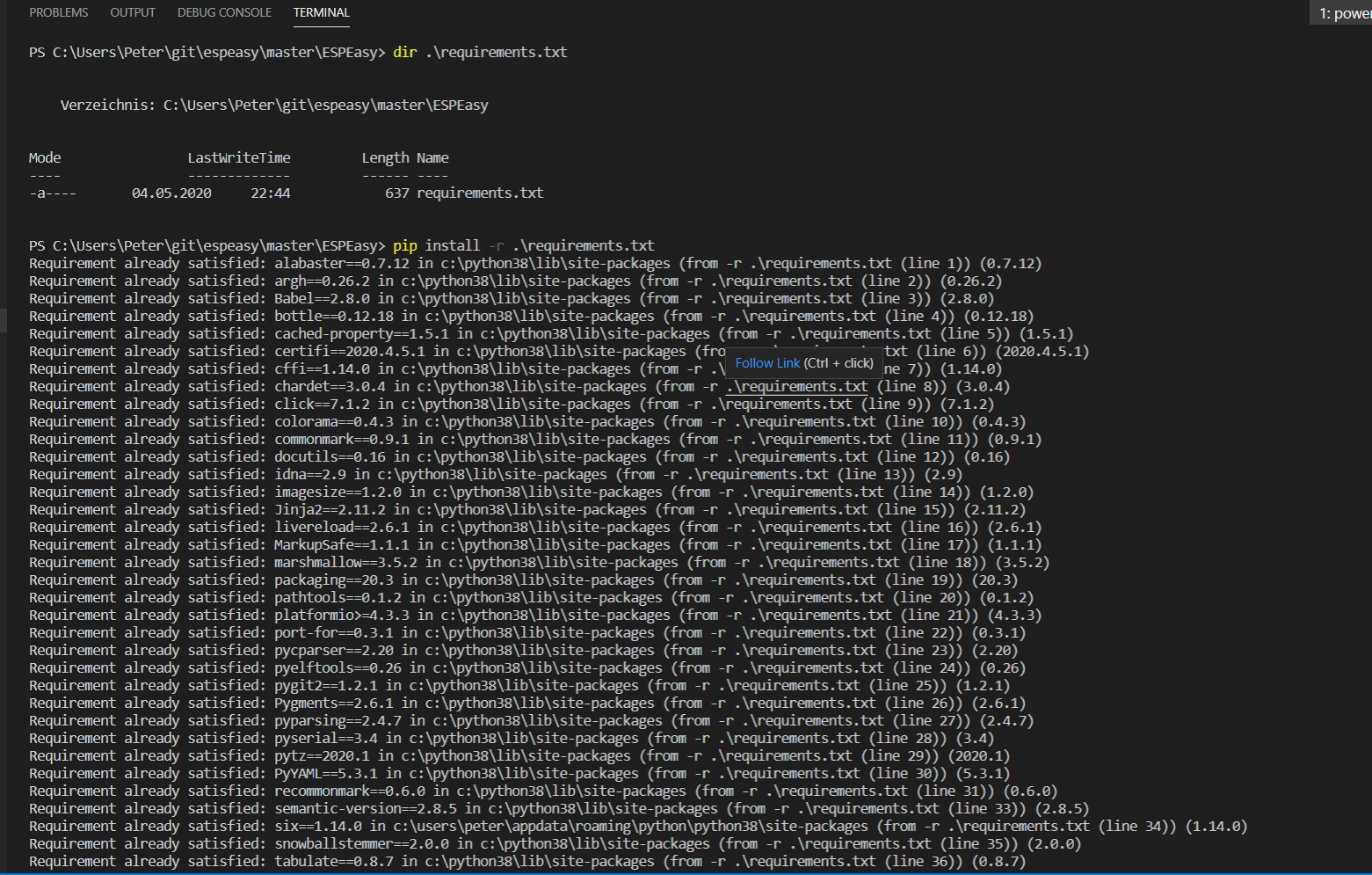

This didn't help, because "Requirement already satisfied"
kretzp
on 5 May 2020

The error is still there
kretzp
on 5 May 2020
Hey guys, thanks for your ideas, I solved the problem myself.
Very strange beahvior.
The Terminal in visual code platformio is not the python environment use by platformio when running debug. Ther terminal uses my python 3.8 in normal windows environment installed version.
platformio uses a version installed in
Executing
C:\Users\Peter\.platformio\penv\Scripts\pip install -r C:\Users\Peter\git\espeasy\master\ESPEasyrequirements.txt
solved the problem.
I think it is beacause I installed Python 3.8 for another purpose after installing platformio and this installation perhaps changed paths.
kretzp
on 5 May 2020
Thanks for that feedback @kretzp
 Grovkillen
on 5 May 2020
Grovkillen
on 5 May 2020
For documentation:
C:\Users\<user>\.platformio\penv\Scripts\pip install -r C:\<pathToRepo>\requirements.txt
Grovkillen
on 5 May 2020
in facts VSCode asks you about it once if he can use own copy of platformio, so like here it can provide some confusion
nice to hear you found it
can't find reference why they switched to pygit2 and where it is used in platformio, perhaps 2.26.0 bug?
uzi18
on 5 May 2020
I think they use pygit2 in the reorganized build process
kretzp
on 5 May 2020
Yep pygit2 was something I included to get build information.
That's -for now- the only one that really relies on Python3.6+
So I was thinking I could do that part in some kind of try-catch block. If it fails then you're missing out on a single diagnostics field in the sysinfo page.
About the -for now- part...
Travis and Read The Docs were warning a bit more annoyingly about the deprecated state of Python 2.x, so I was a bit worried they may suddenly stop supporting it at a less convenient time. That's why I upgraded it all right now, while I was working on the build process anyway.
As you may have seen in the recent commits I did test a lot on different platforms (Linux/Windows/Ubuntu-on-Windows/Vagrant/Travis) but the case of separate Python environments between PIO and VS-code has not been part of this test.
TD-er
on 5 May 2020
I have the same problem as @kretzp. However, following the suggestion above
C:\Users\<user>\.platformio\penv\Scripts\pip install -r C:\<pathToRepo>\requirements.txt
leaves me with some errors:
Collecting MarkupSafe==1.1.1
Using cached MarkupSafe-1.1.1-cp27-cp27m-win_amd64.whl (13 kB)
ERROR: Could not find a version that satisfies the requirement marshmallow==3.5.2 (from -r D:\ESPEASY\ee2\ESPEasyrequirements.txt (line 18)) (
from versions: 0.1.0, 0.2.0, 0.2.1, 0.3.0, 0.3.1, 0.4.0, 0.4.1, 0.5.0, 0.5.1, 0.5.2, 0.5.3, 0.5.4, 0.5.5, 0.6.0, 0.7.0, 1.0.0a0, 1.0.0, 1.0.1,
1.1.0, 1.2.0, 1.2.1, 1.2.2, 1.2.3, 1.2.4, 1.2.5, 1.2.6, 2.0.0a1, 2.0.0b1, 2.0.0b2, 2.0.0b3, 2.0.0b4, 2.0.0b5, 2.0.0rc1, 2.0.0rc2, 2.0.0, 2.1.0,
2.1.1, 2.1.2, 2.1.3, 2.2.0, 2.2.1, 2.3.0, 2.4.0, 2.4.1, 2.4.2, 2.5.0, 2.6.0, 2.6.1, 2.7.0, 2.7.1, 2.7.2, 2.7.3, 2.8.0, 2.9.0, 2.9.1, 2.10.0, 2
.10.1, 2.10.2, 2.10.3, 2.10.4, 2.10.5, 2.11.0, 2.11.1, 2.12.0, 2.12.1, 2.12.2, 2.13.0, 2.13.1, 2.13.2, 2.13.3, 2.13.4, 2.13.5, 2.13.6, 2.14.0,
2.15.0, 2.15.1, 2.15.2, 2.15.3, 2.15.4, 2.15.5, 2.15.6, 2.16.0, 2.16.1, 2.16.2, 2.16.3, 2.17.0, 2.18.0, 2.18.1, 2.19.0, 2.19.1, 2.19.2, 2.19.3,
2.19.4, 2.19.5, 2.20.0, 2.20.1, 2.20.2, 2.20.3, 2.20.4, 2.20.5, 2.21.0, 3.0.0a1, 3.0.0b1, 3.0.0b2, 3.0.0b3, 3.0.0b4, 3.0.0b5, 3.0.0b6, 3.0.0b7
, 3.0.0b8, 3.0.0b9, 3.0.0b10, 3.0.0b11, 3.0.0b12, 3.0.0b13, 3.0.0b14, 3.0.0b15, 3.0.0b16, 3.0.0b17, 3.0.0b18, 3.0.0b19, 3.0.0b20, 3.0.0rc1, 3.0
.0rc2, 3.0.0rc3, 3.0.0rc4, 3.0.0rc5)I tried the same on a linux machine with similar result. Any Idea?
 stefbo27
on 7 May 2020
stefbo27
on 7 May 2020
You don't have Python 3.6 or higher there.
Try to run python --version to check.
TD-er
on 7 May 2020
Just found out that new python was not used. So I renamed folder penv to penv_old which forced Platformio to reinstall. Now new python version is detected and used and above procedure works.
@TD-er : maybe you can add this in #3058 as well.
last strange thing: I installed python 3.8.2 but python --version now gives 3.7.5 (obviously platformio detected this version only, as it created a folder python37 in .platformio) Any idea, how I can tell Platformio which python to use?
stefbo27
on 7 May 2020
I am not sure where PlatformIO gets its Python version from.
At least Python 3.7.5 will also work, but it is nice to know what happens :)
Maybe there was a 3.7.5 Python version installed somewhere and when PlatformIO could not find its virtual env it tried the first one it found while searching your system.
You can also check you PATH environment variable.
If VS-code was started before you installed Python 3.8.2, then it was still using the active environment when VS-code was started.
If there is a location which also has some Python.exe in the PATH settings prior to the actual Python 3.8.2 path, then it will use that one to create the new virtual env.
TD-er
on 7 May 2020
finally I made it to upgrade the environment in platformio.
https://docs.platformio.org/en/latest/core/installation.html#virtual-environment helped a lot!
stefbo27
on 7 May 2020
Related issues
 kristi5
·
111Comments
kristi5
·
111Comments
 micropet
·
78Comments
micropet
·
78Comments
 aperoap
·
107Comments
TD-er
·
198Comments
aperoap
·
107Comments
TD-er
·
198Comments
 Budman1758
·
90Comments
Budman1758
·
90Comments
Most helpful comment
For documentation:
C:\Users\<user>\.platformio\penv\Scripts\pip install -r C:\<pathToRepo>\requirements.txt