Espeasy: mega-20190730 not working, enters a wifi loop after reboot
Gents,
Tried the mega-20190730 in several versions on a esp8266 this morning, (dev, normal 2.5.2 and normal all 4 Mb and it seems all suffer from something entering Loop in the wifi part of the build.
It does respond on serial commands so it is not a Mcu-crash, but it will not connect on Wifi and render the esp and its sensors useless after a online wifi based upgrade.
Will attach some logging of the one with the DEV version here the end is cut-off it is continues repeated :
reboot
1513692 : Command: reboot
1513717 : WIFI : WiFiConnected() out of sync
1513718 : Reset WiFi.
ets Jan 8 2013,rst cause:2, boot mode:(3,7)
load 0x4010f000, len 1384, room 16
tail 8
chksum 0x2d
csum 0x2d
v8b899c12
~ld
⸮U75 :
INIT : Booting version: mega-20190730 (ESP82xx Core 2_5_2, NONOS SDK 2.2.1(cfd48f3), LWIP: 2.1.2 PUYA support)
76 : INIT : Free RAM:30184
77 : INIT : Warm boot #1 Last Task: Const Interval timer, id: 9 - Restart Reason: Software/System restart
79 : FS : Mounting...
104 : FS : Mount successful, used 75802 bytes of 957314
564 : CRC : program checksum ...OK
600 : CRC : SecuritySettings CRC ...OK
601 : CRC : binary has changed since last save of Settings
602 : IP : Static IP : 192.168.3.46 GW: 192.168.3.1 SN: 255.255.255.0 DNS: 192.168.3.1
714 : INIT : Free RAM:25416
716 : INIT : I2C
716 : INIT : SPI not enabled
764 : INFO : Plugins: 81 [Normal] [Testing] [Development] (ESP82xx Core 2_5_2, NONOS SDK 2.2.1(cfd48f3), LWIP: 2.1.2 PUYA support)
766 : EVENT: System#Wake
797 : WIFI : WiFiConnected() out of sync
798 : Reset WiFi.
800 : WIFI : Connecting vucnet attempt #0
801 : IP : Static IP : 192.168.3.46 GW: 192.168.3.1 SN: 255.255.255.0 DNS: 192.168.3.1
804 : WIFI : WiFi.status() = WL_DISCONNECTED SSID: vucnet
826 : EVENT: System#Boot
932 : WIFI : Entering processGotIP()
933 : WIFI : Entering processDisconnect()
1035 : EVENT: WiFi#Disconnected
1041 : WIFI : Disconnected! Reason: '(1) Unspecified'
1042 : firstLoopConnectionsEstablished
1043 : WIFI : WiFiConnected() out of sync
1044 : Reset WiFi.
1049 : WIFI : Entering processGotIP()
1050 : WIFI : Entering processDisconnect()
1152 : EVENT: WiFi#Disconnected
1157 : WIFI : Disconnected! Reason: '(1) Unspecified'
1161 : WIFI : WiFiConnected() out of sync
1162 : Reset WiFi.
1165 : WIFI : Entering processGotIP()
1166 : WIFI : Entering processDisconnect()
1267 : EVENT: WiFi#Disconnected
1271 : WIFI : Disconnected! Reason: '(1) Unspecified'
1274 : WIFI : WiFiConnected() out of sync
1275 : Reset WiFi.
1278 : WIFI : Entering processGotIP()
1279 : WIFI : Entering processDisconnect()
1380 : EVENT: WiFi#Disconnected
1384 : WIFI : Disconnected! Reason: '(1) Unspecified'
1385 : WIFI : WiFiConnected() out of sync
1386 : Reset WiFi.
 pwassink
All 24 comments
Yep.. same here !
 ironataerial
on 30 Jul 2019
ironataerial
on 30 Jul 2019
Here too.
 micropet
on 30 Jul 2019
micropet
on 30 Jul 2019
Are you all using a Static IP?
 TD-er
on 30 Jul 2019
TD-er
on 30 Jul 2019
I use DHCP
micropet
on 30 Jul 2019
I am !!
-D
On Tue, Jul 30, 2019 at 12:26 PM Gijs Noorlander notifications@github.com
wrote:
Are you all using a Static IP?
—
You are receiving this because you commented.
Reply to this email directly, view it on GitHub
https://github.com/letscontrolit/ESPEasy/issues/2519?email_source=notifications&email_token=ACZJV64UPJOIEZKRELOZ7P3QCACKNA5CNFSM4IHY6VEKYY3PNVWWK3TUL52HS4DFVREXG43VMVBW63LNMVXHJKTDN5WW2ZLOORPWSZGOD3DLYAI#issuecomment-516340737,
or mute the thread
https://github.com/notifications/unsubscribe-auth/ACZJV66P54JW2LIZOM3SONDQCACKNANCNFSM4IHY6VEA
.
ironataerial
on 30 Jul 2019
Although the IPs are public I am using them as private on this (for legacy
purposes).
4326 : WIFI : Disconnected: WiFi.status() = 0
4428 : WIFI : Connecting JohnyWalker6 attempt #1
4429 : IP : Static IP : 195.97.88.133 GW: 195.97.88.142 SN:
255.255.255.240 DNS: 8.8.8.8
4431 : WIFI : WiFi.status() = WL_DISCONNECTED SSID: JohnyWalker6
4545 : WIFI : Entering processGotIP()
4546 : WIFI : Entering processDisconnect()
4647 : WIFI : Disconnected! Reason: '(1) Unspecified'
4648 : WIFI : Disconnected: WiFi.status() = 6
4755 : WIFI : Entering processGotIP()
4756 : WIFI : Entering processDisconnect()
4857 : WIFI : Disconnected! Reason: '(1) Unspecified'
4858 : WIFI : Disconnected: WiFi.status() = 0
4962 : WIFI : Wifi status out sync WiFi.status() = 0
4963 : WIFI : Disconnected: WiFi.status() = 0
5066 : WIFI : Entering processGotIP()
-D
On Tue, Jul 30, 2019 at 12:26 PM Gijs Noorlander notifications@github.com
wrote:
Are you all using a Static IP?
—
You are receiving this because you commented.
Reply to this email directly, view it on GitHub
https://github.com/letscontrolit/ESPEasy/issues/2519?email_source=notifications&email_token=ACZJV64UPJOIEZKRELOZ7P3QCACKNA5CNFSM4IHY6VEKYY3PNVWWK3TUL52HS4DFVREXG43VMVBW63LNMVXHJKTDN5WW2ZLOORPWSZGOD3DLYAI#issuecomment-516340737,
or mute the thread
https://github.com/notifications/unsubscribe-auth/ACZJV66P54JW2LIZOM3SONDQCACKNANCNFSM4IHY6VEA
.
ironataerial
on 30 Jul 2019
Hmm, static IP troubles are also reported in another issue.
But @micropet apparently is using DHCP, so it might be 2 different issues here?
@micropet can you show me also your log?
TD-er
on 30 Jul 2019
I added a warning + reference to this issue on the release page of the download.
TD-er
on 30 Jul 2019
Yesterday I did flash the version ESP_Easy_mega-20190716-15-PR_2514_normal_ESP8266_4M.bin.
It was running fine using DHCP. I changed to fixed IP ---> Now I can confirm the wifi loop with fixed IP with the tested pre-release, too.
 Wiki591
on 30 Jul 2019
Wiki591
on 30 Jul 2019
The source code used to build the test build was almost the same. The only change was unrelated to WiFi code.
So I am not surprised it does behave the same. I am rather glad it does appear to be deterministic :)
TD-er
on 30 Jul 2019
I made a fix for this.
At least on my node it does seem to work, but just to be sure I am now build a test build.
See PR #2520
TD-er
on 30 Jul 2019
Same here. Static IP. But 7 segment 4 digit display seams to start work again. I wrote "seams" because it display initial string (four minuses) as defined in startup rule. Then reboot and loopboot.
 mackowiakp
on 30 Jul 2019
mackowiakp
on 30 Jul 2019
Test build with fix for static IP is finished: Test build PR 2520
TD-er
on 30 Jul 2019
Flashed OTA ESP_Easy_mega-20190730-2-PR_2520_normal_ESP8266_4M.bin, set fixed IP, left the rest as it was, works, thumbs up.
Not sure, just a feeling, but seems to be more performant at all.
Wiki591
on 30 Jul 2019
The failing nodes are working again after a reflash, Gijs,
Can Confirm the fix ,
used this version
Binary Filename:⋄ESP_Easy_mega-20190730-2-PR_2520_dev_ESP8266_4M.bin
Peter
pwassink
on 30 Jul 2019
It works for me with PR_250 fix and fixed IP.
I used as always normal build 4MB.
What strange is, after update my rotary encoder was disabled in devices.
When i enable it the esp crashes and come up again with rotary still disabled.
 Sasch600xt
on 30 Jul 2019
Sasch600xt
on 30 Jul 2019
What plugin do you use for the rotary switch?
Pulse counter?
The disabled symptom you're seeing is a protection I built in a while ago to prevent lockout of the user when a plugin behaves badly.
The procedure is to count number of unsuccessful restarts.
If that number reaches 10, it will start disabling the plugins, one at a time until it has a successful restart. (settings are changed in memory, not on flash)
The same for controllers etc.
TD-er
on 30 Jul 2019
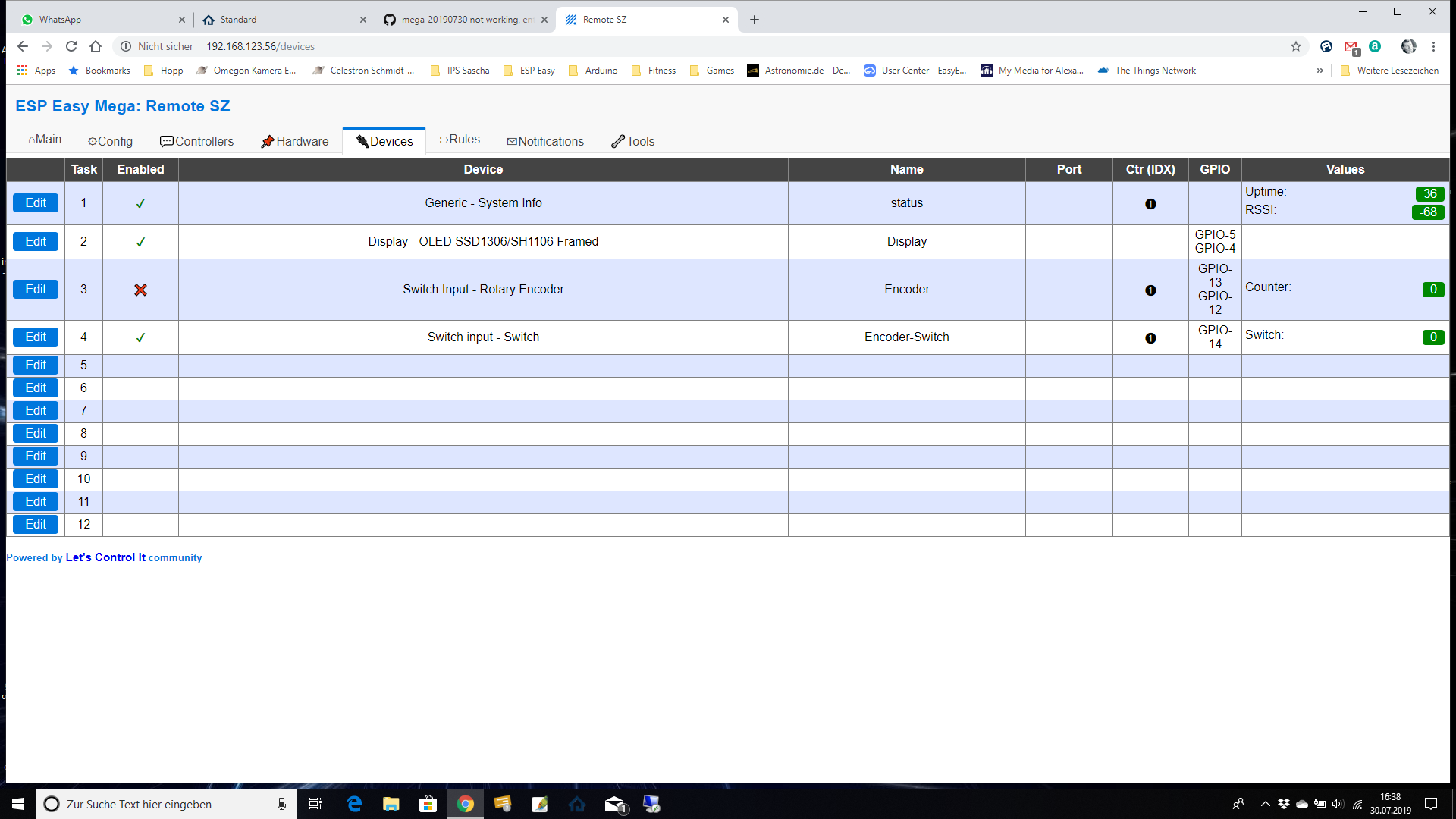
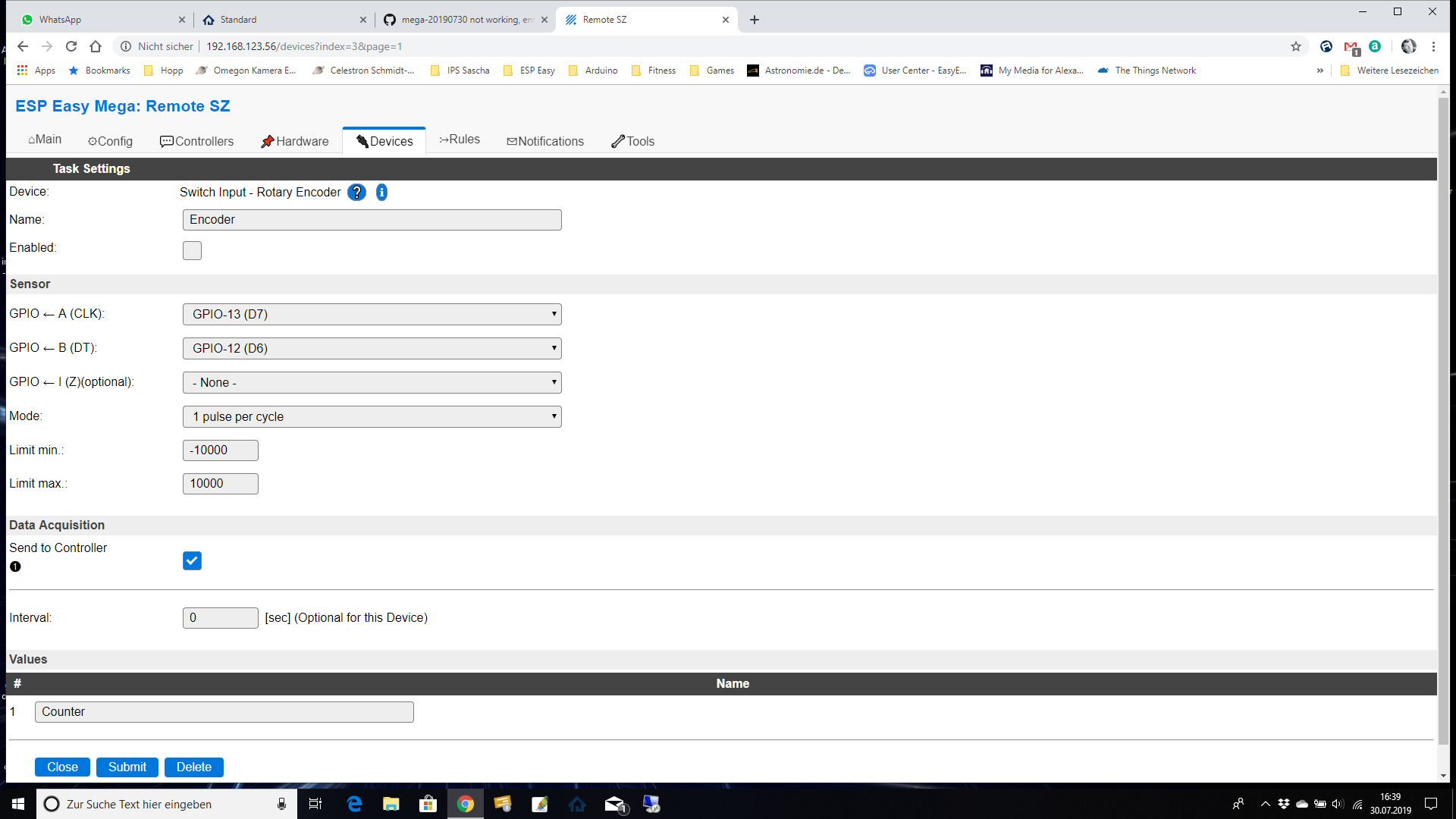
I hope that helps :)
Have a great day
Sascha
Sasch600xt
on 30 Jul 2019
Confirmed to work now
-D
On Tue, Jul 30, 2019 at 3:36 PM Gijs Noorlander notifications@github.com
wrote:
Test build with fix for static IP is finished: Test build PR 2520
https://www.dropbox.com/s/giw6fipynug9wb2/ESPEasy_mega-20190730-2-PR_2520.zip?dl=0—
You are receiving this because you commented.
Reply to this email directly, view it on GitHub
https://github.com/letscontrolit/ESPEasy/issues/2519?email_source=notifications&email_token=ACZJV6ZNAA3P5YUTYLIYFNTQCAYVDA5CNFSM4IHY6VEKYY3PNVWWK3TUL52HS4DFVREXG43VMVBW63LNMVXHJKTDN5WW2ZLOORPWSZGOD3D2GKY#issuecomment-516399915,
or mute the thread
https://github.com/notifications/unsubscribe-auth/ACZJV66NU463L33QK2GWEATQCAYVDANCNFSM4IHY6VEA
.
ironataerial
on 30 Jul 2019
@Sasch600xt , @TD-er
Rotary Encoder, has to do with ICACHE_RAM_ATTR
Check for the error log message: ISR not in IRAM!
Reported earlier:
https://github.com/letscontrolit/ESPEasy/issues/2492#issuecomment-505908967
 Domosapiens
on 30 Jul 2019
Domosapiens
on 30 Jul 2019
I will look into that one this evening too.
That ISR not in IRAM is a relatively new "feature" added in the core libs.
And I'm really glad they added it. Better crash immediately than let it appear to work but crash every now and then without any option to reproduce.
TD-er
on 30 Jul 2019
Howto flash again, but keep my config.
I use static IP too, can i change this somehow, before or after flashing?
Forget about it, apparently there's a new tool with this functionality in it. :-)
 Jopelepoop
on 30 Jul 2019
Jopelepoop
on 30 Jul 2019
Additionally can confirm that after 24 hours, 7 segment LED display works correctly. Formerly it display random segments of disply after 1-2 hours of work. I use two 4 digit displays, multiplexing by external hardware and appropriate rule. So far - OK !
mackowiakp
on 31 Jul 2019
@Sasch600xt and @Domosapiens
Fixing the rotary encoder took too much time yesterday, so I will continue that one hopefully today.
I guess this issue can be closed as it is being fixed.
TD-er
on 31 Jul 2019
Related issues
 ronnythomas
·
3Comments
ronnythomas
·
3Comments
 hamed-ta
·
5Comments
TD-er
·
4Comments
hamed-ta
·
5Comments
TD-er
·
4Comments
 s0170071
·
3Comments
s0170071
·
3Comments
 MarceloProjetos
·
4Comments
MarceloProjetos
·
4Comments