Espeasy: (power issue) ESPEASY is not work on WeMos D1 NodeMcu Lua V3!
I have WeMos D1 NodeMcu Lua V3.
I tried following ESPEASY MEGA:
- ESP_Easy_mega-20190315_normal_ESP8266_4M.bin
- ESP_Easy_mega-20190311_normal_ESP8266_4M.bin
- ESP_Easy_mega-20190305_normal_ESP8266_4M.bin
i can see "ESP_Easy_0" and conact with this. web AP ist very slowly. I can search my router WIFI. When i choose my wifi and enter my password, starts the countdown but it cant conact with my router and i have to repeat it all again.
with build R120 can i conact und anything works.
Please help, i have 25 WeMos D1 NodeMcu Lua V3 and i need MQTT-import.
 aperoap
All 107 comments
have you also tried other core builds of the latest build?
For example core 2.6.0 sdk 2.2.2?
Please also try 20181231 build
 TD-er
on 26 Mar 2019
TD-er
on 26 Mar 2019
None of the current versions (20190315) does work on my Wemos (cheap nodeMCU clone). I tried them all.
Then I tried 20181231: that one gives quite another output in the debug screen. But also 20181231 does not properly make a connection to my AP.
20181231: Wifi indicates that it is connected to the primary AP, but after a beacon timeout it stops.
Quick analysis: it can send, but does not receive (no DHCP address claimed)
dhcp client start...
bcn_timout,ap_probe_send_start
ap_probe_send over, rest wifi status to disassoc
WIFI : Disconnected! Reason: '(200) Beacon timeout' Connected for 25 s
Then it tries to connect to the fallback AP, etcetera.
This is what my AP sees:
attempts to associate
connected, signal strength -48
disconnected, received disassoc: no activity (4)attempts to associate
connected, signal strength -48
disconnected, received disassoc: no activity (4)
So sending does work in 20181231, but no wifi packages are received.
 HV-NL
on 27 Mar 2019
HV-NL
on 27 Mar 2019
In my opinion it is antena issues or faulty module/board.
 uzi18
on 27 Mar 2019
uzi18
on 27 Mar 2019
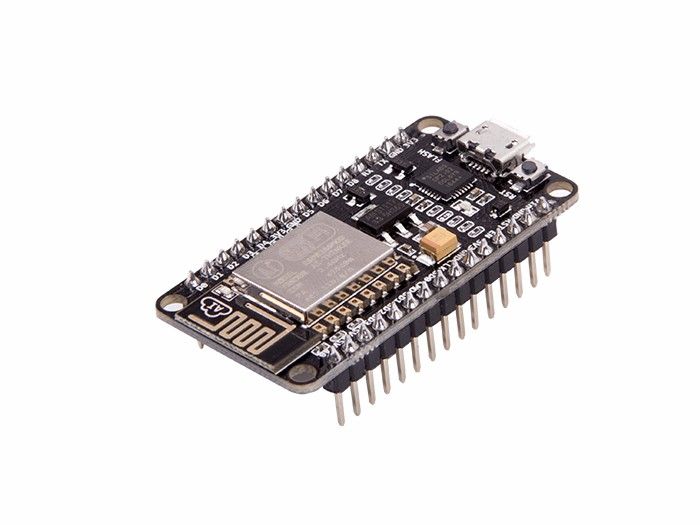
Please post here photo of board
uzi18
on 27 Mar 2019
Well, it was said to be working with R120, but that one was using a totally different core library and was also do a lot less at startup.
TD-er
on 27 Mar 2019
See [/issues/1337/] (april 30 2018) for a picture of this cheap clone.
The antenna should be OK: the device can send, and the message is properly received by the accesspoint. The device even gets a DHCP address once, so it even receives properly, but finally a 'beacon' is not received, and the connection is broken down. After that no new connections are possible any more.
connected with LinksysAtHome, channel 1
dhcp client start...
ip:192.168.11.71,mask:255.255.255.0,gw:192.168.11.1
4567 : WIFI : Connected! AP: LinksysAtHome (B8:69:F4:1C:56:90) Ch: 1 Duration: 3843 ms
4568 : WIFI : DHCP IP: 192.168.11.71 (ESP-Easy-20) GW: 192.168.11.1 SN: 255.255.255.0 duration: 41 ms
4574 : Webserver: start
bcn_timout,ap_probe_send_start
ap_probe_send over, rest wifi status to disassoc
state: 5 -> 0 (1)
rm 0
13105 : WIFI : Disconnected! Reason: '(200) Beacon timeout' Connected for 8536 ms
An older version of ESPEasy does work, so the device is probably not completely faulty.
HV-NL
on 27 Mar 2019
See also the discussion here: https://github.com/esp8266/Arduino/issues/5908#issuecomment-475867223
Maybe you can also try this?
Maybe it is also possible to just wipe the flash and try core 2.4.1 or 2.4.2.
Wiping the flash should also clear the RF calibration values.
TD-er
on 27 Mar 2019
Wiping the RF calibration data did not help.
Wiping the flash + reflash 20190315 core 2.4.2 also did not give me a working wifi.
Just flashed v2.0.0-dev13 again: wifi is working again.
So I tried a different approach: I created a very small program, to test this device stand-alone, using the current Arduino IDE. I used the library 'wifiManager' for this test.
include
include
include
include
//https://github.com/tzapu/WiFiManager WiFi Configuration Magic void configModeCallback (WiFiManager *myWiFiManager) {
Serial.println("Entered config mode");
Serial.println(WiFi.softAPIP());
Serial.println(myWiFiManager->getConfigPortalSSID());
} //configModeCallbackvoid setup() {
Serial.begin(115200);
WiFiManager wifiManager;
wifiManager.setAPCallback(configModeCallback);
if(!wifiManager.autoConnect()) {
Serial.println("failed to connect and hit timeout");
//reset and try again, or maybe put it to deep sleep
ESP.reset();
delay(1000);
}
//if you get here you have connected to the WiFi
Serial.println("connected...yeey :)");
} // setupvoid loop() {
} // loop
This also does not work on this cheap 4M Wemos clone (I wiped flash before upload): no wifi.
I also uploaded this to a 'normal' 4M nodeMCU clone (with a blank aluminium cap over the wifi part): works OK.
So my impression is that this cheap Wemos clone is currently incompatible with the current IDE and/or ESP8266 library, and this is not a dedicated ESPEasy configuration related item.
HV-NL
on 28 Mar 2019
Thanks for this test with a simple setup using WiFimanager
That's giving me some confidence it is indeed not an ESPeasy issue.
One thing you could try to do is to call lots of delays at boot until connected
TD-er
on 28 Mar 2019
have you also tried other core builds of the latest build?
For example core 2.6.0 sdk 2.2.2?Please also try 20181231 build
i have 20181231 build tried. it works very good.

a pic of my ESP from Wemos
aperoap
on 28 Mar 2019
interesting it is not covered by metallic cup
uzi18
on 29 Mar 2019
@uzi18 The Wemos D1 mini pro (16M) is also not covered with a metal shield.
One of the things changed since 2018/12/31 is that it now tries to lessen the load during startup.
TD-er
on 29 Mar 2019
Hello everyone,
For more than 6 months, I use EspEasy with happiness, congratulations to all.
I use either classic NodeMCU Lua V3 (with metal shield) or Wemos D1 mini (also with a metal shield) or Wemos D1 mini Pro with ceramic antenna and no metal shield...
It's the D1 mini Pro which poses problem starting from the version ESP_Easy_mega-20190305_normal_ESP8266_4M (idem for test and dev).
Wifi is working but the browser (Firefox or IE) is waiting for a response...
A port scan indicates that ports 25,80,110,119,143,465,563,587,993,995 are open.
 jcpy70
on 29 Mar 2019
jcpy70
on 29 Mar 2019
I tested several versions with the Wemos D1 Mini Pro (ceramic antenna and no WiFi shielding):
The latest stable release is ESPEasy_mega-20190216.
If it can be useful.
jcpy70
on 31 Mar 2019
I also have one of these Wemos devices. Mine looks exactly as the one @aperoap has posted. Old firmware R120 work fine. I then stepped through more recent firmware builds, beginning with 20181231 (but skipped some in between). Here are my results:
- 20181231_normal_ESP8266_4096.bin -> OK, stable
- 20190106_normal_ESP8266_4096.bin -> not OK, connect to initial AP mode fails
- 20190212_normal_ESP8266_4096.bin -> not OK, connect to initial AP mode fails
- 20190215_normal_ESP8266_4096.bin -> not OK, connect to initial AP mode fails
- 20190216_normal_ESP8266_4096.bin -> not OK, initial AP mode worked, later WiFi client slow and unstable.
- 20190225_normal_ESP8266_4M.bin -> OK, stable (*)
- 20190226_normal_ESP8266_4M.bin -> OK, stable (*)
- 20190227_normal_ESP8266_4M.bin -> not OK, initial AP mode worked, later WiFi client slow and unstable.
- 20190305_normal_ESP8266_4M.bin -> not OK, connect to initial AP mode fails
- 20190311_normal_ESP8266_4M.bin -> not OK, connect to initial AP mode fails
- 20190315_normal_ESP8266_4M.bin -> not OK, connect to initial AP mode fails
- 20190404_normal_ESP8266_4M.bin -> not OK, connect to initial AP mode fails
(*) these two firmware releases sometimes require several attempts to proceed with the initial AP mode
 khambrecht
on 5 Apr 2019
khambrecht
on 5 Apr 2019
Good new !
The latest version ESP_Easy_mega-20190406_xxx is well supported by the Wemos D1 Mini Pro card (with ceramic or external antenna).
Thanks to the whole team !
jcpy70
on 8 Apr 2019
@jcpy70 Good to hear.
Not to spoil it, but I want to make sure it isn't a build issue, so let's try again for the next build.
TD-er
on 8 Apr 2019
@TD-er :
Tested today... Ok with ESP_Easy_mega-20190409_xxx
I use these cards, the soldering for the external antenna is not easy, the 0 ohm resistor (R9) is small ...

jcpy70
on 9 Apr 2019
Great, good to hear it isn't just a single build that was working by accident :)
I use these boards too. They are great and I'm also working on getting to use the whole 16M of the flash.
About the 0-Ohm resistors. I know what you mean. I have a strip of them in case I loose one or destroy in the process.
TD-er
on 9 Apr 2019
unfortunately neither 20190406 nor 20190409 will work on the Wemos D1 NodeMcu devices (these are not like the D1 mini [pro/lite] devices). See @aperoap https://github.com/letscontrolit/ESPEasy/issues/2409#issuecomment-477787441 for picture of the Wemos D1 NodeMcu device. Have to revert back to 20190226 or 20181231 to get the device working.
khambrecht
on 9 Apr 2019
FWIW:
Also having this strange issue. This is a new clone of Wemos D1 R2. But what I notice from the picture above, is that my mcu is also strange: it has "ECO Plugs" label on mcu instead of familiar ESP8266... labeling. I'm suspecting these are some sort of rebadge/rebrand (and maybe rejects/extras/grey-runs :( ).
Anyhow,
ESP_Easy_mega-20190409_normal_ESP8266_4M.bin also does not work for me: it never picks up an ip address, whereas ESP_Easy_mega-20190226_normal_ESP8266_4M.bin works.
 zerog2k
on 10 Apr 2019
zerog2k
on 10 Apr 2019
Good new !
The latest version ESP_Easy_mega-20190406_xxx is well supported by the Wemos D1 Mini Pro card (with ceramic or external antenna).
Thanks to the whole team !
I am using also the Wemos D1 mini pro. It works with 20190226. It doesn't work with 20190227 and later. The card i have is a v1.0.0. Which versions is yours?
 arnemauer
on 13 Apr 2019
arnemauer
on 13 Apr 2019
IMHO, its power supply issues. I've had that with other boards from china before. Its a capacitor/regulator misalignment. try adding some caps to the 5V an 3,3v and you will see the problems shift or disappear.
For example, for me the at firmware always worked, since the consumption is lower somehow. but then after changing to easyesp, sometimes they would work, sometimes they dont.
I add a 470µF to the 5V and 100µF to the 3,3V, and 2 or 3 0,1µF to the 3,3V. Helps most of the times.
Problem is they use cheap regulators, that cannot handle power bursts.
 sebastianheyn
on 15 Apr 2019
sebastianheyn
on 15 Apr 2019
I am running now on a few of these Wemos D1 mini pro's here on my desk and they all seem to work.
I am using good (and short) USB cables and all is powered from a 7+3 port USB3 hub from Anker, with a 60 Watt power supply.
Also on the boards I make, I have added a few capacitors and these boards also run stable.
The boards I make have a 470uF capacitor near the ESP node (and the sensors that need 5V) and have thick copper traces for the traces that run power lines.
TD-er
on 15 Apr 2019
@TD-er & sebastianheyn
Yes, of course, these are basic engineering rules ... But how do you explain that the same Wemos on the same PCB (this is my case for my personal-made PCBs) works correctly with some versions of ESPEasy and not others? The presence of capacitors does not explain everything.
@arnemauer : My Wemos are also 1.0.0 versions.

jcpy70
on 16 Apr 2019
@arnemauer : My Wemos are also 1.0.0 versions.
I found this tread on reddit about a bad voltage regulator on de wemos clone boards: https://www.reddit.com/r/esp8266/comments/9iizx4/warning_clone_wemos_d1_minis_with_only_150ma_33v/. And... yes mine came with a 150ma voltage regulator :(
I removed the regulator and replaced it with an ams1117-3.3v and couple of capacitors but the esp keeps crashing :(
arnemauer
on 16 Apr 2019
I removed the regulator and replaced it with an ams1117-3.3v and couple of capacitors but the esp keeps crashing :(
I confirm that
 Domosapiens
on 16 Apr 2019
Domosapiens
on 16 Apr 2019
Today i tried 20190416 on a wemos d1 pro with ams1117 + capacitors and on a nodemcu amica (also ams1117). I used three different cables (logitech 100cm, anker 30cm, ikea 150cm) and three power supplies (laptop, anker 24w, samsung 2A). I flashed the chips with the blank.bin before flashing the new release. 8/10 times the esp crashes in the initial setup while scanning or after entering de wifi password.
I posted the exceptions and traces on pastebin:
Wemos D1 + AMS1117 + Anker: https://pastebin.com/w56Lf7Pn
Wemos D1 + AMS1117 + Samsung: https://pastebin.com/R6CEv3PR
NodeMCU amica + Anker: https://pastebin.com/t2Lz9gaL
@TD-er Where do you get your wemos D1 pro's? Lolin doesn't make them anymore and alle versions on aliexpress have the 150mA voltage regulator.
arnemauer
on 17 Apr 2019
I recently ordered a few and will look at the regulators they use.
will let you know asap
TD-er
on 17 Apr 2019
Has LDO S2RC (or S2RE ... old eyes). It has the Mircone swoosh logo:
https://www.reddit.com/r/esp8266/comments/9itox8/survey_did_you_get_a_150ma_regulator_on_your/
Under test now
(links now working)
Domosapiens
on 17 Apr 2019
OK, I opened the last mini pro's I ordered and indeed they all have some 4Axx marking on them.
So that will become an issue later on.
I also had a Wemos D1 mini (non pro) which I had to toss away last week as not even able to flash it.
Took that one out of the bin and that one even has a B2X marking, which I cannot even find anything about.
I have on my boards always a 100 nF cap over the 3V3 line, near any sensor and also near the ESP itself.
Maybe I should increase the one near the ESP just to be sure, although I cannot predict whether it will boot properly if the cap is too big.
And I will add a separate 3V3 regulator for the external components.
TD-er
on 18 Apr 2019
I have ordered a Wemos D1 mini for another project, and I can tell you, my nodemcu works fine, but the same firmware doesnt work on wemos d1 mini. The original Wemos D1 mini schematics suggests to use a ME6211 regulator (pricey) which is able to handle the power surge without capacitor. if you use a knock-off part with the same pinout, the wemos d1 would severely suffer from not having big capacitors, in comparison to the nodemcu (lolin) board
sebastianheyn
on 18 Apr 2019
What I can do, is to add some delay before initializing the wifi. And then make this delay an option to disable (or even make it dynamic if it crashes)
This then allows to charge some capacitors before requiring the high current peak.
TD-er
on 18 Apr 2019
I don't think we should focus that much on power/voltage issue. My device, which is exactly the one that @aperoap has posted a picture of, has indeed the recommended AMS1117 voltage regulator. And this device works perfectly with some of the firmware releases, but does not work with others. See my posting above for working and non-working releases. So, IMHO power/voltage is just a secondary issue.
khambrecht
on 18 Apr 2019
I agree we must not focus on it as if that's the only issue, but I also want to make sure we're not polluting the reported issues with possible power issues.
And I am not entirely sure those not working builds are build issue and not power related.
TD-er
on 18 Apr 2019
Just for the records. I tested the latest releases on my (somewhat unknown) Wemos device. 20190413 and 20190416 do not work at all (no initial AP mode connect), while 20190419 and 20190425 will get the initial AP mode (after several attempts), but WiFi is very unstable and slow, so not really usable. Going back to 20190226 the device works fine.
khambrecht
on 25 Apr 2019
question for those having this issue:
does your mcu have normal "esp8266ex" or somesuch marking on it, or does it have the "eco plugs" marking?
zerog2k
on 26 Apr 2019
question for those having this issue:
does your mcu have normal "esp8266ex" or somesuch marking on it, or does it have the "eco plugs" marking?
@zerog2k: my cheap Wemo clone has the marking 'ESP8266EX', and even so has big problems:
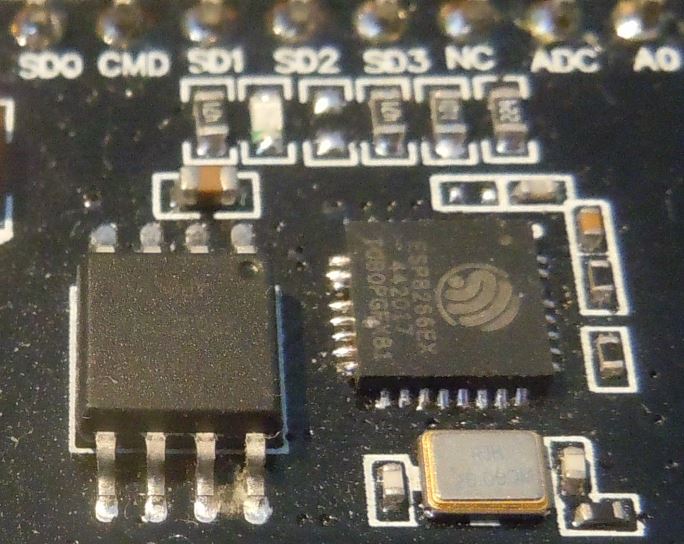
(and an on-board AMS1117 power regulator)
HV-NL
on 28 Apr 2019
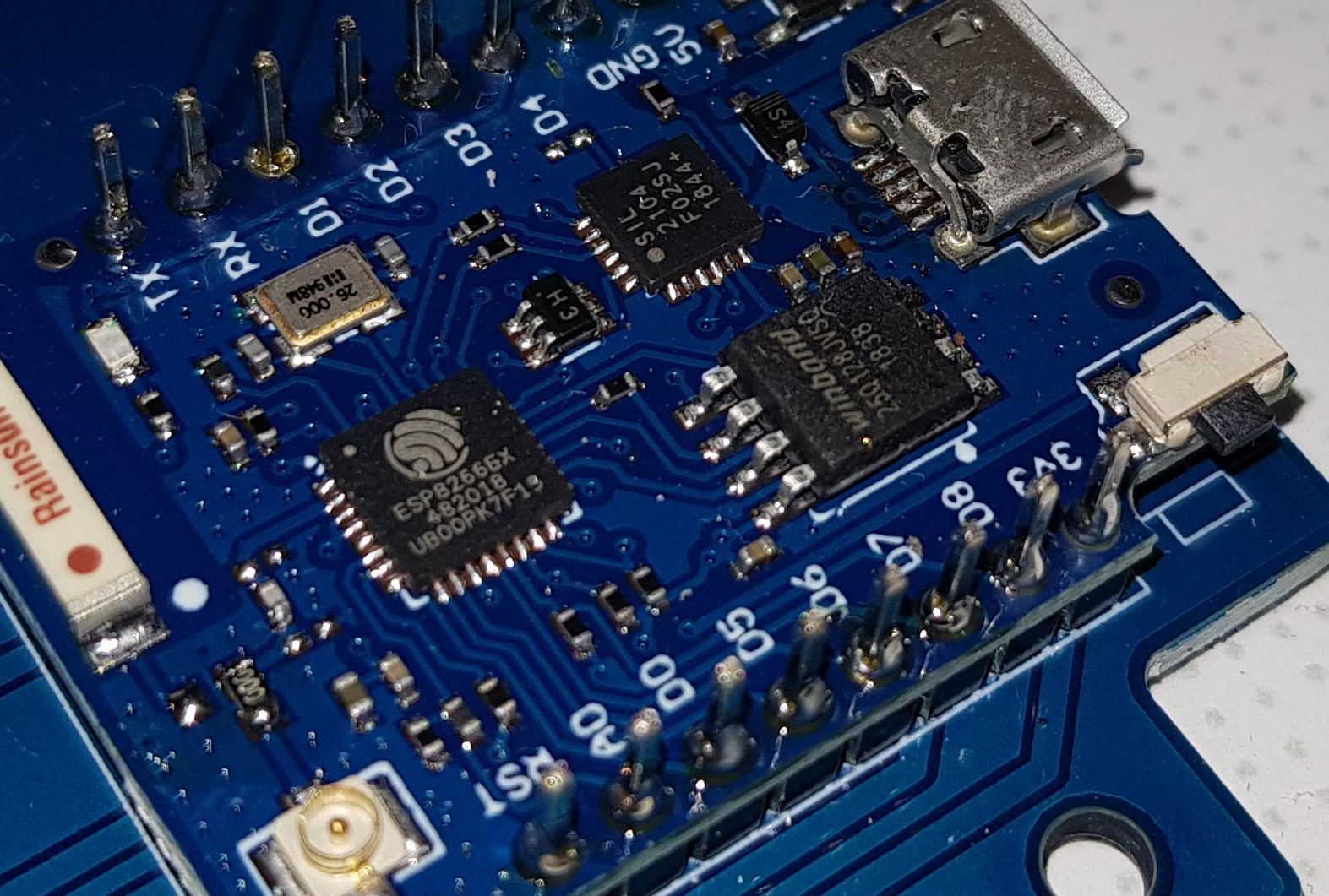
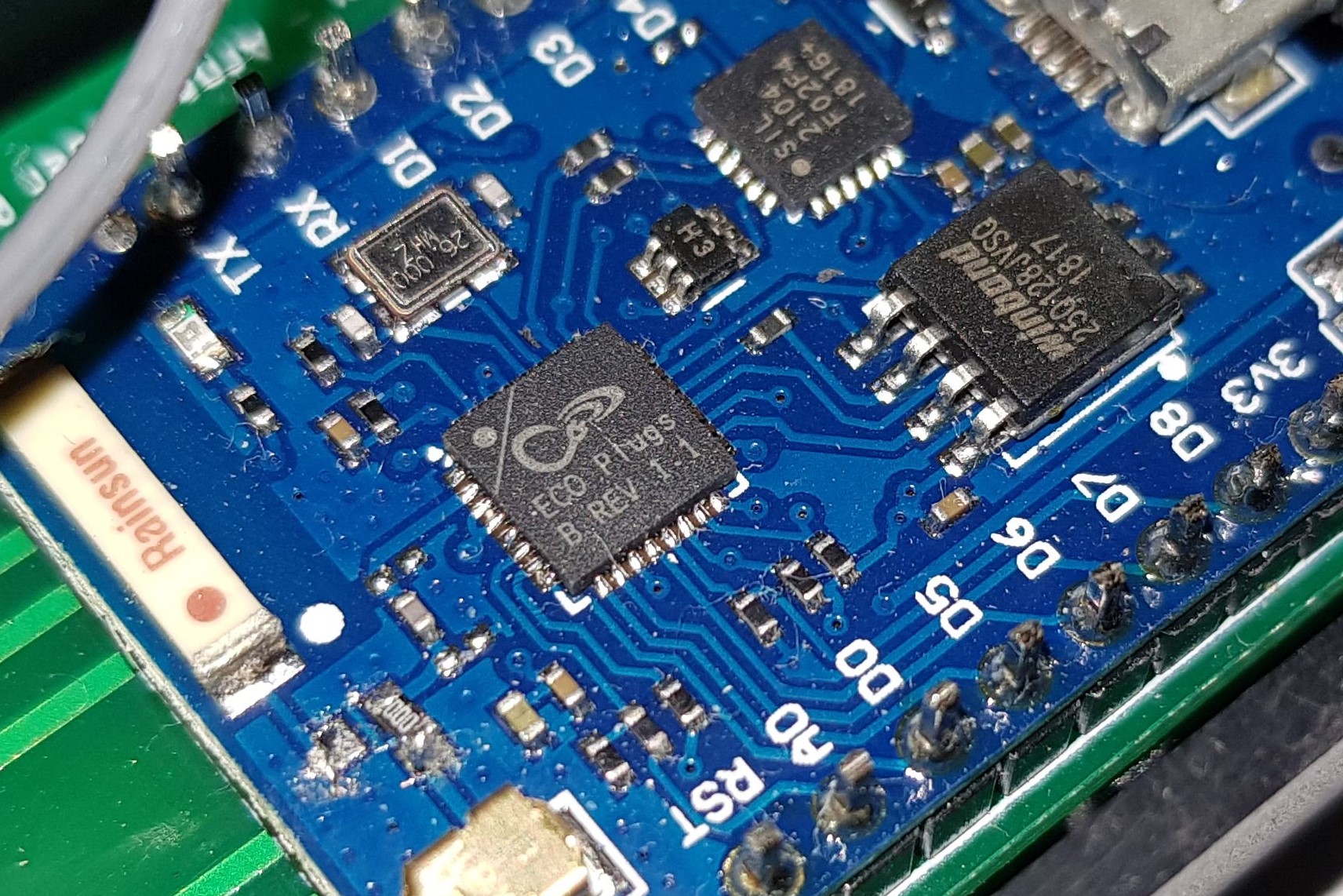
I have a board with "ESP8266EX" and a board with "ECO Plugs B REV 1.1". Both with a AMS1117.
arnemauer
on 28 Apr 2019
Ok, at least for me, I doubt the issue is power related.
- I put scope on 3v3 rail near mcu, with 3.2v trigger - never sagged
- did not see any evidence of reset on serial line when starting. (Would expect power issues to manifest as resets?)
- from serial line (w/
debug 4), seems like it claims it's connecting to wifi ap, but then never seems to get an ip. It does not become unresponsive. Serial commands still work, i.e. I can still issuewifidisconnect,settings,reboot, etc.
zerog2k
on 28 Apr 2019
So, it looks like the events for WiFi activity is not processed?
The strange thing is, is that it seems to be working in some builds and not in others.
So it seems to be related to the randomness of builds.
Sounds like something not being initialized.
TD-er
on 29 Apr 2019
After a long time, I give it a try on my Wemos D1 NodeMcu device again. Release 20190805 (firmware file ESP_Easy_mega-20190805_normal_ESP8266_4M). This one works somewhat. Initial AP configuration works. However I see lots of DHCP request from the device after connecting to regular WiFi network (e.g. every 10-15 sec), making connections very slow due to lots of lost packages. I do not see this DHCP issue with Release 20190226.
khambrecht
on 6 Aug 2019
I don't think the DHCP requests are making it slow, but the fact that it actually thinks it needs to do those requests.
It is an indication the node does reset the network connection a lot.
Can you set it to force B/G mode only?
Also make sure no metal is near the WiFi antenna and try to position the node to get maximum RSSI from the AP. (or rotate the AP if that's easier for the test)
TD-er
on 6 Aug 2019
@khambrecht what is your rssi in module?
uzi18
on 6 Aug 2019
Well, yes. Maybe the connection itself is not slow. However, each time the device sends a DHCP request, existing client connections (e.g. Browser) get dropped and require reconnect. This makes it at least behave slowly and you often have to reload/refresh browser page.
As already mentioned, the device works fine with release 20190226, using same power supply, same location. I do not see these frequent DHCP requests and the connection is reliable.
RSSI is around -58dB, with both, release 20190805 and 20190226. Force B/G does not make a difference.
khambrecht
on 6 Aug 2019
debug log should give us some hints, witch core use 20190226 build?
uzi18
on 6 Aug 2019
set serial to debug-dev. attached serial output from Rel. 20190226 (working) and Rel. 20190805 (not working).
20190226-serial-debug.log
20190805-serial-debug.log
khambrecht
on 6 Aug 2019
lots of :
WIFI : Disconnected! Reason: '(200) Beacon timeout' Connected for 8652 ms
uzi18
on 6 Aug 2019
@TD-er isn't a problem reported by @clumsy-stefan ?
uzi18
on 6 Aug 2019
Well, Beacon timeout can be caused by a lot of things, but if it happens quite often then I agree you may be on to something.
Let's summon @clumsy-stefan on this one :)
TD-er
on 6 Aug 2019
Just to let you know, same issue with release 20190809. DHCP requests exactly every 10 sec.
khambrecht
on 12 Aug 2019
I can confirm a bug also on build mega-20190903 running on ESP-01S:
disconnected, received disassoc: no activity (4)
and
DHCP requests exactly every 10 sec.
In ESP Easy logs:
WIFI : Disconnected! Reason: '(200) Beacon timeout' Connected for 8621 ms
Some investigation shows the following info concerning DHCP:
build mega-20190903 on NodeMcu v2 works fine and I see in DHCP Server on Mikrotik that device has a client ID and active host name, but for ESP-01S with the same build mega-20190903 these fields are empty.
Maybe it somehow related.
 mrdc
on 15 Sep 2019
mrdc
on 15 Sep 2019
Are you sure the settings are the same on both?
And has the ESP-01S a PUYA chip for flash?
TD-er
on 15 Sep 2019
Are you sure the settings are the same on both?
Well, they have different sensors attached: CO2+BME280@NodeMcu and DS18B20@ESP-01S.
As I remember, on ESP-01S I have "Periodical send Gratuitous ARP" enabled.
In the morning I've switched it off - ESP-01S started to work better (at least it wasn't disconnecting each 10s). Will see in the evening how it performed with "Periodical send Gratuitous ARP" set to off.
And has the ESP-01S a PUYA chip for flash?
Yes, it's PUYA.
mrdc
on 16 Sep 2019
The last build, using core 2.6.0 should also be able to work (and continue to work) without Gratuitous ARP checked.
Can you also compare some timings on the timingstats page?
For example the LoadTaskSettings() line.
That one is called quite often, so it may be a simple indication for the flash speed.
Please also compare it with another node (not using PUYA chips) which is working fine.
As a comparison these timings on 2 different nodes I have here. Both NodeMCU, but the slower one is on my breadboard test node.
So that one probably has a very fragmented file system.
N.B. The breadboard one is already replaced once, since I had worn out the flash of the first one after a few 1000x flashing a new build on it. So that one is being abused quite a lot :)
Description | Function | #calls | call/sec | min (ms) | Avg (ms) | max (ms)
-- | -- | -- | -- | -- | -- | --
LoadTaskSettings() (clean filesystem) | | 17402 | 1.59 | 3.296 | 3.755 | 7.227
LoadTaskSettings() (fragmented filesystem)| | 11872 | 1.05 | 3.572 | 17.845 | 39.134
TD-er
on 16 Sep 2019
Can you also compare some timings on the timingstats page?
Here you go:
ESP-01S (PUYA flash)
1.
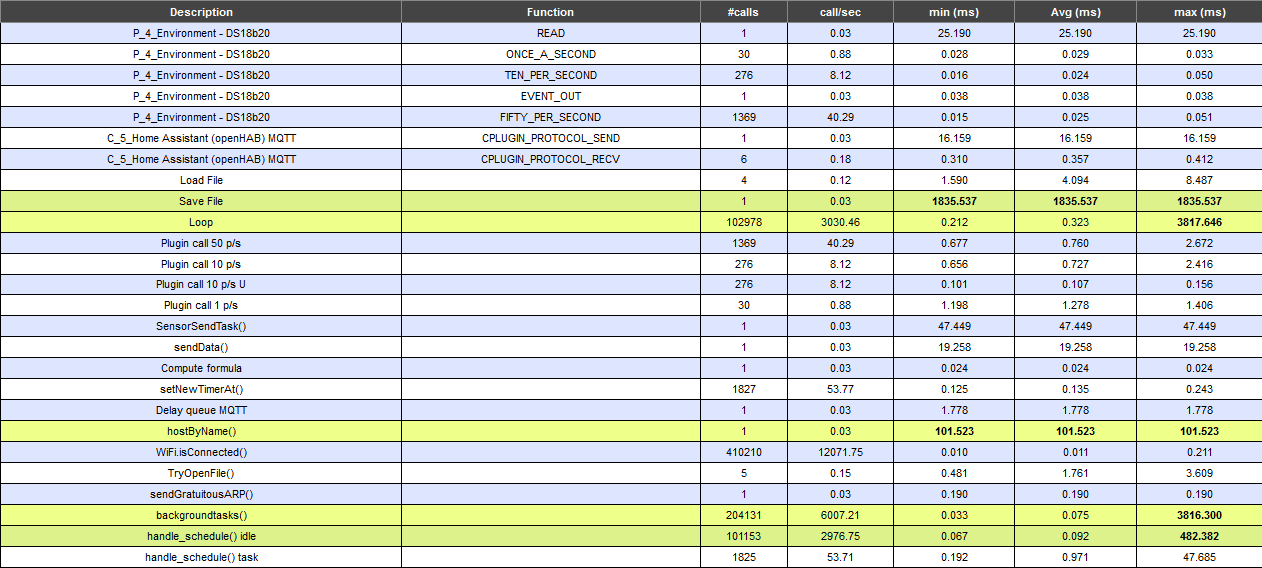
2.
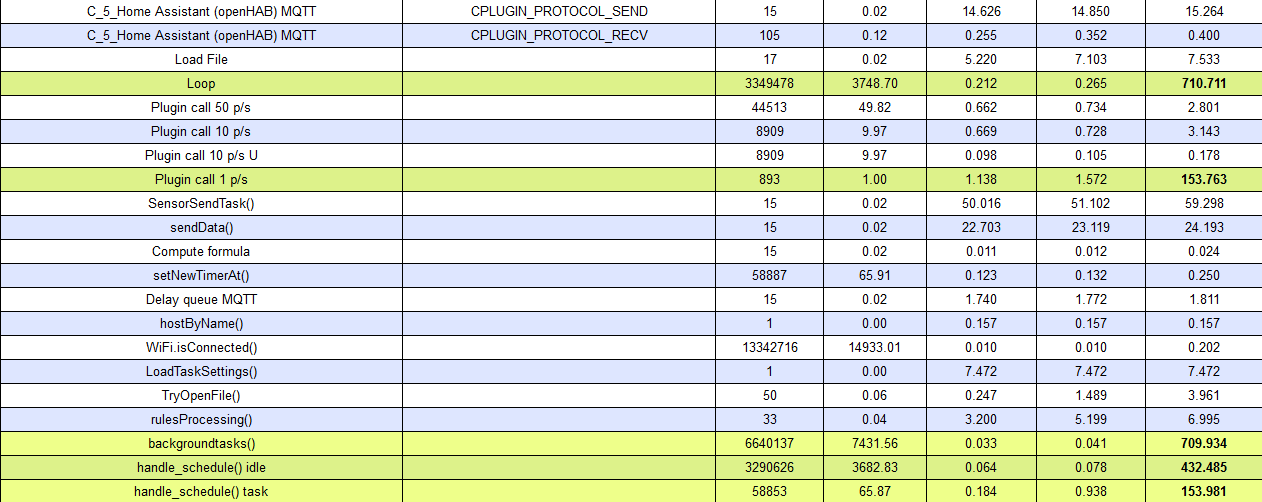
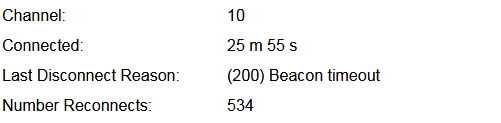
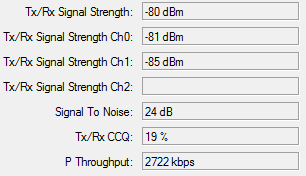
I've set Force WiFi No Sleep: true for tests.
NodeMcu v2
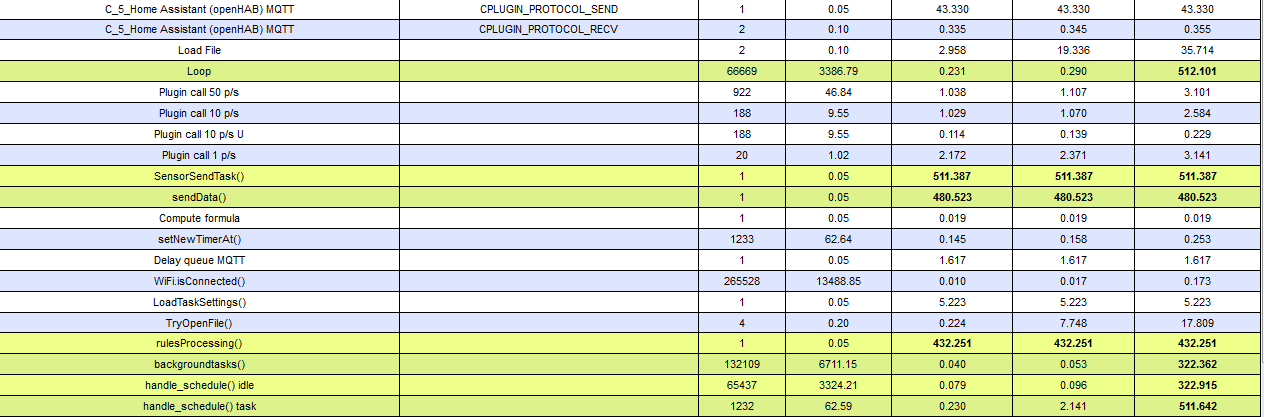
mrdc
on 16 Sep 2019
So the reading from flash of the Puya ones does seem to be faster, or it is always trying to read the same plugin data (only 1 plugin active or sending to a controller?)
With a RSSI of worse than -75, you may also want to try to force B/G only.
500+ reconnects is a lot.
Can you backup the settings, perform a full clean flash (writing the blank image) and flash it again?
I'm beginning to suspect the RF calibration data on the node could be wrong here.
TD-er
on 17 Sep 2019
or it is always trying to read the same plugin data (only 1 plugin active or sending to a controller?)
I have only one sensor attahced to ESP-01S.
With a RSSI of worse than -75, you may also want to try to force B/G only.
I've tried it - the same behaviour.
Can you backup the settings, perform a full clean flash (writing the blank image) and flash it again?
Yes, no problem. BTW I've already had flashed blank image before flashing mega-20190903. Should I do it one more time?
mrdc
on 18 Sep 2019
Yes, no problem. BTW I've already had flashed black image before flashing
mega-20190903. Should I do it one more time?
If it is related to bad RF calibration (hard to say right now), then it may make a difference.
Just make sure you are running it with a proper power supply and maybe even more important a good USB cable.
Maybe also add some capacitors over the 3v3 line and GND to help stabilize the power during high current consumption.
TD-er
on 18 Sep 2019
If it is related to bad RF calibration (hard to say right now), then it may make a difference.
Ok, will flash the blank image first.
Just make sure you are running it with a proper power supply and maybe even more important a good USB cable.
Will try Hi-Link 3V3 power supply. For my current power supply I've measured it's performance under load and it works well with 800-900mA.
Maybe also add some capacitors over the 3v3 line and GND to help stabilize the power during high current consumption.
Can you, please, suggest the right capacity?
mrdc
on 18 Sep 2019
I would say 330 uF for the 3v3 and it is also advised to have 100 nF as close as possible to the 3V3 pin of the ESP. (and also for any sensor, over its Vcc/GND, as close as possible to these sensors)
TD-er
on 18 Sep 2019
BTW I also receive in router logs "Unicast key exchange timeout" for ESP-01S and after some time router bans ESP-01S till I reboot the ESP.
mrdc
on 18 Sep 2019
router logs "Unicast key exchange timeout"
try to force B/G mode in settings/advanced (reboot the esp after changing) and see if it happens again... more explanation here: #1987
probably that solves the issues...
 clumsy-stefan
on 18 Sep 2019
clumsy-stefan
on 18 Sep 2019
It's not router issue - I've tried to connect to ESP-01S when it's in AP mode: my laptop connects to it, connection speed is 54Mbit, but I can't open config web page... Will try another ESP-01S module, hope it will have better quality.
mrdc
on 18 Sep 2019
agree! It's an ESP issue. Rekeeying in N-Mode does not (always) work and node looses connectivity to the AP... does not happen if you force to node to B/G mode (advanced settings of the node)! see above issue mentioned...
clumsy-stefan
on 18 Sep 2019
if you force to node to B/G mode
Have done it already - will check tomorrow logs to see if it keeps loosing wifi connection.
mrdc
on 19 Sep 2019
Another option can be to check the option "restart wifi on lost connection" (or how it is called)
This will switch off the wifi and initiate a new connection when the WiFi connection is lost.
This takes more time to reconnect, but it may help correct unknown states after disconnects.
TD-er
on 19 Sep 2019
"restart wifi on lost connection"
I've tried it brifly but haven't made any conclusions. Need to test it one more time.
mrdc
on 19 Sep 2019
Please also test with "Force WiFi No Sleep"
This NodeMCU, does it have a metal cap over the ESP, or is the ESP not shielded?
TD-er
on 19 Sep 2019
Please also test with "Force WiFi No Sleep"
Have tested it already - see no improvement.
NodeMCU v2 I use has the metal cover. Soon Wemos D1 mini v3.0 will arrive (without the cover) - will test it.
mrdc
on 19 Sep 2019
What kind of antenna does it have?
A so called "chip antenna" or one etched on the PCB?
TD-er
on 19 Sep 2019
mrdc
on 19 Sep 2019
does not happen if you force to node to B/G mode
So, force B/G mode gives me 250 reconnects in 10 hours... And the same "Unicast key exchange timeout" in router logs.
Additionally I see in router logs "disconnetc, received disassoc: sending station leaving (8)". Router log is again filled with thousand entries concerning ESP01 WiFi reconnects.
mrdc
on 20 Sep 2019
@mdc hmm, you're saying you're using Mikrotik's (which I do too)? Try looking at the WiFi settings: Installation (indoor/outdoor), Distance (Dynamic/Fixed) and Disconnect Timeout.
Adjusting theese also had some impact. Also in Security Profiles the "Group Key Update" parameter has some impact. But this is just a guess...Power and RSSI can also be a core issue...
clumsy-stefan
on 20 Sep 2019
"Group Key Update"
It's 30 min.
Disconnect Timeout.
3 sec.
(indoor/outdoor
It's indoor.
Power and RSSI can also be a core issue...
10% that it's power source issue. With RSSI it's also not clear - when ESP-01S is in AP mode I can directly connect to it from my laptop which is in 10m and 1 wall, connection speed is 54Mbit and still I can't open web interface.
Will play with it during weekend: with different power supply and another ESP-01S module.
mrdc
on 20 Sep 2019
if you set the "Distance" to dynamic MT tells you in the "Registration" tab an artificial "distance" it calculated for each connected client. this gives some hints on how "fast" the node reacted to requests from the AP (like rekeeying), just as a further debug possibility...
clumsy-stefan
on 20 Sep 2019
Do you have other ESP-01 modules which you could test, just to make sure it isn't a problem with that single module?
Also, is it possible to place the ESP-01 on a pin header to place it in a slightly different position?
I do think something is happening here at electrical/RF level which is causing these disconnects.
So either the ESP is not responding on packets sent from the AP which require some acknowledgement, or the ESP is missing to many (all?) beacons sent by the AP and disconnects itself.
Another possibility is that the used crystal on that unit is too far off, which makes it hard for the ESP to tune to the right frequency.
TD-er
on 20 Sep 2019
Possible a default/poorly setup MikroTik router? If you have the time, watch the following on some suggestions on how to improve your WiFi setup - https://www.youtube.com/watch?v=JRbAqie1_AM
I don't remember if I have posted this before, but really helped me improve my WiFi setups.
 LeeNX
on 20 Sep 2019
LeeNX
on 20 Sep 2019
if you set the "Distance" to dynamic MT tells you in the "Registration" tab an artificial "distance" it calculated for each connected client.
It gives strange distances: for a NodeMcu v2 which is in 50 cm from the router, artificial distance is 3km, a laptop 5 meters away also 3km, a phone which is charging near the router 27km, wifi camera in the next room and 30m away including a wall - 14km, ESP-01S 47km.
ESP-01S signal qulity:
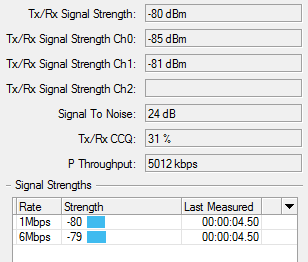
Possible a default/poorly setup MikroTik router?
I hope not so poorly) My config works ok for 5 years already with a lot of different wifi devices. I've configured it based on several guides.
mrdc
on 20 Sep 2019
What does the ESP report as RSSI value?
TD-er
on 20 Sep 2019
don't care/look at the unit (km) that has nothing to say... it's derived from some timings... obvisoulsy km can't be at all ;) I also have some devices which show 50 and more... eg. slow devices are reported as longer distance....
problem with "indoor" setting is, that the MT allows only for a limited time to get a response from the device (eg. distance <10 or so)... therefore this could be an issue...
clumsy-stefan
on 20 Sep 2019
What does the ESP report as RSSI value?
Can't login to check - web interace is not loading :(
I've put NodeMcu v2 with mega-20190903 and different power supply to the same place where ESP-01S is located - the same wifi issues:
disconnected, received disassoc: no activity (4)
extensive data loss.
NodeMcu v2 RSSI is -83 dB. Mikrotik shows 3km "distance" ...
But at least I can access it via web interface with many retries.
mrdc
on 20 Sep 2019
Can it be because of wifi issues in Espressif SDK? Planning also to flash my firmware for tests but it builds with Espressif SDK...
mrdc
on 20 Sep 2019
It can have many causes.
Apparently Tasmota is doing things different here, so we may need to see what they are doing.
ESPeasy is using events to keep track of the connectivity and process the next steps.
I know Tasmota is not doing that, so maybe the core library is handling the WiFi connect/reconnect in a different way here? (maybe longer timeouts, who knows)
TD-er
on 20 Sep 2019
Oh, good idea - i'll put Sonoff switch (with stock firmware) near ESP-01S.
mrdc
on 20 Sep 2019
I can confirm that using these settings the wifi problem was fixed for me:

ESP-01S is accessible via web interface, doesn't drop wifi connection etc. Wifi signal level is the same as I've posted above. No changes were made to hardware&software part: the same power supply, the same ESP-01S module, the same ESP-01S position, the same router settings.
So, looks like the problem is caused by Wifi Sleep as previous time Force WiFi B/G was enabled and I've had the same connections issues.
mrdc
on 22 Sep 2019
Not sure if these settings have a command, but I guess it would be great to have some command to set WiFi into "safe mode" or something like that.
Or maybe these should also be selectable during WiFi setup? When AP+STA is active, it is effectively the same as the last option "Force WiFi No Sleep".
TD-er
on 22 Sep 2019
WiFi into "safe mode" or something like that.
Yes, some sort of a fallback when a lot of disconnections occur. Or Wifi sleep function should be investigated as in my case it causes wifi connection issues.
mrdc
on 22 Sep 2019
During WiFi sleep mode, the WiFi is turned on every "beacon interval", which is often 102.4 msec.
On some ESP units, the used crystal is of really inferior quality, which will also have an effect on other functions, like timing this interval and thus it will miss the beacon interval.
With WiFi no sleep, the radio is always listening when not sending, so it will not miss the interval.
You can check the drift of the internal clock by looking at the logs for NTP updates.
It will also show something like "0.1 msec/sec" when a new update is received.
I think it is useful to also have it in the sysinfo summary, since I do see some extremes here. which will for sure cause issues with WiFi connectivity. (and other timing issues)
TD-er
on 22 Sep 2019
You can check the drift of the internal clock by looking at the logs for NTP updates.
7550439: NTP : NTP replied: delay 170 mSec Accuracy increased by 0.846 seconds
7550440: Time adjusted by -248.94 msec. Wander: -0.07 msec/second
mrdc
on 22 Sep 2019
0.07 msec/second
That's not too bad.
I've seen unit with > 1 msec/sec and that's a receipt for instability.
TD-er
on 22 Sep 2019
Wifi uptime is solid now - almost 14 hours and a few disconnects:

mrdc
on 23 Sep 2019
Hi, what about Xtal frequency? Some ESP8266 has 40MHz, but some has 26MHz Xtal. Default builds are with 40MHz Xtal?
 MiloshCZ
on 23 Sep 2019
MiloshCZ
on 23 Sep 2019
I have actually no idea how that's being scaled internal and where it is defined.
The only thing I am aware of when building our project is the clock frequencies used for the CPU and flash.
But that doesn't have a strict 1-to-1 relation with the used crystal.
I guess the ESP does have some PLL internal which does the up-scaling, but like I said I have no idea if that's being defined somewhere and how.
26 and 40 MHz is quite far off, so maybe the ESP can switch PLL configuration dynamically at boot?
TD-er
on 23 Sep 2019
I can confirm that using these settings the wifi problem was fixed for me:
So, looks like the problem is caused by Wifi Sleep as previous time
Force WiFi B/Gwas enabled and I've had the same connections issues.
Unfortunately this does not solve the issue on the Wemos D1 NodeMcu devices.
As this one has 4MB flash, I tried these firmware builds:
- ESP_Easy_mega-20190903_normal_core_242_ESP8266_1M.bin
- ESP_Easy_mega-20190903_custom_ESP8266_4M1M.bin (-> has core 2.5.2)
- ESP_Easy_mega-20190903_minimal_core_242_ESP8266_1M_OTA.bin
Still DHCP reconnect every 10 sec. Due to the intermittent connection, it's hard to access the advanced configuration, but once you have managed to activate "Force Wifi No Sleep", this does not have any effect.
So, as release 20190226 was the last known working one (with core 2.4.2 btw.), I also tired test/dev build with core 2.6.0 (ESP_Easy_mega-20190226_test_core_260_sdk2_alpha_ESP8266_4M.bin). This is also stable, without these reconnects.
khambrecht
on 24 Sep 2019
Can you make a test build yourself?
If not, then I can build you a test build on the current core 2.6.0
Last night there has been a fix merged into core 2.6.0 stage, which may deal with disconnect issues like these and I would really like to know if it does fix these disconnect issues you're seeing.
Edit:
Can you test test_core_260_sdk222_alpha_ESP8266_4M1M_issue2409.bin ?
TD-er
on 24 Sep 2019
Can you test test_core_260_sdk222_alpha_ESP8266_4M1M_issue2409.bin ?
tested, but no improvement, even with force wifi no sleep :-(
Still DHCP requests every 10 sec. Have attached serial debug log.
test_core_260_serial-debug.log
khambrecht
on 25 Sep 2019
Some update:


RSSI: -78 dB
But sometimes Wi-Fi connection is unstable and my router logs are full of reconnects from ESP-01S:
disconnected, received disassoc: no activity (4)
mrdc
on 8 Oct 2019
That's similar to being kicked of the AP by the AP due to no activity.
If you check to send Gratuitous ARP, then there will be activity every N seconds (max 5 seconds if I'm correct)
TD-er
on 9 Oct 2019
Is this still an issue?
TD-er
on 4 Nov 2019
Is this still an issue?
Just checked with mega-20191104, used these binary files
- ESP_Easy_mega-20191104_normal_ESP8266_4M1M.bin
- ESP_Easy_mega-20191104_normal_core_260_sdk222_alpha_ESP8266_4M1M.bin
- ESP_Easy_mega-20191104_normal_core_241_ESP8266_4M1M.bin
and yes, still an issue with frequent DHCP requests.
khambrecht
on 6 Nov 2019
@TD-er
Looks like in my case it was Mikrotik router issue: the same ESP-01S, the same "old" mega-20190903, the same place (distance to my router), but new RouterOS 6.46 (auto updated yesterday). No more extensive data loss, disconnects due inactivity etc.

Before it was thousands reconnects a day.
Or maybe it's related to WiFi channel? :) Will test how it performes with ROS 6.46 and report later.
mrdc
on 5 Dec 2019
Hmm good to know there is an update for MikroTik.
Will keep it mind to do some tests here between versions.
TD-er
on 5 Dec 2019
Powered off the router, turned on and look what I see:

11th channel is not as good as 9th.
mrdc
on 5 Dec 2019
ESP-01S with mega-20190903.

BTW in my previous post I wasn't correct - additionally to the new router firmware the router itself was moved ~ 15cm. Don't think that it can affect WiFi so dramatically in my case (the same walls etc and "line of sight" between router and ESP-01S).
mrdc
on 8 Dec 2019
BTW in my previous post I wasn't correct - additionally to the new router firmware the router itself was moved ~ 15cm. Don't think that it can affect WiFi so dramatically in my case (the same walls etc and "line of sight" between router and ESP-01S).
Well, the wifi wave length is 12.5 cm.
A quarter of a wave length difference can be the difference between min and max. reception.
12.5 / 4 = 3.125 cm.
So if you move it (N+1/4) or (N + 3/4) times the wavelength in the direction of the receiving node, then it can make a lot of difference in signal strength.
This 12.5 cm is a rough estimate based on 2.4 GHz, but if you change the channel, you will use a different frequency, so also the wavelength changes.
So in short, 15 cm movement can have a very big effect on the signal quality.
TD-er
on 8 Dec 2019
So if you move it (N+1/4) or (N + 3/4) times the wavelength in the direction of the receiving node, then it can make a lot of difference in signal strength.
I've moved it not in the direction of ESP-01S. The distance is the same - router was moved ~15cm to the left if you stay upfront of ESP-01S.
But now the connection is rock solid: day+ without reconnects.
mrdc
on 8 Dec 2019
Related issues
 Budman1758
·
83Comments
TD-er
·
388Comments
Budman1758
·
90Comments
TD-er
·
79Comments
Budman1758
·
83Comments
TD-er
·
388Comments
Budman1758
·
90Comments
TD-er
·
79Comments
 TheAppService
·
105Comments
TheAppService
·
105Comments