Espeasy: mqtt controller domoticz
hi, my configuration is simple: name of esp: wemos_155
number of unit: 155
i set as controller mqtt domoticz and using standard configuration for controller subscive:
domoticz/out
and controller publish:
domoticz/in
if i send a command to esp it not work.
if i set as controller subscrive:
/%sysname%/#
and i send the comand:
sudo mosquitto_pub -t /wemos_155/cmd -m pwm,0,400,1900
the esp not react (this is for all commands)
but if i set as controller openhab and put as controller subscrive the same topic:
/%sysname%/#
and i send again the message:
sudo mosquitto_pub -t /wemos_155/cmd -m pwm,0,400,1900
now it work
so, is it possible to correct this bug?
i need domoticz mqtt....
thanks
 megamarco833
All 32 comments
The controller is sending data from a plugin to some endpoint (e.g. MQTT)
There is also a plugin called "MQTT import", which can collect (numerical) data.
For Domoticz there are some exceptions, which are plugin specific.
For example the switch plugin can accept some commands via the controller from Domoticz.
But then you have to define a switch and connect that one to Domoticz.
Not sure about PWM, but maybe that's possible when you define the switch as a dimmer.
 TD-er
on 21 Feb 2019
TD-er
on 21 Feb 2019
Not sure about PWM, but maybe that's possible when you define the switch as a dimmer.
Correct, I use that in combination with MQTT Output Helper
 wdonker
on 22 Feb 2019
wdonker
on 22 Feb 2019
Not sure about PWM, but maybe that's possible when you define the switch as a dimmer.
Correct, I use that in combination with MQTT Output Helper
can you please explain better how do you use mqtt output helper? thanks
megamarco833
on 24 Feb 2019
The controller is sending data from a plugin to some endpoint (e.g. MQTT)
There is also a plugin called "MQTT import", which can collect (numerical) data.For Domoticz there are some exceptions, which are plugin specific.
For example the switch plugin can accept some commands via the controller from Domoticz.
But then you have to define a switch and connect that one to Domoticz.Not sure about PWM, but maybe that's possible when you define the switch as a dimmer.
sorry i do not understand.
if i set as controller "open hab" and set as controller subscrive:
/%sysname%/#
and i send a command:
sudo mosquitto_pub -t /wemos_155/cmd -m pwm,0,400,1900
it works perfectly
but if i send same command but with setting as controller domoticz mqtt and same controller subscrive as above the esp not respond, why?
it's not a bug?
at the end, if what way do you use mqtt output helper?
and what command i need to send for activate a gpio or pwm using shell with mqtt?
thanks so much
megamarco833
on 24 Feb 2019
I have no access to my config right now but it is important that:
- you define a MQTT client gateway in Domoticz.
This makes Domoticz subscribe to messages on topic domoticz/in and publish to domoticz/out. - you must keep this topic names in EspEasy controller to make it work.
- you must set the IDX of the MQTT Output Helper to the idx of the device in Domoticz. The helper
receives all messages from the MQTT-controller and filters on idx.
You can find more info in Domoticz wiki https://www.domoticz.com/wiki/MQTT#Domoticz_to_MQTT
wdonker
on 24 Feb 2019
@megamarco833
If it is working fine in OpenHAB MQTT controller and not in Domoticz MQTT controller, then it is "inconsistent" to say the least.
But since there are so many exceptions in the code regarding Domoticz, I cannot yet say if it is a bug or intentional behavior.
As far as I know, it should only be possible to change a GPIO pin via a switch plugin.
And for the switch plugin, there are some exceptions in the controller code to handle incoming updates (via MQTT) from Domoticz. Maybe also from OpenHAB, but for that I am not sure.
The "MQTT Output Helper" is a plugin, also written mainly for use with Domoticz, but I never used it myself.
Like I said, the Domoticz integration is not really well structured and there are way too many loop-holes made in the past to make it work with Domoticz.
Also OpenHab's controller does look a lot more elaborate than the other controllers.
This also means that it is very well possible that things may work differently depending on the MQTT controller used.
TD-er
on 24 Feb 2019
@TD-er
If it is working fine in OpenHAB MQTT controller and not in Domoticz MQTT controller, then it is "inconsistent" to say the least.
But since there are so many exceptions in the code regarding Domoticz, I cannot yet say if it is a bug or intentional behavior.
yes, the same controller subscrive:
/%sysname%/#
is working if setted in openhab and not working if setted in domoticz controller.
So i think that is inconsistent...
could be investigate by some one and "correct"?
Like I said, the Domoticz integration is not really well structured and there are way too many loop-holes made in the past to make it work with Domoticz.
This also means that it is very well possible that things may work differently depending on the MQTT controller used.
yes, could be improved for the next release?
for light for example is very important to have an integration with mqtt and domoticz :-)
thanks
megamarco833
on 25 Feb 2019
I think the difference between OpenHAB and Domoticz is that Domoticz publishes ALL changes for devices to 1 topic so a sysname as topic will never work for more than 1 ESP-node.
Again, for me the integration with Domoticz and MQTT works well enough as it is.
wdonker
on 25 Feb 2019
I think the difference between OpenHAB and Domoticz is that Domoticz publishes ALL changes for devices to 1 topic so a sysname as topic will never work for more than 1 ESP-node.
Again, for me the integration with Domoticz and MQTT works well enough as it is.
Ok but in this case if I want to set pwm of gpio 0 at value of 800 in 1,5second what command I have to send?
Now I use :
sudo mosquitto_pub -t /wemos_155/cmd -m pwm,0,800,1500
where my topic is the esp name: wemos_155
if I still using as topi subscrive= domoticz/in
this command is not working, so what command I should use?
Thanks
megamarco833
on 25 Feb 2019
You do not use a command; the Domoticz MQTT Client gateway publishes the event for you and the MQTT Output helper captures it. But you cannot use the 1,5 second because Domoticz does not support that.
Please read my previous comments and the Domoticz wiki!
wdonker
on 25 Feb 2019
For pwm you need to define a dimmer in Domoticz and set the idx and gpio in the MQTT output helper.
If you than set the dimmer percentage in Domoticz it will be translated into pwm level by the output helper.
wdonker
on 25 Feb 2019
For pwm you need to define a dimmer in Domoticz and set the idx and gpio in the MQTT output helper.
If you than set the dimmer percentage in Domoticz it will be translated into pwm level by the output helper.
it seams that is not workin.
i create a task with Output - Domoticz MQTT Helper
i set here the GPIO 0
the idx 36
in domoticz i set idx36 as dimmer switch
now if i move the slider in domoticz i have no response on gpio0
on the espeasy i set as controller domoticz and as topic:
Subscribe: = domoticz/out
Publish: = domoticz/in
megamarco833
on 26 Feb 2019
And you also defined the MQTT Client Gateway?
wdonker
on 26 Feb 2019
yes, sure.
in domoticz i set up the mqtt
and also in espeasy as i wrote
mqtt brocker is working because if i send message as in the first topic is working
megamarco833
on 26 Feb 2019
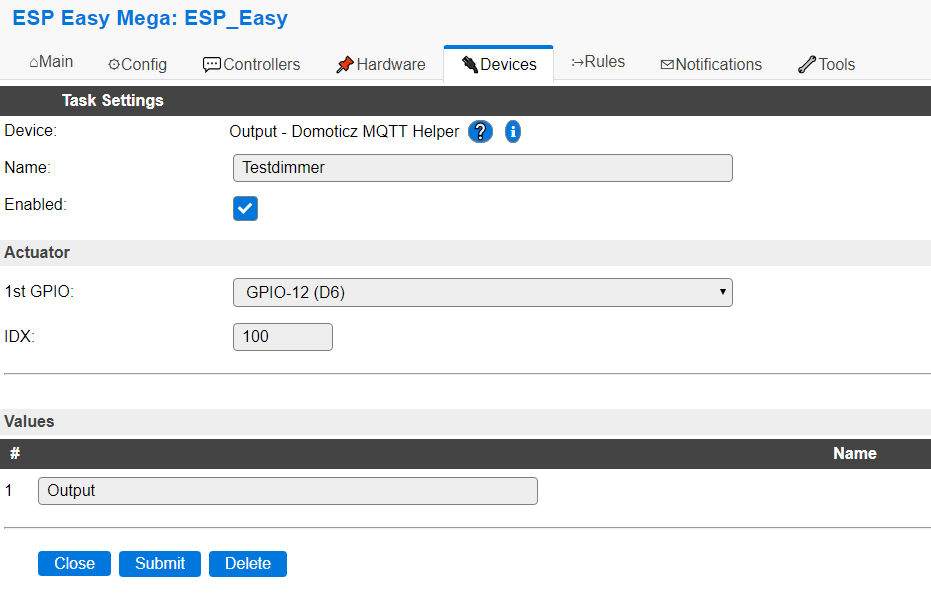
Ok, so here is a few screenshots of my working config:
The MQTT client gateway in Domoticz:

The MQTT Controller in ESPEasy:

The helper device in ESPEasy:
The log when I set the dimmer to 48% in Domoticz:
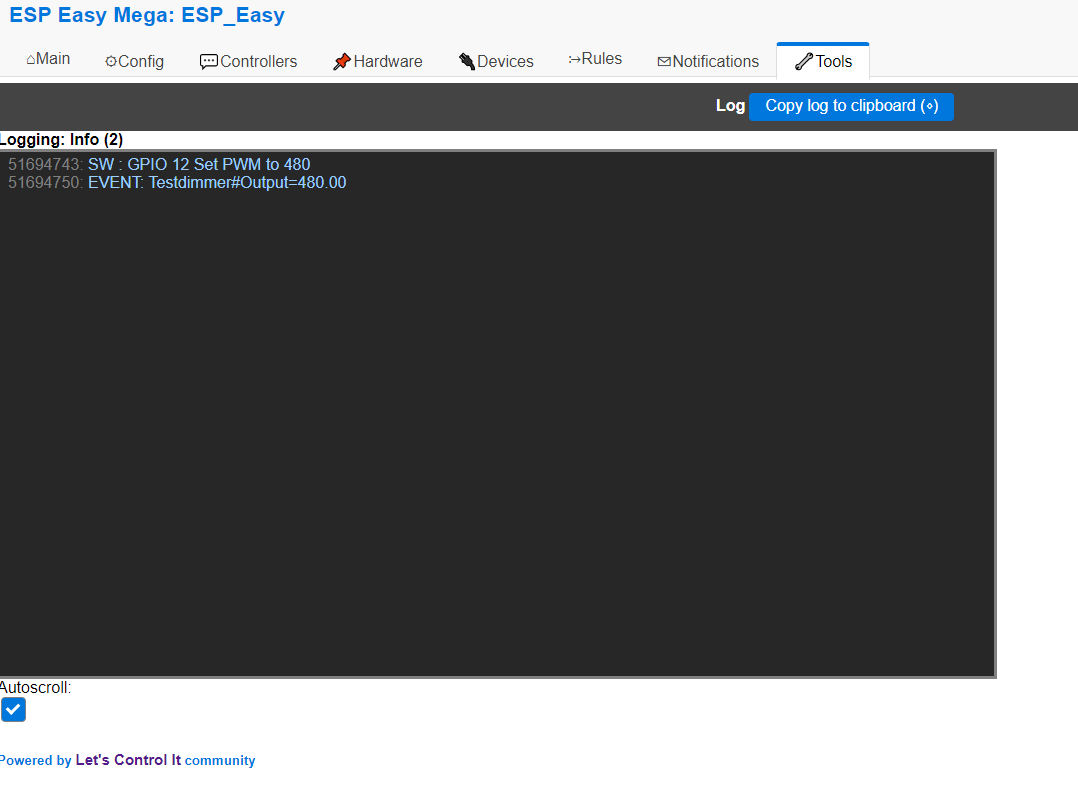
Hope this is of any use. By the way, I am using ESPEasy mega-20190202.
wdonker
on 28 Feb 2019
megamarco833
on 1 Mar 2019
wdonker
on 1 Mar 2019
TD-er
on 1 Mar 2019
megamarco833
on 1 Mar 2019
wdonker
on 1 Mar 2019
TD-er
on 1 Mar 2019
wdonker
on 1 Mar 2019
TD-er
on 1 Mar 2019
wdonker
on 1 Mar 2019
TD-er
on 1 Mar 2019
wdonker
on 1 Mar 2019
wdonker
on 1 Mar 2019
 pedromes
on 2 Mar 2019
TD-er
on 2 Mar 2019
wdonker
on 2 Mar 2019
pedromes
on 2 Mar 2019
megamarco833
on 4 Mar 2019
pedromes
on 2 Mar 2019
TD-er
on 2 Mar 2019
wdonker
on 2 Mar 2019
pedromes
on 2 Mar 2019
megamarco833
on 4 Mar 2019
Related issues
TD-er
·
3Comments
 s0170071
·
3Comments
s0170071
·
3Comments
 jobst
·
5Comments
jobst
·
5Comments
 uzi18
·
5Comments
uzi18
·
5Comments
 jroux1
·
6Comments
jroux1
·
6Comments