Espeasy: Manual reboot - Software Watchdog
Hello,
my big Problem, my Wemos D1 Mini with Easyesp reboots sometimes.
At the beginn i would say every 2-3 hours.
Now every ~20mins or directly after i logged in...
In the Log:
192.168.xx.xx,10.02.2019 21:23:08,Notice (5),Controlcenter EspEasy: Webserver: start
192.168.xx.xx,10.02.2019 21:23:12,Notice (5),Controlcenter EspEasy: DHT  : Temperature: 29.00
192.168.xx.xx,10.02.2019 21:23:12,Notice (5),Controlcenter EspEasy: DHT  : Humidity: 42.40
192.168.xx.xx,10.02.2019 21:23:12,Notice (5),Controlcenter EspEasy: EVENT: Test#Temperatur=29.00
192.168.xx.xx,10.02.2019 21:23:12,Debug (7),Controlcenter EspEasy: EVENT: Test#Temperatur=29.00 Processing time:38 milliSeconds
192.168.xx.xx,10.02.2019 21:23:12,Notice (5),Controlcenter EspEasy: EVENT: Test#RLF=42.40
192.168.xx.xx,10.02.2019 21:23:12,Debug (7),Controlcenter EspEasy: EVENT: Test#RLF=42.40 Processing time:36 milliSeconds
192.168.xx.xx,10.02.2019 21:23:23,Notice (5),Controlcenter EspEasy: Webserver: start
192.168.xx.xx,10.02.2019 21:23:24,Notice (5),Controlcenter EspEasy: NTP  : NTP replied: delay 40 mSec Accuracy increased by 0.437 seconds
192.168.xx.xx,10.02.2019 21:23:24,Notice (5),Controlcenter EspEasy: Time adjusted by -1549830199701.24 msec. Wander: -430508388.81 msec/second
192.168.xx.xx,10.02.2019 21:23:24,Notice (5),Controlcenter EspEasy: Current Time Zone:  DST time start: 2019-01-27 02:00:00 offset: 60 minSTD time start: 2019-10-27 03:00:00 offset: 0 min
192.168.xx.xx,10.02.2019 21:23:24,Notice (5),Controlcenter EspEasy: EVENT: Time#Initialized
192.168.xx.xx,10.02.2019 21:23:24,Debug (7),Controlcenter EspEasy: EVENT: Time#Initialized Processing time:37 milliSeconds
192.168.xx.xx,10.02.2019 21:23:24,Notice (5),Controlcenter EspEasy: EVENT: Clock#Time=Sun,21:23
192.168.xx.xx,10.02.2019 21:23:24,Debug (7),Controlcenter EspEasy: EVENT: Clock#Time=Sun,21:23 Processing time:33 milliSeconds
192.168.xx.xx,10.02.2019 21:23:30,Notice (5),Controlcenter EspEasy: DHT  : Temperature: 28.90
192.168.xx.xx,10.02.2019 21:23:30,Notice (5),Controlcenter EspEasy: DHT  : Humidity: 41.70
192.168.xx.xx,10.02.2019 21:23:30,Notice (5),Controlcenter EspEasy: EVENT: Test#Temperatur=28.90
192.168.xx.xx,10.02.2019 21:23:30,Debug (7),Controlcenter EspEasy: EVENT: Test#Temperatur=28.90 Processing time:36 milliSeconds
192.168.xx.xx,10.02.2019 21:23:30,Notice (5),Controlcenter EspEasy: EVENT: Test#RLF=41.70
192.168.xx.xx,10.02.2019 21:23:30,Debug (7),Controlcenter EspEasy: EVENT: Test#RLF=41.70 Processing time:35 milliSeconds
192.168.xx.xx,10.02.2019 21:23:30,Debug (7),Controlcenter EspEasy: HTTP : C011 connecting to 192.168.xx.xx:8082
192.168.xx.xx,10.02.2019 21:23:41,Notice (5),Controlcenter EspEasy: Webserver: start
192.168.xx.xx,10.02.2019 21:23:48,Notice (5),Controlcenter EspEasy: DHT  : Temperature: 28.70
192.168.xx.xx,10.02.2019 21:23:48,Notice (5),Controlcenter EspEasy: DHT  : Humidity: 41.80
192.168.xx.xx,10.02.2019 21:23:48,Notice (5),Controlcenter EspEasy: EVENT: Test#Temperatur=28.70
192.168.xx.xx,10.02.2019 21:23:48,Debug (7),Controlcenter EspEasy: EVENT: Test#Temperatur=28.70 Processing time:37 milliSeconds
192.168.xx.xx,10.02.2019 21:23:48,Notice (5),Controlcenter EspEasy: EVENT: Test#RLF=41.80
192.168.xx.xx,10.02.2019 21:23:48,Debug (7),Controlcenter EspEasy: EVENT: Test#RLF=41.80 Processing time:34 milliSeconds
192.168.xx.xx,10.02.2019 21:23:48,Debug (7),Controlcenter EspEasy: HTTP : C011 connecting to 192.168.xx.xx:8082
192.168.xx.xx,10.02.2019 21:24:02,Notice (5),Controlcenter EspEasy: Webserver: start
{"System":{
"Build":20103,
"Git Build":"mega-20190202",
"System libraries":"ESP82xx Core 2_4_2, NONOS SDK 2.2.1(cfd48f3), LWIP: 2.0.3 PUYA support",
"Plugins":74,
"Plugin description":" [Normal] [Testing]",
"Local time":"2019-02-10 21:22:51",
"Unit":0,
"Name":"Controlcenter",
"Uptime":0,
"Last boot cause":"Manual reboot",
"Reset Reason":"Software Watchdog",
"Load":53.30,
"Load LC":18,
"Free RAM":14520
},
Any Tipps?
EDIT: Now is very bad....
I start the Wemos.
I connect to webpanel and login.
I click on tools, then on advanced.
If i click on advanced it redirects me to login (wemos has rebootet)
 mlfactory
All 31 comments
What version was working fine?
For an open pull-request I made this test build a few days ago
In the Advanced settings there is a new option to force B/G WiFi.
Can you test that build and that new option to see if it is working better with that option.
Please make sure your AP allows devices operating in 802.11G mode before enabling this checkbox.
 TD-er
on 10 Feb 2019
TD-er
on 10 Feb 2019
Hey,
no Version was working fine - i installed only the version "Build":20103, "Git Build":"mega-20190202" - no other.
The problems became more and more common.
Yes i can test the build - but.... I should reflash the wemos with this version, correct?
So, all Settings are gone, right?
Please make sure your AP allows devices operating in 802.11G mode before enabling this checkbox.
My AP is a Wlan Hotspot of a Wiko Lenny 2.
In the Hotspot settings i can change nothing like 802.11G...
Cherrs and many thanks!
EDIT: Now it reboots every 2-10 Mins without any activity from me at the webpanel :(
EDIT: Question: Power Supply is a HTC Power Supply 5V Output 2A.
I read about the wemos mini d1 required input voltage is 7-12V.
Is that right and can be that the reason?
A USB Port on a Laptop also provide 5V or?
mlfactory
on 10 Feb 2019
Nope, if you use the build with the same memory layout (e.g. 4096 in the filename) the settings should remain.
And please do not use > 5 V for power supply.
It will make the power regulator on board quite hot.
Just make sure you have a proper USB cable (not a cheap one) and some USB power supply capable of handling 1A or more is just fine. (500 mA should be fine too, but those ones may lower output voltage a before 500 mA)
What plugins do you have enabled?
TD-er
on 10 Feb 2019
Ok many thanks.
Im wondering why some pages says from 7-12V.
Hmm it says "Plugins":74 but im sure i installed no plugins.
Is there a plugin list?
I just flashed the wemos with the flash tool.
Nope, if you use the build with the same memory layout (e.g. 4096 in the filename) the settings should remain.
Ok cool, flash via tool per laptop or can i make this also via the webpanel?
Hope the wemos not restarting at the flash process :/
mlfactory
on 10 Feb 2019
If you didn't add any on the device page, then you didn't add any yourself ;)
And with the "74 plugins" you have installed the "test" build.
You may want to start with the "normal" build. That one has less plugins included and thus more memory left.
See the documentation plugin list for the list of existing plugins
TD-er
on 10 Feb 2019
Hey,
ah sorry ok i dont know that plugins are devices....
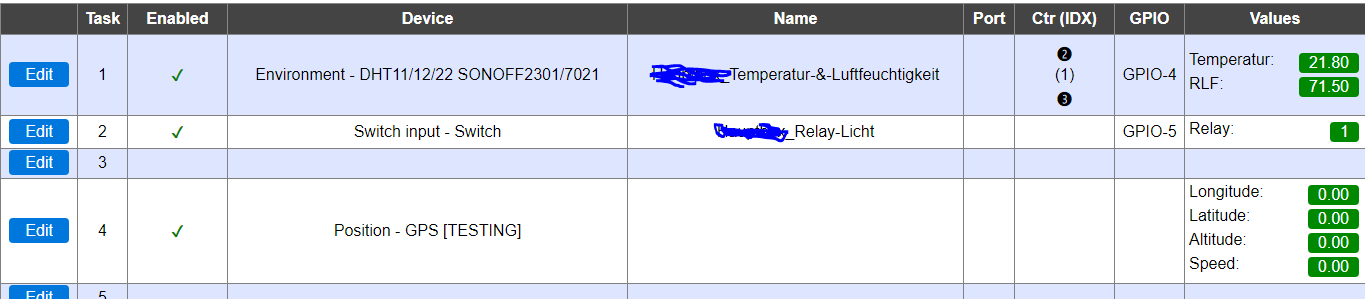
So, Task 1 and 2 is right and this 2 devices i need.
Task 4 is not correct.
Is a fail from my site, i added for testing this device without have a device.
Now if i click on task 4 "Edit" site loading long and the the wemos also reboot....
So im not able to delete or change task 4...
I will flash now the build u linking.
Should i flash per Flash Tool or can i do this via Webpanel?
Cheers and many thanks,
Michael
EDIT: OH i forgot, i need also the Generic HTTP Advanced [TESTING] Controller to send the datas to my mysql database...
Cheers
mlfactory
on 11 Feb 2019
The issue with the GPS plugin crashing is known and I am working on it.
Oh and you can perform an OTA update via the webinterface.
Just make sure you at least performed 1 hard reboot after the initial flash via serial (known hardware bug) before performing the OTA update.
TD-er
on 11 Feb 2019
Ok thx one last question before i run a update.
https://espeasy.readthedocs.io/en/latest/Plugin/_Plugin.html
I not found Generic HTTP Advanced [TESTING]
In this test release here https://www.dropbox.com/s/gpjz8286m5cycmt/ESPEasy_mega-20190202-65-PR_2235.zip?dl=0 is there the Generic HTTP Advanced Plugin included?
Cheers
EDIT: And what file should i flash?
There are a lot files in your link.
ESP_Easy_mega-20190202-65-PR_2235_hard_core_250_beta_SONOFF_POW_4M.bin or other?
I have no sonoff...
mlfactory
on 11 Feb 2019
The Generic HTTP Advanced is not a plugin, but a controller.
We have:
- Plugin - read a sensor and output a set of values
- Controller - receive a set of values from a plugin or rules and send it to some endpoint. e.g. Domoticz, OpenHab, Thingspeak, some HTTP request
- Rules - perform some actions triggered by an event.
There are some notable exceptions on this.
For example we also have support for displays and these are also put in plugins. (receive data and display, not output data)
MQTT import is also a plugin, since the controllers currently only output data, not input.
TD-er
on 11 Feb 2019
About the files.
See the readme included in the ZIP where the different builds are explained.
TD-er
on 11 Feb 2019
Ok thanks but then i should install dev?
- normal  => Only Stable plugins and controllers
- test    => Stable + Testing
So Generic HTTP Advanced is [TESTING] also i have to install the test version?
But then i have the problem with the many plugins too...
Cheers
mlfactory
on 11 Feb 2019
Flashed
ESP_Easy_mega-20190202-65-PR_2235_test_ESP8266_4096.bin
end enabled Force WiFi B/G.
I will see and give a feedback.
Many thanks to you.
Cheers and have a nice day!
mlfactory
on 11 Feb 2019
Ok bad thing...
If i activate log - level dev via syslog - wemos restarts ^^
Hmm
mlfactory
on 11 Feb 2019
You can install a binary and it will read the stored settings.
Just to get an idea about how it's working.
Your flash is partitioned into a space for the sketch (the firmware you download) and a filesystem in which the settings are stored.
So as long as you flash binary files meant for the same amount of flash memory (4096 in the filename or 4M), you can switch between versions to test.
TD-er
on 11 Feb 2019
With ESP_Easy_mega-20190202-65-PR_2235_test_ESP8266_4096 same Problem after 3 hours - Watchdog reboot.
Now i flashed ESP_Easy_mega-20190202-65-PR_2235_normal_core_241_ESP8266_4096 , run for 2 hours now i will let run the wemos over night i hope it works now.
If not i dont no what i can do to solve the problem.
mlfactory
on 11 Feb 2019
You can try a (much) older version which is missing a lot of changes, but is using an older core library.
For example a build before 20180320. Around that time I started to change the way how WiFi is being dealt with.
Around May we switched to core 2.4.0, so you can also try a build from around that time.
TD-er
on 11 Feb 2019
Many thanks :)
Run now 3h47min - so long the wemos never runed before with easyesp.
i hope the best and i will see in the next days if all stable.
Cheers
mlfactory
on 11 Feb 2019
Hey,
im running about 20 hrs ESP_Easy_mega-20190202-65-PR_2235_normal_core_241_ESP8266_4096 without a reboot.
I will look in the next days/weeks/months if this version run stable.
One Problem in this Version i have.
I switched from Generic HTTP Advanced is [TESTING] to Generic HTTP (Advanced not enabled in normal version).
This works also good but a little problem is the easyesp sends the request 2 times - also the values there inserted in the mysql database via php also double....

In the easyesp log
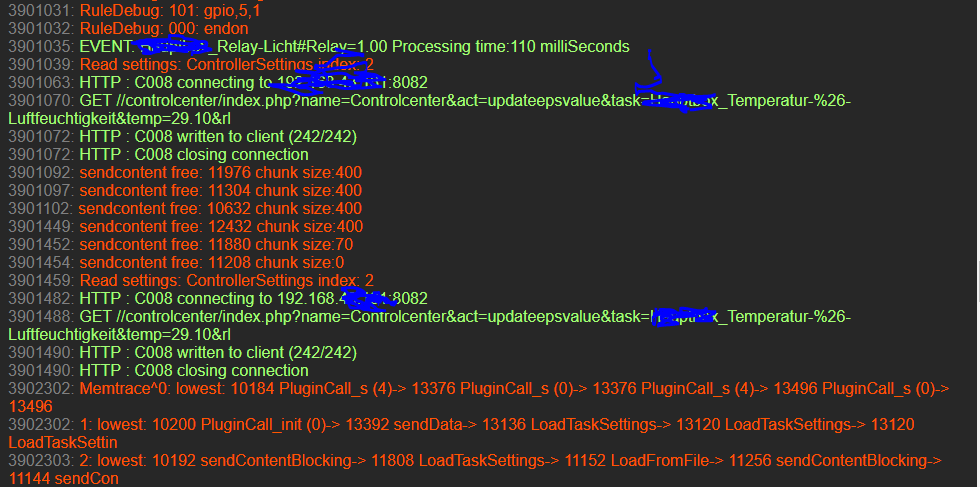
The connects in the same seconds or one seconds after the first connect see at datetime on the mysql screen.
Why this happens?
mlfactory
on 12 Feb 2019
How do you send the data to this controller?
Do you use rules, or some plugin which sends the data? What plugin?
Some plugins collect multiple values and from my memory, this controller only processes 1 value per message.
So if you're using a plugin like sysinfo, it can send up-to 4 values (which are default the same, still have to look into that one) and sending it to this controller will result in 4 times the same message.
Oh and if you're sending data to an internal IP-address (starting with 192.168.x.y) you don't have to grey out those. Nobody outside your own network can address those. Still it is good to be privacy-aware when posting publicly.
TD-er
on 12 Feb 2019
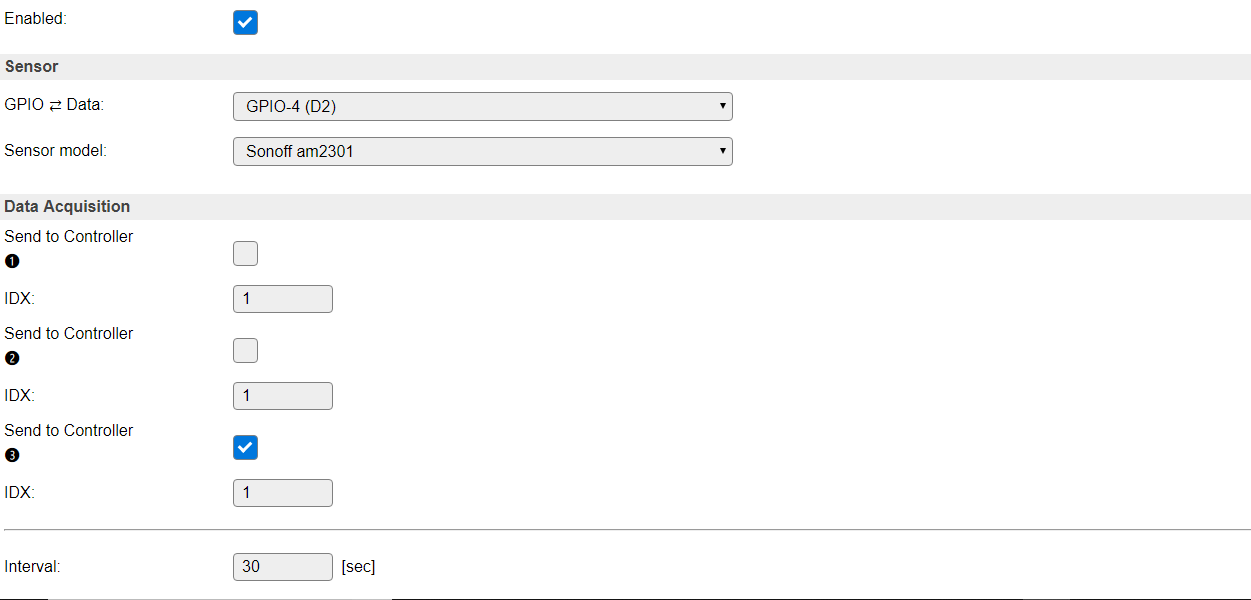
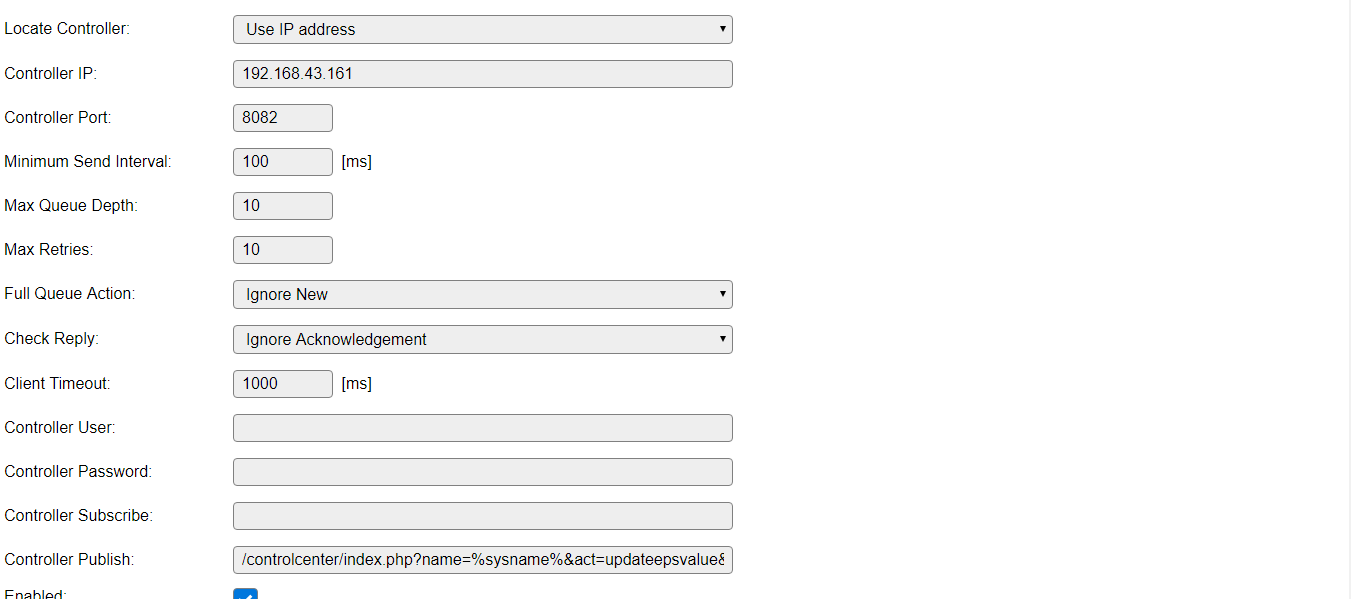
Ok thanks have read about the problem.
So there is no way to fix the problem without use a test version , correct?
Thanks
mlfactory
on 12 Feb 2019
That's not correct.
You can use the 'dummy' plugin, which can be used to store values in and use that dummy to collect the separate values you want.
You can also send those requests not using the controller, but using the rules. (a scripting language which acts on events)
But these things are not anymore about things that need to be fixed, but more a discussion on how to use/do stuff.
Those are more questions for the forum I guess.
The Github issues are about bugs/change requests etc.
TD-er
on 12 Feb 2019
Ok.
Have a new Problem...
If the wemos/easyesp lost the connection to the wlan hotspot/ap - easyesp reboots -.-
"Last boot cause":"Manual reboot",
"Reset Reason":"Exception",
Any idea why?
Im frustrated :(
mlfactory
on 12 Feb 2019
That's a very good question and I can also fully agree on the frustration.
In short...
There is an issue with the current core libraries which does not handle WiFi disconnects very well.
This may result in several separate issues, of which the symptoms are:
- Reboot caused by exception
- Reboot caused by hardware watchdog
- Reboot caused by software watchdog
- unreachable node
These symptoms can also be caused by other issues, which makes it very hard to determine what's going on.
In the test builds I linked is a new option, to force the WiFi to B/G mode, which seems to improve stability. (or make it harder to reproduce the symptoms)
But since the symptoms may manifest due to several issues, it is no guarantee it will help in your case.
If you look for "hardware watchdog", you will find most reported issues.
I would advice you to start testing the B/G only option in one of the more recent test builds I made.
The last one I made is here
TD-er
on 12 Feb 2019
Ok i give up....
Hotspot/AP was over the night online.
Wemos/Easyesp reboots after 12 hrs of runtime...
Force WiFi to B/G mode was enabled.
If tested about 10 releases, everytime the same result.
Problem is this should be a system for Terrarium - so the system must be stable without any reboots.
I run one 70w CDM lamp over the relay of the wemos.
If the wemos reboot and the lamp was before on - easyesp turns after reboot the light on but for CDM lamps this as very bad. Lamp must be cooled down about 30min before turn on.
Many many thanks for your nice help, really nice!
Cheers
mlfactory
on 13 Feb 2019
You haven't tried the older versions I suggested? (somewhere around mid March 2018)
TD-er
on 13 Feb 2019
Yes , this night, crashed in the morning hours after ~7hrs of running....
I have tested ESP_Easy_v2.0-20180316_normal_ESP8266_4096
Other question (sorry)
My Wemos running offline without internet.
My local NTP run on Port 1233 - Ports under 1000 are blocked -.-
Is there a way to change the NTP Port in Time Settings?
Thanks
mlfactory
on 13 Feb 2019
Nope, not yet.
The NTP request is sent from a random port > 1024, to overcome these kind of issues but only about ISP blocking level.
TD-er
on 13 Feb 2019
In the latest version reset every few hours: "External System"
 melwinek
on 16 Feb 2019
melwinek
on 16 Feb 2019
@melwinek What build version (core version) are you using?
And when is it resetting? Do you have some log, or idea where it is crashing?
TD-er
on 16 Feb 2019
In 2.4.2 (mega-20190216) there were resets. I can not tell in which moments. Now I've uploaded 2.4.1 (mega-20190216) and a half hour is fine. At this room I have poor wifi coverage. In 2.4.2 RSSI -85. In 2.4.1 RSSI -81. These are not just numbers, 2.4.1 loads pages more smoothly.
Here someone had a similar problem, maybe it's WIFI Sleep? https://github.com/esp8266/Arduino/issues/5083
....
In 2.4.1 also reboot. I'm going back to mega-20190106
melwinek
on 16 Feb 2019
I just merged a commit that may reduce the needed amount of stack memory for sending out syslog log entries.
Hopefully that also fixes these issues.
Please let me know if it does fix these issues.
TD-er
on 28 Jun 2020
Related issues
 ymoona
·
103Comments
TD-er
·
388Comments
TD-er
·
198Comments
ymoona
·
103Comments
TD-er
·
388Comments
TD-er
·
198Comments
 clumsy-stefan
·
195Comments
clumsy-stefan
·
195Comments
 Erd86
·
90Comments
Erd86
·
90Comments