Espeasy: Sleep function and loadcell (HX711)
After wake up ESP doesn't read load cell value (HX711).
 astra16
All 40 comments
Which breakout board are you using?
Is your load cell driven with 3.3 volts or 5 volts?
I'm using 5 volts for the load cell / the hx711 and a logic converter for the signals.
Here (ESP_Easy_mega-20190121_test_ESP8266_4096.bin) the hx711 is working with sleep mode. I've set the sleep awake time to 5 seconds and the sleep delay to 300 seconds. I've collected the data with fhem.
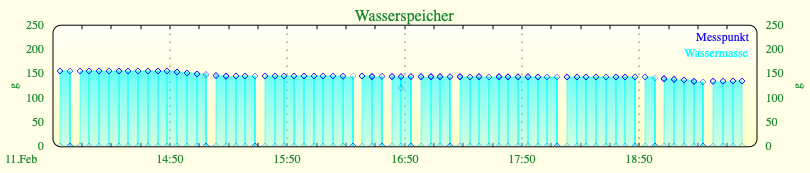
Problem is: the first measurement is not valid, it's nearby to zero:
2019-02-11_19:32:44 0.1
2019-02-11_19:32:44 133.4
2019-02-11_19:32:44 133.7
2019-02-11_19:32:44 133.7
2019-02-11_19:32:44 133.5
2019-02-11_19:32:45 133.6
2019-02-11_19:32:45 133.6
2019-02-11_19:32:45 133.2
2019-02-11_19:37:43 0.1
2019-02-11_19:37:43 133.5
2019-02-11_19:37:43 133.6
2019-02-11_19:37:43 133.7
2019-02-11_19:37:43 133.5
2019-02-11_19:37:43 133.6
2019-02-11_19:37:43 133.7
2019-02-11_19:37:44 133.3
2019-02-11_19:37:44 133.3
2019-02-11_19:42:41 0.1
2019-02-11_19:42:42 133.4
2019-02-11_19:42:42 133.6
2019-02-11_19:42:42 133.8
2019-02-11_19:42:42 133.5
2019-02-11_19:42:42 133.6
2019-02-11_19:42:42 133.6
2019-02-11_19:42:42 133.4
2019-02-11_19:47:40 0.1
2019-02-11_19:47:40 133.4
2019-02-11_19:47:40 133.7
2019-02-11_19:47:41 133.7
2019-02-11_19:47:41 133.6
2019-02-11_19:47:41 133.6
2019-02-11_19:47:41 133.6
2019-02-11_19:47:41 133.4
 thymjan
on 11 Feb 2019
thymjan
on 11 Feb 2019
I am using CJMCU-711 HX711 Electronic Weighing Sensor 24-bit A/D Converter Module connected to 3.3V on ESP8662 E12 (ESP_Easy_mega-20190121_dev_ESP8266_4096.bin).
Sleep time 895s, Awake time 5s, Controller Delay time:7s
Problem is: The first measurement is wrong(old value),second measurement is OK.
40.1
12 februar 06:58:10
40.1
12 februar 06:58:11
40.1
12 februar 07:12:26 after wake up it sends old value (value has to be 55.0 Kg)
55.0
12 februar 07:12:27 second measurement is correct 55.0 Kg
55.0
12 februar 07:26:41 after wake up it sends old value (value has to be 40.1 Kg)
40.1
12 februar 07:26:42 second measurement is correct 40.1 Kg
40.1
12 februar 07:40:57 after wake up it sends old value (value has to be 55.0 Kg)
55.0
12 februar 07:40:58 second measurement is correct 55.0 Kg
astra16
on 12 Feb 2019
To be honest, I think we may have to look at several plugins to see how the first sample is being used.
Some sensors (e.g. the BMx280) have an internal moving averaging function in which they need some number of samples to get within N% of the 'truth'.
The parameters for these filters can often be set, but then you have to know/understand how much samples are needed to get a good (first) reading, or to react on changes.
For continuous sampling this isn't really an issue most of the time, but for other use cases like the first sample after deep sleep, it really is an issue.
I guess this sensor is also using some filter like that (24 bit sampling is too sensitive for noise and the first value looks like 75%-ish of the actual value).
So you're definitely on to something, but my estimate is that it is a more wide spread issue.
 TD-er
on 12 Feb 2019
TD-er
on 12 Feb 2019
@astra16: If you say „send“ which type of controller are you using? The sending of the value seems to be delayed, isn‘t it?
thymjan
on 12 Feb 2019
UDP protocol.
The sending of the value seems to be delayed, isn‘t it?
Yes, it is possible.
BR
astra16
on 12 Feb 2019
How did you configure the "Generic UDP"-protocol?
Minimum Send Intervall:
Max Queue Depth:
Max. Retries:
Full Queue Action:
Check Reply:
Client Timeout:
Where did you set the controller delay time?
thymjan
on 12 Feb 2019
Tomorow.
If you wont, I can open you access to my device.
astra16
on 12 Feb 2019
That's not necessary. Just look in your ESPEasy-configuration.
Try to reduce the Max Queue Depth and the Max. Retries to 0. Maybe your ESP is set to sleep before the queue is emptied and so a value from a measurement before is send in the next awake session. Maybe the Full Queue Action can change this behavior also, if set to Delete Oldest instead of Ignore New. Just give it a try.
thymjan
on 12 Feb 2019
Sleep: 115s, Awake: 5s
Minimum Send Intervall: 1000ms
Max Queue Depth:1
Max. Retries:1
Full Queue Action: Delete Oldest
Check Reply: ignore
Client Timeout: 1000ms
Where did you set the controller delay time? = Device/Weight - HX711 Load Cell [TESTING] / Interval
If I set Interval to 7s
0.50 kg
13 februar 12:04:25
0.50
13 februar 12:04:27
0.50 kg HAS TO BE 0.00
13 februar 12:06:26
0.0
13 februar 12:06:28
0.00 kg HAS TO BE 0.50
13 februar 12:08:28
0.50
13 februar 12:08:29
If I set Interval to 60s controller send just one value (always the same)
0.50 kg
13 februar 11:34
0.50 kg
13 februar 11:36
0.50 kg has to be 0.00 kg
13 februar 11:38
0.50 kg has to be 0.00 kg
13 februar 11:40
0.50 kg has to be 0.00 kg
13 februar 11:42
0.50 kg has to be 0.00 kg
13 februar 11:44
0.50 kg has to be 0.00 kg
13 februar 11:46
astra16
on 13 Feb 2019
And what happens if you reduce the minimum send intervall to 100ms and set the max queue depths and max retries to zero?
I‘m not shure what the controller delay exactly does.
But if the awake time is set to 5 seconds and the controller delay is longer, which setting has priority?
thymjan
on 13 Feb 2019
Documentation on the Controller settings
Are you still missing settings, or is there something still unclear?
TD-er
on 13 Feb 2019
So the intervall setting in the hx711 (or every other module) is ignored in sleep mode and the modul is firing values as fast as possible, does it?
Or should it be set to zero or some other value?
thymjan
on 14 Feb 2019
So the intervall setting in the hx711 (or every other module) is ignored in sleep mode and the modul is firing values as fast as possible, does it? *That's how it should be*
Or should it be set to zero or some other value? * It does not matter because awake time has higher priority*
The fact is that ESP, when it wakes up, does not read the new values from HX711 For this reason the Device Interval must be configured to carry out at least two readings.
astra16
on 14 Feb 2019
That's correct upto some point.
The functions to perform a read are all guaranteed to be called at least once when awake from sleep.
After they are run, and the wifi has made connection, it will operate until it has to go to sleep again (the awake time)
If set to zero, it will be interpreted as the default set. I thought it was also possible to set that value somewhere in the interface but I cannot find it. The default is 60 seconds.
TD-er
on 14 Feb 2019
The read function of all devices isn't implemented equal.
Meaning it depends on the plugin how its behavior is to a read command.
Some just start the reading sequence when read is called and you have to call read again to get a value. (so when was it actually taken then?)
Some start the reading sequence and continue fetching the data at the call of 10/sec function and then schedule a read call themselves. So then you actually get the value as soon as it is being read from the sensor.
And some prepare the reading and just report the latest reading as soon as a read call is made.
TD-er
on 14 Feb 2019
@astra16: So why is your first reading always a value from the last awake session? Is this value stored in the module, in the hx711 or in the queue?
thymjan
on 14 Feb 2019
The last measured values are being stored in RTC memory.
This is needed for the state of switches etc. (there are still issues with the switches at boot, but that's another issue)
So that's probably why it may be reported at wake up from sleep
TD-er
on 14 Feb 2019
I thing that I get old value because:
Procedure: If the device Interval is set to 60s:
- ESP wake up (for 5s)
- ESP does not read new value from HX711
- ESP send value via UDP
- ESP goes to sleep
I this case ESP I never get correct value .
Procedure: If the device Interval is set to 7s:
- ESP wake up (5s)
- ESP does not read new value from HX711
- ESP send value via UDP from the last awake session (first sending)
- in this case ESP read new correct value from HX711
- ESP send value via UDP from this session (second sending)
- ESP goes to sleep
I this case I get value from the last awake session and from this session. Why is 7 seconds OK if it's awake time is set to only 5s, I do not know.
astra16
on 14 Feb 2019
The 7 seconds are starting to count from the first reading.
The 5 seconds (re)start to count as soon as there is a wifi connection.
If the wifi connection isn't ready in this 5 seconds, it will go back to sleep again.
So it is a bit tight and it may fail sometimes, since the time to make a WiFi connection is variable.
Connecting to the WiFi takes at least 2.4 seconds (scanning of 12 channels, 200 msec per channel) and getting an IP via DHCP also may take a few seconds.
When using a fixed IP, you may save those last few seconds which saves battery life.
TD-er
on 14 Feb 2019
Very useful information.Thx
astra16
on 14 Feb 2019
@astra16: Question once again: Did you try to set the max queue depth and max retries to zero in the controller settings? These are the default settings for the controller fhem. And my first transmitted value after waking up is something near zero and not the value from the last wakeup period.
Has the shutdown priority after the wakeup time is gone or to empty the queue with the measurements?
And did you try to reduce the Minimum Send Intervall to 100ms to empty the queue faster?
thymjan
on 14 Feb 2019
I will now have a look at this specific plugin.
Maybe we can have a simple change to make it report a proper value immediately.
TD-er
on 14 Feb 2019
First impression:
That is a lot of code duplication :(
Apparently it always reports true, when the read is being called. No matter if the value has changed.
So I guess making the returned success depending on whether a value was read will already help a bit here.
Also I don't know how frequently a new value is being returned by the sensor. It is being called from the 50/sec loop, but I guess it takes more than 20 msec for a sample.
If oversampling is being used, it stops sampling after 250 samples. So if the plugin interval is set to a longer interval than needed to take these 250 samples, then you may be looking at an old value.
This plugin may need some TLC.
Too bad I don't have the hardware to test it myself.
After lunch, I will make at least some changes to the returned value of a call to the read function, since that's for sure a bug.
TD-er
on 14 Feb 2019
@thymjan
I can not setup Max Queue Depth and Max Retries to 0. Min is 1.
Minimum Send Intervall: 100ms
Results: no change :(
0.10
14 februar 12:45:10
0.03
14 februar 12:45:11
0.03
14 februar 12:47:10
0.48
14 februar 12:47:11
astra16
on 14 Feb 2019
@astra16
Can you give a (short) summary on what's wrong with the plugin?
As far as I can see, it is:
- Last (reported) measurement will be reported when just awake from sleep
- If node is awake long enough, the 2nd and later reported value is fine
TD-er
on 14 Feb 2019
Information from the datasheet:
Output data rate can be set by hardware to 10SPS (hx711 intern oscillator) or to 80SPS.
This will be 100ms or 12,5ms per sample accordingly. On my breakout board the intern oscillator is activated (The Rate-Pin is set to GND).
The startup time from power safe mode is 400ms. For entering the power safe mode while sleeping the SCL-Pin should be set to GND.
When SCK pin changes from low to high and stays at high longer than 60 microsec, HX711 enters power down mode (page 5 datasheet).
thymjan
on 14 Feb 2019
I would like to set awake time as short as posible. For this reason I setup device Interval time to 60s. With this setup, controller send once, but never refresh value.
astra16
on 14 Feb 2019
Why not set the device interval time to 1 sec?
TD-er
on 14 Feb 2019
This is my setting (interval time 1 sec). Only Channel A is used. Oversampling is activated, Gain is set to 128.
thymjan
on 14 Feb 2019
I can do this. In this case controller will send cca 4 messages. In my case this is not problem but Thingspeak do not like this.
astra16
on 14 Feb 2019
And why not set Minimum Send Interval to 15sec instead?
thymjan
on 14 Feb 2019
This is workaround. I would yust like that the author solve the bug, if there is.
astra16
on 14 Feb 2019
Than the only thing we want, is a first valid measurement when awaking from sleep?
thymjan
on 14 Feb 2019
Yes and then as soon as possible to deepsleep.
astra16
on 14 Feb 2019
And I have not checked yet if ESP send PowerOf signal to HX711 before it goes to sleep.
astra16
on 14 Feb 2019
I've read an article wich says the ESP set all PINs to LOW when it's asleep. So the HX711 can't be set to sleep simultaneous without additional hardware, can it?
thymjan
on 15 Feb 2019
Not sure if the sensor itself has some sleep mode.
If it has, it could be possible to put it into sleep before letting the ESP go to deep sleep.
Still, the sensor itself will remain powered, so it will draw some current.
If you want to keep that idle current as low as possible, you should indeed also cut the power of the sensors too.
TD-er
on 16 Feb 2019
When SCK pin changes from low to high and stays at high longer than 60 microsec, HX711 enters power down mode (page 5 datasheet).
astra16
on 16 Feb 2019
Any new ideas??
astra16
on 25 Feb 2019
@astra16 I haven't done anything on this one, except that I put this sensor in the shopping basket for Ali Express, but I think I didn't even come to paying it.
TD-er
on 25 Feb 2019
Related issues
 MarceloProjetos
·
4Comments
TD-er
·
3Comments
MarceloProjetos
·
4Comments
TD-er
·
3Comments
 hamed-ta
·
5Comments
hamed-ta
·
5Comments
 wolverinevn
·
5Comments
wolverinevn
·
4Comments
wolverinevn
·
5Comments
wolverinevn
·
4Comments