Espeasy: ESP32 crash with DS18b20
If you self compile, please state this and PLEASE try to ONLY REPORT ISSUES WITH OFFICIAL BUILDS!
ESP32 with mega-20180930
Summarize of the problem/feature request
ESP32 crashes after checking the Enabled checkbox of the Environment DS18b20 device.
Expected behavior
I expect the device to work
Actual behavior
The ESP32 reboots.
Steps to reproduce
- Select the Environment DS18b20 device
- Fill out all appropriate boxes end check Enabled checkbox
- Click submit
System configuration
Hardware: WEMOS ESP32 board with ESP-WROOM-32 chip and OLED with SPI.
ESP Easy version:
mega-20180930
On ESP32, self compiled with Platformio, PIO Upload (esp32test_1M8_partition)
ESP Easy settings/screenshots:
Rules or log data
Guru Meditation Error: Core 1 panic'ed (Interrupt wdt timeout on CPU1)
Core 1 register dump:
PC : 0x4008f9c6 PS : 0x00060034 A0 : 0x8008eb2a A1 : 0x3ffb05d0
A2 : 0x3ffd195c A3 : 0x3ffb2050 A4 : 0x00000001 A5 : 0x00000001
A6 : 0x00060023 A7 : 0x00000000 A8 : 0x3ffb2050 A9 : 0x3ffb2050
A10 : 0x00000018 A11 : 0x00000018 A12 : 0x3ffb2b40 A13 : 0x00000100
A14 : 0x3ffb2b2c A15 : 0xc904c804 SAR : 0x0000001d EXCCAUSE: 0x00000006
EXCVADDR: 0x00000000 LBEG : 0x4000c2e0 LEND : 0x4000c2f6 LCOUNT : 0x00000000
Backtrace: 0x4008f9c6:0x3ffb05d0 0x4008eb27:0x3ffb05f0 0x4008d72b:0x3ffb0610 0x40159b2b:0x3ffb0650 0x40159c02:0x3ffb0670 0x400836fe:0x3ffb0690 0x400830e6:0x3ffb06b0 0x401581c3:0x3ffb0720 0x4015c7ab:0x3ffb0750 0x40160953:0x3ffb0780 0x4015e0c7:0x3ffb07b0 0x4015fc42:0x3ffb07f0 0x4015d5bc:0x3ffb0830 0x4015c188:0x3ffb0860 0x40152145:0x3ffb08c0 0x4000bcc5:0x3ffb08e0 0x40156d91:0x3ffb0900 0x400d7859:0x3ffb0920 0x400d6d17:0x3ffb09a0 0x400ef323:0x3ffb09d0 0x400efaad:0x3ffb0a20 0x400f00f7:0x3ffb0a50 0x4010a815:0x3ffb0a90 0x401c602d:0x3ffb1e20 0x400d6046:0x3ffb1e40 0x400dcb59:0x3ffb1e60 0x400dcba6:0x3ffb1e90 0x400dcd02:0x3ffb1ee0 0x4012c887:0x3ffb1f30 0x40143d68:0x3ffb1f50 0x4014433d:0x3ffb1f70 0x401a81ea:0x3ffb1fa0
Core 0 register dump:
PC : 0x4008ced8 PS : 0x00060034 A0 : 0x8008dd15 A1 : 0x3ffd4010
A2 : 0x3ffc1308 A3 : 0xb33fffff A4 : 0x00060023 A5 : 0x003fffff
A6 : 0x00060021 A7 : 0x00000000 A8 : 0x0000cdcd A9 : 0x0000cdcd
A10 : 0x0000abab A11 : 0x00060023 A12 : 0x00060021 A13 : 0x3ffd40b0
A14 : 0x00000000 A15 : 0x3ffd40df SAR : 0x00000015 EXCCAUSE: 0x00000006
EXCVADDR: 0x00000000 LBEG : 0x00000000 LEND : 0x00000000 LCOUNT : 0x00000000
Backtrace: 0x4008ced8:0x3ffd4010 0x4008dd12:0x3ffd4040 0x4008f6c8:0x3ffd4060 0x4008f67e:0x00000000
Rebooting...
ets Jun 8 2016 00:22:57
rst:0xc (SW_CPU_RESET),boot:0x17 (SPI_FAST_FLASH_BOOT)
configsip: 0, SPIWP:0xee
clk_drv:0x00,q_drv:0x00,d_drv:0x00,cs0_drv:0x00,hd_drv:0x00,wp_drv:0x00
mode:DIO, clock div:2
load:0x3fff0018,len:4
load:0x3fff001c,len:952
load:0x40078000,len:6084
load:0x40080000,len:7944
entry 0x40080310
⸮U31 :
INIT : Booting version: (ESP32 SDK v3.2-dev-39-gaaf12390)
32 : INIT : Cold Boot - Restart Reason: CPU0: Software reset[E][WiFiUdp.cpp:219] parsePacket(): could not receive data: 9
CPU CPU1: Software reset CPU
32 : FS : Mounting...
57 : CRC : No program memory checksum found. Check output of crc2.py
69 : CRC : SecuritySettings CRC ...OK
128 : INIT : Free RAM:234068
128 : INIT : I2C
128 : INIT : SPI not enabled
145 : INFO : Plugins: 63 [Normal] (ESP32 SDK v3.2-dev-39-gaaf12390)
145 : EVENT: System#Wake
156 : WIFI : Set WiFi to STA
257 : WIFI : Connecting Spoon3 attempt #0
257 : IP : Static IP : xxxxxxxxxx GW: xxxxxxxxx SN: xxxxxxxx DNS: xxxxxxxxxxxxxxx
262 : OTA : Arduino OTA enabled on port 3232
374 : EVENT: System#Boot
1166 : BMx280 : Detected BME280
1710 : WD : Uptime 0 ConnectFailures 0 FreeMem 190484
3168 : BME280: dew point 10.01C
3179 : BME280 : Address: 0x76
3179 : BME280 : Temperature: 17.59
3179 : BME280 : Humidity: 61.34
3179 : BME280 : Barometric Pressure: 1016.24
3180 : EVENT: BM1#Temperature=17.59
3188 : EVENT: BM1#Humidity=61.34
3195 : EVENT: BM1#Pressure=1016.24
3198 : Domoticz: Sensortype: 4 idx: 1 values: 17.59;61.34;3;1016.24;0
3312 : WIFI : Static IP: xxxxxxxxxxxxxxxxxx (ESP32-2-2) GW: xxxxxxxxxxxx SN:xxxxxxxxxxxxxxx duration: 3219 ms
3323 : EVENT: WiFi#Connected
3332 : Webserver: start
3333 : WIFI : Arduino wifi status: WL_CONNECTED ESPeasy internal wifi status: ESPEASY_WIFI_SERVICES_INITIALIZED
[E][WiFiClient.cpp:427] flush(): 11
3350 : HTTP : C001 connecting to xxxxx:8080
3373 : GET /json.htm?type=command¶m=udevice&idx=1&nvalue=0&svalue=17.59;61.34;3;1016.24;0&rssi=6 HTTP/1.1
Host: xxxxxxxxxxx3:8080
User-Agent: ESP Easy/20102/Sep 30 2018 18:58:23
Connection: close
 berbergh
All 31 comments
Please note that the set of plugins included in the esp32test_1M8_partition is highly experimental.
I was finally able to compile a lot more plugins and the I2C now seems stable enough to run >1 plugin.
So the current status of that version is: "it compiles"
That being said, please report any issue found with this build, since we really want to eventually have full support for the ESP32.
 TD-er
on 30 Sep 2018
TD-er
on 30 Sep 2018
@TD-er. I am aware of the experimental state, but you can regard this as my contribution to help solving issues.
berbergh
on 30 Sep 2018
@berbergh Great, really appreciate it :)
TD-er
on 30 Sep 2018
although I compile my own, I am running an ESP32 on near-current source with 3 DS18b20 sensors without issue. I am NOT using them via I2C
 waspie
on 2 Oct 2018
waspie
on 2 Oct 2018
Hi, I had this error last night until I put a 4.7K resistor between power and signal on the sensor. Has been working fine since.
 ibishop100
on 2 Oct 2018
ibishop100
on 2 Oct 2018
Still it would be nice if an error was reported and not a crash :)
TD-er
on 2 Oct 2018
hi there
i want to add some info regarding this issue
i have "esp32 devkit v1", ESP_Easy_mega-20191003_esp32test_1M8_partition.bin firmware
reboot occurs if you select GPIO for 1-wire and not connect or somehow disconnect pull-up resistor
if you disconnect DS18b20 - it's ok, you've got "Temperature: Error!" in console but not reboot
so if you want to bind DB18b20 to other GPIO, you _should_ first "disable" it in device settings, and then choose another GPIO, _connect pul-up resistor to new GPIO_, and at the end of it you should go to sensor settings to _change GPIO_ and enable sensor
once again: reboot occurs if you chose GPIO for 1-wire, do not connect pull-up resistor and _enable_ device for 1-wire
"enable" - should be done last, "disable" - should be done first, but if you have contact issue in your setup, you can run into a problem
maybe it's a sort of hw problem?
 aleksey-ru52
on 16 Oct 2019
aleksey-ru52
on 16 Oct 2019
What is the reboot reason when this happens? HW watchdog?
TD-er
on 16 Oct 2019
Guru Meditation Error: is it watchdog?
wdt - watch dog timeout?
Guru Meditation Error: Core 1 panic'ed (Interrupt wdt timeout on CPU1)
Core 1 register dump:
PC : 0x4008c9a0 PS : 0x00060c34 A0 : 0x8008bac3 A1 : 0x3ffb1de0
A2 : 0x3ffafea0 A3 : 0x3ffb8074 A4 : 0x00000001 A5 : 0x00000001
A6 : 0x00060c23 A7 : 0x00000000 A8 : 0x3ffb8074 A9 : 0x3ffb8074
A10 : 0x00000018 A11 : 0x00000018 A12 : 0x3ffae8f4 A13 : 0x00000000
A14 : 0x00000000 A15 : 0x00000000 SAR : 0x0000000a EXCCAUSE: 0x00000006
EXCVADDR: 0x00000000 LBEG : 0x4000c2e0 LEND : 0x4000c2f6 LCOUNT : 0xffffffff
Backtrace: 0x4008c9a0:0x3ffb1de0 0x4008bac0:0x3ffb1e00 0x4008a523:0x3ffb1e20 0x40180b79:0x3ffb1e60 0x401c5db2:0x3ffb1e8
Core 0 register dump:
PC : 0x4008af4a PS : 0x00060d34 A0 : 0x8008a0f8 A1 : 0x3ffafcf0
A2 : 0x3ffafec4 A3 : 0x0000cdcd A4 : 0xb33fffff A5 : 0x00000001
A6 : 0x00060d20 A7 : 0x0000abab A8 : 0x0000abab A9 : 0x3ffafcf0
A10 : 0x00000003 A11 : 0x00060d23 A12 : 0x00060d20 A13 : 0x00000020
A14 : 0x00000020 A15 : 0x00000000 SAR : 0x00000010 EXCCAUSE: 0x00000006
EXCVADDR: 0x00000000 LBEG : 0x4000c2e0 LEND : 0x4000c2f6 LCOUNT : 0xffffffff
Backtrace: 0x4008af4a:0x3ffafcf0 0x4008a0f5:0x3ffafd20 0x40180bfe:0x3ffafd60 0x401c1f15:0x3ffafd80 0x40090a1f:0x3ffafda
Rebooting...
aleksey-ru52
on 16 Oct 2019
Looks like it does not have a timeout implemented.
It does disable interrupts during communication, but if there is no activity then it may wait too long.
Then the watchdog does reboot the node to get out of this situation.
TD-er
on 16 Oct 2019
If such issue exists without pullup resistor we can consider to add internal pullup in 1 wire implementation or we can search root couse for reboot ;)
 uzi18
on 16 Oct 2019
uzi18
on 16 Oct 2019
I guess it should need a time out in processing this.
Also every other location where the interrupts are disabled should have a timeout.
TD-er
on 16 Oct 2019
fast search shows it's not so simple, about _internal_ pull-ups
https://www.esp32.com/viewtopic.php?t=439
i'm agree about "should have timeout"
aleksey-ru52
on 16 Oct 2019
ok nice catch, did you tried to use different gpio like - 14, 16, 17, 18, 19, 21, 22, 23 ?
uzi18
on 16 Oct 2019
if you about article - it's not mine
14, 18, 19, 21, 22, 23 with latest fw mega-20191003 (ESP32 SDK v3.2.3) works the same - reboot
just checked for myself
16, 17 can't see on devboard pins
aleksey-ru52
on 16 Oct 2019
little addition
you can't change settings if you have _disabled_ DS18b20... you should connect resistor to GPIO line first... then you click on "Edit" DS18b20 settings on Device page it trying to detect sensor on selected GPIO, i suppose, even if it's disabled - and you've got a reboot again
interface shows mapped GPIO, it's good, so you don't need to do a "blind" search for GPIO to pull-up
aleksey-ru52
on 17 Oct 2019
I can also confirm this problem on ATOM Lite. 1-wire works fine, but only if there's an external pull-up resistor on the GPIO.
 ToniA
on 10 Aug 2020
ToniA
on 10 Aug 2020
I can also confirm this problem on ATOM Lite. 1-wire works fine, but only if there's an external pull-up resistor on the GPIO.
What release/build of ESPEasy have you found this behavior? There have been many improvements to ESP32 support & stability since this issue was last reported. And on what GPIO is the sensor connected?
The latest release can always be downloaded from https://github.com/letscontrolit/ESPEasy/releases
 tonhuisman
on 10 Aug 2020
tonhuisman
on 10 Aug 2020
I've done some investigation, and it seems there is some kind of stack over- or under-flow during the PLUGIN_WEBFORM_SAVE action of the Dallas (P004) plugin. (Log during crash shows it seems to land in a totally unrelated plugin that I don't even have configured) As I don't fully comprehend all things that are going on there during save, I don't expect to fix it myself, but I can confirm it crashes when trying to select a different GPIO on an ESP32.
tonhuisman
on 11 Aug 2020
OK, that sounds like something that may also occur on other plugins.
Maybe even related to reading settings after settings have been updated.
Will have a look at it.
TD-er
on 11 Aug 2020
@tonhuisman I tried the latest build (mega-20200801). Works fine on any available GPIO on ATOM Lite, but only with pull-up.
@TD-er I suspect the do-while loop starting from line 499 (link below). It will disable interrupts while waiting for the GPIO to go to high state. This will never happen without pull-up, and probably the watchdog will cause the reset.
https://github.com/letscontrolit/ESPEasy/blob/mega/src/_P004_Dallas.ino#L499
ToniA
on 11 Aug 2020
@ToniA Ah that's a likely cause indeed.
It doesn't switch the interrupts on when returning.
TD-er
on 11 Aug 2020
Tested the (same) fix that TD-er did, and it does resolve the reboot issue. 👍
But for the 1-wire to work as expected, a pull-up is required to be able to read the device ID's, and get the option to select the desired sensor. (I only got it working on GPIO-5 without pull-up in my dev-tests, but that is highly questionable in real-life situations, so: a pull-up is required, as per manufacturer specs).
tonhuisman
on 11 Aug 2020
So we should change this line to true?
Device[deviceCount].PullUpOption = false;
Or is the internal one too weak for the Dallas sensors?
TD-er
on 11 Aug 2020
The pull-up should be around 4k7, afaik, and possibly down to 2k2 when connecting more than around 4 sensors. But that's what I read, no testing done.
The internal pull-up are in the 80 - 100k, so that isn't in the right range, though it might be just enough for 1 sensor, if you feel lucky...
I'll test a bit tomorrow
tonhuisman
on 11 Aug 2020
I'll test a bit tomorrow
Pun intended? :)
TD-er
on 11 Aug 2020
Nice catch with the loop.
We had discussion about pullup resistor and we recommend external as dallas documentation states it is necessary and internal pullup have some big tolerance so we can't be sure it will work correctly on all applications/mcus, will have more issues
uzi18
on 11 Aug 2020
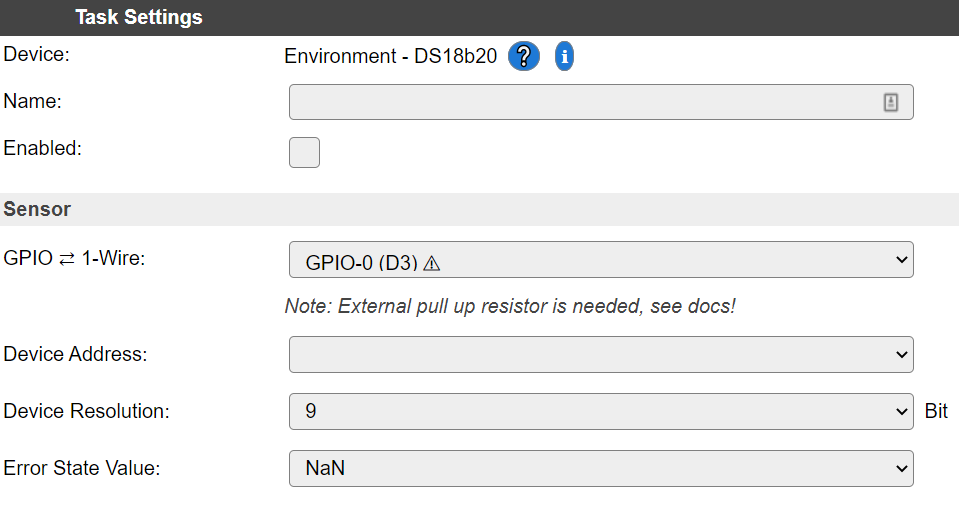
I can add a note on the web interface, mentioning the need of a pull-up resistor.
TD-er
on 11 Aug 2020
Added the warning.
TD-er
on 11 Aug 2020
I'll test a bit tomorrow
Pun intended? :)
I tested flipping that PullUpOption (bit 😛) to true, but it won't work properly, as it doesn't find the device ID's on most GPIOs. So an external pull-up is indeed needed, as the UI now shows 👍
tonhuisman
on 12 Aug 2020
Thanks for testing, so now we know for sure.
TD-er
on 12 Aug 2020
Related issues
 thehijjt
·
4Comments
thehijjt
·
4Comments
 SANCLA
·
4Comments
SANCLA
·
4Comments
 MarceloProjetos
·
4Comments
MarceloProjetos
·
4Comments
 Barracuda09
·
5Comments
Barracuda09
·
5Comments
 wolverinevn
·
5Comments
wolverinevn
·
5Comments