Espeasy: Not correct work DS18b20 ...
Dear friends! Some months early i can see adress of DS18b20 in port column, like:

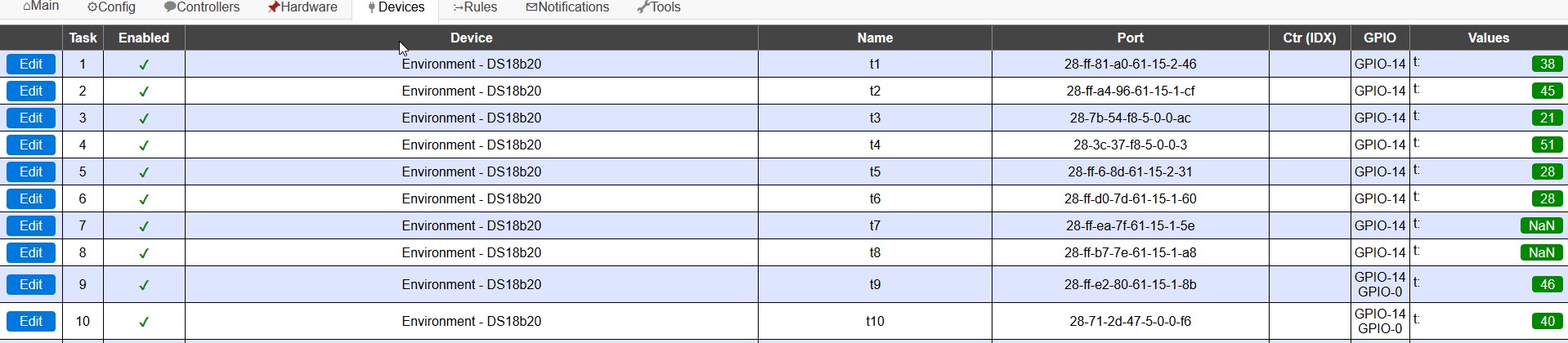
Today build not show that:

What's wrong?
 itProfi
All 69 comments
P.S. - try many time on differets builds..
itProfi
on 9 Sep 2018
Do you have any idea what version worked?
 TD-er
on 9 Sep 2018
TD-er
on 9 Sep 2018
Do you have any idea what version worked?
I can say absolutely accurate - it was on 18-01-2018 - the version was the last at that time!
itProfi
on 9 Sep 2018
Also, i have 10 sensors -it work absolutly sporadically....


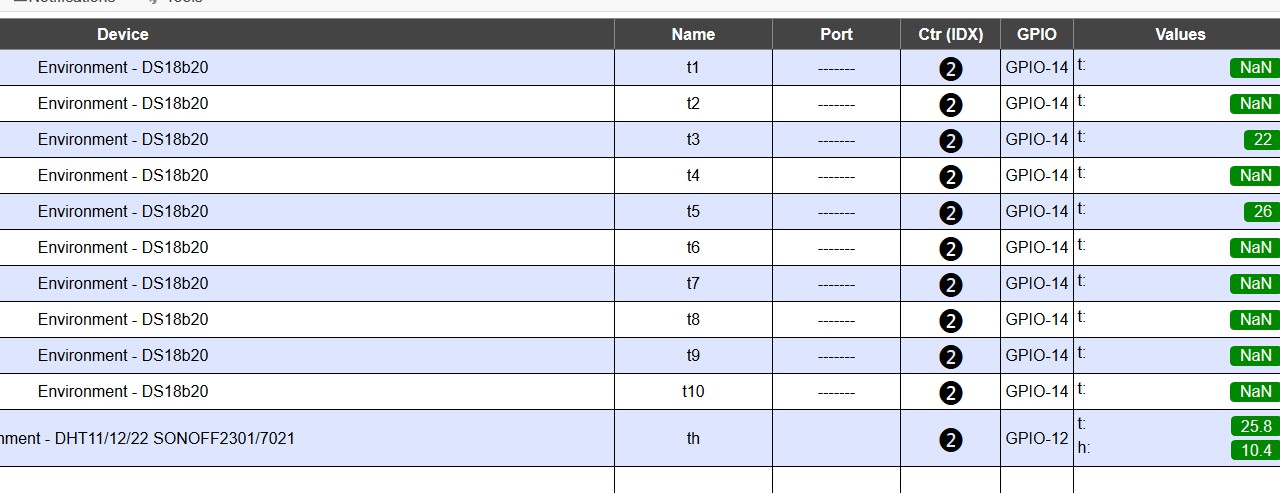
My log file:
1161147: EVENT: Rules#Timer=1
1161162: ACT : Publish /kotel/IP,192.168.1.48
1161186: ACT : Publish /kotel/time on esp,9.9.18=15:30:26
1161207: ACT : timerSet,1,15
1161288: Command: publish
1161318: Command: publish
1161319: Command: timerset
1162515: DS : Temperature: Error! (28-7b-54-f8-5-0-0-ac)
1164153: EVENT: Rules#Timer=2
1164172: ACT : timerSet,2,32
1164246: Command: timerset
1166548: DS : Temperature: 26.06 (28-3c-37-f8-5-0-0-3)
1166551: EVENT: t4#t=26.06
1166700: DS : Temperature: Error! (28-ff-ea-7f-61-15-1-5e)
1169586: DS : Temperature: Error! (28-ff-6-8d-61-15-2-31)
1169625: DS : Temperature: 25.50 (28-ff-d0-7d-61-15-1-60)
1169628: EVENT: t6#t=25.50
1169755: DS : Temperature: Error! (28-ff-b7-7e-61-15-1-a8)
1169783: DS : Temperature: Error! (28-ff-e2-80-61-15-1-8b)
1169829: DS : Temperature: Error! (28-71-2d-47-5-0-0-f6)
1169857: DHT : Temperature: 25.80
1169857: DHT : Humidity: 9.70
1169860: EVENT: th#t=25.80
1169944: EVENT: th#h=9.70
1170478: DS : Temperature: Error! (28-ff-a4-96-61-15-1-cf)
1176510: DS : Temperature: Error! (28-7b-54-f8-5-0-0-ac)
1177150: EVENT: Rules#Timer=1
1177166: ACT : Publish /kotel/IP,192.168.1.48
1177191: ACT : Publish /kotel/time on esp,9.9.18=15:30:42
1177211: ACT : timerSet,1,15
1177297: Command: publish
1177301: Command: publish
1177302: Command: timerset
1180696: WD : Uptime 20 ConnectFailures 0 FreeMem 15128
1182548: DS : Temperature: 26.06 (28-3c-37-f8-5-0-0-3)
1182551: EVENT: t4#t=26.06
1182681: DS : Temperature: Error! (28-ff-ea-7f-61-15-1-5e)
1184620: DS : Temperature: Error! (28-ff-d0-7d-61-15-1-60)
1184696: DS : Temperature: 24.50 (28-ff-b7-7e-61-15-1-a8)
1184699: EVENT: t8#t=24.50
1184814: DS : Temperature: Error! (28-ff-e2-80-61-15-1-8b)
1184851: DS : Temperature: Error! (28-71-2d-47-5-0-0-f6)
1184881: DHT : Temperature: 25.80
1184882: DHT : Humidity: 10.20
1184884: EVENT: th#t=25.80
1184942: EVENT: th#h=10.20
1187477: DS : Temperature: Error! (28-ff-a4-96-61-15-1-cf)
1190510: DS : Temperature: Error! (28-7b-54-f8-5-0-0-ac)
1193147: EVENT: Rules#Timer=1
1193166: ACT : Publish /kotel/IP,192.168.1.48
1193188: ACT : Publish /kotel/time on esp,9.9.18=15:30:58
1193208: ACT : timerSet,1,15
1193314: Command: publish
1193318: Command: publish
1193319: Command: timerset
1195147: EVENT: Clock#Time=Sun,15:31
1197152: EVENT: Rules#Timer=2
1197170: ACT : timerSet,2,32
1197268: Command: timerset
1198550: DS : Temperature: Error! (28-3c-37-f8-5-0-0-3)
1198659: DS : Temperature: Error! (28-ff-ea-7f-61-15-1-5e)
1199435: DS : Temperature: Error! (28-ff-81-a0-61-15-2-46)
1199709: DS : Temperature: Error! (28-ff-d0-7d-61-15-1-60)
1199749: DS : Temperature: Error! (28-ff-b7-7e-61-15-1-a8)
1199781: DS : Temperature: 25.50 (28-ff-e2-80-61-15-1-8b)
1199784: EVENT: t9#t=25.50
1199908: DS : Temperature: Error! (28-71-2d-47-5-0-0-f6)
1199943: DHT : Temperature: 25.80
1199944: DHT : Humidity: 10.10
1199946: EVENT: th#t=25.80
1200004: EVENT: th#h=10.10
1204477: DS : Temperature: Error! (28-ff-a4-96-61-15-1-cf)
1204509: DS : Temperature: 22.56 (28-7b-54-f8-5-0-0-ac)
1204511: EVENT: t3#t=22.56
itProfi
on 9 Sep 2018
Any idea? :)
itProfi
on 11 Sep 2018
We definitely need to start doing this full time. :)
So no news yet.
 Grovkillen
on 11 Sep 2018
Grovkillen
on 11 Sep 2018
I am now a supporter :-)
https://www.patreon.com/GrovkillenTDer/overview
 Heiend
on 11 Sep 2018
Heiend
on 11 Sep 2018
Thank you for that! 👍 We will hopefully gain even more supporter soon 😄
Grovkillen
on 11 Sep 2018
Did not know this was a thing!! Count me in!! Thanks Guys!
 LeeNX
on 11 Sep 2018
LeeNX
on 11 Sep 2018
Just my 2 cents:
I have 4 production units running with each 16# DS18B20, based on ESPEasy_v2.0.0-dev11 modified to 24 tasks. They are running smooth with hardly any NAN reports.
Since 2 days running ESPEasy_mega-20180522 (reported by someone as stable) on an experimental WEMOS D1 mini with 2# DS18B20 and I see a lot of NAN reports and 1 time a crash and ports where lost.
 Domosapiens
on 12 Sep 2018
Domosapiens
on 12 Sep 2018
Running mega-20180323 here with 8 ds18b20. One is sometimes reporting nan but jiggling the 3.5 mm connector a bit sorts it out. Just as info. Not a fix 😎
Grovkillen
on 12 Sep 2018
I also had issues with too many ds18b20 on one node. Especially if you run all of them on the same IO Pin. Reducing cable-length's, reducing number of sensors or splitting them to different ports solved my problem... also running them on 5V vs 3.3V braught some changes...
seems to be more of a HW (protocol/timing/bus) issue than a SW/Firmware problem... IMHO...
 clumsy-stefan
on 12 Sep 2018
clumsy-stefan
on 12 Sep 2018
I got the same feeling that @clumsy-stefan . I think it's the way I have built my one-wire bus.. it's a star shaped network (with equal length cables) but not the correct way of doing it with one long wire and short wires from that to the sensors.
Grovkillen
on 12 Sep 2018
Could 1-wire devices benefit from bus termination?
And hardware issues don't explain these issues when it used to work in the same setup with older versions.
I don't think a lot has changed in these 1-wire plugins, so maybe something changed in the core libraries? Or internal pull-up of GPIO-pins now has another default setting?
TD-er
on 12 Sep 2018
or it could be a simple protocol-timing issue after all the changes how things are performed in the background. as the bus runs quite fast, it's easy to miss some things on the bus... or a combination of both...
termination is (as fas as I understand) not really an issue. it's more the capacity of the wires that affect the comms... however I'm not an electrician ;)
my comment was really just my observations (with any of the versions), that fewer sensors/shorter cables solved my problems...
clumsy-stefan
on 12 Sep 2018
i had in past manually writing sketch, which work with standart library 1-wire and work with 27 pcs- ds18b20 on the one pin, publish in mqtt server (pubsub library)...
i not shure, that is only HW problems...
DallasDS18B20_MQTT_example.txt
This example work with 16 sensors absolutly stable!
itProfi
on 12 Sep 2018
2# DS18B20 system:
Build time | May 22 2018 02:12:00
Binary filename | ESP_Easy_mega-20180522_normal_ESP8266_4096.bin
What I see:
Manual reboot, reason Hardware Watchdog.
Task GUI sensor1:
GPIO is still correct
Device Address is EMPTY (no selection possibility)
Device resolution 9, instead of the selected 12
Task GUI sensor2:
GPIO is still correct
Device Address is EMPTY (both sensors selectable)
Device resolution still 12
Note ...
But the sensors are still working !!??
Domosapiens
on 12 Sep 2018
@itProfi: completely agree, that would support the theory, that it's a combination of too may HW for a too slow/busy SW... that could be why it works either with custom software which is "exclusively" polling the sensors or less sensors / faster response from sensors...
clumsy-stefan
on 12 Sep 2018
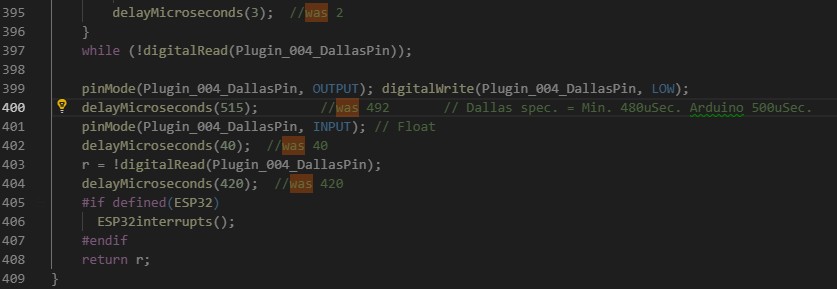
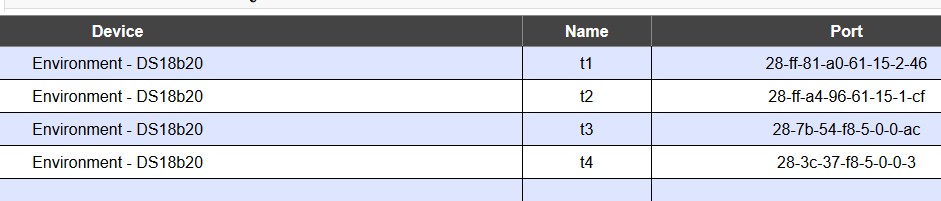
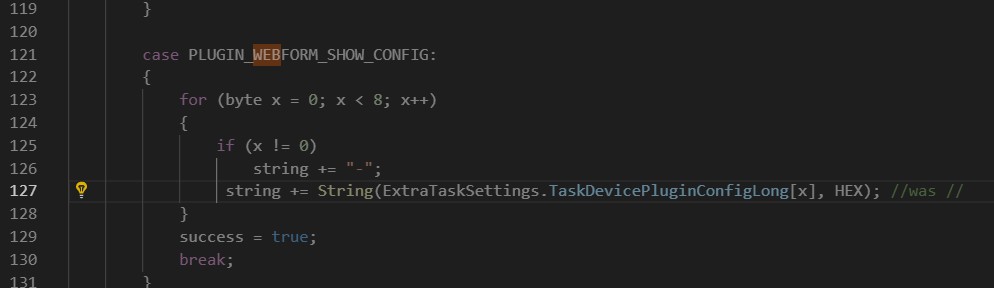
until no epic fail for 4 hours ..
itProfi
on 26 Sep 2018
1wire need hardware bus pullup, and it is possible to write statemachine for these thermometers, so delays will be not a problem here and communication will be more realible.
I will try to check actual implementation later evening.
 uzi18
on 3 Oct 2018
uzi18
on 3 Oct 2018
Some things often not considered.
The internal pullup inside the ESP is weak. For one DS18B20 near the ESP it is enough.
For several DS18B20 and/or longer cable place one (!) pullup resistor of 4.7K from Vcc to the data line near the ESP.
Cabling should not be "hair wire". A Cat6 or Cat7 network cable works well.
On top: Long cables are a beautifull antenna collecting noise from the environment around, mostly mains 50 Hz hum. A capacitor of 10...47 µF from Vcc to ground besides every DS18B20 is a good idea then.
 ShardanX
on 3 Oct 2018
ShardanX
on 3 Oct 2018
Some things often not considered.
The internal pullup inside the ESP is weak. For one DS18B20 near the ESP it is enough.
For several DS18B20 and/or longer cable place one (!) pullup resistor of 4.7K from Vcc to the data line near the ESP.Cabling should not be "hair wire". A Cat6 or Cat7 network cable works well.
On top: Long cables are a beautifull antenna collecting noise from the environment around, mostly mains 50 Hz hum. A capacitor of 10...47 µF from Vcc to ground besides every DS18B20 is a good idea then.
Ok, i try..I mean capasitor..
itProfi
on 3 Oct 2018
@itProfi please add capacitor between VCC-GND of thermometers.
uzi18
on 3 Oct 2018
@itProfi please show us actual logs from lates release and t1 / t2 configuration screenshot
uzi18
on 3 Oct 2018
@itProfi please show us actual logs from lates release and t1 / t2 configuration screenshot
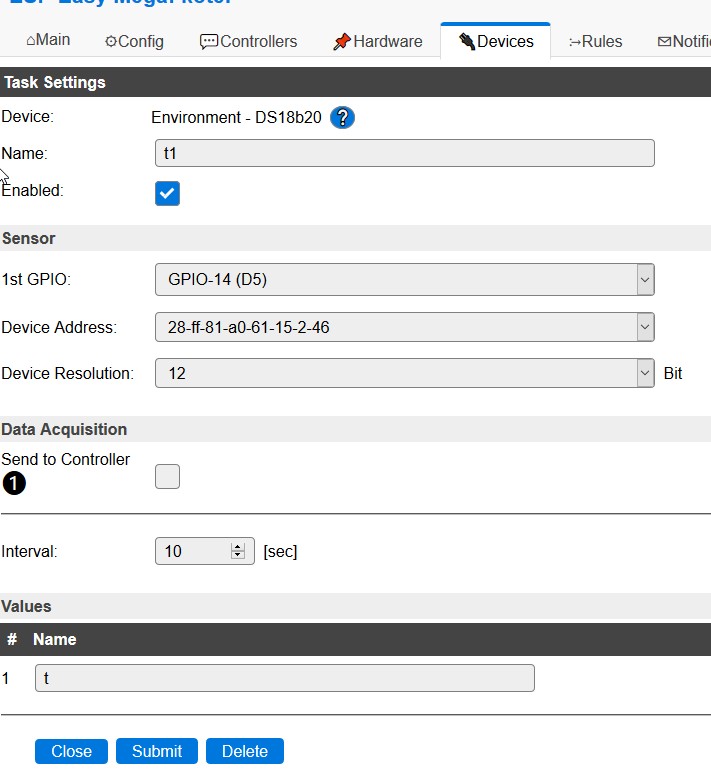
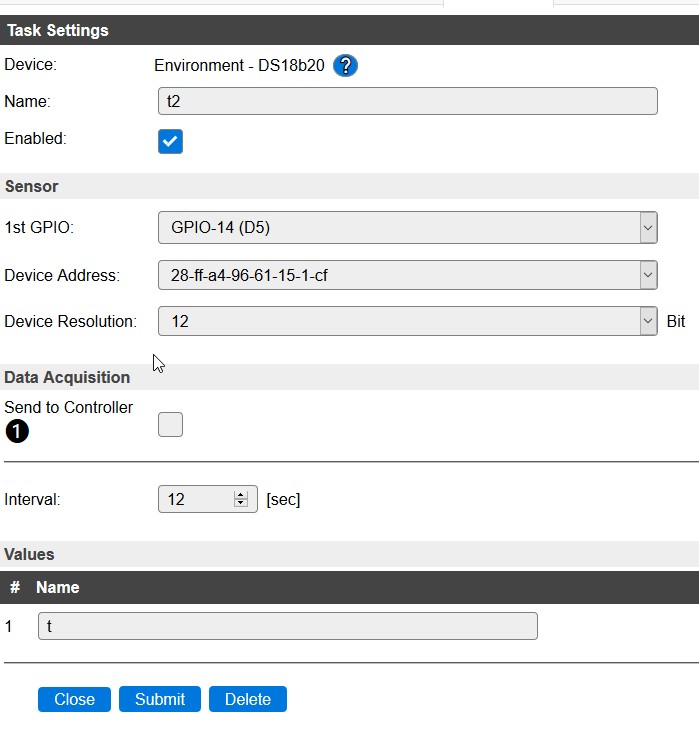
itProfi
on 5 Oct 2018
Log
Logging: Info (2)
78697270: EVENT: t2#t=27.31
78697322: Command: publish
78697325: Command: publish
78697326: Command: publish
78697326: Command: publish
78697327: Command: publish
78697328: Command: publish
78697328: Command: publish
78697329: Command: publish
78697330: Command: publish
78697330: Command: publish
78697331: Command: publish
78697332: Command: publish
78697333: Command: timerset
78698262: DS : Temperature: 25.50 (28-ff-b7-7e-61-15-1-a8)
78698263: EVENT: t8#t=25.50
78699108: DS : Temperature: 31.19 (28-ff-e2-80-61-15-1-8b)
78699110: EVENT: t9#t=31.19
78700990: EVENT: Rules#Timer=2
78701002: ACT : timerSet,2,32
78701033: Command: timerset
78702342: DS : Temperature: 27.06 (28-ff-81-a0-61-15-2-46)
78702343: EVENT: t1#t=27.06
78702877: DS : Temperature: 28.50 (28-3c-37-f8-5-0-0-3)
78702879: EVENT: t4#t=28.50
78704105: DS : Temperature: 31.19 (28-ff-e2-80-61-15-1-8b)
78704107: EVENT: t9#t=31.19
78705727: DS : Temperature: 26.06 (28-ff-6-8d-61-15-2-31)
78705728: EVENT: t5#t=26.06
78708032: DS : Temperature: 25.94 (28-7b-54-f8-5-0-0-ac)
78708034: EVENT: t3#t=25.94
78709105: DS : Temperature: 31.12 (28-ff-e2-80-61-15-1-8b)
78709107: EVENT: t9#t=31.12
78709186: DS : Temperature: 27.31 (28-ff-a4-96-61-15-1-cf)
78709188: EVENT: t2#t=27.31
78709951: DS : Temperature: 29.69 (28-71-2d-47-5-0-0-f6)
78709953: EVENT: t10#t=29.69
78710414: DS : Temperature: 25.56 (28-ff-ea-7f-61-15-1-5e)
78710416: EVENT: t7#t=25.56
78711007: DHT : Temperature: 26.90
78711007: DHT : Humidity: 1.00
78711009: EVENT: th#t=26.90
78711040: EVENT: th#h=1.00
78712260: DS : Temperature: 25.50 (28-ff-b7-7e-61-15-1-a8)
78712262: EVENT: t8#t=25.50
78712340: DS : Temperature: 27.06 (28-ff-81-a0-61-15-2-46)
78712341: EVENT: t1#t=27.06
78712564: WD : Uptime 1312 ConnectFailures 18 FreeMem 19024
78713193: ACT : timerSet,1,15
78713238: Command: publish
78713240: Command: publish
78713241: Command: publish
78713243: Command: publish
78713243: Command: publish
78713244: Command: publish
78713244: Command: publish
78713245: Command: publish
78713246: Command: publish
78713246: Command: publish
78713247: Command: publish
78713247: Command: publish
78713257: Command: timerset
78714105: DS : Temperature: 31.12 (28-ff-e2-80-61-15-1-8b)
78714107: EVENT: t9#t=31.12
78718877: DS : Temperature: 28.50 (28-3c-37-f8-5-0-0-3)
78718879: EVENT: t4#t=28.50
78719105: DS : Temperature: 31.12 (28-ff-e2-80-61-15-1-8b)
78719106: EVENT: t9#t=31.12
78720723: DS : Temperature: 26.06 (28-ff-6-8d-61-15-2-31)
78720725: EVENT: t5#t=26.06
78721186: DS : Temperature: 27.31 (28-ff-a4-96-61-15-1-cf)
78721187: EVENT: t2#t=27.31
78722032: DS : Temperature: 25.94 (28-7b-54-f8-5-0-0-ac)
78722034: EVENT: t3#t=25.94
78722340: DS : Temperature: 27.06 (28-ff-81-a0-61-15-2-46)
78722341: EVENT: t1#t=27.06
78724105: DS : Temperature: 31.12 (28-ff-e2-80-61-15-1-8b)
78724107: EVENT: t9#t=31.12
78724951: DS : Temperature: 29.69 (28-71-2d-47-5-0-0-f6)
78724953: EVENT: t10#t=29.69
78726260: DS : Temperature: 25.50 (28-ff-b7-7e-61-15-1-a8)
78726262: EVENT: t8#t=25.50
78727414: DS : Temperature: 25.56 (28-ff-ea-7f-61-15-1-5e)
78727416: EVENT: t7#t=25.56
78729265: EVENT: t9#t=31.12
78729318: Command: publish
78729320: Command: publish
78729321: Command: publish
78729322: Command: publish
78729323: Command: publish
78729324: Command: publish
78729324: Command: publish
78729325: Command: publish
78729325: Command: publish
78729326: Command: publish
78729327: Command: publish
78729327: Command: publish
78729328: Command: timerset
78731009: DHT : Temperature: 26.90
78731009: DHT : Humidity: 1.00
78731011: EVENT: th#t=26.90
78731043: EVENT: th#h=1.00
itProfi
on 5 Oct 2018
With partial Fix - https://github.com/letscontrolit/ESPEasy/commit/3bad683211c8e8b128688f3d6d96ca5c6cbbd3e0#diff-d239721beb1b564fdf0d836e4356031d the same problem on two different devices..
itProfi
on 6 Oct 2018
partial fix is only for dallas ID in port column
uzi18
on 7 Oct 2018
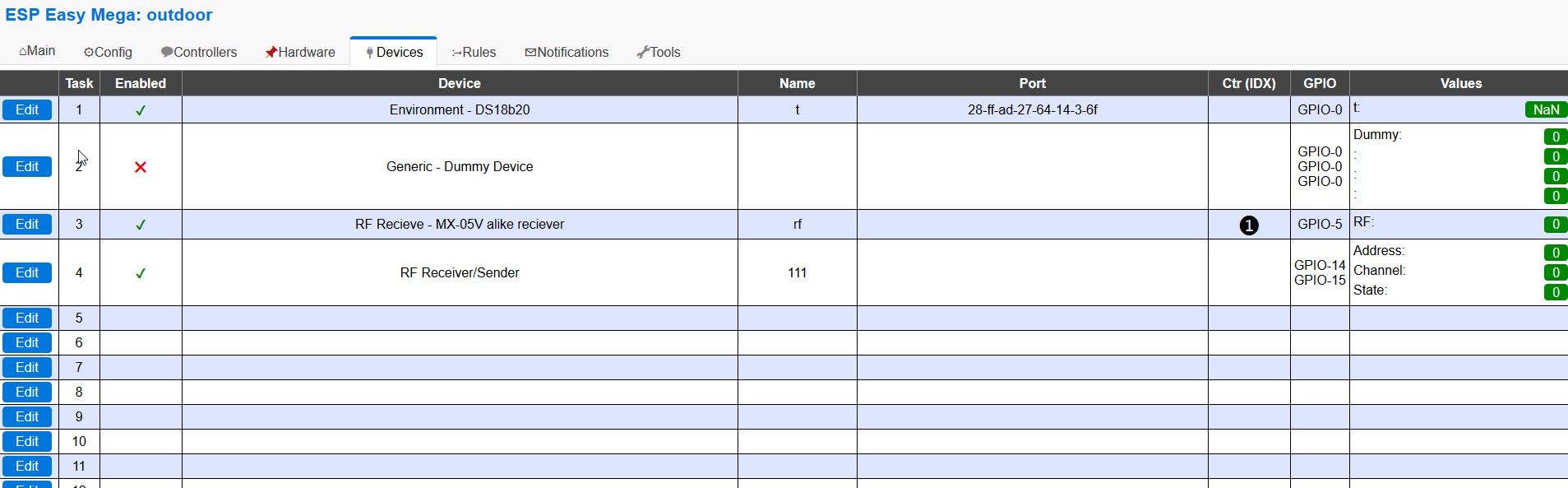
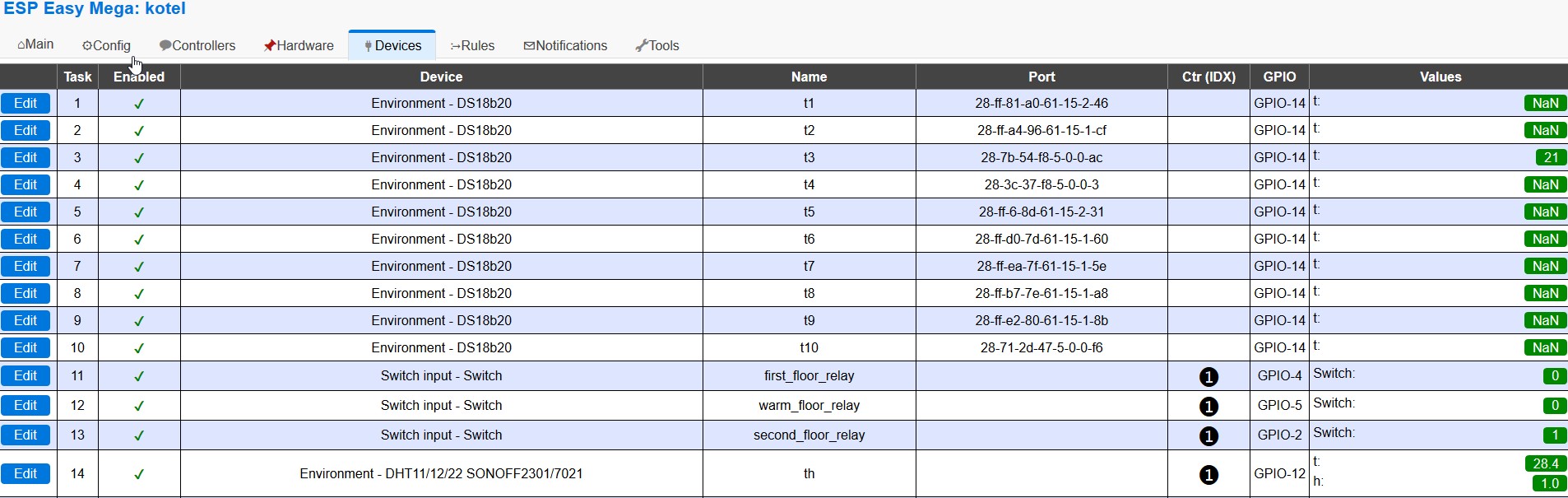
Once again! In the same time on two different ESP...
itProfi
on 7 Oct 2018
@itProfi after restart readings are always ok ?
uzi18
on 7 Oct 2018
Again..((
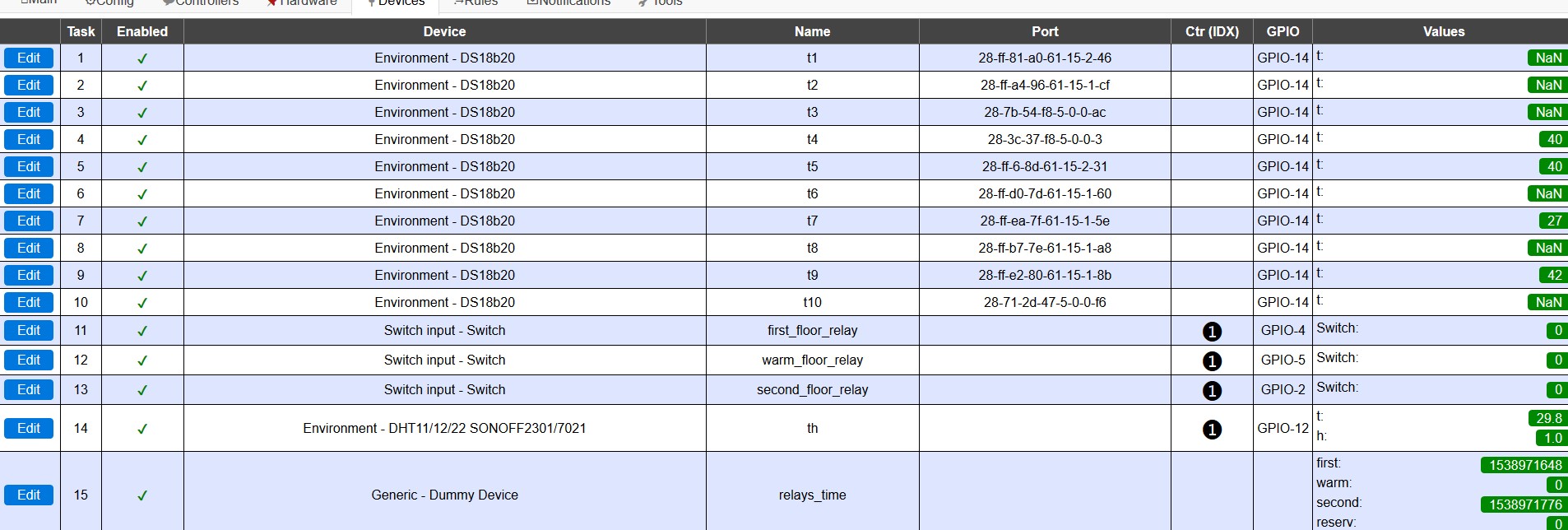
And after restart:
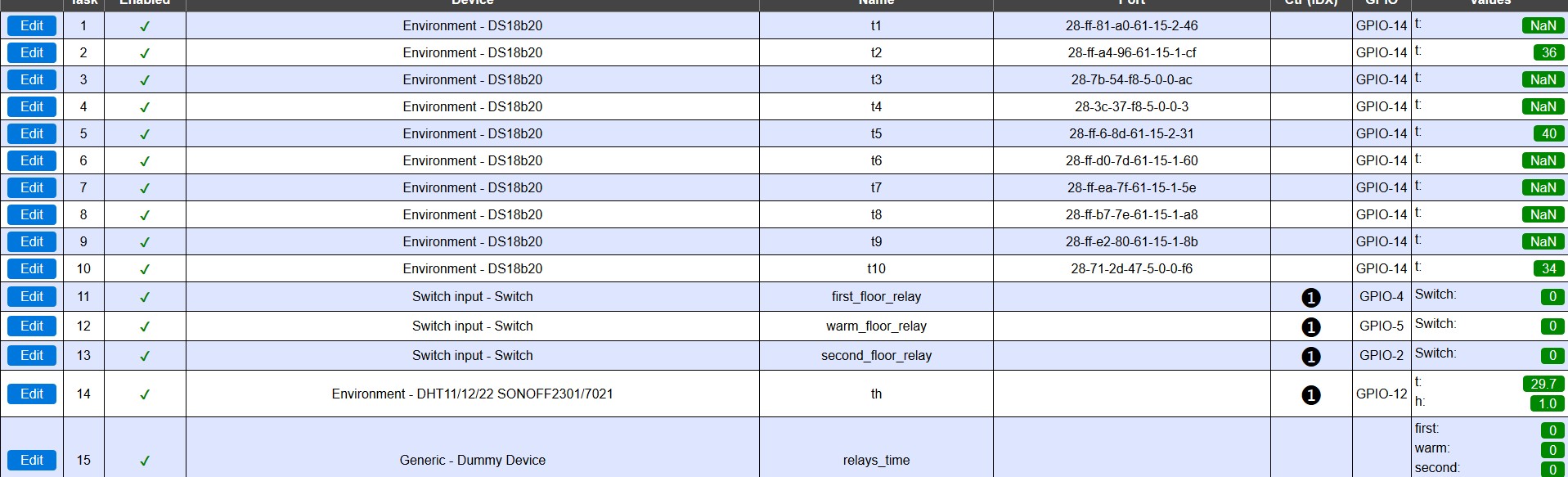

Only, when i first disable ds18b20, Submit button, then Enable sensor - work immediatly.
itProfi
on 8 Oct 2018
I used a standard box with a set of 2 DS18B20 sensors (data with 4K3 pull-up, power with 47uF Elco and 100nF C).
With release mega-20180322 they work perfect.
After upgrade to release ESPEasy_mega-20181001 up-to ESPEasy_mega-20181017
I see the following problems:
- GUI actions are often not accepted
-- 12 bit selection often not executed
-- Sometimes no sensor addresses shown - Many time NaN instead of temperature, or only NaN
-- Show temperature data on a local LCD to see empty/no presentation in case of NaN
If I combine both problems (GUI and NaN) then it looks to me a HW communication problem.
- Is ESPEasy nowadays too fast for the communication protocol?
- Removed Delay(), or Yield() statements?
- Is this a cause of the Hardware Watchdog interventions?
- Or is this a side-effect from a _P004_Dallas.ino modification?
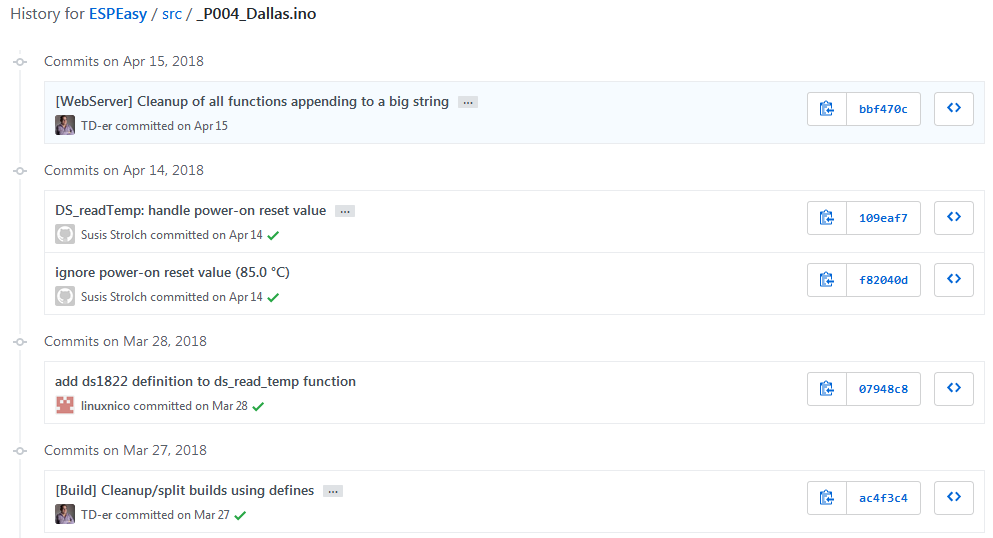
Domosapiens
on 20 Oct 2018
This question does not interest anyone except 3-5 people ...
itProfi
on 21 Oct 2018
Of course, I understand that this is an amateur community and no one owes anyone. Just one of the fundamental functions does not work :) The temperature sensor on the most common DS18B20 sensor in the world for 7-9 months .. But apparently, the authors of the project have their own priorities .. Personally, I have already refused for 18 of my sensors on DS18B20 in favor of wifi-iot.com. Although the functionality of the ESPEasy firmware is simply incomparable ... But alas .. (((
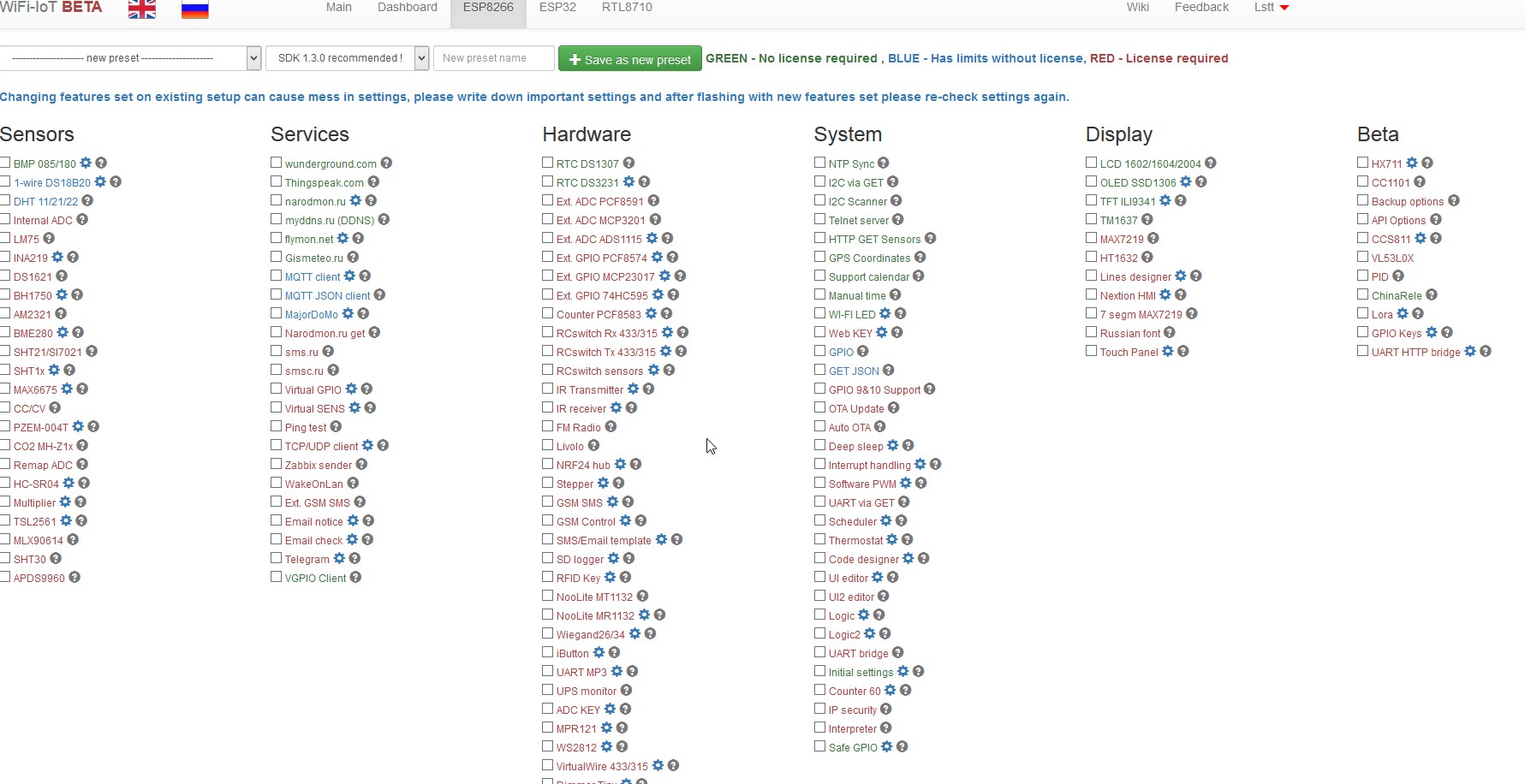
It's work! 36 days without reboot with my own 10 pcs ds18b20!
itProfi
on 21 Oct 2018
I have no problems with DS18B20, running different versions of ESPEasy from 20180804 to 20180910.
Heiend
on 21 Oct 2018
@itProfi As you may have noticed, the number of authors on this project is very limited.
For the past X months I have been just about the sole programmer with a number of pull requests from only a handful of contributors. (I do like all the help, so I am thankful for these)
The last few months were mainly about stability issues which affect a lot of users, so I have to choose.
Also I don't have the DS18B20 here installed on my breadboards, so that's also a deciding factor in what to choose.
Another point in deciding priority is working on the things I know and until now I never did anything with 1-wire, so it may take some time to get into it and time is one of the most limited resources.
TD-er
on 21 Oct 2018
@TD-er , the info from @Heiend leads to the conclusion that the cause is not a change in _P004_Dallas.ino.
I will install a unit with mega-20180910.
I think that this DS18B20 problem is symptom of the stability issues,
Hope this hint helps for the WatchDog hunt.
Domosapiens
on 21 Oct 2018
I just tested a DS18B20 with a 20181015 release (self compiled with stable plugin set plus WiFiMan plugin). Works fine. The sensor has just a 4k7 resistor between vcc and data, no capacitor.
Heiend
on 21 Oct 2018
I suggest to review HW connection. as described here https://github.com/letscontrolit/ESPEasy/issues/1723#issuecomment-420541077 I had this issue a number of times, always solved by eitehr shortening the wires or move it to different I/o pins. currently I run 4-5 DS18B20 on a single GPIO with up to 10m wire length.
also I had a number of faulty DS18B20, when connecting them, the whole BUS comms were dead. tried to connect one after the other until I identified the faulty one... same thing with too many sensors on one GPIO... removed one by one until it worked again...
hope this helps...

clumsy-stefan
on 21 Oct 2018
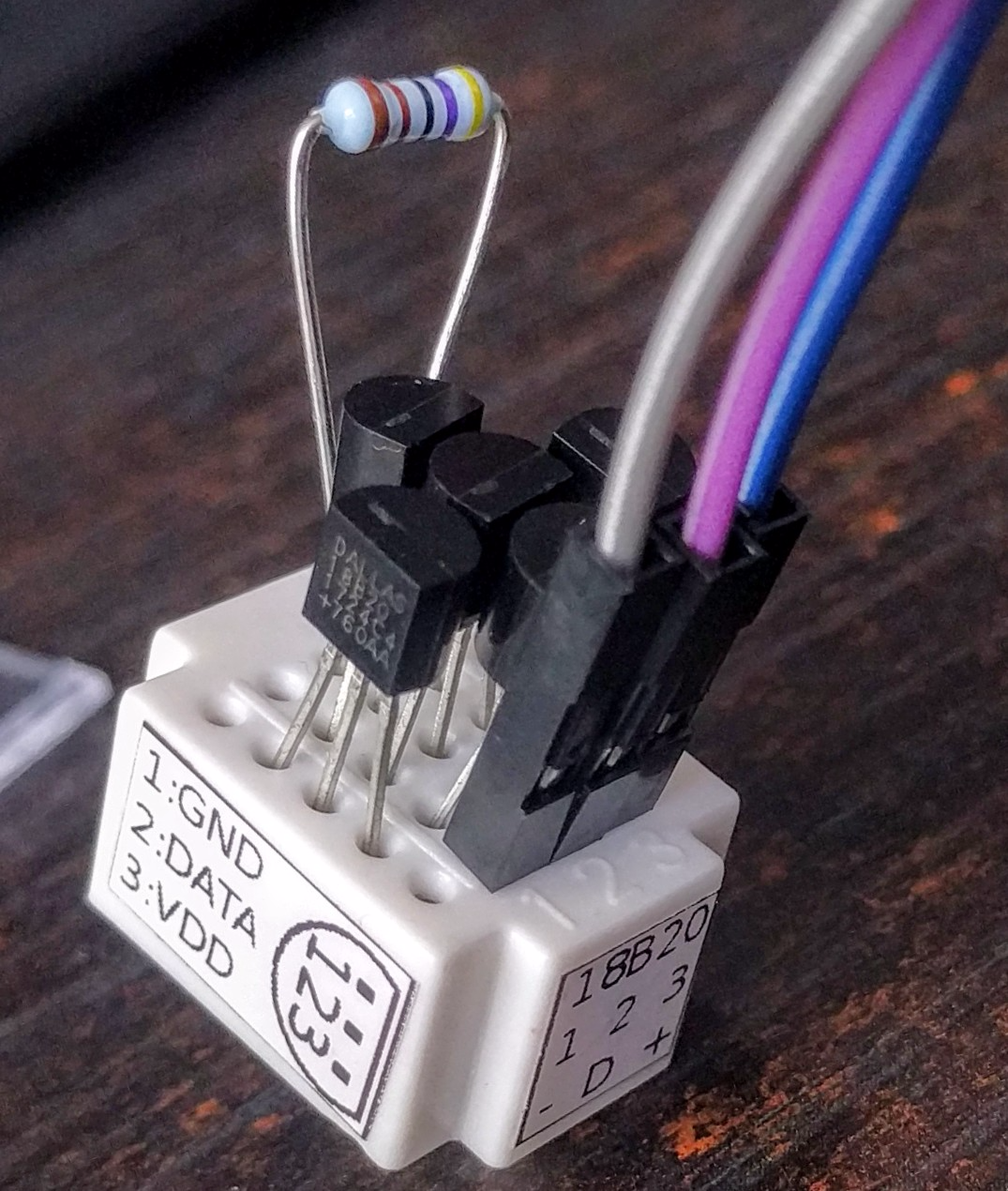
I just made a test board setup for these DS18B20 sensors.
3 sensors connected and the other 2 inserted as spare, so I won't loose them.
I will add them to my "test board" to see how stable the plugin is.
TD-er
on 21 Oct 2018
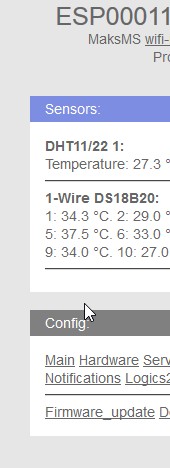
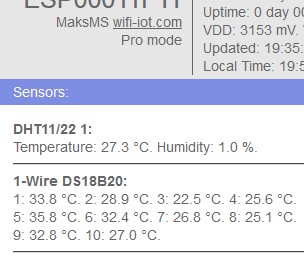
Wifi-iot - Sensors reads every 5 ! seconds! same hardware! not problems -
itProfi
on 21 Oct 2018
I trust that we will get the bus to be read properly. We have made much changes to how things are being handled (for the better, much better) and the deal is that the main loop is running much faster since we're now using the scheduler. Older versions could read 10 DS18B20 without any problem so it's a matter of getting the timing right. That being said, we appreciate your eagerness to push us to a fix. You're being noticed :)
Grovkillen
on 21 Oct 2018
@itProfi so what was wrong if now works?
uzi18
on 21 Oct 2018
@uzi18 Who say, that ESPEasy work? I say work absolutly stable on the same board another firmware - wifi-iot.com...
itProfi
on 22 Oct 2018
Wifi-iot - Sensors reads every 5 ! seconds! same hardware! not problems -
itProfi
on 22 Oct 2018
@uzi18 Who say ESPEasy work? Work stable firmware wifi-iot.com
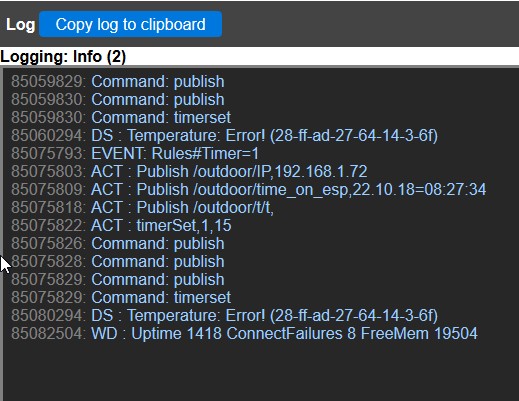
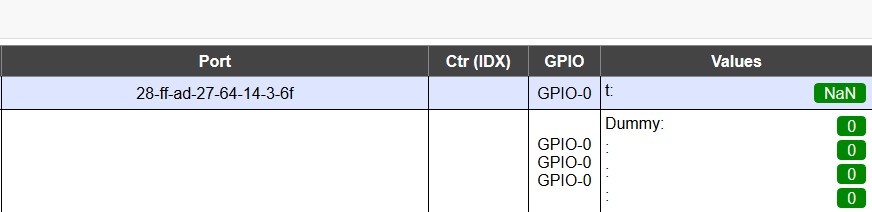
Another esp8266 with 1 DS18b20...
itProfi
on 22 Oct 2018
@itProfi:
Wifi-iot - Sensors reads every 5 ! seconds! same hardware! not problems -
don't take me wrong, but wifi-iot is a licenced software (you have to pay to use most of the plugins).
Here we do it for free and for hobby.
 giig1967g
on 22 Oct 2018
giig1967g
on 22 Oct 2018
@itProfi
Is there some option for you to see what wifi-iot is doing to make it work in your setup?
I installed 3 DS18B20 on the board I showed a few posts back.
Since the moment I added it, it has been running without a single missing update to my Domoticz.
I even mixed Domoticz MQTT and Domoticz HTTP per module and 2 are set to 12 bit, one is set to 9 bit.
The same module runs a OLED display and BME280 module.
TD-er
on 22 Oct 2018
@TD-er How often are your sensors polled? In my cases is 18-25 seconds for al of this...
itProfi
on 23 Oct 2018
@itProfi Every 10 seconds
TD-er
on 23 Oct 2018
@TD-er
The NAN problem is rather hidden:
- you can catch them in the Log by luck
- therefore my request #1820 for a Log filter
- see them on a local LCD as empty space (in the past as text NAN)
- not sure what rules do with NAN:
- do they trigger a rule?
- what if you subtract 2 sensors and one is the trigger and the other is NAN?
- i think NAN values are not send to Domoticz.
- Domoticz integrates graphs to 5min. values (a few lost updates are not seen)
- If you subtract 2 temperatures (with bias unequal temp.) I see in Domoticz the result flipping to 0 and then back to the difference.
I tried to make a NAN catcher with 2 sensors:
One sensor is checking the other for a value larger then 1 every 30 seconds.
If both are NAN, it could be that the rule is not triggered.
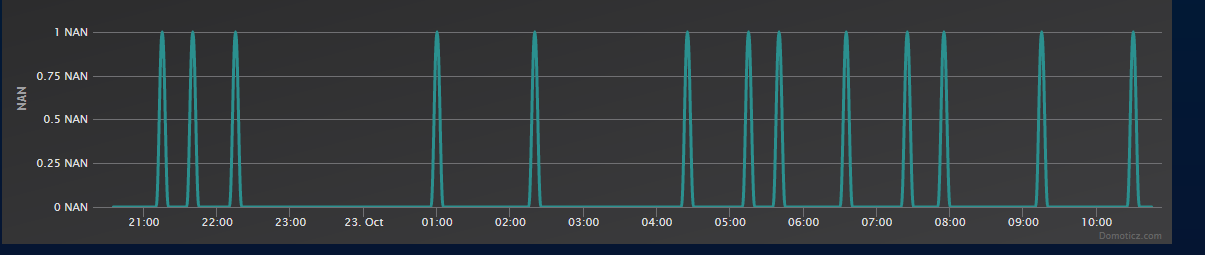
mega-20181017
Boot | Manual reboot (59)
Reset Reason | Hardware Watchdog
Domoticz HTTP
No MQTT !
Yes, I know, NAN can happen. But there are much more then before.
In the same time frame on another box with 2 sensors:
mega-20180328
No reboot
No NAN at all!
Hope this helps to narrow down to the problem.
Greetz !
Domosapiens
on 23 Oct 2018
The controllers may filter out NaN values indeed.
I will add an internal counter to see how often this occurs.
I am not sure if communication errors should be considered as something bad, as long as incorrect values are not affecting operation and they don't occur too often to make reading intervals unreliable.
So we must track such statistics I guess.
TD-er
on 23 Oct 2018
I am not sure if communication errors should be considered as something bad, as long as incorrect values are not affecting operation and they don't occur too often to make reading intervals unreliable.
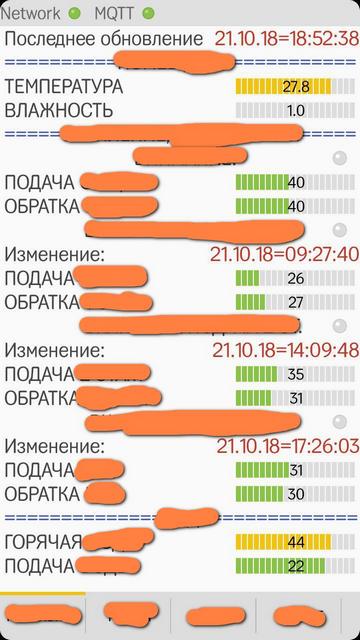
The fact is that if you use the values obtained for the current display, for example in the MQTT application, it can be very inconvenient. Instead of the temperature values, it is an empty space (according to MQTT and if the Retain option is enabled)
itProfi
on 23 Oct 2018
Agree.
So we should try to find out how often this happens and maybe add some settings to toggle filtering known incorrect values:
- Per controller
- per plugin
If disabled per plugin, the incorrect sampled value will never leave the plugin so to say.
TD-er
on 23 Oct 2018
Maybe the NaN could be converted into a integer if wanted?
So NaN behavior:
- Report
- Ignore
- Replace
Where replace could then be set to a preferred number and that number could then be used on receiving side. NaN-->99999 could then be acted upon, as an example.
Grovkillen
on 23 Oct 2018
@itProfi are You able to check if dallas problem gone with #1975 patch?
What firmware version you need?
uzi18
on 28 Oct 2018
@itProfi please update to today release, set in advenced options weblog to Debug and paste here about 50-100 lines from Log subpage, maybe we will find something.
@TD-er this is my log with 1 dallas.
847926: DS: SP: d2,1,55,0,7f,ff,55,28,78,OK
847933: DS : Temperature: 29.12 (28-ff-3e-2d-64-14-2-d3)
847936: EVENT: dallas#Temperature=29.12
847944: EVENT: dallas#Temperature=29.12 Processing time:8 milliSeconds
857926: DS: SP: ce,1,55,0,7f,ff,55,28,13,OK
857933: DS : Temperature: 28.87 (28-ff-3e-2d-64-14-2-d3)
857936: EVENT: dallas#Temperature=28.87
857943: EVENT: dallas#Temperature=28.87 Processing time:7 milliSeconds
867926: DS: SP: c9,1,55,0,7f,ff,55,28,c3,OK
867933: DS : Temperature: 28.56 (28-ff-3e-2d-64-14-2-d3)
867936: EVENT: dallas#Temperature=28.56
867946: EVENT: dallas#Temperature=28.56 Processing time:9 milliSeconds
@TD-er some hardware related issues provide also NaN.
101022 : DS: SP: 50,5,55,0,7f,ff,c,10,21,OK
101029 : DS   : Temperature: Error! (28-ff-3e-2d-64-14-2-d3)
communication is ok but ...
0x0550 == 85deg. (initial Value), it means sensor is not properly powered (power delivered only during reset signal).
in this test case - pullup resistor has no connection to +3V
uzi18
on 4 Nov 2018
@itProfi I need debug log not info log
uzi18
on 5 Nov 2018
 itProfi
on 5 Nov 2018
itProfi
on 5 Nov 2018
Dear friends! Are there any news ? :)
itProfi
on 11 Nov 2018
@itProfi do You have some sensors. in parasite mode?
uzi18
on 11 Nov 2018
No. I have 2 esp8266 board (one board have 10 pcs ds18b20 and second board have 1 pcs ds18b20). No parasite mode.

itProfi
on 12 Nov 2018
@itProfi please change 4k7 to 2k2 or add one more 4k7 in parallel - it will push more power to sensors.
From log I can say - you got communication errors and powering errors, please double check all connections.
We still not support for parasite mode (if VCC of sensor is not properly connected) so some of reading are with errors even if communication works ok sometimes - sensors are every time in reset state.
uzi18
on 12 Nov 2018
Hey guys,
started yesterday with espeasy and love it :-) Thanks for your great work!
I use NodeMCU and 7 DS18B20 in parasite mode on GPIO2 (D4). Resolution is set to 9Bit.
Version: ESP_Easy_mega-20181112_normal_ESP8266_4096
The setup works great, but after reboot, all resolutions were automatically set to 12 and most sensors show only NaN.
After manually changing back to 9Bit, the values are ok.
I've tried this two times, and the problem occured both times.
 Erd86
on 17 Nov 2018
Erd86
on 17 Nov 2018
@itProfi
Lower the resistor as uzi said - on top i'd prefer a capacitor 10...47 µF in parallel to Vcc-GND to the sensors... On longer lines add one cap at every sensor. These cablings are pretty nice antennas for collecting interferences.
ShardanX
on 17 Nov 2018
Ther friends! I close this issue, becase i thing, that NOT HARDWARE issue, because, as i write above other firmwares works absolutly no mistakes.
I try lower resistor, i try change Vcc to +5v..I thing thats code bug in this case (P004).
Thanks for all!
itProfi
on 18 Nov 2018
Are you sure the read errors do not occur on other firmware projects?
Or do they simply ignore NaN values, or perform a re-read when a read error occurs?
In other words, do they mask read errors?
Not saying it is a bad way of handling errors, if they do it like that, but it may skew the observed behavior and lead to incorrect conclusions.
TD-er
on 18 Nov 2018
I'm sure we can close issue, and open new with request for parasite mode support
I think they just detect parasite mode (because poor/bad connection) and use it for such scenario.
And scenario is... a little bit different, about communication and temperature conversion
uzi18
on 18 Nov 2018
Related issues
uzi18
·
5Comments
 ronnythomas
·
3Comments
TD-er
·
4Comments
ronnythomas
·
3Comments
TD-er
·
4Comments
 s0170071
·
3Comments
s0170071
·
3Comments
 MarceloProjetos
·
4Comments
MarceloProjetos
·
4Comments