Espeasy: Add sub-second delays support for timer
Summarize of the problem/feature request
I use ESP to trigger UDP events like INITIAL_PRESS, SHORT_RELEASE, LONG_RELEASE and HOLD. Hold event is implemented using timer, but as it's not possible to fire it more often than once in second, also HOLD event is sent only once a second. This is too big delay, if i want to use it to control brightness of lamp.
Expected behavior
It should be possible for timer to trigger with smaller delays, e.g. 100ms could be smallest unit.
Would be perfectly enough, if it's possible to specify in settings, how many milliseconds are behind 1 unit specified with timerSet command. E.g. in settings i set it to 200ms. Then if i use e.g. timerSet,1,2 it would trigger in 400ms.
ESP Easy version: v2.0-20180322
Rules or log data
on dev_switch1#btnState do
  gpio,2,[dev_switch1#btnState]
  TaskValueSet 2,1,[dummy#evtNr]+1

  if [dev_switch1#btnState] = 0.00
    TaskValueSet 2,2,0
    timerSet,1,1
    SendToUDP 10.99.0.12,514,btn=epsBtn1,evt=INITIAL_PRESS,seq=[dummy#evtNr]
  endif

  if [dev_switch1#btnState] = 1.00 AND [dummy#longPress]=0
    timerSet,1,0
    SendToUDP 10.99.0.12,514,btn=epsBtn1,evt=SHORT_RELEASED,seq=[dummy#evtNr]
  endif

  if [dev_switch1#btnState] = 1.00 AND [dummy#longPress]=1
    timerSet,1,0
    SendToUDP 10.99.0.12,514,btn=epsBtn1,evt=LONG_RELEASED,seq=[dummy#evtNr]
  endif

endon

on rules#timer=1 do
   timerSet,1,1
   TaskValueSet 2,1,[dummy#evtNr]+1
   TaskValueSet 2,2,1 // set it to long press

    SendToUDP 10.99.0.12,514,btn=epsBtn1,evt=HOLD,seq=[dummy#evtNr]
endon
 JohnMTu
All 9 comments
I am working on a complete redesign/rewrite on timers in ESPeasy.
See this project list: https://github.com/letscontrolit/ESPEasy/projects/4
It is indeed my intention to allow rules timers to run at sub-second precision.
First I have to move the rules timers to start using the new scheduler and then there is still a lot to be done to make sure other plugins and controllers are no longer blocking.
It is possible to run timers at a specified time with a margin of about 6 msec. (<1 msec even when no other plugins are active)
There are plugins which may take over 200 msec to run and for example the OLED frames plugin takes about 70 - 80 msec to run when no animations are used.
So the margin in timers may be in that order of magnitude.
To get back to your feature request, it is surely my intention to make this happen, although it will be very hard to make it a hard real-time deadline. There will be some tolerances, which may exceed 100 msec.
At present the tolerances will only be "positive", meaning the job will not start before the set timer expired, so maybe I can make the scheduler a bit more intelligent to give high priority jobs more priority ;)
 TD-er
on 27 Jul 2018
TD-er
on 27 Jul 2018
Thanks, nice to hear, there is improvement planned. Good job.
Atm For me it would be enogh to get to somewhere around 300-500ms. Exact timing is not important at all for my actual usecase.
Is it maybe easy just to change some constant in code and recompile? If so, i would maybe try to dig through build process to create own build with adapted timer.
JohnMTu
on 27 Jul 2018
I was planning to do some programming tomorrow and moving the rules to use the new Scheduler was one of the things I planned to do.
If that's ready, then it is very simple to add an extra timer_ms to the rules.
TD-er
on 27 Jul 2018
Different option is to add button plugin or extend switch/expanders plugins
with button detection, so no black magic in rules anymore.
pt., 27.07.2018, 10:16 użytkownik Gijs Noorlander notifications@github.com
napisał:
I was planning to do some programming tomorrow and moving the rules to use
the new Scheduler was one of the things I planned to do.
If that's ready, then it is very simple to add an extra timer_ms to the
rules.—
You are receiving this because you are subscribed to this thread.
Reply to this email directly, view it on GitHub
https://github.com/letscontrolit/ESPEasy/issues/1614#issuecomment-408347169,
or mute the thread
https://github.com/notifications/unsubscribe-auth/AAHOU1cQxZvxZ5e44EaN5B2I1iPXFoUjks5uKsxsgaJpZM4VjBQG
.
 uzi18
on 27 Jul 2018
uzi18
on 27 Jul 2018
I would like to do both.
When moving the rules timers to the new scheduler, it is also possible to add more of them (almost no limit)
And handling events will also be more flexible, since it can just be added to this scheduler as a job to do.
A button press should then fire a (user definable) event, which can be used to trigger a rule.
In the end, each plugin should be able to set an event name (and type?) which can trigger a rule.
TD-er
on 27 Jul 2018
ms delay/timer is also needed but i think 100ms resolution is enough and could be more reliable.
uzi18
on 27 Jul 2018
Sure. I tested using my scope to see how accurate I could time the longpulse_ms command and below 100 msec is only possible when non-blocking tasks were active.
Then it is possible to get it quite accurate, but most of the time the fluctuation was within 6 msec.
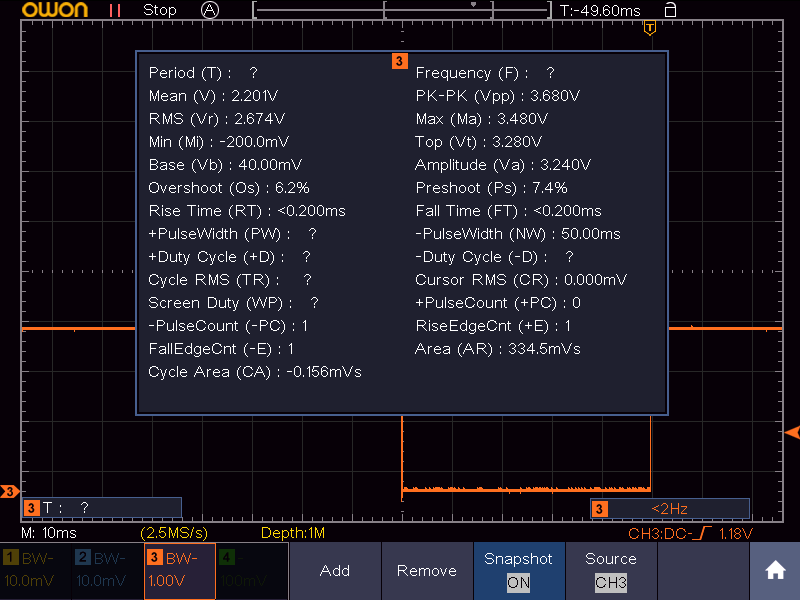
This was with the pulse-width set to 50 msec. :)
TD-er
on 27 Jul 2018
try add 2 controllers and 10 tasks =)
uzi18
on 27 Jul 2018
This was with Domoticz MQTT enabled and a BMP280 connected.
The idea is all jobs should be taking a little time as possible and then the overhead should be minimal.
Still tasks will have effect on eachother, especially when you try to run them at the same time.
TD-er
on 27 Jul 2018
Related issues
TD-er
·
98Comments
 pwassink
·
96Comments
pwassink
·
96Comments
 TheAppService
·
105Comments
TD-er
·
79Comments
TheAppService
·
105Comments
TD-er
·
79Comments
 Budman1758
·
90Comments
Budman1758
·
90Comments
Most helpful comment
I am working on a complete redesign/rewrite on timers in ESPeasy.
See this project list: https://github.com/letscontrolit/ESPEasy/projects/4
It is indeed my intention to allow rules timers to run at sub-second precision.
First I have to move the rules timers to start using the new scheduler and then there is still a lot to be done to make sure other plugins and controllers are no longer blocking.
It is possible to run timers at a specified time with a margin of about 6 msec. (<1 msec even when no other plugins are active)
There are plugins which may take over 200 msec to run and for example the OLED frames plugin takes about 70 - 80 msec to run when no animations are used.
So the margin in timers may be in that order of magnitude.
To get back to your feature request, it is surely my intention to make this happen, although it will be very hard to make it a hard real-time deadline. There will be some tolerances, which may exceed 100 msec.
At present the tolerances will only be "positive", meaning the job will not start before the set timer expired, so maybe I can make the scheduler a bit more intelligent to give high priority jobs more priority ;)