Espeasy: Adafruit 16-Channel 12-bit PWM / Servo Driver does not work
Hello,
can anyone confirm that the Adafruit PCA9685 board works?
I've connected several boards here, but get out no PWM signal
The PWM command arrives on the Wemos, but the 16CH board shows no reaction.


 micropet
All 26 comments
which command did you use?
for pca9685 you must use the pcapwm command or [taskname].pwm. In your case pca9685.pwn,1,2000 or pcapwm,1,2000
 workgroupengineering
on 9 Jun 2018
workgroupengineering
on 9 Jun 2018
I have used:
mosquitto_pub -t ESP-201/cmd -m 'pwm, 1,2220'
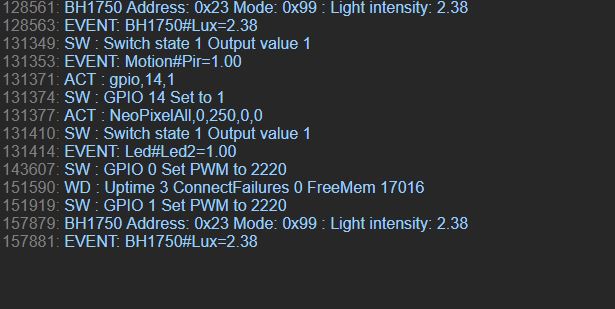
and get in the log:
17866: SW : GPIO 1 Set PWM to 2220
mosquitto_pub -t ESP-201/cmd -m 'pca9685.pwm,1,2200'
gives
PCA 0x40: GPIO 1
mosquitto_pub -t ESP-201/cmd -m 'pcapwm,0,220'
gives
204420: PCA 0x68: GPIO 0
mosquitto_pub -t ESP-201/cmd -m 'PCA9685.pwm,2,220'
gives
519425: PCA 0x40: GPIO 2
but no PWM.
I tried several Wemos D1 and 16 CH boards.
Nothing works
micropet
on 9 Jun 2018
What version of ESPeasy?
There have been some issues with commands recently.
Introduced after 20180522 and a quick fix (not a proper fix) at 20180606.
 TD-er
on 9 Jun 2018
TD-er
on 9 Jun 2018
Release mega-20180606
micropet
on 10 Jun 2018
hi @micropet ,
i have found the mistake. The port is not address of PCA9685 but offset from PCA9685 base address (0x40).
In your configuration the address you have configure is 0x68 (0x40 + 0x28 (40 dec)).
When i have some time a will do pr for fix this issue.
workgroupengineering
on 19 Jun 2018
That's great. I want to equip my ESPS with Led drivers and 50W LEDs.
micropet
on 19 Jun 2018
i published the pr #1520
workgroupengineering
on 20 Jun 2018
Does not work.
I tried:
mosquitto_pub -t ESP-201/cmd -m 'PCA9685.pwm 0,1000'
mosquitto_pub -t ESP-201/cmd -m 'pwm 0,1200'
and get:
27926: PCA 0x40: GPIO 0
32831: SW : GPIO 0 Set PWM to 1200
But the Leds are only off.
Now the BME280 also does not work:
336234: BMx280 : Unable to detect chip ID
336235: BMx280 : Unable to detect chip ID
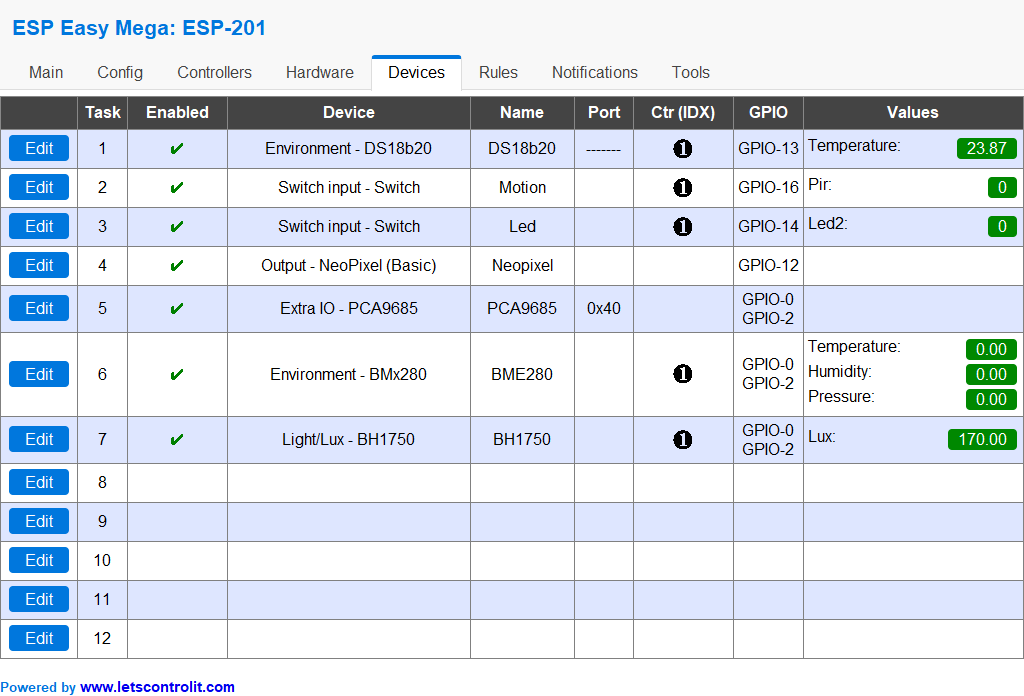
The I2CSCANNER Page now is sometimes empty.
micropet
on 20 Jun 2018
If the I2C scanner page also returns empty results, you may want to add pull-up resistors to both I2C lines.
4k7 or 10k between 3V3 and each of the I2C lines should help improve the signal quality.
TD-er
on 20 Jun 2018
I have 2x 10k on the 16 CH board and 2x 10k on the BME280 board.
The whole design works perfectly with simple Arduino programs.
micropet
on 20 Jun 2018
@workgroupengineering, have you ever tried the PCA9685 plugin?
If so, does it work for you?
micropet
on 21 Jun 2018
@micropet Yes, I tried. What MQTT controller do you use? Have you tried using an http command?
workgroupengineering
on 21 Jun 2018
I use mosquitto for all my ESPEasy devices. This works perfectly.
On the Device i have set openHAB MQTT Controller.
HTTP commands i have never used.
All devices are connected via MQTT. Likewise openHAB as my home automation system.
micropet
on 21 Jun 2018
I tried, but I have not found issue. Please, can you send screen of your openHAB controller config.
workgroupengineering
on 21 Jun 2018

micropet
on 21 Jun 2018
What is the exact syntax of the HTTP commands that work for you?
i tried:
http://192.168.0.201/control?cmd=pwm,0,1000
http://192.168.0.201/control?cmd=PCAPWM,0,1000
http://192.168.0.201/control?cmd=PCA9685.pwm,0,1000
Nothing works.
micropet
on 22 Jun 2018
This Programs works on all my Wemos with 16 CH Driver:
include
include
// called this way, it uses the default address 0x40
Adafruit_PWMServoDriver pwm = Adafruit_PWMServoDriver();
void setup() {
Serial.begin(115200);
Serial.println("16 channel PWM test!");
pwm.begin();
pwm.setPWMFreq(1600); // This is the maximum PWM frequency
// if you want to really speed stuff up, you can go into 'fast 400khz I2C' mode
// some i2c devices dont like this so much so if you're sharing the bus, watch
// out for this!
Wire.setClock(400000);
}
void loop() {
// Drive each PWM in a 'wave'
for (uint16_t i=0; i<4096; i += 8) {
for (uint8_t pwmnum=0; pwmnum < 16; pwmnum++) {
pwm.setPWM(pwmnum, 0, (i + (4096/16)*pwmnum) % 4096 );
}
ifdef ESP8266
yield(); // take a breather, required for ESP8266
endif
}
}
micropet
on 22 Jun 2018
First of all i explain the command you use:
pwm,0,1000Set wemos internal GPIO 0 pwm to1000pcapwm,0,1000Set first PCA9685 GPIO 0 pwm to 1000extra.pwm,0,1000Set GPIO 0 pwm to 1000 of PCA9685 named Extra
These commands are independent of interface you using (Serial,web,http,MQTT).
In your case you should use pca9685.pwm,0,1000
I checked the difference between the snippet you published and the plug-in code. The difference is the i2c bus frequency and the ALLCALL flag of the MODE 1 register.
Please, Try comment 'Wire.setClock(400000);' in your snippet .
Another check is to just connect only the PCA9685 and remove all other devices from the configuration.
Then check if i2cScan detects the PCA9685. If you find it then try to execute commands from the serial.
workgroupengineering
on 23 Jun 2018
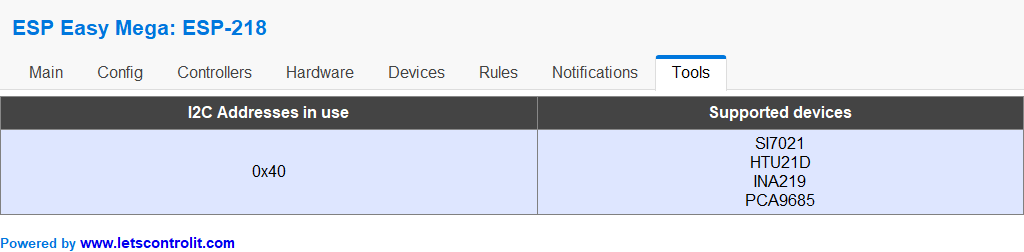
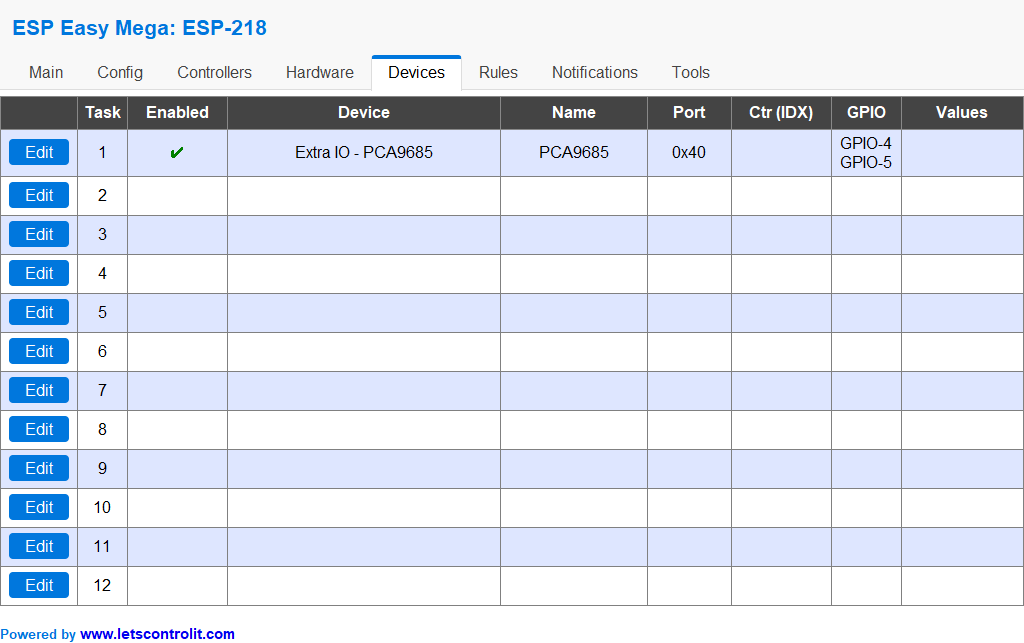
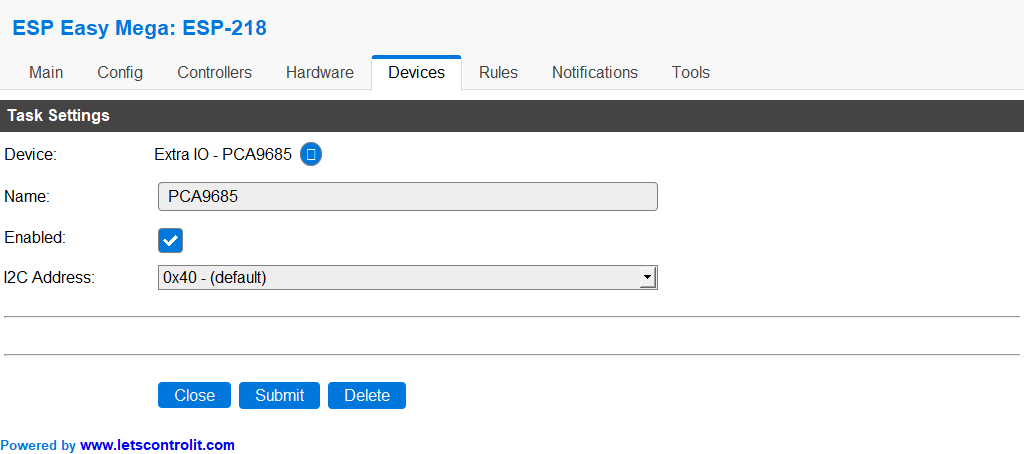
Here are the results on a Wemos D1 where only the 16 CH board is connected:
Without "Wire.setClock (400000);" the 16 CH board does not work anymore with the Arduino Sketch..
When I flash the ESPEasy Soft and enter the commands via the console, I get the following:
PCA9685.pwm,0,1000
or
pcapwm,0,1000
gives:
310021 : PCA 0x40: GPIO 0
{
"log": "0: GPIO 0",
"plugin": 22,
"pin": 0,
"mode": "PWM",
"state": 1000
}
But the Leds stay dark.
micropet
on 23 Jun 2018
I just connected a Led to GPIO12 and one to GPIO13.
I can dim the LEDs with pwm 12,150 and pwm 13,150.
Is this hardware PWM or software PWM?
micropet
on 23 Jun 2018
@workgroupengineering,
I just flashed the Wemos with the current sources of this afternoon. Now the 16 CH board works, great.
But I still have a little problem.
With pcapwm, 0.0, the LED driver switches the LED to 100% brightness.
pcapwm, 0.4095 turns off the LEDs.
This is a little unattractive for me.
Can you still add a parameter to invert the values?
And many thanks for your efforts.
micropet
on 24 Jun 2018
Yes, I will add this feature
workgroupengineering
on 25 Jun 2018
Fine !!
micropet
on 25 Jun 2018
Hello
Is there a way to send the channel information to a controller?
Similar to the solved with the P019.
Thus, each channel could receive and set status and status.
The parameter DimLED could also be added to dim LEDs. It would also be nice to have some time to dimming with this one.
So you could simulate different channels regardless of another LED's dimming and so a reasonably realistic sunrise and sunset.
greetings
André
 rieders
on 26 Jun 2018
rieders
on 26 Jun 2018
1+
micropet
on 26 Jun 2018
hi,
@micropet Please, close this issue and open new one with new feature request.
@rieders
Hello
Is there a way to send the channel information to a controller?
Similar to the solved with the P019.
Thus, each channel could receive and set status and status.
The parameter DimLED could also be added to dim LEDs. It would also be nice to have some time to dimming with this one.
So you could simulate different channels regardless of another LED's dimming and so a reasonably realistic sunrise and sunset.
PCF8574 is input/output
PCA9685 is only output, so the status depends only on the command you send, so I do not find this feature useful.
If you want, open new new feature request for discuss it .
workgroupengineering
on 28 Jun 2018
Related issues
 hamed-ta
·
5Comments
hamed-ta
·
5Comments
 wolverinevn
·
4Comments
wolverinevn
·
4Comments
 s0170071
·
3Comments
s0170071
·
3Comments
 ronnythomas
·
3Comments
ronnythomas
·
3Comments
 ghtester
·
3Comments
ghtester
·
3Comments
Most helpful comment
hi @micropet ,
i have found the mistake. The port is not address of PCA9685 but offset from PCA9685 base address (0x40).
In your configuration the address you have configure is 0x68 (0x40 + 0x28 (40 dec)).
When i have some time a will do pr for fix this issue.