Espeasy: Home Assistant MQTT Template
Currently, Home Assistant users use the Openhab MQTT template changing the Controller Subscribe and Publish.
As stated in home assistant documentation:
https://www.home-assistant.io/components/sensor.mqtt/#get-sensor-value-from-a-device-with-espeasy
Controller Subscribe: home/%sysname%/# _(instead of /%sysname%/#)_
Controller Publish: home/%sysname%/%tskname%/%valname% _(instead of /%sysname%/%tskname%/%valname%)_
Since this is such a simple change wouldn't be possible to add the template?
Besides naming is just this two lines from _C005.ino:
    case CPLUGIN_PROTOCOL_TEMPLATE:
      {
        event->String1 = F("/%sysname%/#");
        event->String2 = F("/%sysname%/%tskname%/%valname%");
        break;
      }
 ferazambuja
All 129 comments
It seems that openHAB now have gone from having a starting / to have %sysname% in as the base topic. I would suggest not to change to home/%sysname%/... for the openHAB controller. We need to find a more generic way of using the same MQTT core and only apply templates.
https://docs.openhab.org/addons/bindings/mqtt1/readme.html
So based on these new info I'd say we could at least change the default to %sysname%/%tskname%/%valname% (with no leading front slash).
 Grovkillen
on 25 Apr 2018
Grovkillen
on 25 Apr 2018
If OpenHAB and HomeAssistant are different, we could add a new controller, which will share a lot of code between them, but have their own implementation where they differ.
I guess that will be better than having some solution that's sub-optimal for both.
So please try to think of the best topic template for Home Assistant. (and for OpenHAB if the current one could be better)
 TD-er
on 25 Apr 2018
TD-er
on 25 Apr 2018
Related to this topic. Eclipse Smarthome (OpenHab is based on this) gets a shinny new MQTT stack while I'm writing these lines. Some research went into auto-discovery of (IoT) devices and published sensors/actuators. The need for devices to describe themselves and their capabilities is inherent.
To form some sort of standard (convention on top of MQTT), members of the OpenHab community collaborated with the creator of the Homie convention.
It would be very convenient if ESPeasy could speak Homie 3.x and allows easy point and click integration in future OpenHab versions.
 davidgraeff
on 25 Apr 2018
davidgraeff
on 25 Apr 2018
Sounds like a good idea.
I have to read it first to let the concept shape in my head.
The general idea to have a single description of the device you have to allow low level discovery is very good and I hope this description does not place too many limitations on the current (and future) ESPeasy design itself.
I will have a look into this.
Too bad you have to read documents like this. An audiobook/podcast would be great, since I'm behind the wheels about 10 - 15 hours/week ;)
TD-er
on 25 Apr 2018
Has there been any discussion/progress among the team in implementing one of these standards (Homie or HomeAssistant) within the ESPEasy Controller? @davidgraeff 's newest MQTT binding in openHAB is now live (https://community.openhab.org/t/mqtt-binding-version-2-4/53811/55) and supports auto-discovery of MQTT topics, as long as they're defined in the Homie/HomeAssistant format, as I understand it. It would be excellent if I could convert all of my sensors to use this, rather than having to manually build them into my openHAB configuration...
 bkpsu
on 31 Oct 2018
bkpsu
on 31 Oct 2018
Do you have an easy to read document on how such an auto-discovery should look like?
TD-er
on 31 Oct 2018
This is the official convention that I could find for Homie. There seems to be a lot of topics that need to be populated for auto-discovery, but, I did see an issue (https://github.com/homieiot/convention/issues/45) opened that aims to thin down those topics to a minimal set of required ones.
bkpsu
on 31 Oct 2018
It looks like well documented and elaborate.
Maybe a bit too elaborate at this moment to get an idea on where to start.
So can you give an example, for me to get a feeling about this discovery, to for instance let a switch input be discovered.
What should the node do and what settings can be derived and what should be given by the user?
TD-er
on 31 Oct 2018
A "in a nutshell" paragraph is missing, indeed.
- The homie version is required: "homie/device123/$version" → 3.0
- The device state is of interest: "homie/device123/$state" → ready (can be init, ready, sleeping, lost and some more)
- A device name is helpful: "homie/device123/$name" → My cool device
- We need an explit comma separated list of available nodes:
- "*homie/device123/$nodes" → thermostat
- We need an explit comma separated list of available properties:
- "*homie/device123/thermostat/$properties" → temperature
- Each property need a name and a type, eg:
- "homie/device123/thermostat/temperature/$name" = Temperature
- "homie/device123/thermostat/temperature/$type" = integer (can be integer, float, boolean, string, enum, color)
- The property topic itself contains the state.
- The command topic is "homie/device123/thermostat/temperature/set".
That's it!
davidgraeff
on 31 Oct 2018
@bkpsu Please refer to the web-page https://homieiot.github.io/ instead of the repository. The repo contains the latest/in-development specification, and is not meant to be used for implementers.
davidgraeff
on 31 Oct 2018
I currently start my home automation new from scratch. The "old" system was based on openHAB 1.8 and mosquitto MQTT server and a lot of openHAB code. I waited a wile until openHAB 2.x settled. Recently I discovered that with Version 2.4 openHAB committed to MQTT by integrating a MQTT server inside as a binding - great!. With some rules and a little mod of the MQTT-import plugin to receive true and false payloads It is possible to get sensors and actors running ESPEasy autodiscovered and working with no line of code, rules or conf files.
I'm planning to implement a controller plugin for homie and/or home assistant. For a "proof of concept" I did a test implementation which works out fine
Basically a rule is triggered every minute to propagate the features. In the future this should be sent only on mqtt connect with retained flag set but for a quick test this works.
on System#Boot do
 Debug 4
 timerSet,1,60
endon

On Rules#Timer=1 do  //Update autodiscover
 Publish homie/%sysname%/$homie,3.0.0
 Publish homie/%sysname%/$name,%sysname%
 Publish homie/%sysname%/$localip,%ip%
 Publish homie/%sysname%/$mac,%mac% // not working but not used by openhab
 Publish homie/%sysname%/$fw/name,ESP Easy Mega
 Publish homie/%sysname%/$fw/version,2.0.0
 Publish homie/%sysname%/$imlementation,ESP8266
 Publish homie/%sysname%/$stats/interval,90 // publish a longer interval helps to avoid timeout messages
 Publish homie/%sysname%/$nodes,Durchfluss,switchValve // to devices, one sensor one actor

 Publish homie/%sysname%/Durchfluss/$name,Durchflussrate
 Publish homie/%sysname%/Durchfluss/$type,Flowcounter
 Publish homie/%sysname%/Durchfluss/$properties,Count,Total,Time // sensor offers 3 values

 Publish homie/%sysname%/Durchfluss/Count/$name,Zaehler // Value 1
 Publish homie/%sysname%/Durchfluss/Count/$datatype,integer
 Publish homie/%sysname%/Durchfluss/Count/$unit,#
 Publish homie/%sysname%/Durchfluss/Total/$name,Gesamt // Value 2
 Publish homie/%sysname%/Durchfluss/Total/$datatype,integer
 Publish homie/%sysname%/Durchfluss/Total/$unit,#
 Publish homie/%sysname%/Durchfluss/Time/$name,Zeit // Value 3
 Publish homie/%sysname%/Durchfluss/Time/$unit,sec
 Publish homie/%sysname%/Durchfluss/Time/$datatype,integer

 Publish homie/%sysname%/switchValve/$name,Stellventil
 Publish homie/%sysname%/switchValve/$type,Valve
 Publish homie/%sysname%/switchValve/$properties,Valve
 Publish homie/%sysname%/switchValve/Valve/$name,Ventil
 Publish homie/%sysname%/switchValve/Valve/$settable,true // because it is an actor
 Publish homie/%sysname%/switchValve/Valve/$datatype,boolean // needs a modified flow2string function to convert true/false to 1/2

 Publish homie/%sysname%/$state,ready //all up and ready
 timerSet,1,60
endon

on Valve do // handle the incomming /set msg via MQTT import plugin
TaskValueSet 4,1,%eventvalue% // store value for debug reasons
if [switchValve#Valve]=1
  gpio,5,1
  Publish homie/%sysname%/switchValve/Valve,true // confirm back to homie
else
  gpio,5,0
  Publish homie/%sysname%/switchValve/Valve,false
endif
endon
after a few seconds a new thing is detected

So with the little mod of the source code to handle incomming true/false msgs by the MQTT import plugin the relais work. And it is usable after a few clicks.

Now I'm planning to implement this as a controller plugin to do most things automatically.
- in the CPLUGIN_INIT section the header should be sent. looping through all devices/tasks and values
- in the CPLUGIN_PROTOCOL_RECV section the %value%/set commands should be handeled and feedback sent automatically
- CPLUGIN_PROTOCOL_SEND should work as is with the "homie/%sysname%/%tskname%/%valname%" template
- messages for the $state topic should send "sleeping" (before falling asleep), "init" (during boot), "ready" and "alert" (when the user should handle errors) messages.
My "only" concern is adding/deleting devices as the retained flag should be set. There will be the need of a little bit of housekeeping to get rid of unused devices/nodes: With the above rules "New Thing" and "Thing updated" is working inside paper UI.
- openhab should delete all devices/nodes if they are not listed in the $nodes message any more (prefered)
- openhab mqtt server could accept homie/sysname/# messages with no payload to erase all messages
- or subscribe to the topic and loop through the retained messages an looking for outdated entries and deleting them (most complicated but certainly possible)
so with every reboot the header and node informations should be send/updated. If a user do modifications a reboot once he is happy is better than having openHAB handle "half backed" configurations with every change.
Finally I like the home assistant spec a little bit better because of less topics with JSON formatted payload but I first took a look on the homie as recomended by @davidgraeff
It cannot be stressed enough, to consider changing existing MQTT client devices to an MQTT convention like the mentioned Homie 3.x convention. That might not be possible in some cases though.
So my questions are:
- is something like this already in the works and I will waste my time?
- are there any traps I should consider - beside reading the wiki?
- anybody with the same demand for making ESPeasy homie and/or homeassistant compatible?
or is there a existing way I not found or thought of?
BTW: I'm totally new in contributing to an open source project and so please be partitioned.
 Christian-Me
on 27 Feb 2019
Christian-Me
on 27 Feb 2019
These look like they can be incorporated in an extension to the existing OpenHab controller.
How often do these messages have to be sent to the broker?
At least on a change I assume? We can create an event when settings are saved, then a rule can be triggered. Maybe later on also a command to publish the discovery texts, so it can also be queried from OpenHab I guess? Is there an existing format for?
Maybe we must also add something to the plugins themselves, or to a group of plugins.
And about the info you may need, just ask here and someone will answer :)
TD-er
on 27 Feb 2019
I would not extend the openHAB controller, which should only stay as a legacy controller (or be removed, depending on your backwards compatibility policies).
openHAB is now fully compliant to the MQTT Homie specification and for OH 2.5 we aim to be fully compatible to the HomeAssistant MQTT-Components specification.
A Homie convention controller and a HA-controller is fully sufficient.
I like the home assistant spec a little bit better because of less topics with JSON formatted payload
Homie tries to stay json free, that's true. But HA MQTT has the issue that they are not generic. They have specified a set of components and that's it. If your device has more features or does not fit into one of the components you are out of luck with their specification. That's why I think both conventions should be considered.
openhab should delete all devices/nodes if they are not listed in the $nodes message any more
That is actually happening. But the OH core does not remove a once-seen thing or channel, no matter what the binding requests. There is an issue on our issue tracker and also a PR. Might be fixed for OH 2.5.
davidgraeff
on 27 Feb 2019
I agree to start with a new "homie" controller and perhaps a extra homeassistant controller later when openHAB 2.5 is ready. Looking into homeassistants definition I agree that there are some limitations.
as tools like mqtt-forget are available and openhab ignores old $nodes there should be no problem with "housekeeping"
Christian-Me
on 27 Feb 2019
Hello
@davidgraeff is it possible that the build in mqtt server do not set the retain flag as expected? I spend a few hours poking around in the ESPeasy source to find out why mqttFX don't show the retained flag until i found that messages I send by mqttFX with the retained flag set also not show up as retained. Sending the same message to my "old" mosquitto server work as expected,
openHAB server:

mosquitto server:

Retained flag always set:

or doese the build in mqtt server recognizes the retained flag and "consumes" it?
Christian-Me
on 2 Mar 2019
The mqtt specification allows MQTT servers to ignore the "retained" flag if QoS is 0. Might that be your problem?
davidgraeff
on 2 Mar 2019
The question is if "retained" is nessesary for autodiscover? And if so should I use a higher QoS?
The homie convention says that most messages should be sent with retain flag set.
Or can I simply ignore that the retain flag here. I plan to send all the information only once after reboot.
Christian-Me
on 2 Mar 2019
Retained is not necessary and only affects how the server processes and stores messages. openHAB will use whatever message it receives.
davidgraeff
on 2 Mar 2019
Fine, than I‘ll not wasting my time on this any further.
Christian-Me
on 2 Mar 2019
I finished 1st draft version of the homie protocol/controller plugin (I called it c014 for now if it's ok)
currently the basic discovery for sensors is implemented. Incomming messages are the next task.
I ran into several issues:
- I added a new event called CPLUGIN_CONNECTED which should be called by the framework as soon a mqtt connection is established but only once.
- I used the MQTTpublish() function and found out later that this only puts the messages into the queue. processMQTTdelayQueue(); helps but I think there should/must be a better way. (handling all mqtt messages completely by the plugin itself directly to the pubsub lib(?)
- Did not found good way to find information about the expected units (°C, A, V ...) - Used the value Names for testing
- Don't know how to determine settable values for displays, motors, neopixels .... and to handle them (should be read and settable. i.e homie/esp_test/oled/line1 for sending and homie/esp_test/oled/line1/set for setting. can be done for each devive "hardcoded" but I'm looking for a general solution.
- Tried to mimize incomming traffic (every message gets echoed with the default publish / subcribe topic masks because the subscribe is a subset of the publish mask. Thought "homie/%sysname%/+/+/#" for subscription and "homie/%sysname%/%tskname%/%valname%" for sending whould help but still every message is echoed.
- for sending commands a scheme perhaps should be defined like "homie/%sysname%/cmd/%command%" should be defined. But again the complete echoed stream must be analysed. Pausing subscribing is not a solution because according to the conventions the messages should be flagged as retained.
- Handling of GPIOs like Relays or LEDs without rules to match the convention homie/%sysname%/_GPIO_Plugin_Name_/_GPIO_A_ for reading and /set for writes. Perhaps there should be a simple GPIO plugin that a Name can be associated to a GPIO (I learned that a plugin can handle 3 GPIOs)
- proper error handling is not done to make sure that finally all messages are sent because the queue is limited.
- and may more ...
Every comments and help welcome. I committed the plugin and some changes in the framework to my repro.
Christian-Me
on 4 Mar 2019
@Christian-Me : Could you please link your repo here (with the correct branch preselected)? That saves people time, who are willing to have a look.
I also suggest that you create small PRs for required framework changes separately and try to get those in first. Your repo/branch should at the end only contain your new controller.
davidgraeff
on 4 Mar 2019
For now it is only possible to have 1 MQTT controller active in ESPeasy.
So please be aware of that when testing yourself.
This is still a legacy decision and I plan on removing that limitation, but that needs a lot of code changes.
About the queue system used for controllers.
Each controller has its own delay queue system and I advice you have a short look at it to understand the idea behind it.
The main purpose for writing this queue is to make sure handling messages is not stalling other tasks on the ESP.
The MQTT controllers all use the same queue mechanism, which is also the simplest of all, since PubSub client is also using some buffer.
But still that buffer is limited, so the MQTT delay queue is making ESPeasy behave a lot faster with a lot less delays since the PubSubClient buffer is quite small.
For testing purposes you can increase the limits of those queues, but keep in mind they tend to use a lot of memory if they retain the entire MQTT message.
See also controller documentation about the available parameters for that buffer.
If you need to extend these, please let me know, so other controllers can benefit from it too.
But please don't try to do things different from other controllers, unless it is really needed.
I've been trying very hard to make the code for all controllers look as much the same as possible so we can move stuff into separate helpers instead of the severe code duplication it was in the past.
If you need to process the items in the queue, please have a look at the function scheduleNextMQTTdelayQueue and processMQTTdelayQueue.
As can be seen there, the scheduler is having an entry for handling the MQTT delay queue and processing incoming messages.
For example by calling setIntervalTimerOverride(TIMER_MQTT, 10); you will schedule to handle the MQTT flow at 10 msec from now. (don't set it to '0' or else you may cause lots of other scheduled tasks to become delayed)
By setting that timer, it will schedule a task to run runPeriodicalMQTT(), which does also call the loop() function of PubSubClient.
That loop function does the actual MQTT work.
So please try to use the existing MQTT functions as much as possible and if there's something missing, don't try to interact directly with PubSubClient, but try to find a way to use or extend the code in ESPeasy.
If you're trying to interact directly with PubSubClient, you may cause other issues when someone is running another setup than the one you've been testing with.
Also note that we're not using the same code as on the official PubSubClient Github.
I've made a few fixes myself and combined ideas of others that made pull requests to that repo. Currently there is a newer version than the one our lib is based on, but I didn't have time to check the differences.
TD-er
on 4 Mar 2019
you can find my 1st attempt here complete fork
or the controller plugin directly here: _C014.ino
The autodiscover information for my test setup are more than 20 topics (10-12 for the system information, 3 for every device and 2 for every value) so expanding the queue is not an option I think. I used the following code for each topic (example for the system name):
        // $name    Device → Controller Friendly name of the device Yes Yes
        tmppubname = pubname;
        tmppubname.replace(F("#"), "$name");
        log = F("C014: $name: ");
        log += Settings.Name;
        if (MQTTpublish(event->ControllerIndex, tmppubname.c_str(), Settings.Name, 1)) {addLog(LOG_LEVEL_INFO, log+" success!");}
            else addLog(LOG_LEVEL_ERROR, log+" ERROR!");
        processMQTTdelayQueue();
This works fine in most cases.
The plugin will need 4 new events
// new messages for autodiscover plugins (experimental)
#define CPLUGIN_CONNECTED                  52 // call after connected to mqtt server to publich device autodicover features
#define CPLUGIN_FALLING_ASLEEP             53 // call before going to sleep
#define CPLUGIN_AWAKE                      54 // call after wakeup (not sending autodicover feed)
#define CPLUGIN_SEND_STATS                 55 // call every interval loop
I'm not sure were to place the function calls.
CPLUGIN_CONNECTED should be called after the MQTT connection is established but not after deep sleep. Currently placed in bool MQTTCheck(int controller_idx)
CPLUGIN_AWAKE should be called instead after deep sleep
CPLUGIN_FALLING_ASLEEP should be called before deep sleep
CPLUGIN_SEND_STATS should be called periodical Currently placed inside void runEach30Seconds()
Christian-Me
on 5 Mar 2019
Well at first I would suggest to make a separate function to show the extra plugin functions needed.
Then we can call those later from the right points.
In the loop function in ESPEasy.ino there is a function which is called right before going to sleep.
You can add a call to this function from there.
Later we will move these calls to the right place if we know more about their use. (it is now still in flux)
About the queue for all those topics.
Do you think we can define a fixed set of topics? Then you could make some enum to keep these along with the values you try to send.
Then we only store an enum and the values and generate the whole strings from the queue again as soon as they are being read from the queue.
That's also being done in some other controller queues.
Only store what is needed to recreate the message when needed.
Edit:
I guess those topics are depending on the plugin, right?
Then the right place would eventually be to ask the plugin for the topic. But if it can be done via some helper to create generic topics for a type of sensor value, then we would have less code duplication.
So that means we should query the plugin for a specific type of value it is trying to send. (e.g. temp/humidity/distance/time/CO2/etc)
TD-er
on 5 Mar 2019
The plan is to create a controller plugin to be as close as possible to the homie convention without changing code inside plugins and as less as possible in the firmware. In the beginning I thought I could uses the INIT message but this is to early in the boot process.
- There are 11 messages to describe the Device Attributes (see point 5.2.1) marked as required
- There are 3 messages to describe the Node (See point 5.3.1) in ESPEasy terms a plugin / Sensor
- There are 7 (not required) for every value (for sensors) (5.4.1) and minimum 1 required for actors ( the settable attribute). I think unit and a friendly name is interesting too.
- Device Statistics (5.2.3) only Uptime is required as a heartbeat. Think for WIFI devices signal strength is good too.
- Device Behavior (5.2.2) is good to implement to aware of sleep states or low battery or sensor failures
All required messages for sensors can be acquired without any change in plugins leaving the unit open.
For actors a final solution is open. I think for test reasons i will "had code" LCD/OLED and simple NEOPixel because I have them here. Perhaps the two motor plugins too because I have both somewhere in my desk. Most interesting could be GPIOs for Relais. They can be handled by the controller directly catching incoming messages like homie/systemName/GPIO/Number/set 0 or 1 so no extra plugin necessary. Problem is how to determine when they should be in use. Perhaps if the set in the hardware tab to anything else than default or input. When set as input they can be estimated as buttons (homie/systeminfo/GPIO/Number without the settable flag set and handled by the controller.
Can you point me to an good example controller how a enum could be implemented?
Every topic acording to this scheme homie/%deviceName%/%nodeName%/%valueName%
ie. homie/sensorDevice1/BMP280/Temperature
Sending Values work "of the shelf" by sending to "homie/%sysname%/%tskname%/%valname%"
Receiving works by appending /set to set a value. i.e. "homie/motorDevice/motorController1/Speed/set". It is expected that the value will be set and sent back as a confirmation.
It would be good that beside the value name a value Unit can be selected currently °C Degree Celsius, °F Degree Fahrenheit, ° Degree, L Liter, gal Galon, V Volts, W Watt, A Ampere, % Percent, m Meter, ft Feet, Pa Pascal, psi PSI, # Count or Amount. I can thing about some more Hz, Ah, Wh, VA, LUX, ....
Perhaps a set of fixed Units define by a byte can be enough. If I look in openHAB there are many more units defined.
Hey this started looking like a quick hack and going to be a real task, Its the first time in contribute to an opensource project ...
Christian-Me
on 5 Mar 2019
@Christian-Me You should have a look at Homie 4. This is what unofficially a lot of controllers have implemented. Have a look at the home page example:
  homie / device123 / $homie → 3.0
  homie / device123 / $name → My device
  homie / device123 / $state → ready
  homie / device123 / $nodes → my_thermostat

  homie / device123 / my_thermostat / $name → My thermostat
  homie / device123 / my_thermostat / $properties → temperature

  homie / device123 / my_thermostat / temperature → 22
  homie / device123 / my_thermostat / temperature / $name → Temperature
  homie / device123 / my_thermostat / temperature / $unit → °C
  homie / device123 / my_thermostat / temperature / $datatype → integer
So it's 4 topics for the device, 2 per node, and 3-4 publishes for a property, including the value.
And one subscription per property on the "/set" topic. A LWT topic MUST be published for the $state. That's all.
- You need a hook for the system start.
- You don't necessarily need one for deep sleep, the last-will will mark the device offline or asleep.
- You need a hook for a value change
Don't care about the $stats part. That is obsolete and not really thought trough. And $settable is optional in Homie 4, defaulting to false.
davidgraeff
on 5 Mar 2019
That's fine but still too many to fill the queue when I think of my current project - my garden water supply system (flow counter, 2 valve coils, 1 motor valve, 2 pressure sensors, 1 relay for the pump, a LCD or OLED display).
I was not spending time with the deep sleep issue, I personal don't think ESPeasy is the best firmware for battery devices. Will check how to determine if the system start is caused by wakeup to avoid sending all info again every deep sleep cycle and wasting time and battery life.
Value changes are already working out of the box as I wrote in my first post, fine.
So next is to work on the actors, I think I go for the homie/systemName/gpio/pinX/set 0 or 1 if the default is set to low or high and as imput if it is set to input. For now without configurable Names. Here I will need the $settable flag, it worked with my proof of concept. The node showed up in openhab as a switch and via the MQTT import plugin I was able to handle the /set messages (after the true/false 1/0 mod)
$stats are already working good with uptime and quality. That's what I usually configure for all of my ESPs. $state ALERT can be a nice addon in the future when I think of the failed underwater sensors in my pond last year.
BTW were can I find Homie 4?
But still now idea of the best way to work with units.
Christian-Me
on 5 Mar 2019
I think having units defined in a plugin is also a great addition. Also because it could allow for some very simple transformations like C => F etc.
TD-er
on 5 Mar 2019
We will have to find a good standard for providing a units list for the plugins.
Just wondering how to pass values form the controller to a plugin. i.e LCD Screen
here is an example:
topic=homie/my_esp1/lcd/line1/set payload=send from openHAB or
topic=homie/my_esp1/5/line1/set payload=send from openHAB if the LCD is device Number 5.
so I have the name of the device given by the user (not the number, but this could be possible too as the human readable name can be given by the $name parameter) lcd and the value line1
What is the best function to call or task structure to modify?
As mentioned before I'm still looking for a good way to find out which "settable" values a plugin provides. I go through a few known plugins like LCD or OLED but this means to update the controller code for every new or modified plugin and makes the code of the controller bigger every time. Also I could not find a way to determine features of the plugin like if it's a 2 or 4 line LCD display.
For simple GPIO tasks (true/false) I use the GPIO,<pin>,<0/1> like if a command is received.
Christian-Me
on 12 Mar 2019
At this moment we only have the plugin MQTTimport, which can gather data from MQTT and present it just like a normal plugin would.
So that's currently limited to up-to 4 float values.
Right now, ESPeasy does not have an internal representation schema for other types than numerical values.
Also the need for writing stuff (in a command for example) to a display is a much requested feature.
It exists for the OLED plugin, but not the "Framed OLED" one. (LCD plugin also has its own write function)
But right now we don't have a command in the rules to fetch data from a broker, so that's also a bit limited.
One of the things I would like to add in the (near) future, is a specific "display controller", which can have a number of spots on a display to show information.
Each spot will then be marked with either a configurable "IDX" value (is already present for the plugin and is used by Domoticz but can be re-used here too) or a marker like how it is used in the rules to access a variable. (e.g. [bme#T] for the variable T in sensor called "bme", like the BME280)
This will make addressing displays much more uniform, since it is already a bit messy right now with the different displays. Also a display is not actually a plugin, since it is only accepting data, not producing data.
TD-er
on 12 Mar 2019
The mqtt specification allows MQTT servers to ignore the "retained" flag if QoS is 0. Might that be your problem?
The retain flag is still an issue. The pubsubclient lib used in ESPEasy does not support qos 1 or 2 (as far as i found out). When I send messages created by my controller plugin with qos 2 via mqttSpy all seams perfect in openHAB. Validation over the homie website says everything is should be ok!
When ESPEasy is sending the messages only once on boot with qos0 and retain=true the device will be detected in PaperUI. When you add it you will get an error that the /$homie message is missing (but it was send before). After second reboot it says online but will not recognize the nodes ... It worked in my "proof of concept" above because the rule was sending all messages every minute ...
In my tests I used homie 4.0.0.
I do not know how to get ESPEasy to send retained messages with qos above 0. So very disappointing.
It seams that openHAB need that the messages are "properly" send and retained for the multi step autodiscover process.
Any ideas? BTW mosquitto retains the messages even with qos=0. Perhaps I use mosquitto for now (does autodiscover works with an external broker too?)
Christian-Me
on 26 Mar 2019
moquette can be configured to also retain messages with qos=0 but I didn't do that as the current state is also standard conform.
I made also a few fixes just recently for the entire mqtt binding. The homeassistant autodiscovery also works with most devices now. This doesn't help with openHAB 2.4 of course.
davidgraeff
on 26 Mar 2019
I totally understand to stay on agreed standards that everybody can rely on.
So the only paths I currently see is either to get the pubsubclient to send qos>0 (1 or 2, what is actually needed for moquette?) or trying to use mosquitto for now. I do not want to go the homeassiastant path as to the limitations as @davidgraeff mentioned above.
A future way could be how openHAB and the build in mqtt broker/client handles the multi step registration process of a new thing. For me looking from the outside it looks like it relies on the fact that the broker retains the messages and publish them again every registration step (adding a thing, adding an item ...). Looking at the discussions of several pull requests for the pubsubclient trying to add qos>0 I even understand why this isn't implemented due to memory restrictions on microcontrollers or even on capable micros like the ESP running a complex firmware like ESPEasy.
Another Idea I just got a expansion of the homie standard. Instead of sending all information at once perhaps it is useful sending only basic information in the on boot (i.e. system name and list of device names) and sending detailed information of the device (with the list of values) and later the single values on request. This would keep the traffic caused by for already discovered items low.
Hope I cam find some time to test the mosquito solution soon.
Christian-Me
on 27 Mar 2019
later the single values on request
That's the point. MQTT is a pub/sub protocol, you can't request a value. In Homie we must therefore retain everything. There is also no start/finish signaling, so a controller must guess when it is allowed to actually create something out of the many received topics. Other conventions like HomeAssistant therefore have chosen json to package complex values into one topic, which is suboptimal, because they need to send the entire structure again if a single value changes.
For those reasons I think that MQTT is not the best solution for IoT and small embeddeds. I prefer CoAP (REST+subscriptions via UDP basically).
davidgraeff
on 27 Mar 2019
As controller and device is sending and receiving perhaps a simple two way communication could be possible. My idea for a multi step auto-discover can look like this:
On boot a system/ESP8266 (Name: homie-3) send for example this four messages:
homie/homie-3/$homie 3.0.0
homie/homie-3/$name homie-3
homie/homie-3/$nodes SYSTEM,mySystemInfo,myNeoPixel,myLCD,myCounter,myAnalogInput,myDummy
homie/homie-3/$state ready
So the controller/openHAB can recognize the system with all it's nodes/devices and can recognize changes on the devices if the known name change, appear or disappear.
then the controller can ask for the features of a node/device when necessary
by sending to homie/homie-3/$nodes/get topic the name or list of names for nodes the controller whats more information.
homie/homie-3/$nodes/get SYSTEM
Then the system can send the detailed information:
reply
homie/homie-3/SYSTEM/$name SYSTEM
homie/homie-3/SYSTEM/$properties cmd,gpio4,gpio5
and then the controller can ask for the values
homie/homie-3/SYSTEM/$properties/get cmd,gpio5 (as an example gpio4 is not relevant)
reply
homie/homie-3/SYSTEM/cmd/$name Command
homie/homie-3/SYSTEM/cmd/$settable true
homie/homie-3/SYSTEM/gpio5/$name gpio5
homie/homie-3/SYSTEM/gpio5/$settable true
if the query of every single value is to complicated or not suitable (like in openHAB) then perhaps like this
homie/homie-3/$nodes/getAll SYSTEM
reply
homie/homie-3/SYSTEM/$name SYSTEM
homie/homie-3/SYSTEM/cmd/$name Command
homie/homie-3/SYSTEM/cmd/$settable true
homie/homie-3/SYSTEM/gpio4/$name gpio4
homie/homie-3/SYSTEM/gpio5/$name gpio5
homie/homie-3/SYSTEM/gpio5/$settable true
homie/homie-3/SYSTEM/$properties cmd,gpio4,gpio5
There could be some "keywords" defined like <ALL> to get everything in one go instead by name or list of names. A simple checksum response could make sure that all messages are transferred as this should work on qos=0;
Only an idea, likely it is far to complicated and not fail proof! The goal is to reduce the permanent traffic, the amount of messages send in one go, the length of messages and to avoid outdated retained messages on the broker.
I agree with your opinion that MQTT is not the best but one reason that it is so popular especially in the maker/diy scene is that MQTT is so simple and so easy to debug and seams to be quite fail proof. But I'm not an expert in this field.
Christian-Me
on 27 Mar 2019
Please suggest homie changes in the homie repo. This repo is about espEasy.
Your idea replicates a client/server architecture but mqtt is a pub/sub one. You probably have heard of the saying, "if all you have is a hammer, everything looks like a nail". Mqtt might just not be the right tool/protocol for 1:1 connections.
There are enough coap libraries out there and openHAB will soon also support an mqtt like binding for coap.
one reason that it is so popular especially in the maker/diy scene is that MQTT is so simple
That's not the reason. Someone just started to use mqtt, probably because Eclipse has open source mqtt libraries for all kind of languages since ever. If there would be one good coap library on platform.io for Arduino and the esps and controllers like openHAB start to pick coap up, that trend might as well change.
davidgraeff
on 27 Mar 2019
I agree with all above.
To “nail it down” or “make a long story short”: Due to the fact that homie relies on retained messages and ESPeasy is (currently) not able to send retained messages in a standardized way (qos>0) it is currently not possible to fulfill the homie standard with ESPEasy. Right?
Every other attempt like “hammering” the data out every minute will be against accepted standards and what not.
So I will try to get ESPEasy to send qos>0, even for my private fun or forget all my time I spend up to now.
Christian-Me
on 27 Mar 2019
So I will try to get ESPEasy to send qos>0, even for my private fun or forget all my time I spend up to now.
You would "violate" the homie spec, but you can as well use mosquitto and retain messages with qos 0 with your devices. That's not an issue. If you find the right knob for moquette, you can also add a patch PR for openHAB to accept qos 0 retained messages.
davidgraeff
on 27 Mar 2019
Just to have it all clear, what exactly is the problem with QoS levels > 0?
And what has to be changed to support it and what are the most likely reasons it currently isn't supported?
I am not an expert on MQTT, but I do know the internals of ESPeasy, so I could maybe help thinking of a way how things can be done in ESPeasy if the "hammer" does not fit the nails we have here :)
TD-er
on 27 Mar 2019
@TD-er QoS has 3 Levels @davidgraeff please correct me if I'm wrong
0: fire and forget
1: make sure that the message arrives minimum once
2: make shure that a message arrives once (and only once)
The pubsubclient lib do only support sending with QoS 0 see limitations. This is done by purpose because to make QoS > 0 you have to store the topic and message and id to react on the confirmation send(or not) by the broker to resend in case of a problem. This eat up memory.
More Details here ...
retain means that the flaged message is stored by the broker and will be sent to every subscriber as soon as they subscribe to a topic. The Homie convention demand most messages for autodiscover as to be flagged as retained. This make sense that ESPEasy has to send them only once (during boot) and they can be found by a client later or as often as needed.
It seams like a broker not necessarily "needs" to store messages flagged as retained if the QoS flag is 0.
There are many discussions if qos for a local network based on TCP/IP needs QoS>0 because the undelaying TCP/IP should take care that a message arrives at the broker by itself.
I found pull requests for the pubsubclient to send messages with QoS 1 or 2 but not taking care of resending so not storing messages. That is in my opinion not "correct". Qos 0 is perfect for sensor data send in a permanent interval like ESPEasy (contoller can react if the messages don't arrive every timeframe), perhaps problematic if you only send data on changes (controller can have outdated data for a long time) and for actors (i.e. heater do not start because the ON message never arrived).
Homie takes care of the last scenario because the device needs a response for every /set message.
All fine and dandy so far. The problem here is that the broker have to store the autodiscover data for the discovery process. That's totally ok because the controller not necessarily is subscribed when the device send the data. A little bit difficult if a device goes offline for ever or even is renamed by the user. Then the old data stays on the broker and must be deleted by "hand" or with a tool like mqtt-forget. Therefor the disconnected message is defined in homie.
I personally don't get why a broker should not store a messages sent with retained flag even when it was sent with qos = 0, perhaps somebody can explain.
Christian-Me
on 27 Mar 2019
@davidgraeff can you please explain why you think I violate homie when I'm able to get ESPEasy to send the retained messages with QoS > 0? I worked with QoS=2 messages on the STM32 platform. It could be painful but is doable.
Christian-Me
on 27 Mar 2019
you violate if you send with qos=0 as home requires qos>0
davidgraeff
on 27 Mar 2019
OK, I think I get it with these QoS levels 0 and 1 (2 was already too complex for me at this time of day ;) )
I understand why PubSubClient does not want to be held responsible for resending when a QoS level 1 message was not acknowledged.
But if it is only needed for these autodiscovery things, then it is not really taking up much memory resources on the ESPeasy side.
So if we would patch PubSubClient to accept QoS=1, then we must also implement a way to communicate back to see the message was sent.
This means we must keep track of the message ID when sending a QoS=1 message, since PubSubClient should not have to.
Pseudo code:
- Send message to PubSubClient with QoS=1
- Receive message ID of that message and keep it until acknowledged.
- If PubSubClient receives an acknowledgement, it should report that including the ID of the acknowledgement.
- ESPeasy can remove the ID from the list of unacknowledged IDs
- Periodically check if there are unacknowledged IDs and resend them after some timeout.
- Receive ID of that resent message (marked "DUP")
The first way of communicating back such an acknowledgement could be some internal subscribe with a special acknowledge topic.
Also you must be able to mark messages with QoS and DUP flag, since you don't want PubSubClient to be responsible for it.
TD-er
on 28 Mar 2019
@TD-er, I totally agree on your post. This gives ESPEasy the possibility to notice that the send messages don't arrive @ the broker even if the underlying protocol still works. In my opinion a rare situation because the TCP stack will spit out errors before. ESPeasy can send "alarm" to $state but in this case it is more than unlikely that this will reach the broker. Then the LWT can kick in.
But what I don't get (perhaps it was too late yesterday and still too early now is @davidgraeff eplanation why openHAB 2.4 build in broker not keep messages with retained flag set if they ares sent with QoS 0 and doing so should "violate" the Homie convention)
Point 2.3 of the homie convention says:
QoS and retained messages
The nature of the Homie convention makes it safe about duplicate messages, so the recommended QoS for reliability is QoS 1. All messages MUST be sent as retained, UNLESS stated otherwise.
I read: QoS 1 is recommended (not a MUST) for reliability. Reliability is nice! But as explained /set messages from the controller has to be confirmed with a update of the value itself. All Data send by the device can be controlled by the heartbeat interval (if a message don't reach the controller the device can anyway don't do much about it except notifying locally)
The MQTT standard is quite clear (if I read it correctly and found the correct one (here 5.0 but also 3.1.1)
Point 3.3.1.3:
If the Server receives a PUBLISH packet with the RETAIN flag set to 1, and QoS 0 it SHOULD store the new QoS 0 message as the new retained message for that topic, but MAY choose to discard it at any time. If this happens there will be no retained message for that topic.
I read this that the Broker SHOULD store the Message. It is not necessary to sore them in non volatile memory and MAY forget the topic if needed (i.e. outdated or memory issues). In our case it makes sense (for me) that the Broker actually keeps the messages (especially homie/$xxx Messages) because this (can) help to serve the purpose of autodetection. I naively thought the Broker was build into openHAB not only to make it convenient for the end user but perhaps also to serve the special needs of openHAB.
Before messing around with the pubsubclient lib I will first try to go back working with an external broker like mosquitto. Patching around and inside openHAB is far above my capabilities and do not fit into my initial approach to do a "as clean as possible, well documented, close to standard and easy to update" start from scratch for my private home automation system (running for more than two years on openHAB 1.8 with many ESPs running mostly ESPEasy without major issues)
Christian-Me
on 28 Mar 2019
Little Update:
Downloaded recent mosquitto and run with default config (simply running the mosquitto.exe on my windows notebook) and added it to openHAB
Thing shows up after reboot of ESPEasy inside the Inbox

Step (which fails with the build in broker)

Add a Item/value:

Nice, default Naming is looking good
4.And you have a working Relais (old Wemos Relais Shield for testing purpose only)

5.Or showing a value from the System Info plugin as an example

For now I'm happy with that, especially form and "end User" perspective. (Still some task to do but I think the mqtt broker issue is solved for now)
Christian-Me
on 29 Mar 2019
BTW: Perhaps we should either rename the topic of the issue or raise a new one because this has nothing to do with Home Assistant any more.
Christian-Me
on 29 Mar 2019
After getting gpio working I whanted to try to implement other commands, like TaskValueSet or LCD.
I poked around some hours to get a good point to set values for the dummy device. As this plugin do not have a PLUGIN_WRITE function, I cannot find a good way access it`s values. I even cannot set the values of a dummy device via the openhab mqtt controller C005 via the cmd topic. I know I can do it calling a event,rule but I'm looking for a more elegant solution: sending values to the topic homie/%sysname%/dummyDevice/value1/set
I can add a PLUGIN_WRITE function but as it is working via HTTP there should be a better way.
Question: Is there a standard function handling all commands? Perhaps @TD-er has an idea.
EDIT: I implemented a PLUGIN_WRITE function in the dummy plugin and it's working fine. But this morning I woke up with a thought that this will only work with the first appearance of the dummy plugin. That's why TaskValueSet is not specific for the DUMMY plugin (perhaps). So is there a way to run PluginCall(PLUGIN_WRITE, ... ) for a specific Plugin either by Name or by the position in the task/device list?
Christian-Me
on 2 Apr 2019
TaskValueSet indeed needs to know the variable number and the plugin number.
Just for reference, see also the Read the Docs documentation
Some of the commands have been "disabled" from outside access. For example the factory reset command should not be open for anyone to access.
But I cannot think of a reason why TaskValueSet should not be made accessible for calls from outside.
One way could be to use the MQTT import to generate an event and then call TaskValueSet, but I can imagine it is a bit too much work to do it for numerous topics and values. And you may run out of resources like max rules size, max number of active plugins and perhaps some more.
Maybe @Grovkillen can think of some other ways to do it with the current feature set.
The main problem here is probably that ESPeasy was originally designed to be collecting data from a sensor, do stuff with it and get the data out.
So given that main design, there is no real proper way of getting the data in. MQTTimport is somewhat of a hack and also some controllers (Domoticz and OpenHAB) have some hooks to get some specific plugin related info from outside ESPeasy.
TD-er
on 2 Apr 2019
Thank you for the fast answer, sorry to answer so late, I was busy with many other things. And as usual when developing with one board I ran into some issues with openHAB yesterday which should not be ESPEasy related as MQTTSpy shows correct communication only that suddenly openHAB don't send any messages and not updating values. Have to solve this problem first
I welcome that critical commands should not be able to be sent via WIFI. I used the rules a lot in my current setup. Rules are on reason why I'm a big fan of ESPEasy. I try to handle many tasks locally on the ESP (like garden sprinkler systems) to make sure to stop the sprinkler even if WIFI is down). But my current approach is to avoid "workarounds" if possible.
No problems in finding plugin number, number of the device in the device list and variable number ... Currently if a /set message arrives (for example for a dummy device) all of this is somehow in the topic or can be found by name. So in the end the controller forms the command string i.e. TaskValueSet,6,2,12.5 (that's all done).
I only do not know to which is the best function to pass it to. I thought plugincall() would be best (like GPIO,5,1 or LCD,1,1,Test works already perfect) but later found that the dummy plugin do not have a "PLUGIN_WRITE" function. That´s understood because there should be multiple dummy devices available and with "PLUGIN_WRITE" this process stops after the first hit, or is there another reason why TaskValueSet cannot be send by i.e. the openHAB MQTT controller like it is possible via http - instead you should pass this via rules.
So I wrote a "PLUGIN_WRITE" function for the dummy plugin that itself checks if it is the correct instance in the list. If not it passes to the next. That is working fine.
I only implement special solutions like GPIO for use cases where controls are available in i.e. openHAB (Switch) without coding.
The homie/device/SYSTEM/cmd/set topic should be able to receive the same set of commands that can be sent to the ESP by http for any other use cases like gpio pulses or triggering events.
I only want to make sure that I followed the right path.
Christian-Me
on 3 Apr 2019
Well a command could have an extra parameter of course to indicate task ID.
The PLUGIN_WRITE should only return success = true when it was able to handle it.
If the command was not for that instance, it should not handle it and thus not return true.
So I don't think that's a route to ignore.
That leaves the hardest part still open, to think of a proper name for this command.
Maybe "DummyValueSet" ?
And if that's working fine, can you please create a pull request for it?
TD-er
on 3 Apr 2019
@TD-er "DummyValueSet" is an good Idea with the same parameter as TaskValueSet to make the modification of existing rules or other code as easy as possible. TaskValueSet will stay untouched and there will be no overlap or double call.
I would urgently like to create a pull request but I really don't have a clue how to that. I somehow messed up with my fork totally (think while trying to catch up with the latest changes via:
git fetch upstream
git pull upstream mega
First time I lost all my code and had to restore from backup (I think that caused this problem:
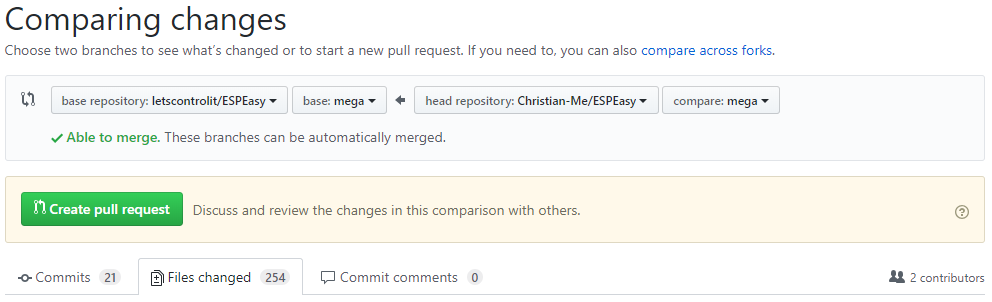
I read a lot about cherry picking but that's way above my capabilities.
Do you know a good way to fix this. Start with a new fork and copy paste back the changes I made?
Christian-Me
on 4 Apr 2019
I guess it's just a few files, so for now you can also zip them and share a link here.
For me, Git became clear when using GitKraken. I'm quite visual oriented in understanding concepts, and GitKraken made it very easy for me to work with Git.
I must make a quick how-to commit, since it's a returning question for ages (and I've been telling myself I should write such a how-to)
TD-er
on 4 Apr 2019
If you have a backup of your changes:
git reset --hard origin master
And for rebasing to the newest changes always do:
git pull origin -r (or upstream instead of origin in your case. Optionally with the destination branch like you did. The -r is important to first apply upstream and then your changes on top)
davidgraeff
on 4 Apr 2019
Thank you, will do the steps @davidgraeff suggested, and then hope that GitKraken can help a careless newbee like me ;)
Christian-Me
on 4 Apr 2019
What will be difference between taskvalueset and dummyvalueset?
 uzi18
on 4 Apr 2019
uzi18
on 4 Apr 2019
@uzi18 At this moment the taskvalueset command is not executed from within the plugin itself.
And the dummyvalueset would be. Right now I do not yet know what the pros and cons are for a separate command, but seeing code is always a lot more clear to me than lots of texts explaining things :)
Also does a (test) command give more flexibility to start poking around to test what's useful. For example if Home Assistant (to get a bit more back on topic) should give multiple values at once.
As soon as it is clear what's really needed, then we can also decide on changing permissions of the existing command or continue with the new command.
TD-er
on 4 Apr 2019
Finally pull request done ... had to delete and fork the repo again to solve the mess I created but now it should work. For testing with openHAB use version 2.5M because I ran into issues on 2.4 (not only with the homie controller even with the "old" openHAB mqtt controller). Inspecting via mqttSPY looks correct in my perspective.
@uzi18 I think it is better A) to avoid potential conflicts, B) to be more descriptive: Setting dummy values.
Christian-Me
on 5 Apr 2019
This is a very interesting topic, thank you for all the nuggets in here, someone should rename this Issue to “Homie - the new frontier for Open Source Home Automation (discovery & events per global standard)” or similar.
After running a home on ESP_Easy and Node-RED for the last 3 yrs, I am rebuilding a new one on NR - the topics of standardisation and configuration in one place only, is paramount in my designs. The reason? Maintaining without standards becomes a drag, family members asked me to implement for them too, thus without standards, it will become difficult to maintain the systems.
I documented my thinking here —> https://github.com/IoTPlay/iotp_dig2. A key to the design is to standardise the events ‘protocol’, independent of the controlling firmware, I use ESP_Easy, Shelly (unflashed - local mqtt mode), an RF Bridge, tapping into my alarm system, etc, then I use Apple HomeKit, Messenger, with it. This is now running life in my home.
Then I came to know about Homie. I am busy adapting my event protocol internally between all building blocks to Homie. This discussion threat helped me - specically the suggestions from @Christian-Me to segrate the mqtt events, grouped per self-registration, then events, etc.
Thank you.
Really looking forward to getting Homie enabled on ESP_Easy.
 IoTPlay
on 15 Apr 2019
IoTPlay
on 15 Apr 2019
@IoTPlay Nice to hear that. The pull request is in review and I currently performing some test "out in the wild" @ home, specially on my sprinkler, pond and water supply system (It`s finally spring in Berlin;). In the meantime perhaps you like to download from my repro and give it a try.
I make a new approach with openHAB 2.4 (2.5M & snapshots to be precise) together with node-red. I never got familiar with Xtend so I do all the logic in node-red and handling the "things" in openHAB. Not sure if I use Habpanel or the node-red dashboard as primary UI. Both have their advantages and disadvantages. Combining openHAB with node-red is cool to get the best out of both worlds.
Christian-Me
on 15 Apr 2019
@Christian-Me I just merged it.
I will change the name of the controller to add "[testing]".
Please add some new issue if you found something, even if you make a PR to fix it.
It is easier to track discussions in an issue.
TD-er
on 15 Apr 2019
@TD-er now that Homie Controller is merged I'd like to ask about the same thing that was asked in the issue. WIll there be a separate controller for Home Assitant?
On their page there are listed firmwares that support their MQTT Autodiscovery.
It would be awesome to have ESPEasy on that list. I'm sure it would make Your awesome firmware more popular.
If ESPEasy is already fully compatible with their autodiscovery it should be listed there.
 Misiu
on 18 Apr 2019
Misiu
on 18 Apr 2019
@Misiu I am not that familiar with Home Assistant, so I cannot tell you if it is now compliant with their auto discovery.
And if not compliant, I don't know what should be added to make it compliant.
TD-er
on 18 Apr 2019
@TD-er I have a fresh install of Home Assistant so I can give this a try.
I'm new to both ESPEasy and HA so I'll be grateful if more experienced users could give this a try. @ferazambuja?
Misiu
on 18 Apr 2019
I see we need to install HA and check how it works.
Any link for installation to existing raspbian?
uzi18
on 18 Apr 2019
@uzi18 try this guide: https://www.home-assistant.io/docs/installation/raspberry-pi/ Pozdrawiam :)
Misiu
on 18 Apr 2019
@Misiu the new controller is for communication via MQTT according to the Homie convention. Home Assistant should be able to work with Homie through a module according to this resource and here. So give it a try. Please be aware that you need a mqtt broker which retains messages even when send with QoS=0. Use mqqt-spy, MQTTfx or any other tool to check if all messages sent and stored successful (last message in the sequence is .../$nodes).
@TD-er Will do that. Currently I perform some "out in the wild" tests and after updating to a current openHAB 2.5 snapshot build communication seems quit stable. (only issue (still) is the amount of messages necessary for homie). I would like to make a little documentation. Can you please point me in the best direction. Think it is best to open a new issue for further discussion as soon this is done.
Christian-Me
on 23 Apr 2019
@Christian-Me Documentation is in the same repository as the rest of the code.
It is a Sphinx setup and we even documented how you can build the documentation yourself (to test your own doc updates)
TD-er
on 23 Apr 2019
Done and followed the instructions for building it with atom but could`t build the html version on windows:
PS C:\Users\cmeinert\Documents\GitHub\ESPEasy\docs> ./make.bat html
Running Sphinx v1.8.5
loading intersphinx inventory from https://docs.python.org/3/objects.inv...
building [mo]: targets for 0 po files that are out of date
building [html]: targets for 175 source files that are out of date

updating environment: 175 added, 0 changed, 0 removed
reading sources... [100%] index
C:\Users\cmeinert\Documents\GitHub\ESPEasy\docs\source\Plugin\P003_LJ12A3.rst:74: WARNING: Title level inconsistent:

Task settings
~~~~~~~~~~~~~
looking for now-outdated files... none found
pickling environment... done
checking consistency... done
preparing documents... done
writing output... [ 12%] Plugin/P000_Buzzer_RTTTL
Encoding error:
'charmap' codec can't decode byte 0x81 in position 3: character maps to <undefined>
The full traceback has been saved in c:\users\cmeinert\appdata\local\temp\sphinx-err-kg9qkk.log, if you want to report the issue to the developers.
any Ideas? Same problem when re downloaded the recent unmodified docs folder.
Christian-Me
on 27 Apr 2019
Looks like there may be a Unicode character in there?
TD-er
on 28 Apr 2019
I think something is going wrong with the image tags: If I delete the image tag
.. image:: P000_Buzzer_RTTTL_1.jpg
the error pops up in the next Page with image tags (P000_Level_converter.rst). And if I delete the image tags there the next file with image tags throw an error...
Christian-Me
on 28 Apr 2019
Could be an issue with the paths. As far as I know, the docs build fine on the online build server. (running Linux)
TD-er
on 28 Apr 2019
platform runs with python 2.7 and Sphinx demands 3.5+. So I tried to run the script outside atom from the command prompt with python 3.7 but with the same result. Now I`m lost.
Christian-Me
on 29 Apr 2019
I'm not around a computer the coming days, so it may take a few days until I can look at what's wrong.
TD-er
on 29 Apr 2019
No Problems & no hurry! Have a nice time.
Christian-Me
on 30 Apr 2019
I've set up a Linux VM and here the documents are build fine. So there is a problem in my configuration on windows or in general on windows machines.
Christian-Me
on 2 May 2019
Hello everybody.
That's a great thing.
I activated the Homie MQTT (Version 4.0.0 dev) controller on a Wemos D1 (release mega-20190511) and the Thing "MQTT Broker" in Openhab 2.5.0.
After a reboot of the Wemos the device (ESP-201) was immediately in the inbox and could be taken over.
There are also a lot of data sent via MQTT but unfortunately not the temperature values of the BME280 and the DS1820 sensor.
Should that work?
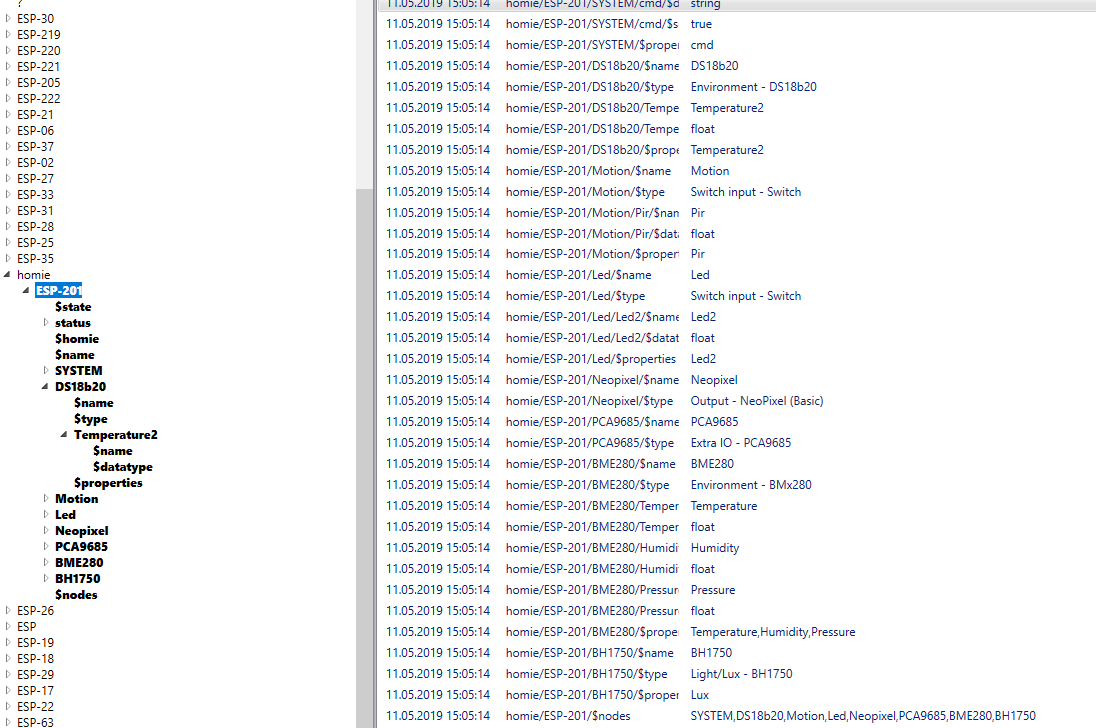
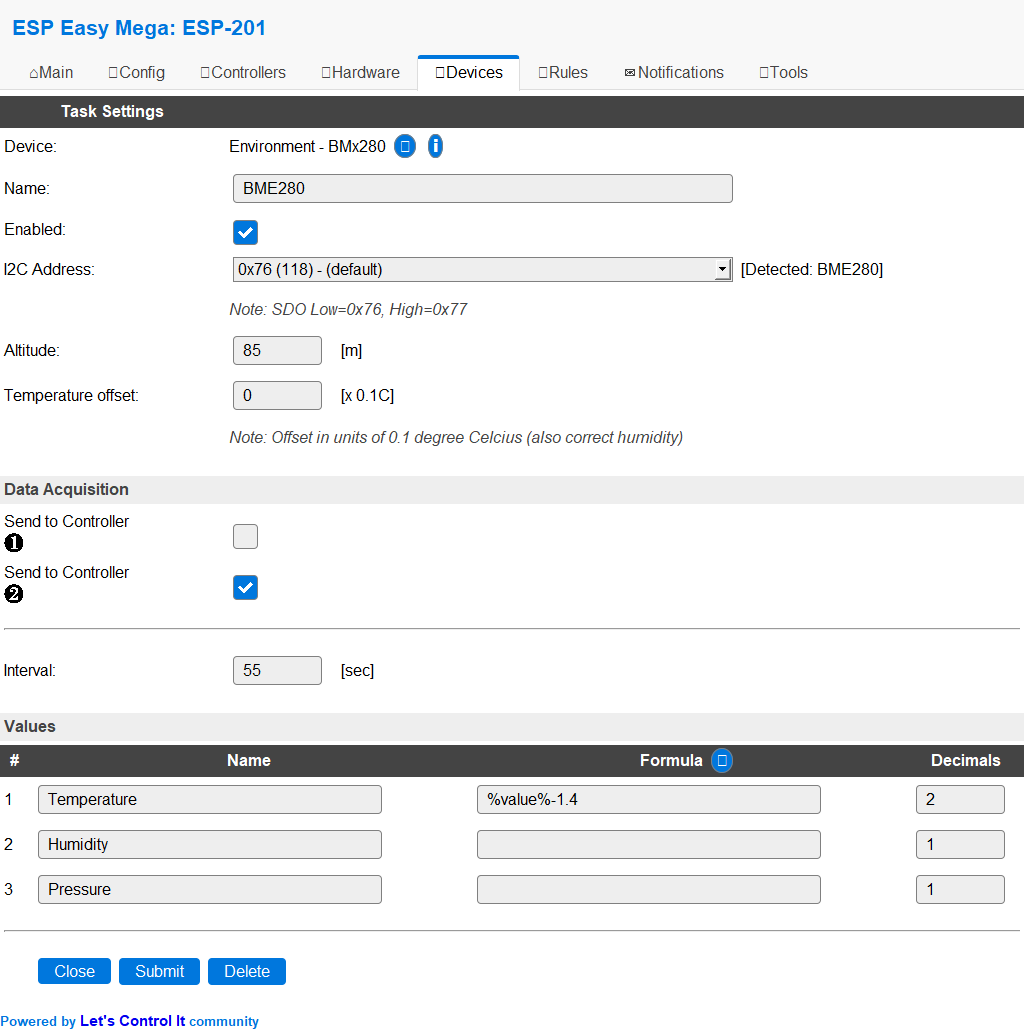
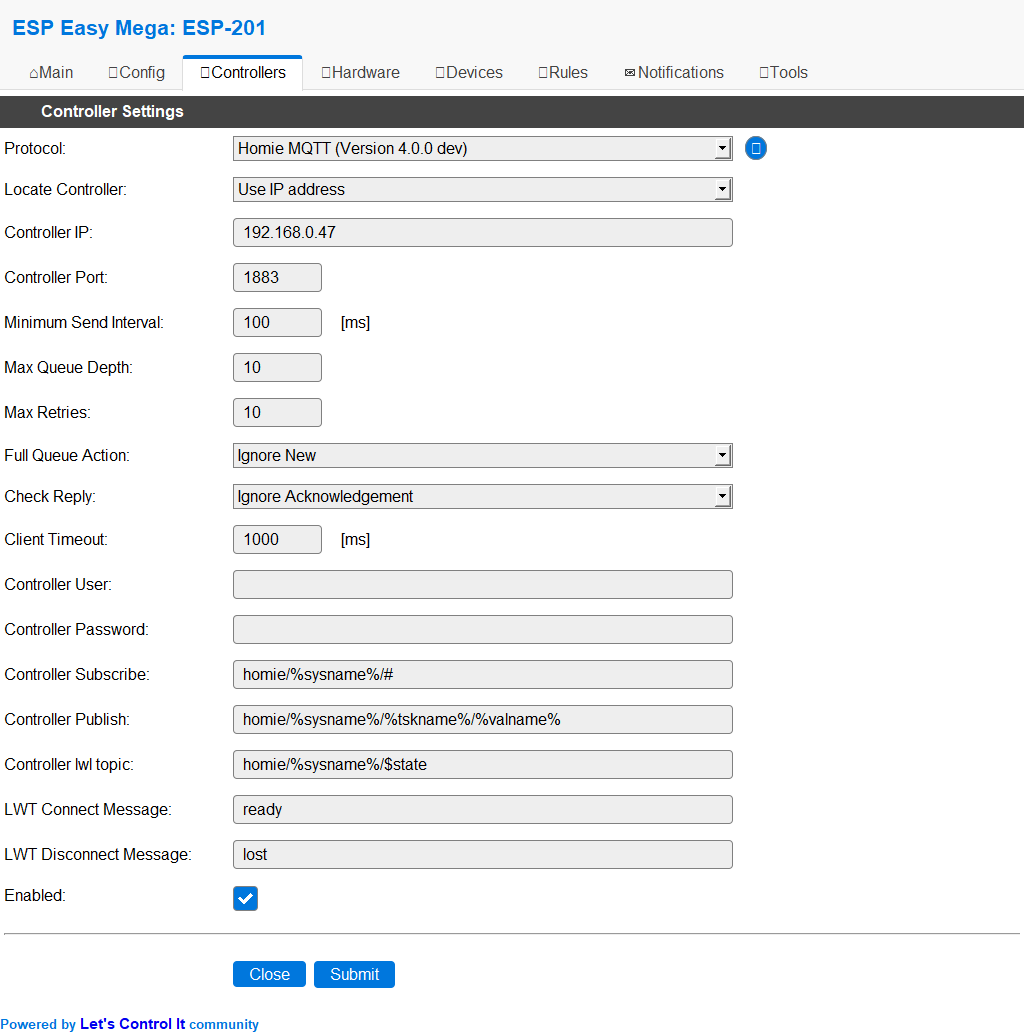
 micropet
on 11 May 2019
micropet
on 11 May 2019
Hi, @micropet Sorry I haven`t read your message. I'm lost in too many notifications.
As I see you have a lot of devices used and two controllers. Perhaps you start first with only the System Device for a test. (see Documentation)
Minimum the %state massage should be sent every 30 seconds.
C014 : $stats information sent with no errors! (1 messages)
The log file should give you a message when a value is sent if the log level is set to debug:
C014 : Sent to homie/ESP_Easy/System_Info/uptime 2.00
As I know espeasy stops sending value when there is not enough memory. I ran into this problem before.
Christian-Me
on 3 Jul 2019
There has been an update of the Arduino JSON library, which has been merged into ESPeasy very recently (last few days).
Maybe that library update does also help in reduction of resources used?
TD-er
on 4 Jul 2019
@ Christian-Me I know that and overlook also some notifications.
Thank you both. Meanwhile, it is running, but I have not had time for further attempts.
@ TD-he I have not heard anything from you for a couple of months now.
Is it still going on with ESPEasy? Or are you doing something else now?
Greetings Peter
micropet
on 4 Jul 2019
@micropet I've not been that visible here indeed.
But I'm still very active in the background and ESPeasy is absolutely not forgotten.
As you may know, I have started my own business and for that I use ESPeasy as a tool in some prototyping assignments.
For example:
- CO2 tracker to record CO2 concentration (and other units of measure) and log them to flash to upload them to a database incl. position (GPS plugin and Cache controller written for it and more to come)
- Delsbo Electric event -> World record attempt for most energy efficient transport by rails. I made the measurement equipment for it (AccuEnergy plugin written for it and using the Cache Controller)
- For another use case scenario, I am working on some new controller to overcome the limitations of WiFi (range and power consumption)
- For education I am working on an integration of data to cloud platforms, which will in the end also end up in the ESPeasy repository.
Just to name a few things where ESPeasy and my (paid) assignments overlap.
So for sure ESPeasy is still very active and alive.
Also I spent yesterday the whole day (12+ hours) on the issue regarding WD reboots and WiFi reconnects and I am at least pleased to know that I have a very good reproducible setup now to trigger the WD reboots and am still narrowing down the root cause.
I think I can now make a sketch of about 100 lines of code which do reproduce the WD reboots.
For this I also added a few PR's yesterday, with one which appeared to be very useful in debugging.
It does store the last executed item of the scheduler and shows it in the system info page.
That alone already helped me fix 2 separate issues yesterday :)
TL;DR;
Nope still going strong, only not as many nightly builds as before.
That also gives me more peace of mind to process reported issues, or else you have to keep track of 10's of reported issues which may or may not be related.
TD-er
on 4 Jul 2019
@TD-er BTW Broadcasts (subscribing to home/$broadcast) and (because it is possible) a replacement of the MQTT import plugin are working (but I still do some tests before I will send a PR). As I see it it comes without any additional resources necessary. By the use of the combination of the homie controller and the home receiver. The receiver plugin is used to do the definition of the topics and values where the controller handles the incoming messages, updating the uservar and triggers an event. It uses the already established system MQTT instance. As I see it subscribing to additional topics do not need resources because only the MQTT server is informed that the client like to receive messages matching an additional topic.
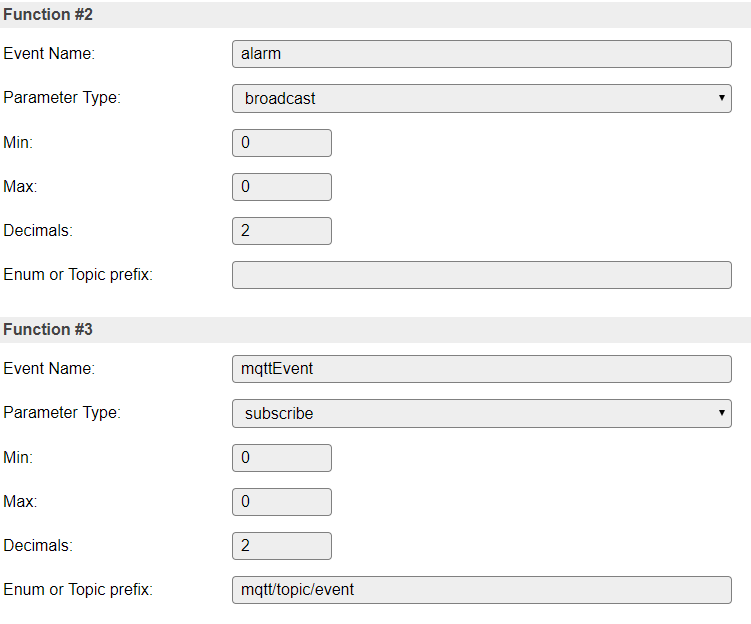
68876 : EVENT: MQTT#Connected
68979 : C014 : autodiscover information of 4 Devices and 3 Nodes sent with no errors! (21 messages)
68990 : P086 : broadcast topic: homie/$broadcast/alarm subscribed.
68994 : P086 : subscribe topic: mqtt/topic/event subscribed.
16727 : C014 : MQTT broadcast received: homie/$broadcast/alarm payload: 1
16734 : C014 : deviceNr:0 valueNr:0 valueType:7 Event: alarm,1
16746 : EVENT: alarm,1
118763 : C014 : MQTT subscibtion property: mqtt/topic/event value:mqttEvent set to: 123.00
118764 : C014 : deviceNr:0 valueNr:0 valueType:7 Event: mqttEvent,123
118849 : EVENT: mqttEvent,123
I had to set up a new notebook due to hardware problems so it will take a while until I have my environment back fully operational.
The WD problem make me afraid to pull all recent changes because everything works flawlessly on my side (more than 30 commits behind)
Christian-Me
on 5 Jul 2019
@ TD-er
Fine, that you are still active. Sure, you also have to earn money for your family.
But without you, the project will continue slowly.
But you and the other project members have already achieved a lot. For me, the ESPs are running for months without big problems.
Only every 6 to 10 weeks , an ESP lose contact with the WLAN.
He must then be restarted.
Overall I am very satisfied.
Peter
micropet
on 5 Jul 2019
@micropet I know, it does seem to move a bit slow right now.
I'm (still) very busy also looking into the WiFi stability issues, since that's also a very big deal to get stuff stable.
If it does reboot every now and then, you simply cannot have it controlling some actuators. (lights will switch as the node reboots for example)
@Christian-Me
The WD problem make me afraid to pull all recent changes because everything works flawlessly on my side (more than 30 commits behind)
The WD problems also seem partly related to just "luck" since there is some randomness in the crashes per build.
For example I was yesterday changing a string in a log entry and after rebuild it was incredibly unstable. Reverting that change and it was rather stable (I am crashing it a lot here for testing)
TD-er
on 5 Jul 2019
@TD-er I will update my repro asap. Perhaps I can detect a pattern inside the randomness;)
Speaking about stability, I'm controlling 18 water valves, one three way valve and two pumps of my garden sprinkle and pond filter and refill system. I do not want to flood my garden or empty my pond when an ESP reboots.
So I tried to make everything as fail proof as possible: After reboot everything should go to a save state. All "power off states" (there could be a power loss too) should be save. The worst case is if a ESPeasy stops working without reboot. Then the server has no chance to set the system in a safe state. I`m thinking about controlling the mains power of the system through an extra controller to have an emergency switch and a possible way to cold start everything remotely.
A reboot stopping a running sprinkler program is annoying. There comes your RTC Memory controller very handy to resume the program after a WD reset. Not implemented jet but on my ToDo list.
Christian-Me
on 5 Jul 2019
Well the plugin value states are stored in RTC and restored at reboot.
So you can store values in dummy plugins to keep states used in rules.
TD-er
on 5 Jul 2019
Only the dummy plugin Values? Could perhaps useful to store the values from the homie receiver plugin too as they are more versatile when using the homie convention. For example storing the hsv or rgb value to survive a reboot (ok the serial led chips do this themselves but the values of the esp and after this of the controller are invalid after reboot)
Christian-Me
on 5 Jul 2019
All plugin values are stored in the RTC, but the dummy plugin is the only one you can write values to using rules commands.
So that's the one you can use to keep track of state or variables in rules.
TD-er
on 6 Jul 2019
@TD-er : As I wrote before I had to reinstall my notebook. I thought this is a good way to update my repro.
When I tried the first build I ran into this error message:
Processing dev_ESP8266_4M (framework: arduino; platform: https://github.com/TD-er/platform-espressif8266.git#patch/v1.8.0_Puya; board: esp12e)

PackageManager: Installing framework-arduinoespressif8266 @ 2.20402.4-puya
Error: Could not find a version that satisfies the requirement '2.20402.4-puya' for your system 'windows_amd64'
Do you have any idea how to solve this?
Tried it on another computer - same here:
platformio run

Processing dev_ESP8266_4M (framework: arduino; platform: https://github.com/TD-er/platform-espressif8266.git#patch/v1.8.0_Puya; board: esp12e)

PlatformManager: Installing platform-espressif8266
espressif8266 @ 9ffc857 is already installed
The platform 'https://github.com/TD-er/platform-espressif8266.git#patch/v1.8.0_Puya' has been successfully installed!
The rest of packages will be installed automatically depending on your build environment.

PackageManager: Installing framework-arduinoespressif8266 @ 2.20402.4-puya
Error: Could not find a version that satisfies the requirement '2.20402.4-puya' for your system 'windows_amd64'
I had the some done to me when I pressed clean instead of build
 jimmys01
on 7 Jul 2019
jimmys01
on 7 Jul 2019
What PIO version are you running?
TD-er
on 7 Jul 2019
PIO core 3.6.7 on Atom
esp-wrover-kit_test_1M8_partition compiles correctly
Think I had version 4.0 on my old installation because the old platformio.ini file says "default_envs" instead "env_default", but can`t remember how I got to 4.0 ...
Christian-Me
on 7 Jul 2019
You can go to 4 by giving the dev argument in pio upgrade.
But I'm not sure how to go back ;)
TD-er
on 8 Jul 2019
downgrade here: https://community.platformio.org/t/downgrade-platformio/217/5
uzi18
on 8 Jul 2019
All fine but I get the same error on
pio --version
PlatformIO, version 4.0.0rc4
What makes me wonder is : [...] for your system 'windows_amd64' ... What has windows to do with targeting an ESP8266?
Christian-Me
on 8 Jul 2019
I found the bug and it is on my side/site (webhosting).
I'm working on it.
It appeared something is wrong with the Let's Encrypt on my webserver and the json file cannot be fetched.
You can try to build using core 2.5.2, since that's one that doesn't need a patched Arduino environment.
It may take a day to get the core 2.4.x patched versions up and running again, since I'm transferring it to another VM that I was already working on, but the DNS is set to 86400 sec TTL, so it may take 24h for all nameservers to be updated.
Also I cannot create a new Let's Encrypt certificate for the new VM until the DNS is settled.
About the windows_amd64 part. That's about your own computer you're working on right now.
It has to find a package which is marked to be for your dev platform.
TD-er
on 8 Jul 2019
Thank you for your help! I appreciate all your work.
I can wait a few days, no problem!
Christian-Me
on 8 Jul 2019
At least the SSL certificate has been generated and in my environment I can now download the core242 again.
So it may already work on your side too.
As I said, core 2.5.2 should work without my td-er.nl domain being online.
TD-er
on 8 Jul 2019
I switched to core 2.5.2 ... took me a wile to figure out how to do this ;)
[env:dev_ESP8266_4M]
platform                  = ${core_2_5_2.platform}
And it works fine! Thank you.
--
Build:⋄ | 20103 - Mega
System Libraries:⋄ | ESP82xx Core 2_5_2, NONOS SDK 2.2.1(cfd48f3), LWIP: 2.1.2 PUYA support
Git Build:⋄ |
Plugins:⋄ | 81 [Normal] [Testing] [Development]
Build Time:⋄ | Jul 8 2019 10:35:35
Binary Filename:⋄ | Self built!
And now ...${dev.platform} is working again! Great!
Christian-Me
on 8 Jul 2019
@TD-er in one of the comments You mentioned (https://github.com/letscontrolit/ESPEasy/issues/1314#issuecomment-384213864) that there can be created a new controller for Home Assistant? Change isn't hard, just some small tweaks as @ferazambuja mentioned.
Do You think there could be a separate controller for Home Assistant? There is one for Homie, Domoticz, etc. Having a separate one for HAwould eliminate a lot of mistakes people are doing (including me 🙂)
Misiu
on 11 Jul 2019
I suggest we do stuff like this at the front end. I mean, it's a simple
settings thing and not a technical difference. Thus we shouldn't add more
controllers just to simplify for use cases like this. :+1
Den tors 11 juli 2019 22:08Misiu notifications@github.com skrev:
@TD-er https://github.com/TD-er in one of the comments You mentioned (#1314
(comment)
https://github.com/letscontrolit/ESPEasy/issues/1314#issuecomment-384213864)
that there can be created a new controller for Home Assistant? Change isn't
hard, just some small tweaks as @ferazambuja
https://github.com/ferazambuja mentioned.
Do You think there should be a separate controller for Home Assistant?
This would eliminate a lot of mistakes people are doing (including me 🙂)—
You are receiving this because you were mentioned.
Reply to this email directly, view it on GitHub
https://github.com/letscontrolit/ESPEasy/issues/1314?email_source=notifications&email_token=AGLYCYQPGMGTMGCIB5R6LU3P66HLXA5CNFSM4E4LF2MKYY3PNVWWK3TUL52HS4DFVREXG43VMVBW63LNMVXHJKTDN5WW2ZLOORPWSZGODZX2YXI#issuecomment-510635101,
or mute the thread
https://github.com/notifications/unsubscribe-auth/AGLYCYSAIIZ3NHDV36TLQDLP66HLXANCNFSM4E4LF2MA
.
Grovkillen
on 11 Jul 2019
@Grovkillen if this can be set via front end then even better, but please another option to Protocol dropdown. I'm aware that we can just edit Controller Subscribe and Controller Publish but why should we choose openHAB if we want Home Assistant, that's confusing for new users.
Misiu
on 11 Jul 2019
Totally agree on that. It should be protocol first.
Den tors 11 juli 2019 23:28Misiu notifications@github.com skrev:
@Grovkillen https://github.com/Grovkillen if this can be set via front
end then even better, but please another option to Protocol dropdown. I'm
aware that we can just edit Controller Subscribe and Controller Publish
but why should we choose openHAB if we want Home Assistant, that's
confusing for new users.—
You are receiving this because you were mentioned.
Reply to this email directly, view it on GitHub
https://github.com/letscontrolit/ESPEasy/issues/1314?email_source=notifications&email_token=AGLYCYTYAPN66HFT5FWDZPDP66QYRA5CNFSM4E4LF2MKYY3PNVWWK3TUL52HS4DFVREXG43VMVBW63LNMVXHJKTDN5WW2ZLOORPWSZGODZYBBBA#issuecomment-510660740,
or mute the thread
https://github.com/notifications/unsubscribe-auth/AGLYCYUV4FZ4K4H5LVWZ4JTP66QYRANCNFSM4E4LF2MA
.
Grovkillen
on 12 Jul 2019
@Grovkillen I see all the HTML comes from WebServer.ino file.
The easiest thing (for me) would be to create a new Controller (and change https://github.com/letscontrolit/ESPEasy/blob/mega/src/_C005.ino#L42), but as You suggested this should be done using C005 (OpenHAB MQTT), but how should I duplicate controller on list and change its settings when I select it? Basically, I think I should add C005 with a new name (Home Assistant MQTT) and when the user selects it I should update its settings by changing subscribe and publish topics.
Misiu
on 17 Jul 2019
Currently there can be only one MQTT controller active.
TD-er
on 17 Jul 2019
@TD-er so the easiest way would be to add new controller (Home Assistant MQTT), but as @Grovkillen suggested here we should reuse existing controller.
If you agree I can create a new controller (_C018?) for Home Assistant.
Misiu
on 17 Jul 2019
What are the exact differences between Home Assistant MQTT and OpenHAB MQTT?
If they are almost the same, I would suggest to add some kind of selector in the existing one.
I don't like code duplication and have already moved a lot of code duplication from the controllers a few months ago.
TD-er
on 17 Jul 2019
@davidgraeff could You please help me with this one?
The current version of openHAB is using Homie convention, which is supported by https://github.com/letscontrolit/ESPEasy/blob/mega/src/_C014.ino.
The old versions of openHAB were supported by C005.
The changes are minimal, @ferazambuja posted them in the first post here.
Take a look at official HA docs.
Controller Subscribe: home/%sysname%/# (instead of /%sysname%/#)
Controller Publish: home/%sysname%/%tskname%/%valname% (instead of /%sysname%/%tskname%/%valname%)
If C005 isn't used maybe it can be renamed to Home Assistant MQTT?
I was confused that I must use openHAB and tweak some settings if I want to connect to Home Assistant.
Maybe name like openHAB/Home Assistant MQTT would be better? and a selector that would prefill topics according to selection.
Misiu
on 17 Jul 2019
Maybe name like
openHAB/Home Assistant MQTTwould be better? and a selector that would prefill topics according to selection.
I think this is the way to go if the only difference is the default topic.
TD-er
on 17 Jul 2019
@TD-er I'm relatively new to both Home Assistant and openHAB so I'd like to ask more advanced users for confirmation. I base my answer on official HA docs and my short experience.
@ferazambuja any comments? Did You notice any other differences?
Misiu
on 17 Jul 2019
openHABs preferred MQTT convention is Homie. But openHAB also supports the HomeAssistant MQTT convention. A name like this "Home Assistant (openHAB) MQTT" will do. Because it's their standard I would suggest to name Home Assistant first for the label and openHAB only in parentheses.
davidgraeff
on 17 Jul 2019
if @TD-er agrees I will rename C005 controller to Home Assistant (openHAB) MQTT, but how/where I should add selector that will prefill topics? is it in WebServer.ino?
How can I add two buttons and a couple of lines of JS to this controller Web UI?
Something like this.
Misiu
on 18 Jul 2019
Please remind me if I didn't reply this evening.
I am on the road now.
TD-er
on 18 Jul 2019
I don't see a reason for this javascript or UI part. The openHAB implementation mimics the Home Assistant implementation. Right now it expects "homeassistant" to be the first topic part as seen in the sources:
This could be configurable, but I do not see why. The HomeAssistant guys should instead settle on a good default (like for example "homeassistant" so what we can all agree on how to perform discovery).
I propose to change the HA documents and swap the suggested "home" with "homeassistant" or get a confirmation from a HA dev, that they want to keep "home" and I will change the openHAB implementation. No matter what, a UI or different topics for both systems are not necessary.
davidgraeff
on 18 Jul 2019
@Misiu
The default topics are defined in the controller plugin
    case CPLUGIN_PROTOCOL_TEMPLATE:
      {
        event->String1 = F("/%sysname%/#");
        event->String2 = F("/%sysname%/%tskname%/%valname%");
        break;
      }
The current (old) templates are not (strictly) correct because mqtt toppics do not start with an "/". This results in an empty root topic: Here my last device running with C005

@davidgraeff : When can we expect a new openHAB milestone build or a snapshot where the mqtt issues are fixed. I currently still run into several problems (during testing C014 & P086).
- openHAB stops updating values (disable / enable this thing helps)
- openHAB shows things as offline (but they are not - again disable and enable the thing helps)
- openHAB do not autodetect (sometimes) new things (restart openHAB or adding things manually helps)
All problems seems to be a result of openHAB stops receiving messages. Still have to use Mosquitto because of the QoS problem (see above).
I cannot recommend M1 because of other problems without an easy workaround. So I`m desperately waiting for M2 or a "good" snapshot. Do not want to test random snapshots because I have to run it on my live environment to do the "real life tests".
Christian-Me
on 18 Jul 2019
I'm not involved in the release process of openHAB. Could happen at any time when someone presses the release button. The mqtt update problems are related to the used paho mqtt java library which is shit. A migration to the hivemqtt library is probably required but I do not have time for that.
But back to the topic: The protocol template would need a "homeassistant" base topic as well.
davidgraeff
on 18 Jul 2019
Can you describe what is happening when OpenHAB stops updating values?
Would it help if ESPeasy has a disconnect/reconnect MQTT option in the controller?
How should something like that be initiated?
Also ESPeasy is not perfect regarding network stability. For example a WiFi disconnect may not always be detected in ESPeasy itself, which may lead to strange behavior. Most of the times a WiFi reconnect does lead to WDT reboots, which is -in this use case- the preferable solution since it forces a proper reconnect.
TD-er
on 18 Jul 2019
Currently performing many tests on "real hardware" with the Homie Plugins together with MQTT Explorer (which is a great help) showing that ESPEasy even when running complex rules is quite stable and can perform well even after a reboot (using RTC memory / retained mqtt messages).
I found out the sometimes openHAB do not react on value updates any more. Values can still be sent over #/set topics to ESPEasy so the MQTT connection to the broker is still alive but it seams that messages get lost within openHAB. This correlates with openHAB stopping to autodetect new or updated things. I did not dig into the logs ... as a workaround I use node-red (witch is my main logic engine) ... where all communication with ESPEasy via MQTT is flawless.
Christian-Me
on 19 Jul 2019
@TD-er @davidgraeff I've created PR that renames C005 plugin.
I'll also create an issue in HA repo to get more info about the first topic.
Should I also change topics in C005 and add home to the beginning?
Misiu
on 22 Jul 2019
At least some topic descriptions/examples in the documentation would be fine.
TD-er
on 22 Jul 2019
@TD-er, as mentioned in my PR Home Assistant, doesn't have a base topic (prefix).
Please take a look at https://www.home-assistant.io/components/sensor.mqtt/
I can add a link to HA documentation.
@davidgraeff can openHAB ignore first part? Currently homeassistant is required as the base topic, but this isn't required by HA in any way (I might be wrong on that one, so please correct me if so)
Misiu
on 22 Jul 2019
but this isn't required by HA in any way
Might be correct. But than there is no proper way to detect HA components. In Homie we have "something/{deviceid}/$homie" to recognise the Homie convention.
davidgraeff
on 22 Jul 2019
@davidgraeff because of Homie there is the ability to do autodiscovery in openHAB. HA doesn't support Homie (hope this will change), but what about the old way? Was there some kind of auto-discovery?
In Home Assistant I'm adding every sensor manually by following docs.
There are scripts for specific devices (like this one for Shelly), but there isn't any standard I can think of.
Misiu
on 22 Jul 2019
MQTT doesn't enforce any topic layout. There is no way of performing auto discovery. That's why those two conventions emerged. But I thought that HA had a fixed default topic. Without that, it is not really suitable for auto-discovery, I guess.
davidgraeff
on 22 Jul 2019
Can https://github.com/letscontrolit/ESPEasy/pull/2517 get merged? @TD-er @davidgraeff any comments? Something missing?
Misiu
on 24 Jul 2019
@Misiu I guess it can be merged, but not right now, for several reasons.
- I'm a few days away ;)
- The current state of the WiFi related code is something wrong.
That last point is mainly why I will not yet merge code into the mega branch. If I merge code, it will trigger a rebuild and that one has about 50% chance of failing to connect to WiFi. A gamble which is unique for each and every bin file in the ZIP.
Something is just too time critical (or some complete other reason) which does result in perfectly working WiFi connect and just adding something completely unrelated => not able to connect to WiFi.
And since I'm not home right now, I cannot work on that part, nor delete the build as early as possible tomorrow morning.
TD-er
on 24 Jul 2019
@TD-er no worries 🙂
It can get merged later. It's not a critical change.
The WiFi part is more important and should be addressed/fixed first.
Misiu
on 25 Jul 2019
2517 is merged so I guess this can be closed?
Misiu
on 12 Aug 2019
Yep.
I should use references in commits more often ("Fixes #issuenr" does automatically close issues when merged)
TD-er
on 12 Aug 2019
Related issues
 MarceloProjetos
·
4Comments
TD-er
·
3Comments
MarceloProjetos
·
4Comments
TD-er
·
3Comments
 ronnythomas
·
3Comments
ronnythomas
·
3Comments
 ghtester
·
3Comments
ghtester
·
3Comments
 tedenda
·
6Comments
tedenda
·
6Comments
Most helpful comment
@bkpsu Please refer to the web-page https://homieiot.github.io/ instead of the repository. The repo contains the latest/in-development specification, and is not meant to be used for implementers.