Espeasy: System Info Input VCC not read if delay is 0
NOTE: This is not a support forum! For questions and support go here: https://www.letscontrolit.com/forum/viewforum.php?f=1
Steps to reproduce
Flash a Vcc-Firmware, set device to "Generic - System Info - Input VCC" and Delay to 0 and reboot the ESP. No value is read.
Does the problem persists after powering off and on? (just resetting isn't enough sometimes)
Yes.
Expected behavior
Single read the internal Vcc value, without repeat.
Actual behavior
No Vcc value is read.
System configuration
Hardware:
ESP-01
Software or git version:
ESP_Easy_mega-20180329_dev_ESP8266PUYA_1024_VCC
 Micha-he
All 18 comments
This delay value of 0 should be removed, since it will always lead to issues and I can not think of any good reason to update a sensor value on every iteration of the loop.
 TD-er
on 30 Mar 2018
TD-er
on 30 Mar 2018
I thought until today, the 0 is used to disable a repeat of this device. Only a single publish after the specified controller is connected !
This would be a great power-saving solution, for my battery-powered sensors...
And your're right, every loop is nonsense!
Micha-he
on 30 Mar 2018
Instead of removing the 0 delay, we could indeed change behavior to that interpretation.
It makes sense I guess.
TD-er
on 30 Mar 2018
This one should no longer be an issue.
So I will close it.
Please let me know if it is still an issue.
TD-er
on 4 Nov 2019
Now that you've closed the post: How is the behavior with a delay value 0? A single publisch or ...?
Micha-he
on 5 Nov 2019
With the "delay" you mean the "interval" of the plugin?
I did fix a lot regarding the ADC plugin:
- First value is probed immediately when the plugin is initialized (before WiFi is started)
- Controllers are now initialized before plugins (otherwise a plugin could not send its data)
- ADC is not read during WiFi RF calibration, since that may lead to crashes (on ESP82xx)
And some other fixes as well, but these are the most important ones related to this issue.
TD-er
on 5 Nov 2019
Yes, you're right. I mean "interval" in the newer firmware-versions.
I've flashed a 20191104 on my battery-powered window-contact. And now:
- The (important) first publisch of the internal Vcc-value is "-1" (also at some intervals later, after ~30s the Vcc-value is correct). I know the value -1 is incomplete reading, but why it is published, if it's invalid ?
The Firmware from 20180309 publish the correct value after ~5s ;-)
P.S.: If I set the interval of a switch-device to 0 (Send Boot State is enabled), then nothing is published to MQTT-Controller !
Micha-he
on 5 Nov 2019
P.S.: If I set the interval of a switch-device to 0 (Send Boot State is enabled), then nothing is published to MQTT-Controller !
It should then use the default (60) seconds interval, but I guess it should still run at least once when starting from deepsleep.
Does it send anything after 60 seconds?
TD-er
on 5 Nov 2019
No nothing is send from this device. Nothing after 60s and also nothing later…
The System-Info/Vcc (Interval=0) publish exactly once (wrong). A second test-switch-device also publish nothing, if I set the interval to 0.
Micha-he
on 5 Nov 2019
I've looked in the source code.
For plugins with this set, the interval is disabled when set to 0.
Device[deviceCount].TimerOptional = true;
However, the ADC plugin does not have this set to true,
I think I found what causes this issue.
But now I have to think of whether we should consider it a bug, or an undocumented (or not well-defined) feature.
void process_task_device_timer(unsigned long task_index, unsigned long lasttimer) {
  unsigned long newtimer = Settings.TaskDeviceTimer[task_index];

  if (newtimer != 0) {
    newtimer = lasttimer + (newtimer * 1000);
    schedule_task_device_timer(task_index, newtimer);
  }
  START_TIMER;
  SensorSendTask(task_index);
  STOP_TIMER(SENSOR_SEND_TASK);
}
This considers the 0 value as disable the interval, which is a nice feature to have, since we can run a task from the rules and for some use cases it is very useful to have the option to only run it manually.
See this forum post
TD-er
on 5 Nov 2019
it should stay like that - 0 will disable task from scheduler
 uzi18
on 5 Nov 2019
uzi18
on 5 Nov 2019
it should stay like that - 0 will disable task from scheduler
I think so too, but then we should also change the logic for TimerOptional in another place where it checks for this bool.
It does render this boolean value no longer needed, if we change the definition of interval == 0.
TD-er
on 5 Nov 2019
what about backword compatibility?
we can add global option for this in advenced menu as behavior for 0 interval
uzi18
on 5 Nov 2019
That's a nice one.
Yep, will add that as an option.
TD-er
on 5 Nov 2019
@TD-er I hope this isn't offtopic but I can't set Interval to 0 for DS18B20 and Dummy:
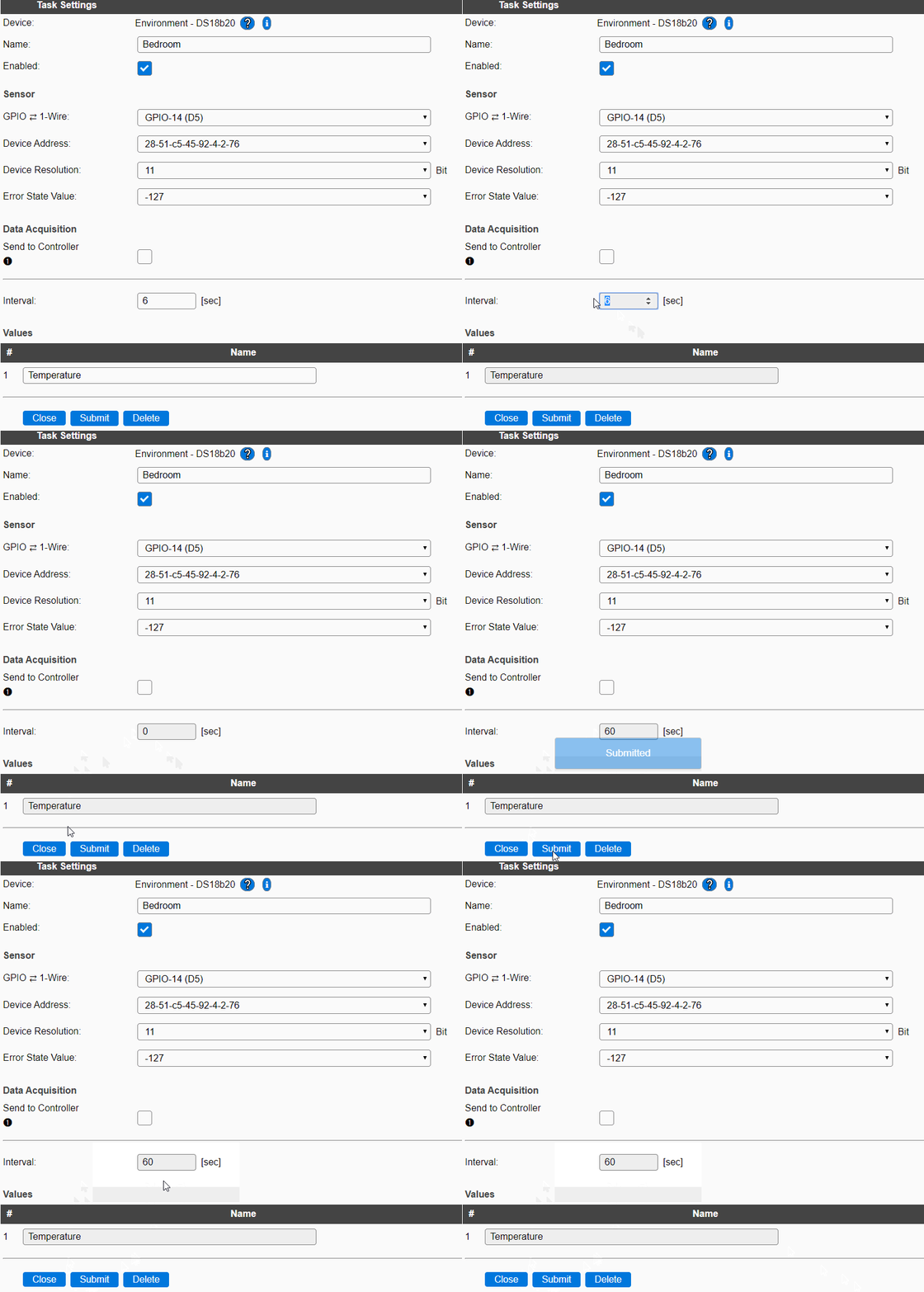
When I enter 0 and hit Submit the value changes to 60 (the default value)
 Misiu
on 5 Nov 2019
Misiu
on 5 Nov 2019
And that's where the suggestion made by @uzi18 should help.
It is indeed not really intuitive right now.
There is a possible trick (as long as you don't use deep sleep)
The "60" seconds value is copied from the Sleep time on the Config tab. (see: https://github.com/letscontrolit/ESPEasy/issues/2690 )
So I guess you could set that one to 0 (if possible) and try again.
TD-er
on 5 Nov 2019
As asked here I'm adding my use case:
I have a DS18B20 as the first device. Read interval is 5 seconds.
The second device is a dummy device that I use in rules to calculate the average of readings (from the first device). It has an interval set to 60 seconds. Only this device is sending data to the controller (MQTT)
My main idea is to have at least 10 readings, so I'm able to calculate the average and then send it to the controller.
This works great (rules are awesome! 🎉), but there is one problem: At the start, the device is sending the value to the controller without including the delay, so when calculating the average I have nine zeros and only one actual reading.
Ideally, there should be an option that would allow us to disable the first send to the controller (after start), this way my device will have 60 seconds to acquire enough readings to correctly calculate the average.
Misiu
on 6 Nov 2019
Ok, I've set the interval to a max. value. Now both value are published, but the value for Vcc is still -1.
Should I open a new issue for this problem? Then you can close this issue, if you cleared the handling from interval = 0.
But contrary to @Misiu, I need the following sequence for my battery powered window contact:
- WakeUp with reset, 2. connect WIFI, 3. publish state of switch, 4. publisch battery Vcc, 5. goto DeepSleep. And that as fast as possible.
The firmware from last year, need someone between ~5-10 seconds and that without a line of a rule. The actual Firmware ~ 25-30 seconds and publish a Vcc from -1 first, what the old version doesn't do.
Micha-he
on 6 Nov 2019
Related issues
 s0170071
·
3Comments
s0170071
·
3Comments
 jroux1
·
6Comments
TD-er
·
3Comments
jroux1
·
6Comments
TD-er
·
3Comments
 Wandmalfarbe
·
5Comments
TD-er
·
5Comments
Wandmalfarbe
·
5Comments
TD-er
·
5Comments
Most helpful comment
I've looked in the source code.
For plugins with this set, the interval is disabled when set to 0.
However, the ADC plugin does not have this set to true,
I think I found what causes this issue.
But now I have to think of whether we should consider it a bug, or an undocumented (or not well-defined) feature.
This considers the 0 value as disable the interval, which is a nice feature to have, since we can run a task from the rules and for some use cases it is very useful to have the option to only run it manually.
See this forum post