Espeasy: Multiple DS18b20, hard to know which are used
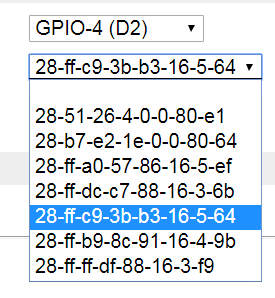
I have some nodes that uses many DS18b20 sensors (it's kinda in the nature of the senors to have many since they are 1-wire). I have to write down each and every ID (Device Address) and pick the one not used. I would like to be able to see which ones are used (task no?) and only pick the unused sensor.
 Grovkillen
All 39 comments
That's a good idea.
Maybe also add a warning when duplicates are used, similar to the issue to warn when names are already used.
But still we would want to allow it, otherwise it will be hard to switch sensors.
 TD-er
on 15 Mar 2018
TD-er
on 15 Mar 2018
I guess we could let the browser handle this instead of the ESP. I will try to do a JavaScript function for it in the upcoming GUI overhaul.
Grovkillen
on 4 Aug 2018
@Grovkillen would it be possible to plug new DS18B20 sensor and rescan for sensors?
This way user will be able to attach sensors one by one and assign them properly (using Your method).
 Misiu
on 23 May 2019
Misiu
on 23 May 2019
It looks like new (json) api is disabled by default
 uzi18
on 24 May 2019
uzi18
on 24 May 2019
@Grovkillen is this implemented (I don't have any device near me to test).
About the UI, maybe when the sensor is used You could display a message near the address?
28-ff-c9-3b-b3-16-5-64 (device name)
or use
<option value="value" style="font-weight: bold;">28-ff-c9-3b-b3-16-5-64</option> to display bold text for not used values?
Misiu
on 17 Jul 2019
it looks like we need some core work here - will add it to my TODO list
uzi18
on 17 Jul 2019
@uzi18 this would be a great improvement.
What about rescan? Will ESP Easy automatically add new DS18B20 sensors to the list?
Misiu
on 17 Jul 2019
@uzi18 @Grovkillen please take a look at https://github.com/letscontrolit/ESPEasy/issues/1085#issuecomment-482051441. This can be addressed with the same functionality.
Misiu
on 17 Jul 2019
@Misiu @Grovkillen first things first, need to add something like manager for all dallases first, than we can think about it ...
uzi18
on 17 Jul 2019
@uzi18 am I right that now we can store only 8 devices (https://github.com/letscontrolit/ESPEasy/blob/mega/src/_P004_Dallas.ino#L78)
Can't we reuse savedAddress.
The HTML dropdown is build here, so maybe we can add (used) to option if that address is already used (is in savedAddress?)
Please correct me if I'm wrong.
Misiu
on 17 Jul 2019
no, we haven't got list of already used sensors and this is only to select one on list
uzi18
on 17 Jul 2019
The list in the Dallas plugin is populated with addresses found on the bus after performing a scan.
So it is not stored anywhere.
What is stored is the selected address and that is being stored rather inefficient.
I should be possible to store up-to 4 addresses in the same amount of settings bytes.
But @uzi18 is right, before we do a lot of other changes, there should be a central 1wire manager, which would allow to have multiple instances of the same plugin to be active without interacting with eachother (if using the same pin)
Then we can also extend the plugin to support >1 sensor per plugin.
This last new feature also requires some updates in how plugins should handle sending data to a controller. For example Domoticz should split the sensor updates into a single update per sensor and also include an IDX value per sensor. (not sure yet how we should store that extra IDX)
TD-er
on 17 Jul 2019
how many bytes of ram we can use? sensor id is 6bytes, gpionum 1byte,extra status 1, so i need 8bytes per sensor for manager.
@Grovkillen @Misiu how many dallas you want to connect?
uzi18
on 17 Jul 2019
@uzi18 I think that 8 DS18B20 is enough (but this limit should be documented). If one would need more he always can add a second physical device) with another set of sensors (Wemos D1 clone can be bought for less than 2$)
Misiu
on 17 Jul 2019
A plugin cannot handle more than 4 output values per plugin, so there should be no more than 4 Dallas sensors per plugin.
The address is now stored as a byte per value of 32 bit, so that's why I mentioned it can store 4x as many.
TD-er
on 17 Jul 2019
I want to search bus and store all data internally in manager, task only will fetch data from manager so it will be possible to have dallas task with 4 sensors later.
Manager need some amount of memory to store all sensors from buses/gpios with statuses and schedule all work in time
uzi18
on 17 Jul 2019
I think it does make sense to let the manager scan for sensors and then let all instances of the plugin tell the manager whether or not they are interested in the data from a specific sensor. (incl settings like bits resolution)
So the manager does not have to store anything in flash. It will all do it using RAM and be initialized via the plugins.
TD-er
on 17 Jul 2019
I have use mode like this in my own project but coded it in pure C with static array.
Here we need something like dynamic list of structs, don't know what is better to choose, need to have fast iteration on list in for loop possible.
uzi18
on 17 Jul 2019
You could use a std::map or std::list
But I think you will most likely address them from a plugin, so I would suggest to use std::vector for this one.
Then you simply must make a function to compute an id from plugin-ID + variable and use that as an index in the std::vector.
A map does somewhat similar. There you have a key (to address the value in the map) and such a key must be unique.
The map will be able to find the element quite fast.
So the key can be something like an uint16 and made by
TD-er
on 17 Jul 2019
Edit:
Sorry wrong topic... ;)
TD-er
on 17 Jul 2019
for manager i will try to use std:list first and pass just ids to task
uzi18
on 17 Jul 2019
That's also a good idea, just only store a reference to the task + value nr in the list of the manager.
You may want to look if the set ID is stored in the task extra settings or not.
If it is stored in the extra settings, you may want to store it in a list managed by the manager, since loading the Extra Task Settings does take some time and should not be done that often.
TD-er
on 17 Jul 2019
A plugin cannot handle more than 4 output values per plugin, so there should be no more than 4 Dallas sensors per plugin.
The address is now stored as a byte per value of 32 bit, so that's why I mentioned it can store 4x as many.
Is this by design? I was looking for a way to log temperature from 6 DS18B20 into SD card. I've recently found this PR and I want to give it a try, but I need two more DS18B20 sensors.
Is there an option to increase output values from 4 to 8? This would allow us to add more DS18B20.
Misiu
on 22 Jul 2019
@Misiu I can send you 24 tasks version of espeasy ;) (24 dallases supported)
Dallas plugin will be completely rewrited, so we will have more features in the future.
uzi18
on 22 Jul 2019
@uzi18 that would be helpful :) Dzięki 😁
I hopefully will build the hardware by the end of the week.
I'm monitoring this thread, so when Your manager will be ready I can test it!
Misiu
on 22 Jul 2019
@Misiu
http://forum.abc-service.com.pl/viewtopic.php?t=17
W razie czego pisz na forum/pw do mnie.
uzi18
on 22 Jul 2019
@uzi18 dzięki :)
Misiu
on 22 Jul 2019
Beware 24 tasks version use different format of configuration file
uzi18
on 22 Jul 2019
When in doubt, run meminfodetail command and then check the sysinfo page again :)
Just as a reference, this is the memory-layout of the default settings layout
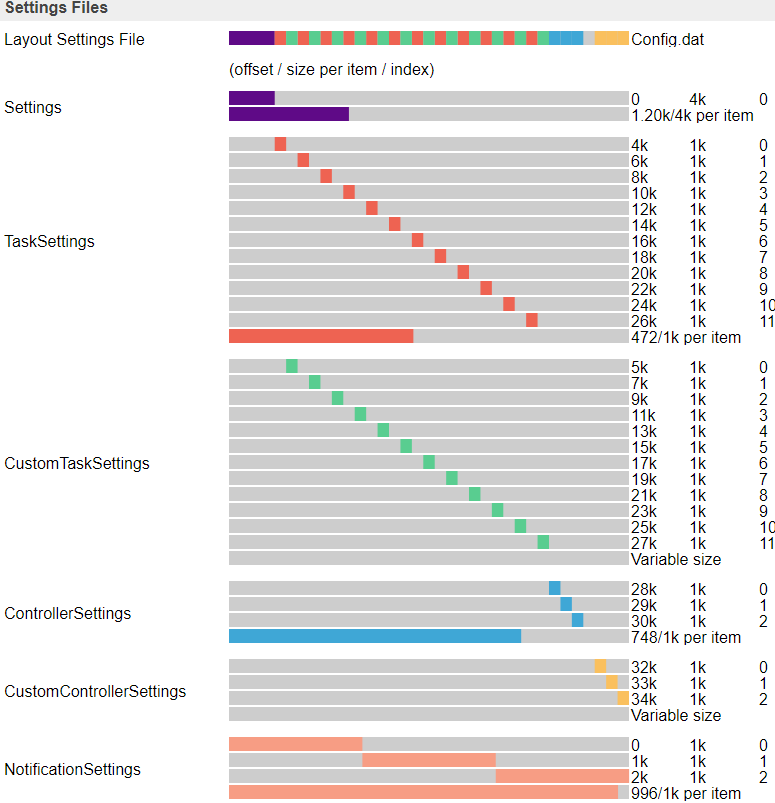
Maybe, if it is being used by more people, we should add a define in all the places where this is being used?
Also 34k of the 64k is used, so there is room for 20k extra.
If needed, we can make a hybrid version?
TD-er
on 22 Jul 2019
@uzi18 any updates on the manager?
Misiu
on 1 Aug 2019
time is not on my/our side ;)
uzi18
on 1 Aug 2019
No worries :) Take Your time
Misiu
on 1 Aug 2019
No worries :) Take Your time
Where? ;)
I'm also looking for it.
TD-er
on 1 Aug 2019
@TD-er I'm returning to the data logger project. Do You think it will be possible to double the amount of sensor a plugin can handle? You wrote that currently there is a limit of four sensors.
I know that I can use multiple devices and store the data using a simple PHP script, but for a simple temperature logger, a Wemos D1, SD Card and six DS18B20 are enough. I want to avoid extra equipment, especially that the sensors and Wemos will be placed in a place that has no wifi.
Misiu
on 21 Oct 2019
You could add 6x this plugin and all use the same GPIO pin.
Increasing the number of output values per plugin is something that's going to break all existing settings and very likely introduce a lot of errors..
TD-er
on 21 Oct 2019
The original question is still valid though? The idea of using one task with four DS18b20.
Grovkillen
on 21 Oct 2019
The original question is still valid though? The idea of using one task with four DS18b20.
Yep that should be feasible.
Not sure how far @uzi18 has come with the Dallas code to introduce a single 1Wire line manager (by lack of a better term)
TD-er
on 21 Oct 2019
You could add 6x this plugin and all use the same GPIO pin.
I didn't know about that. That will solve my problem :) I'm going to check that and hopefully, the data from all sensors will be stored on to SD card.
Misiu
on 21 Oct 2019
Well try first just to be sure.
For example by having 1 sensor a bit warmer (keep in hand) so you can see if values are mixed up.
I can imagine it may happen another task is interpreting the data from a sensor and thus the measurements are mixed.
I would suspect that if we have this bug, then the 1st sensor in the task list will take priority, so test by warming the 2nd or 3rd (or later) sensor and see if it does cause issues.
Also there are a lot of fake Dallas sensors out there. One of the reported issues with fake ones is that you cannot use them with more than 3 in a chain. This is not conclusive for all fakes out there, but it is just one of the (many) reported issues which later appeared to be related to fake ones.
TD-er
on 21 Oct 2019
Related issues
 DittelHome
·
5Comments
DittelHome
·
5Comments
 hamed-ta
·
5Comments
hamed-ta
·
5Comments
 MarceloProjetos
·
4Comments
TD-er
·
3Comments
MarceloProjetos
·
4Comments
TD-er
·
3Comments
 tedenda
·
6Comments
tedenda
·
6Comments
Most helpful comment
That's a good idea.
Maybe also add a warning when duplicates are used, similar to the issue to warn when names are already used.
But still we would want to allow it, otherwise it will be hard to switch sensors.