Espeasy: [GPIO-XX#State] as event?
All 47 comments
Only issue I can think of, is that inspecting a GPIO is very volatile and you cannot set a trigger to it. ("changed" is missing in the rules)
 TD-er
on 5 Mar 2018
TD-er
on 5 Mar 2018
Aha, I understand. It's on the "future" list so we might get it going in the long run if we keep it in our minds when we do a overhaul of the rules etc.
 Grovkillen
on 5 Mar 2018
Grovkillen
on 5 Mar 2018
It can still be useful for inspection of a current state on boot.
TD-er
on 5 Mar 2018
For sure! I often force GPIO state on boot for this.
Grovkillen
on 5 Mar 2018
It is already supported by Pcf8574 expander plugin so why not in standard gpios.
 uzi18
on 5 Mar 2018
uzi18
on 5 Mar 2018
@uzi18 I'm not saying it cannot be done, just that we might raise expectations which cannot be met and those "limitations" should eventually be mentioned in documentation.
Or someone here could have a brilliant suggestion on how to do it to make it just right ;)
There are 2 issues:
- Just use as string replacement (inspect current state)
- Keep state to detect change and trigger an event
The second one involves a lot more. And how often should it be inspected?
Should these result to a boolean state also in the rules?
TD-er
on 5 Mar 2018
pcf plugin keeps track of state and if change it generates event.
uzi18
on 5 Mar 2018
OK, then we should look into that implementation for inspiration :)
That will make it easier to support both.
Suggestion on pin number naming for the PCF's (I guess that's been asked before)
TD-er
on 5 Mar 2018
AFAIK the PCF plugin shares the same code as the regular switch. Using PLUGIN_TEN_PER_SECOND to poll the GPIO. Any pin can trigger an event on each change, when a task (switch) is configured for it.
Did i miss something here?
 ghost
on 5 Mar 2018
ghost
on 5 Mar 2018
Yes that is correct but should a device be needed? Not very intuitive.
Grovkillen
on 5 Mar 2018
ESP Easy has two ways to configure workloads, either tasks or the rule engine. What would be an intuitive third way?
ghost
on 5 Mar 2018
Events?
A task is something periodically, typically multi-second to minutes interval.
A rule will check every second if something has to be done.
An event will trigger an action immediately.
TD-er
on 5 Mar 2018
@mvdbro right, implementation looks almost the same, so where is the problem?
We got such event already. Is it not working sometimes?
uzi18
on 5 Mar 2018
But events are mainly created by tasks, almost realtime when using tenpersecond calls. And each event immediatly triggers the rule engine.
ghost
on 5 Mar 2018
@uzi18: that's my question too. What is the issue here?
ghost
on 5 Mar 2018
What I mean is, should a task be needed for basic GPIO state? Should we need to use a dummy device to store PWM level or servo position?
Grovkillen
on 5 Mar 2018
@mvdbro
I think the main idea is to not have to use a task to determine the state of a gpio. As it is now you can't monitor all the pins on an MCP23017. Sure you can trigger them but upon trigger is the only way to know what state they are in. (afaik) Need to be able to determine state without a task assigned to each pin.
 Budman1758
on 6 Mar 2018
Budman1758
on 6 Mar 2018
If we don't want to use Tasks, it should be build into the plugin TEN_PER_SECOND mechanisme.
Could be done, but we have to take care not to sacrifice performance too much.
And some plugins need to be informed to do this kind of work as they cannot automatically detect what you want them to do.
Example:
The MCP plugin cannot tell if the detected device really is an MCP. Could be a PCF, LCD module or any other device using the same address.
And once it knows that it has 8 MCP modules attached, should it try to monitor all 128 pins, either input or output?
I guess we will only be using this within the rule engine. So we could create some new commands to run at boot stage to inform the ESP that we would like to monitor some GPIO's on some devices and send events on state changes.
And we should add a rule engine 'command' to retrieve the pin status from the existing internal "Pin State table"
ghost
on 6 Mar 2018
We need to think this through but it feels that your on to something @mvdbro :wink:
It's labeled "future" so we got time to get it right.
Grovkillen
on 6 Mar 2018
Regarding PWM and servo positions I guess a simple dump to a variable should be sufficient?
Grovkillen
on 6 Mar 2018
It's quite a new way of thinking because ESP Easy was build around tasks, but I've tried a simple solution to get event triggers from build-in GPIO ports and also be able to retrieve the state of any build-in GPIO port.
It required some new type of PLUGIN calls because the existing ones were task based.
Current implementation might suffer from performance issues when it's implemented on a lot of plugins...
We might need to implement 'short names' for each plugin to make things a bit easier and faster.
Syntax: [Plugin#
Sample: [Plugin#GPIO#Pinstate#13]=0
The command "Pinstate" could be omitted, but this way we can expand features in the future without changing syntax structure.
(a plugin could return other data than just the pin state)
Sample rules to test or demonstrate.
We get triggers on GPIO-15 and we'll check GPIO-13 as condition.
No task is configured.
on System#Boot do
  Monitor GPIO,15
endon

on GPIO#15=0 do
  if [Plugin#GPIO#Pinstate#13]=0
    // do something
  endif
endon

on GPIO#15=1 do
  if [Plugin#GPIO#Pinstate#13]=1
    // do something
  endif
endon
I've pushed the changes to github, but it must be considered "preliminary".
When we think it's ok, we could try to implement it on the MCP23017 plugin
ghost
on 7 Mar 2018
Looking good. Will test asap.
Grovkillen
on 7 Mar 2018
Ok I will test this too, looking for something just like this.. Which firmware can this be found in ?
I was thinking a plugin which lets you use a GPIO with a switch on it - as a sensor
You can not 'switch' it - it only gives a 'true state' reading of that switch..
make sense ?
 Oxyandy
on 20 Mar 2018
Oxyandy
on 20 Mar 2018
please add it to wiki - pinstate :)
uzi18
on 4 May 2018
Hello :)
may i ask how the syntax is to monitor a MCP23017 gpio pin ?
Thank you for your help
Sascha
 Sasch600xt
on 22 Oct 2018
Sasch600xt
on 22 Oct 2018
Ehm... not yet developed!
I am now developing the doubleclick and longpress events for PCF and MCP.
Then will develop the GPIO MONITOR for PCF and MCP.
 giig1967g
on 22 Oct 2018
giig1967g
on 22 Oct 2018
oops......sorry :) i was looking too much in future i guess :)
but thank you very much for developing it :)
monitor the MCP pins i will use a lot ! Great feature
greetz
Sascha
Sasch600xt
on 22 Oct 2018
@Sasch600xt
can you try my test version of the monitor command for MCP?
You can find it here:
https://github.com/letscontrolit/ESPEasy/pull/2057#issuecomment-441464115
giig1967g
on 26 Nov 2018
syntax is:
monitor,mcp,x
giig1967g
on 26 Nov 2018
sorry for the late reply :(
Tonight i will give it a try......would be awesome :)
Thanks already for your work !
Sasch600xt
on 3 Dec 2018
i am so sorry, i am so busy at my work till end of the year......did somebody else had a chance to test it ?
Thank you and sorry again :(
Sasch600xt
on 7 Dec 2018
ok, tonight and tomorrow i have a little time.
i put
on System#Boot do
monitor,mcp,1
monitor,mcp,2
monitor,mcp,3
monitor,mcp,4
monitor,mcp,5
monitor,mcp,6
monitor,mcp,7
monitor,mcp,8
monitor,mcp,9
monitor,mcp,10
monitor,mcp,11
monitor,mcp,12
monitor,mcp,13
monitor,mcp,14
monitor,mcp,15
monitor,mcp,16
timerSet,1,10
endon
in rules.
How can i send the pinstate to my server ?
at the moment i do it with a timer every 10 seconds for all 16 ports like:
On Rules#Timer=1 do
Publish,%sysname%/MCP-GPIO/A0,[plugin#mcpgpio#pinstate#1]
Publish,%sysname%/MCP-GPIO/A1,[plugin#mcpgpio#pinstate#2]
Publish,%sysname%/MCP-GPIO/A2,[plugin#mcpgpio#pinstate#3]
Publish,%sysname%/MCP-GPIO/A3,[plugin#mcpgpio#pinstate#4]
Publish,%sysname%/MCP-GPIO/A4,[plugin#mcpgpio#pinstate#5]
Publish,%sysname%/MCP-GPIO/A5,[plugin#mcpgpio#pinstate#6]
Publish,%sysname%/MCP-GPIO/A6,[plugin#mcpgpio#pinstate#7]
Publish,%sysname%/MCP-GPIO/A7,[plugin#mcpgpio#pinstate#8]
Publish,%sysname%/MCP-GPIO/B0,[plugin#mcpgpio#pinstate#9]
Publish,%sysname%/MCP-GPIO/B1,[plugin#mcpgpio#pinstate#10]
Publish,%sysname%/MCP-GPIO/B2,[plugin#mcpgpio#pinstate#11]
Publish,%sysname%/MCP-GPIO/B3,[plugin#mcpgpio#pinstate#12]
Publish,%sysname%/MCP-GPIO/B4,[plugin#mcpgpio#pinstate#13]
Publish,%sysname%/MCP-GPIO/B5,[plugin#mcpgpio#pinstate#14]
Publish,%sysname%/MCP-GPIO/B6,[plugin#mcpgpio#pinstate#15]
Publish,%sysname%/MCP-GPIO/B7,[plugin#mcpgpio#pinstate#16]
timerSet,1,10
endon
Is there a better way now ?
Goal would be to get only a message when GPIO pinstate has changed and get the pinstate (0 or 1 / true or false) of only the one GPIO which has changed. So not always all 16 together.
I am sorry for stupid "User" questions :)
Thank you so much for your work
Sascha
Sasch600xt
on 13 Dec 2018
@Sasch600xt Just as heads up.
The builds after 20181204 had GPIO related changes which led to lots of unforeseen issues with rules etc.
We plan to revert those changes for now, back to how they were at 1204 and do a proper refactor of the GPIO related code.
So you may want to wait for tomorrows build.
TD-er
on 13 Dec 2018
no problem.....thank you for reply :)
Sasch600xt
on 13 Dec 2018
Hello :)
i still fight a little with the syntax.
Can someone help me out here ?
As i said befor, i want to get the state of a mcp gpio in that moment it changes.
So i did try this, but it is not working so far :(
on System#Boot do
monitor,mcp,1
monitor,mcp,2
monitor,mcp,3
endon

on [plugin#mcpgpio#pinstate#1]=0 do
Publish,%sysname%/MCP-GPIO/A0,[plugin#mcpgpio#pinstate#1]
endon

on [plugin#mcpgpio#pinstate#1]=1 do
Publish,%sysname%/MCP-GPIO/A0,[plugin#mcpgpio#pinstate#1]
endon
any ideas what i am doing wrong here ?
maybe because there are still configured as "output" ?
So how can i change that ? i assume by getting the state of it via browser.
How is the syntax for this ?
Sorry.....i had a long break and forgot a lot :(
(using build from 14.12 normal 4096)
Thank you
Sascha
Sasch600xt
on 15 Dec 2018
the syntax is:
on mcp#1 do
Publish,%sysname%/MCP-GPIO/A0,[plugin#mcpgpio#pinstate#1]
endon
Works perfect !!!!
Thank you so much :) Now i can build my dream hardware :)
Sascha
Sasch600xt
on 15 Dec 2018
I am happy!
giig1967g
on 15 Dec 2018
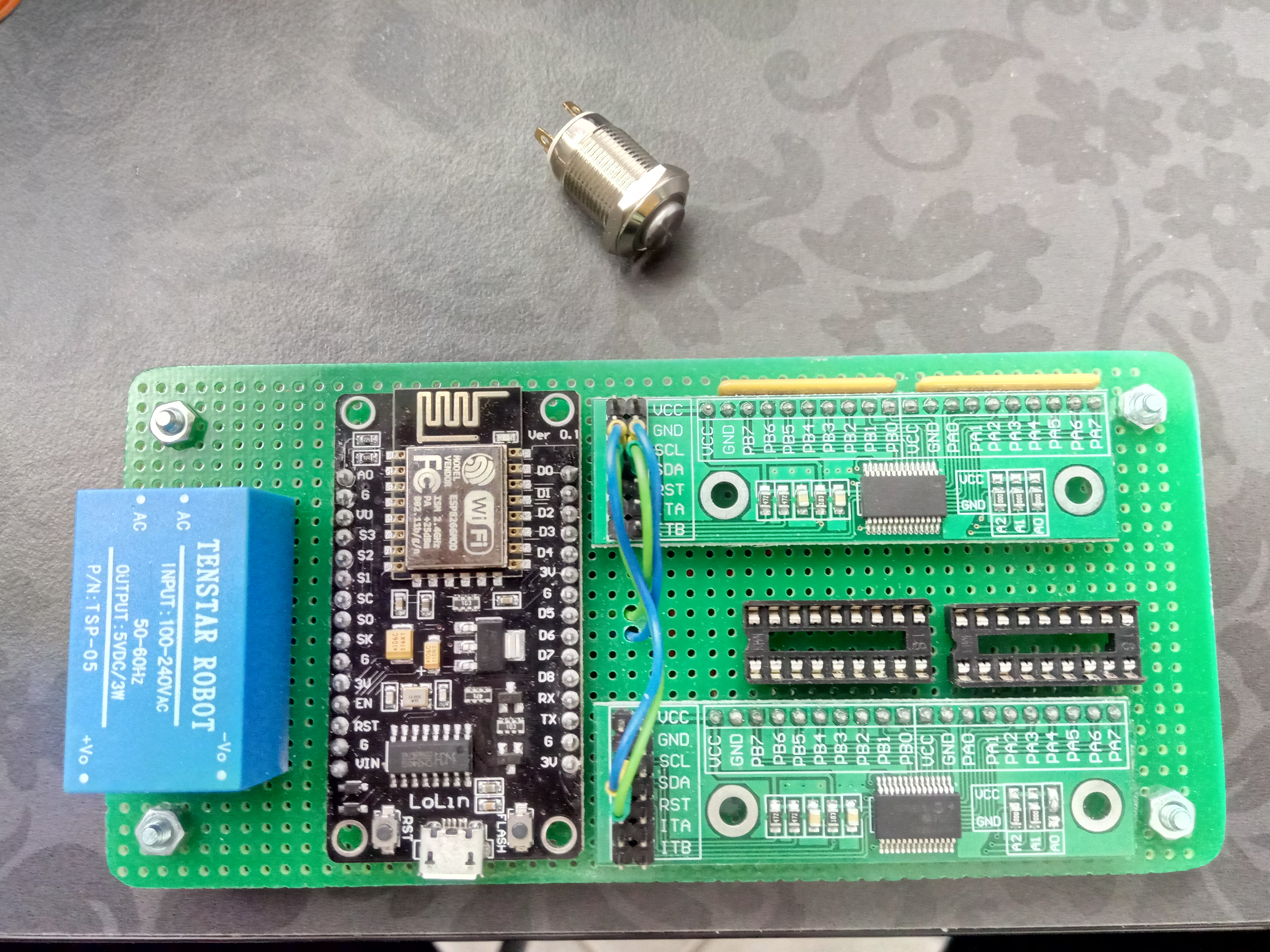
16 Buttons with 16 LEDs
So 32 ports of MCP.
16 for buttons, 16 for LEDs
if i push a button for a wlan relay for example, the led will only lit up when i get the true feedback of the relay :)
Also by switching the relay from another platform like ipad or alexa, the led will show the state of the relay :)
Sasch600xt
on 15 Dec 2018
How do i publish the state of GPIO via MQTT?
[GPIO#1] is not having a value
thanks
 riker65
on 14 Feb 2019
riker65
on 14 Feb 2019
You could add a switch plugin to that pin.
TD-er
on 14 Feb 2019
on GPIO#1 do
  publish /%sysname%/gpio1,[PLUGIN#GPIO#PINSTATE#1]
endon
ok Thanks
are those commands case sensitive?
riker65
on 14 Feb 2019
No command should be case sensitive. If they are it's a bug and we need to fix that.
Grovkillen
on 14 Feb 2019
ok Thanks
are those commands case sensitive?
no. Just my personal syntax scheme for better readibility... :)
giig1967g
on 14 Feb 2019
I guess we can close this one... I'm including it in the #2308 PR
Grovkillen
on 14 Feb 2019
Will add info for the MCP etc. once I get to it
Grovkillen
on 14 Feb 2019
Related issues
 micropet
·
78Comments
micropet
·
78Comments
 megamarco833
·
187Comments
TD-er
·
198Comments
megamarco833
·
187Comments
TD-er
·
198Comments
 Erd86
·
90Comments
Erd86
·
90Comments
 ferazambuja
·
129Comments
ferazambuja
·
129Comments
Most helpful comment
It's quite a new way of thinking because ESP Easy was build around tasks, but I've tried a simple solution to get event triggers from build-in GPIO ports and also be able to retrieve the state of any build-in GPIO port.
It required some new type of PLUGIN calls because the existing ones were task based.
Current implementation might suffer from performance issues when it's implemented on a lot of plugins...
We might need to implement 'short names' for each plugin to make things a bit easier and faster.
Syntax: [Plugin###]
Sample: [Plugin#GPIO#Pinstate#13]=0
The command "Pinstate" could be omitted, but this way we can expand features in the future without changing syntax structure.
(a plugin could return other data than just the pin state)
Sample rules to test or demonstrate.
We get triggers on GPIO-15 and we'll check GPIO-13 as condition.
No task is configured.
I've pushed the changes to github, but it must be considered "preliminary".
When we think it's ok, we could try to implement it on the MCP23017 plugin