Espanso: Modulo forms do not work
Config :
- Windows 10 64bits (Updated)
- Keyscrambler (deactivated - Espanso doesn't work when it is activated)
- Bitdefender
Hello,
I can't use forms with Espanso. In fact, they just don't appear at all.
I tried with the code samples given in the Documentation (like : greet) and they don't work. When I type the command it can't fetch the data because I can't type it.
For example,

Will just replace ":greet" by nothing.
I tried to install manually Modulo, which worked perfectly on its own (I used the doc to create a form which appeared successfully).
There is nothing in the logs.
I hope I was clear.
_PS : The "filter-title" filter also doesn't work (I don't know if it's linked but It doesn't work)_
Thank you for helping me,
_Sincerely,_
 AntoineQ1
All 22 comments
Hey @AntoineQ1,
I'm sorry you experienced this problem! Could you please post the espanso log output here?
Cheers :)
 federico-terzi
on 26 Aug 2020
federico-terzi
on 26 Aug 2020
Hello @federico-terzi ,
I reinstalled Espanso but the problem is still there:
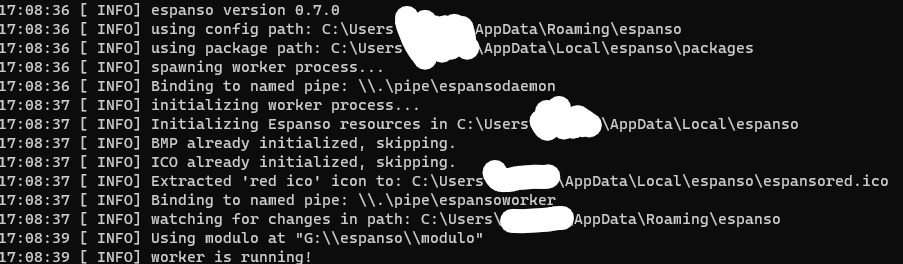
I have currently some problems on my PC (a few days ago I couldn't create a shortcut in StartUp Folder). And during the install I couldn't install Espanso in the classic path, it didn't have the authorization.
I installed it somewhere else ("G:\") and the first part of the setup worked until it didn't manage to create the shortcut for the Windows Explorer Menu and an unknown registry key (error no. 5).
I had to manually kill the process when the error appears since If I didn't the setup just rollback.
I manually created the shortcut, and now I have still the same problems and even more since when I type "/O" it should give me a slashed O but it gives me the slashed O plus "/O" (it gives me '∅/O').
Also, "+inf" should give me "+" followed by the infinity sign but it gives me "++inf"...
I don't know what to do it doesn't work at all now...
Thanks,
AntoineQ1
on 26 Aug 2020
This might be related to #418. I'll ship a new version very soon, hopefully, that will solve the "++inf" problem
federico-terzi
on 26 Aug 2020
Thanks.
The 0.7.1 version didn't solve the problem (see #418 ).
AntoineQ1
on 26 Aug 2020
Thanks, working on a new release
federico-terzi
on 26 Aug 2020
Thank you very much, the release worked. Now there is only the forms' problem to solve. They just don't appear (like before).
AntoineQ1
on 26 Aug 2020
@AntoineQ1 Thank you, I think I might have realized the problem. In your first example, you shouldn't include the replace field. It should be:
  - trigger: ":greet"
    form: |
      Hey {{name}},
      Happy Birthday!
and not:
  - trigger: ":greet"
    replace: "{{name}}"
    form: |
      Hey {{name}},
      Happy Birthday!
Let me know if that helps :)
federico-terzi
on 26 Aug 2020
Thank you :) . But it doesn't work, it just disappears when I type the last letter of "greet" like before... I wonder what's the problem behind this.
AntoineQ1
on 27 Aug 2020
@AntoineQ1 Any chance you could post a GIF or video of what is happening?
federico-terzi
on 27 Aug 2020
Of course, I sent it to your e-mail.
AntoineQ1
on 27 Aug 2020
@AntoineQ1 Thanks, I've watched your video and it's indeed a strange behavior. I'm curious about the log files after typing :greet. If something goes wrong when invoking modulo, espanso should log it, but only after the error.
So could you:
- Type
:greet, making sure that espanso deletes the trigger as shown in the video - Run
espanso logand post the output here
There's a high chance an error will be logged at that point
federico-terzi
on 27 Aug 2020
Hello,
I just did it again, and as I said before nothing is logged, there is just the same code:
20:19:30 [ INFO] espanso version 0.7.1
20:19:30 [ INFO] using config path: X:\Users\\AppData\Roaming\espanso
20:19:30 [ INFO] using package path: X:\Users\\AppData\Local\espanso\packages
20:19:30 [ INFO] spawning worker process...
20:19:30 [ INFO] Binding to named pipe: \\.\pipe\espansodaemon
20:19:30 [ INFO] initializing worker process...
20:19:30 [ INFO] Initializing Espanso resources in X:\Users\\AppData\Local\espanso
20:19:30 [ INFO] BMP already initialized, skipping.
20:19:30 [ INFO] ICO already initialized, skipping.
20:19:30 [ INFO] red ICO already initialized, skipping.
20:19:30 [ INFO] Binding to named pipe: \\.\pipe\espansoworker
20:19:30 [ INFO] watching for changes in path: X:\Users\\AppData\Roaming\espanso
20:19:32 [ INFO] Using modulo at "X:\\espanso\\modulo"
20:19:32 [ INFO] worker is running!
It is quite strange... Maybe some sort of debug mode would help us solve this problem...
AntoineQ1
on 27 Aug 2020
@AntoineQ1 Yep, that's very strange. No sign of errors there. I'll have to think about another way to debug this problem
federico-terzi
on 28 Aug 2020
Hello, I have an example from macOS of forms not working. I'm running Big Sur beta 9 (I know, it's not supported at this time).
I used the example :greet that is part of espanso documentation. When I run it, it skips past showing me any GUI and just spits out an empty version of the form.
You can see the espanso log output in that video too.
 pseudomichael
on 7 Oct 2020
pseudomichael
on 7 Oct 2020
@pseudomichael Thanks for reporting this issue! Most likely not related to this one, but it seems (from the logs) that espanso has problems invoking modulo. What did you use to install espanso?
Also, if you type which modulo in the terminal, do you get any output?
Cheers :)
federico-terzi
on 7 Oct 2020
I installed Espanso via Homebrew, and from what I gathered Modulo should have been included in that installation automatically?
pseudomichael
on 7 Oct 2020
@pseudomichael Yes it should. I'm wondering whether macOS is preventing modulo from being executed.
Could you please try opening a terminal and type:
which modulo
then post the output here?
federico-terzi
on 8 Oct 2020
Last login: Wed Oct  7 23:15:36 on console
➜  ~ which modulo
modulo not found
➜  ~
@pseudomichael This is really strange and explains why your forms are not displaying... Could you please try with:
espanso stop
espanso unregister
brew remove espanso
brew install espanso
espanso register # Giving also the accessibility permissions
espanso start
Posting the output of brew install espanso here? Somehow it seems like your installation is missing modulo...
federico-terzi
on 8 Oct 2020
I got an error about the CLT:
Last login: Thu Oct  8 08:02:03 on ttys000
➜  ~ espanso stop
➜  ~ espanso unregister
Entry removed correctly!
➜  ~ brew remove espanso
Error: No installed keg or cask with the name "espanso"
➜  ~ brew install espanso
Updating Homebrew...
==> Auto-updated Homebrew!
Updated 1 tap (homebrew/core).
==> New Formulae
fleet-cli                                git-hound
==> Updated Formulae
Updated 300 formulae.

Warning: You are using macOS 11.0.
We do not provide support for this pre-release version.
You will encounter build failures with some formulae.
Please create pull requests instead of asking for help on Homebrew's GitHub,
Discourse, Twitter or IRC. You are responsible for resolving any issues you
experience while you are running this pre-release version.

==> Installing espanso from federico-terzi/espanso
==> Downloading https://github.com/federico-terzi/modulo/releases/download/v0.1.
Already downloaded: /Users/pseudomichael/Library/Caches/Homebrew/downloads/a53326b42d5444a525d066b481dc684d202164c42fe1050b39c3d1f25b385c98--modulo-mac
==> Downloading https://github.com/federico-terzi/espanso/releases/download/v0.7
Already downloaded: /Users/pseudomichael/Library/Caches/Homebrew/downloads/394aa92ef4e61079739a3cd03cfd08cc544e54c4571da2d4b44e47a195265b17--espanso-mac.tar.gz
Error: Your CLT does not support macOS 11.0.
It is either outdated or was modified.
Please update your CLT or delete it if no updates are available.
➜  ~
I went to Apple's Developer site and downloaded and installed Command_Line_Tools_for_Xcode_12.2_beta_2
Going to see if that fixes the problem...
pseudomichael
on 9 Oct 2020
That seems to have fixed it. I had to rm the espanso directory before brew would be happy to install and link it. But now I get this in terminal:
Last login: Thu Oct  8 17:33:21 on ttys000
➜  ~ which espanso
/usr/local/bin/espanso
➜  ~ which modulo
/usr/local/bin/modulo
➜  ~
@pseudomichael Glad you sorted it out! Until Homebrew gets proper support for Big Sur, we can expect these sort of problems
federico-terzi
on 9 Oct 2020
Related issues
 xaquica
·
3Comments
federico-terzi
·
5Comments
xaquica
·
3Comments
federico-terzi
·
5Comments
 owzim
·
6Comments
owzim
·
6Comments
 not-AMM
·
4Comments
not-AMM
·
4Comments
 online
·
6Comments
online
·
6Comments