Espanso: [doc][macOS] Synchronisation not using symlink folder
Hej,
according to the documentation i tried to move my config folder to Dropbox.
I've tried the following:
macOS
By default, the espanso configuration folder resides in this folder (change “user” with your username):

/Users/user/Library/Preferences/espanso
The first step is moving this folder in your Dropbox folder, for example in:

/Users/user/Dropbox/espanso
Now you need to create a symbolic link. Open the Terminal and type the following command, making sure you specify the correct paths:

ln -s "/Users/user/Dropbox/espanso" "/Users/user/Library/Preferences/espanso"
Now restart espanso and you should be ready to go!
And within the Library/Preferences/espanso folder i get the following after restart espanso:
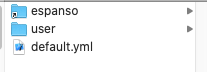
It creates a new default.yml and using this instead of the symlink created one.
I think the last command to create a symlink is wrong. The symlink should be created within /Users/user/Library/Preferences/ instead of /Users/user/Library/Preferences/espanso. To get the following:

↑ this is working for me. So maybe just fix it in the documentation? :)
 Maybach91
All 8 comments
Hey @Maybach91,
Thanks for pointing that out! This is most probably my mistake. As soon as I get my hands on a mac I'll try it out and update the docs accordingly.
Thanks for your help :)
 federico-terzi
on 28 Apr 2020
federico-terzi
on 28 Apr 2020
Hey there,
the actual documentation and the way how the Symlinks should be created on MacOS is correct (there is no difference to a Linux based system). I've re-verified the same on my Mac (even without stopping espanso before doing the change).
 timorunge
on 28 Apr 2020
timorunge
on 28 Apr 2020
@federico-terzi Thanks!
@timorunge yea, nothing wrong with creating the symlink in general. its just that the symlink should be created in a different folder (within the Preferences folder) instead inside the Preferences/espanso folder, i guess. Because its only working when the symlink is in the Preferences folder
Maybach91
on 28 Apr 2020
@Maybach91 the actual problem is, that if a folder with the given name is present OS is automatically creating the Symlink inside the existing folder. If the folder is not present everything is fine.
So:
espanso stop
mv /Users/user/Library/Preferences/espanso /Users/user/Dropbox/espanso
ln -s /Users/user/Library/Preferences/espanso /Users/user/Dropbox/espanso
espanso start
will do the trick.
You can easily test this via
mkdir -p /tmp/test/espanso
ln -s ~/.config/espanso/ /tmp/test/espanso # I'm storing my config over here, even on MacOS
ls -alG /tmp/test/espanso/
and via (remove the test folder before via rm -rf /tmp/test/espanso):
mkdir -p /tmp/test
ln -s ~/.config/espanso/ /tmp/test/espanso
ls -alG /tmp/test/espanso/
I see, that's a strange behaviour indeed! I'll add a note in the docs, stating that there should be no folder named "espanso" when creating the link.
federico-terzi
on 28 Apr 2020
# stop espanso
espanso stop
# move the espanso folder in preferences to dropbox
mv /Users/<username>/Library/Preferences/espanso /Users/<username>/Dropbox/Library/Preferences/
# link the espanso folder in dropbox back to Preferences folder
# no need to define the full destination path or you can even create a relative link
ln -s /Users/<username>/Dropbox/Library/Preferences/espanso /Users/<username>/Library/Preferences/
# start espanso
espanso start
l /Users/<username>/Library/Preferences/ | grep espanso
# rwxr-xr-x username staff 49 B Tue May 12 11:41:41 2020 espanso ⇒ /Users/<username>/Dropbox/Library/Preferences/espanso
This created as you saw a symlink to the dropbox espanso folder into an espanso folder in Preferences instead of the root of the Preferences folder.
ln -s "/Users/user/Dropbox/espanso" "/Users/user/Library/Preferences/espanso"
This is the same method on Linux, just the paths are different.
 atika
on 12 May 2020
atika
on 12 May 2020
Hey @atika,
Thank you for the suggestion, I'll test out this approach in the upcoming days.
Cheers
federico-terzi
on 12 May 2020
As an alternative you can do:
# Go to the preferences folder
cd /Users/<username>/Library/Preferences/

# Move the folder to Dropbox
mv espanso /Users/<username>/Dropbox/Library/Preferences/

# Create a symlink into the current folder (absolute)
ln -s /Users/<username>/Dropbox/Library/Preferences/espanso
# Or even something like this (relative)
ln -s ../../Dropbox/Library/Preferences/espanso
Related issues
 mrgnw
·
6Comments
mrgnw
·
6Comments
 fmaiabatista
·
5Comments
fmaiabatista
·
5Comments
 Tzahreddin
·
3Comments
Tzahreddin
·
3Comments
 Adam13531
·
7Comments
federico-terzi
·
3Comments
Adam13531
·
7Comments
federico-terzi
·
3Comments
Most helpful comment
As an alternative you can do: