Esp8266_deauther: An error occurred while uploading the sketch
Arduino: 1.8.5 (Windows 10), Board: "NodeMCU (ESP-12 Module), 160 MHz, Serial, 80MHz, DIO, 115200, 4M (3M SPIFFS)"

Archiving built core (caching) in: C:\Users\Andrej\AppData\Local\Temp\arduino_cache_896219\core\core_deauther_esp8266_nodemcuv2_CpuFrequency_160,UploadTool_esptool,FlashFreq_80,FlashMode_dio,UploadSpeed_115200,FlashSize_4M3M_9e623ed66f78550e898d313dcef72074.a
Sketch uses 654366 bytes (62%) of program storage space. Maximum is 1044464 bytes.
Global variables use 42380 bytes (51%) of dynamic memory, leaving 39540 bytes for local variables. Maximum is 81920 bytes.
java.io.IOException: Cannot run program "{runtime.tools.esptool.path}/esptool.exe": CreateProcess error=2, The system cannot find the file specified
    at java.lang.ProcessBuilder.start(ProcessBuilder.java:1048)
    at processing.app.helpers.ProcessUtils.exec(ProcessUtils.java:26)
    at cc.arduino.packages.Uploader.executeUploadCommand(Uploader.java:129)
    at cc.arduino.packages.uploaders.SerialUploader.uploadUsingPreferences(SerialUploader.java:207)
    at cc.arduino.UploaderUtils.upload(UploaderUtils.java:78)
    at processing.app.SketchController.upload(SketchController.java:713)
    at processing.app.SketchController.exportApplet(SketchController.java:686)
    at processing.app.Editor$DefaultExportHandler.run(Editor.java:2168)
    at java.lang.Thread.run(Thread.java:748)
Caused by: java.io.IOException: CreateProcess error=2, The system cannot find the file specified
    at java.lang.ProcessImpl.create(Native Method)
    at java.lang.ProcessImpl.<init>(ProcessImpl.java:386)
    at java.lang.ProcessImpl.start(ProcessImpl.java:137)
    at java.lang.ProcessBuilder.start(ProcessBuilder.java:1029)
    ... 8 more
 andrej66659
All 8 comments
delete the /AppData/Local/Arduino15 folder in your home directory, caution: all Arduino settings are lost
 tobozo
on 24 Mar 2018
tobozo
on 24 Mar 2018
Still,wont upload..
andrej66659
on 24 Mar 2018
In your Documents folder you also have two folders "Arduino" and "ArduinoData", can you try to move them somewhere else (i.e. to your desktop), relaunch the IDE and proceed to the re-installation of esp8266 sdk first, then deauther sdk.
tobozo
on 24 Mar 2018
Well,still im having the same issue.
andrej66659
on 24 Mar 2018
Maybe use the binaries instead ?
I've given you all the know solutions for this issue, can't do more with this much information.
tobozo
on 24 Mar 2018
Index error: could not find referenced tool name=esptool version=0.4.6 packager=esp8266
Index error: could not find referenced tool name=xtensa-lx106-elf-gcc version=1.20.0-26-gb404fb9-2 packager=esp8266
Index error: could not find referenced tool name=mkspiffs version=0.1.2 packager=esp8266
Index error: could not find referenced tool name=esptool version=0.4.6 packager=esp8266
Index error: could not find referenced tool name=xtensa-lx106-elf-gcc version=1.20.0-26-gb404fb9-2 packager=esp8266
Index error: could not find referenced tool name=mkspiffs version=0.1.2 packager=esp8266
Also getting this when in Boards Menager with this link "http://phpsecu.re/esp8266/package_deauther_index.json"
as additional boards manager url.
andrej66659
on 24 Mar 2018
just updated the readme accordingly, you need to install the esp8266 package too
also add this URL in your boards manager: http://arduino.esp8266.com/stable/package_esp8266com_index.json
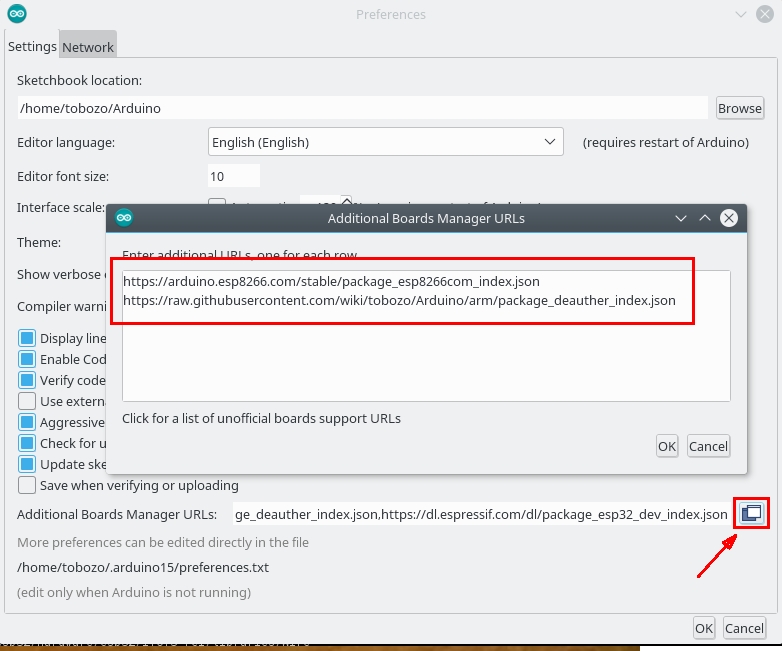
installing the latest sdk from esp8266 fixes this
tobozo
on 24 Mar 2018
Okay,its uploading now.Thanks sir,
andrej66659
on 24 Mar 2018
Related issues
 an0n47
·
4Comments
an0n47
·
4Comments
 avoiceofreason
·
5Comments
avoiceofreason
·
5Comments
 ghost
·
3Comments
ghost
·
3Comments
 sieuwe1
·
4Comments
sieuwe1
·
4Comments
 xdobry
·
3Comments
xdobry
·
3Comments
Most helpful comment
Okay,its uploading now.Thanks sir,