Esp-idf: Feature request: toolchain for macOS aarch64 (Apple M1) hosts? (IDFGH-4262)
Is your feature request related to a problem? Please describe.
Looks like Espressif only provides ESP32 toolchains and scripts for ARM Linux hosts for now. I would like to know are there any plans for getting them working on macOS aarch64 hosts?
Describe the solution you'd like
I've bought a MacBook Pro with Apple Silicon M1 a few days ago. I'm happy to help with testing and porting later when it arrives.
So far maybe just a recompile with Espressif's crosstool-ng is fine, or maybe some slight mods are necessary. But I'm not sure.
Describe alternatives you've considered
N/A
Additional context
The status of Homebrew (we need some dependencies from it): https://github.com/Homebrew/brew/issues/7857
Status for some other dev apps (e.g. IDE): https://github.com/ThatGuySam/doesitarm
 huming2207
All 31 comments
@huming2207 Thanks for the feature request and you offer to help. If you share some early experience with crosstool-NG on aarch64 macOS, that will be appreciated. We are ordering a similar computer as well for development and testing.
Aside from that, there are a few other things required to enable development workflow on macOS 11.0 and the new Apple hardware: new pyserial library release, some fixes on Python side, SiLabs releasing their updated VCP drivers, some Python libraries we depend on need to start releasing wheels built for macOS aarch64, etc.
 igrr
on 13 Nov 2020
igrr
on 13 Nov 2020
Hi @igrr ,
Yep no problem. My laptop should arrive later next week or the week after.
I have some boards with CH340. I think Apple has integrated since macOS 10.14, so the driver should not an issue for me. But anyway I haven't used Mac for quite a while (since late 2018). I will test it later after the device arrives.
huming2207
on 13 Nov 2020
Just bought an M1 Macbook pro as well.
After doing some research, looks like the only way to get HomeBrew working on Big Sur with an M1 Mac is to copy it over from another mac. To get around this, I installed MacPorts using Rosetta 2 and was able to install all the dependencies.
Is there any way to override the environment variable to run the install.sh script? I'm more than happy to use Rosetta 2 for the IDF environment, but I'm getting stuck trying to run the install script with this error:
ERROR: Platform Darwin-arm64 appears to be unsupported
 akhilv1
on 17 Nov 2020
akhilv1
on 17 Nov 2020
Found a workaround in idf_tools.py to run setup with the Rosetta 2 compatibility layer:
By adding 'Darwin-arm64': PLATFORM_MACOS, to the PLATFORM_FROM_NAME I can get the install script to continue.
Now, I just need to get all the python dependencies installed.
akhilv1
on 17 Nov 2020
Found a workaround in idf_tools.py to run setup with the Rosetta 2 compatibility layer:
By adding 'Darwin-arm64': PLATFORM_MACOS, to the PLATFORM_FROM_NAME I can get the install script to continue.
Now, I just need to get all the python dependencies installed.
Thanks for your update @akhilv1
My laptop is still on the way somehow. I've seen someone have got it already but I might have been a bit out of luck and it is still saying "Processing".
Meanwhile, can those python dependencies be installed and working as expected? If that works, then all we need to do might just get a toolchain for macOS aarch64 hosts.
huming2207
on 18 Nov 2020
I saw that my local Apple store had the two base models in stock, so I just picked mine up this morning. So far, I'm pretty impressed with the new CPU.
After spending a few hours wrangling python installs, I've gotten most everything to work. Where I've hit a roadblock is with getting cryptography installed because clang can't find openssl.
Normally, installing openssl through home-brew is the fix for this issue - even after installing openssl from MacPorts, I'm still running into this issue (see below):
build/temp.macosx-10.14.6-arm64-3.8/_openssl.c:575:10: fatal error: 'openssl/opensslv.h' file not found
#include <openssl/opensslv.h>
^~~~~~~~~~~~~~~~~~~~
1 error generated.
error: command 'clang' failed with exit status 1
----------------------------------------
ERROR: Failed building wheel for cryptography
Failed to build cryptography
ERROR: Could not build wheels for cryptography which use PEP 517 and cannot be installed directly
@akhilv1 Sounds like it's a include path issue?
huming2207
on 18 Nov 2020
https://github.com/Homebrew/brew/issues/7857#issuecomment-729204557
After installing home-brew, I reinstalled openSSL through that, and that resolved the include path issues for cryptography.
I had to manually set the environment variables as such to proceed:
export PATH="/usr/local/opt/[email protected]/bin:$PATH"
export LDFLAGS="-L/usr/local/opt/[email protected]/lib"
export CPPFLAGS="-I/usr/local/opt/[email protected]/include"
export PKG_CONFIG_PATH="/usr/local/opt/[email protected]/lib/pkgconfig"
Unfortunately, now I'm running into this issue:
Traceback (most recent call last):
File "/Users/aveluru/esp/esp-idf/tools/idf_tools.py", line 58, in <module>
import ssl
File "/opt/local/Library/Frameworks/Python.framework/Versions/3.8/lib/python3.8/ssl.py", line 98, in <module>
import _ssl # if we can't import it, let the error propagate
ImportError: dlopen(/opt/local/Library/Frameworks/Python.framework/Versions/3.8/lib/python3.8/lib-dynload/_ssl.cpython-38-darwin.so, 2): Library not loaded: /opt/local/lib/libssl.1.1.dylib
Referenced from: /opt/local/Library/Frameworks/Python.framework/Versions/3.8/lib/python3.8/lib-dynload/_ssl.cpython-38-darwin.so
Reason: image not found
akhilv1
on 18 Nov 2020
https://github.com/[Homebrew/brew/issues/7857](https://github.com/Homebrew/brew/issues/7857)#issuecomment-729204557
After installing home-brew, I reinstalled openSSL through that, and that resolved the include path issues for cryptography.
I had to manually set the environment variables as such to proceed:
export PATH="/usr/local/opt/[email protected]/bin:$PATH" export LDFLAGS="-L/usr/local/opt/[email protected]/lib" export CPPFLAGS="-I/usr/local/opt/[email protected]/include" export PKG_CONFIG_PATH="/usr/local/opt/[email protected]/lib/pkgconfig"Unfortunately, now I'm running into this issue:
Traceback (most recent call last): File "/Users/aveluru/esp/esp-idf/tools/idf_tools.py", line 58, in <module> import ssl File "/opt/local/Library/Frameworks/Python.framework/Versions/3.8/lib/python3.8/ssl.py", line 98, in <module> import _ssl # if we can't import it, let the error propagate ImportError: dlopen(/opt/local/Library/Frameworks/Python.framework/Versions/3.8/lib/python3.8/lib-dynload/_ssl.cpython-38-darwin.so, 2): Library not loaded: /opt/local/lib/libssl.1.1.dylib Referenced from: /opt/local/Library/Frameworks/Python.framework/Versions/3.8/lib/python3.8/lib-dynload/_ssl.cpython-38-darwin.so Reason: image not found
From my understanding, the x86 libraries are AOT'ed to a cached compiled file, which Python (that is probably aarch64?) cannot load it. You can probably try installing aarch64's openssl.
My laptop finally went to "preparing to ship" state and Apple deducted my money from my bank account. I think it will arrive tomorrow or next Monday. I will have a try by then.
huming2207
on 19 Nov 2020
Somehow messing with the openssl installs left me being unable to use any sort of HTTPS connections, so I decided to do a clean re-install and start from scratch.
Using the Python 3 distribution that is installed with xcodetools and running terminal in "Use Rosetta" mode, I was able to get openssl and all the Python library dependencies up and running. I think I'm getting closer to having a working install of the IDF.
Now my issue is as follows:
When running the install script - at the step where the script installs the python dependerminating the script encies, I'm running into this error:
Installing Python packages from /Users/aveluru/esp/esp-idf/requirements.txt
Traceback (most recent call last):
File "/Users/aveluru/esp/esp-idf/tools/idf_tools.py", line 1589, in <module>
main(sys.argv[1:])
File "/Users/aveluru/esp/esp-idf/tools/idf_tools.py", line 1585, in main
action_func(args)
File "/Users/aveluru/esp/esp-idf/tools/idf_tools.py", line 1312, in action_install_python_env
subprocess.check_call(run_args, stdout=sys.stdout, stderr=sys.stderr)
File "/System/Library/Frameworks/Python.framework/Versions/2.7/lib/python2.7/subprocess.py", line 190, in check_call
raise CalledProcessError(retcode, cmd)
subprocess.CalledProcessError: Command '['/Users/aveluru/.espressif/python_env/idf4.3_py2.7_env/bin/python', '-m', 'pip', 'install', '--no-warn-script-location', '-r', '/Users/aveluru/esp/esp-idf/requirements.txt']' returned non-zero exit status -9
From some cursory googling, I think what's happening is that the shell is terminating the script due to an infinite loop (exit status 9). If I run python3 -m pip install -r requirements.txt all the requirements are properly installed and recognized.
akhilv1
on 19 Nov 2020
Can you try to create a symlink from ~/bin/python to $(which python3)? It looks like python points to a Python 2.7 interpreter, and idf_tools.py tries to use it when creating the virtual environment. After creating the symlink, check that python --version reports Python 3.
igrr
on 19 Nov 2020
After creating a symlink using ln -s /usr/local/bin/python3.9 /usr/local/bin/python I was able to continue the install and export scripts successfully!
I was also able to successfully build a project, but it seems a little slower than my intel based mac. As everything gets updated though, I'm expecting cmake performance will improve
akhilv1
on 19 Nov 2020
@akhilv1 I've also seen someone duplicated a terminal app and force to run it in Rosetta emulation mode. Then when you install Homebrew (and Python etc.) it will be always x86. I'm not sure if that works or not.
But anyway, my laptop is finally out from Sydney:

huming2207
on 19 Nov 2020
Hi all,
I've finally got my laptop this morning. I had a try for building crosstool-ng to see if I can build a Xtensa toolchain for macOS aarch64 hosts. But I can't even build ct-ng itself. It fails when I run make for ct-ng. Looks like the linker can't find the correct symbol.
Since I'm building for native aarch64 hosts, I installed the Homebrew and its dependencies in aarch64 as well (instead of under Rosetta 2). See here for more info: https://github.com/mikelxc/Workarounds-for-ARM-mac
Here's the log:
/opt/homebrew/bin/gmake all-recursive
gmake[1]: Entering directory '/Volumes/ctng/crosstool-NG'
Making all in kconfig
gmake[2]: Entering directory '/Volumes/ctng/crosstool-NG/kconfig'
bison -y -l -b zconf -p zconf -ozconf.c zconf.y
flex -L -Pzconf -ozconf.lex.c zconf.l
/opt/homebrew/bin/gmake all-am
gmake[3]: Entering directory '/Volumes/ctng/crosstool-NG/kconfig'
depbase=`echo conf.o | sed 's|[^/]*$|.deps/&|;s|\.o$||'`;\
gcc -DHAVE_CONFIG_H -I. -I.. -include config.h -DCONFIG_=\"CT_\" -I/opt/homebrew/opt/ncurses/include -I/opt/homebrew/opt/gettext/include -g -O2 -MT conf.o -MD -MP -MF $depbase.Tpo -c -o conf.o conf.c &&\
mv -f $depbase.Tpo $depbase.Po
depbase=`echo zconf.o | sed 's|[^/]*$|.deps/&|;s|\.o$||'`;\
gcc -DHAVE_CONFIG_H -I. -I.. -include config.h -DCONFIG_=\"CT_\" -I/opt/homebrew/opt/ncurses/include -I/opt/homebrew/opt/gettext/include -g -O2 -MT zconf.o -MD -MP -MF $depbase.Tpo -c -o zconf.o zconf.c &&\
mv -f $depbase.Tpo $depbase.Po
gcc -DHAVE_CONFIG_H -I. -I.. -include config.h -DCONFIG_=\"CT_\" -I/opt/homebrew/opt/ncurses/include -I/opt/homebrew/opt/gettext/include -D_DARWIN_C_SOURCE -I/opt/homebrew/Cellar/ncurses/6.2/include/ncursesw -I/opt/homebrew/Cellar/ncurses/6.2/include -g -O2 -MT nconf-nconf.o -MD -MP -MF .deps/nconf-nconf.Tpo -c -o nconf-nconf.o `test -f 'nconf.c' || echo './'`nconf.c
gcc -DHAVE_CONFIG_H -I. -I.. -include config.h -DCONFIG_=\"CT_\" -I/opt/homebrew/opt/ncurses/include -I/opt/homebrew/opt/gettext/include -D_DARWIN_C_SOURCE -I/opt/homebrew/Cellar/ncurses/6.2/include/ncursesw -I/opt/homebrew/Cellar/ncurses/6.2/include -g -O2 -MT nconf-nconf.gui.o -MD -MP -MF .deps/nconf-nconf.gui.Tpo -c -o nconf-nconf.gui.o `test -f 'nconf.gui.c' || echo './'`nconf.gui.c
gcc -DHAVE_CONFIG_H -I. -I.. -include config.h -DCONFIG_=\"CT_\" -I/opt/homebrew/opt/ncurses/include -I/opt/homebrew/opt/gettext/include -D_DARWIN_C_SOURCE -I/opt/homebrew/Cellar/ncurses/6.2/include/ncursesw -I/opt/homebrew/Cellar/ncurses/6.2/include -g -O2 -MT nconf-zconf.o -MD -MP -MF .deps/nconf-zconf.Tpo -c -o nconf-zconf.o `test -f 'zconf.c' || echo './'`zconf.c
depbase=`echo mconf.o | sed 's|[^/]*$|.deps/&|;s|\.o$||'`;\
gcc -DHAVE_CONFIG_H -I. -I.. -include config.h -DCONFIG_=\"CT_\" -I/opt/homebrew/opt/ncurses/include -I/opt/homebrew/opt/gettext/include -g -O2 -MT mconf.o -MD -MP -MF $depbase.Tpo -c -o mconf.o mconf.c &&\
mv -f $depbase.Tpo $depbase.Po
depbase=`echo lxdialog/checklist.o | sed 's|[^/]*$|.deps/&|;s|\.o$||'`;\
gcc -DHAVE_CONFIG_H -I. -I.. -include config.h -DCONFIG_=\"CT_\" -I/opt/homebrew/opt/ncurses/include -I/opt/homebrew/opt/gettext/include -g -O2 -MT lxdialog/checklist.o -MD -MP -MF $depbase.Tpo -c -o lxdialog/checklist.o lxdialog/checklist.c &&\
mv -f $depbase.Tpo $depbase.Po
depbase=`echo lxdialog/inputbox.o | sed 's|[^/]*$|.deps/&|;s|\.o$||'`;\
gcc -DHAVE_CONFIG_H -I. -I.. -include config.h -DCONFIG_=\"CT_\" -I/opt/homebrew/opt/ncurses/include -I/opt/homebrew/opt/gettext/include -g -O2 -MT lxdialog/inputbox.o -MD -MP -MF $depbase.Tpo -c -o lxdialog/inputbox.o lxdialog/inputbox.c &&\
mv -f $depbase.Tpo $depbase.Po
depbase=`echo lxdialog/menubox.o | sed 's|[^/]*$|.deps/&|;s|\.o$||'`;\
gcc -DHAVE_CONFIG_H -I. -I.. -include config.h -DCONFIG_=\"CT_\" -I/opt/homebrew/opt/ncurses/include -I/opt/homebrew/opt/gettext/include -g -O2 -MT lxdialog/menubox.o -MD -MP -MF $depbase.Tpo -c -o lxdialog/menubox.o lxdialog/menubox.c &&\
mv -f $depbase.Tpo $depbase.Po
depbase=`echo lxdialog/textbox.o | sed 's|[^/]*$|.deps/&|;s|\.o$||'`;\
gcc -DHAVE_CONFIG_H -I. -I.. -include config.h -DCONFIG_=\"CT_\" -I/opt/homebrew/opt/ncurses/include -I/opt/homebrew/opt/gettext/include -g -O2 -MT lxdialog/textbox.o -MD -MP -MF $depbase.Tpo -c -o lxdialog/textbox.o lxdialog/textbox.c &&\
mv -f $depbase.Tpo $depbase.Po
depbase=`echo lxdialog/util.o | sed 's|[^/]*$|.deps/&|;s|\.o$||'`;\
gcc -DHAVE_CONFIG_H -I. -I.. -include config.h -DCONFIG_=\"CT_\" -I/opt/homebrew/opt/ncurses/include -I/opt/homebrew/opt/gettext/include -g -O2 -MT lxdialog/util.o -MD -MP -MF $depbase.Tpo -c -o lxdialog/util.o lxdialog/util.c &&\
mv -f $depbase.Tpo $depbase.Po
depbase=`echo lxdialog/yesno.o | sed 's|[^/]*$|.deps/&|;s|\.o$||'`;\
gcc -DHAVE_CONFIG_H -I. -I.. -include config.h -DCONFIG_=\"CT_\" -I/opt/homebrew/opt/ncurses/include -I/opt/homebrew/opt/gettext/include -g -O2 -MT lxdialog/yesno.o -MD -MP -MF $depbase.Tpo -c -o lxdialog/yesno.o lxdialog/yesno.c &&\
mv -f $depbase.Tpo $depbase.Po
mv -f .deps/nconf-nconf.gui.Tpo .deps/nconf-nconf.gui.Po
mv -f .deps/nconf-nconf.Tpo .deps/nconf-nconf.Po
/opt/homebrew/bin/glibtool --tag CC --mode=link gcc -g -O2 -L/opt/homebrew/opt/ncurses/lib -L/opt/homebrew/opt/gettext/lib -o conf conf.o zconf.o
/opt/homebrew/bin/glibtool --tag CC --mode=link gcc -g -O2 -L/opt/homebrew/opt/ncurses/lib -L/opt/homebrew/opt/gettext/lib -o mconf mconf.o zconf.o lxdialog/checklist.o lxdialog/inputbox.o lxdialog/menubox.o lxdialog/textbox.o lxdialog/util.o lxdialog/yesno.o -L/opt/homebrew/Cellar/ncurses/6.2/lib -Wl,-search_paths_first -lncursesw
mv -f .deps/nconf-zconf.Tpo .deps/nconf-zconf.Po
/opt/homebrew/bin/glibtool --tag CC --mode=link gcc -D_DARWIN_C_SOURCE -I/opt/homebrew/Cellar/ncurses/6.2/include/ncursesw -I/opt/homebrew/Cellar/ncurses/6.2/include -g -O2 -L/opt/homebrew/opt/ncurses/lib -L/opt/homebrew/opt/gettext/lib -o nconf nconf-nconf.o nconf-nconf.gui.o nconf-zconf.o -lmenuw -lpanelw -L/opt/homebrew/Cellar/ncurses/6.2/lib -Wl,-search_paths_first -lncursesw
glibtool: link: gcc -g -O2 -o conf conf.o zconf.o -L/opt/homebrew/opt/ncurses/lib -L/opt/homebrew/opt/gettext/lib
glibtool: link: gcc -g -O2 -o mconf mconf.o zconf.o lxdialog/checklist.o lxdialog/inputbox.o lxdialog/menubox.o lxdialog/textbox.o lxdialog/util.o lxdialog/yesno.o -Wl,-search_paths_first -L/opt/homebrew/opt/ncurses/lib -L/opt/homebrew/opt/gettext/lib -L/opt/homebrew/Cellar/ncurses/6.2/lib -lncursesw
glibtool: link: gcc -D_DARWIN_C_SOURCE -I/opt/homebrew/Cellar/ncurses/6.2/include/ncursesw -I/opt/homebrew/Cellar/ncurses/6.2/include -g -O2 -o nconf nconf-nconf.o nconf-nconf.gui.o nconf-zconf.o -Wl,-search_paths_first -L/opt/homebrew/opt/ncurses/lib -L/opt/homebrew/opt/gettext/lib -lmenuw -lpanelw -L/opt/homebrew/Cellar/ncurses/6.2/lib -lncursesw
Undefined symbols for architecture arm64:
"_libintl_bindtextdomain", referenced from:
_main in conf.o
"_libintl_gettext", referenced from:
_main in conf.o
_conf in conf.o
_check_conf in conf.o
_conf_sym in conf.o
_conf_askvalue in conf.o
_conf_parse in zconf.o
_conf_read_simple in zconf.o
...
"_libintl_setlocale", referenced from:
_main in conf.o
"_libintl_textdomain", referenced from:
_main in conf.o
ld: symbol(s) not found for architecture arm64
clang: error: linker command failed with exit code 1 (use -v to see invocation)
gmake[3]: *** [Makefile:515: conf] Error 1
gmake[3]: *** Waiting for unfinished jobs....
Undefined symbols for architecture arm64:
"_libintl_bindtextdomain", referenced from:
_main in mconf.o
"_libintl_gettext", referenced from:
_conf in mconf.o
_handle_exit in mconf.o
_build_conf in mconf.o
_show_help in mconf.o
_conf_parse in zconf.o
_conf_read_simple in zconf.o
_conf_write in zconf.o
...
"_libintl_setlocale", referenced from:
_main in mconf.o
"_libintl_textdomain", referenced from:
_main in mconf.o
ld: symbol(s) not found for architecture arm64
clang: error: linker command failed with exit code 1 (use -v to see invocation)
gmake[3]: *** [Makefile:537: mconf] Error 1
Undefined symbols for architecture arm64:
"_libintl_bindtextdomain", referenced from:
_main in nconf-nconf.o
"_libintl_gettext", referenced from:
_main in nconf-nconf.o
_conf in nconf-nconf.o
_do_exit in nconf-nconf.o
_build_conf in nconf-nconf.o
_show_help in nconf-nconf.o
_handle_f1 in nconf-nconf.o
_handle_f3 in nconf-nconf.o
...
"_libintl_setlocale", referenced from:
_main in nconf-nconf.o
"_libintl_textdomain", referenced from:
_main in nconf-nconf.o
ld: symbol(s) not found for architecture arm64
clang: error: linker command failed with exit code 1 (use -v to see invocation)
gmake[3]: *** [Makefile:541: nconf] Error 1
gmake[3]: Leaving directory '/Volumes/ctng/crosstool-NG/kconfig'
gmake[2]: *** [Makefile:430: all] Error 2
gmake[2]: Leaving directory '/Volumes/ctng/crosstool-NG/kconfig'
gmake[1]: *** [Makefile:2387: all-recursive] Error 1
gmake[1]: Leaving directory '/Volumes/ctng/crosstool-NG'
make: *** [all] Error 2
Regards,
Jackson
huming2207
on 23 Nov 2020
Okay I fixed it. We need to add -lintl to LDFLAG in kconfig/Makefile.
Now I'm trying to build a xtensa toolchain for macOS aarch64 hosts...
huming2207
on 24 Nov 2020
...and it fails at building gmp:
[INFO ] Installing GMP for host
[EXTRA] Configuring GMP
[ERROR] configure: error: Oops, mp_limb_t is 64 bits, but the assembler code
[ERROR]
[ERROR] >>
[ERROR] >> Build failed in step 'Installing GMP for host'
[ERROR] >> called in step '(top-level)'
[ERROR] >>
[ERROR] >> Error happened in: CT_DoExecLog[scripts/functions@373]
[ERROR] >> called from: do_gmp_backend[scripts/build/companion_libs/100-gmp.sh@92]
[ERROR] >> called from: do_gmp_for_host[scripts/build/companion_libs/100-gmp.sh@58]
[ERROR] >> called from: do_companion_libs_for_host[scripts/build/companion_libs.sh@36]
[ERROR] >> called from: main[scripts/crosstool-NG.sh@679]
[ERROR] >>
[ERROR] >> For more info on this error, look at the file: 'build.log'
[ERROR] >> There is a list of known issues, some with workarounds, in:
[ERROR] >> https://crosstool-ng.github.io/docs/known-issues/
[ERROR] >>
[ERROR] >> NOTE: Your configuration includes features marked EXPERIMENTAL.
[ERROR] >> Before submitting a bug report, try to reproduce it without enabling
[ERROR] >> any experimental features. Otherwise, you'll need to debug it
[ERROR] >> and present an explanation why it is a bug in crosstool-NG - or
[ERROR] >> preferably, a fix.
[ERROR] >>
[ERROR] >> If you feel this is a bug in crosstool-NG, report it at:
[ERROR] >> https://github.com/crosstool-ng/crosstool-ng/issues/
[ERROR] >>
[ERROR] >> Make sure your report includes all the information pertinent to this issue.
[ERROR] >> Read the bug reporting guidelines here:
[ERROR] >> http://crosstool-ng.github.io/support/
[ERROR]
[ERROR] (elapsed: 11:09.00)
[11:09] / gmake: *** [ct-ng:232: build] Error 1
@igrr Could you please provide some suggestions? Thanks.
huming2207
on 24 Nov 2020
hello can you help me
i am at that point at the install.sh
Building wheel for cryptography (PEP 517) ... error
ERROR: Command errored out with exit status 1:
command: /Users/yvesbazin/.espressif/python_env/idf4.3_py3.9_env/bin/python /Users/yvesbazin/.espressif/python_env/idf4.3_py3.9_env/lib/python3.9/site-packages/pip/_vendor/pep517/_in_process.py build_wheel /var/folders/jz/vrr0pq9x4k79_1dhcdn0_5ch0000gn/T/tmp8fsxo8h7
cwd: /private/var/folders/jz/vrr0pq9x4k79_1dhcdn0_5ch0000gn/T/pip-install-dzbj27mx/cryptography
Complete output (887 lines):
running bdist_wheel
running build
running build_py
creating build
creating build/lib.macosx-11-x86_64-3.9
creating build/lib.macosx-11-x86_64-3.9/cryptography
copying src/cryptography/__init__.py -> build/lib.macosx-11-x86_64-3.9/cryptography
copying src/cryptography/utils.py -> build/lib.macosx-11-x86_64-3.9/cryptography
copying src/cryptography/__about__.py -> build/lib.macosx-11-x86_64-3.9/cryptography
copying src/cryptography/exceptions.py -> build/lib.macosx-11-x86_64-3.9/cryptography
copying src/cryptography/fernet.py -> build/lib.macosx-11-x86_64-3.9/cryptography
creating build/lib.macosx-11-x86_64-3.9/cryptography/hazmat
copying src/cryptography/hazmat/_der.py -> build/lib.macosx-11-x86_64-3.9/cryptography/hazmat
copying src/cryptography/hazmat/__init__.py -> build/lib.macosx-11-x86_64-3.9/cryptography/hazmat
copying src/cryptography/hazmat/_oid.py -> build/lib.macosx-11-x86_64-3.9/cryptography/hazmat
creating build/lib.macosx-11-x86_64-3.9/cryptography/x509
copying src/cryptography/x509/oid.py -> build/lib.macosx-11-x86_64-3.9/cryptography/x509
copying src/cryptography/x509/ocsp.py -> build/lib.macosx-11-x86_64-3.9/cryptography/x509
copying src/cryptography/x509/general_name.py -> build/lib.macosx-11-x86_64-3.9/cryptography/x509
copying src/cryptography/x509/__init__.py -> build/lib.macosx-11-x86_64-3.9/cryptography/x509
copying src/cryptography/x509/extensions.py -> build/lib.macosx-11-x86_64-3.9/cryptography/x509
copying src/cryptography/x509/name.py -> build/lib.macosx-11-x86_64-3.9/cryptography/x509
copying src/cryptography/x509/base.py -> build/lib.macosx-11-x86_64-3.9/cryptography/x509
copying src/cryptography/x509/certificate_transparency.py -> build/lib.macosx-11-x86_64-3.9/cryptography/x509
creating build/lib.macosx-11-x86_64-3.9/cryptography/hazmat/backends
copying src/cryptography/hazmat/backends/interfaces.py -> build/lib.macosx-11-x86_64-3.9/cryptography/hazmat/backends
copying src/cryptography/hazmat/backends/__init__.py -> build/lib.macosx-11-x86_64-3.9/cryptography/hazmat/backends
creating build/lib.macosx-11-x86_64-3.9/cryptography/hazmat/primitives
copying src/cryptography/hazmat/primitives/cmac.py -> build/lib.macosx-11-x86_64-3.9/cryptography/hazmat/primitives
copying src/cryptography/hazmat/primitives/__init__.py -> build/lib.macosx-11-x86_64-3.9/cryptography/hazmat/primitives
copying src/cryptography/hazmat/primitives/poly1305.py -> build/lib.macosx-11-x86_64-3.9/cryptography/hazmat/primitives
copying src/cryptography/hazmat/primitives/constant_time.py -> build/lib.macosx-11-x86_64-3.9/cryptography/hazmat/primitives
copying src/cryptography/hazmat/primitives/keywrap.py -> build/lib.macosx-11-x86_64-3.9/cryptography/hazmat/primitives
copying src/cryptography/hazmat/primitives/hmac.py -> build/lib.macosx-11-x86_64-3.9/cryptography/hazmat/primitives
copying src/cryptography/hazmat/primitives/hashes.py -> build/lib.macosx-11-x86_64-3.9/cryptography/hazmat/primitives
copying src/cryptography/hazmat/primitives/padding.py -> buil
...
 hpwit
on 3 Dec 2020
hpwit
on 3 Dec 2020
@akhilv1 Have tried the different steps you mentionne bu I ma still blocked at the crypto part
can you help me ?
hpwit
on 3 Dec 2020
Hello I have managed to install it
Have installed the prerequisite (off course having terminal running in rosetta mode)
i had the issue assert len(base_version) == 2 which when going into error
it's because the code is expecting the macOS version to be macosx-10.14-x86_64 with a '.' And if you change the code to display the actual value it's macosx-11-x86_64 hence not "."
I have done this in the file site-packages/wheel/maxosx_libfile.py
def calculate_macosx_platform_tag(archive_root, platform_tag):
"""
Calculate proper macosx platform tag basing on files which are included to wheel
Example platform tag `macosx-10.14-x86_64`
"""
#added line
platform_tag ="macosx-11.01-x86_64"
prefix, base_version, suffix = platform_tag.split('-')
it's not really clean buy it works
hope this help
hpwit
on 4 Dec 2020
Hi @igrr
I had another attempt with the latest crosstool-ng with your xtensa-overlay and configurations. I've also set the custom LDFLAG and CFLAG to point to an aarch64 Homebrew installation for ncurses and gettext. Here's what I've got:
[INFO ] Installing binutils for host
[EXTRA] Configuring binutils
[EXTRA] Building binutils
[ERROR] /Users/hu/esp/ctng-volume/ct-ng/.build/xtensa-esp32-elf/src/binutils/readline/rltty.c:83:7: error: implicit declaration of function 'ioctl' is invalid in C99 [-Werror,-Wimplicit-function-declaration]
[ERROR] /Users/hu/esp/ctng-volume/ct-ng/.build/xtensa-esp32-elf/src/binutils/readline/rltty.c:720:3: error: implicit declaration of function 'ioctl' is invalid in C99 [-Werror,-Wimplicit-function-declaration]
[ERROR] /Users/hu/esp/ctng-volume/ct-ng/.build/xtensa-esp32-elf/src/binutils/readline/rltty.c:759:3: error: implicit declaration of function 'ioctl' is invalid in C99 [-Werror,-Wimplicit-function-declaration]
Looks like ioctl was not found somehow. Maybe it's too old for my host??
Jackson
huming2207
on 14 Dec 2020
Here's a full build log for your reference.
huming2207
on 14 Dec 2020
Well, I patched the binutils, but still no good. Got this while bootstrapping the GCC (Installing pass-2 core C gcc compiler):
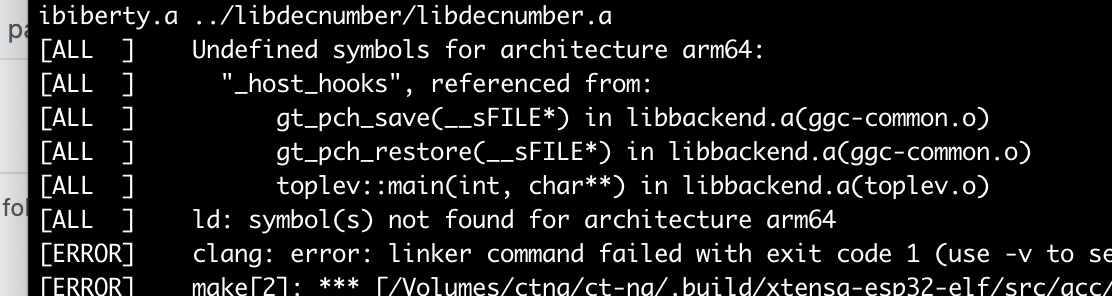
I will leave it as-is and use my Linux machines till Espressif patch it. @igrr
Jackson
huming2207
on 14 Dec 2020
And FYI, here's the full log.
huming2207
on 14 Dec 2020
I had success on MacOS Big Sur (11.1) / M1 ARM processor by installing the esp-idf x86 toolchain but using as many native ARM Homebrew packages as possible:
First install the ARM HomeBrew to /opt/homebrew as described in Homebrew docs and add __/opt/homebrew/bin__ to __$PATH__ (IMPORTANT!) Note that the default shell in Big Sur is zsh (not bash!) so _~/.zshrc_ is the file that you need to edit. Also make sure that there's no alias set for python (so it will be de facto located via $PATH).
Then update brew and install python 3.9:
> brew update
> brew install python3
Make sure that python3 is the default interpreter found (esp-idf python virtual environment will be created based on this version). The legacy Python 2.7 on Big Sur doesn't seem to work correctly:
> ln -s /opt/homebrew/bin/python3 /opt/homebrew/bin/python
> which -a python
.. which should output:
/opt/homebrew/bin/python
/usr/bin/python
Check the version:
> python -V
Python 3.9.1
Then install dependencies and Xcode command line tools:
> brew install cmake ninja dfu-util
> xcode-select --install
Install Rosetta2:
> /usr/sbin/softwareupdate --install-rosetta --agree-to-license
Continue as described in "Get ESP-IDF" section:
mkdir -p ~/esp
cd ~/esp
git clone --recursive https://github.com/espressif/esp-idf.git
cd ~/esp/esp-idf
Add our M1 ARM platform __Darwin-arm64__ to line 123 of tools/idf_tools.py:
'Darwin-arm64' : PLATFORM_MACOS,
Continue with the installation:
./install.sh
. ./export.sh
Regarding the USB to Virtual COM bridge support, the Silicon Labs (SiLabs) CP2102/2104 based ESP32 modules seem to work out-of-the-box without any additional drivers. The interface shows up as
/dev/tty.usbserial-xxxx
 mjuhanne
on 7 Jan 2021
mjuhanne
on 7 Jan 2021
@mjuhanne Thanks for the step-by-step guide! Could you confirm whether the platform string in idf_tools.py is Darwin-MacOS or Darwin-arm64 as indicated in https://github.com/espressif/esp-idf/issues/6113#issuecomment-729258896?
igrr
on 7 Jan 2021
@mjuhanne Thanks for the step-by-step guide! Could you confirm whether the platform string in idf_tools.py is
Darwin-MacOSorDarwin-arm64as indicated in #6113 (comment)?
Whoops, that was a typo. Yes, It's 'Darwin-arm64' (corrected in my post now)
mjuhanne
on 7 Jan 2021
I'm able to install & build my idf project using an M1 mac, and can successfully run
idf.py -p /dev/tty.usbserial-110 monitor
but receive the following if I attempt to run the 'flash' or 'erase_flash' commands.
Serial port /dev/tty.usbserial-110
Connecting........_____..
Chip is ESP32-S2
Features: WiFi, ADC and temperature sensor calibration in BLK2 of efuse
Crystal is 40MHz
MAC: 7c:df:a1:01:5e:1a
Uploading stub...
Running stub...
Stub running...
Changing baud rate to 460800
Changed.
Configuring flash size...

A fatal error occurred: Timed out waiting for packet header
CMake Error at run_cmd.cmake:14 (message):
  esptool.py failed
Call Stack (most recent call first):
  run_esptool.cmake:21 (include)


FAILED: CMakeFiles/flash
Is anyone aware of the reason for this/ run into a similar issue?
 michael-drury
on 11 Jan 2021
michael-drury
on 11 Jan 2021
I followed the steps posted by @mjuhanne on my M1 MacBook Air.
But I run in to issues with the install script:
Fatal Python error: config_get_locale_encoding: failed to get the locale encoding: nl_langinfo(CODESET) failed
Python runtime state: preinitialized
I've tried in both fish and zsh and have tried setting both LANG and LC_ALL etc. to en_US.UTF-8 to no avail. Not sure what more I can try. And I realize this error probably isn't strictly related to this project, but perhaps someone else saw the same thing or has a clue?
EDIT: Unsetting LC_ALL fixed the issue.
 simme
on 12 Jan 2021
simme
on 12 Jan 2021
Hello I have managed to install it
Have installed the prerequisite (off course having terminal running in rosetta mode)
i had the issueassert len(base_version) == 2which when going into error
it's because the code is expecting the macOS version to be macosx-10.14-x86_64 with a '.' And if you change the code to display the actual value it's macosx-11-x86_64 hence not "."
I have done this in the filesite-packages/wheel/maxosx_libfile.pydef calculate_macosx_platform_tag(archive_root, platform_tag): """ Calculate proper macosx platform tag basing on files which are included to wheel Example platform tag `macosx-10.14-x86_64` """ #added line platform_tag ="macosx-11.01-x86_64" prefix, base_version, suffix = platform_tag.split('-')it's not really clean buy it works
hope this help
I'm also running into this issue, but not sure which site-packages you're referencing. I tried changing ~/Users/tanabs/.espressif/python_env/idf4.1_py3.9_env/lib/python3.9/site-packages/wheel/macosx_libfile.py but it didn't work.
 briantanabe
on 19 Jan 2021
briantanabe
on 19 Jan 2021
hello i have modified this file too
.espressif/python_env/idf4.3_py3.9_env/lib/python3.9/site-packages/wheel/macosx_libfile.py
because now that it's bigSur 11.1 or more you should not see this error occur at this place
can you put here the full error ?
hpwit
on 19 Jan 2021
Hopefully not mucking up the thread with a simple problem, thanks for the quick response @hpwit
tanabs@tanabscomputer esp-idf % ./install.sh
Installing ESP-IDF tools
Installing tools: xtensa-esp32-elf, xtensa-esp32s2-elf, esp32ulp-elf, esp32s2ulp-elf, openocd-esp32
Skipping [email protected] (already installed)
Skipping [email protected] (already installed)
Skipping [email protected] (already installed)
Skipping [email protected] (already installed)
Skipping [email protected] (already installed)
Installing Python environment and packages
Installing Python packages from /Users/tanabs/esp/esp-idf/requirements.txt
Ignoring None: markers 'sys_platform == "win32"' don't match your environment
Requirement already satisfied: setuptools>=21 in /Users/tanabs/.espressif/python_env/idf4.1_py3.9_env/lib/python3.9/site-packages (from -r /Users/tanabs/esp/esp-idf/requirements.txt (line 4)) (49.2.1)
Collecting click>=5.0
  Using cached click-7.1.2-py2.py3-none-any.whl (82 kB)
Collecting cryptography>=2.1.4
  Using cached cryptography-3.3.1.tar.gz (539 kB)
  Installing build dependencies ... done
  Getting requirements to build wheel ... done
    Preparing wheel metadata ... error
    ERROR: Command errored out with exit status 1:
     command: /Users/tanabs/.espressif/python_env/idf4.1_py3.9_env/bin/python /Users/tanabs/.espressif/python_env/idf4.1_py3.9_env/lib/python3.9/site-packages/pip/_vendor/pep517/_in_process.py prepare_metadata_for_build_wheel /var/folders/dm/ks8czvx51cn9lvkz89lq7yp40000gn/T/tmpocibej2t
         cwd: /private/var/folders/dm/ks8czvx51cn9lvkz89lq7yp40000gn/T/pip-install-1eequrdt/cryptography_c9a4aff7b9a94778ad350273e7c9c222
    Complete output (54 lines):

        =============================DEBUG ASSISTANCE=============================
        If you are seeing a compilation error please try the following steps to
        successfully install cryptography:
        1) Upgrade to the latest pip and try again. This will fix errors for most
           users. See: https://pip.pypa.io/en/stable/installing/#upgrading-pip
        2) Read https://cryptography.io/en/latest/installation.html for specific
           instructions for your platform.
        3) Check our frequently asked questions for more information:
           https://cryptography.io/en/latest/faq.html
        =============================DEBUG ASSISTANCE=============================

    Traceback (most recent call last):
      File "/Users/tanabs/.espressif/python_env/idf4.1_py3.9_env/lib/python3.9/site-packages/pip/_vendor/pep517/_in_process.py", line 280, in <module>
        main()
      File "/Users/tanabs/.espressif/python_env/idf4.1_py3.9_env/lib/python3.9/site-packages/pip/_vendor/pep517/_in_process.py", line 263, in main
        json_out['return_val'] = hook(**hook_input['kwargs'])
      File "/Users/tanabs/.espressif/python_env/idf4.1_py3.9_env/lib/python3.9/site-packages/pip/_vendor/pep517/_in_process.py", line 133, in prepare_metadata_for_build_wheel
        return hook(metadata_directory, config_settings)
      File "/private/var/folders/dm/ks8czvx51cn9lvkz89lq7yp40000gn/T/pip-build-env-hqwyvd3i/overlay/lib/python3.9/site-packages/setuptools/build_meta.py", line 161, in prepare_metadata_for_build_wheel
        self.run_setup()
      File "/private/var/folders/dm/ks8czvx51cn9lvkz89lq7yp40000gn/T/pip-build-env-hqwyvd3i/overlay/lib/python3.9/site-packages/setuptools/build_meta.py", line 145, in run_setup
        exec(compile(code, __file__, 'exec'), locals())
      File "setup.py", line 44, in <module>
        setup(
      File "/private/var/folders/dm/ks8czvx51cn9lvkz89lq7yp40000gn/T/pip-build-env-hqwyvd3i/overlay/lib/python3.9/site-packages/setuptools/__init__.py", line 153, in setup
        return distutils.core.setup(**attrs)
      File "/Users/tanabs/.pyenv/versions/3.9.1/lib/python3.9/distutils/core.py", line 108, in setup
        _setup_distribution = dist = klass(attrs)
      File "/private/var/folders/dm/ks8czvx51cn9lvkz89lq7yp40000gn/T/pip-build-env-hqwyvd3i/overlay/lib/python3.9/site-packages/setuptools/dist.py", line 432, in __init__
        _Distribution.__init__(self, {
      File "/Users/tanabs/.pyenv/versions/3.9.1/lib/python3.9/distutils/dist.py", line 292, in __init__
        self.finalize_options()
      File "/private/var/folders/dm/ks8czvx51cn9lvkz89lq7yp40000gn/T/pip-build-env-hqwyvd3i/overlay/lib/python3.9/site-packages/setuptools/dist.py", line 708, in finalize_options
        ep(self)
      File "/private/var/folders/dm/ks8czvx51cn9lvkz89lq7yp40000gn/T/pip-build-env-hqwyvd3i/overlay/lib/python3.9/site-packages/setuptools/dist.py", line 715, in _finalize_setup_keywords
        ep.load()(self, ep.name, value)
      File "/private/var/folders/dm/ks8czvx51cn9lvkz89lq7yp40000gn/T/pip-build-env-hqwyvd3i/overlay/lib/python3.9/site-packages/cffi/setuptools_ext.py", line 219, in cffi_modules
        add_cffi_module(dist, cffi_module)
      File "/private/var/folders/dm/ks8czvx51cn9lvkz89lq7yp40000gn/T/pip-build-env-hqwyvd3i/overlay/lib/python3.9/site-packages/cffi/setuptools_ext.py", line 49, in add_cffi_module
        execfile(build_file_name, mod_vars)
      File "/private/var/folders/dm/ks8czvx51cn9lvkz89lq7yp40000gn/T/pip-build-env-hqwyvd3i/overlay/lib/python3.9/site-packages/cffi/setuptools_ext.py", line 25, in execfile
        exec(code, glob, glob)
      File "src/_cffi_src/build_openssl.py", line 77, in <module>
        ffi = build_ffi_for_binding(
      File "src/_cffi_src/utils.py", line 54, in build_ffi_for_binding
        ffi = build_ffi(
      File "src/_cffi_src/utils.py", line 74, in build_ffi
        ffi = FFI()
      File "/private/var/folders/dm/ks8czvx51cn9lvkz89lq7yp40000gn/T/pip-build-env-hqwyvd3i/overlay/lib/python3.9/site-packages/cffi/api.py", line 48, in __init__
        import _cffi_backend as backend
    ImportError: dlopen(/private/var/folders/dm/ks8czvx51cn9lvkz89lq7yp40000gn/T/pip-build-env-hqwyvd3i/overlay/lib/python3.9/site-packages/_cffi_backend.cpython-39-darwin.so, 2): no suitable image found.  Did find:
        /private/var/folders/dm/ks8czvx51cn9lvkz89lq7yp40000gn/T/pip-build-env-hqwyvd3i/overlay/lib/python3.9/site-packages/_cffi_backend.cpython-39-darwin.so: mach-o, but wrong architecture
        /private/var/folders/dm/ks8czvx51cn9lvkz89lq7yp40000gn/T/pip-build-env-hqwyvd3i/overlay/lib/python3.9/site-packages/_cffi_backend.cpython-39-darwin.so: mach-o, but wrong architecture
    ----------------------------------------
ERROR: Command errored out with exit status 1: /Users/tanabs/.espressif/python_env/idf4.1_py3.9_env/bin/python /Users/tanabs/.espressif/python_env/idf4.1_py3.9_env/lib/python3.9/site-packages/pip/_vendor/pep517/_in_process.py prepare_metadata_for_build_wheel /var/folders/dm/ks8czvx51cn9lvkz89lq7yp40000gn/T/tmpocibej2t Check the logs for full command output.
Traceback (most recent call last):
  File "/Users/tanabs/esp/esp-idf/tools/idf_tools.py", line 1388, in <module>
    main(sys.argv[1:])
  File "/Users/tanabs/esp/esp-idf/tools/idf_tools.py", line 1384, in main
    action_func(args)
  File "/Users/tanabs/esp/esp-idf/tools/idf_tools.py", line 1197, in action_install_python_env
    subprocess.check_call(run_args, stdout=sys.stdout, stderr=sys.stderr)
  File "/Users/tanabs/.pyenv/versions/3.9.1/lib/python3.9/subprocess.py", line 373, in check_call
    raise CalledProcessError(retcode, cmd)
subprocess.CalledProcessError: Command '['/Users/tanabs/.espressif/python_env/idf4.1_py3.9_env/bin/python', '-m', 'pip', 'install', '--no-warn-script-location', '-r', '/Users/tanabs/esp/esp-idf/requirements.txt']' returned non-zero exit status 1.
Related issues
 ESP32DE
·
4Comments
ESP32DE
·
4Comments
 luc-github
·
4Comments
luc-github
·
4Comments
 jakkra
·
3Comments
jakkra
·
3Comments
 feelfreelinux
·
4Comments
feelfreelinux
·
4Comments
 JLIspace
·
3Comments
JLIspace
·
3Comments
Most helpful comment
I had success on MacOS Big Sur (11.1) / M1 ARM processor by installing the esp-idf x86 toolchain but using as many native ARM Homebrew packages as possible:
First install the ARM HomeBrew to /opt/homebrew as described in Homebrew docs and add __/opt/homebrew/bin__ to __$PATH__ (IMPORTANT!) Note that the default shell in Big Sur is zsh (not bash!) so _~/.zshrc_ is the file that you need to edit. Also make sure that there's no alias set for python (so it will be de facto located via $PATH).
Then update brew and install python 3.9:
Make sure that python3 is the default interpreter found (esp-idf python virtual environment will be created based on this version). The legacy Python 2.7 on Big Sur doesn't seem to work correctly:
.. which should output:
Check the version:
Then install dependencies and Xcode command line tools:
Install Rosetta2:
Continue as described in "Get ESP-IDF" section:
Add our M1 ARM platform __Darwin-arm64__ to line 123 of tools/idf_tools.py:
Continue with the installation:
Regarding the USB to Virtual COM bridge support, the Silicon Labs (SiLabs) CP2102/2104 based ESP32 modules seem to work out-of-the-box without any additional drivers. The interface shows up as