Esp-idf: SmartConfig not working (IDFGH-3247)
I've tried as many things as I can but still can't get SmartConfig to work. Are there any known issues I should be aware of?
IDF v4.2
Latest ESPTOUCH from Google Play store.
ESP32 WROOM.
It appears to find the app ok and tries to retrieve the SSID and password (it's a 2.4G network), but the debug is not helpful. Should I be seeing the individual characters of the SSID and password coming in?
Here's the log of a few attempts:
D (00:00:00.890) WIFI: WIFI_EVENT_STA_START
I (2141) smartconfig: SC version: V2.9.0
I (5281) wifi:ic_enable_sniffer
I (5291) smartconfig: Start to find channel...
I (10171) smartconfig: T|once 1 80
I (10171) smartconfig: save rssi:-77 ,bssid:1c:b7:2c:c1:0a:60
I (10171) smartconfig: iCh lock
I (10731) smartconfig: confirm rssi:-77, bssid:1c:b7:2c:c1:0a:60
I (10731) smartconfig: TYPE: ESPTOUCH
I (10741) smartconfig: T|sniffer on ch:2,width:0
I (10741) smartconfig: T|AP MAC: 1c:b7:2c:c1:0a:60
I (10741) smartconfig: T|Head Len:80
I (10741) smartconfig: Found channel on 2-0. Start to get ssid and password...
I (10751) smartconfig: T|SYNC STATUS
I (12251) smartconfig: T|1-7
I (13481) smartconfig: T|32-3
I (13861) smartconfig: T|
-38
I (14461) smartconfig: T|--30
I (19671) smartconfig: T|I-9
I (44551) smartconfig: T|n-24
I (51021) smartconfig: T|:-70
I (56741) wifi:ic_disable_sniffer
I (56741) smartconfig: smartconfig restart
I (56791) smartconfig: SC version: V2.9.0
I (59931) wifi:ic_enable_sniffer
I (59941) smartconfig: Start to find channel...
I (103881) smartconfig: T|once 1 80
I (103881) smartconfig: save rssi:-75 ,bssid:1c:b7:2c:c1:0a:60
I (103881) smartconfig: confirm rssi:-75, bssid:1c:b7:2c:c1:0a:60
I (103881) smartconfig: TYPE: ESPTOUCH
I (103891) smartconfig: T|sniffer on ch:2,width:0
I (103891) smartconfig: T|AP MAC: 1c:b7:2c:c1:0a:60
I (103891) smartconfig: T|Head Len:80
I (103901) smartconfig: Found channel on 2-0. Start to get ssid and password...
I (103901) smartconfig: T|SYNC STATUS
I (119161) smartconfig: T|1-7
I (120691) smartconfig: T|e-15
I (130831) smartconfig: T|
-34
I (149891) wifi:ic_disable_sniffer
I (149891) smartconfig: smartconfig restart
I (149941) smartconfig: SC version: V2.9.0
I (153081) wifi:ic_enable_sniffer
I (153091) smartconfig: Start to find channel...
I (176011) smartconfig: T|once 1 80
I (176011) smartconfig: save rssi:-84 ,bssid:1c:b7:2c:c1:0a:60
I (176011) smartconfig: confirm rssi:-84, bssid:1c:b7:2c:c1:0a:60
I (176011) smartconfig: TYPE: ESPTOUCH
I (176011) smartconfig: T|sniffer on ch:2,width:0
I (176021) smartconfig: T|AP MAC: 1c:b7:2c:c1:0a:60
I (176021) smartconfig: T|Head Len:80
I (176031) smartconfig: Found channel on 2-0. Start to get ssid and password...
I (176031) smartconfig: T|SYNC STATUS
I (179131) smartconfig: T|�-42
I (192881) smartconfig: T|1-7
I (210391) smartconfig: T|I-9
I (222011) wifi:ic_disable_sniffer
I (222011) smartconfig: smartconfig restart
I (222061) smartconfig: SC version: V2.9.0
I (225201) wifi:ic_enable_sniffer
I (225211) smartconfig: Start to find channel...
I (227981) smartconfig: T|once 1 80
I (227981) smartconfig: save rssi:-83 ,bssid:1c:b7:2c:c1:0a:60
I (227981) smartconfig: confirm rssi:-83, bssid:1c:b7:2c:c1:0a:60
I (227981) smartconfig: TYPE: ESPTOUCH
I (227981) smartconfig: T|sniffer on ch:2,width:0
I (227991) smartconfig: T|AP MAC: 1c:b7:2c:c1:0a:60
I (227991) smartconfig: T|Head Len:80
I (228001) smartconfig: Found channel on 2-0. Start to get ssid and password...
I (228001) smartconfig: T|SYNC STATUS
I (255571) smartconfig: T|L-28
I (256231) smartconfig: T|8-1
I (257701) smartconfig: T|162-8
I (260821) smartconfig: T|a-24
I (262001) smartconfig: T|1-7
I (266641) smartconfig: T|
-31
I (269981) smartconfig: T|,-33
I (273981) wifi:ic_disable_sniffer
I (273981) smartconfig: smartconfig restart
I (274031) smartconfig: SC version: V2.9.0
I (277171) wifi:ic_enable_sniffer
I (277181) smartconfig: Start to find channel...
And this is my callback, which never gets called:
esp_event_handler_register(SC_EVENT, SC_EVENT_GOT_SSID_PSWD, _sc_event_handler, NULL);
void Wifi::_sc_event_handler(void *arg, esp_event_base_t base, int32_t event_id, void *data)
{
    smartconfig_event_got_ssid_pswd_t *evt = (smartconfig_event_got_ssid_pswd_t *)data;
    uint8_t ssid[33] = { 0 };
    uint8_t password[65] = { 0 };
    uint8_t cellphone_ip[4];
    esp_err_t err = ESP_OK;

    memcpy(ssid, evt->ssid, sizeof(evt->ssid));
    memcpy(password, evt->password, sizeof(evt->password));
    memcpy(cellphone_ip, evt->cellphone_ip, sizeof(evt->cellphone_ip));

    ESP_LOGD(LOG_TAG, "SSID:%s", ssid);
    ESP_LOGD(LOG_TAG, "PASSWORD:%s", password);
    ESP_LOGD(LOG_TAG, "Phone ip: %d.%d.%d.%d\n", cellphone_ip[0], cellphone_ip[1], cellphone_ip[2], cellphone_ip[3]);

    err = sc_send_ack_start(evt->type, evt->token, evt->cellphone_ip);
    if (err != ESP_OK) {
        ESP_LOGE(LOG_TAG, "Send smartconfig ACK error: %d", err);
    }

    memcpy(wifi_config.sta.ssid, ssid, sizeof(ssid));
    memcpy(wifi_config.sta.password, password, sizeof(password));

    xEventGroupSetBits(event_group, WIFI_SC_DONE_BIT);
}
Note, if I don't use smartconfig, and hard code the SSID and password, the ESP32 connects and works as expected.
 howroyd
All 31 comments
Another log. My SSID is "GreenGiant-2G4" which it seems to be getting individual characters of but not in the right order, etc:
D (00:00:01.187) WIFI: WIFI_EVENT_STA_START
I (2552) smartconfig: SC version: V2.9.0
I (5692) wifi:ic_enable_sniffer
I (5692) smartconfig: Start to find channel...
I (46462) smartconfig: T|once 1 80
I (46462) smartconfig: save rssi:-76 ,bssid:1c:b7:2c:c1:0a:60
I (46462) smartconfig: confirm rssi:-76, bssid:1c:b7:2c:c1:0a:60
I (46462) smartconfig: TYPE: ESPTOUCH
I (46472) smartconfig: T|sniffer on ch:2,width:0
I (46472) smartconfig: T|AP MAC: 1c:b7:2c:c1:0a:60
I (46482) smartconfig: T|Head Len:80
I (46482) smartconfig: Found channel on 2-0. Start to get ssid and password...
I (46492) smartconfig: T|SYNC STATUS
I (48622) smartconfig: T|32-3
I (56512) smartconfig: T|96-5
I (56542) smartconfig: T|69-6
I (67262) smartconfig: T|`-39
I (69722) smartconfig: T|e-12
I (74022) smartconfig: T|4-33
I (74672) smartconfig: T|
-34
I (76482) smartconfig: T|�-37
I (80802) smartconfig: T|-56
I (85382) smartconfig: T|
-38
I (92472) wifi:ic_disable_sniffer
I (92472) smartconfig: smartconfig restart
I (92522) smartconfig: SC version: V2.9.0
I (95662) wifi:ic_enable_sniffer
I (95662) smartconfig: Start to find channel...
I (105482) smartconfig: T|once 1 80
I (105482) smartconfig: save rssi:-75 ,bssid:1c:b7:2c:c1:0a:60
I (105482) smartconfig: confirm rssi:-75, bssid:1c:b7:2c:c1:0a:60
I (105482) smartconfig: TYPE: ESPTOUCH
I (105482) smartconfig: T|sniffer on ch:2,width:0
I (105492) smartconfig: T|AP MAC: 1c:b7:2c:c1:0a:60
I (105492) smartconfig: T|Head Len:80
I (105492) smartconfig: Found channel on 2-0. Start to get ssid and password...
I (105502) smartconfig: T|SYNC STATUS
I (109652) smartconfig: T|2-31
I (114262) smartconfig: T|e-22
I (115822) smartconfig: T|�-18
I (126242) smartconfig: T|i-26
I (138222) smartconfig: T|G-25
I (143792) smartconfig: T|�-37
I (144362) smartconfig: T|t-16
I (151482) wifi:ic_disable_sniffer
I (151482) smartconfig: smartconfig restart
I (151532) smartconfig: SC version: V2.9.0
I (154672) wifi:ic_enable_sniffer
I (154672) smartconfig: Start to find channel...
And this is my callback, which never gets called:
esp_event_handler_register(SC_EVENT, SC_EVENT_GOT_SSID_PSWD, _sc_event_handler, NULL);
Hi @howroyd to troubleshoot the same code, have you tried to run unmodified smart_config example?
It works for me and SSID / password are reterived. The difference is that I am using "EspTouch" App on iPhone.
 krzychb
on 5 May 2020
krzychb
on 5 May 2020
Nope, looks like the same issue with the example too.
Log of a couple of attempts using the example, no modifications at all:
I (521) cpu_start: Starting scheduler on PRO CPU.
I (0) cpu_start: Starting scheduler on APP CPU.
I (587) wifi:wifi driver task: 3ffc0e50, prio:23, stack:3584, core=0
I (587) system_api: Base MAC address is not set, read default base MAC address from BLK0 of EFUSE
I (587) system_api: Base MAC address is not set, read default base MAC address from BLK0 of EFUSE
I (717) wifi:wifi firmware version: 3866d0b
I (717) wifi:config NVS flash: enabled
I (717) wifi:config nano formating: disabled
I (717) wifi:Init dynamic tx buffer num: 32
I (727) wifi:Init data frame dynamic rx buffer num: 32
I (727) wifi:Init management frame dynamic rx buffer num: 32
I (737) wifi:Init management short buffer num: 32
I (737) wifi:Init static rx buffer size: 1600
I (747) wifi:Init static rx buffer num: 10
I (747) wifi:Init dynamic rx buffer num: 32
I (847) phy: phy_version: 4180, cb3948e, Sep 12 2019, 16:39:13, 0, 0
I (847) wifi:mode : sta (80:7d:3a:c7:5d:8c)
I (897) smartconfig: SC version: V2.9.0
I (4997) wifi:ic_enable_sniffer
I (4997) smartconfig: Start to find channel...
I (4997) smartconfig_example: Scan done
I (12037) smartconfig: TYPE: ESPTOUCH
I (12037) smartconfig: T|AP MAC: 1c:b7:2c:c1:0a:60
I (12037) smartconfig: Found channel on 2-0. Start to get ssid and password...
I (12037) smartconfig_example: Found channel
I (63037) wifi:ic_disable_sniffer
I (63037) smartconfig: smartconfig restart
I (63087) smartconfig: SC version: V2.9.0
I (67187) wifi:ic_enable_sniffer
I (67187) smartconfig: Start to find channel...
I (67187) smartconfig_example: Scan done
I (79917) smartconfig: TYPE: ESPTOUCH
I (79927) smartconfig: T|AP MAC: 1c:b7:2c:c1:0a:60
I (79927) smartconfig: Found channel on 2-0. Start to get ssid and password...
I (79927) smartconfig_example: Found channel
I (125927) wifi:ic_disable_sniffer
I (125927) smartconfig: smartconfig restart
I (125977) smartconfig: SC version: V2.9.0
I (130077) wifi:ic_enable_sniffer
I (130077) smartconfig: Start to find channel...
I (130077) smartconfig_example: Scan done
And, tried a couple more times but with log_enable set to true, if it helps:
I (521) cpu_start: Starting scheduler on PRO CPU.
I (0) cpu_start: Starting scheduler on APP CPU.
I (627) wifi:wifi driver task: 3ffc0f78, prio:23, stack:3584, core=0
I (627) system_api: Base MAC address is not set, read default base MAC address from BLK0 of EFUSE
I (627) system_api: Base MAC address is not set, read default base MAC address from BLK0 of EFUSE
I (657) wifi:wifi firmware version: 3866d0b
I (657) wifi:config NVS flash: enabled
I (657) wifi:config nano formating: disabled
I (657) wifi:Init dynamic tx buffer num: 32
I (657) wifi:Init data frame dynamic rx buffer num: 32
I (667) wifi:Init management frame dynamic rx buffer num: 32
I (667) wifi:Init management short buffer num: 32
I (677) wifi:Init static rx buffer size: 1600
I (677) wifi:Init static rx buffer num: 10
I (687) wifi:Init dynamic rx buffer num: 32
I (777) phy: phy_version: 4180, cb3948e, Sep 12 2019, 16:39:13, 0, 0
I (777) wifi:mode : sta (80:7d:3a:c7:5d:8c)
I (837) smartconfig: SC version: V2.9.0
I (4937) wifi:ic_enable_sniffer
I (4937) smartconfig: Start to find channel...
I (4937) smartconfig_example: Scan done
I (22847) smartconfig: T|once 1 80
I (22847) smartconfig: save rssi:-69 ,bssid:1c:b7:2c:c1:0a:60
I (22847) smartconfig: confirm rssi:-69, bssid:1c:b7:2c:c1:0a:60
I (22847) smartconfig: TYPE: ESPTOUCH
I (22847) smartconfig: T|sniffer on ch:2,width:0
I (22857) smartconfig: T|AP MAC: 1c:b7:2c:c1:0a:60
I (22857) smartconfig: T|Head Len:80
I (22857) smartconfig: Found channel on 2-0. Start to get ssid and password...
I (22867) smartconfig: T|SYNC STATUS
I (22877) smartconfig_example: Found channel
I (30977) smartconfig: T|4-33
I (37407) smartconfig: T|n-28
I (42667) smartconfig: T|t-16
I (68847) wifi:ic_disable_sniffer
I (68847) smartconfig: smartconfig restart
I (68897) smartconfig: SC version: V2.9.0
I (72997) wifi:ic_enable_sniffer
I (72997) smartconfig: Start to find channel...
I (72997) smartconfig_example: Scan done
I (129607) smartconfig: T|once 1 80
I (129607) smartconfig: save rssi:-74 ,bssid:1c:b7:2c:c1:0a:60
I (129607) smartconfig: confirm rssi:-74, bssid:1c:b7:2c:c1:0a:60
I (129607) smartconfig: TYPE: ESPTOUCH
I (129607) smartconfig: T|sniffer on ch:2,width:0
I (129617) smartconfig: T|AP MAC: 1c:b7:2c:c1:0a:60
I (129617) smartconfig: T|Head Len:80
I (129627) smartconfig: Found channel on 2-0. Start to get ssid and password...
I (129627) smartconfig: T|SYNC STATUS
I (129637) smartconfig_example: Found channel
I (144927) smartconfig: T|5-18
I (145237) smartconfig: T|`-39
I (145537) smartconfig: T|r-21
I (175607) wifi:ic_disable_sniffer
I (175617) smartconfig: smartconfig restart
I (175667) smartconfig: SC version: V2.9.0
I (179767) wifi:ic_enable_sniffer
I (179767) smartconfig: Start to find channel...
I (179767) smartconfig_example: Scan done
Screenshot of the ESPTOUCH app (sorry, had to obscure my password!):
https://photos.app.goo.gl/MxVQ8cPjrzHuEkaE9
howroyd
on 5 May 2020
I should add, the version of ESPTOUCH that I got from the play store today is:
App version v1.0.0
EspTouch Version: v0.3.7.1
howroyd
on 5 May 2020
@howroyd I did another test using Android phone and the same app you mentioned above and it worked. Then tried "ESP8266 SmartConfig" (also from Play Store) and it worked as well.
krzychb
on 5 May 2020
Just tried it on a different network. Worked first time, then again second time.
Only differences in SSID and password are the network that doesn't work has numbers in the ssid and the password has an "@" symbol. But it doesn't look like it even gets that far from the logs above.
How do I decipher the part where it is receiving the SSID? This may help me figure out what it is getting stuck on with the original network:
I (7452) smartconfig: Found channel on 2-0. Start to get ssid and password...
I (9332) smartconfig: T|34-0
I (9462) smartconfig: F|34-0
I (9472) smartconfig: T|10-1
I (9682) smartconfig: F|10-1
I (9692) smartconfig: T|181-2
I (9712) smartconfig: F|181-2
I (9762) smartconfig: T|131-3
I (9762) smartconfig: T|SCAN SSID: GreenGiant-MEMO
For completeness, the successful log to a different network, again, omitted the password bit but it all succeeded:
D (00:00:01.184) WIFI: WIFI_EVENT_STA_START
I (2552) smartconfig: SC version: V2.9.0
I (5692) wifi:ic_enable_sniffer
I (5692) smartconfig: Start to find channel...
I (7412) smartconfig: T|once 1 80
I (7412) smartconfig: save rssi:-48 ,bssid:c6:41:1e:4b:13:af
I (7412) smartconfig: confirm rssi:-48, bssid:c6:41:1e:4b:13:af
I (7412) smartconfig: TYPE: ESPTOUCH
I (7422) smartconfig: T|sniffer on ch:2,width:0
I (7422) smartconfig: T|AP MAC: c6:41:1e:4b:13:af
I (7432) smartconfig: T|Head Len:80
I (7432) smartconfig: Found channel on 2-0. Start to get ssid and password...
I (7442) smartconfig: T|SYNC STATUS
I (7452) smartconfig: TYPE: ESPTOUCH
I (7452) smartconfig: F|sniffer on ch:2,width:0
I (7452) smartconfig: F|rssi:35, ch:2
F|head:82
I (7452) smartconfig: Found channel on 2-0. Start to get ssid and password...
I (9332) smartconfig: T|34-0
I (9462) smartconfig: F|34-0
I (9472) smartconfig: T|10-1
I (9682) smartconfig: F|10-1
I (9692) smartconfig: T|181-2
I (9712) smartconfig: F|181-2
I (9762) smartconfig: T|131-3
I (9762) smartconfig: T|SCAN SSID: GreenGiant-MEMO
I (9762) smartconfig: T|all len:34,pass len:10
I (9762) smartconfig: T|scan ap: 1
I (9922) smartconfig: F|131-3
I (9922) smartconfig: F|XOR
I (9932) smartconfig: T|59-4
@krzychb In the 8266 app I just get unknown ssid on both networks, and it doesn't work.
I am wondering if it is an Android issue? Just speculation, I am not an expert on apps.
howroyd
on 5 May 2020
I've done a bit more playing about and SmartConfig just does not like the network on my Asus RT-AC87U router. The Linksys E900 (running DD-WRT bridged onto the Asus 2.4G router) it has no trouble with.
I've messed about with various settings in the Asus to make them match the Linksys as best I can to no avail. Strangely, not using SmartConfig and hard coding the SSID and password, still works absolutely fine.
Happy to provide more debug and router settings if required.
With my naivety it seems to me like an issue in getting the SSID (or which network to connect to). Whether that is on the phone or on the Esp32 I don't know without understanding what is passed over. Whether this is because the Asus isn't providing something that is required, or that data is not handled correctly, again, I don't know without knowing the underlying protocol which I cannot find any info on.
This is a feature I really really want, so please use me as you see fit if it helps the community!
howroyd
on 6 May 2020
@howroyd
According to your description, Asus RT-AC87U router has the problem, but Linksys E900 works fine, right?
Which phone do you use? Which version of the operating system?
 zhangyanjiaoesp
on 6 May 2020
zhangyanjiaoesp
on 6 May 2020
@zhangyanjiaoesp
Correct. However, the ESP32 can connect to both and work without issues if manually given the SSID and password, it's just SmartConfig that has an issue.
Google Pixel 4, latest version of Android 10 (QQ2A.200405.005)
howroyd
on 6 May 2020
Ok, I will try to reproduce this issue on my side. By the way, can you provide the capture packets?
zhangyanjiaoesp
on 6 May 2020
@zhangyanjiaoesp
If you can let me know how to turn that on, yes of course? I assume this is more than the enable_log being set to true in the smartconfig_start_config_t struct??
howroyd
on 6 May 2020
You need to use Wireshark or Omnipeek to capture the wifi packets.
zhangyanjiaoesp
on 6 May 2020
Is this the format you need it in?
https://drive.google.com/open?id=1Xyex0q31pOdjS8yjUPZxtOT_ibdyVQGK
The console debug for this was:
I (4793607) wifi:ic_enable_sniffer
I (4793607) smartconfig: Start to find channel...
I (4793607) smartconfig_example: Scan done
I (15260987) smartconfig: T|once 1 80
I (15260987) smartconfig: save rssi:-67 ,bssid:1c:b7:2c:c1:0a:60
I (15260987) smartconfig: confirm rssi:-67, bssid:1c:b7:2c:c1:0a:60
I (15260997) smartconfig: TYPE: ESPTOUCH
I (15260997) smartconfig: T|sniffer on ch:8,width:0
I (15261007) smartconfig: T|AP MAC: 1c:b7:2c:c1:0a:60
I (15261007) smartconfig: T|Head Len:80
I (15261007) smartconfig: Found channel on 8-0. Start to get ssid and password...
I (15261017) smartconfig: T|SYNC STATUS
I (15261027) smartconfig_example: Found channel
I (15271427) smartconfig: T|96-5
I (15272327) smartconfig: T|t-11
I (15272387) smartconfig: T|r-13
I (15284037) smartconfig: T|,-36
I (15300587) smartconfig: T|32-3
I (15306997) wifi:ic_disable_sniffer
I (15306997) smartconfig: smartconfig restart
I (15307047) smartconfig: SC version: V2.9.0
I (15311147) wifi:ic_enable_sniffer
I (15311147) smartconfig: Start to find channel...
I (15311147) smartconfig_example: Scan done
Correct! I will analyze the captures tomorrow, thanks !
zhangyanjiaoesp
on 6 May 2020
hi @howroyd,
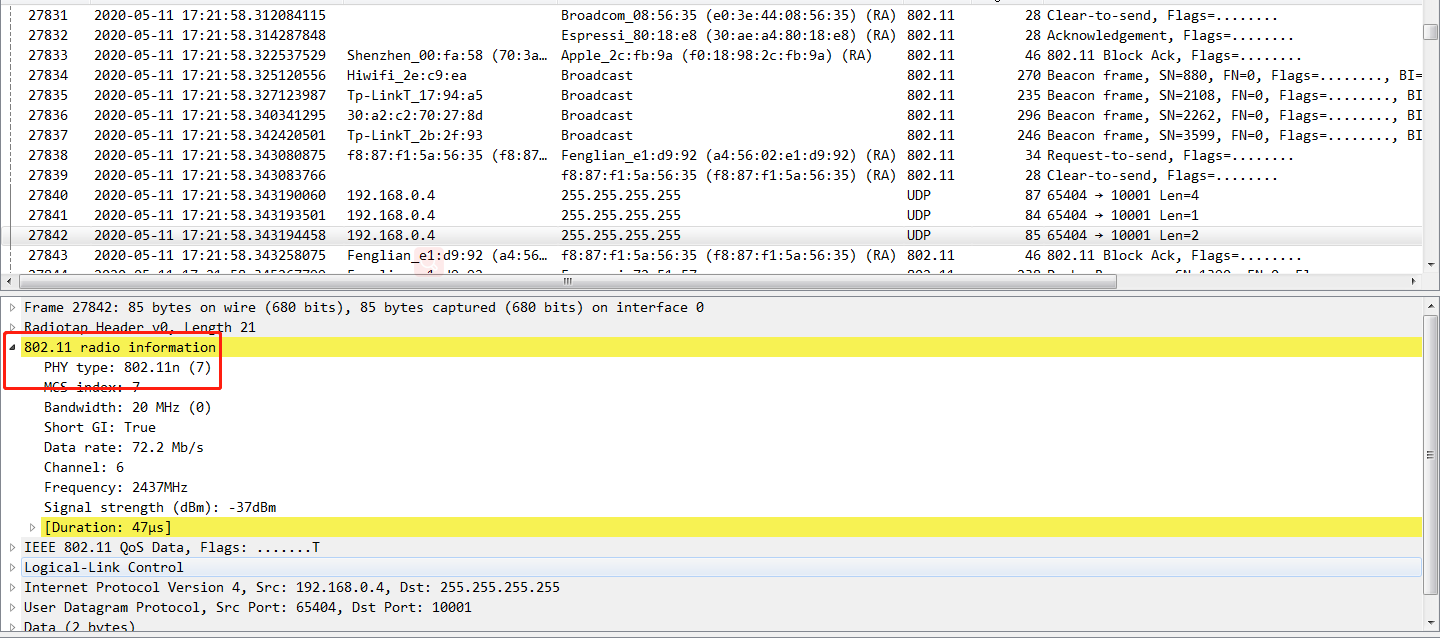
I'm sorry there are some urgent tasks to deal with recently. So I looked your capture just now. Your capture is ethernet packets. What we need is the wireless packets. Just like the following:
By the way, can you set the router to 11bg mode to have a test?
zhangyanjiaoesp
on 15 May 2020
I have no idea why wireshark thinks they're ethernet packets. My phone, on IP=96.69.1.162 definitely doesn't have an ethernet port.
Also, the computer I am running wireshark on doesn't have the ethernet connected, it too is wireless. I'm not very familiar with wireshark so let me know if I am doing something wrong in the capture.
I can't set my router to bg at the moment as it would cause my network to dropout which I cant afford to do right now. I may be able to try this over the weekend though.
Not sure what else I can do to help, please let me know.
howroyd
on 15 May 2020
I've bought an ESP8266 and have tried the smartconfig example, using RTOS_SDK v2.5.1 (I can'rt figure out how to have both 8266 and 32 IDFs alongside each other on Windows).
It did exactly the same thing. Failed to work on my main Asus router, worked first time on the second router, as above.
howroyd
on 6 Jun 2020
@howroyd
We have bought one Google Pixel 4 with Android 10, and use the ASUS RT-AC87U, test on the smartconfig example, but it works well. We can't reproduced your problem.
zhangyanjiaoesp
on 15 Jun 2020
Hmm ok thank you for confirming, this is reassuring at least. I shall play about with the settings on my router and see if something on there is causing the issue, which I will feedback to you.
howroyd
on 16 Jun 2020
In terms of settings on the router side. Is there anything that SmartConfig depends upon that I could have disabled or enabled? e.g. AI Protection, firewalls, etc?
This is my 2.4G settings page, anything on here look wrong? Screenshot1 here
And this is the corresponding "Professional" tab Screenshot2 here
howroyd
on 17 Jun 2020
I may have found the issue but not sure and have no idea how to fix it. Screenshot here
Notice that the BSSID of the router ends :60 but in the debug log it is ending :61
No idea whether that is causing the issue but it doesn't look right?
howroyd
on 17 Jun 2020
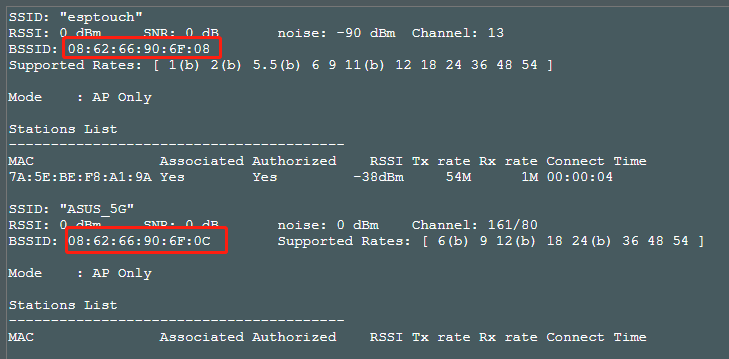
Do you enable the 5G settting ? On my side, the BSSID of 2.4G and 5G as follwing:
zhangyanjiaoesp
on 17 Jun 2020
Yes, that has a different BSSID:


howroyd
on 17 Jun 2020
And my 2.4G setting pages is a little different from yours, Maybe I can set it the same to you and test again.
zhangyanjiaoesp
on 17 Jun 2020
Can your close the 5G frequency and have a try? I have closed the 5G frequency when I was testing.
zhangyanjiaoesp
on 17 Jun 2020
Just given this a go, disabled the 5G radio but the issue is the same.
The log isn't too helpful but here it is:
I (44) boot: ESP-IDF v3.3-rc1-82-g2a65b024-dirty 2nd stage bootloader
I (44) boot: compile time 10:35:54
I (45) qio_mode: Enabling default flash chip QIO
I (53) boot: SPI Speed      : 40MHz
I (59) boot: SPI Mode       : QIO
I (66) boot: SPI Flash Size : 2MB
I (72) boot: Partition Table:
I (77) boot: ## Label            Usage          Type ST Offset   Length
I (88) boot:  0 nvs              WiFi data        01 02 00009000 00006000
I (100) boot:  1 phy_init         RF data          01 01 0000f000 00001000
I (112) boot:  2 factory          factory app      00 00 00010000 00080000
I (123) boot:  3 storage          Unknown data     01 82 00090000 00070000
I (135) boot: End of partition table
I (141) esp_image: segment 0: paddr=0x00010010 vaddr=0x40210010 size=0x4cc10 (314384) map
I (155) esp_image: segment 1: paddr=0x0005cc28 vaddr=0x4025cc20 size=0x08f30 ( 36656) map
I (169) esp_image: segment 2: paddr=0x00065b60 vaddr=0x3ffe8000 size=0x00674 (  1652) load
I (182) esp_image: segment 3: paddr=0x000661dc vaddr=0x40100000 size=0x00a30 (  2608) load
I (196) esp_image: segment 4: paddr=0x00066c14 vaddr=0x40100a30 size=0x05954 ( 22868) load
I (210) boot: Loaded app from partition at offset 0x10000
I (237) system_api: Base MAC address is not set, read default base MAC address from EFUSE
I (242) system_api: Base MAC address is not set, read default base MAC address from EFUSE
phy_version: 1159.0, 85b471e, Apr 21 2020, 17:03:08, RTOS new
I (311) phy_init: phy ver: 1159_0
I (314) reset_reason: RTC reset 2 wakeup 0 store 0, reason is 2
I (318) gpio: GPIO[16]| InputEn: 0| OutputEn: 1| OpenDrain: 0| Pullup: 0| Pulldown: 0| Intr:0
I (382) sc: Reading file wifi
I (387) sc: SPIFFS unmounted
SC version: V2.8.2
I (391) sc: Initializing SPIFFS
I (3924) sc: SC_STATUS_FINDING_CHANNEL
TYPE: ESPTOUCH, ch:8
T|PHONE MAC: f0:5c:77:df:7c:5e
T|AP MAC: 1c:b7:2c:c1:0a:60
I (89125) sc: SC_STATUS_GETTING_SSID_PSWD
smartconfig restartSC version: V2.8.2
I (138652) sc: SC_STATUS_FINDING_CHANNEL
I have checked the AP MAC and the phone MAC, both correct.
Would be interested to know what your 2.4G settings are if you're able to share them and I will give it a go to try and narrow down where the issue is.
Connecting to the Lynksys router still works first time, curiously.
The only other thing I can think of is that my DHCP and DNS server are not on the router (I have PiHole) but no other devices struggle with this, I have had it years. The lynksys has it's own internal DNS and DHCP server which is being used on a different subnet so is more "vanilla".
howroyd
on 18 Jun 2020
DONE IT!!!! Oh my gosh...
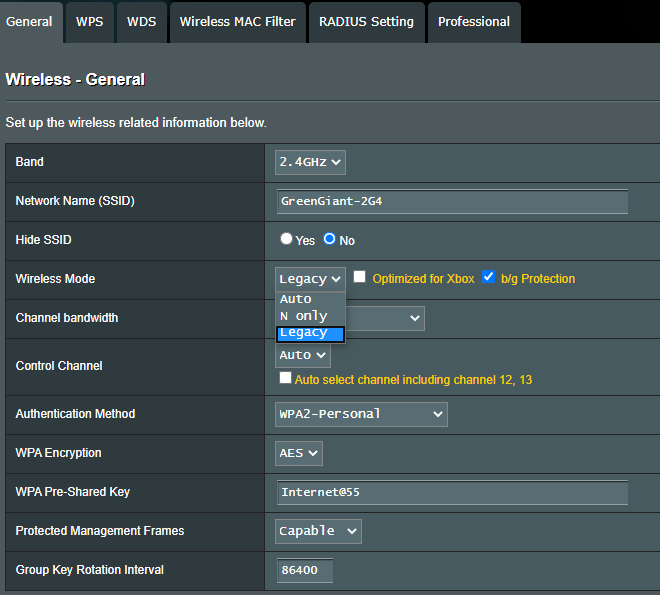
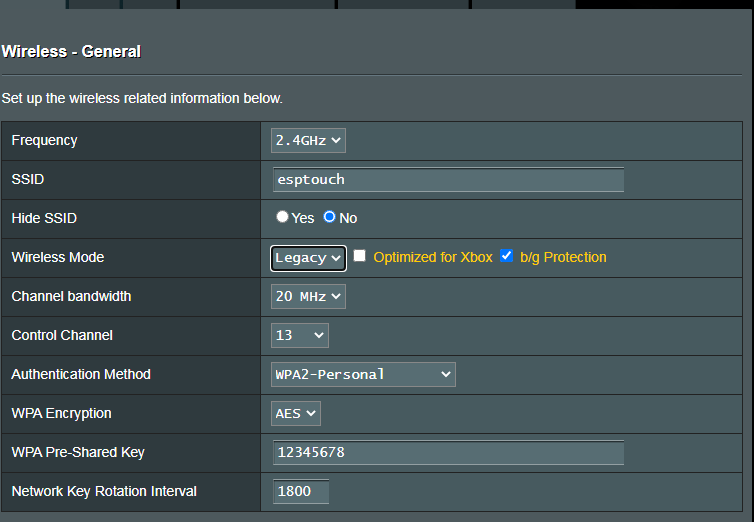
Mode MUST be set to LEGACY. Auto and N Only do not work, at least not for me. Would be interested if that is the same for you, or whether I just got lucky then?
howroyd
on 18 Jun 2020
Yes, my setting is legacy. Yesterday I always failed to upload pictures, so I did not provide the configuration here.
zhangyanjiaoesp
on 18 Jun 2020
Great. That's it then, I will close the issue.
Many many thanks for your help. Keep up the amazing work and stay safe
howroyd
on 18 Jun 2020
Thanks for reporting this issue, and thanks for your positive support to find the root cause.
zhangyanjiaoesp
on 18 Jun 2020
Related issues
 LosDeiblos
·
4Comments
LosDeiblos
·
4Comments
 okasha55
·
3Comments
okasha55
·
3Comments
 jakkra
·
3Comments
jakkra
·
3Comments
 JLIspace
·
3Comments
JLIspace
·
3Comments
 ESP32DE
·
4Comments
ESP32DE
·
4Comments