Esp-idf: Python requirement not satisfied (IDFGH-3074)
I am running on Windows 10 with 20191231 version of the MSYS GNU Make environment.
I updated to latest version of master (v4.2-dev-1097-g2e14149bf) about 2 hours ago.
Without having changed ANYTHING else I suddenly I have the following errors:
The following Python requirements are not satisfied:
gdbgui>=0.13.2.0
pygdbmi<=0.9.0.2
I have tried al the following commands:
pacman -Syu to update everything
pacman -Ss gdbgui and pacman -S mingw-w64-i686-python2-gdbgui
pacman -Ss pygdbmi and pacman -S mingw-w64-i686-python2-pygdbmi
The first option above returns no response.
The second options just return
error: target not found: mingw-w64-i686-python2-?????
Any suggestions?
All help appreciated.
 ammaree
All 23 comments
Hi @ammaree
Installing this package: mingw-w64-i686-gcc in msys2 should help to run
python -m pip install -r "$IDF_PATH/requirements.txt"
without an error.
Another option is to run the actual tools/windows/windows_install_prerequisites.sh, which installs that package and all required python packages afterwards.
 david-cermak
on 11 Apr 2020
david-cermak
on 11 Apr 2020
Same issue on v4.2-dev-1115-ga7f87f091 on debian, pip install running correctly but these packages seem to be missing.
Patched with python -m pip install --user pygdbmi==0.9.0.2 gdbgui for now (and seems related to #5133 ?)
 ryankurte
on 20 Apr 2020
ryankurte
on 20 Apr 2020
@ryankurte if you have a minute, could you please try what is suggested in https://github.com/espressif/esp-idf/issues/5133#issuecomment-614536173 and post the result in that issue? Thanks in advance.
 igrr
on 20 Apr 2020
igrr
on 20 Apr 2020
@david-cermak
Step 1: To start the process I reverted back to Master from v4.1 and tried to build the application. Output as below.
Step 1 output.txt
Step 2: As per your suggestion I then ran ' python -m pip install -r $IDF_PATH/requirements.txt" ' console output below.
Step 2 output.txt
Step 3: In spite of the error messages I then tried to build again, the console output result from that being.
Step 3 output.txt
Step 4: I then ran 'pacman -Syu' once system upgrade completed (without any errors) I terminated (not exit) session, restarted session and ran 'pacman -Syu' again. Again no errors
Step 5: I then, based on #5133 ran install.sh from my IDP directory which completed with an error after downaloading the latest 2020r1 tols again. Console output is below.
Step 5 output.txt
Ultimately, at the end of all this, the error is still exactly the same complaint.
ammaree@giga MINGW32 /c/Dropbox/devs/ws/z-appl/irmacs
make -j9 all
/c/Dropbox/devs/ws/z-support/ESP32_TFT_library/components/mkspiffs/Makefile.projbuild:13: warning: overriding recipe for target 'clean'
/c/Dropbox/devs/ws/z-sdk/esp-idf/components/app_update/Makefile.projbuild:53: warning: ignoring old recipe for target 'clean'
Toolchain path: /opt/xtensa-esp32-elf/bin/xtensa-esp32-elf-gcc
Toolchain version: esp-2020r1
Compiler version: 8.2.0
The following Python requirements are not satisfied:
gdbgui>=0.13.2.0
pygdbmi<=0.9.0.2
The recommended way to install a packages is via "pacman". Please run "pacman -Ss
NOTE: You may need to run "pacman -Syu" if your package database is older and run twice if the previous run updated "pacman" itself.
Please read https://github.com/msys2/msys2/wiki/Using-packages for further information about using "pacman"
make: * No rule to make target 'check_python_dependencies', needed by '/c/Dropbox/devs/ws/z-appl/irmacs/build/include/config/auto.conf'. Stop.
ammaree@giga MINGW32 /c/Dropbox/devs/ws/z-appl/irmacs
ammaree
on 20 Apr 2020
@igrr python is /usr/bin/python, version 2.7.16, building with this dockerfile, I don't have time to patch the lines from 5133 in rn but will get back to it when I can.
ryankurte
on 20 Apr 2020
@ryankurte Ah okay, this issue looks simpler than #5133.
Looking at the dockerfile, you are only adding the toolchain and $IDF_PATH/tools to the PATH:
ENV PATH="$PATH:/root/esp-idf/tools/"
ENV PATH="$PATH:/root/.espressif/tools/xtensa-esp32-elf/esp-2019r2-8.2.0/xtensa-esp32-elf/bin/"
You aren't adding the path to Python virtual environment, which is created by install.sh That path will look like /root/.espressif/python_env/idf4.2_py2.7_env/bin. Once you add it to the PATH, python will be taken from the virtual environment, and the packages installed by install.sh will be found.
FWIW, the complete list of paths added by export.sh should look like this:
  /path/to/esp-idf/components/esptool_py/esptool
  /path/to/esp-idf/components/espcoredump
  /path/to/esp-idf/components/partition_table
  /path/to/esp-idf/components/app_update
  $HOME/.espressif/tools/xtensa-esp32-elf/esp-2020r1-8.2.0/xtensa-esp32-elf/bin
  $HOME/.espressif/tools/xtensa-esp32s2-elf/esp-2020r1-8.2.0/xtensa-esp32s2-elf/bin
  $HOME/.espressif/tools/esp32ulp-elf/2.28.51-esp-20191205/esp32ulp-elf-binutils/bin
  $HOME/.espressif/tools/esp32s2ulp-elf/2.28.51-esp-20191205/esp32s2ulp-elf-binutils/bin
  $HOME/.espressif/tools/openocd-esp32/v0.10.0-esp32-20200406/openocd-esp32/bin
  $HOME/.espressif/python_env/idf4.2_py3.7_env/bin
  /path/to/esp-idf/tools
By the way, we do have an esp-idf docker image which may satisfy your use case: https://docs.espressif.com/projects/esp-idf/en/latest/esp32/api-guides/tools/idf-docker-image.html.
igrr
on 21 Apr 2020
@ammaree
Sorry, not sure if you have actually installed the mingw-w64-i686-gcc via pacman -Ss as indicated before.
Could you please run one of the below commands?
pacman --noconfirm -S --needed mingw-w64-i686-gcc./tools/windows/windows_install_prerequisites.sh(this script)
Apologies if you've already done so, but that wasn't clear to me from your previous post
david-cermak
on 21 Apr 2020
Hi @david-cermak
I have done that many many times, BOTH options with the same result.
See attached console output.
New Text Document.txt
ammaree
on 21 Apr 2020
Here is output from second option, the script file.
Fix 2 script.txt
This time the error message at the end was different so I moved all the python27 files into a subdir and run the script again.
The script completed successfully, no errors, but when I tried to run "make -j9 all" it terminated complaining about not being able to find python27.exe and hence not being able to run the prerequisites checking script.
When I move the python27 files (all except python.exe) back into the C:\msys32\mingw32\bin directory the normal error, pasted below, returned.
make -j9 all
Toolchain path: /opt/xtensa-esp32-elf/bin/xtensa-esp32-elf-gcc
Toolchain version: esp-2020r1
Compiler version: 8.2.0
The following Python requirements are not satisfied:
gdbgui>=0.13.2.0
pygdbmi<=0.9.0.2
The recommended way to install a packages is via "pacman". Please run "pacman -Ss" for searching the package database and if found then "pacman -S mingw-w64-i686-python2- " for installing it.
NOTE: You may need to run "pacman -Syu" if your package database is older and run twice if the previous run updated "pacman" itself.
Please read https://github.com/msys2/msys2/wiki/Using-packages for further information about using "pacman"
make: * No rule to make target 'check_python_dependencies', needed by '/c/Dropbox/devs/ws/z-appl/irmacs/build/include/config/auto.conf'. Stop.
So we are back right at the start
ammaree
on 21 Apr 2020
@ammaree
Thanks for trying out both options and posting results!
It seems that your MSYS2 package is based on some older image, where the default python.exe is still python2.7 and the problematic packages are having trouble compiling for python2.7
One way to solve the issues is to use the latest package https://docs.espressif.com/projects/esp-idf/en/latest/esp32/get-started-legacy/windows-setup.html#toolchain-setup with python3 being a default python.
It might be also possible to somehow set the python3 to be executed when running python, but would recommend updating the MSYS package.
david-cermak
on 21 Apr 2020
@david-cermak I dont think this is the case.
Attached a screenshot of the msys ZIP file downloaded (and installed) on April 5th and again today.
As you can see both are the exact same base name and size.

After installing the new download the C:/msys/mingw32/bin directory contains the same python2.7
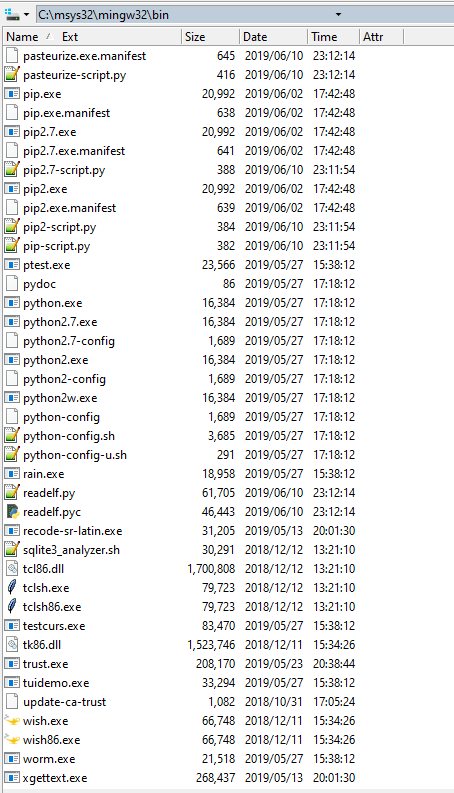
I follow the EXACT instructions as per the link you provided, again cloned the master repo and exactly the same error with the newly downloaded msys32 (as per 1st attachment) and esp-idf repo just download.
ammaree
on 21 Apr 2020
@ammaree Ah, right, the actual version is has python2 as default python (sorry thought of the upcoming package which should default to python3)
but running the update script, specifically the line https://github.com/espressif/esp-idf/blob/master/tools/windows/windows_install_prerequisites.sh#L37 should make the default one to python3.
In your case, however, this it is not happening for some reason, as you've indicated above that the script finished okay only when python2.7 and related been removed.
Also seeing from your listing python.exe is has the exact size as python2.7.exe (and no python3 present!)
Could you please try to simply run:
pacman --noconfirm -S --needed mingw-w64-i686-python
and post the result here? if finished with errors, might also need to do pacman --noconfirm -Syu and restart the msys terminal before that.
Would be also interesting to see the listing c:\msys32\mingw32\bin for python*.exe files as posted above. (In my case, after this command, the default python.exe points to python3.8 /or is the exact copy of python3.8.exe)
david-cermak
on 21 Apr 2020
Step 1:
pacman --noconfirm -S --needed mingw-w64-i686-python
warning: mingw-w64-i686-python-3.8.2-2 is up to date -- skipping
there is nothing to do
Step 2:
pacman --noconfirm -Syu
:: Synchronising package databases...
mingw32 is up to date
mingw64 is up to date
msys is up to date
:: Starting core system upgrade...
there is nothing to do
:: Starting full system upgrade...
there is nothing to do
Step 3:
ls -l /mingw32/bin/python*.exe
-rwxr-xr-x 1 ammaree ammaree 97280 Apr 9 16:12 /mingw32/bin/python.exe
-rwxr-xr-x 1 ammaree ammaree 16384 Apr 20 19:20 /mingw32/bin/python2.7.exe
-rwxr-xr-x 1 ammaree ammaree 16384 Apr 20 19:20 /mingw32/bin/python2.exe
-rwxr-xr-x 1 ammaree ammaree 16384 Apr 20 19:20 /mingw32/bin/python2w.exe
-rwxr-xr-x 1 ammaree ammaree 97280 Apr 9 16:12 /mingw32/bin/python3.8.exe
-rwxr-xr-x 1 ammaree ammaree 97280 Apr 9 16:12 /mingw32/bin/python3.exe
-rwxr-xr-x 1 ammaree ammaree 95744 Apr 9 16:12 /mingw32/bin/python3w.exe
ammaree
on 21 Apr 2020
@david-cermak
OK, I have found the problem. In "SDK tool configuration" option "Python interpreter" python2.7 was specified. By removing this the error went away.
I guess, since has been a very long ongoing project (since IDF 2.x), the configuration has never been completely restarted.
Thanks for the help
ammaree
on 21 Apr 2020
Same issue on
v4.2-dev-1115-ga7f87f091on debian, pip install running correctly but these packages seem to be missing.Patched with
python -m pip install --user pygdbmi==0.9.0.2 gdbguifor now (and seems related to #5133 ?)
Or even better (this fixed it in my case):
python -m pip install pygdbmi==0.9.0.2 gdbgui==0.13.2.0
 MKesenheimer
on 23 Aug 2020
MKesenheimer
on 23 Aug 2020
i have done all of the above. a few times. still getting:
The following Python requirements are not satisfied:
gdbgui>=0.13.2.0
did not found "SDK tool configuration" option "Python interpreter" python2.7
also python -m pip install pygdbmi==0.9.0.2 gdbgui==0.13.2.0 did not worked.
got all versions of python installed.
would appreciate any help... (but please no re-install install or whatever because this is just unhelpful atall, also judging by the fact that the users themselves usually provide espressif with working workarounds.... see entire section above.)
thanks in advance
 mazorvanunu
on 29 Aug 2020
mazorvanunu
on 29 Aug 2020
did you try an newer version of python, for example python3?
You can choose which python version to use by typing
update-alternatives --install /usr/bin/python python /usr/bin/python3.8 1
MKesenheimer
on 29 Aug 2020
huh, i resolved this waay back but it has suddenly recurred in all our CI builds somehow :-/
ryankurte
on 1 Sep 2020
hey good people of espia, i got the issue resolved but cant figure out why\how exactly...
TBH i am using an extension for visual studio (not espressif eclipse, sadly the windows build was problematic for me but ill try to do it on a linux machine) and i believe much of the faulty behavior came from some mix of dependencies between the extension i am using and other toolchain artifacts of espressif.
in the end i just uninstalled everything i could think of that relates to espressif installation\python\python environment\CMAKE(for sure problematic, atleast for me on windows) and microsoft awful env variables, re install the standalone sysgcc toolchain, went to sleep, by morning things worked out.
one thing i cant point to for sure is the mixing of python environment on my pc, when i started playing with which python executable is getting the calls, errors began to change.
also i was using c++ and i don't think it was that wise to do, especially in the lower levels of the esp32 firmware app entry point.
keep up the good work, and stay strong <3
just to share my little small and narrow point of view, the toolchain itself is pretty much great, from gcc and openocd etc
the problems i was having were mostly to do with higher level of interfacing between me and the IDE of choice, cmake and such
keep up the good work, and stay strong <3
mazorvanunu
on 1 Sep 2020
Looks like (at least in our release/v4.2 derived branch) there are contrary dependencies for gdbgui and pygdbmi in requirements.txt, resolved with the following patch:
diff --git a/requirements.txt b/requirements.txt
index 6a19513ad..f711ebd26 100644
--- a/requirements.txt
+++ b/requirements.txt
@@ -11,7 +11,7 @@ future>=0.15.2
 cryptography>=2.1.4
 pyparsing>=2.0.3,<2.4.0
 pyelftools>=0.22
-gdbgui>=0.13.2.0
+gdbgui==0.13.2.0
 pygdbmi<=0.9.0.2
 # The pygdbmi required max version 0.9.0.2 since 0.9.0.3 is not copatible with latest gdbgui (>=0.13.2.0)
 reedsolo==1.5.3
right on the money brother ryan, well put
saw this exact same error, made me reinstall sysgcc, maybe that was the ticker.
also noticed some probs with the python env processing of the requirements.txt, python was 2.7, switched it to 3..
mazorvanunu
on 1 Sep 2020
Same issue on
v4.2-dev-1115-ga7f87f091on debian, pip install running correctly but these packages seem to be missing.
Patched withpython -m pip install --user pygdbmi==0.9.0.2 gdbguifor now (and seems related to #5133 ?)Or even better (this fixed it in my case):
python -m pip install pygdbmi==0.9.0.2 gdbgui==0.13.2.0
This solved my problem
 saramonteiro
on 1 Sep 2020
saramonteiro
on 1 Sep 2020
Struggled with that for days. Solved for me too!
 bzaaiman
on 10 Sep 2020
bzaaiman
on 10 Sep 2020
Related issues
 bfriedkin
·
38Comments
bfriedkin
·
38Comments
 no1seman
·
38Comments
no1seman
·
38Comments
 arossoinsite
·
39Comments
arossoinsite
·
39Comments
 mringwal
·
55Comments
mringwal
·
55Comments
 nassks
·
157Comments
nassks
·
157Comments
Most helpful comment
Or even better (this fixed it in my case):
python -m pip install pygdbmi==0.9.0.2 gdbgui==0.13.2.0