Esp-idf: ENC28J60 last transmit still in progress error (IDFGH-2673)
Environment
- Development Kit: ESP32-Wrover-Kit
- Kit version (for WroverKit/PicoKit/DevKitC): v4.1
- Module or chip used: ESP32-D0WD
- IDF version: v4.1-dev-2222-g7647b5c66
- Build System: CMake
- Compiler version: xtensa-esp32-elf-gcc (crosstool-NG esp-2019r2) 8.2.0
- Operating System: Linux
- Power Supply: USB|external 5V&Battery
Problem Description
In some recent commits finally got ENC28J60 support and during first tests periodically got the following error:
E (1740376) enc28j60: emac_enc28j60_transmit(766): last transmit still in progress
Expected Behavior
No errors
Actual Behavior
Errors periodically appears
Steps to reproduce
- make esp32 IP and MAC statically binded
- run 'ping
-s 1400' - build/flash/monitor enc28j60 example
- continue monitor
- reboot esp32 or unplug/plag RJ45 connector or simply wait > 10 minutes
Code to reproduce this issue
https://github.com/espressif/esp-idf/tree/master/examples/ethernet/enc28j60
Debug Logs
I (28) boot: ESP-IDF v4.1-dev-2222-g7647b5c66 2nd stage bootloader
I (28) boot: compile time 15:49:45
I (29) boot: chip revision: 1
I (41) boot.esp32: SPI Speed      : 40MHz
I (41) boot.esp32: SPI Mode       : DIO
I (42) boot.esp32: SPI Flash Size : 2MB
I (46) boot: Enabling RNG early entropy source...
I (52) boot: Partition Table:
I (55) boot: ## Label            Usage          Type ST Offset   Length
I (63) boot:  0 nvs              WiFi data        01 02 00009000 00006000
I (70) boot:  1 phy_init         RF data          01 01 0000f000 00001000
I (78) boot:  2 factory          factory app      00 00 00010000 00100000
I (85) boot: End of partition table
I (89) esp_image: segment 0: paddr=0x00010020 vaddr=0x3f400020 size=0x10830 ( 67632) map
I (123) esp_image: segment 1: paddr=0x00020858 vaddr=0x3ffb0000 size=0x021d0 (  8656) load
I (127) esp_image: segment 2: paddr=0x00022a30 vaddr=0x40080000 size=0x00404 (  1028) load
0x40080000: _WindowOverflow4 at /home/user/esp/esp-mdf/esp-idf/components/freertos/xtensa/xtensa_vectors.S:1789

I (130) esp_image: segment 3: paddr=0x00022e3c vaddr=0x40080404 size=0x0b2e4 ( 45796) load
I (158) esp_image: segment 4: paddr=0x0002e128 vaddr=0x00000000 size=0x01ef0 (  7920)
I (161) esp_image: segment 5: paddr=0x00030020 vaddr=0x400d0020 size=0x30fb4 (200628) map
0x400d0020: _stext at ??:?

I (244) boot: Loaded app from partition at offset 0x10000
I (244) boot: Disabling RNG early entropy source...
I (244) cpu_start: Pro cpu up.
I (248) cpu_start: Application information:
I (253) cpu_start: Project name:     enc28j60
I (258) cpu_start: App version:      1
I (262) cpu_start: Compile time:     Feb 11 2020 16:04:13
I (268) cpu_start: ELF file SHA256:  8ff1afa2d0b1bef1...
I (274) cpu_start: ESP-IDF:          v4.1-dev-2222-g7647b5c66
I (281) cpu_start: Starting app cpu, entry point is 0x400812f8
0x400812f8: call_start_cpu1 at /home/user/esp/esp-mdf/esp-idf/components/esp32/cpu_start.c:274

I (0) cpu_start: App cpu up.
I (291) heap_init: Initializing. RAM available for dynamic allocation:
I (298) heap_init: At 3FFAE6E0 len 00001920 (6 KiB): DRAM
I (304) heap_init: At 3FFB39E8 len 0002C618 (177 KiB): DRAM
I (310) heap_init: At 3FFE0440 len 00003AE0 (14 KiB): D/IRAM
I (317) heap_init: At 3FFE4350 len 0001BCB0 (111 KiB): D/IRAM
I (323) heap_init: At 4008B6E8 len 00014918 (82 KiB): IRAM
I (329) cpu_start: Pro cpu start user code
I (347) spi_flash: detected chip: generic
I (348) spi_flash: flash io: dio
W (357) spi_flash: Detected size(4096k) larger than the size in the binary image header(2048k). Using the size in the binary image header.
I (360) cpu_start: Starting scheduler on PRO CPU.
I (0) cpu_start: Starting scheduler on APP CPU.
I (376) enc28j60: revision: 6
I (396) esp_eth.netif.glue: 02:00:00:12:34:56
I (396) esp_eth.netif.glue: ethernet attached to netif
I (406) eth_example: Ethernet Started
I (2406) enc28j60: working in 10Mbps
I (2406) enc28j60: working in half duplex
I (2406) eth_example: Ethernet Link Up
I (2406) eth_example: Ethernet HW Addr 02:00:00:12:34:56
I (3376) esp_netif_handlers: eth ip: 192.168.3.151, mask: 255.255.255.0, gw: 192.168.3.1
I (3376) eth_example: Ethernet Got IP Address
E (3376) enc28j60: emac_enc28j60_transmit(766): last transmit still in progress
I (3376) eth_example: ~~~~~~~~~~~
I (3386) eth_example: ETHIP:192.168.3.151
I (3396) eth_example: ETHMASK:255.255.255.0
I (3396) eth_example: ETHGW:192.168.3.1
I (3406) eth_example: ~~~~~~~~~~~
I (542406) eth_example: Ethernet Link Down
I (548406) enc28j60: working in 10Mbps
I (548406) enc28j60: working in half duplex
I (548406) eth_example: Ethernet Link Up
I (548406) eth_example: Ethernet HW Addr 02:00:00:12:34:56
I (552876) esp_netif_handlers: eth ip: 192.168.3.151, mask: 255.255.255.0, gw: 192.168.3.1
I (552876) eth_example: Ethernet Got IP Address
I (552876) eth_example: ~~~~~~~~~~~
I (552876) eth_example: ETHIP:192.168.3.151
I (552886) eth_example: ETHMASK:255.255.255.0
I (552886) eth_example: ETHGW:192.168.3.1
I (552896) eth_example: ~~~~~~~~~~~
I (568406) eth_example: Ethernet Link Down
I (572406) enc28j60: working in 10Mbps
I (572406) enc28j60: working in half duplex
I (572406) eth_example: Ethernet Link Up
I (572406) eth_example: Ethernet HW Addr 02:00:00:12:34:56
I (576876) esp_netif_handlers: eth ip: 192.168.3.151, mask: 255.255.255.0, gw: 192.168.3.1
I (576876) eth_example: Ethernet Got IP Address
I (576876) eth_example: ~~~~~~~~~~~
I (576876) eth_example: ETHIP:192.168.3.151
I (576886) eth_example: ETHMASK:255.255.255.0
I (576886) eth_example: ETHGW:192.168.3.1
I (576896) eth_example: ~~~~~~~~~~~
Other items if possible
 no1seman
All 38 comments
After adding second 'ping' from other console got the following errors:
E (902406) enc28j60: emac_enc28j60_read_phy_reg(438): phy is busy
E (902406) enc28j60: enc28j60_update_link_duplex_speed(92): read PHSTAT2 failed
E (902406) enc28j60: enc28j60_get_link(131): update link duplex speed failed
no1seman
on 11 Feb 2020
+1 on the second issue. Never recovers, either.
 lucastcox
on 12 Feb 2020
lucastcox
on 12 Feb 2020
@no1seman , does the issue get better with shorter wires between the esp32 and the enc28j60?
lucastcox
on 13 Feb 2020
@lucastcox,
my hardware config:
- Using ~8 cm (~3 in.) wires, quite shot for my point of view, because on the same board I'm using ili9341/XTP2046/SDCARD with the same wires length and everything works fine: ili9341 at 40 Mhz, XTP2046 on 2 Mhz and SDCARD in SPI mode at 20 Mhz.
- Using 10K pull-up resistors on MISO, MOSI and CS lines, as recomended.
- Modules equipped with ENC28J60-I/SO 1205DG9
- SPI clock speed - 5 Mhz
no1seman
on 13 Feb 2020
Xm, a little bit confused, because in master branch ENC28J60 support was added by https://github.com/espressif/esp-idf/commit/eda07acc81bb4024681a506698f8535517e68dd8 commit, and removed by https://github.com/espressif/esp-idf/commit/9e59be1aabc8b4d9cef700d4051ebc74ab02670b commit
no1seman
on 14 Feb 2020
@no1seman It wasn't taken out completely. Just taken out of the idf library and left in the examples folder.
Yeah, I was just curious about wire length in case it was the cause for my issues. My wire length was about 5 inches, but with yours being three, that shouldn't cause an issue at 5MHz.
@suda-morris @Alvin1Zhang , do you have any ideas about how we could go about diagnosing this issue? If you have any tips, I'd really appreciate them. My expertise in ethernet drivers is lacking.
lucastcox
on 14 Feb 2020
E (2063840) enc28j60: emac_enc28j60_read_phy_reg(419): phy is busy
E (2063840) enc28j60: enc28j60_update_link_duplex_speed(92): read PHSTAT2 failed
E (2063840) enc28j60: enc28j60_get_link(131): update link duplex speed failed
E (2065840) enc28j60: emac_enc28j60_read_phy_reg(419): phy is busy
E (2065840) enc28j60: enc28j60_update_link_duplex_speed(92): read PHSTAT2 failed
E (2065840) enc28j60: enc28j60_get_link(131): update link duplex speed failed
Getting this error about once every hour without recover with ok wires and 5 MHz.
Im on master.
For me the error did not occur with the original pull request. [https://github.com/espressif/esp-idf/pull/4435]
 nx518
on 26 Feb 2020
nx518
on 26 Feb 2020
It looks like a lot of errata workarounds that are implemented in in libraries like EtherCard are not implemented here. If you'd like, @suda-morris , if I get time, I can do a PR in the next few weeks with these workarounds.
Reference: http://ww1.microchip.com/downloads/en/devicedoc/80349c.pdf
Reference: https://github.com/8-DK/EtherCard/blob/f321934475be01d0b2784a619786df4f0bf1a8b3/src/enc28j60.cpp#L474 (the entirety of the packetSend function has several errata workarounds).
Note: most of these issues only happen in half-duplex mode. If you configure your router/switch to be full duplex at 10mbps, these issues (apparently) should go away. Will try to test that Monday.
Errata #1 only happens at SPI speeds below 8 MHZ, oddly.
lucastcox
on 29 Feb 2020
@lucastcox,
it will be great if that helps
Here is my tests results:
- All tests made with: v4.2-dev-459-ge36516372
- My modules doesn't work at SPI clock speed > 6 Mhz, even if I connects my my module with as short as possible wires (actually 3-4 cm MAX length between ESP32 chip pins and ENC28J60 pins). Got: wrong chip ID error.
- As you can see in my log, my ENC28J60 boards has strange revision: 6, the Errata list does not mention the 6th revision (only 5-th and 7-th).
- I'm using Mikrotik RB260GS with 10/100/1000 ports, with half/full duplex and many other features and it shows full-duplex on desired port:

- I made a number of changes in example code :
...
esp_eth_mac_t *mac = NULL;

/** Event handler for Ethernet events */
static void eth_event_handler(void *arg, esp_event_base_t event_base,
                              int32_t event_id, void *event_data)
{
    uint8_t mac_addr[6] = {0};
    /* we can get the ethernet driver handle from event data */
    esp_eth_handle_t eth_handle = *(esp_eth_handle_t *)event_data;

    switch (event_id) {
    case ETHERNET_EVENT_CONNECTED:
        esp_eth_ioctl(eth_handle, ETH_CMD_G_MAC_ADDR, mac_addr);
        ESP_LOGI(TAG, "Ethernet Link Up");
        ESP_LOGI(TAG, "Ethernet HW Addr %02x:%02x:%02x:%02x:%02x:%02x",
                 mac_addr[0], mac_addr[1], mac_addr[2], mac_addr[3], mac_addr[4], mac_addr[5]);
        ESP_ERROR_CHECK(mac->set_duplex(mac, ETH_DUPLEX_FULL));
        break;
    case ETHERNET_EVENT_DISCONNECTED:
        ESP_LOGI(TAG, "Ethernet Link Down");
        break;
    case ETHERNET_EVENT_START:
        ESP_LOGI(TAG, "Ethernet Started");
        break;
    case ETHERNET_EVENT_STOP:
        ESP_LOGI(TAG, "Ethernet Stopped");
        break;
    default:
        break;
    }
}
...
    mac = esp_eth_mac_new_enc28j60(&enc28j60_config, &mac_config);
...
Full code:
enc28j60_example_main.zip
Then I built, flash and monitor example and run ping -s 1400
After that changes errors goes away, but if I once unplug/plug RJ45 coonector during test run I've got the following:
I (3778) eth_example: Ethernet Got IP Address
I (3788) eth_example: ~~~~~~~~~~~
I (3788) eth_example: ETHIP:192.168.3.148
I (3798) eth_example: ETHMASK:255.255.255.0
I (3798) eth_example: ETHGW:192.168.3.1
I (3808) eth_example: ~~~~~~~~~~~
D (858838) event: running post ETH_EVENT:3 with handler 0x400d8048 and context 0x3ffb9b74 on loop 0x3ffb898c
0x400d8048: esp_netif_action_disconnected at /home/user/esp/esp-mdf/esp-idf/components/esp_netif/esp_netif_handlers.c:86

D (858838) esp_netif_handlers: esp_netif action disconnected with netif0x3ffb98b4 from event_id=3
D (858838) esp_netif_lwip: check: remote, if=0x3ffb98b4 fn=0x400d9180
0x400d9180: esp_netif_down_api at /home/user/esp/esp-mdf/esp-idf/components/esp_netif/lwip/esp_netif_lwip.c:1086


D (858848) esp_netif_lwip: esp_netif_down_api esp_netif:0x3ffb98b4
D (858858) esp_netif_lwip: esp_netif_dhcpc_cb lwip-netif:0x3ffb9934
D (858858) esp_netif_lwip: esp_netif_start_ip_lost_timer esp_netif:0x3ffb98b4
D (858868) esp_netif_lwip: if0x3ffb98b4 start ip lost tmr: interval=120
D (858878) esp_netif_lwip: esp_netif_start_ip_lost_timer esp_netif:0x3ffb98b4
D (858878) esp_netif_lwip: if0x3ffb98b4 start ip lost tmr: already started
D (858888) esp_netif_lwip: call api in lwip: ret=0x0, give sem
D (858898) event: running post ETH_EVENT:3 with handler 0x400d5328 and context 0x3ffb9bdc on loop 0x3ffb898c
0x400d5328: eth_event_handler at /home/user/esp/enc28j60/build/../main/enc28j60_example_main.c:28

I (858908) eth_example: Ethernet Link Down
I (864838) enc28j60: working in 10Mbps
I (864838) enc28j60: working in half duplex
D (864838) event: running post ETH_EVENT:2 with handler 0x400d7f44 and context 0x3ffb9b4c on loop 0x3ffb898c
0x400d7f44: esp_netif_action_connected at /home/user/esp/esp-mdf/esp-idf/components/esp_netif/esp_netif_handlers.c:44

D (864838) esp_netif_handlers: esp_netif action connected with netif0x3ffb98b4 from event_id=2
D (864848) esp_netif_lwip: check: remote, if=0x3ffb98b4 fn=0x400d913c
0x400d913c: esp_netif_up_api at /home/user/esp/esp-mdf/esp-idf/components/esp_netif/lwip/esp_netif_lwip.c:1063


D (864858) esp_netif_lwip: esp_netif_up_api esp_netif:0x3ffb98b4
D (864858) esp_netif_lwip: call api in lwip: ret=0x0, give sem
D (864868) esp_netif_lwip: check: remote, if=0x3ffb98b4 fn=0x400d87d4
0x400d87d4: esp_netif_dhcpc_start_api at /home/user/esp/esp-mdf/esp-idf/components/esp_netif/lwip/esp_netif_lwip.c:874


D (864878) esp_netif_lwip: esp_netif_dhcpc_start_api esp_netif:0x3ffb98b4
D (864878) esp_netif_lwip: esp_netif_start_ip_lost_timer esp_netif:0x3ffb98b4
D (864888) esp_netif_lwip: if0x3ffb98b4 start ip lost tmr: already started
D (864898) esp_netif_lwip: starting dhcp client
D (864898) esp_netif_lwip: call api in lwip: ret=0x0, give sem
D (864908) event: running post ETH_EVENT:2 with handler 0x400d5328 and context 0x3ffb9bdc on loop 0x3ffb898c
0x400d5328: eth_event_handler at /home/user/esp/enc28j60/build/../main/enc28j60_example_main.c:28

I (864918) eth_example: Ethernet Link Up
I (864918) eth_example: Ethernet HW Addr 02:00:00:12:34:56
I (864928) enc28j60: working in full duplex
D (869248) esp_netif_lwip: esp_netif_dhcpc_cb lwip-netif:0x3ffb9934
D (869248) esp_netif_lwip: if0x3ffb98b4 ip changed=0
D (869248) event: running post IP_EVENT:4 with handler 0x400d806c and context 0x3ffb9bb0 on loop 0x3ffb898c
0x400d806c: esp_netif_action_got_ip at /home/user/esp/esp-mdf/esp-idf/components/esp_netif/esp_netif_handlers.c:93

D (869258) esp_netif_handlers: esp_netif action got_ip with netif0x3ffb98b4 from event_id=4
I (869258) esp_netif_handlers: eth ip: 192.168.3.148, mask: 255.255.255.0, gw: 192.168.3.1
D (869268) event: running post IP_EVENT:4 with handler 0x400d5280 and context 0x3ffb9bf4 on loop 0x3ffb898c
0x400d5280: got_ip_event_handler at /home/user/esp/enc28j60/build/../main/enc28j60_example_main.c:58

I (869278) eth_example: Ethernet Got IP Address
I (869288) eth_example: ~~~~~~~~~~~
I (869288) eth_example: ETHIP:192.168.3.148
I (869298) eth_example: ETHMASK:255.255.255.0
I (869298) eth_example: ETHGW:192.168.3.1
I (869308) eth_example: ~~~~~~~~~~~
and then I've got the following:
D (978868) esp_netif_lwip: esp_netif_ip_lost_timer esp_netif:0x3ffb98b4
D (978868) esp_netif_lwip: if0x3ffb98b4 ip lost tmr: no need raise ip lost event
E (1828148) enc28j60: emac_enc28j60_transmit(766): last transmit still in progress
E (1916468) enc28j60: emac_enc28j60_transmit(766): last transmit still in progress
Full log:
log.zip
no1seman
on 1 Mar 2020
@no1seman , does it recover after those last errors? I think I’m going to have to rewrite the driver to block until the transmission is finished. Similar to how Ethercard does it.
Ah, good idea forcing full-duplex. I’ll try to do some more testing tomorrow. This should help improve my Ethernet driver experience. Haha.
lucastcox
on 2 Mar 2020
@lucastcox,
yes it's recovers, pings continues to recieve ACKs, but the problem is:
- two simultaneous pings with 1400 bytes payload it's not a high load even for 10 Mbit/s.
- each error - is lost transmit, imagine how it will work for protocols that doesn't have recover and resend, for example: http/https
PS I also looked in dm9051 code, it is written in the same way - without locks. I don't have one dm9051 and can't find any modules based on that chip on ALI. Seems that it if with dm9051 on high load has the same problems than yes, it's only one way to solve is to use locks.
Also, as far as I know API of ENC28J60 is fully compatible with Wiznet W5100. If you have one it will be good to be tested too.
no1seman
on 2 Mar 2020
@no1seman Did some full-duplex testing as well. I got up to about 100 terminal tabs pinging it with -s 144. According to system monitor, network throughput to it was around 250KiB/s. So around 2MiBps. However, it did start periodically reporting "last transmit still in progress." And eventually I got the phstat error. I have no idea why the SPI speed can't be set above 6 or so without corrupting the reads. Some race condition on reads/writes, I'm guessing.
Oh, and rev B7 returns a value of 6, according the the datasheet.
Also, what do you mean "without locks"? Looks like all of the base functions for reading/writing/clearing/setting/etc all call enc28j60_lock(emac) and unlock.
Also, @hendog82, feel free to chime in on this if you have any ideas. I know you're the original author of the enc28j60 driver.
lucastcox
on 3 Mar 2020
For your first error, "last transmit still in progress" it sounds like it only happens periodically, so I probably just didn't notice it. From section 12. Module: Transmit Logic of the Errata, it looks like the driver should definitely include the recommended workaround. It shouldn't be too complicated to add.
 hendog82
on 4 Mar 2020
hendog82
on 4 Mar 2020
The next error, "phy is busy" seems more concerning. This is caused by the MISTAT_BUSY bit never being cleared. It looks like timeout period is set at 1000us, which should be more than sufficient considering the datasheet says to wait 10.24 us. I do not see anything about this in the Errata. @no1seman did you say that you fixed this issue?
hendog82
on 4 Mar 2020
As @lucastcox mentioned everything does lock. The higher-level function like enc28j60_read_packet() do not lock, but these call SPI command functions like enc28j60_do_memory_read() which do lock.
hendog82
on 4 Mar 2020
@hendog82
No I didn't fix it, I just added forcing full duplex on link up.
Today I've made some logging (added functions call counters and printout when errors occur:
esp_eth_mac_enc28j60.zip and likely there is no any race conditions.
Seems that it will need to add silicon errata workarounds to solve th problems.
no1seman
on 4 Mar 2020
@hendog82, thanks for the info. As you mentioned, the errata workarounds
should be pretty simple to add. I'm also getting some PCBs in with the
esp32 and enc28j60 on them, so I'll see if I can troubleshoot the max spi
speed being around 6MHZ, when the chip should be able to handle 20MHz.
On Wed, Mar 4, 2020 at 1:11 PM Yaroslav Shumakov notifications@github.com
wrote:
@hendog82 https://github.com/hendog82
No I didn't fix it, I just added forcing full duplex on link up.Today I've made some logging (added functions call counters and printout
when errors occur:
esp_eth_mac_enc28j60.zip
https://github.com/espressif/esp-idf/files/4288863/esp_eth_mac_enc28j60.zip
and likely there is no any race conditions.Seems that it will need to add silicon errata workarounds to solve th
problems.—
You are receiving this because you were mentioned.
Reply to this email directly, view it on GitHub
https://github.com/espressif/esp-idf/issues/4747?email_source=notifications&email_token=ABRR55KFXW4LINIFCTJLOJDRF2KWNA5CNFSM4KTBGGZ2YY3PNVWWK3TUL52HS4DFVREXG43VMVBW63LNMVXHJKTDN5WW2ZLOORPWSZGOENZK6GQ#issuecomment-594718490,
or unsubscribe
https://github.com/notifications/unsubscribe-auth/ABRR55PFWSNYIS7PTDBXKTTRF2KWNANCNFSM4KTBGGZQ
.
lucastcox
on 4 Mar 2020
@lucastcox,
for my point of view clock speed problems is related to different base frequencies of chips:
ESP32 has: APB_CLK_FREQ = 80 Mhz and ENC28J60 = 25 Mhz
ESP32 ENC28J60 Delta
APB_CLK_FREQ/12 = 6,153 Mhz 25/4 = 6,25 Mhz 0,097 MHz
APB_CLK_FREQ/11 = 7,273 Mhz
APB_CLK_FREQ/10 = 8 Mhz 25/3 = 8,3 Mhz 0,3 Mhz
APB_CLK_FREQ/9 = 8.89 MHz
APB_CLK_FREQ/8 = 10 MHz
APB_CLK_FREQ/7 = 11.43 MHz
APB_CLK_FREQ/6 = 13.33 MHz 25/2 = 12,5 Mhz 0,83 Mhz
APB_CLK_FREQ/5 = 16 MHz
APB_CLK_FREQ/4 = 20 MHz
APB_CLK_FREQ/3= 26.67 MHz 25/1 = 25 Mhz 1,66 Mhz
So, on 6 Mhz difference between clock speed is minimal and thats why it works, other combinations has bigger difference and ENC can't sync up
PS IMHO need to quit this futile business and go with drivers for more perspective WizNet W5?00
no1seman
on 4 Mar 2020
I just ran a test with the following setup:
- ENC28J60 and ESP32 on the same board.
- SPI at 5 Mhz
- 3 devices pinging the ESP simultaneously
I ran this test for about 5 hours, and I saw the _last transmit still in progress_ error plenty of times (the system recovered each time, dropping one response each time) but I did not see the _phy is busy_ error ever.
I ran this test at 5 Mhz which is a common divisor of both 25 Mhz and 80 Mhz, so if the problem is related to the different clock speeds then I wouldn't have seen it.
However, Ido not believe that this is related to the different clock speeds of the devices, because the SPI communications are all only 16-24 bits long (with the exception of write/read buffer memory, which would not cause this error). 24 bits is short enough that I would not think that the timing issues you are mentioning would be significant.
I am running another test at 20 Mhz SPI speed. It has been running for about an hour without issues. I will leave it running overnight to see if anything happens.
hendog82
on 5 Mar 2020
@hendog82,
there are 2 different unrelated problems:
- ENC28J60 and ESP32 has different clock speed and thats why ENC28J60 can't be run on frequencies greater than 6.15 Mhz. That means that you can't archive throuput greater than theoretical 6 Mbit/s or 750 Kbytes/s (half-duplex).
- Silicon bugs that need to be fixed by implementing workarounds into drivers code which have not yet been implemented.
PS My ENC28J60 modules doesn't run on 10 Mhz even though the frequencies coincide
no1seman
on 5 Mar 2020
@no1seman agreed, these are separate issues.
I have been able to run SPI speeds up to 20Mhz without problems. If you are having problems with this then it may be because of issues with your SPI lines. I had some trouble with higher SPI frequencies when I was using chips on different boards. I was able to fix this by using shorter wires. With both chips on the same board I don't have any problems at any frequency.
The silicon bugs should indeed have the workarounds implemented. I will have more time to write these in about two weeks or so unless @lucastcox wants to write them earlier.
hendog82
on 5 Mar 2020
@hendog82 , good to know that you didn't have SPI speed issues. I figured it was wire length. Mine are currently "pretty short," but that's all relative.
I am not sure if I'll be able to start on it in the next two weeks or not, as well. If I do, I'll post here to let you know. Just let me know if/when you start it. The Ethercard library provides a pretty good reference for the errata workarounds. It even includes a workaround they claim were not in the errata, but was present in the microchip driver lib.
lucastcox
on 5 Mar 2020
@hendog82 @no1seman , Well, after getting a board in, I can confirm that SPI will not work above 6MHZ for me. Strange. I'll have to investigate further on Monday.
lucastcox
on 13 Mar 2020
@lucastcox,
good news!
Let's begin with right silicon revision printout:
```char *chip_id(uint8_t id)
{
switch (id)
{
case 0b00000010:
return "B1";
break;
case 0b00000100:
return "B4";
break;
case 0b00000101:
return "B5";
break;
case 0b00000110:
return "B7";
break;
default:
return "UKNOWN";
break;
}
}
/**
- @brief Verify chip ID
*/
static esp_err_t enc28j60_verify_id(emac_enc28j60_t *emac)
{
esp_err_t ret = ESP_OK;
uint8_t id;
MAC_CHECK(enc28j60_register_read(emac, ENC28J60_EREVID, &id) == ESP_OK,
"read EREVID failed", out, ESP_FAIL);
ESP_LOGI(TAG, "revision: %s", chip_id(id));
MAC_CHECK(id > 1 && id < 7, "wrong chip ID", out, ESP_ERR_INVALID_VERSION);
out:
return ret;
}```
I've got B7 revision on hands.
no1seman
on 14 Mar 2020
@hendog82,
how you have made connection between ESP32 and ENC28J60, I mean: pullups, pulldowns, etc.? Will you share your schematics?
no1seman
on 14 Mar 2020
@no1seman and @hendog82 which spi port and pins are are you using? I realized that I've been using spi 2, even though the pins I selected are tied (via the io_mux) to spi3. Since I'm using spi2 on those pins, the signals are routed through the gpio matrix instead of the io_mux, which adds some delay. Theoretically, it shouldn't be a problem to run through the gpio matrix at such low spi speeds, but I'll check using spi3 on monday.
lucastcox
on 15 Mar 2020
@lucastcox,
here is my settings:
#
# Example Configuration
#
CONFIG_EXAMPLE_ENC28J60_SPI_HOST=2
CONFIG_EXAMPLE_ENC28J60_SCLK_GPIO=18
CONFIG_EXAMPLE_ENC28J60_MOSI_GPIO=23
CONFIG_EXAMPLE_ENC28J60_MISO_GPIO=19
CONFIG_EXAMPLE_ENC28J60_CS_GPIO=5
CONFIG_EXAMPLE_ENC28J60_SPI_CLOCK_MHZ=5
CONFIG_EXAMPLE_ENC28J60_INT_GPIO=26
# end of Example Configuration
Log:
D (788) spi: SPI3 use iomux pins.
D (788) intr_alloc: Connected src 31 to int 17 (cpu 0)
D (788) spi_hal: eff: 5000, limit: 80000k(/0), 0 dummy, -1 delay
D (798) spi_master: SPI3: New device added to CS0, effective clock: 5000kHz
D (808) spi_master: SPI device changed from 3 to 0
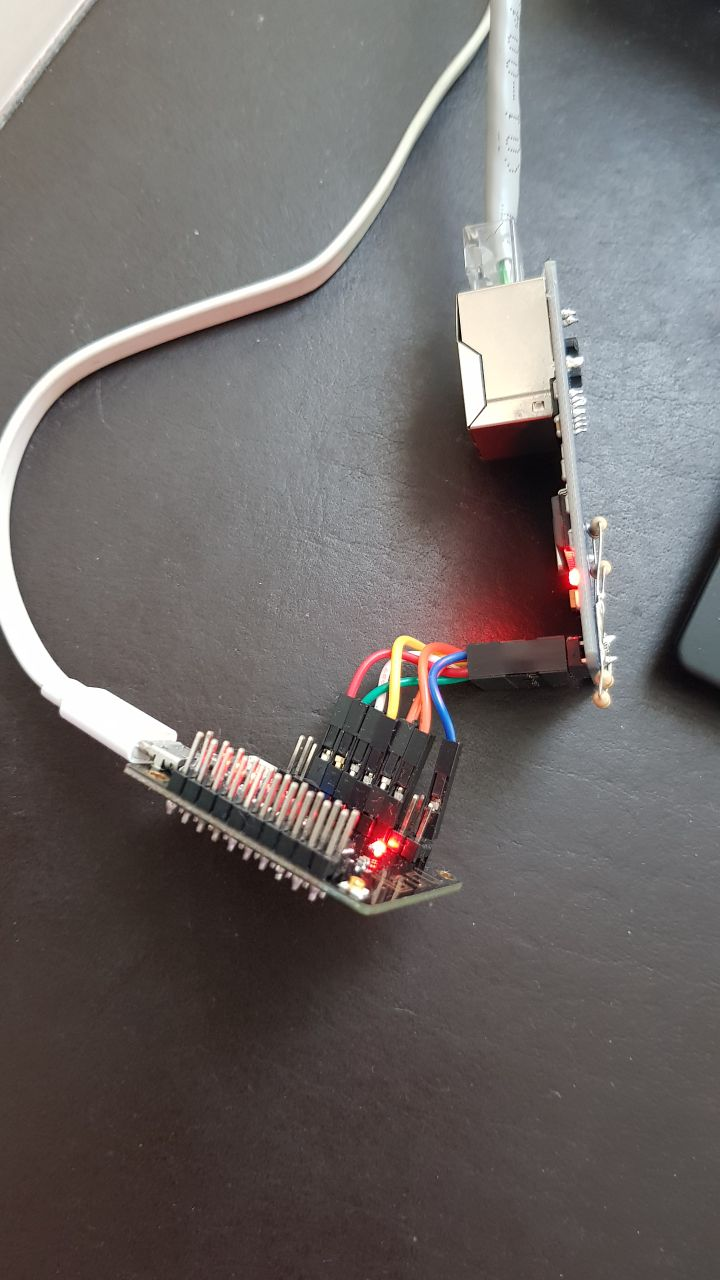
Hardware environment:
Board: TTGO 32 mini v1.3 (https://github.com/LilyGO/ESP32-MINI-32-V1.3)
SPI Bus: MISO && MOSI && CS - pulled up to VDD (3.3v) with 10K resistors
Connection: Dupont wires with ~4 cm (1,5 inch) length:
Chips tested:
- ENC28J60-I/SO 1610U11 (Manufactured 10th week of 2016, Revision B7)
- ENC28J60-I/SO 1205DG9 (Manufactured 5th week of 2012, Revision B7)
no1seman
on 16 Mar 2020
Exactly the same as mine (except mine are both on the same pcb now). Tested this morning using spi3 and iomux. No difference. @hendog82 what is your secret?? Haha
lucastcox
on 16 Mar 2020
So, still can't got it work on SPI speed greater than 6 Mhz, but made some errata issues fixes:
- Disabled forcing fullduplex;
- Fixed errata issue 6 by adding additional checks to ISR task;
- Fixed errata issue 12 by adding reset of internal transmit logic to transmit function logic;
- Fixed errata issue 13 by adding polling cycle to transmit function logic.
Full project code will be found here:
https://github.com/no1seman/enc28J60_esp32_idf
Need smbd to test and code review.
With this code got no errors except one:
D (2878) esp_netif_lwip: esp_netif_dhcpc_start_api esp_netif:0x3ffb98cc
D (2878) esp_netif_lwip: esp_netif_start_ip_lost_timer esp_netif:0x3ffb98cc
D (2888) esp_netif_lwip: if0x3ffb98cc start ip lost tmr: no need start because netif=0x3ffb994c interval=120 ip=0
D (2898) esp_netif_lwip: starting dhcp client
E (2918) enc28j60: emac_enc28j60_transmit(1179): last pending transmit cancelled due to timeout
D (2928) esp_netif_lwip: call api in lwip: ret=0x0, give sem
D (2928) event: running post ETH_EVENT:2 with handler 0x400d5318 and context 0x3ffb9bf4 on loop 0x3ffb89a4
0x400d5318: eth_event_handler at /home/user/esp/enc28j60/build/../main/enc28j60_example_main.c:28

I (2938) eth_example: Ethernet Link Up
I (2938) eth_example: Ethernet HW Addr 02:00:00:12:34:56
D (3748) esp_netif_lwip: esp_netif_dhcpc_cb lwip-netif:0x3ffb994c
D (3748) esp_netif_lwip: if0x3ffb98cc ip changed=1
D (3748) event: running post IP_EVENT:4 with handler 0x400d81f4 and context 0x3ffb9bc8 on loop 0x3ffb89a4
0x400d81f4: esp_netif_action_got_ip at /home/user/esp/esp-mdf/esp-idf/components/esp_netif/esp_netif_handlers.c:93
It's not clear why dhcp client tries to send any data to interface before linkup event. In that case error is a normal behaviour.
no1seman
on 17 Mar 2020
@no1seman thanks for doing that. I also got some captures of the transmissions at 6MHZ and 7MHZ spi clock. You can use a text editor to vs the 6MHZ and 7MHZ csv files. Or view the logic data directly by downloading salea logic software. https://www.saleae.com/downloads/ I haven't combed through it thoroughly, but there definitely appear to be some corrupted data on both the master and slave at higher frequencies.
captures.zip
lucastcox
on 19 Mar 2020
@hendog82 , sorry to keep spamming you. Would you mind providing any relevant info on how you were able to get your spi clock to 20MHZ? Pinout, simplified schematic, esp-idf version, etc?
lucastcox
on 25 Mar 2020
@hendog82 , one last spam, just in case. :smile:
lucastcox
on 4 May 2020
This driver is very slow, I only get about 30kb/s. My layout should be fine. (It is a pcba, not a wired breakout board). SPI_CLOCK 6MHz is max, with higher values driver does not initialize.
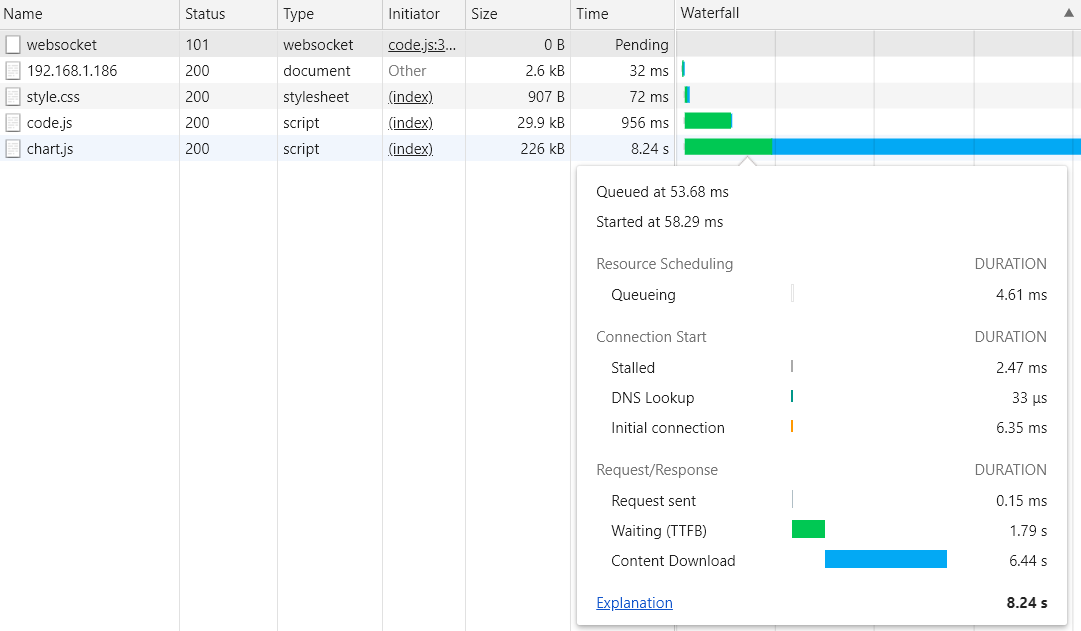
@no1seman I also tested your version, but it was even slower, I only got about 4kb/s. The same page/program loads instantly over Wifi.
Is anyone still working on this? A fix would be appreciated. Current version has not enough throughput for many applications.
nx518
on 4 Jun 2020
@nx518,
I decided to stop trying to make it workable, I ordered Wiznet w5500 modules and when it will arrive I will try to make driver for it, but it will be may be by the end of summer, I have some urgent projects for now
no1seman
on 4 Jun 2020
@nx518 I am also moving on from this. It's pretty unusable in its current state for anything requiring more than minimal throughput. Tried to get a hold of @suda-morris and @hendog82 to see if they had any further ideas, but I think they've been busier with other projects.
Moving on to the DM9051. That has been integrated for longer, and appears to have a MUCH smaller errata than the enc28j60. You can buy it from LCSC. https://lcsc.com/product-detail/Ethernet-ICs_DAVICOM_DM9051NP_DAVICOM-DM9051NP_C113756.html
Example schematic for the dm9051: https://www.dacomwest.de/images/Dateien/Davicom/Dokumente/MAC-PHY-Controller/DM9051/DM9051_demo_v2.1.pdf
lucastcox
on 6 Jun 2020
@nx518,
I decided to stop trying to make it workable, I ordered Wiznet w5500 modules and when it will arrive I will try to make driver for it, but it will be may be by the end of summer, I have some urgent projects for now
Do you intend on making the code available? I ported the W5100 driver to esp-idf and the http_client and mqtt examples (currently it pretty much only supports the specific board design I'm working with), and I'm looking for feedback and other reference implementations in order to improve mine and learn more.
 KaeLL
on 1 Oct 2020
KaeLL
on 1 Oct 2020
@KaeLL Sorry, my plans was changed, I've got test boards but I have no time to play with them..
no1seman
on 1 Oct 2020
No pressure.
KaeLL
on 1 Oct 2020
Related issues
 arossoinsite
·
39Comments
arossoinsite
·
39Comments
 Gfast2
·
39Comments
Gfast2
·
39Comments
 huming2207
·
70Comments
huming2207
·
70Comments
 mikaelkanstrup
·
50Comments
mikaelkanstrup
·
50Comments
 vmsh0
·
41Comments
vmsh0
·
41Comments