Esp-idf: Unable to boot with Secure Boot and Encrypted Flash (IDFGH-2359)
Environment
- Development Kit: [ESP32-DEVKIT]
- Kit version (for WroverKit/PicoKit/): [v1|v2|v3|v4]
- IDF version : ESP-IDF v4.1-dev-1086-g93a8603c5-dirty
- Build System: Make
Compiler version (run
xtensa-esp32-elf-gcc --versionto find it):
xtensa-esp32-elf-gcc (crosstool-NG esp-2019r2) 8.2.0
Copyright (C) 2018 Free Software Foundation, Inc.
This is free software; see the source for copying conditions. There is NO
warranty; not even for MERCHANTABILITY or FITNESS FOR A PARTICULAR PURPOSE.Operating System: Linux(Fedora 30)
- Power Supply: USB
Problem Description
The problem is that on the terminal the ESP32 dev kit is continuously printing the following message after enabling secure boot and flash encryption and I do follow all the steps from #3548
still facing the issue as below
rst:0x10 (RTCWDT_RTC_RESET),boot:0x13 (SPI_FAST_FLASH_BOOT)
flash read err, 1000
ets_main.c 371
ets Jun 8 2016 00:22:57
//Detailed problem description goes here.
Expected Behavior
It should run blink example successfully with secure bootloader and encrypted flash
Actual Behavior
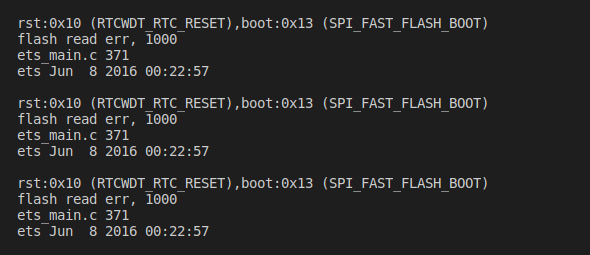
Steps to repropduce
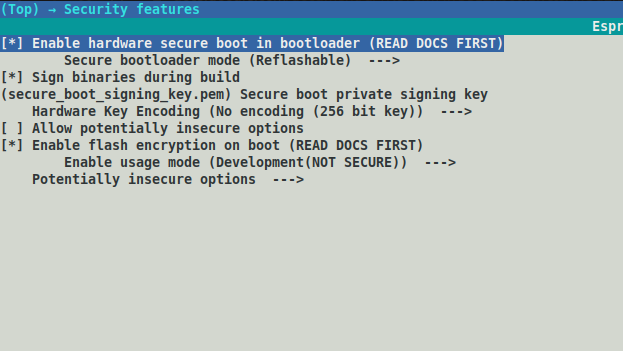
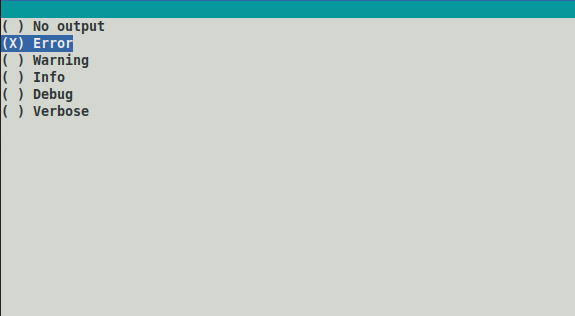
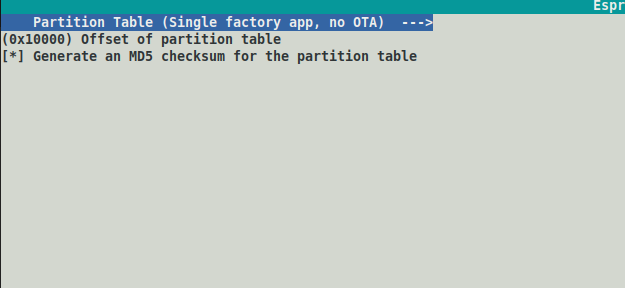
Below are the screenshots of menuconfig and commands to reproduce this issue //Detailed problem description goes here.
I took blink example from IDF/examples
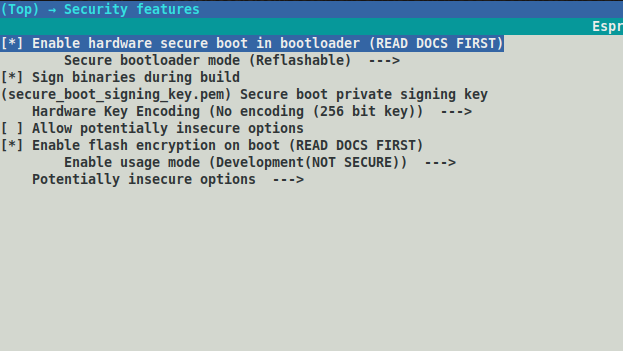
Step1: On menuconfig>securtity options I have set as below
Step 2: creating .pem file
openssl ecparam -name prime256v1 -genkey -noout -out my_secure_boot_signing_key.pem
Step 3: Digesting private key to bin file to flash to efuse and I have used below commands to produce bin files(Both produces same bin file with different names because the fact I've used to digest based on same pem file)
espsecure.py digest_private_key --keyfile secure_boot_signing_key.pem --keylen 256 my_flash_encryption_key.bin
espsecure.py digest_private_key --keyfile secure_boot_signing_key.pem --keylen 256 secure-bootloader-key.bin
Step 4: Burning keys to efuse
espefuse.py --port /dev/ttyUSB0 burn_key flash_encryption my_flash_encryption_key.bin
espefuse.py --port /dev/ttyUSB0 burn_key secure_boot secure-bootloader-key.bin
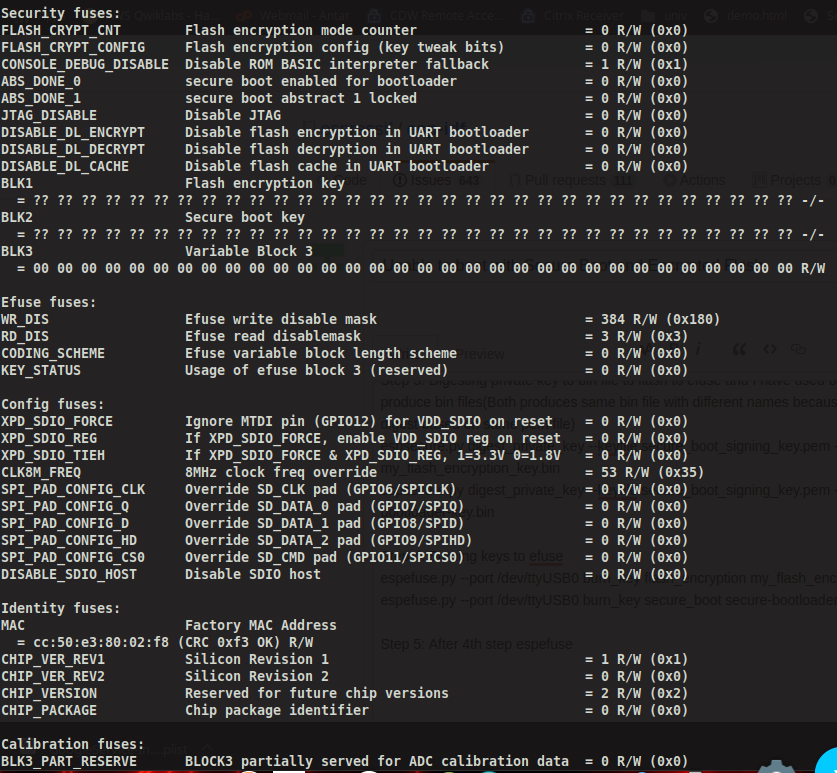
Step 5: After 4th step espefuse summary looks like below
Step 6: make bootloader && make partition_table && make -j4 (After this step bootloader.bin size:32.7kb and bootloader-reflash-digest.bin 36.9kb)
Step 7: Encrypting all bins with the my_flash_encryption_key.bin which was produced in step3
esptool.py --chip esp32 --port /dev/ttyUSB0 --baud 921600 --before default_reset --after hard_reset write_flash -z --flash_mode dio --flash_freq 40m --flash_size detect 0x1000 /build/bootloader/bootloader-encrypted.bin
(In menuconfig i have setted parttion offset to 10,000,Inorder to prevent bootloader overirite the partition table which is by default 0x8000)
esptool.py --port /dev/ttyUSB0 --baud 921000 write_flash 0x10000 build/partitions_singleapp-encrypted.bin
espsecure.py encrypt_flash_data --keyfile my_flash_encryption_key.bin --address 0x20000 -o build/blink-encrypted.bin build/blink.bin
Step 8: Now flashing each encrypted bin files to the esp flash.
esptool.py --chip esp32 --port /dev/ttyUSB0 --baud 921600 --before default_reset --after hard_reset write_flash -z --flash_mode dio --flash_freq 40m --flash_size detect 0x1000 /build/bootloader/bootloader-encrypted.bin
esptool.py --port /dev/ttyUSB0 --baud 921000 write_flash 0x10000 build/partitions_singleapp-encrypted.bin
esptool.py --port /dev/ttyUSB0 --baud 921000 write_flash 0x20000 build/app-encrypted.bin
Code to reproduce this issue
include
include "freertos/FreeRTOS.h"
include "freertos/task.h"
include "driver/gpio.h"
include "sdkconfig.h"
define BLINK_GPIO CONFIG_BLINK_GPIO
void app_main(void)
{
gpio_pad_select_gpio(BLINK_GPIO);
/* Set the GPIO as a push/pull output */
gpio_set_direction(BLINK_GPIO, GPIO_MODE_OUTPUT);
while(1) {
    /* Blink off (output low) */
printf("Turning off the LED\n");
    gpio_set_level(BLINK_GPIO, 0);
    vTaskDelay(1000 / portTICK_PERIOD_MS);
    /* Blink on (output high) */
printf("Turning on the LED\n");
    gpio_set_level(BLINK_GPIO, 1);
    vTaskDelay(1000 / portTICK_PERIOD_MS);
}
}
```
// If your code is longer than 30 lines, GIST is preferred.
Debug Logs
(https://user-images.githubusercontent.com/3605941/70848008-92c9a080-1e91-11ea-9781-85528d4d7223.png)
Other items if possible
- [*] sdkconfig file (attach the sdkconfig file from your project folder)
- [*] elf file in the
buildfolder (note this may contain all the code details and symbols of your project.) - [ ] coredump (This provides stacks of tasks.)
blink_elf_and_sdkconfig.zip
 kanakamedalasumanth
All 18 comments
Try this repo:
https://gitlab.com/rhr407/keith
 rhr407
on 14 Dec 2019
rhr407
on 14 Dec 2019
You are flashing encrypted binaries but you haven't enabled encryption in efuse
 negativekelvin
on 15 Dec 2019
negativekelvin
on 15 Dec 2019
You are flashing encrypted binaries but you haven't enabled encryption in efuse
Can you please suggest the commands for that?
kanakamedalasumanth
on 15 Dec 2019
You do not need to exclusively program efuse for flash encryption. When you set the FLASH_CRYPT_CONFIG bit in make menuconfig, it will automatically set the efuse. For more details visit https://docs.espressif.com/projects/esp-idf/en/release-v3.3/security/flash-encryption.html#setting-flash-crypt-config
Please remember, the repo I have shared was for reflashable esp32. If you want one time flash then you will need to enable that option in the menuconfig. But I do not recommend it at all because in that way you will never have OTA in your product which is highly unlikely in IoT devices.
rhr407
on 15 Dec 2019
You do not need to exclusively program efuse for flash encryption. When you set the FLASH_CRYPT_CONFIG bit in make menuconfig, it will automatically set the efuse. For more details visit https://docs.espressif.com/projects/esp-idf/en/release-v3.3/security/flash-encryption.html#setting-flash-crypt-config
Please remember, the repo I have shared was for reflashable esp32. If you want one time flash then you will need to enable that option in the menuconfig. But I do not recommend it at all because in that way you will never have OTA in your product which is highly unlikely in IoT devices.
Thank you for your great support Rizwan.
As you can see in step 1 , I have set the option as a reflashable
Above repo, I getting 404 not found and also I have sent my gitlab id on email.

kanakamedalasumanth
on 15 Dec 2019
Check now
On Sun, Dec 15, 2019 at 9:53 AM Sumanth kanakamedala <
[email protected]> wrote:
You do not need to exclusively program efuse for flash encryption. When
you set the FLASH_CRYPT_CONFIG bit in make menuconfig, it will
automatically set the efuse. For more details visit
https://docs.espressif.com/projects/esp-idf/en/release-v3.3/security/flash-encryption.html#setting-flash-crypt-configPlease remember, the repo I have shared was for reflashable esp32. If you
want one time flash then you will need to enable that option in the
menuconfig. But I do not recommend it at all because in that way you will
never have OTA in your product which is highly unlikely in IoT devices.Thank you for your great support Rizwan.
Above repo, I getting 404 not found and also I have sent my gitlab id on
email.[image: 404]
https://user-images.githubusercontent.com/3605941/70861019-adae1a80-1f4e-11ea-8005-632606aa14ed.png—
You are receiving this because you commented.
Reply to this email directly, view it on GitHub
https://github.com/espressif/esp-idf/issues/4486?email_source=notifications&email_token=AGGSH4LYFYJTJISIJGTCC6LQYX5CZA5CNFSM4J22C2J2YY3PNVWWK3TUL52HS4DFVREXG43VMVBW63LNMVXHJKTDN5WW2ZLOORPWSZGOEG4VJSQ#issuecomment-565793994,
or unsubscribe
https://github.com/notifications/unsubscribe-auth/AGGSH4IZGXZSWVB74WI4GLTQYX5CZANCNFSM4J22C2JQ
.
rhr407
on 15 Dec 2019
Check now
…
On Sun, Dec 15, 2019 at 9:53 AM Sumanth kanakamedala < @.*> wrote: You do not need to exclusively program efuse for flash encryption. When you set the FLASH_CRYPT_CONFIG bit in make menuconfig, it will automatically set the efuse. For more details visit https://docs.espressif.com/projects/esp-idf/en/release-v3.3/security/flash-encryption.html#setting-flash-crypt-config Please remember, the repo I have shared was for reflashable esp32. If you want one time flash then you will need to enable that option in the menuconfig. But I do not recommend it at all because in that way you will never have OTA in your product which is highly unlikely in IoT devices. Thank you for your great support Rizwan. Above repo, I getting 404 not found and also I have sent my gitlab id on email. [image: 404] https://user-images.githubusercontent.com/3605941/70861019-adae1a80-1f4e-11ea-8005-632606aa14ed.png — You are receiving this because you commented. Reply to this email directly, view it on GitHub <#4486?email_source=notifications&email_token=AGGSH4LYFYJTJISIJGTCC6LQYX5CZA5CNFSM4J22C2J2YY3PNVWWK3TUL52HS4DFVREXG43VMVBW63LNMVXHJKTDN5WW2ZLOORPWSZGOEG4VJSQ#issuecomment-565793994>, or unsubscribe https://github.com/notifications/unsubscribe-auth/AGGSH4IZGXZSWVB74WI4GLTQYX5CZANCNFSM4J22C2JQ .
Thanks!
On the first step, you are showing eFuse summary right. In your case, you have loaded appropriate values to the blocks(BLK1, BLK2). Can you guide me on how I can do that step before starting the actual process because I might be doing something wrong there?
By this Wednesday I getting new ESP's.
kanakamedalasumanth
on 15 Dec 2019
Hi @kanakamedalasumanth ,
Your existing chips are probably still fine and can be recovered.
Your steps 1-6 have set up the device with Secure Boot & Flash Encryption keys burned into the efuse key blocks (BLK1 & BLK2), and you've configured the project for Secure Boot & Flash Encryption but these features are not enabled in the hardware yet. You can double check this by running espefuse.py summary again and checking that ABS_DONE_0==0 (set to 1 when secure boot is enabled), and that FLASH_CRYPT_CNT==0 (set to 1 when Flash Encryption is enabled).
Your Steps 7 & 8 prepared pre-encrypted images and flashed them, but because flash encryption is not actually enabled yet the ESP32 sees random bytes in the flash and can't boot.
The recommended process for enabling Flash Encryption & Secure Boot is to allow the device to enable these features itself on first boot. Because you've pre-burned keys in efuse, these keys will be used. But you need to flash plaintext binaries, not encrypted ones. The device will encrypt itself on first boot and enable all the efuses required for Flash Encryption & Secure Boot.
To do the initial flash of plaintext, you can follow these steps from the Secure Boot docs:
https://docs.espressif.com/projects/esp-idf/en/latest/security/secure-boot.html#how-to-enable-secure-boot
After the first boot is done and you want to update, you will need to flash pre-encrypted files like what you've shown in your Steps 7 & 8.
Because you seem to be in the development phase and using ESP-IDF v4.1-dev, you may also be interested in the new Flash Encryption "development" mode which was added in ESP-IDF v4.x:
https://docs.espressif.com/projects/esp-idf/en/latest/security/flash-encryption.html#flash-enc-development-mode
Configuring a project in Development mode allows you to re-flash the encrypted ESP32 without needing to pre-encrypt the binaries on the host, or even keep a copy of the flash encryption key.
In general, you may also want to read or re-read the rest of the documentation pages on Secure Boot & Flash Encryption (linked above).
Angus
 projectgus
on 16 Dec 2019
projectgus
on 16 Dec 2019
@rhr407
If you want one time flash then you will need to enable that option in the menuconfig. But I do not recommend it at all because in that way you will never have OTA in your product which is highly unlikely in IoT devices.
I can't see the repo you shared, but if using the Flash Encryption & Secure Boot features with the standard ESP-IDF configuration then this is not correct - OTA is always possible.
projectgus
on 16 Dec 2019
@rhr407
If you want one time flash then you will need to enable that option in the menuconfig. But I do not recommend it at all because in that way you will never have OTA in your product which is highly unlikely in IoT devices.
I can't see the repo you shared, but if using the Flash Encryption & Secure Boot features with the standard ESP-IDF configuration then this is not correct - OTA is always possible.
After flashing blink.bin getting the same error.Before that everything goes as expected until I flashed
blink.bin.
Note: And for this testing, I took new blink example and with same .pem file which I have used earlier and also changed IDF version to 3.3.1(esp-idf-v3.3.1 which is stable version)
Below are the steps I have followed:
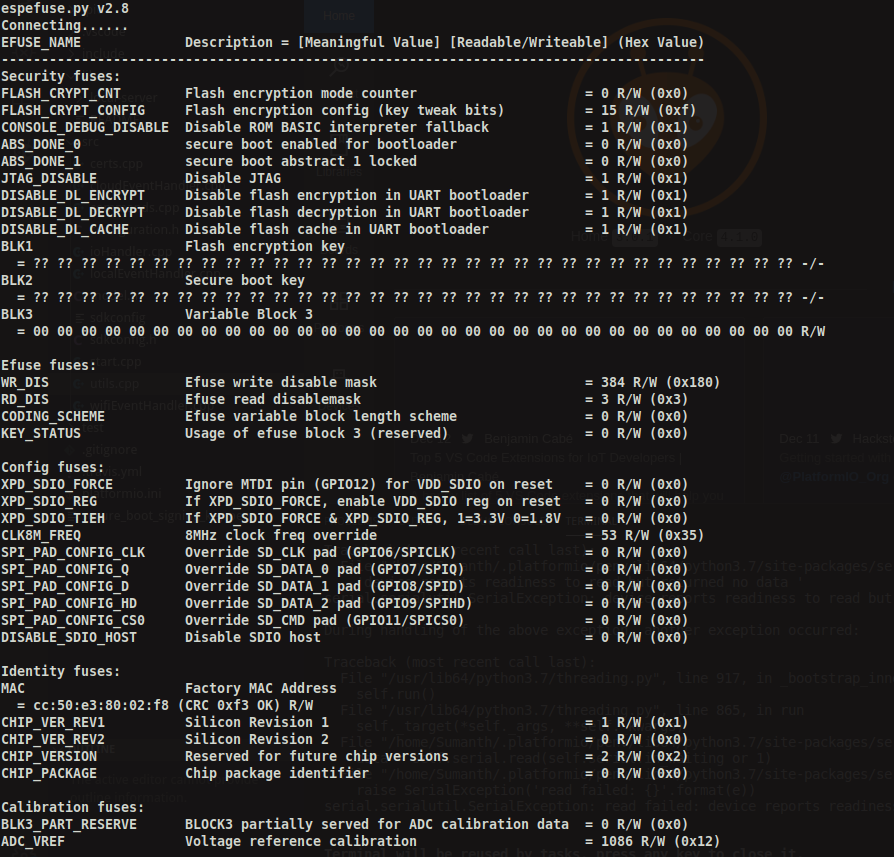
Step 1: eFuse summary
Note: After @projectgus suggested I have tested and flashed plaintext bins, After that I have observed that FLASH_CRYPT_CONFIG has changed to 15
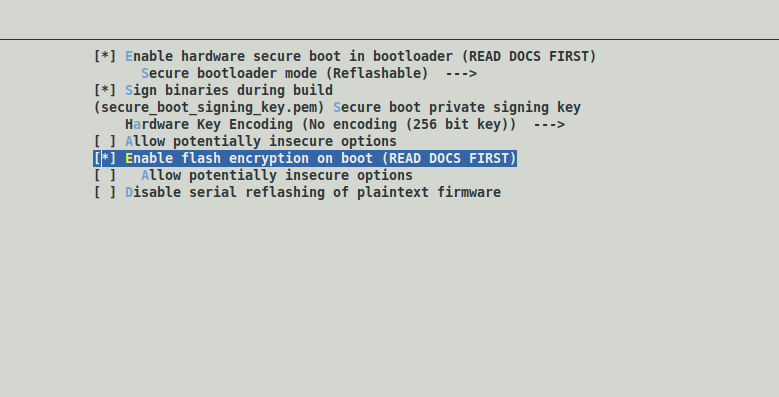
Step 2:In menuconfig setting are below
Security Settings:
Bootloader :
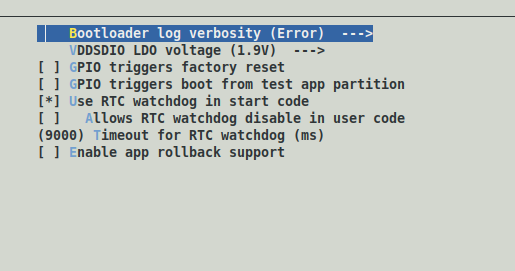
Partition:
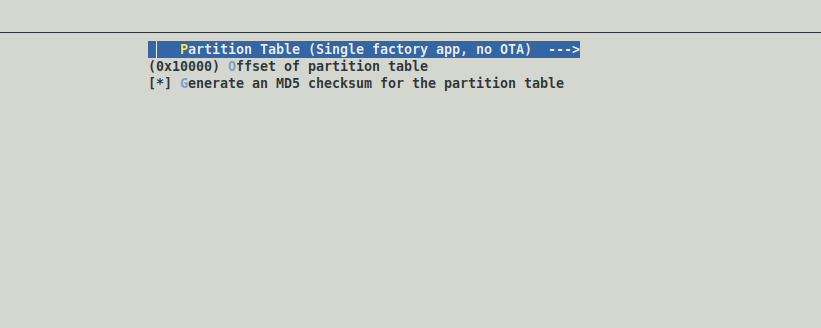
Serial flasher config:
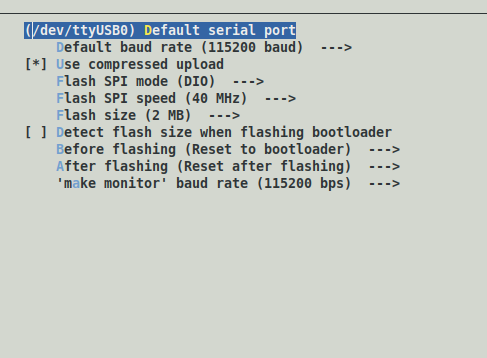
Step 3: make bootloader && make partition_table && make -j4(bootloader.bin is 31.4kB and bootloader-reflash-digest.bin is 35.6kB)
Step 4: flashing bootloader.bin and monitored for output
python /home/Sumanth/Documents/esp-idf-v3.3.1/components/esptool_py/esptool/esptool.py --chip esp32 --port /dev/ttyUSB0 --baud 115200 --before default_reset --after hard_reset write_flash -z --flash_mode dio --flash_freq 40m --flash_size 2MB 0x1000 blink/build/bootloader/bootloader.bin
Output looks as below:
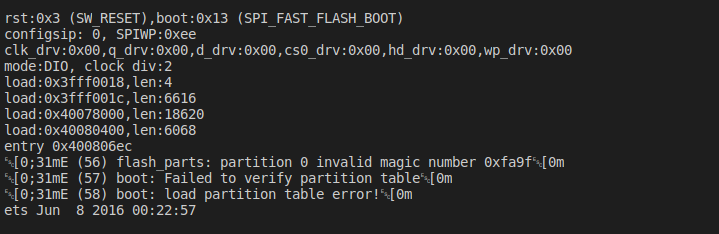
Step 5: flashing partition table and monitored for output
python /home/Sumanth/Documents/esp-idf-v3.3.1/components/esptool_py/esptool/esptool.py --chip esp32 --port /dev/ttyUSB0 --baud 115200 --before default_reset --after hard_reset write_flash 0x10000 /blink/build/partitions_singleapp.bin
Output looks as below:
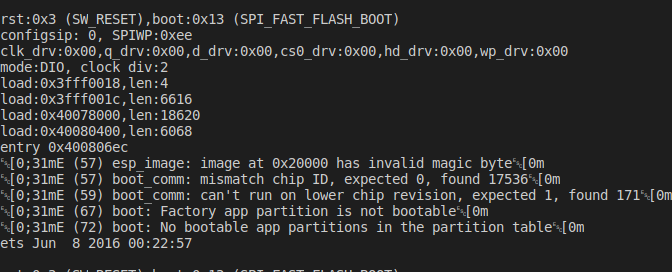
Step 6: Flashing app and monitored for output
python /home/Sumanth/Documents/esp-idf-v3.3.1/components/esptool_py/esptool/esptool.py --chip esp32 --port /dev/ttyUSB0 --baud 115200 --before default_reset --after hard_reset write_flash 0x20000 /blink/build/blink.bin
After the above step immediate output is

kanakamedalasumanth
on 16 Dec 2019
Hi @kanakamedalasumanth,
Thanks for the updates.
Note: After @projectgus suggested I have tested and flashed plaintext bins, After that I have observed that FLASH_CRYPT_CONFIG has changed to 15
This efuse is not what enables flash encryption. The efuse which enables flash encryption is FLASH_CRYPT_CNT, and this is still zero.
Rather than flashing individual binaries one at a time, please follow exactly the steps I sent you in my previous reply.
Here's the same link, but for ESP-IDF v3.3.1: https://docs.espressif.com/projects/esp-idf/en/v3.3.1/security/secure-boot.html#how-to-enable-secure-boot
Pay particular attention to steps 5 through 8.
projectgus
on 16 Dec 2019
Hi @kanakamedalasumanth,
Thanks for the updates.
Note: After @projectgus suggested I have tested and flashed plaintext bins, After that I have observed that FLASH_CRYPT_CONFIG has changed to 15
This efuse is not what enables flash encryption. The efuse which enables flash encryption is
FLASH_CRYPT_CNT, and this is still zero.Rather than flashing individual binaries one at a time, please follow exactly the steps I sent you in my previous reply.
Here's the same link, but for ESP-IDF v3.3.1: https://docs.espressif.com/projects/esp-idf/en/v3.3.1/security/secure-boot.html#how-to-enable-secure-boot
Pay particular attention to steps 5 through 8.
It's working now. @projectgus I really appreciate your help!!
And my final eFuse summary
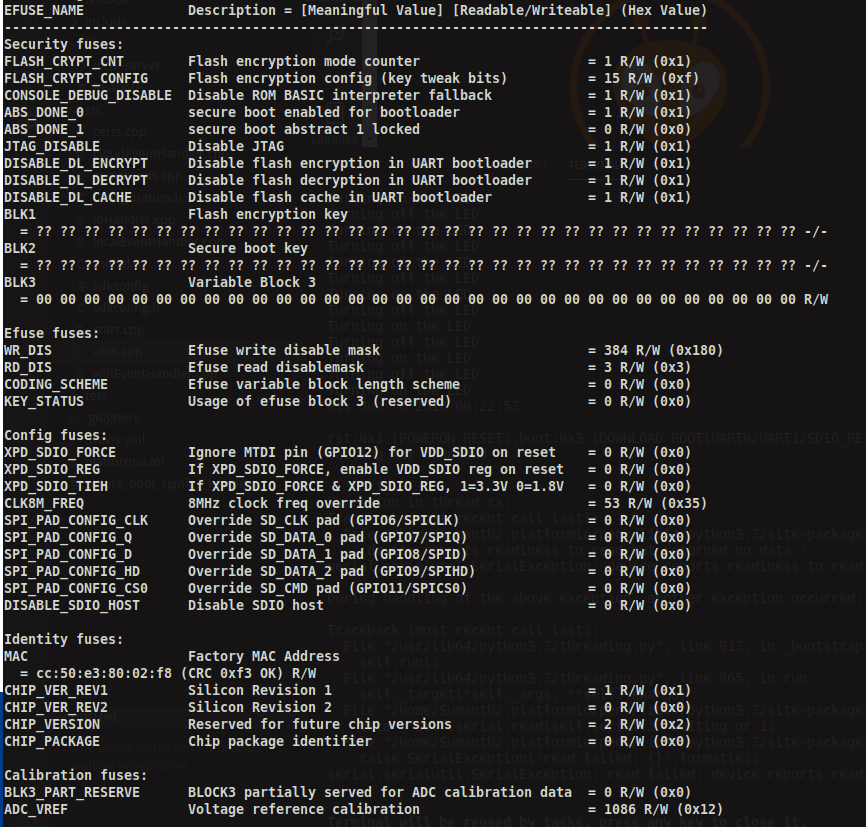
kanakamedalasumanth
on 16 Dec 2019
Thanks for the update @kanakamedalasumanth , good to hear everything is working now.
projectgus
on 16 Dec 2019
@rhr407
If you want one time flash then you will need to enable that option in the menuconfig. But I do not recommend it at all because in that way you will never have OTA in your product which is highly unlikely in IoT devices.
I can't see the repo you shared, but if using the Flash Encryption & Secure Boot features with the standard ESP-IDF configuration then this is not correct - OTA is always possible.
Please try now! I have made it public now. You are right but according to section in the docs https://docs.espressif.com/projects/esp-idf/en/stable/security/flash-encryption.html#flash-encryption-secure-boot
we need to have the new app signed correctly with the Secure Boot signing key. That said, we need the bootloader to encrypt our apps. How is it possible with OTA that is a new application. Can you please throw more light?
rhr407
on 17 Dec 2019
@rhr407 ota can write the new app to the flash and encrypt it at the same time because the running app has the ability to write encrypted flash
negativekelvin
on 17 Dec 2019
@projectgus , Actually I'm seeing that in the documentation, OTA should be pre-encrypted .bin file. So, Is there any workaround to give OTA after encryption. so that sensitive data should hide in source code.
kanakamedalasumanth
on 17 Dec 2019
- Use https with client/server certificates
- Encrypt the bin yourself and modify ota to decrypt it before writing to flash
- Use a fixed flash encryption key (not recommended)
There is a lot of discussion about this already https://www.google.com/search?q=site%3Aesp32.com+ota+encryption
negativekelvin
on 17 Dec 2019
Got It..did some tweaks on esp_ota_ops.c. and flashing OTA with an encrypted bin.
Thanks, @negativekelvin!!!
kanakamedalasumanth
on 17 Dec 2019
Related issues
 JLIspace
·
3Comments
JLIspace
·
3Comments
 bfriedkin
·
4Comments
bfriedkin
·
4Comments
 borch84
·
4Comments
borch84
·
4Comments
 ghost
·
4Comments
ghost
·
4Comments
 beriberikix
·
3Comments
beriberikix
·
3Comments
Most helpful comment
There is a lot of discussion about this already https://www.google.com/search?q=site%3Aesp32.com+ota+encryption