Esp-idf: windows10 cmake build error (IDFGH-535)
- windows 10
- idf version 3.1.1
D:\esp\hello_world>idf.py build
Running ninja in directory D:\esp\hello_world\build
Executing "ninja all"...
[1/4] Generating hello-world.bin
FAILED: hello-world.bin
cmd.exe /C "cd /D D:\esp\hello_world\build && C:\Users\dtboy\.platformio\python27\python.exe D:/msys32/home/dtboy/esp/esp-idf/components/esptool_py/esptool/esptool.py --chip esp32 elf2image --flash_mode dio --flash_freq 40m --flash_size 2MB -o hello-world.bin hello-world.elf"
Traceback (most recent call last):
  File "D:/msys32/home/dtboy/esp/esp-idf/components/esptool_py/esptool/esptool.py", line 35, in <module>
    import serial.tools.list_ports as list_ports
ImportError: No module named serial.tools.list_ports
[2/4] Performing build step for 'bootloader'
FAILED: bootloader-prefix/src/bootloader-stamp/bootloader-build bootloader/bootloader.elf bootloader/bootloader.bin bootloader/bootloader.map
cmd.exe /C "cd /D D:\esp\hello_world\build\bootloader && "D:\Program Files\CMake\bin\cmake.exe" --build ."
[1/1] Generating bootloader.bin
FAILED: bootloader.bin
cmd.exe /C "cd /D D:\esp\hello_world\build\bootloader && C:\Users\dtboy\.platformio\python27\python.exe D:/msys32/home/dtboy/esp/esp-idf/components/esptool_py/esptool/esptool.py --chip esp32 elf2image --flash_mode dio --flash_freq 40m --flash_size 2MB -o bootloader.bin bootloader.elf"
Traceback (most recent call last):
  File "D:/msys32/home/dtboy/esp/esp-idf/components/esptool_py/esptool/esptool.py", line 35, in <module>
    import serial.tools.list_ports as list_ports
ImportError: No module named serial.tools.list_ports
ninja: build stopped: subcommand failed.
ninja: build stopped: subcommand failed.
ninja failed with exit code 1
pip install pyserial
Requirement already satisfied: pyserial in d:\python27\lib\site-packages
You are using pip version 9.0.3, however version 18.1 is available.
You should consider upgrading via the 'python -m pip install --upgrade pip' command.
 dtboy1995
All 14 comments
Hello @dtboy1995!
Please try to run C:\Users\dtboy\.platformio\python27\python.exe -m pip install pyserial. If that doesn't help you then please post here the output of C:\Users\dtboy\.platformio\python27\python.exe -m pip show pyserial
 dobairoland
on 27 Dec 2018
dobairoland
on 27 Dec 2018
@dobairoland be deeply grateful. it works well
dtboy1995
on 27 Dec 2018
@dobairoland Thank you, I would like to ask you a question, my python environment variable is set to D:\Python27, why the path will be changed to C:\Users\dtboy. Platformio \Python27 \ after using idf.py?
dtboy1995
on 27 Dec 2018
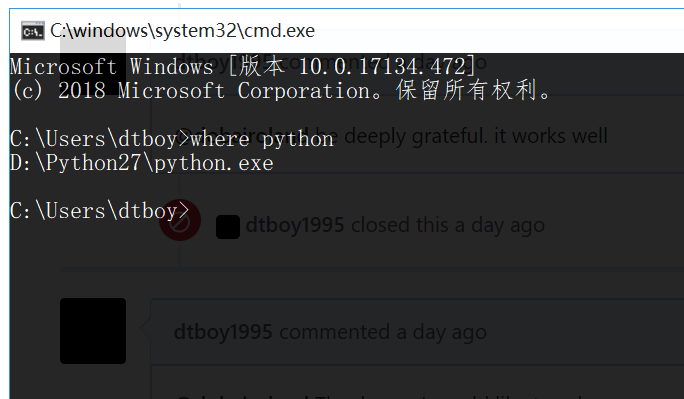
Are you using Windows command line cmd? Running where python shows you D:\Python27\python.exe or the other one?
dobairoland
on 27 Dec 2018
@dobairoland
Sorry for not replying in time
This is a screenshot
dtboy1995
on 28 Dec 2018
Hello @dtboy1995.
Yes, you are right. It seems that esptool was invoked with a different Python interpreter than idf.py was invoked with. However, I wasn't able to find the root cause, therefore, I reopened the issue to help track this as TODO.
dobairoland
on 2 Jan 2019
thanks a lot @dobairoland
dtboy1995
on 3 Jan 2019
I had the same problem. I believe that problem lies in what Python instance was used when idf.py was first run. My "build.ninja" had several instances of my platform.io python executable.
To fix it, I cleared out my build folder, then regenerated everything explicitly using the desired Python27 install. That got me past this error.
idf.py fullclean
C:\Python27\python.exe C:\ESP_IDF\tools\idf.py flash
You could probably replace all of the "python.exe" references in the "build.ninja" file to the correct path and that would fix it too.
 dcm684w
on 29 Jan 2019
dcm684w
on 29 Jan 2019
Hi @dtboy1995 & @dcm684w ,
Thanks for being patient while someone got back to you about this.
The root cause for this issue was fixed in commit d0b2d5ec95113fc7c9ec17787e16d30afb8aebf5. In some cases, the default interpreter registered in Windows for ".py" files was being used to execute a Python script instead of the correct interpreter.
In @dtboy1995's case, it looks like the python.exe in the .platformio directory was registered as the interpreter for .py files, but this was not the interpreter that was used to run idf.py.
If you update to the latest master branch, the same Python interpreter should be used throughout. Please leave another comment if that's not the case, and we'll reopen.
 projectgus
on 28 Mar 2019
projectgus
on 28 Mar 2019
@dtboy1995 Oops, I missed you were using the 3.1.1 release. This hasn't been backported to v3.1 yet, but it will be. Will update this issue when that fix is merged.
projectgus
on 28 Mar 2019
@projectgus, thank you very much, it's great!
dtboy1995
on 28 Mar 2019
@dtboy1995 Actually there's something a bit odd here, the error you got matches a fix we made in master branch but that bug was never in the 3.1 release branch (the bug was introduced after we had created the 3.1 release branch).
There are two possibilities:
- This error has a different root cause
- You were using master branch when you reported the issue, not the 3.1.1 release.
Could you please double check for me?
projectgus
on 29 Mar 2019
@projectgus I am very sorry, after that I used the Ubuntu system
But I remember that I followed the cmake build guide step by step.
dtboy1995
on 29 Mar 2019
@dtboy1995 No problems. Glad you found a workaround.
@dcm684w If you're still experiencing this bug, please let us know your IDF version and we can reopen the issue.
projectgus
on 29 Mar 2019
Related issues
 borch84
·
4Comments
borch84
·
4Comments
 okasha55
·
3Comments
okasha55
·
3Comments
 jakkubu
·
4Comments
jakkubu
·
4Comments
 ghost
·
4Comments
ghost
·
4Comments
 LosDeiblos
·
4Comments
LosDeiblos
·
4Comments
Most helpful comment
Hello @dtboy1995!
Please try to run
C:\Users\dtboy\.platformio\python27\python.exe -m pip install pyserial. If that doesn't help you then please post here the output ofC:\Users\dtboy\.platformio\python27\python.exe -m pip show pyserial