Esp-idf: IDF_PATH didn't work with Eclipse under windows. (IDFGH-3081)
Dear to all,
I tried to setup a ESP32 IDF but the eclipse will not work with the IDF_PATH settings.
I have already installed a Python (with Serial-Module) and a C/C++ Eclipse on my WIN7 system.
Therefore, I want to setup the IDF at this system also.
I followed all the getting starting instructions at the espressif getting started homepage.
But I am not successful with using the Eclipse.
Here is the status of my environment:
Command line within MSYS32 is running:
- Downloaded the “esp32_win32_msys2_environment_and_toolchain-20180110.zip” and installed it at “D:\msys32”.
Installed the IDF within the MSYS32 under “D:\msys32\home\Axel\esp\esp-idf”
Setup the the IDF_PATH environment and download the “Hello_World” project to “D:\msys32\home\Axel\esp\hello_world”.
I made the configuration with “make menuconfig” and now it is possible to compile the project and generate the BIN-file within the MSYS32 system.
But Eclipse doesn’t work:
- I imported the “Hello_World” project and renamed it to “ESP32_Hello_World”.
Made all the setup steps, corresponding to your description.
First, I setup the IDF_PATH = “D:/msys32/home/Axel/esp/esp-idf”
With this I get the message in the eclipse console:
14:14:58 **** Incremental Build of configuration Default for project ESP32_hello_world ****
"c:\\python27\\python" "D:/msys32/home/Axel/esp/esp-idf\\tools\\windows\\eclipse_make.py" all
_D:/msys32/home/Axel/esp/esp-idf/make/project.mk:98: *** IDF_PATH cannot contain colons. If overriding IDF_PATH on Windows, use MSYS Unix-style /c/dir instead of C:/dir.  Schluss.
Running make in 'D:/msys32/home/Axel/esp/hello_world'_
- Therefore, I changed IDF_PATH to “/d/msys32/home/Axel/esp/esp-idf”
But then I get the following message in the eclipse console:
14:37:24 **** Incremental Build of configuration Default for project ESP32_hello_world ****
"c:\\python27\\python" "/d/msys32/home/Axel/esp/esp-idf\\tools\\windows\\eclipse_make.py" all
_c:\python27\python: can't open file '/d/msys32/home/Axel/esp/esp-idf\tools\windows\eclipse_make.py': [Errno 2] No such file or directory_
- After this I made several tests with changing some lines in the corresponding make files and mixing up both syntaxes.
But this was also not successful.
Can you tell me what’s going wrong?
Is there another IDF version, with different make files, necessary?
Thank you in advanced.
Kind regards,
Axel.
 AxelKeller
All 14 comments
I have already installed a Python ...
Hi @AxelKeller,
Setup instructions for Windows do not mention installation of Python. It is already provided within MSYS2 / MINGW32. I see c:\python27\python: can't open file ... in your error log, that indicates some issue of using separately installed Python.
Unless you need it for other purposes, I would uninstall 'c:\python27' and repeat Eclipse configuration steps.
 krzychb
on 5 Feb 2018
krzychb
on 5 Feb 2018
To add to what @krzychb mentions, it shouldn't be unecessary to uninstall other Python versions if you set the PATH in the Eclipse project properties to only the MSYS2 directories.
The PATH to set is given under the third dot point in the setup guide here:
https://esp-idf.readthedocs.io/en/latest/get-started/eclipse-setup-windows.html#project-properties
Please check if the PATH in the Eclipse properties contains any other directories.
Angus
 projectgus
on 5 Feb 2018
projectgus
on 5 Feb 2018
Thank you for your fast reply.
I removed now the link to my local Python installation:
Build command: python ${IDF_PATH}/tools/windows/eclipse_make.py
But the results are the same:
When I set the IDF_PATH = “/d/msys32/home/Axel/esp/esp-idf”
I get the following message:
10:05:18 **** Incremental Build of configuration Default for project ESP32_hello_world ****
python /d/msys32/home/Axel/esp/esp-idf/tools/windows/eclipse_make.py all
D:\msys32\mingw32\bin\python.exe: can't open file '/d/msys32/home/Axel/esp/esp-idf/tools/windows/eclipse_make.py': [Errno 2] No such file or Directory
Now the msys32 python is used. And when I change the IDF_PATH = “d:/msys32/home/Axel/esp/esp-idf”, I get the same Message as yesterday:
09:54:20 **** Incremental Build of configuration Default for project ESP32_hello_world ****
python d:/msys32/home/Axel/esp/esp-idf/tools/windows/eclipse_make.py all
d:/msys32/home/Axel/esp/esp-idf/make/project.mk:98: *** IDF_PATH cannot contain colons. If overriding IDF_PATH on Windows, use MSYS Unix-style /c/dir instead of C:/dir.  Schluss.
I double checked all the settings for the Project-Properties bud I didn’t find any failures.
I made some further investigations and here are the results:
When I understand this process right, the first step of this make process is to call “eclipse_make.py”.
Within “eclipse_make.py” some path checks will passed without failures.
Then the make is called and this opens the "project.mk", where the IDF_PATH check went wrong.
There is no hint, that there are files outside of MSYS32 are used.
I assume the special call of “eclipse_make.py” in the windows subfolder should adapt some settings between UNIX and Windows. but I do not recognize any adjustments before the make calling.
See line 27..29 of “eclipse_make.py”:
def main():
    print("Running make in '%s'" % check_path(os.getcwd()))
    make = subprocess.Popen(["make"] + sys.argv[1:] + ["BATCH_BUILD=1"], stdout=subprocess.PIPE)
    ...
Did somebody have an Idea why this adjustments do work on my system?
Kind regards
Axel
AxelKeller
on 5 Feb 2018
Sorry, I don't want to CLOSE this issue.
Kind regards
Axel.
AxelKeller
on 5 Feb 2018
Hello to all,
I found my mistake.
I didn't delete the previous PATH setting as described in
https://dl.espressif.com/doc/esp-idf/latest/get-started/eclipse-setup-windows.html#eclipse-windows-setup
I append the MSYS32 pathes, but this causes the failure behaviour.
Now my path definition is
PATH = D:\msys32\usr\bin;D:\msys32\mingw32\bin;D:\msys32\opt\xtensa-esp32-elf\bin
and it works.
Kind regards, Axel.
AxelKeller
on 8 Feb 2018
@AxelKeller, this is great news!
Thank you for update.
krzychb
on 8 Feb 2018
Hello to all,
i have exactly same problem on STABLE 3.1.1 version :-(. Win7
I am able to make .bin in msys32 environment.
But i have trouble in Eclipse. I have followed the official steps from "get-started" doc.
Looks like the "eclipse_make.py" is not working properly.
I can not get rid of "IDF_PATH cannot contain colons".
Can you help me anybody, please?

 Paiklabs
on 18 Dec 2018
Paiklabs
on 18 Dec 2018
Same error when I run eclipse_make.py from terminal :

Paiklabs
on 18 Dec 2018
I solved this.
https://www.esp32.com/viewtopic.php?f=13&t=8523
Paiklabs
on 20 Dec 2018
I need you guys help !
I can run Python under mingw32/bin/python
But I got error when run on eclipse
python ${IDF_PATH}/tools/windows/eclipse_make.py
"Error: Program "python" not found in PATH
PATH=[c:\msys32\usr\bin; c:\msys32\mingw32\bin; c:\msys32\opt\xtensa-esp32-elf\bin; c:\Pathon27]"
I did install another Python2.7 on other location after above error.
BUT I can

I am not sure eclipse runs
python ${IDF_PATH}/tools/windows/eclipse_make.py
under where? mingw32? or windows 7 cmd ?
why it can't automatically pick from the PATH,
 zhouypau
on 2 Jan 2019
zhouypau
on 2 Jan 2019
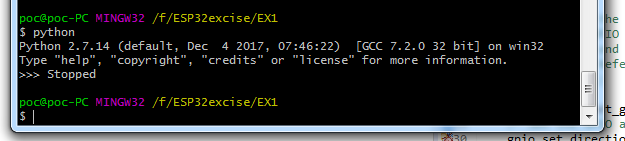
You can see it can run Python at mingw32 in project fold .
also it can run windows 7 cmd

BUT not in eclipse

Please someone can help ,
zhouypau
on 2 Jan 2019
I'm not sure if it helps but i replaced the path with:
. $IDF_PATH/tools/windows/eclipse_make.sh
so that python isn't required.
 f71p5y
on 11 Apr 2020
f71p5y
on 11 Apr 2020
In between, If you're working with IDFv4.0 and above(CMake) I would suggest to use new IDF Eclipse Plugin which will simplify the workflow. https://github.com/espressif/idf-eclipse-plugin#espressif-idf-eclipse-plugins
 kolipakakondal
on 13 Apr 2020
kolipakakondal
on 13 Apr 2020
I managed to get around this error. From following the Python code, the script is looking for a file named "version.txt" in the ESP-IDF directory. This was NOT in my directory. From git, I found I was at version 4.0, so I simply added a file "version.txt" with one line "v4.0" in the base ESP-IDF. This cleared the error, I was able to install the tools in Eclipse and they work.
 kfine100
on 2 May 2020
kfine100
on 2 May 2020
Related issues
 LosDeiblos
·
4Comments
LosDeiblos
·
4Comments
 ESP32DE
·
4Comments
ESP32DE
·
4Comments
 jakkubu
·
4Comments
jakkubu
·
4Comments
 bfriedkin
·
4Comments
bfriedkin
·
4Comments
 luc-github
·
4Comments
luc-github
·
4Comments
Most helpful comment
Hello to all,
I found my mistake.
I didn't delete the previous PATH setting as described in
https://dl.espressif.com/doc/esp-idf/latest/get-started/eclipse-setup-windows.html#eclipse-windows-setup
I append the MSYS32 pathes, but this causes the failure behaviour.
Now my path definition is
PATH = D:\msys32\usr\bin;D:\msys32\mingw32\bin;D:\msys32\opt\xtensa-esp32-elf\binand it works.
Kind regards, Axel.