Esp-homekit-devices: Sonoff SV doesn't work properly with just Close sensor - Help needed
Please see further done to https://github.com/RavenSystem/esp-homekit-devices/issues/428#issuecomment-502628939 for updated information on issue.
Hi there,
I was home today and suddenly heard the garage door opening. I didn't receive a notification and looked at my phone and saw I had no wifi signal for some reason.
My router, server with home bridge and the Sonoff sv for the garage door opener are all in my garage and most likely working off the same power and it appears there was a power cut for a short amount of time.
But the garage door opened! How do I setup the Sonoff sv so if there is a power failure the garage door won't open??
The door state (physical and on the home app) was closed prior to power cut.
I've turned off the garage door and the Sonoff sv and then powered them back on and the Sonoff always triggers to open the door when it's powered on.
Please help as this is a huge security risk for me and I can't use the Sonoff to open the garage door until I know this is sorted.
Firmware is 0.8.5
 jat80
jat80
All 46 comments
First step: update to las version.
 RavenSystem
on 17 Jun 2019
RavenSystem
on 17 Jun 2019
First step: update to las version.
Updated to latest version (0.9.6) and still the same problem. I have Reverse SW1 set on as it's the only way for it to work properly in regards to open and closing the right way. I'm wondering if that has anything to do with it?
jat80
on 17 Jun 2019
AFAIK, RavenCore has no initial state for a Garage door type.. so it's definetely triggered.
It might be a fluctuation triggering the relay.
Is your "With Button-Control" disabled?
If external button is used, there's also a Button Filter option to tune.
 i3laze
on 17 Jun 2019
i3laze
on 17 Jun 2019
AFAIK, RavenCore has no initial state for a Garage door type.. so it's definetely triggered.
It might be a fluctuation triggering the relay.Is your "With Button-Control" disabled? If used, there's also a Button Filter option to tune.
With Button-Control is Off. Do I need it to be on?
jat80
on 17 Jun 2019
Let it stay off.
I have Reverse SW1 set on as it's the only way for it to work properly in regards to open and closing the right way
That's not good.. cause, opening and closing states are related to Sensor Close NC option, and Reverse SW1 to trigger movement.
Please describe your setup a bit more detailed.
So, you push voltage from Sonoff-SV to the door most of the time..
And when you require a door to open/close, you make an inch?
Personally, I've got two garage doors, and both are triggered by a 0.3 sec inch and that's it - no constant voltage.
i3laze
on 17 Jun 2019
Let it stay off.
I have Reverse SW1 set on as it's the only way for it to work properly in regards to open and closing the right way
That's not good.. cause, opening and closing states are related to NC Sensor option, and Reverse SW1 to trigger movement.Please describe your setup a bit more detailed.
So, you push voltage from Sonoff-SV to the door most of the time..
And when you require door to open/close, you make an inch?Personally, I've got two garage doors, and both are triggered by a 0.3 sec inch and that's it - no constant voltage.
I've wired my Sonoff SV like the picture below

from this site: https://www.hagensieker.com/wordpress/2019/02/18/sonoff-sv-for-garage-door-opener/
jat80
on 17 Jun 2019
My settings are like below:

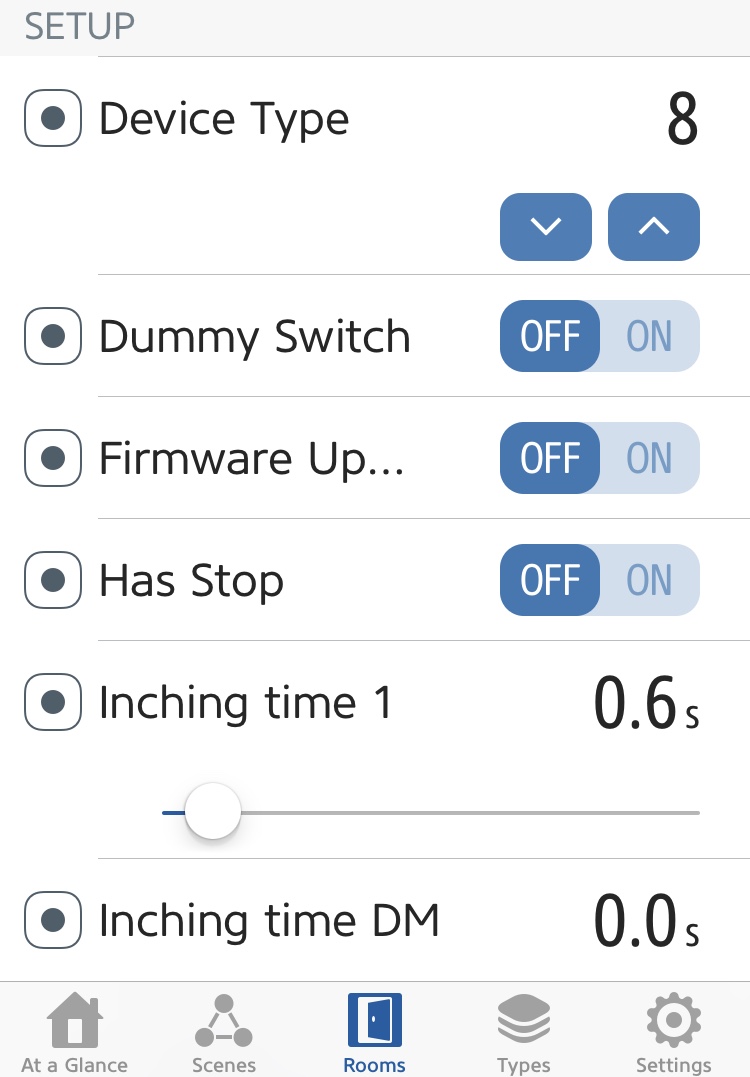
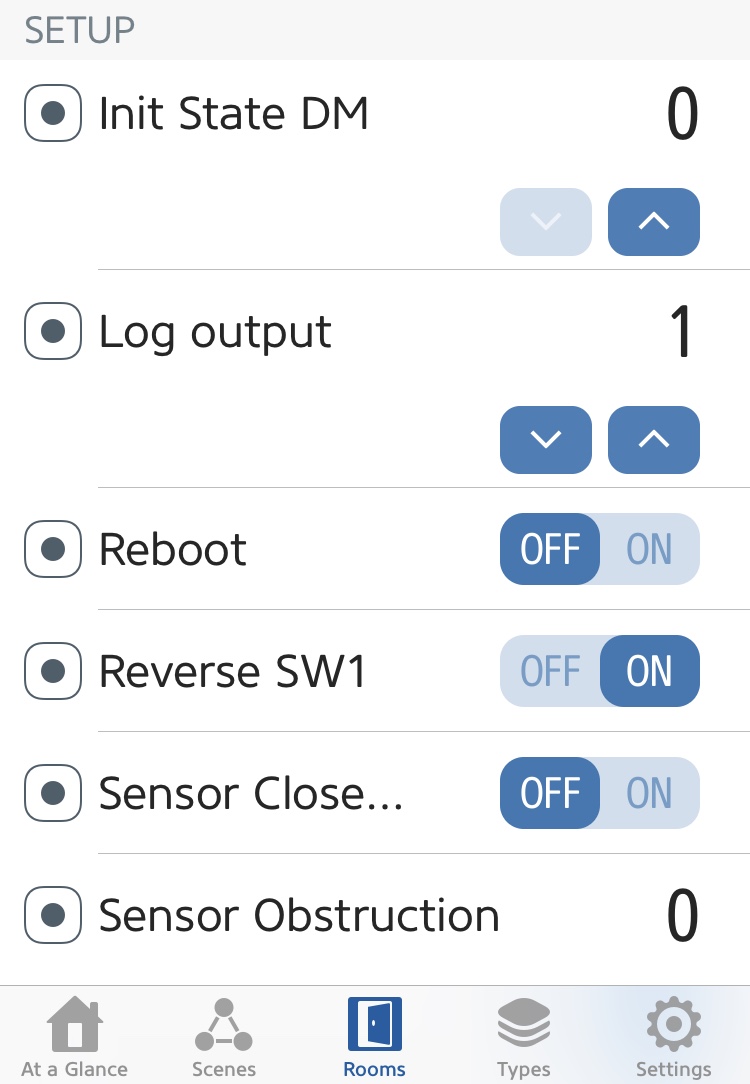
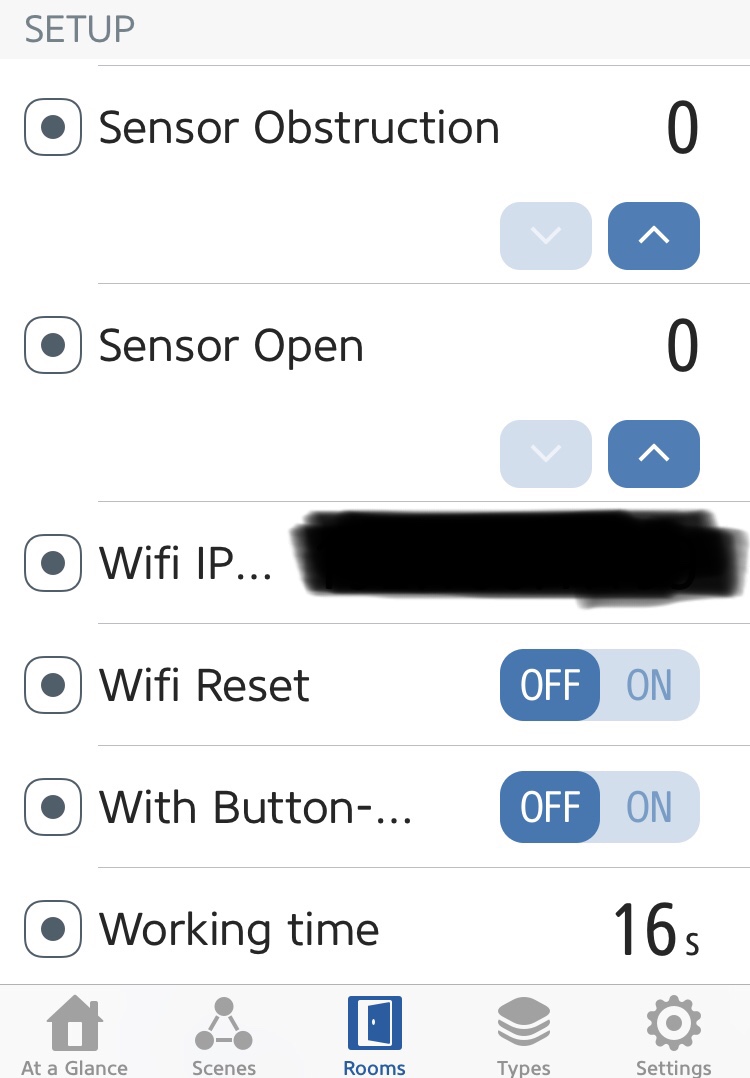
jat80
on 17 Jun 2019
Indeed it's strange you have to reverse SW1... Are you sure the sensors are the right way (NC/NO)?
I had to think twice about them (and I think maybe "Sensor Close NC" toggle could be replaced by 0/1/2 button like "Sensor Open" for improved uniformity).
 skanico
on 17 Jun 2019
skanico
on 17 Jun 2019
I suspect it's Reverse SW1 is the cause.
When power outage occurs, garage door is powered on first..
After that Sonoff boots and applies voltage to SW1 and that may cause a trigger.
Where do you take voltage for Sonoff to run?
i3laze
on 17 Jun 2019
I also suspect Reverse to be the problem (I didn't check for initial state in the code, but for a garage door, it should be off). And if you reverse SW, then it is ON!
No the jumper is ok, I have the same. Inching time is needed because a short impulsion doesn't trigger the motor.
skanico
on 17 Jun 2019
The relay contact is placed in parallel to the physical button (power comes from the motor).
skanico
on 17 Jun 2019
The relay contact is placed in parallel to the physical button (power comes from the motor).
So have I wired it wrong? I'm not quite sure what you mean by this sorry.
jat80
on 17 Jun 2019
Indeed, the scheme is fine. Relay shorts "Remote Button" contacts for an inch time.
And Reverse SW shouldn't be used here.
The question is why door doesn't trigger without Reverse SW?
How exactly door behaves with Reverse SW off?
A garage door manual and its' motherboard photos are welcome. Or just door model.
i3laze
on 17 Jun 2019
This is the wiring you should have :
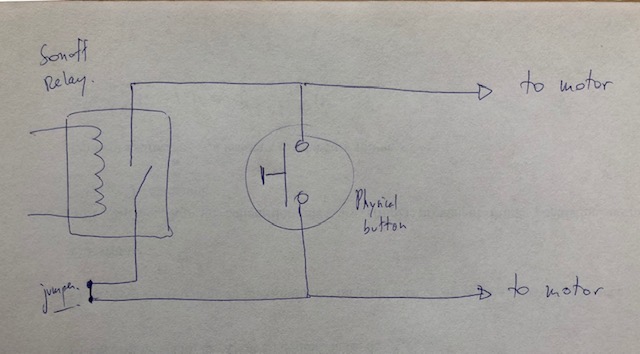
skanico
on 17 Jun 2019
Indeed, the scheme is fine. Relay shorts "Remote Button" contacts for an inch time.
And Reverse SW shouldn't be used here.The question is why door doesn't work without Reverse?
A garage door board manual and its' photos are welcome.
This was my initial problem as mentioned in this issue:
https://github.com/RavenSystem/esp-homekit-devices/issues/383
Garage door Make is Guardian and Model is 21230L
There are 4 terminals on the back labeled 1-4 and I'm using 2 and 3 which work when I short them together to open the garage door. It also had wires to them for a external button but one wasn't put in.
So the wires from the Sonoff "too remote button" are going straight to the back of the garage door motor terminals 2 and 3.
jat80
on 17 Jun 2019
Regarding #383 issue, I had to turn off "has stop" to make it work. But I didn't have to switch on "Reverse SW". If you have to short pins 2 and 3 on the motor, then "Reverse SW" shouldn't be enabled. Maybe check again the wiring and the sensor (NO/NC)
skanico
on 17 Jun 2019
Regarding #383 issue, I had to turn off "has stop" to make it work. But I didn't have to switch on "Reverse SW". If you have to short pins 2 and 3 on the motor, then "Reverse SW" shouldn't be enabled. Maybe check again the wiring and the sensor (NO/NC)
I have "has stop" turned off in my current config.
Sensor works fine with current config? What would I change in the sensor settings or wiring?
jat80
on 17 Jun 2019
"Sensor Close NC" set to OFF means that when your door is closed, sensor is open. Is this the case?
skanico
on 17 Jun 2019
BTW the wiki is outdated here
The option name is "Sensor open" and not "Has Opened Sensor"
skanico
on 17 Jun 2019
"Sensor Close NC" set to OFF means that when your door is closed, sensor is open. Is this the case?
I have a NO sensor (that's what it was labeled as when I received it) connected to GPIO 14. When the door is closed both parts of the sensor are together if that makes sense and with the current config it tells me the door is closed.
Should I change the SW1 reverse to off and the close sensor on GPIO14 to ON?
PS. I don't know why the open and close sensors don't have the same options eg:
Sensor type:
Not used
NO: Normal-Opened
NC: Normal-Closed
jat80
on 17 Jun 2019
Sensor works fine with current config? What would I change in the sensor settings or wiring?
Cause your setup is currently working (by some luck) wrong.
Thanks, I think it is my understanding of everything it limited so accept I'm wrong and have wired or configured something wrong myself. Thanks for your help in trying to determine what I've done wrong. I do appreciate everyones help. Hopefully can get It sorted. Sorry for my limited understanding.
jat80
on 17 Jun 2019
No offense, sorry. Just mentioning you're having wrong setup somehow working.
So the wires from the Sonoff "to remote button" are going straight to the back of the garage door motor terminals 2 and 3.
Your wiring is absolutely correct. So Sonoff simulates a push button.
(Manual, Figure 11A: http://vartutechnika.lt/assets/PDF_instrukcijos/pakeliami/B7-21230L.pdf)
- No need in Reverse SW here - switch it Off and then Reboot.
- Try running your door first with Sensor Close NC Off and then with On.
i3laze
on 17 Jun 2019
I have a NO sensor (that's what it was labeled as when I received it) connected to GPIO 14. When the door is closed both parts of the sensor are together if that makes sense and with the current config it tells me the door is closed.
That's why I said I had to think twice about sensors... If your sensor is made from two parts that must be close to each other when the door is closed (reed switch?), then you normally should switch ON "Sensor Close NC".
Maybe the wiki could be clarified about this point.
skanico
on 17 Jun 2019
Not the position of two reed parts, but an internal design/magnet define if sensor is NC or NO:
If it magnets on closure and breaks contact - it's NC, cause Normally the cirquit stays Closed.
If it magnets on closure and makes contact - it's NO, cause most of the time the cirquit is open.
I recommend trying both Sensor Close NC settings - one of them should follow door logical state correctly.
i3laze
on 17 Jun 2019
That's what I meant (but maybe I did not express myself well). What is a little destabilizing in the case of a garage door is that the "most frequent" position is the "closed door" position and therefore with the closing sensor contact which is NOT at rest.
skanico
on 17 Jun 2019
Can confirm that when power is cut and turned back on with Reverse SW to OFF - Sonoff does NOT trigger door to open which is good.
BUT:
Settings 1:
Has stop to OFF
Reverse SW1 to OFF
Sensor Close to ON
Sensor Open to 0
Outcome:
I open the door using the home app and the door opens BUT it doesn't say open after the 16s I have it set to in the eve settings, in the home app it just stays on "opening" and the Eve app switches to Closed????
Settings 2:
Has stop to OFF
Reverse SW1 to OFF
Sensor Close to OFF
Sensor Open to 0
I open the door using the home app and the door opens BUT it doesn't say open after the working time of 17s I have it set to in the eve settings, in the home app it just stays on "opening" and the Eve app stays on closing.
I press the home app again and it says closing but it doesn't trigger the switch so just stays on closing Eve app unchanged, stays on closing.
I press it a 3rd time and in home app it says Garage door open notification and the door starts to close then when the door is finally closed it gives a garage door closed notification. Home app an eve say door is closed.
jat80
on 17 Jun 2019
That's strange Eve app contradicts Home app...
Did you reboot after you changed the settings?
Maybe try to remove device and do pairing again?
I cannot help more with the timing setting as I have both an opened and closed sensor.
skanico
on 17 Jun 2019
That's strange Eve app contradicts Home app...
Did you reboot after you changed the settings?
Maybe try to remove device and do pairing again?
I cannot help more with the timing setting as I have both an opened and closed sensor.
Yes I have rebooted after making changes and turned off show setup as well. Also tried removing the accessory and re-adding it and still the same behaviour.
jat80
on 17 Jun 2019
Wow it looks more complicated than I thought ... sorry I can't help you more at the moment. If I think of something, I'll tell you.
skanico
on 17 Jun 2019
Wow it looks more complicated than I thought ... sorry I can't help you more at the moment. If I think of something, I'll tell you.
Thanks mate. Appreciate your time helping me this far.
Maybe It doesn't work with just a closed sensor and I need an open one as well?
It's weird that it works fine with the Reverse SW1 set to ON - working time works fine this way but power outage means it will open garage door when power comes back on.
Hopefully @RavenSystem can help.
jat80
on 17 Jun 2019
Yes indeed it is strange. I cannot explain that (I did not dive so deeply into the code unfortunately).
I cross my fingers, as it works fine for me (except "has stop" function, but that's not a big problem actually).
Hope it will work finally for you too!
skanico
on 17 Jun 2019
“Has Stop” function does work for me.. by giving inch when door is in opening/closing state.. and after 1 sec giving another inch.
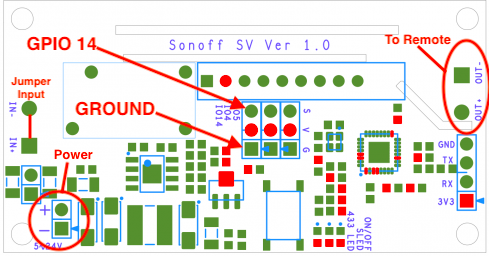
Let's come from another side.
Does sensor actually work? Any HomeKit status updates when you close/open door by remote control?
Did you actually connect sensor to GPIO14 and GND?
i3laze
on 17 Jun 2019
Yes sensor works. The interesting thing is. If I use the manual garage remote to open the door. All states in home app are correct. If I use home app to open, it just keeps on saying opening after the working time of 17s.
jat80
on 18 Jun 2019
Sensor Open is currently 0 (none), I hope?
i3laze
on 18 Jun 2019
Yeah Sensor open is set to 0 (zero).
I think this could be a bug
jat80
on 18 Jun 2019
Can’t confirm, cause my two doors are working fine (modded Sonoff Basic).
Got a spare Sonoff SV, will give it a try this evening.
i3laze
on 18 Jun 2019
Cool thanks mate.
jat80
on 18 Jun 2019
Did thorough tests with Sensor Close NC off and on, Inching time 0,3;0,6; Working time 5;17.
Sonoff SV working just fine on v0.9.6, I'd say 95% fine.
However.. noticed a bug, which might (or might not) cause cascade/wrong behavior:
_(@RavenSystem, please confirm)_
https://github.com/RavenSystem/esp-homekit-devices/issues/436
@jat80, I suggest you re-check you've got:
- v0.9.6 (Properties in Eve or Home.app)
- Board type 1
- Sensor open 0
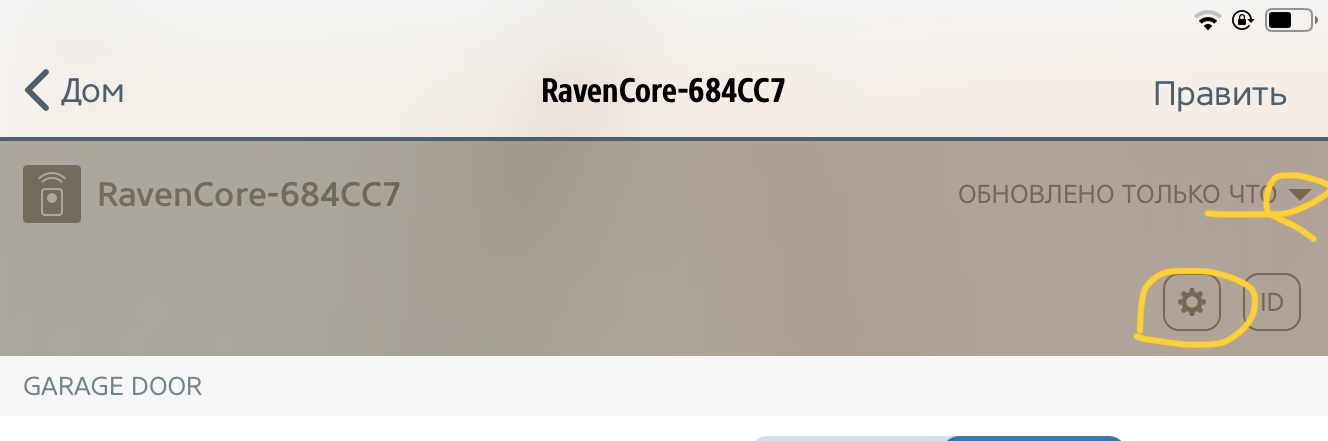
P.S. In rare occasions killing Home.app (double Home - swipe up) helps seeing the right HomeKit picture.
i3laze
on 19 Jun 2019
Did thorough tests with Sensor Close NC off and on, Inching time 0,3;0,6; Working time 5;17.
Sonoff SV working just fine on v0.9.6, I'd say 95% fine.However.. noticed a bug, which might (or might not) cause cascade/wrong behavior:
With Has Stop Step On and NC both Off or On:
State: _Open_ -> Closing -> I click -> Opening back.. -> Open.
Device doesn't respect _"Has Stop Step On"_ and does 1 click only.It still does two clicks when Closed -> Opening -> I Click -> Closing.
@jat80, I suggest you re-check you've got:
- v0.9.6 (Properties in Eve or Home.app)
- Board type 1
- Sensor open 0
P.S. In rare occasions killing Home.app (double Home - swipe up) helps seeing the right HomeKit picture.
Thanks for taking the time to test on your end. Appreciate it.
Did you test it with just the one sensor for close only?
Yes confirmed that Board type and Sensor open are correct. Also firmware is updated to v0.9.6 in both the home app and Eve app.
Can confirm that the has stop definitely looks like a bug as I get the same results when enabled.
As I mentioned before. If I manually open it with these settings it works fine. it's only if I open the door with the apps or Siri that it just stays on door opening with the settings.
Where to from here?
I could try and hook up a sensor open sensor as well.
Would re-flashing the Sonoff be of any use even though this was the problem prior to 0.9.6 as well?
I do have another Sonoff SV that I could try it with and flash it?
Do all versions of Sonoff SV use board type 1?
I'm stumped. @RavenSystem - anything else you could recommend me do?
Regards,
JT.
jat80
on 20 Jun 2019
Single Close sensor is enough for most setups.
Board type only affects GPIO input and relay pins numbering (hardcoded to a type).
SV board hasn’t ever changed - mine year2018 is labeled Ver 1.0
It won’t hurt to erase_flash and flash RavenCore back.
- I suggest you combine this with testing the setup on your desktop. With serial attached to PC/Mac (I personally like CoolTerm.app).
- The only way it says Opening forever.. is when Close sensor didn’t sense a thing and feels the door still closed. This can be verified in serial console:
First time just open the sensor.
Second time trigger inch via HomeKit and after few secs open the sensor - console should react.
Potentially you might have messed with jumpers or inching somehow affects GPIO14 state - a voltmeter might help troubleshooting here.
- Adding Open sensor should solve your problem eventually, but it’s really not mandatory.
I also hope you’re using 3rd party reed sensor, not garage door’s embedded one (I used one successfully, but it’s too risky). Photos are always welcome.
i3laze
on 20 Jun 2019
I have tested garage door with only closed sensor and it works perfectly. Remember to setup sensor type correctly, because it is very important (Normal Open or Normal Close).
Respect to stop step issue:
With Has Stop Step On and NC both Off or On:
State: Open -> Closing -> I click -> Opening back.. -> Open.
Device doesn't respect "Has Stop Step On" and does 1 click only.
It is a bug, and will be fixed soon with next version. Many thanks!
RavenSystem
on 20 Jun 2019
I have tested garage door with only closed sensor and it works perfectly. Remember to setup sensor type correctly, because it is very important (Normal Open or Normal Close).
I've reflashed the Sonoff SV.
I've tried both a NO and NC sensor and both reproduce the same result.
As I mentioned before. If I manually open it with these settings using the garage door remote it works fine. It's only if I open the door with the apps or Siri that it just stays on door opening with the settings even after the working time of 17s. Why @RavenSystem would this be the case? Its like it's ignoring this setting or some reason?
jat80
on 22 Jun 2019
The only way it infinitely stays in “Opening” is when device doesn’t sense Sensor change.
Please, post serial output here.
i3laze
on 22 Jun 2019
How do I post serial output?
The sensor changes when I manually use the garage door remote though and sensor does show change. It doesn’t when I use the home app.
jat80
on 22 Jun 2019
Unplug Sonoff and connect it to PC using serial cable. It will get power from USB and will respond just fine to Home.app commands.
Use any Terminal app, like Putty (Win) or CoolTerm (Mac). Baud Rate is 115200.
i3laze
on 22 Jun 2019
Ok, I think it's fixed! I've updated it to 1.0 firmware and reduced the inching time down to 0.3s and it WORKED! I'm pretty sure I've tried many different inching times previously so not sure what the difference was other than the firmware update but it's work fine now. Thanks for everyones time and help with this.
jat80
on 12 Jul 2019
Related issues
 arturodiazad1
·
3Comments
arturodiazad1
·
3Comments
 noobydp
·
5Comments
noobydp
·
5Comments
 macjl
·
5Comments
RavenSystem
·
5Comments
macjl
·
5Comments
RavenSystem
·
5Comments
 fluppie
·
5Comments
fluppie
·
5Comments
Most helpful comment
Ok, I think it's fixed! I've updated it to 1.0 firmware and reduced the inching time down to 0.3s and it WORKED! I'm pretty sure I've tried many different inching times previously so not sure what the difference was other than the firmware update but it's work fine now. Thanks for everyones time and help with this.