Esp-homekit-devices: Wifi Config Setup Issue
I recently got 4 Sonoff basics, have successfully flashed them with the RavenSystem repo. But I am unable to get past the wifi config.
The page appears to have badly formatted HTML or JS. Screenshot attached. You can see the join button starts off to the right of the last network.
I want to connect to the network called Creative. But when I click into the password field it selects the network at the bottom. Even if I select the network at the bottom and use its correct password it will not successfully submit the form and join that wifi.
I sometimes end up with a blank page.
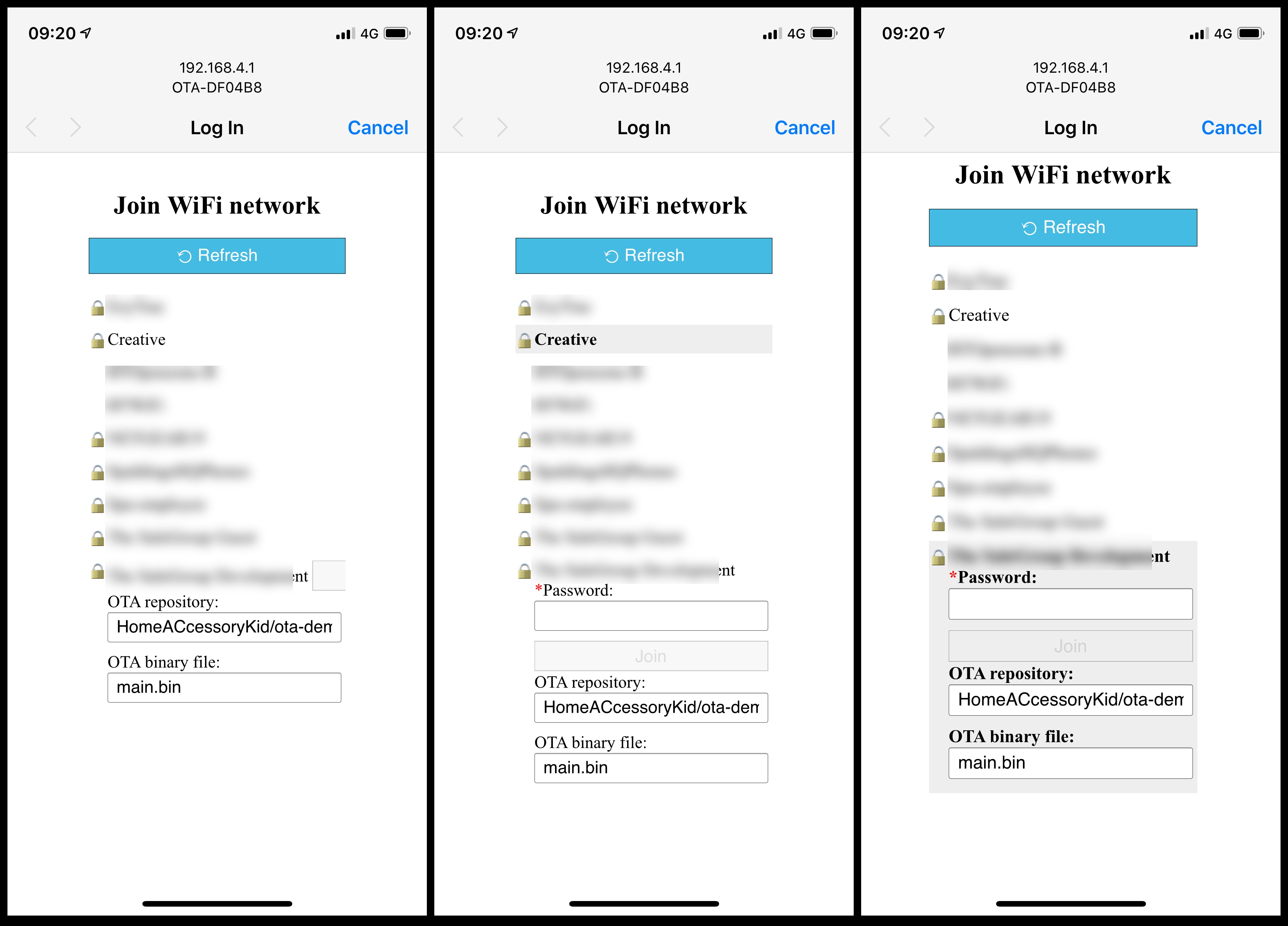
Note: these Sonoffs are the newer versions labelled Sonoff RF R2 Power V1.0 - https://github.com/arendst/Sonoff-Tasmota/issues/4515
 RickNunn
All 11 comments
Hi Rick,
I am very close to updating the OTA software to the LCM repository
While I do not think the actual issue you have will be solved there (I made only minor changes in other parts of it) I intend to make the setup ALSO available via the serial terminal (which you most likely have connected at the time of flashing).
Could you also indicate which phone you are using here? Our assumption is that all homekit users are using iOS... and there it works fine.
 HomeACcessoryKid
on 4 Jan 2019
HomeACcessoryKid
on 4 Jan 2019
Thanks Kid,
I’m using an iPhone X on latest. Have also tried on my Mac with chrome and Safari.
How close is close?
Thanks
RickNunn
on 4 Jan 2019
I just started to test the raw code for the serial input system so it will be a bit bumpy
In this stage I will not make releases yet, but I can commit and sync to GitHub so you can test with your phone compiling yourself
In general: if you are setting up new devices and don't mind to reflash if they die, just start using otabootbeta.bin from LCM today. Or use otabeta.bin if you want only tested releases.
But to answer your question, I hope by the end of today.
HomeACcessoryKid
on 4 Jan 2019
My operation is
- Select wifi
- Enter the OTA repository: & OTA binary file:
- Enter your password
 yukonx
on 4 Jan 2019
yukonx
on 4 Jan 2019
@HomeACcessoryKid thanks, I'll try out otabootbeta.bin and keep an eye on your repo for the serial release. Configuring wifi at the flashing stage would be A+++.
@yukonx I am glad it's working for you, it isn't for me.
RickNunn
on 4 Jan 2019
@HomeACcessoryKid I flashed with otabootbeta.bin and I've got it working. When the config page loaded at first it was broken still, but (I think) I hit the checkbox at the very bottom, it reloaded and looked right.
Still not really sure what was wrong with that page. But will have a play with this on one, and probable reflash the rest with your update when that comes out.
Thanks again
RickNunn
on 4 Jan 2019
You might try the version 0.9.16 which I asked others to test as final candidate
It is marked as pre-release, so you'd need otabootbeta.bin as startpoint.
Please switch to otaboot.bin once you start using it as a production device. do a full erase first
HomeACcessoryKid
on 4 Jan 2019
I released version 1.0.0 of LCM
please use otaboot.bin and see if all works fine for you?
Enjoy,
HacK
HomeACcessoryKid
on 5 Jan 2019
I shall load this up next time I’m at my desk and let you know how I get on. Thanks
RickNunn
on 5 Jan 2019
@HomeACcessoryKid all working well for me thanks
RickNunn
on 7 Jan 2019
This can be closed now. It's no longer an issue on the latest release.
RickNunn
on 7 Jan 2019
Related issues
 Codi878
·
4Comments
Codi878
·
4Comments
 lizzus
·
5Comments
lizzus
·
5Comments
 richardlimaa
·
4Comments
richardlimaa
·
4Comments
 arturodiazad1
·
3Comments
arturodiazad1
·
3Comments
 noobydp
·
5Comments
noobydp
·
5Comments