Esmvaltool: conda environment install not working properly
If I follow the installation instructions for setting up a new environment as described in CONTRIBUTING.md
conda env create --name esmvaltool3 --file environment.yml
I get the problem that the installation seems to get stuck at solving the environment. It took more than 70 minutes before I had to interrupt the installation.
Additionally, the nightly tests on CircleCI "conda_install" and "conda_build" fail on a regular basis.
 hb326
hb326
All 25 comments
looking into this right now -> just to confirm, the branch is version2_development right?
 valeriupredoi
on 12 Dec 2019
valeriupredoi
on 12 Dec 2019
It was not for my try. Not sure about the CircleCI. @bjoernbroetz, you know that, right?
hb326
on 12 Dec 2019
I will test the installation now with version2_development.
hb326
on 12 Dec 2019
please check your conda version by running conda --version: confirm that environment build fine with conda=4.7.11 and conda=4.8.0(latest), if your conda is older than 4.7.11 please update it by running conda update -n base -c defaults conda. Closing this since it's a non issue, if you still have troubles please reopen and post the output of conda --version && lsb_release -a && python -V :beer:
valeriupredoi
on 12 Dec 2019
actually prob best to reopen before we establish why the nightly CI builds fail -> @bjoernbroetz ?
valeriupredoi
on 12 Dec 2019
Nightly conda_build fails with
Too long with no output (exceeded 10m0s): context deadline exceeded
Using the version2_development.
But conda_install has been fine for this branch last night, which is what is relevant here I guess.
By the way, there is a lot testing on circle CI going on for version2_master which seems to be not active anymore.
 bjoernbroetz
on 12 Dec 2019
bjoernbroetz
on 12 Dec 2019
Saying that. When we look back a bit:
https://circleci.com/gh/ESMValGroup/ESMValTool/tree/version2_development
we see that also conda_install was failing 2 days ago and before reporting
Exited with code exit status 137
Which is the linux way to say that there was to less memory for this. We have 4GB on this VM.
bjoernbroetz
on 12 Dec 2019
OK - what does conda --version say? It takes at most 800MB for conda-env to run - you may have a whole lot of processes that are impeding it to run and it may sleep for long enough to be killed by the job killer. It sounds to me like a transitory issue and nothing systemic
valeriupredoi
on 12 Dec 2019
whoaa hold your horses, I see what the bugger is: https://circleci.com/gh/ESMValGroup/workflows/ESMValTool?pipelines-ui-opt-out - the nightly build uses conda install from the nightly built package which is a turkey! The esmvaltool package needs to be updated with the latest environment and should pull the latest esmvalcore off pip that hasn't been rebuilt for ages now - the py<3.8 pin is not there and the env fails to build coz numba. But for users the usual instructions work fine, that's not a problem, just the build+install straight from conda are broken
valeriupredoi
on 12 Dec 2019
The installation worked not when I am on the branch version2_development. Thanks for the hint!
hb326
on 12 Dec 2019
Birgit, not when you are on version2_development?
valeriupredoi
on 12 Dec 2019
Birgit, _not_ when you are on
version2_development?
Sorry, typo. I meant _now_.
hb326
on 12 Dec 2019
ok so an install off the conda built package:
conda create -y --name esmvaltoolX
conda activate esmvaltoolX
conda install -y esmvaltool -c conda-forge -c esmvalgroup
works eventually - it does take about 2GB for dependency solving and env setup but it goes through. It installs an older version of esmvalcore tho:
(esmvaltoolX) valeriu@valeriu-PORTEGE-Z30-C:~/ESMValTool$ conda list esmvalcore
# packages in environment at /home/valeriu/anaconda3R/envs/esmvaltoolX:
#
# Name                    Version                   Build  Channel
esmvalcore                2.0.0b1                    py_0    esmvalgroup
but esmvalcore is old even if it's b3 -> @bouweandela will have to update it, but better if we just wait for the latest for stable v2.0 that will come soon enough
@bjoernbroetz if you notice more nightly build fails for version2_development, pls alert us :beer:
And yes, why are we doing nightly builds for anything else but version2_development? That makes no sense...
valeriupredoi
on 12 Dec 2019
we okay to close this, guys?
valeriupredoi
on 12 Dec 2019
Good with me. Thanks again!
hb326
on 12 Dec 2019
Yes, close it. Normal installation is working fine with this memory footprint:
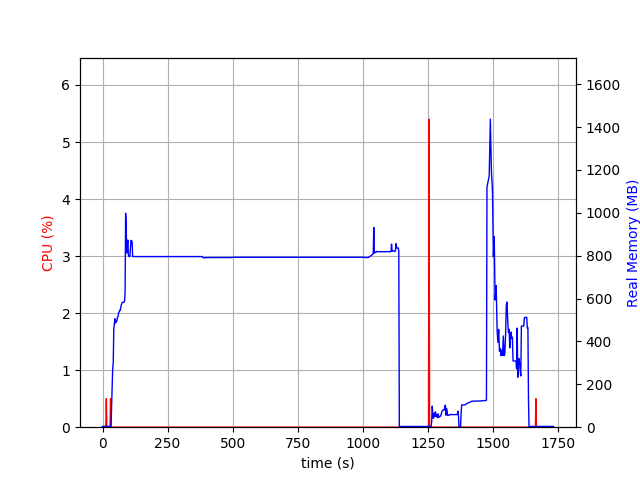
First conda then pip then R with a spike when R makes some tests.
bjoernbroetz
on 12 Dec 2019
nice diagram @bjoernbroetz - I noticed something similar myself, note the almost 20min spent in the cycle of solving the environment and the almost 10min installing the R packages. It is not ideal by far, but updating esmvalcore to latest will improve things
valeriupredoi
on 12 Dec 2019
here's a fresh example of the Too long... issue you noticed https://circleci.com/gh/ESMValGroup/ESMValTool/27849?utm_campaign=vcs-integration-link&utm_medium=referral&utm_source=github-build-link
valeriupredoi
on 12 Dec 2019
Yes, maybe we can change some setting in our Circle CI to prevent those timeouts for now.
The plot is done with my new favorite command line tool: psrecord
bjoernbroetz
on 12 Dec 2019
here https://support.circleci.com/hc/en-us/articles/360007188574-Build-has-hit-timeout-limit - am measuring the R installation time, problem is that we are piping the output to file for artefacts so the stoopid CI thinks it's dead in the water
valeriupredoi
on 12 Dec 2019
https://circleci.com/docs/2.0/configuration-reference/#run
"no_output_timeout | N | String | Elapsed time the command can run without output. The string is a decimal with unit suffix, such as “20m”, “1.25h”, “5s” (default: 10 minutes)"
bjoernbroetz
on 12 Dec 2019
Ok @valeriupredoi , you were more fast
bjoernbroetz
on 12 Dec 2019
right so on a good CPU it took me real 7m5.228s to install the R stuffs so yeah, that could easily go over 10min on a mediocre CPU, we need to fix that parameter :+1:
valeriupredoi
on 12 Dec 2019
But maybe the better way would be as you wrote above, to help Circle CI to understand what we are doing. We could use |tee instead of > to redirect the output and let Circle CI know that we are not dead.
bjoernbroetz
on 12 Dec 2019
well, eventually the CI will rerun the container and tests will pass, but that's only for the user tests (for PR's) and not for the nightly builds by the looks of it. Dunno, up to you guys to decide what the best method -> tee will produce a ton of stdout but we do have a ton of it anyways -> I am impartial :grin:
valeriupredoi
on 12 Dec 2019
Related issues
 IreMav
·
4Comments
IreMav
·
4Comments
 bouweandela
·
4Comments
bouweandela
·
4Comments
 jvegasbsc
·
4Comments
jvegasbsc
·
4Comments
 chris-to-pher
·
3Comments
chris-to-pher
·
3Comments
 jonnyhtw
·
4Comments
jonnyhtw
·
4Comments