Eslint-plugin-react: `prop-types` rule reports for Array.prototype.find is missing
The title explains everything i guess, I'm using eslint-plugin-react in a javascript migrated to typescript project.
Here is a simple version of my code:
import React from 'react';
import { MyType } from './types';

function Component(props: Props): JSX.Element | null {
  const { array } = props;

  function renderFound(): JSX.Element | null {
    const found = array.find(x => x.id === id); // issue here

    if (!found) {
      return null;
    }

    return (
      <div>{found.id}</div>
    );
  }

  return renderFound();
}

interface Props {
  array: MyType[];
}

export default Component;

{
    "eslint": "^6.6.0", // <=
    "eslint-config-airbnb-typescript": "^4.0.1",
    "eslint-plugin-eslint-comments": "^3.1.2",
    "eslint-plugin-import": "^2.18.2",
    "eslint-plugin-jest": "^22.15.2",
    "eslint-plugin-jsx-a11y": "^6.2.3",
    "eslint-plugin-promise": "^4.2.1",
    "eslint-plugin-react": "^7.14.3", // <=
    "eslint-plugin-testcafe": "^0.2.1",
    "eslint-plugin-unicorn": "^10.0.0",
    "extract-text-webpack-plugin": "^3.0.2",
}
~ node --version
v8.16.2

~ npm --version
6.4.1
 gothraven
All 11 comments
What happens with other array methods?
I’d definitely expect this to work with PropTypes.array, but I’m not sure if it’s been tested with the TS array type.
 ljharb
on 30 Oct 2019
ljharb
on 30 Oct 2019
I have example code that shows the same problem with Array.length, using the TS array type.
interface ExampleProps {
  dataArray: Array<string>;
}

export default function ExampleComponent(props: ExampleProps) {
  const { dataArray } = props;

  const hasData = dataArray.length > 0 // error  'dataArray.length' is missing in props validation     react/prop-types

  return hasData && <span>Data!</span>
}
 weelillad
on 12 Feb 2020
weelillad
on 12 Feb 2020
Don't forget to use: "target": "es6", in your tsconfig.json. Otherwise you will be relying on the es5 version of Array. That was why I had errors about array.find and array.findIndex.
 Sharcoux
on 26 Mar 2020
Sharcoux
on 26 Mar 2020
@Sharcoux that would affect TS errors, but not lint errors.
ljharb
on 26 Mar 2020
Any update on this?
We get the same thing using the following:
import React from 'react';

interface MyProps {
    myListOfNumbers: number[];
}

const myComponent = ({myListOfNumbers}: MyProps): JSX.Element => {

    const createMyResult = (): JSX.Element => {
        return (<h2>{myListOfNumbers.join(',')}</h2>); // FAILS - 'myListOfNumbers.join' is missing in props validation eslint(react/prop-types)
    };

    return <>

        <h1>{
            myListOfNumbers.join(',') // OK
        }</h1>

        {createMyResult()}
    </>;
};

export default myComponent;
Our issue seems to be related to that it wants some sort of extra prop validation on an inner helper method that returns JSX. Even if the inner function uses the props from parent component.
 Cnordbo
on 21 Apr 2020
Cnordbo
on 21 Apr 2020
@Cnordbo createMyResult in this case is being detected as a component, which the linter wants to have propTypes. Why does that function exist at all? It would be much faster and simpler and cleaner to eagerly store it into a variable, or inline it into the jsx.
ljharb
on 21 Apr 2020
@ljharb I think @Cnordbo gave us just a small example and createMyResult is a bigger function with much more work than that.
createMyResultin this case is being detected as a component
I don't think createMyResult should be detected as a component because no one creates components functions inside another component functions, and if they do, we don't really want to validate the params agains.
gothraven
on 21 Apr 2020
They definitely do, and those should be detected.
I think it's totally reasonable for the component detection to detect when a function that returns jsx is defined with a name that isn't valid to use inside jsx - a PR would be welcome.
ljharb
on 21 Apr 2020
if this had been a component function inside a component function, then it would have been defined as a component using PascalCase. I believe React gives out an error as well if i were to use it as a component without an uppercase first character.
Using it as a component yields the following error in TypeScript:
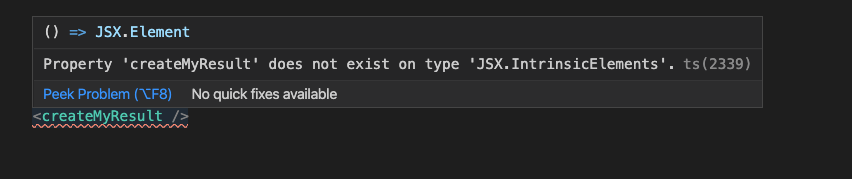
Changing the name to CreateMyResult makes it valid JSX, and the error goes away.
My point here is that it should recognize createMyResult as a normal function while CreateMyResult should be interpreted as a functional component.
(camelCase vs PascalCase)
@ljharb Reading your comment, i think your saying the same thing?
Cnordbo
on 22 Apr 2020
I am.
ljharb
on 22 Apr 2020
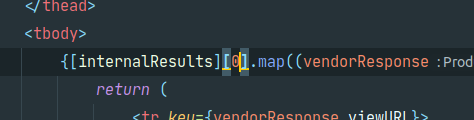
having the same problem:

Doing this until there's a fix :vomiting_face:
 phillt
on 29 Aug 2020
phillt
on 29 Aug 2020
Related issues
 dzhytomyrsky
·
3Comments
dzhytomyrsky
·
3Comments
 Arcanemagus
·
3Comments
Arcanemagus
·
3Comments
 CarlRosell
·
3Comments
CarlRosell
·
3Comments
 gpeal
·
3Comments
gpeal
·
3Comments
 mericsson
·
3Comments
mericsson
·
3Comments
Most helpful comment
I have example code that shows the same problem with Array.length, using the TS array type.