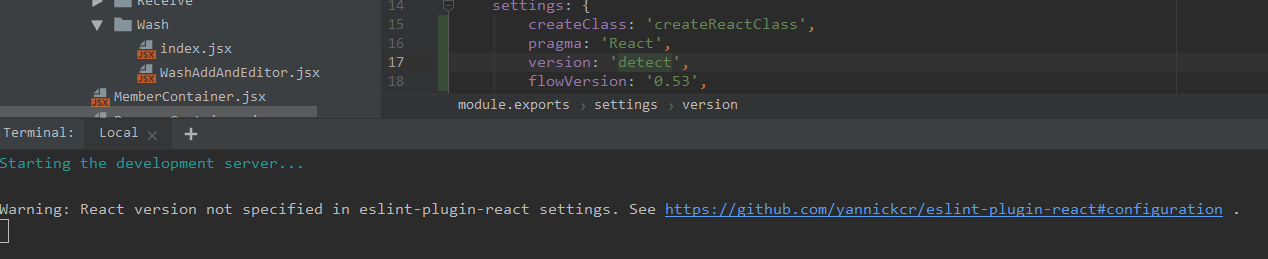
Eslint-plugin-react: [7.12.4]React version not specified in eslint-plugin-react settings
i got this warning in 7.12.4.
- package.json
{
    "name": "xxx",
    "version": "0.1.0",
    "private": true,
    "dependencies": {
        "@antv/data-set": "^0.10.1",
        "antd": "^3.13.2",
        "axios": "^0.18.0",
        "classnames": "^2.2.6",
        "decimal.js-light": "^2.5.0",
        "husky": "^1.3.1",
        "immutability-helper": "^3.0.0",
        "less": "^3.9.0",
        "lint-staged": "^8.1.3",
        "lodash": "^4.17.11",
        "moment": "^2.24.0",
        "node-sass-chokidar": "^1.3.4",
        "npm-run-all": "^4.1.5",
        "prop-types": "^15.7.1",
        "react": "^16.8.1",
        "react-data-grid": "^5.0.5",
        "react-data-grid-addons": "^5.0.5",
        "react-dnd": "^7.0.2",
        "react-dnd-html5-backend": "^7.0.2",
        "react-document-title": "^2.0.3",
        "react-dom": "^16.8.1",
        "react-highlight-words": "^0.16.0",
        "react-hot-keys": "^1.2.2",
        "react-loadable": "^5.5.0",
        "react-resizable": "^1.7.5",
        "react-router-dom": "^4.3.1",
        "react-scripts": "2.1.4",
        "source-map-explorer": "^1.6.0",
        "store": "^2.0.12",
        "wolfy87-eventemitter": "^5.2.5"
    },
    "scripts": {
        "analyze": "source-map-explorer build/static/js/main.*",
        "build-css": "node-sass-chokidar src/ -o src/",
        "watch-css": "npm run build-css && node-sass-chokidar src/ -o src/ --watch --recursive",
        "start-js": "react-app-rewired start",
        "start": "npm-run-all -p watch-css start-js",
        "build-js": "react-app-rewired build",
        "build": "npm-run-all build-css build-js",
        "test": "react-app-rewired test --env=jsdom",
        "eject": "react-scripts eject"
    },
    "lint-staged": {
        "src/**/*.{js,jsx,ts,tsx,json,css,scss,md}": [
            "prettier --config .prettierrc --write",
            "git add"
        ]
    },
    "husky": {
        "hooks": {
            "pre-commit": "lint-staged"
        }
    },
    "devDependencies": {
        "babel-plugin-import": "^1.11.0",
        "babel-preset-latest": "^6.24.1",
        "customize-cra": "^0.2.11",
        "eslint-plugin-react": "^7.12.4",
        "less-loader": "^4.1.0",
        "prettier": "^1.16.4",
        "react-app-rewired": "^2.1.0"
    },

    "browserslist": [
        ">0.2%",
        "not dead",
        "not ie <= 11",
        "not op_mini all"
    ]
}
- eslintrc.js
/** @format */

module.exports = {
    parserOptions: {
        ecmaFeatures: {
            experimentalObjectRestSpread: true,
            jsx: true,
        },
        ecmaVersion: 7,
        sourceType: 'module',
    },
    parser: 'babel-eslint',
    plugins: ['react'],
    settings: {
        createClass: 'createReactClass',
        pragma: 'React',
        version: 'detect',
        flowVersion: '0.53',
        'import/resolver': {
            node: {
                moduleDirectory: ['node_modules', 'src'],
            },
        },
    },
    env: {
        browser: true,
        mocha: true,
        es6: true,
        node: true,
    },
    rules: {
        'no-extra-boolean-cast': 0,
        'no-unreachable': 1,
        'react/no-deprecated': 1,
        'react/self-closing-comp': 0,
        'react/jsx-uses-vars': 2,
        'react/jsx-uses-react': 1,
        'spaced-comment': [0],
        'class-methods-use-this': 0,
        'jsx-a11y/click-events-have-key-events': 0,
        'no-restricted-syntax': 0,
        'react/jsx-closing-tag-location': 0,
        'arrow-parens': 0,
        'react/prefer-stateless-function': 0,
        'react/require-default-props': 0,
        'jsx-a11y/img-redundant-alt': 0,
        'jsx-a11y/interactive-supports-focus': 0,
        'jsx-a11y/anchor-is-valid': 0,
        'jsx-a11y/mouse-events-have-key-events': 0,
        'no-mixed-operators': 0,
        'react/no-array-index-key': 0,
        'no-underscore-dangle': 1,
        'no-unused-vars': 1,
        'space-before-blocks': 0,
        'jsx-a11y/no-static-element-interactions': 0,
        'no-return-assign': 0,
        'no-case-declarations': 0,
        'function-paren-newline': 0,
        'react/prop-types': [0],
        'no-console': 'off',
        'no-class-assign': 'off',
    },
};
and i try ,
require('./package.json').dependencies.reactand 'latest'.

and
999.999.999

- and
detect
1955
question
 alexchen1875
All 5 comments
I don't believe you can fully customize CRA eslint settings without ejecting.
 ljharb
on 11 Feb 2019
ljharb
on 11 Feb 2019
no,im not. i just want to use my .eslintrc.js .
i use customize-cra to override the config ,
this. is config-overrides.js
/** @format */
const {
override,
fixBabelImports,
addLessLoader,
useEslintRc,
} = require('customize-cra');
module.exports = override(
fixBabelImports('import', {
libraryName: 'antd',
libraryDirectory: 'es',
style: true,
}),
addLessLoader({
javascriptEnabled: true,
modifyVars: {
'@table-padding-vertical': '10px',
'@table-padding-horizontal': '10px',
'@form-item-margin-bottom': '10px',
'@text-color': '#000',
'@item-hover-bg': '#096dd9',
'@item-active-bg': '#096dd9',
},
}),
useEslintRc('.eslintrc.js')
);
I'm not familiar with customize-cra, but if the react eslint setting isn't propagating, then it's probably a bug in that.
ljharb
on 11 Feb 2019
@alexchen1875 you should wrap plugin settings under react key inside the settings object in your .eslintrc as following:
{
  "settings": {
    "react": {
      "version": "detect"
    }
  }
}
What you are doing incorrect is:
{
  "settings": {
    "version": "detect"
  }
}
 rifaidev
on 17 Mar 2019
rifaidev
on 17 Mar 2019
👍73
❤16
🚀10
Thanks, this seems answered. Good catch!
ljharb
on 17 Mar 2019
Was this page helpful?
0 / 5 - 0 ratings
Related issues
ljharb
·
3Comments
 mericsson
·
3Comments
mericsson
·
3Comments
 inian
·
3Comments
inian
·
3Comments
 otakustay
·
3Comments
otakustay
·
3Comments
 gpeal
·
3Comments
gpeal
·
3Comments
Most helpful comment
@alexchen1875 you should wrap plugin settings under
reactkey inside thesettingsobject in your.eslintrcas following:What you are doing incorrect is: