Eshoponcontainers: After Docker-up get the issue on the login page
Done all by instructions but get this an error in login page
Sorry, there was an error : unauthorized_client
Request Id: 0HLTA3L5VSPET:00000019
 Taifunov
All 14 comments
same problem here, no matter which repo is used, the same problem happens. WebSPA doesn't work as an alternative either. the only thing that works correctly on client side is the home page, everything else is down. i've tested all repos and all releases.
 loxx123
on 17 Feb 2020
loxx123
on 17 Feb 2020
Looks like a common problem, i've got the exact same issue. I'm starting the docker-composer project in VS2019, with docker desktop for windows 2.2.0.3. Any hint for a possible solution?
 vid83
on 26 Feb 2020
vid83
on 26 Feb 2020
same problem here
 marcosharbs
on 26 Feb 2020
marcosharbs
on 26 Feb 2020
Same issue here. I'm starting the project using VS2019 via the docker compose file and Docker Desktop Windows 2.2.0.3
 pedroyan
on 1 Mar 2020
pedroyan
on 1 Mar 2020
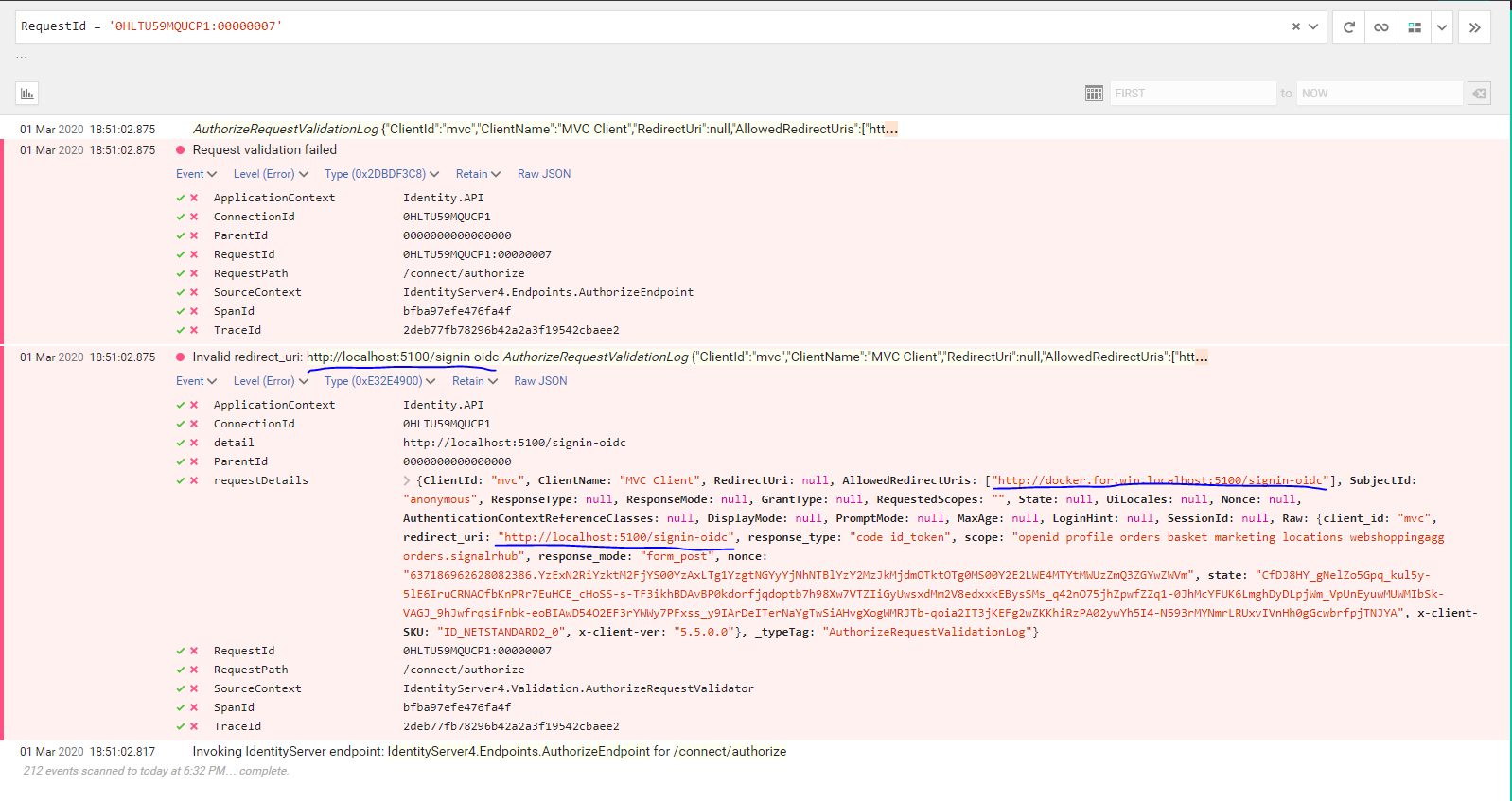
I've looked around SEQ and found this entry. Might be useful
pedroyan
on 1 Mar 2020
Actually I found a solution: see my message here. Not sure if it is the best solution around (pretty sure it isn't :-) ), but it works, and it will allow you to take a look at the MVC application.
Please note that the Identity database in the sql server container must be rebuilt from scratches, so be sure to delete it before restarting the project. If you want to play safe, delete the whole sqldata container.
Again, I have not resolved my perplexities about how this could possibly work: that symbolic name host.docker.internal should be used for the connections FROM a container TO the host (source: Docker Destktop for Windows docs, and not vice versa, like in this case... Anybody? Any suggestion would be greatly appreciated.
vid83
on 2 Mar 2020
@pedroyan I‘ve a question which is beyond the issue 🙂, what is the name of the tool in screenshot used to debug such requests, is it Fiddler?
 mohammed-fuad
on 2 Mar 2020
mohammed-fuad
on 2 Mar 2020
@mohammed-fuad Its called SEQ :) It is a log processing server application that comes with the solution. If you run the docker-compose file and go to http://localhost:5340/, you will be able to see it too
pedroyan
on 2 Mar 2020
Thank you, everyone, for reporting this issue. I wasn't able to reproduce this issue until I reset my docker and started the docker build fresh. I can confirm, this issue is valid and we are looking into it.
@mvelosop probably, it is related to the fixes that went in as part of the DockerNAT issue reported earlier.
Version tested: Docker Desktop 2.2.0.3. Docker version 19.03.5, build 633a0ea.
 nishanil
on 2 Mar 2020
nishanil
on 2 Mar 2020
As a workaround, use docker-compose up and when the services are up navigate to
http://docker.for.win.localhost:5100/ for webmvc and
http://docker.for.win.localhost:5104/ for webspa
nishanil
on 2 Mar 2020
As a workaround, use
docker-compose upand when the services are up navigate to
http://docker.for.win.localhost:5100/for webmvc and
http://docker.for.win.localhost:5104/for webspa
In my case this didn't work, i had to use the host.docker.internal symbolic name. From what I can understand, the docker.for.win.localhost was deprecated (see here
Btw, shouldn't this hostname be used for the connections FROM a container TO the host? How is it possible that a browser running in my host can access a web application running inside a container?
vid83
on 2 Mar 2020
Hi everybody, let's try to figure it out.
I had the issue when upgrading to Docker Desktop 2.2 and could fix it by using the docker.for.win.localhost and just now I tried changing it to host.docker.internal and it worked just the same...
BUT, there's an important detail that that we have to consider.
The unauthorized client issue occurs because the service redirect uri, required to log in, isn't registered in the IdentityServer DB as an authorized client.
Those redirect uris are seeded in the IdentityServer DB upon creation, taking the values from the configuration in docker-compose.override.yaml file:
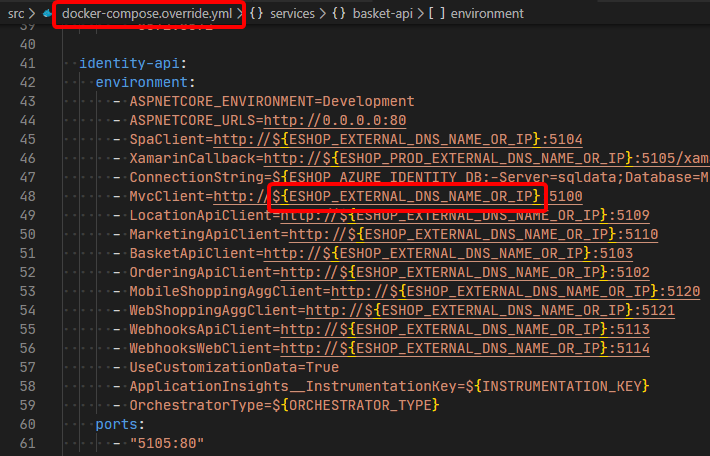
So, if we change now the initial url from localhost to docker.for.win.localhost or host.docker.internal, IdentityServer will reject the connections, because it only knows about localhost clients.
So there at least two possible solutions:
- Update the table records by hand:

- Delete the containers, and just restart the app, BUT first update the .env file like so:

That should do the trick.
If you get problems when restarting the containers, try dropping the related volumes too.
Hope this helps.
 mvelosop
on 10 Mar 2020
mvelosop
on 10 Mar 2020
@mvelosop thanks, works like a charm, you can run this command in SQL server to avoid the manual update:
update ClientRedirectUris set RedirectUri = REPLACE(RedirectUri,'docker.for.win.localhost','localhost');
 HuzzDTX
on 19 Mar 2020
HuzzDTX
on 19 Mar 2020
Glad this helped 😊
@HuzzDTX, thanks for the update command! I'd only suggest to add a minor tweak:
update ClientRedirectUris set RedirectUri = REPLACE(RedirectUri,'host.docker.internal','localhost');
Since docker.for.win.localhost has been deprecated.
mvelosop
on 23 Mar 2020
Related issues
 adahhane
·
4Comments
adahhane
·
4Comments
 Dudelsb
·
3Comments
Dudelsb
·
3Comments
 Mardoxx
·
3Comments
Mardoxx
·
3Comments
 rafsanulhasan
·
3Comments
rafsanulhasan
·
3Comments
 DavidNorena
·
4Comments
DavidNorena
·
4Comments
Most helpful comment
As a workaround, use
docker-compose upand when the services are up navigate tohttp://docker.for.win.localhost:5100/for webmvc andhttp://docker.for.win.localhost:5104/for webspa