Eshoponcontainers: After clicking on the login page, eShopOnContainers did not jump to the login page, but made a mistake.
This problem has been bothering me for many days, and no corresponding answer has been found in China's forum. We can only submit questions here, hoping to solve them. Mine is the dev branch:
An unhandled exception occurred while processing the request.
SocketException: Cannot assign requested address
System.Net.Http.ConnectHelper.ConnectAsync(string host, int port, CancellationToken cancellationToken)
HttpRequestException: Cannot assign requested address
System.Net.Http.ConnectHelper.ConnectAsync(string host, int port, CancellationToken cancellationToken)
IOException: IDX20804: Unable to retrieve document from: 'http://localhost:5105/.well-known/openid-configuration'.
Microsoft.IdentityModel.Protocols.HttpDocumentRetriever.GetDocumentAsync(string address, CancellationToken cancel)
InvalidOperationException: IDX20803: Unable to obtain configuration from: 'http://localhost:5105/.well-known/openid-configuration'.
Microsoft.IdentityModel.Protocols.ConfigurationManager
 mingyanzhen
All 32 comments
Hi @mingyanzhen,
This looks like a network problem typical of having VPN clients, could you please post the result of docker info and docker ps?
 mvelosop
on 21 Sep 2018
mvelosop
on 21 Sep 2018
Hi @mingyanzhen,
This looks like a network problem typical of having VPN clients, could you please post the result of
docker infoanddocker ps?
Thinks @mvelosop ,I didn't use VPN, or my development environment.Because GitHub can't upload pictures, I'll give you a form.
docker ps ,info(The space is limited, with only a few examples listed.)
CONTAINER ID IMAGE PORTS
1dbc9a40ad8c eshop/webmvc:dev 0.0.0.0:5100->80/tcp
edc2d30bcc37 eshop/mobileshoppingagg:dev 0.0.0.0:5120->80/tcp
3a4385679e11 eshop/ocelotapigw:dev 0.0.0.0:5203->80/tcp
6c8df78c04f5 eshop/ordering.signalrhub:dev 0.0.0.0:5112->80/tcp
6af9ca283ab6 eshop/ocelotapigw:dev 0.0.0.0:5202->80/tcp
aba62683d3ad eshop/webshoppingagg:dev 0.0.0.0:5121->80/tcp
36ec67b33d18 eshop/ocelotapigw:dev 0.0.0.0:5201->80/tcp
034fb284a1cc eshop/ocelotapigw:dev 0.0.0.0:5200->80/tcp
dcb5bb266f21 eshop/marketing.api:dev 0.0.0.0:5110->80/tcp
f7efb065dbbc eshop/basket.api:dev 0.0.0.0:5103->80/tcp
c212fa05d35e eshop/locations.api:dev 0.0.0.0:5109->80/tcp
9647df2ee7f3 eshop/ordering.api:dev 0.0.0.0:5102->80/tcp
d6074dad8349 eshop/identity.api:dev 0.0.0.0:5105->80/tcp
mingyanzhen
on 25 Sep 2018
Hi @mingyanzhen
Are you using the SPA or the MVC client when facing this error?
 eiximenis
on 25 Sep 2018
eiximenis
on 25 Sep 2018
Are you using the SPA or the MVC client when facing this error?
Thinks @eiximenis ,Exception using the MVC client.
mingyanzhen
on 25 Sep 2018
Hi @mingyanzhen, thanks for the info.
Please post the complete output from docker ps and docker info commands and use "code fences" (three back ticks) to delimit the listing, so it looks like this:
````
CONTAINER ID IMAGE COMMAND CREATED STATUS PORTS NAMES
be64d420501f eshop/webmvc:latest "dotnet WebMVC.dll" 3 days ago Up 12 seconds 0.0.0.0:5100->80/tcp mvelosop-eshoponcontainers_webmvc_1
8a481657297f eshop/ocelotapigw:latest "dotnet OcelotApiGw.…" 3 days ago Up 15 seconds 0.0.0.0:5201->80/tcp mvelosop-eshoponcontainers_mobilemarketingapigw_1
e12fe454b814 eshop/ocelotapigw:latest "dotnet OcelotApiGw.…" 3 days ago Up 16 seconds 0.0.0.0:5202->80/tcp mvelosop-eshoponcontainers_webshoppingapigw_1
c41fb5d9e216 eshop/ocelotapigw:latest "dotnet OcelotApiGw.…" 3 days ago Up 18 seconds 0.0.0.0:5203->80/tcp mvelosop-eshoponcontainers_webmarketingapigw_1
8b1f6cc92564 eshop/ocelotapigw:latest "dotnet OcelotApiGw.…" 3 days ago Up 19 seconds 0.0.0.0:5200->80/tcp mvelosop-eshoponcontainers_mobileshoppingapigw_1
25b529369087 eshop/webshoppingagg:latest "dotnet Web.Shopping…" 3 days ago Up 17 seconds 0.0.0.0:5121->80/tcp mvelosop-eshoponcontainers_webshoppingagg_1
41e8e61be5ea eshop/mobileshoppingagg:latest "dotnet Mobile.Shopp…" 3 days ago Up 17 seconds 0.0.0.0:5120->80/tcp mvelosop-eshoponcontainers_mobileshoppingagg_1
93875ceab316 eshop/ordering.signalrhub:latest "dotnet Ordering.Sig…" 3 days ago Up 15 seconds 0.0.0.0:5112->80/tcp mvelosop-eshoponcontainers_ordering.signalrhub_1
ea59372052a1 eshop/marketing.api:latest "dotnet Marketing.AP…" 3 days ago Up 26 seconds 0.0.0.0:5110->80/tcp mvelosop-eshoponcontainers_marketing.api_1
fe55ba1e09b0 eshop/basket.api:latest "dotnet Basket.API.d…" 3 days ago Up 25 seconds 0.0.0.0:5103->80/tcp mvelosop-eshoponcontainers_basket.api_1
ad2cb9d3651d eshop/locations.api:latest "dotnet Locations.AP…" 3 days ago Up 28 seconds 0.0.0.0:5109->80/tcp mvelosop-eshoponcontainers_locations.api_1
19e1ea6cf672 eshop/ordering.api:latest "dotnet Ordering.API…" 3 days ago Up 26 seconds 0.0.0.0:5102->80/tcp mvelosop-eshoponcontainers_ordering.api_1
e72c62ea211e eshop/payment.api:latest "dotnet Payment.API.…" 3 days ago Up 26 seconds 0.0.0.0:5108->80/tcp mvelosop-eshoponcontainers_payment.api_1
93509d68b437 eshop/identity.api:latest "dotnet Identity.API…" 3 days ago Up 30 seconds 0.0.0.0:5105->80/tcp mvelosop-eshoponcontainers_identity.api_1
ef6a1d46d764 eshop/ordering.backgroundtasks:latest "dotnet Ordering.Bac…" 3 days ago Up 28 seconds 0.0.0.0:5111->80/tcp mvelosop-eshoponcontainers_ordering.backgroundtasks_1
690ccb6e4ad3 eshop/catalog.api:latest "dotnet Catalog.API.…" 3 days ago Up 27 seconds 0.0.0.0:5101->80/tcp mvelosop-eshoponcontainers_catalog.api_1
6f7088b117bb mongo "docker-entrypoint.s…" 3 days ago Up 32 seconds 0.0.0.0:27017->27017/tcp mvelosop-eshoponcontainers_nosql.data_1
9cef030fb666 eshop/webstatus:latest "dotnet WebStatus.dll" 3 days ago Up 33 seconds 0.0.0.0:5107->80/tcp mvelosop-eshoponcontainers_webstatus_1
6aeefb285a2c rabbitmq:3-management-alpine "docker-entrypoint.s…" 3 days ago Up 32 seconds 4369/tcp, 5671/tcp, 0.0.0.0:5672->5672/tcp, 15671/tcp, 25672/tcp, 0.0.0.0:15672->15672/tcp mvelosop-eshoponcontainers_rabbitmq_1
d96b387c7325 microsoft/mssql-server-linux:2017-latest "/opt/mssql/bin/sqls…" 3 days ago Up 33 seconds 0.0.0.0:5433->1433/tcp mvelosop-eshoponcontainers_sql.data_1
2bbc8bfedb1f redis:alpine "docker-entrypoint.s…" 3 days ago Up 34 seconds 0.0.0.0:6379->6379/tcp mvelosop-eshoponcontainers_basket.data_1
526f2b4a5073 eshop/webspa:latest "dotnet WebSPA.dll" 3 days ago Up 32 seconds 0.0.0.0:5104->80/tcp mvelosop-eshoponcontainers_webspa_1
```
BTW You can paste an image in the text area here, it gets uploaded automatically.
mvelosop
on 25 Sep 2018
Hi @mingyanzhen
It is a configuration error. Value of IdentityUrl has to be 10.0.0.1:5105, not localhost, because MVC access the identity api through internal network.
Are you using docker-compose to launch the application? Visual studio?
eiximenis
on 25 Sep 2018
Hi @mingyanzhen, thanks for the info.
Please post the complete output from
docker psanddocker infocommands and use "code fences" (three back ticks) to delimit the listing, so it looks like this:CONTAINER ID IMAGE COMMAND CREATED STATUS PORTS NAMES be64d420501f eshop/webmvc:latest "dotnet WebMVC.dll" 3 days ago Up 12 seconds 0.0.0.0:5100->80/tcp mvelosop-eshoponcontainers_webmvc_1 8a481657297f eshop/ocelotapigw:latest "dotnet OcelotApiGw.…" 3 days ago Up 15 seconds 0.0.0.0:5201->80/tcp mvelosop-eshoponcontainers_mobilemarketingapigw_1 e12fe454b814 eshop/ocelotapigw:latest "dotnet OcelotApiGw.…" 3 days ago Up 16 seconds 0.0.0.0:5202->80/tcp mvelosop-eshoponcontainers_webshoppingapigw_1 c41fb5d9e216 eshop/ocelotapigw:latest "dotnet OcelotApiGw.…" 3 days ago Up 18 seconds 0.0.0.0:5203->80/tcp mvelosop-eshoponcontainers_webmarketingapigw_1 8b1f6cc92564 eshop/ocelotapigw:latest "dotnet OcelotApiGw.…" 3 days ago Up 19 seconds 0.0.0.0:5200->80/tcp mvelosop-eshoponcontainers_mobileshoppingapigw_1 25b529369087 eshop/webshoppingagg:latest "dotnet Web.Shopping…" 3 days ago Up 17 seconds 0.0.0.0:5121->80/tcp mvelosop-eshoponcontainers_webshoppingagg_1 41e8e61be5ea eshop/mobileshoppingagg:latest "dotnet Mobile.Shopp…" 3 days ago Up 17 seconds 0.0.0.0:5120->80/tcp mvelosop-eshoponcontainers_mobileshoppingagg_1 93875ceab316 eshop/ordering.signalrhub:latest "dotnet Ordering.Sig…" 3 days ago Up 15 seconds 0.0.0.0:5112->80/tcp mvelosop-eshoponcontainers_ordering.signalrhub_1 ea59372052a1 eshop/marketing.api:latest "dotnet Marketing.AP…" 3 days ago Up 26 seconds 0.0.0.0:5110->80/tcp mvelosop-eshoponcontainers_marketing.api_1 fe55ba1e09b0 eshop/basket.api:latest "dotnet Basket.API.d…" 3 days ago Up 25 seconds 0.0.0.0:5103->80/tcp mvelosop-eshoponcontainers_basket.api_1 ad2cb9d3651d eshop/locations.api:latest "dotnet Locations.AP…" 3 days ago Up 28 seconds 0.0.0.0:5109->80/tcp mvelosop-eshoponcontainers_locations.api_1 19e1ea6cf672 eshop/ordering.api:latest "dotnet Ordering.API…" 3 days ago Up 26 seconds 0.0.0.0:5102->80/tcp mvelosop-eshoponcontainers_ordering.api_1 e72c62ea211e eshop/payment.api:latest "dotnet Payment.API.…" 3 days ago Up 26 seconds 0.0.0.0:5108->80/tcp mvelosop-eshoponcontainers_payment.api_1 93509d68b437 eshop/identity.api:latest "dotnet Identity.API…" 3 days ago Up 30 seconds 0.0.0.0:5105->80/tcp mvelosop-eshoponcontainers_identity.api_1 ef6a1d46d764 eshop/ordering.backgroundtasks:latest "dotnet Ordering.Bac…" 3 days ago Up 28 seconds 0.0.0.0:5111->80/tcp mvelosop-eshoponcontainers_ordering.backgroundtasks_1 690ccb6e4ad3 eshop/catalog.api:latest "dotnet Catalog.API.…" 3 days ago Up 27 seconds 0.0.0.0:5101->80/tcp mvelosop-eshoponcontainers_catalog.api_1 6f7088b117bb mongo "docker-entrypoint.s…" 3 days ago Up 32 seconds 0.0.0.0:27017->27017/tcp mvelosop-eshoponcontainers_nosql.data_1 9cef030fb666 eshop/webstatus:latest "dotnet WebStatus.dll" 3 days ago Up 33 seconds 0.0.0.0:5107->80/tcp mvelosop-eshoponcontainers_webstatus_1 6aeefb285a2c rabbitmq:3-management-alpine "docker-entrypoint.s…" 3 days ago Up 32 seconds 4369/tcp, 5671/tcp, 0.0.0.0:5672->5672/tcp, 15671/tcp, 25672/tcp, 0.0.0.0:15672->15672/tcp mvelosop-eshoponcontainers_rabbitmq_1 d96b387c7325 microsoft/mssql-server-linux:2017-latest "/opt/mssql/bin/sqls…" 3 days ago Up 33 seconds 0.0.0.0:5433->1433/tcp mvelosop-eshoponcontainers_sql.data_1 2bbc8bfedb1f redis:alpine "docker-entrypoint.s…" 3 days ago Up 34 seconds 0.0.0.0:6379->6379/tcp mvelosop-eshoponcontainers_basket.data_1 526f2b4a5073 eshop/webspa:latest "dotnet WebSPA.dll" 3 days ago Up 32 seconds 0.0.0.0:5104->80/tcp mvelosop-eshoponcontainers_webspa_1BTW You can paste an image in the text area here, it gets uploaded automatically.
```
Thinks @mvelosop,
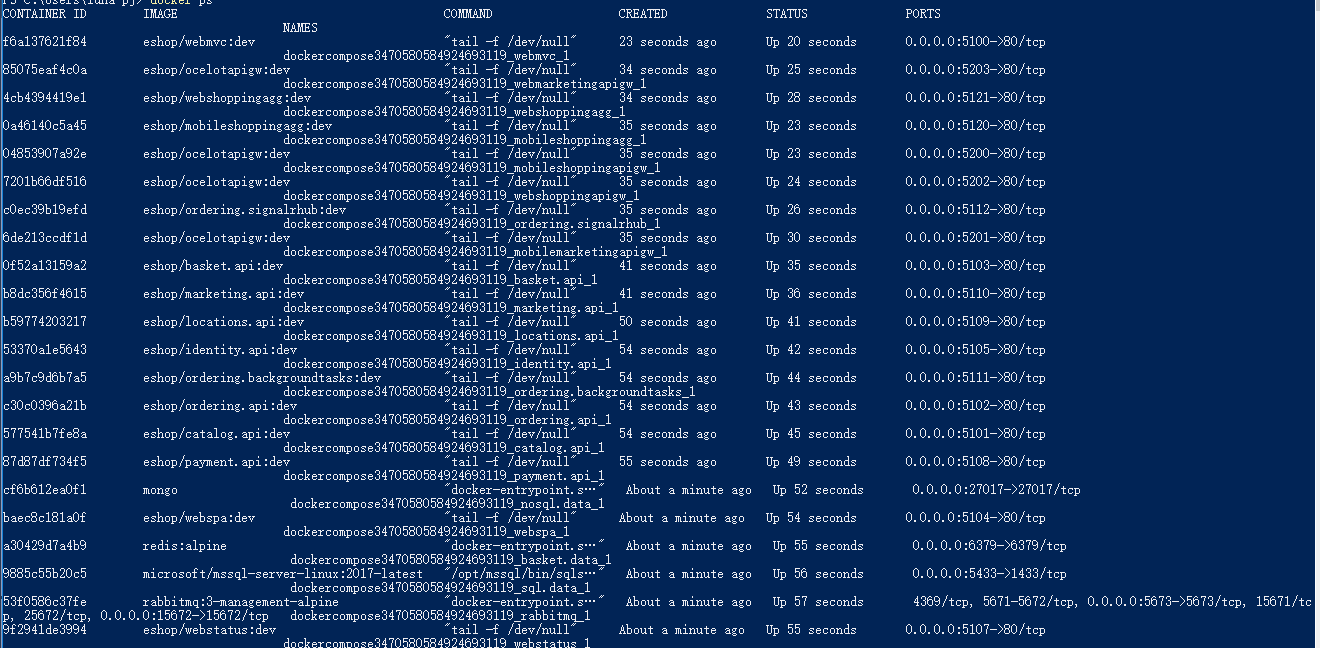
mingyanzhen
on 26 Sep 2018
Hi @mingyanzhen
It is a configuration error. Value of IdentityUrl has to be 10.0.0.1:5105, not localhost, because MVC access the identity api through internal network.
Are you using docker-compose to launch the application? Visual studio?
Thinks @eiximenis ,
My default is 10.0.75.1:5105. But my default(10.0.75.1) is not to change to ‘localhost’.
Yes,Using docker-compose to launch the application in Visual studio.
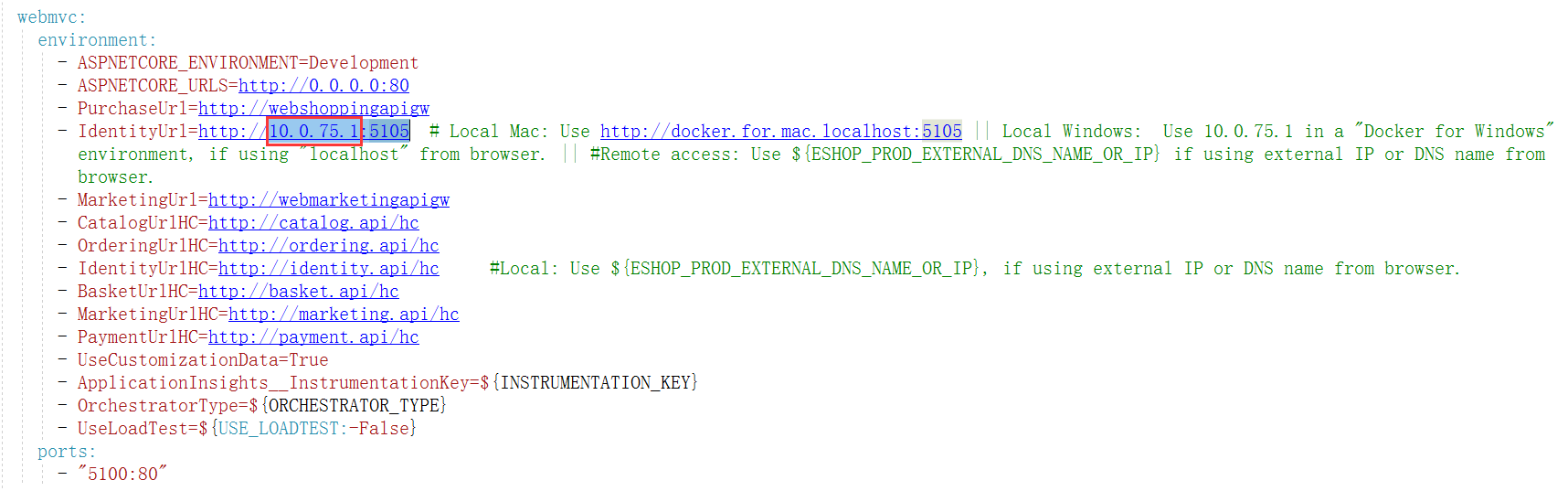
mingyanzhen
on 26 Sep 2018
Hi again @mingyanzhen
Your config seems correct (i was referring to 10.0.75.1 when I said 10.0.0.1, sorry for the confusion).
Your exception message says:
InvalidOperationException: IDX20803: Unable to obtain configuration from: 'http://localhost:5105/.well-known/openid-configuration'.
That is because MVC (or someone else) is trying to pull the OIDC configuration from localhost, instead from 10.0.75.1. Just to be sure, can you:
- Do a
docker psto get the id of the MVC container? - Do a
docker exec -it <id-mvc> /bin/bashto open a bash term against the MVC container - Type a
export | grep IdentityUrland verify that the value is 10.75.0.1 and not localhost
If the value is localhost that means that the problem is elswehere and need to keep digging.
Thanks!
eiximenis
on 26 Sep 2018
Thinks @eiximenis
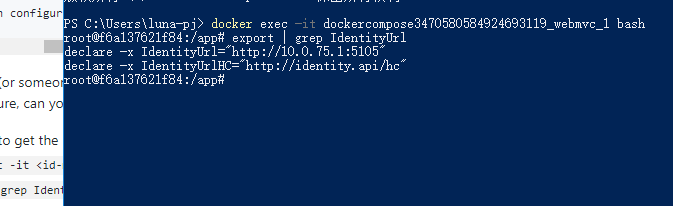
Yes, Is 10.0.75.1
mingyanzhen
on 26 Sep 2018
Having the same issue. Running the default eShopsOnContainers by clicking "Docker Compose" in VS 2017. When I click "Login" the same exception comes up.
 bennettfactor
on 5 Oct 2018
bennettfactor
on 5 Oct 2018
Having the same issue. Running the default eShopsOnContainers by clicking "Docker Compose" in VS 2017. When I click "Login" the same exception comes up.
Thinks @bennettfactor ,
Do you have links? Because I didn't find this link.
mingyanzhen
on 8 Oct 2018
@mingyanzhen Did you open up the firewall ports? You need to run "add-firewall-rules-for-sts-auth-thru-docker.ps1" Powershell script in cli-windows folder. This fixed the issue for me.
bennettfactor
on 8 Oct 2018
"add-firewall-rules-for-sts-auth-thru-docker.ps1"
Thinks @bennettfactor ,
I'm not your problem, I'm not your problem, because I'm visiting localhost on the host, so it's not the port that didn't join the firewall problem. I ran the "add-firewall-rules-for-sts-auth-thru-docker.ps1" script, and the error was still the same.
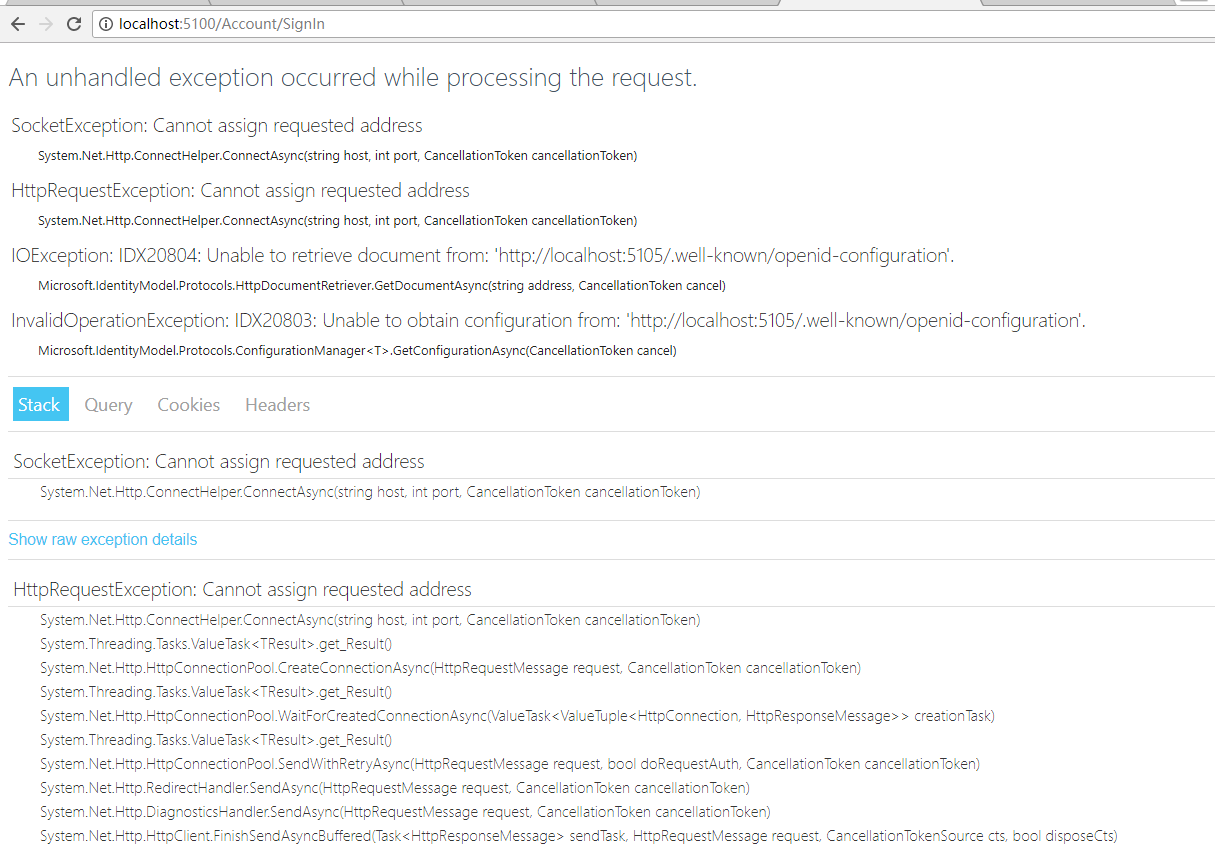
mingyanzhen
on 9 Oct 2018
Disabling Windows Defender firewall seems to solve this issue
 alecola
on 4 Nov 2018
alecola
on 4 Nov 2018
Disabling Windows Defender firewall seems to solve this issue
Thinks @alecola ,
I tried. I still can't do it.
mingyanzhen
on 5 Nov 2018
Disabling Windows Defender firewall seems to solve this issue
Same here. I believe there should be a way to reolve this permanently. Please update if you got any new hint/tip.
 microwales
on 5 Nov 2018
microwales
on 5 Nov 2018
The problem exists for me too. I'm on Windows 10, and I have added the firewall rules using the PowerShell script; the message:
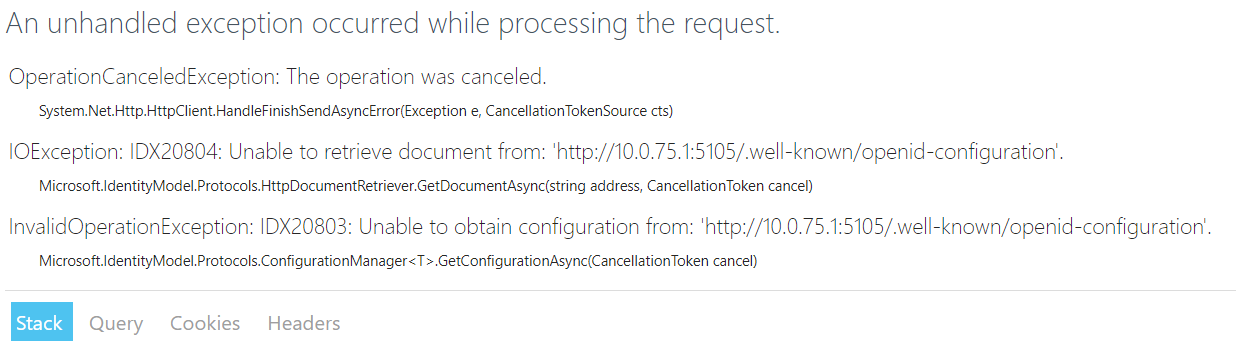
In my VS Output window, I see the following "red" message:
Authorization failed for the request at filter 'Microsoft.AspNetCore.Mvc.Authorization.AuthorizeFilter'.
Microsoft.AspNetCore.Mvc.Internal.ControllerActionInvoker:Information: Authorization failed for the request at filter 'Microsoft.AspNetCore.Mvc.Authorization.AuthorizeFilter'.
Application Insights Telemetry (unconfigured): {"name":"Microsoft.ApplicationInsights.Dev.Message","time":"2018-11-08T14:28:23.2365547Z","tags":{"ai.application.ver":"2.1.5","ai.cloud.roleInstance":"83d6490e2423","ai.operation.id":"6d66916b-4689593a693eb4f9","ai.operation.parentId":"|6d66916b-4689593a693eb4f9.","ai.operation.name":"GET Account/SignIn","ai.location.ip":"172.21.0.1","ai.internal.sdkVersion":"aspnet5c:2.2.1","ai.internal.nodeName":"83d6490e2423"},"data":{"baseType":"MessageData","baseData":{"ver":2,"message":"Authorization failed for the request at filter 'Microsoft.AspNetCore.Mvc.Authorization.AuthorizeFilter'.","severityLevel":"Information","properties":{"{OriginalFormat}":"Authorization failed for the request at filter '{AuthorizationFilter}'.","AspNetCoreEnvironment":"Development","AuthorizationFilter":"Microsoft.AspNetCore.Mvc.Authorization.AuthorizeFilter","CategoryName":"Microsoft.AspNetCore.Mvc.Internal.ControllerActionInvoker","DeveloperMode":"true"}}}}
If I manually go to the specified location (http://10.0.75.1:5105/.well-known/openid-configuration), I CAN see the JSON document, so I'm not sure what's happening.
It would be great if this issue was resolved. It doesn't make much sense to learn how to create a microservice architecture if you can't investigate the sample application! :(
 farzadmf
on 8 Nov 2018
farzadmf
on 8 Nov 2018
Disable the windows firewall (Public Profile) for the "DockerNAT" interface. At this link it is explained how to disable firewall for a generic interface:
https://social.technet.microsoft.com/Forums/windows/en-US/2eeda4bc-9fc3-4ff3-811f-f69133d5466f/how-disable-the-firewall-for-only-one-nic-aka-adapter?forum=w7itpronetworking
alecola
on 11 Nov 2018
I am also having this issue. I've tried everything that was mentioned in this thread and the results are the same. Has anyone found a solution for this issue?
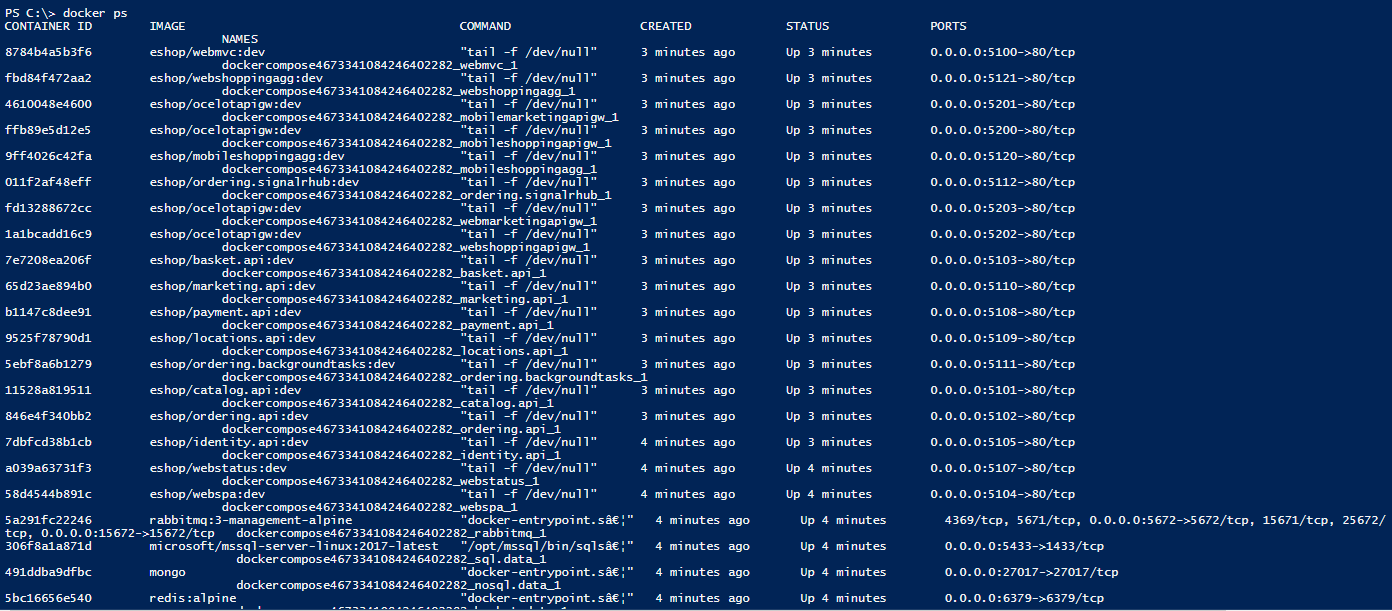
I ran the add-firewall-rules-for-sts-auth-thru-docker.ps1 even after I had manually created the inbound rule, but that didn't solve the problem. Here's my docker ps screenshot:
 alerod1501
on 5 Dec 2018
alerod1501
on 5 Dec 2018
Suggestion by @alecola to disable firewall for the network adapter solved the issue for me
farzadmf
on 5 Dec 2018
Suggestion by @alecola to disable firewall for the network adapter solved the issue for me
I also disabled the adapter from the firewall and I'm still experiencing the same issue
alerod1501
on 5 Dec 2018
Suggestion by @alecola to disable firewall for the network adapter solved the issue for me
Didn't work for me :(
 MrLinDowsMac
on 6 Dec 2018
MrLinDowsMac
on 6 Dec 2018
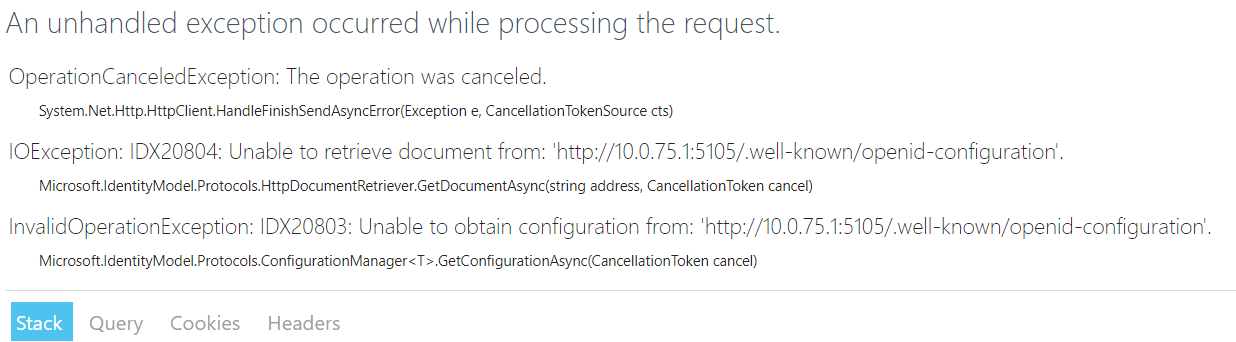
Running into the same issue for MVC Web app (Dev Branch), starting through docker-compose in debug from VS 2017
Following error with masked PII data (How to unmasked this data):-
An unhandled exception occurred while processing the request.
OperationCanceledException: The operation was canceled.
System.Net.Http.HttpClient.HandleFinishSendAsyncError(Exception e, CancellationTokenSource cts)
IOException: IDX20804: Unable to retrieve document from: '[PII is hidden]'.
Microsoft.IdentityModel.Protocols.HttpDocumentRetriever.GetDocumentAsync(string address, CancellationToken cancel)
InvalidOperationException: IDX20803: Unable to obtain configuration from: '[PII is hidden]'.
Microsoft.IdentityModel.Protocols.ConfigurationManager
 sdiwan1
on 17 Jan 2019
sdiwan1
on 17 Jan 2019
Hi folks, could you take a look at issue https://github.com/dotnet-architecture/eShopOnContainers/issues/295, the solution proposed there by @huangmaoyixxx has been confirmed to work.
mvelosop
on 27 Feb 2019
Closing this issue for now as it seems to be (should be) solved, but feel free to comment, will reopen if needed.
mvelosop
on 4 Mar 2019
Disable the windows firewall (Public Profile) for the "DockerNAT" interface. At this link it is explained how to disable firewall for a generic interface:
https://social.technet.microsoft.com/Forums/windows/en-US/2eeda4bc-9fc3-4ff3-811f-f69133d5466f/how-disable-the-firewall-for-only-one-nic-aka-adapter?forum=w7itpronetworking
This resole my problem. Thanks guy
 tuangh
on 11 Dec 2019
tuangh
on 11 Dec 2019
Hello to all,
I ask for help after looking for a couple of days on the problem of connecting to 'http://10.0.75.1:5105/.well-known/openid-configuration'.
Two days ago I downloaded the solution eShopOnContainers dev branch and followed (it seems to me scrupulously) the instructions for its execution in Visual Studio 2019 (Microsoft Visual Studio Community 2019 Version 16.4.3) in Windows 10 (Version 1909 build 18363.592) updated with windows update.
The solution is compiled and executed and the home page is regularly opened.
When I click on login, the following error page appears:
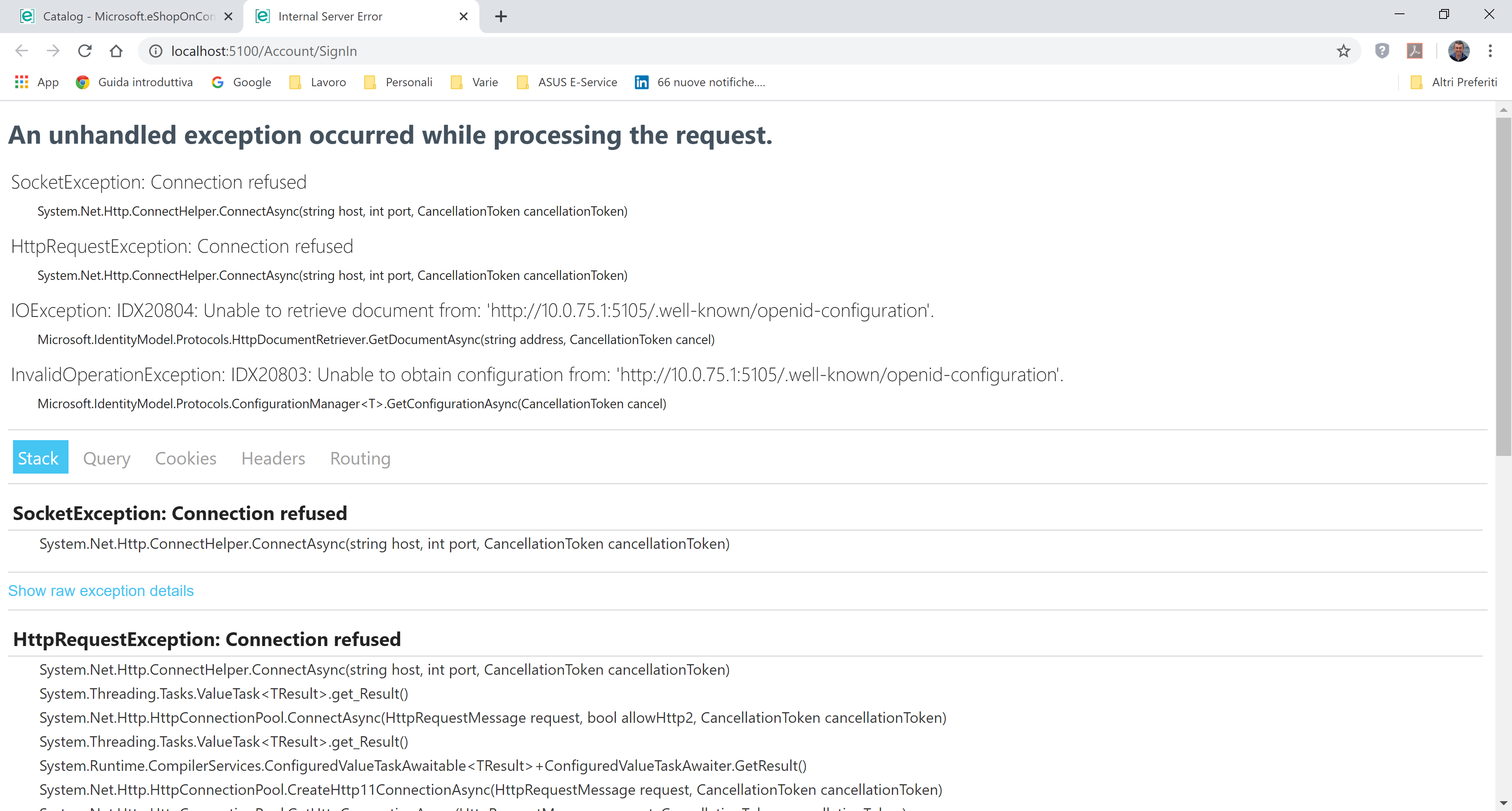
I ran the firewall configuration scripts and opened ports 5100 to 5105 also on my fastweb router.
I also tried to disable the firewall on my PC (Avast + Windows Defender Firewall) but the error persists.
I attach info docker and ps docker with solution running.
Thanks for the support.
Ugo.
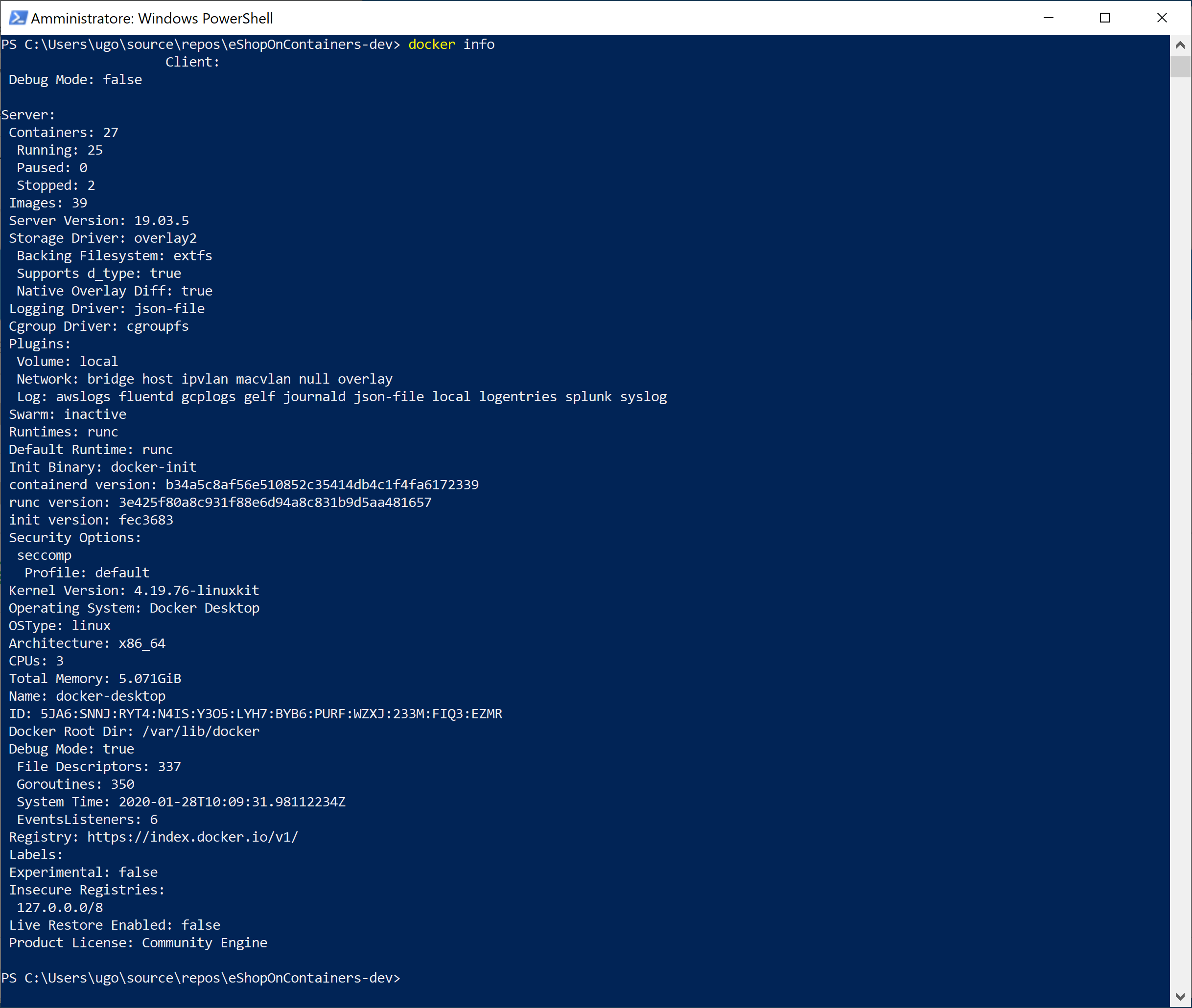

 ugomonte
on 28 Jan 2020
ugomonte
on 28 Jan 2020
Hi @ugomonte
If you use a browser to access to http://10.0.75.1:5105/.well-known/openid-configuration does it work? If so, the problem seems to be some firewall configuration on your computer that is blocking access from dockernat.
You can check if is the Windows firewall by disabling it (on all networks) and then testing again. If it works, then the cause of the issue is the firewall. Usually giving permissions to vpnkit.exe should work.
Let me know!
eiximenis
on 28 Jan 2020
Thanks @eiximenis
I turned off the firewall (avast & win defender) but even with the browser I cannot access the url http://10.0.75.1:5105/.well-known/openid-configuration.
the answer is ERR_CONNECTION_TIMED_OUT.
ugomonte
on 28 Jan 2020
I am also having this issue and have tried all the proposed solutions and it is still not working.
 jarice1978
on 4 Feb 2020
jarice1978
on 4 Feb 2020
I had the same problem "Cannot assign requested address". What worked for me.
- Replace the "docker.for.win.localhost" with "192.168.1.2" (IPv4 Address, used ipconfig to get it).
- Delete the existing database from eShopOnContainers.
- Run the project again to seed the database and open http://192.168.1.2:5100/ in browser (instead of http://localhost:5100/)
 gognjanovski
on 26 Feb 2020
gognjanovski
on 26 Feb 2020
Related issues
 Dudelsb
·
3Comments
Dudelsb
·
3Comments
 dcs3spp
·
4Comments
dcs3spp
·
4Comments
 BrunoLopes
·
4Comments
BrunoLopes
·
4Comments
 arindams621
·
5Comments
arindams621
·
5Comments
 chhotalamansukh
·
4Comments
chhotalamansukh
·
4Comments
Most helpful comment
The problem exists for me too. I'm on Windows 10, and I have added the firewall rules using the PowerShell script; the message:
In my VS Output window, I see the following "red" message:
If I manually go to the specified location (http://10.0.75.1:5105/.well-known/openid-configuration), I CAN see the JSON document, so I'm not sure what's happening.
It would be great if this issue was resolved. It doesn't make much sense to learn how to create a microservice architecture if you can't investigate the sample application! :(