Eshoponcontainers: * Exception when signin
Open URL: http://localhost:5100/Account/SignIn
I got an error
An unhandled exception occurred while processing the request.
TaskCanceledException: A task was canceled.
System.Runtime.CompilerServices.TaskAwaiter.ThrowForNonSuccess(Task task)

IOException: IDX10804: Unable to retrieve document from: 'http://10.0.75.1:5105/.well-known/openid-configuration'.
Microsoft.IdentityModel.Protocols.HttpDocumentRetriever+<GetDocumentAsync>d__8.MoveNext()

InvalidOperationException: IDX10803: Unable to obtain configuration from: 'http://10.0.75.1:5105/.well-known/openid-configuration'.
Microsoft.IdentityModel.Protocols.ConfigurationManager+<GetConfigurationAsync>d__24.MoveNext()
 dohuyphuong
All 9 comments
This is usually caused by a firewall.
If works deactivating the firewall try opening the ports as documented in https://github.com/dotnet-architecture/eShopOnContainers/wiki/03.-Setting-the-eShopOnContainers-solution-up-in-a-Windows-CLI-environment-(dotnet-CLI,-Docker-CLI-and-VS-Code)
 eiximenis
on 13 Feb 2018
eiximenis
on 13 Feb 2018
That ports have opened. but it not works. Thanks for your support
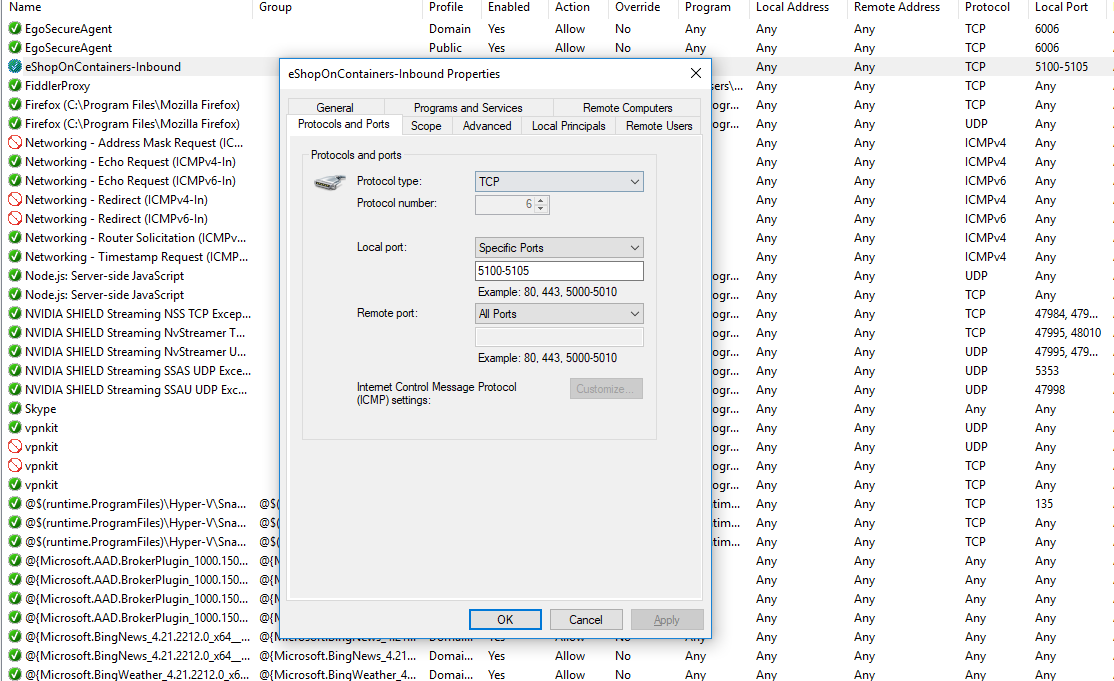
dohuyphuong
on 13 Feb 2018
Some options more...
Try if setting windows firewall to not protect DockerNAT works for you (use your neeeded profile - I used public in the sample pic):

Hope this helps!
eiximenis
on 13 Feb 2018
Thank you @eiximenis
But my machine cannot change this config. that is stupid.

dohuyphuong
on 13 Feb 2018
This hit me as well. Should be part of "02. Setting eShopOnContainers in a Visual Studio 2017 environment" where the filewall settings are described.
 warappa
on 18 Feb 2018
warappa
on 18 Feb 2018
@dohuyphuong It could be due to Domain policies from your company?
Your sreeshot says “Some settings are controlled by Group Policy”.
Can you check the same config in a different machine which is not in the enterprise Windows Domain?
If so, Please, try in a machine that is not within an enterprise domain with policies restricting.
Policies can impact further issues in Docker, as well.
 CESARDELATORRE
on 19 Feb 2018
CESARDELATORRE
on 19 Feb 2018
Closing this issue as it looks it is due to a local PC configuration not being able to open the required ports in the firewall, as specified at the Wiki post for setup:
https://github.com/dotnet-architecture/eShopOnContainers/wiki/02.-Setting-eShopOnContainers-in-a-Visual-Studio-2017-environment
Feel free to open it again if it is due to a different issue.
Thanks,
CESARDELATORRE
on 20 Feb 2018
-1
 rafsanulhasan
on 11 Aug 2018
rafsanulhasan
on 11 Aug 2018
Thank you @eiximenis
But my machine cannot change this config. that is stupid.
@dohuyphuong, seems to be quite late, but try to change Protected Network Connections in Public Profile, not in Domain one. It was the solution in my case.
 yuriy-hanzha
on 30 Jan 2019
yuriy-hanzha
on 30 Jan 2019
Related issues
 Diggzinc
·
5Comments
Diggzinc
·
5Comments
 BrunoLopes
·
4Comments
BrunoLopes
·
4Comments
 Dudelsb
·
3Comments
Dudelsb
·
3Comments
 chhotalamansukh
·
4Comments
chhotalamansukh
·
4Comments
 shubham2325
·
4Comments
shubham2325
·
4Comments
Most helpful comment
Some options more...
Try if setting windows firewall to not protect DockerNAT works for you (use your neeeded profile - I used public in the sample pic):
Hope this helps!