- [x] New DocType "Import Bank Statement"
- [ ] Download Template "Date, Ref No, Description, Debit, Credit"
- [x] Upload
- [x] Sync
Sync Logic:
- If Ref No is found in existing JV then update "Actual Date" (Bank Reco)
- Else trying finding Invoice (Sales or Purchase) against which payment is made / received.
- Find exact amount, if found, find closes match of customer and create JV
- Make JV against (Accounts Payable, Receivable) and found exact Customer / Supplier then add party account, else leave blank
 rmehta
All 21 comments
- [ ] On Uploading populate data in a table
- [ ] Try to match JV against Sales Invoice
- [ ] Allow user to select Invoice against JV
 neilLasrado
on 17 Apr 2015
neilLasrado
on 17 Apr 2015
This looks good. Clearbooks, Quickbooks, Xero etc do this sort of thing. It would be good to emulate what they do.
One pain point I found with Clearbooks (my package) was processing each new entry one at a time when the purchase/payment is with a new customer. We are an online shop/manufacturer that receives many sales and buys many small items. There can be hundreds to do each week so its slow one at a time.
For each entry in a statement a new customer may have to be created which take many mouse clicks and page loads. If it could be done in a grid view that enabled setting the required fields on many entries at once it would be easier. ie, pick existing entity/create new entity, payment method, sales tax rate, assign to invoice (if one exists), etc Then process many at once.
One thing that Clearbooks does well is to auto-select the customer based on bank statement description field (based on your previous assignments) and then autofill the required data. It would be good to do this too.
 marleydc
on 28 Feb 2016
marleydc
on 28 Feb 2016
+1 to have a simple way to import bank data from csv and have a quick booking window. Features required per line:
- create journal entry and allow to assign a default cedit/debit account depending on whether the amount is + or -
- create journal entry allow to assign amount also to other accounts
- allow to assign a default VAT account (amount transferred with bank is usually with tax, separate account for +/- amount)
- search for invoice (with the same positive amount is +) or order (with the same negative amount) and propose booking against it
Attached is a sample CSV from a bank in Europe (converted to xlsx, as github does not accept csv).
Bank_Umsatzliste_20151230sample.xlsx
 rasos
on 8 May 2016
rasos
on 8 May 2016
@neilLasrado @rohitwaghchaure @nabinhait is this still pending for v8?
 GSLabIt
on 1 May 2017
GSLabIt
on 1 May 2017
@joezsweet please don't ask "pending in v8" question - if you can replicate it, please check or just tag and move on
rmehta
on 1 May 2017
@rmehta yeah sorry ..i better ask if it is actively under development
GSLabIt
on 1 May 2017
don't ask anything - just tag based on your understanding 😊
rmehta
on 1 May 2017
:+1:
GSLabIt
on 1 May 2017
I really like this one. I would suggest that in the setup area for account module a sysadmin can define the csv format of the file. e.g. column 1 is desc, column 2 is date, column 3 is credit, etc. That way the feature is not tied to any specific export
 jwrober
on 9 May 2017
jwrober
on 9 May 2017
Ok. I have started working on this after sharing the first draft of the specification at https://github.com/frappe/erpnext/wiki/Bank-Transaction-Management-:-Feature-Specification-(v0.1)
@nabinhait mentioned it would be better to have the feature described in the github issue, so I will copy the spec here and make any updates. Ideally, it would be better to have the spec at the top and comments at the bottom)
Introduction
The aim of this feature is to manage all the erpnext transactions related to bank account easily. This includes creating and updating payment entries, mapping payment entries to invoice, mapping payment entries to transactions in bank statement.
Usecases
Reconcile existing payment entries
A payment entry has already been made in the erpnext, however it is not mapped to any specific invoice. This will keep the payment entry as unallocated and doesn't tell whether a invoice has been paid or not. By mapping the payment entry to invoice, we can reconcile the payment entry and keep invoice status up-to-date
Create payment entries based on the bank transactions
It is often difficult and laborious to create a payment entry every time we make/receive payments. Often, the date of actual transaction may not match the payment entry date. An alternative way to manage payments would be to create payment entries from bank statement on daily/weekly basis. The system should allow importing bank statements and create payments entry automatically based on the bank transaction.
Create journal entries based on the bank transactions
In addition to payment entries, bank transactions will also contain various transactions that results in journal entries like cash withdrawal, bank charges, interest etc. It is very beneficial to create the joural entries automatically based on the bank transactions.
Feature Design
Import Statements
This feature is designed to implement it in phases to improve the usability. Ideally we should provide a mechanism to connect to the bank account directly, which should retrieve the statements automatically. Once the statement transactions are imported, we should examine each one of them and handle them appropriately. It isn't very clear whether all the banks provide an easy way of importing the statements via some API that ERPNext could use. More work needs to be done in this area to find a good way of connecting to bank and importing the statements automatically. So this specification only deals with the second stage where it assumes the statements are already imported in csv format manually.
Handle Statement Format
It is unlikely that all the banks would generate the statements in the same format. However it is assumed that all of them will be able to provide necessary information in csv format. The required information elements are:
- Transaction Date
- Transaction Description
- Debit/Credit amount
So the implementation provides a mapping doctype from standard expected format to actual format. This should be created for each bank where transaction header doesn't match the default description used by ERPNext
Identify transactions automatically
Majority of the bank transactions will have customer/supplier details in the transaction description, so it isn't very difficult to map the transaction to supplier/customer automatically. However it very likely to fail in certain cases. The system should self-learn those mappings by creating a doctype for mapping transaction to supplier/customer/expense account.
Statement management process
- On uploading the bank statement, retrieve all the transactions and automatically map the transaction to a particular supplier/customer/expense account
- Manually fix any entries that has the wrong mapping and save the mappings for future management
- Match the transactions to existing payment/journal entries and display the invoices for reconciliation
- Update invoices that are not mapped properly
- Create new payment/journal entries for new transaction
- Reconcile/submit payment/journal entries
Draft Statement Management Process
- Create the new statement entry for a bank account

- Click the bank-mapping and define the mapping as per your bank statement format
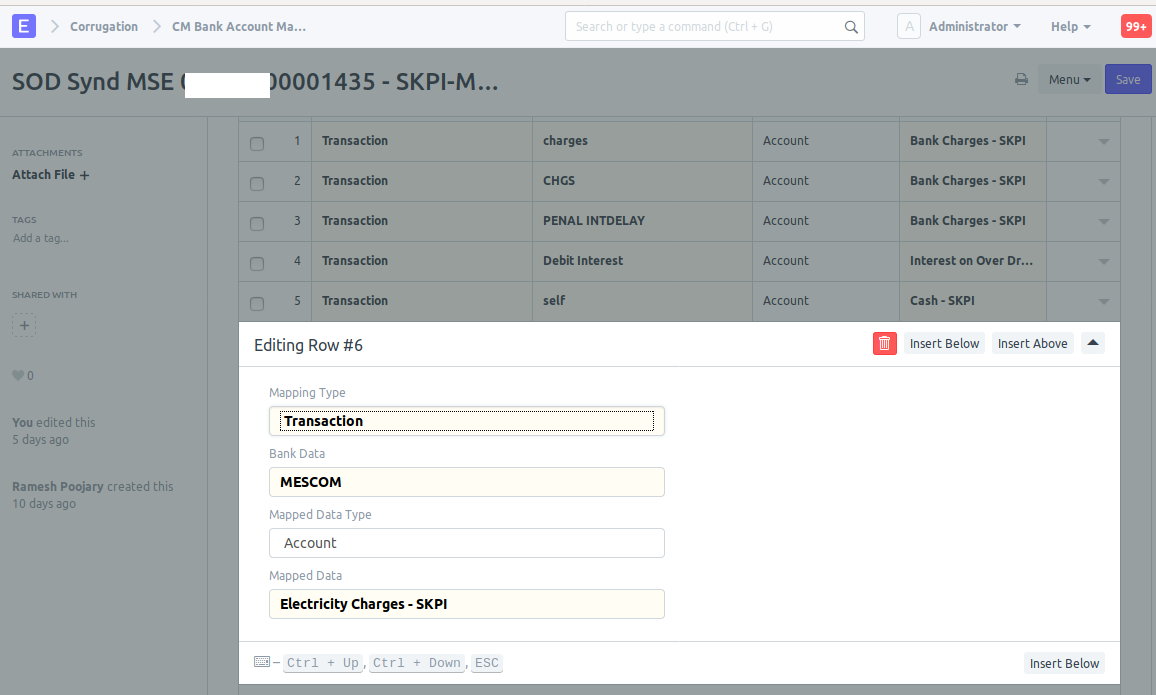
The same doctype is used for mapping both statement fields and transaction description to a customer/supplier/account - Attach the bank statement
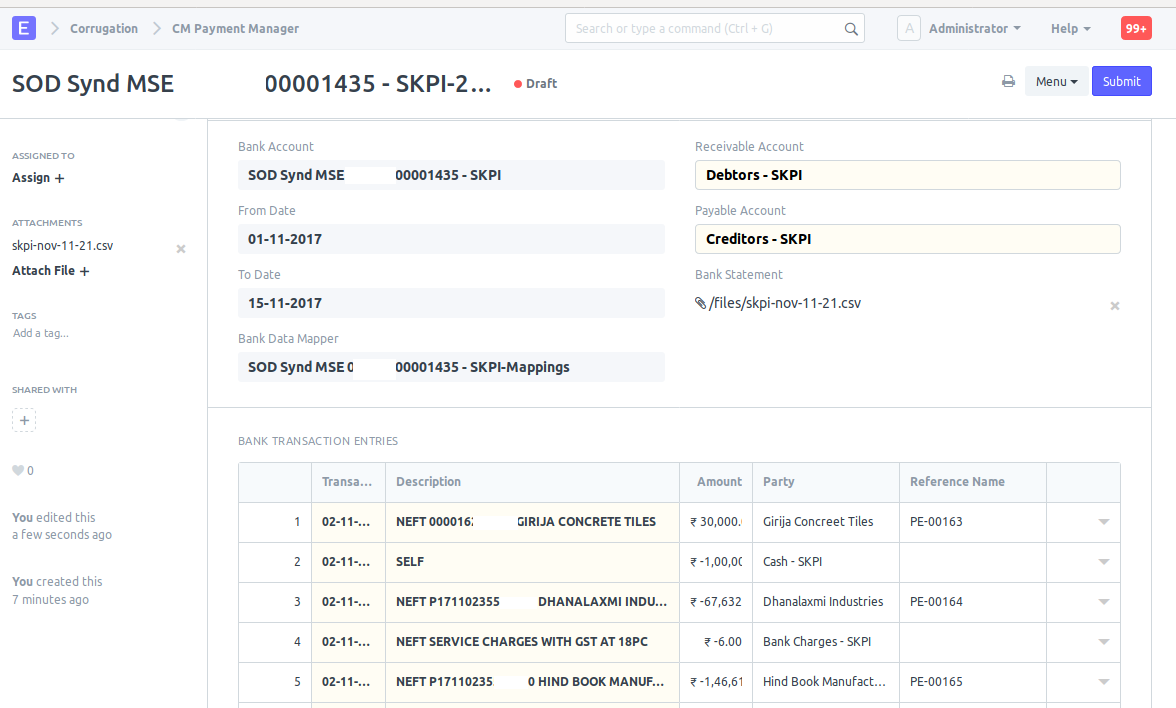
On attachment, it will automatically - Map the transaction to a customer/supplier if the description matches
- Find the associated payment entry/journal voucher if the payment date/party/amount matches
- Manually set the party type and party for transactions that are not mapped because of poor statement description

- Match the transaction to corresponding invoices.

Provide provision to update the invoices in case auto assignment hasn't done the right mapping
- Click 'Create payment/voucher entries' once the statement-invoice mapping is done. This will automatically create the payment entry/journal entry for the transaction if hasn't found one already
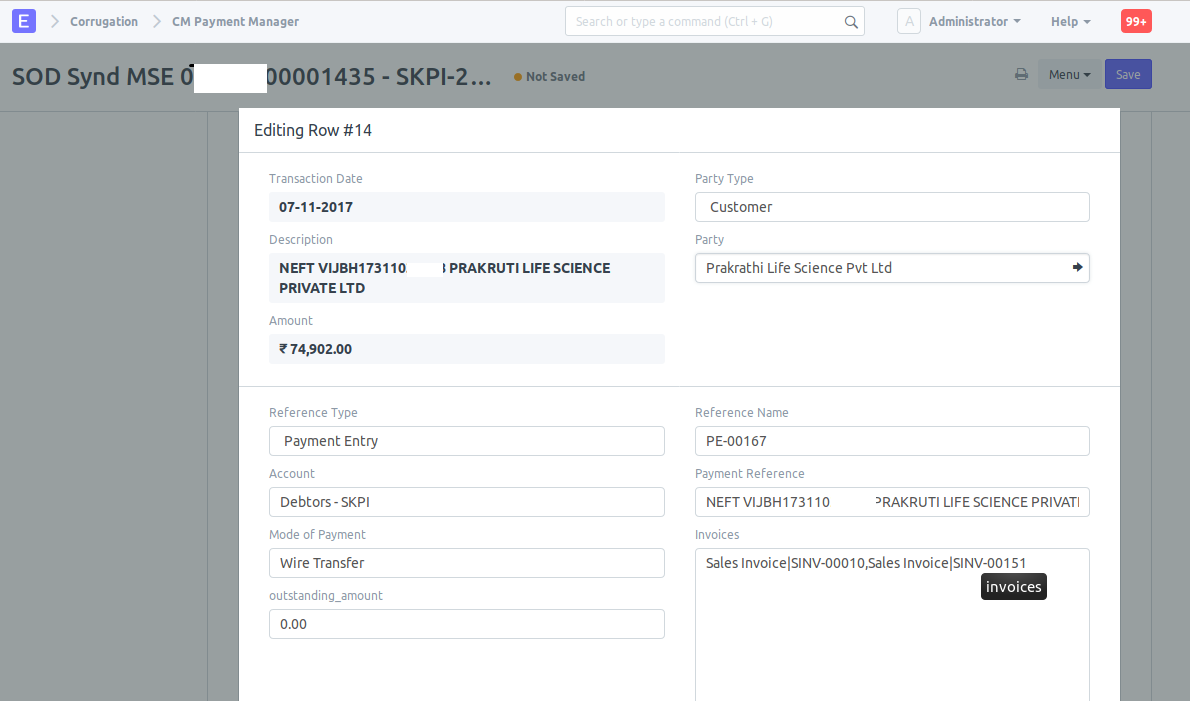
- Update the payment entry details if you need to make further changes
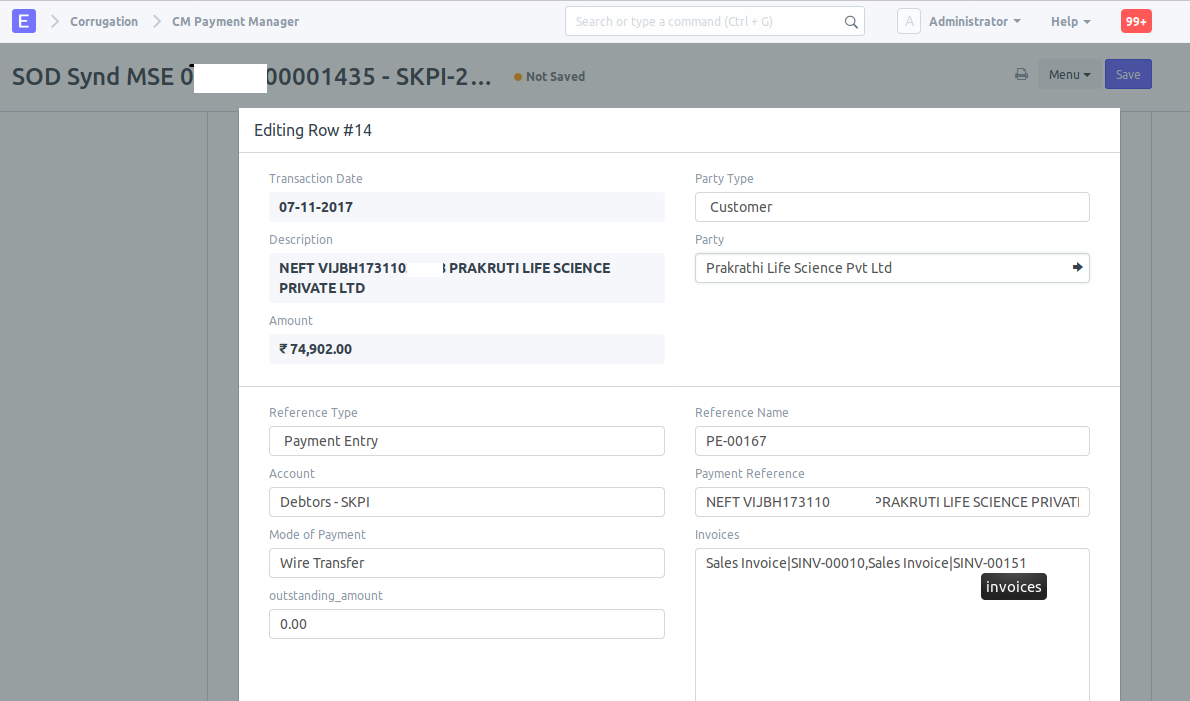
- Submit/Reconcile the entries.
 sathishpy
on 24 Nov 2017
sathishpy
on 24 Nov 2017
There are a number of git issues on this subject. Might be good consolidate all features here?
https://github.com/frappe/erpnext/issues/5903
https://github.com/frappe/erpnext/issues/9307
5903 talks about downloading ofx file and importing to erpnext. Pretty much every bank is going to support this. Might be a good first step before figuring out the API for auto download.
jwrober
on 25 Nov 2017
9307 will be implicitly covered in this feature as it creates the payment entries automatically for wire transfer. It doesn't cover #5903 by default, but all that we need is a clean interface which allows adding a handler that converts ofx format to our bank transaction doctype.
sathishpy
on 28 Nov 2017
Can you please add value date which already exist in any bank statement which will help in the future calculting agio bank and also in treasury.
Regards
 SOLOSOFTMA
on 25 Jan 2018
SOLOSOFTMA
on 25 Jan 2018
We had a similar use case and resolved it in a two step fashion:
- Read csv which was exported from bank statment. From this, generate payment entries (on status draft)
- Match payments: show all unpaid sales invoices and draft payment entries (receiving), user selects one of each list and matches them (auto match based on SINV-reference is work in progress). This will link and submit the payment entry.
The biggest issue we came across is that each and every bank has a different output format, some banks even have so many options that strongly impact the output. A standard (such as pain.001 for payment files) is so far not yet established. Also, the data content varies from very good to extremely poor (date and amount being the worst; no reference or the like).
We only import received payments (to close debtors), as paid payments can be done as payment entries and then a payment file generated (pain.001) and uploaded to the bank for execution.
This is currently available as app for ERPNext...
 lasalesi
on 3 Feb 2018
lasalesi
on 3 Feb 2018
@SOLOSOFTMA, could you please elaborate a bit more on your requirement of value date? The statement will have a start date and end date, which need not be same as the start and end date of payment manager statement. Perhaps we could automate the start date as last date of previously processed statement.
sathishpy
on 4 Feb 2018
In morocco and french countries they use also value date which generally equal to posting date +2 days we need it in treasury
SOLOSOFTMA
on 4 Feb 2018
Sorry, your requirement is still not clear to me. Are you saying the payment entry posting date should be transaction date+2 even though statement has the right transaction date?
sathishpy
on 4 Feb 2018
Scenario:
On Payment Entry (Cheque Receipt from Customer)
- Debit Cheque in Transit A/C
- Credit Customer A/C
On Reconciliation
- Credit Cheque in Transit A/C
- Debit Bank A/C
Is the reconciliation accounting entry handled in the new design?
 PawanMeh
on 14 Feb 2018
PawanMeh
on 14 Feb 2018
I doubt, certainly not tested. Where it works best is no manual payment entries and just import the transactions from bank statement and let the tool create the payment entries. This is a precursor to automatic payment handling, not just reconciliation tool. ie when we start getting the bank transaction feeds, if the payment entry is already created, we should be able to find the corresponding entry and reconcile it. If not, create a new payment entry from the tool and reconcile it.
sathishpy
on 15 Feb 2018
@nabinhait #12472 looks unmerged. Did you close this by mistake?
 deltasquare4
on 22 May 2018
deltasquare4
on 22 May 2018
So..... is ERP Next already supporting .OFX files?
 jboilesen
on 1 Aug 2019
jboilesen
on 1 Aug 2019
Related issues
 gbard
·
4Comments
gbard
·
4Comments
 alimalkhalifa
·
3Comments
alimalkhalifa
·
3Comments
 vorasmit
·
3Comments
vorasmit
·
3Comments
 nabinhait
·
4Comments
nabinhait
·
4Comments
 berniezhao11
·
4Comments
berniezhao11
·
4Comments
Most helpful comment
Ok. I have started working on this after sharing the first draft of the specification at https://github.com/frappe/erpnext/wiki/Bank-Transaction-Management-:-Feature-Specification-(v0.1)
@nabinhait mentioned it would be better to have the feature described in the github issue, so I will copy the spec here and make any updates. Ideally, it would be better to have the spec at the top and comments at the bottom)
Introduction
The aim of this feature is to manage all the erpnext transactions related to bank account easily. This includes creating and updating payment entries, mapping payment entries to invoice, mapping payment entries to transactions in bank statement.
Usecases
Reconcile existing payment entries
A payment entry has already been made in the erpnext, however it is not mapped to any specific invoice. This will keep the payment entry as unallocated and doesn't tell whether a invoice has been paid or not. By mapping the payment entry to invoice, we can reconcile the payment entry and keep invoice status up-to-date
Create payment entries based on the bank transactions
It is often difficult and laborious to create a payment entry every time we make/receive payments. Often, the date of actual transaction may not match the payment entry date. An alternative way to manage payments would be to create payment entries from bank statement on daily/weekly basis. The system should allow importing bank statements and create payments entry automatically based on the bank transaction.
Create journal entries based on the bank transactions
In addition to payment entries, bank transactions will also contain various transactions that results in journal entries like cash withdrawal, bank charges, interest etc. It is very beneficial to create the joural entries automatically based on the bank transactions.
Feature Design
Import Statements
This feature is designed to implement it in phases to improve the usability. Ideally we should provide a mechanism to connect to the bank account directly, which should retrieve the statements automatically. Once the statement transactions are imported, we should examine each one of them and handle them appropriately. It isn't very clear whether all the banks provide an easy way of importing the statements via some API that ERPNext could use. More work needs to be done in this area to find a good way of connecting to bank and importing the statements automatically. So this specification only deals with the second stage where it assumes the statements are already imported in csv format manually.
Handle Statement Format
It is unlikely that all the banks would generate the statements in the same format. However it is assumed that all of them will be able to provide necessary information in csv format. The required information elements are:
So the implementation provides a mapping doctype from standard expected format to actual format. This should be created for each bank where transaction header doesn't match the default description used by ERPNext
Identify transactions automatically
Majority of the bank transactions will have customer/supplier details in the transaction description, so it isn't very difficult to map the transaction to supplier/customer automatically. However it very likely to fail in certain cases. The system should self-learn those mappings by creating a doctype for mapping transaction to supplier/customer/expense account.
Statement management process
Draft Statement Management Process
The same doctype is used for mapping both statement fields and transaction description to a customer/supplier/account
On attachment, it will automatically
Provide provision to update the invoices in case auto assignment hasn't done the right mapping