Hosted on ERPNext Cloud
ERPNext: v10.1.40 (master)
Frappe Framework: v10.1.37 (master)
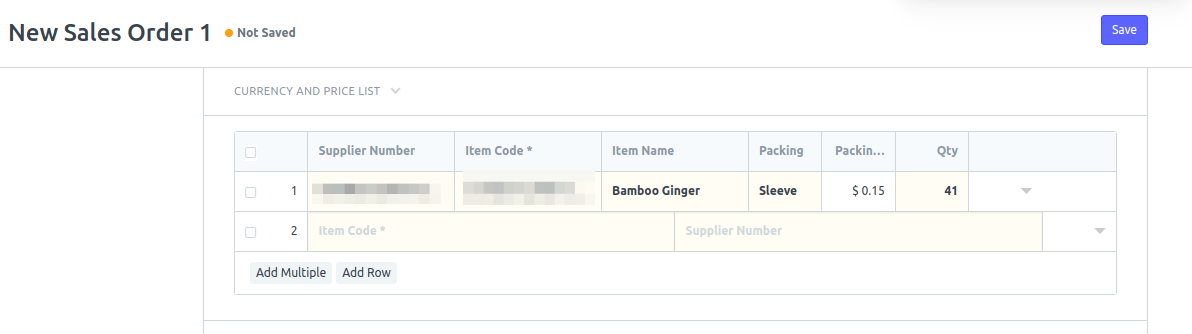
After entering the 1st row, the next rows becomes like the one in the screenshot below:
 jvfiel
All 7 comments
This happens on Chrome and Edge for sure.
 heatherpotter
on 24 Jul 2018
heatherpotter
on 24 Jul 2018
Tested in Environment
ERPNext: v10.1.61 (master)
Frappe Framework: v10.1.54 (master)
It is working Fine , no Issue reported.

 jigneshpshah
on 24 Oct 2018
jigneshpshah
on 24 Oct 2018
This is still occurring for me...
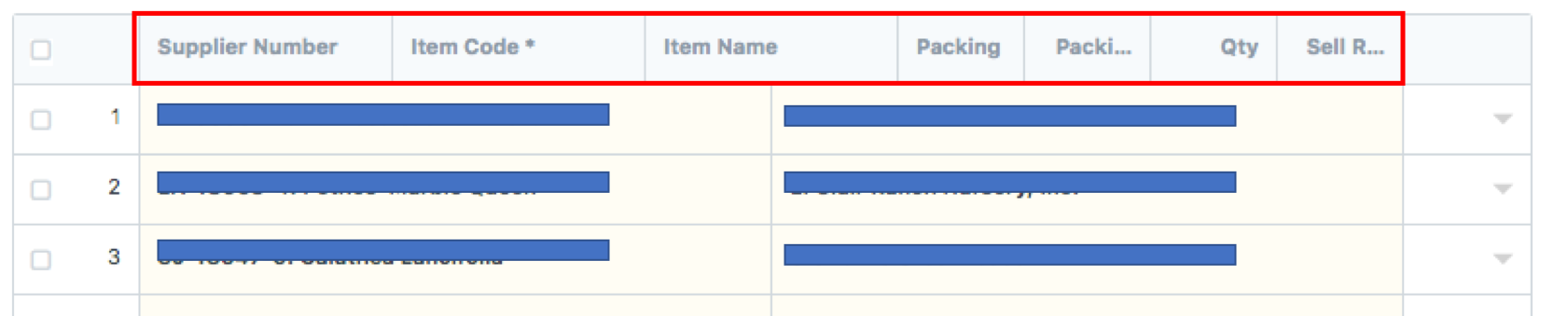
ERPNext: v10.1.58 (master)
Frappe Framework: v10.1.51 (master)
heatherpotter
on 24 Oct 2018
It seems it is a customized SO Item table , as the column names are Supplier Number, Packing Unit etc..
jigneshpshah
on 25 Oct 2018
Yes, it clearly is. But why does it do this? Seems a bug to me?
heatherpotter
on 25 Oct 2018
@heatherpotter It's advisable to add only 4 to maximum 5 fields in child table's grid view.
 shreyashah115
on 25 Oct 2018
shreyashah115
on 25 Oct 2018
@shreyashah115 Well, that's confusing. Why is it even possible if not advisable? In addition, why doesn't ERPNext take full advantage of edge to edge browser window. Makes no sense.
We will have to live with the bug as we have to have the form display exactly those 7 columns when entering the order. Our orders have 50-100 line items that we enter and it must go quickly - we don't have time to click the arrow and so on.
heatherpotter
on 25 Oct 2018
Related issues
 berniezhao11
·
4Comments
berniezhao11
·
4Comments
 setsero71
·
3Comments
setsero71
·
3Comments
 Fredoluka
·
3Comments
Fredoluka
·
3Comments
 alimalkhalifa
·
3Comments
alimalkhalifa
·
3Comments
 gbard
·
4Comments
gbard
·
4Comments
Most helpful comment
This happens on Chrome and Edge for sure.