Erpnext: Need more decimal points for Currency
We buy a lot of electronic components that cost like 0,0025 so we need to set in our company that our currency format allows 4 digits.
The System Settings Float Precision has no influence on that but only counts for float types, not currency types. The Smallest Currency Fraction Value in Currency also doesn't work.
How can we set the decimals for the currency to e.g. 4 or 5?
 dottenbr
All 17 comments
It can be configured (developer_mode on) in DocType: Item Price

 kickapoo
on 24 Mar 2017
kickapoo
on 24 Mar 2017
I was hoping that this would be made configurable. If you change it please don't do it in developer mode but by customizing the form.
dottenbr
on 25 Mar 2017
This issue is not closed in my opinion. Currencies are not only in items but sales orders, quotations, all the ledger entries and we need to be able to set the float precision for all of these at once.
I would recommend to make the currency configurable system-wide in System Settings by setting the float precision or making it configurable company-wide in the Company settings next to the currency to set the float precision wanted for that company.
This should be discussed with @nabinhait to make sure the impact on accounting is tested.
dottenbr
on 27 Mar 2017
Also see https://github.com/frappe/erpnext/issues/8366. I think the currency format should be global and consistent in the system.
 rmehta
on 12 Apr 2017
rmehta
on 12 Apr 2017
Same problem here.. am trying to implement erpnext. but this issue has me running around circles for 15 days now i might as well give up.
 mtyspider
on 17 Apr 2017
mtyspider
on 17 Apr 2017
Fixed it, now there is a dedicated settings for Currency precision under System Settings. You can set it to 9. Also, now Currency formatting is based on "Number Format" field in System Settings.
 nabinhait
on 18 Apr 2017
nabinhait
on 18 Apr 2017
Thank you for implementing the feature. I think it is not ideally designed yet and needs a small improvement. So when buying or selling items we need to be able to set more decimals, you did that. However now these decimals are always visible also when they are not needed.
The most common thing is to show only the two decimals unless more are used.
So instead of the current layout:

I would suggest to show only the decimals beyond 2 when they are used:

This will allow people to use as many decimals as they want but will display nicely.
dottenbr
on 18 Apr 2017
It was implemented as designed. So it should have been specified better!
Sent from phone
On 18-Apr-2017, at 3:21 PM, Dominik Ottenbreit notifications@github.com wrote:
Thank you for implementing the feature. I think it is not ideally designed yet and needs a small improvement. So when buying or selling items we need to be able to set more decimals, you did that. However now these decimals are always visible also when they are not needed.
The most common thing is to show only the two decimals unless more are used.
So instead of the current layout:
I would suggest to show only the decimals beyond 2 when they are used:
This will allow people to use as many decimals as they want but will display nicely.
—
You are receiving this because you commented.
Reply to this email directly, view it on GitHub, or mute the thread.
rmehta
on 18 Apr 2017
I completely agree
dottenbr
on 18 Apr 2017
@rmehta can you pick this up again and have the decimals beyond 2 only show is needed (input or calculation)?
dottenbr
on 8 May 2017
Can @kickapoo try it. You just need to update the formatters
rmehta
on 8 May 2017
@rmehta not in the near future, sorry but I am in some deep machine communication issues.
kickapoo
on 8 May 2017
The currency setting should allow up to that number of float precision. However whenever we display sums like the sub total or the total we should round to 2 decimals.
dottenbr
on 5 Jun 2017
@nabinhait Should there be another setting for currency precision for sub total and totals?
 KanchanChauhan
on 7 Jun 2017
KanchanChauhan
on 7 Jun 2017
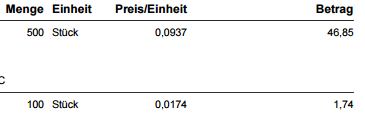
@KanchanChauhan and @nabinhait in general you can not transfer or book any currency value that has more than the currency's decimals. For Euros that is 1 full cent = 0.01 euro. To me it doesnt matter if you want to implement two currency float precisions, maybe that is useful to some. For us and for all other normal businesses it should be sufficient if sums and totals are rounded to full cents.
I have just pulled 3 examples of invoices and order confirmations from some of our suppliers:


dottenbr
on 8 Jun 2017
I would like to add that I believe strongly that the decimals should only be shown if they are used. Maybe this can be configurable to say "always show decimals" or "only show used decimals" that basically converts a 1.2000 -> 1.20 / 1.2120 -> 1.212 etc.
This is the behaviour in Microsoft Dynamics NAV and in all of the order confirmations and invoices I have seen from our suppliers so I think its safe to assume this is a standard.
dottenbr
on 8 Jun 2017
Yes, I think we can make that as the default. Show additional decimals if they are non-zero
rmehta
on 8 Jun 2017
Related issues
 berniezhao11
·
4Comments
berniezhao11
·
4Comments
 alimalkhalifa
·
3Comments
alimalkhalifa
·
3Comments
 heyakyra
·
4Comments
nabinhait
·
4Comments
heyakyra
·
4Comments
nabinhait
·
4Comments
 deantheiceman
·
4Comments
deantheiceman
·
4Comments
Most helpful comment
Yes, I think we can make that as the default. Show additional decimals if they are non-zero