Erpnext: [Feature Request] Multiple due dates in the same invoice
Its a very commom practice in Brazil, Spain and some other countries, Total must be split into multiple due dates against the same invoice (sales and purchase).
This is how it works on oodoo and others https://discuss.erpnext.com/t/payments-due-to-30-60-90-days-very-common-spanish-local-functionality/12932
 applepipe
All 52 comments
I can confirm that even in Italy that payment methods are the most common and all ERP that are well rooted in Italy use this basic feature. It could be a big jump fr EPRNext to provide it natively .
Is any chance to have it availble in next weeeks or few months?
please do it
 Italjapan
on 3 Nov 2016
Italjapan
on 3 Nov 2016
Vote for this one
 kaitorecca
on 3 Dec 2016
kaitorecca
on 3 Dec 2016
+1
 Devens
on 4 Dec 2016
Devens
on 4 Dec 2016
+1
 mhhegazy
on 1 Jan 2017
mhhegazy
on 1 Jan 2017
+1
kaitorecca
on 19 Feb 2017
This was done in some sort on employee loan (v8), there is a payment schedule that is very similar with what we need, maybe the solution is already on erpnext.
applepipe
on 21 Feb 2017
@applepipe : Can it be applied to customer? As I have download the branch develop but don't know how to apply it to customer in this type of loan?
kaitorecca
on 21 Feb 2017
+1
 qrevel
on 22 Feb 2017
qrevel
on 22 Feb 2017
@kaitorecca I don't know, maybe someone skilled could apply the same idea on other documents
applepipe
on 22 Feb 2017
If this is urgent and you want this to be developed almost immediately, please put up bountysource. We are not sure if the ERPNext team will take up this request to develop.
https://www.bountysource.com/teams/frappe/issues
Chances for this feature to be developed are higher because of crowdfunding.
 addymuliady
on 23 Feb 2017
addymuliady
on 23 Feb 2017
:+1:
 GSLabIt
on 26 Apr 2017
GSLabIt
on 26 Apr 2017
Our old version of Quickbooks 2012 never had this done very well - it's a pig to use, so once we can move more of that functionality to ERPNext I will be very happy.
 joolsr
on 27 May 2017
joolsr
on 27 May 2017
:+1:
 msiddiq0
on 30 May 2017
msiddiq0
on 30 May 2017
+1
 mhbu50
on 9 Jun 2017
mhbu50
on 9 Jun 2017
I don't know if it's really related to this issue but I would like to suggest to have the ability to make multiple invoices from one SO based on the applied payment terms.
So if the payment term would be "50% at order remaining 50% before delivery", we would want to make two invoices with an amount of 50% each.
I've seen this future is listed in the roadmap V9 document but it I can't find it listed as a Github issue for V9, that's why I mentioning it here.
 basdereus84
on 27 Jun 2017
basdereus84
on 27 Jun 2017
Please link to V9 road map with details for commentary. I need discount terms such as 30/60/90 and also option for 2%-10 Day, Net 30 terms.
 Jammyinc
on 28 Jun 2017
basdereus84
on 28 Jun 2017
Jammyinc
on 28 Jun 2017
basdereus84
on 28 Jun 2017
I am happy to see this feature is in the roadmap but I think this is urgent for EU and US users, when are you planning to release V9?
 cosimot
on 4 Jul 2017
cosimot
on 4 Jul 2017
this feature it's very very important. I'm working on Italian Localization.
 giuseppelamatrice
on 31 Jul 2017
giuseppelamatrice
on 31 Jul 2017
Work Plan
- [ ] Create Doctype - Payment Due Date
It would have the following fields: - Code e.g EOM, N30, N60
- Description - A description of Code e.g for EOM, description would be "End of Month"; for N30, description would be Net 30 days
- Term days - Days to be added to invoice creation date to arrive at substantive due date e.g 30 means due date will be 30 days after invoice creation.
- Count From Month End - A check box to determine if term days should be calculated from the end of the month of invoice creation e.g If invoice is created on January 1st and Term Days is 21, Due date will 21 days after last day of January. If the invoice was created on 29th January, Due Date will still be 21 days after last day of January.
- With Discount - A check box to signify that there is a cash discount element
- Discount - The percentage discount e.g 5
- Discount Days - The number of days for which the cash discount will apply e.g If Term Days is 30, With Discount is True, Discount is 5(%) and Discount Days is 10, Due Date will be calculated as 30 days after invoice creation but when payment is made, ERPNext will automatically post a 5% discount if the payment was made within 10 days
With this, many common payment terms due dates can easily be defined with flexibility e.g:
- EOM => code = "EOM", description = "End of Month", count from month end=True, term days=1
- 2/10 N30 => code="2/10 N30", description="2% Cash Discount Within 10 days; Net 30 days", term days=30, with discount=True, discount=2, discount days=10
- [ ] Add validation logic for Payment Due Date
- [ ] Create Doctype - Payment Terms
This will contain 2 fields - Payment Due Date
- % of Total Invoice Amount
% of Total Tax Amount - This will be equal to % of Total Invoice Amount by default.
[ ] Add validation to controllers
cc: @nabinhait @rmehta
 tundebabzy
on 5 Aug 2017
tundebabzy
on 5 Aug 2017
The master doctype name: Payment Term
And child doctype name in Sales Invoice: Payment Schedule
@tundebabzy Can you share the workflow inside the invoice? How payment term will be applied in the invoice?
 nabinhait
on 8 Aug 2017
nabinhait
on 8 Aug 2017
@nabinhait It's more convenient manage:
1) multiple due date;
2) multiple payment term.
This is an example of payment term used in Italy, Spain, Brazil and many other countries:
Total Sales Invoice 100.000 €:
- 25.000 € cash, immediately;
- 25.000 € check, after 30 days;
- 50.000 € bank transfer, after 60 days.
giuseppelamatrice
on 8 Aug 2017
I 100% agree with Giuseppe with what I need from this.
Julian
Sent from BlueMail
On 8 Aug 2017, 4:05 pm, at 4:05 pm, Giuseppe Lamatrice notifications@github.com wrote:
@nabinhait It's more convenient manage:
1) multiple due date;
2) multiple payment term.EXAMPLE:
Total Sales Invoice 100.000 €:
- 30.000 € cash, immediately;
- 30.000 € check, after 30 days;
- 60.000 € bank transfer, after 60 days.
--
You are receiving this because you commented.
Reply to this email directly or view it on GitHub:
https://github.com/frappe/erpnext/issues/6301#issuecomment-320984655
joolsr
on 8 Aug 2017
@nabinhait
I'm planning on creating a child table that will contain the payment term and then a field that will specify what portion of the invoice is linked to the payment term. That will make it possible to do things like "Pay 50% within 30 days and balance within the next 30 days. If you pay the first portion within 10 days, you get a 2% discount" or "50% Cash on Delivery and balance within 30 days of month end".
Perhaps I'll name the child table "Payment Term Schedule":
Field | Field Type
--- | ---
payment_term | Link
invoice_portion | Float
Let's assume a case of "Pay 50% Cash on Delivery, pay the balance 30 days after this month end and get cash discount of 2% if you settle within 30 days".
We would save two Payment Term documents as:
Field | Value
-------| -------
code | COD
description | Cash on delivery
term_days | 0
count_from_month_end | 0
with_discount | 0
discount | 0
discount_days | 0
Field | Value
-------| -------
code | 2/10 N30FME
description | 2% cash discount within 30 days; Net 30 days From Month End
term_days | 30
count_from_month_end | 1
with_discount | 1
discount | 2
discount_days | 10
In the sales invoice, the Payment Term Schedule table will be populated in ascending order of the payment term expiry:
Payment Term | Invoice Portion
--- | ---
COD | 50%
2/10 N30FME | 50%
The workflow will be similar to what we have now. The difference will be that will will now be a new GL posting for each Payment Term. Each Payment Term contains the information needed to calculate the due date for specified portion of the invoice. It will also slightly change the behaviour of Payment Entry in that it will check if the references contain Payment Term Schedule. If it does, it will check if it needs to adjust the payment for discounts if the date conditions are right.
In the case of this example, we are supposed to have two entries. For the COD payment term, the 50% is due immediately. So:
DR - Customer --> 0.5 * Invoice amount
CR - Sales --> 0.5 * Invoice amount
(Due Date: Immediate)
For the 2/10 N30FME payment term,
DR - Customer --> 0.5 * Invoice amount
CR - Sales --> 0.5 * Invoice amount
(Due Date: 30 days after end of invoice date)
tundebabzy
on 9 Aug 2017
@tundebabzy I have made a mockup for this, please share your thoughts. We can also discuss on telegram.
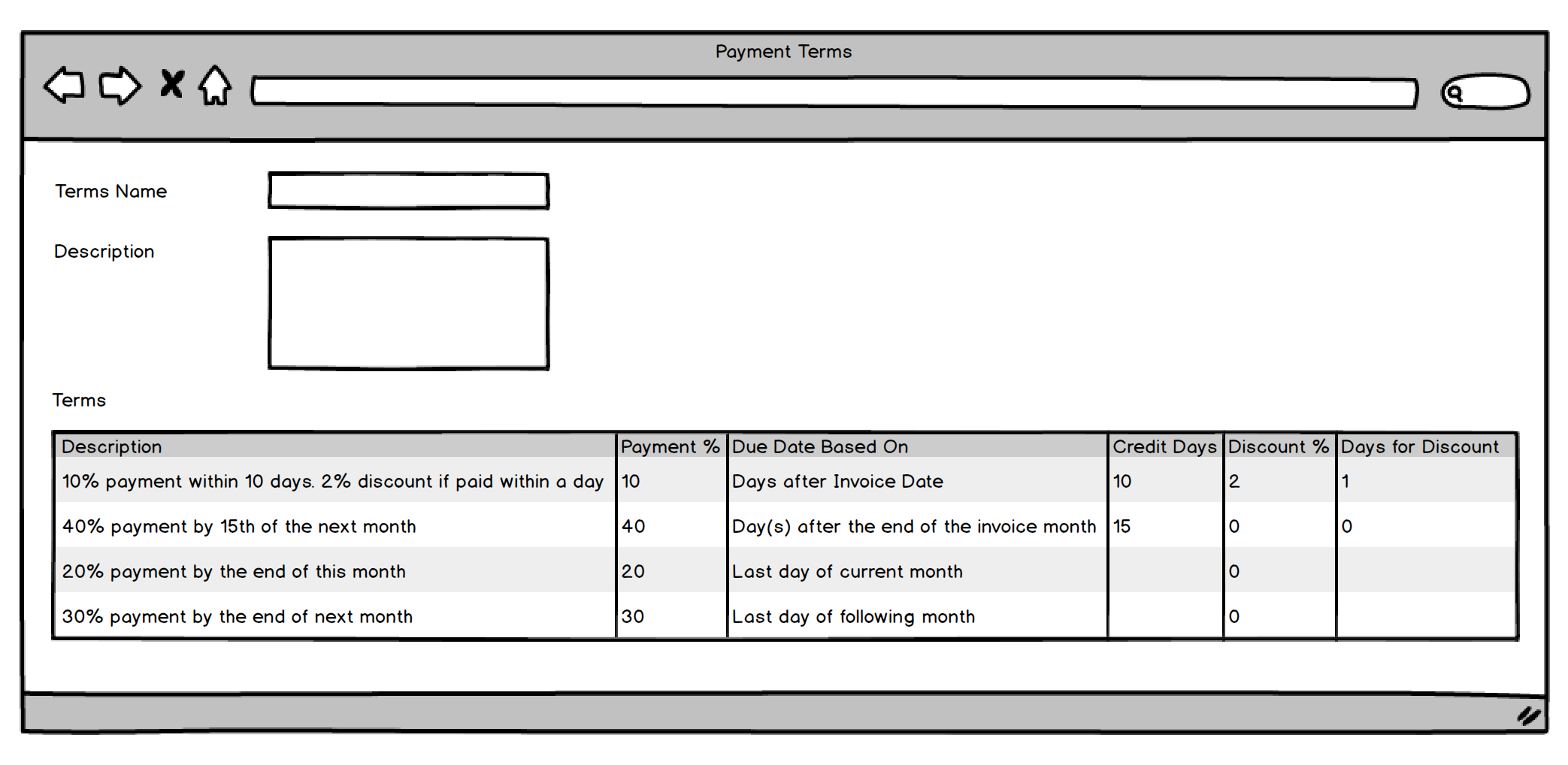
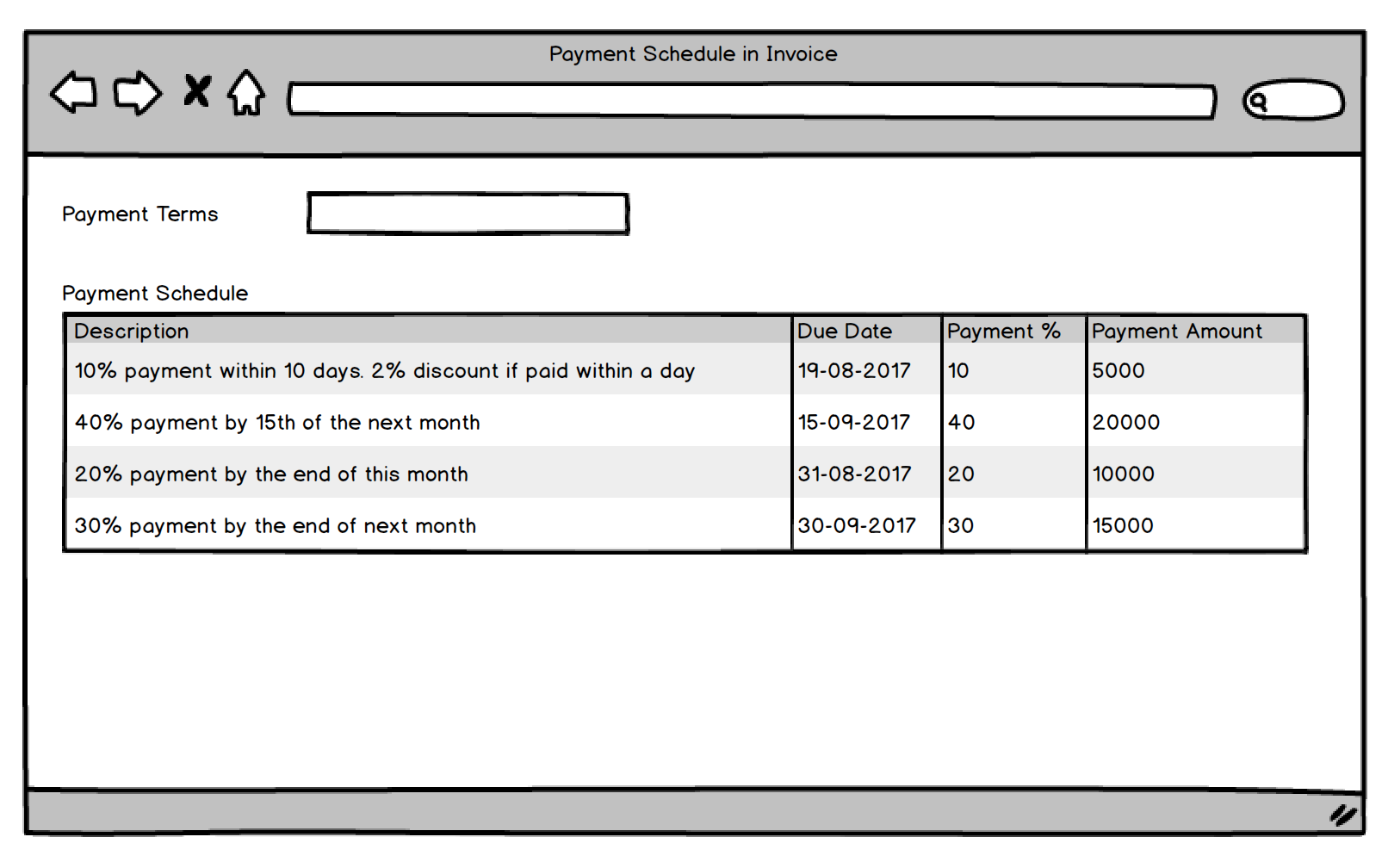
nabinhait
on 9 Aug 2017
- Patch for migrating existing credit Days settings in customer/supplier to Payment terms.
- Link Payment Terms to Customer/Supplier
nabinhait
on 9 Aug 2017
Would this also allow to have multiple invoices (one for each payment term) for one sales order?
basdereus84
on 9 Aug 2017
On 09/08/17 09:58, Nabin Hait wrote:
>
@tundebabzy https://github.com/tundebabzy I have made a mockup for
this, please share your thoughts. We can also discuss on telegram.
Could I also mention that our company regularly requires terms of
Proforma Invoice, which doesn't sit into the payment terms that are
already defined. Is this something that could be defined or allowed for
in some manner? I'm sure its something that would be required by many others
Regards
Julian
screen shot 2017-08-09 at 2 19 30 pm
https://user-images.githubusercontent.com/836784/29113455-a8094efe-7d0e-11e7-8ae5-86fce3a73957.png
>
screen shot 2017-08-09 at 2 24 02 pm
https://user-images.githubusercontent.com/836784/29113458-aaf85a06-7d0e-11e7-9eac-f4bb3df01b56.png—
You are receiving this because you commented.
Reply to this email directly, view it on GitHub
https://github.com/frappe/erpnext/issues/6301#issuecomment-321196362,
or mute the thread
https://github.com/notifications/unsubscribe-auth/AA5D3HDGxBL5AXHMB9vuBUoGd_Rb19jwks5sWXSggaJpZM4J2C5i.
--
Signature Kind regards
Julian Robbins
IT Manager & Marketing Engineer
Elite Antennas logo
https://www.elite-antennas.com/?utm_source=email-signature&utm_medium=email&utm_campaign=email-signature
Elite Antennas Ltd
Leominster, Herefordshire, UK
Tel: +44 (0) 1568 612050
www.elite-antennas.com
https://www.elite-antennas.com/?utm_source=email-signature&utm_medium=email&utm_campaign=email-signature
joolsr
on 9 Aug 2017
@nabinhait This feature interest a few area in ERPNext (example: financial movements). If you want I can write all documentation to help development.
giuseppelamatrice
on 9 Aug 2017
@giuseppelamatrice
Great! Contributions are always welcome.
@joolsr
Yes. The payment terms can be defined as you require. We won't predefine any payment term.
tundebabzy
on 9 Aug 2017
Todo:
- [x] Payment Term
- [ ] Add validations
- [x] Payment Terms Template
- [x] Payment Terms Template Detail
- [x] Payment Schedule
- [x] On selection of Payment Terms Template link, fetch all the terms
- [x] calculate due dates
- [x] calculate payment amount
- [x] on submission, make GLE based on due dates
- [x] add due_date field in GLE
- [x] If there is one due date, set it in parent and copy it to the child table
- [x] If parent due_date is not present, set last due_date as parent due_date
- [x] Add payment schedule in Quote/SO/SI/PI/PO
Payment Entry
- [x] Fetch outstanding invoices as per due_date in a separate row
- [x] Add due_date in reference table
- [x] post due_date in GLE
Journal Entry
- [ ] Make payment entry via Journal Entry, multiple rows based on due dates
- [ ] Add due_date field in child table
- [ ] Post due_date to GLE
- [ ] Check Payment Entry against Sales/Purchase Order
AR/AP report
- [x] Show ageing based on multiple due dates
Patch
- [ ] Create Payment Term and Payment Terms Template based on existing Customer/Supplier Credit Days
- [ ] Set default Payment Terms Template in customer/supplier
- [ ] Set Payment Schedule table based on parent due_date
- [ ] Set due_date in existing GLE
- [ ] Set due_date in Journal Entry child table
Test cases
Documentation
nabinhait
on 10 Aug 2017
On selection of Payment Terms Template link, fetch all the terms
calculate due dates
Would the due dates be automatically recalculated if the delivery date changes? If the delivery date is delayed you want the due date to be postponed as well I would say.
basdereus84
on 11 Aug 2017
Would the due dates be automatically recalculated if the delivery date changes?
No. We didn't factor that into the design. Shouldn't you invoice after delivery?
tundebabzy
on 11 Aug 2017
I think it depends on your payment terms. A common payment term I use for machines or goods I have to produce is:
- 50% at order, remaining 50% before delivery.
I that case I won't start production before the first 50% has been paid and I won't ship out the goods before the second 50% has been paid. As It can happen that the estimated delivery dated is delayed you want to have the due date of the second payment to be postponded as well.
But I must say that in the above case I would send two invoices, each with a value of 50% of the total order amount. So I would send the first invoice as soon I receive the order and the second one when the goods are ready for shipment.
If I'm correct this feature request is about sending one invoice with multiple due dates, which isn't common here in The Netherlands. And I would suspect that is would cause a lot of confusion.
If you're not 100% sure what the exact delivery date will be the predetermined due dates won't match up anymore, A work around would be not printing a due date on the invoice anymore but only printing "40% at order, 50% before delivery and the remaining 10% within 30days after delivery." Problem is that the client can't set any due dates into his accounting system when he receives your invoice, he has to reset and calculate the due date as soon as the delivery has been made, and therefore I suspect the change would be very big that they forget to pay in time.
Any thoughts about this situation?
basdereus84
on 11 Aug 2017
Yes. The feature is for one invoice with multiple terms. Those that don't need it can invoice as before.
However, the payment terms are usually agreed by both parties before Invoicing so in my mind it should not be a problem.
tundebabzy
on 11 Aug 2017
Hello @basdereus84 your use case is in real a COD (cash on delivery) term. It means client will pay 100% of the invoice once you make the invoice. So you will create a payment term named 50% deposit, 50% before delivery and let the due date be the same of invoice date. So just one due date.
As for the Nederlands I think you should ask around you because I have worked a lot with Dutch electrical distributors and they were all paying us 60 days end of month or 60-90 days end of month. This terms are used between companies that have durable and frequent business relationships.
cosimot
on 11 Aug 2017
Thanks for your answers.
@somicoito Am I correct that in your example you're still creating 1 invoice with to payment terms with both the same due date?
I've done some searching on google and couldn't really find any example of Dutch invoices with multiple due dates. For multiple due dates, they seem to send multiple invoices. This does make sense as the disadvantage of sending one invoice at time of order for the complete order amount with multiple due dates is that you have to pay the VAT for the complete order amount in the beginning of the project. If you would send multiple invoices, one for each payment term, you will pay the VAT of that particular invoice at the time you send it to the customer.
If it's a small project with a short time frame it doesn't really matter but if it has a bigger time span, you might end up pre financing the VAT of the upcoming due dates for a long time.
The easiest solution would be to have an option to set the payment terms as suggested in this future request and have the option to choose if you want to make one invoice with multiple due dates or to make multiple invoices one for each due date. That way we can choose which approach would fit your situation the best.
As far As I know at this moment there isn't a good solution to make multiple invoices for on order. I can make multiple invoices but then I'm facing the following situation:
Lets say I have the following order.
- 1pc Machine A €5.000,-
- 1pc Machine B €5.000,-
- 1pc Machine C €5.000,-
- 1pc Machine D €5.000,-
Payment term: 25% at order, 50% before delivery, remaining 25% within 30 days after delivery.
I could make the invoices as follow:
(invoice 1, 25% at order:)
- 1pc Machine A €5.000,-
- 1pc Machine B €5.000,-
- 1pc Machine C €5.000,-
- 1pc Machine D €5.000,-
- 1pc To pay later: 50% before delivery, remaining 25% within 30 days after delivery -€15.000,-
Total invoice amount: €5.000,-
(invoice 2, 50% before delivery:)
- 1pc Machine A €5.000,-
- 1pc Machine B €5.000,-
- 1pc Machine C €5.000,-
- 1pc Machine D €5.000,-
- 1pc Already paid : 25% at order -€5.000,-
- 1pc To pay later : remaining 25% within 30 days after delivery -€5.000,-
Total invoice amount: €10.000,-
(invoice 3, 25% at 30 days:)
- 1pc Machine A €5.000,-
- 1pc Machine B €5.000,-
- 1pc Machine C €5.000,-
- 1pc Machine D €5.000,-
- 1pc Already paid : 25% at order, 50% before delivery -€15.000,-
Total invoice amount: €5.000,-
This looks like a good work around but:
- item 1 to 4 are invoiced 3 times now so the turn over for those products is registered as 3 times the original turn over? (if it's only one item that has been ordered it would be easy to solve by adding the same item with an other description and a deducting value like:
1. 1pc, item nr 1234, Machine A €5.000,-
2. 1pc, item nr 1234, To pay later: -€2.500,-
- after sending the first invoice the order status will already turn to "paid" instead of "partially paid" so after delivery, the order status will turn to completed and there is no indication anymore that there is still an invoice to send and be paid.
I'm sorry for making such a long comment but for me, it's an issue that I don't know how to deal with and I hope someone has a suggestion how to deal with it. Hopefully, I'm seeing problems that are not really there.
basdereus84
on 11 Aug 2017
I say I do concur with the points made by @basdereus84
joolsr
on 11 Aug 2017
REMINDER:
1) multiple due dates on invoice generate multiple financial movements (it's very important);
2) one payment can be linked to multiple invoices (also partially).
PS. I'm writing a documentation on this process.
giuseppelamatrice
on 11 Aug 2017
Hello @basdereus84! I see you point but the way you want to do is not correct according EU regulations for product selling. Basically when you sell an item to your client you must make the invoice. From what I know there is no possibility to make a "late invoice" after 60 days from delivery unless you are a service provider.
This is important as from the moment you transfer the god to your client he is your debitor, this debit is justified by the invoice.
My family company is selling lighting in the Nederlands since 30 years and my uncle, who runs a business in Utrecht, just confirmed what I am saying is correct. Maybe you can ask around you, I am confident you will find confirmation.
For Vat, you are correct, you must advance it. For this reason now some companies are making payment terms Vat 30 days, balance 60 days.
If you are a service provider you can make the invoice once your clients pays you but what if client is late with payment? You can't legally ask for the payment until you make the invoice.
Advanced payment are a different thing as the deposit your client pays for is a credit that gives you.
What are you selling and what is your typical payment term?
cosimot
on 11 Aug 2017
@somicoito
I get you point and you're right you can't postpone the invoice to a later date to shorten the time you have to pre finance the VAT. But the situation with one invoice vs multiple invoices would be:
order date: 15-3
delivery date 1-7
amount 10.000,-
Term: 50% at order, 25% before delivery, remain 25% within 30 days after delivery.
Single invoice:
Invoice date 15-3
Amount 10.000,-
Vat 2.100,-
Pay schedule VAT to the Dutch government: 1-4: 2100,-
I will receive the money as stated in the paymend terms:
- 15-3: 5.000,- + 1.050,- VAT
- 1-7: 2.500,- + 525,- VAT
- 31-7: 2.500,- + 525,- VAT
Multiple invoices
Invoice date 15-3
Due date 15-3
Amount 5.000,-
Vat 1.050,-
Invoice date 1-7
Due date 1-7
Amount 2.500,-
Vat 525,-
Invoice date 1-7
Due date 31-7
Amount 2.500,-
Vat 525,-
Pay schedule VAT to the Dutch government:
- 1-4: 1.050,-
- 1-10 1.050,-
I will receive the money as stated in the paymend terms:
- 15-3: 5.000,- + 1.050,- VAT
- 1-7: 2.500,- + 525,- VAT
- 31-7: 2.500,- + 525,- VAT
I'm supplying physical products, the payment terms are different depending on the product and the client, roughly I use:
- New customers and unreliable debtors: 100% at order
- Stock items by existing clients 100% at 30 days
- Custom made items for existing customer's: multiple payment terms.
Does this make sense?
basdereus84
on 12 Aug 2017
Hi @basdereus84
Remember that according to IAS, revenue should be recognised only when the risk and rewards of goods has been transferred to the seller, the control over the goods have been transferred to the seller, the revenue and costs incurred on the transaction can be reasonably determined and high probability that benefit will flow from buyer to seller. In your case, the first two conditions are not met so you shouldn't be invoicing the customer yet. That said, invoicing a customer before transferring the goods is not in accordance to IAS. The first 75% in your example should actually be advance payments. That said, in your case, you should be having one invoice with straight up due date of 30 days. Your invoice will also show the advance payments received.
tundebabzy
on 12 Aug 2017
Hello @basdereus84 !
According to your 3 types of conditions here is what I think it is correct to do. I have same cases as yours and sell both in the EU and outside the EU. I also suggest you to talk to your accountant because I am convinced that you can't split the invoice after delivery.
Case 1 - 100% Advanced
Issue an invoice for the payed amount dated the same day you receive the money. In the Item list you insert the item "100% deposit". In the item description is better if you specify " Ref. PO N### dated ##/##/#### ".
Issue the payment entry against PO, the Sales invoice for deposit remains unpayed.
When the item is ready Issue a Credit Note against Deposit Sales Invoice. Then issue a Sales Invoice against Purchase Order. The balance payment entry can be issued against this Sales Invoice.
If you prefer to make the invoice only after you receive the payment, you can issue the payment entry against purchase order and make the sales invoice later.
Case 2 - 30 days payment
I am convinced you have to make the invoice by the end of the same month you deliver the item to your client, but it is better if your accountant tells you this.
Case 3 - multiple payment terms
For deposit apply the same rule of Case 1, for the payments after delivery or on item ready in my opinion you have to make only one invoice with multiple due dates.
It is very important to separate deposit invoices from regular sales invoice.
Please ask your accountant to confirm.
In conclusion I am confident you will also benefit from this new feature as 30 days will be calculated automatically once you issue the invoice.
cosimot
on 13 Aug 2017
If you invoice pre payment you use PRO-FORMA invoice, is not it?
You collect the money and make the invoice on date you received in the bank.
It can be 30%, 50% ... whatever. This invoice goes in to accounting.
Then from the second Invoice will be deducted the firs ammount.
In this case it wil be two separate invoice, for the same contract.
First one is the advance payment invoice the second one is the final
Invoice, on time the goods arrived to the customer.
Is this a regular way?.
 krnkris
on 13 Aug 2017
krnkris
on 13 Aug 2017
A Proforma Invoice by definition is _not_ used to record accounts
receivables as it is not technically a demand for payment and thusly has
no position in an accounting system. Its just an estimate of what the
buyer can expect to see on a final commercial invoice. Imagine it as a
Quote rather than an invoice.
In the event you want to send invoices for x% upfront deposit with
balance due upon receipt (or whenever) its a much more complicated
accounting transaction.
You will need to arrange something called Upfront Deposit or Prepayment
You will need to create a Current Liability Account - call it Customer
Upfront Deposit or Prepayment
Next, create a chargeable Item and call it 50% Deposit Payment and
assign the liability account you create above.
Use this item on a invoice and receive payment against this invoice.
Your customer will get their invoice with only this item and this will
not be recognized as income on your P&L since it will be a liability on
your balance sheet that you owe x $ of goods to the customer.
Next create your normal commercial invoice with all the
products/services provided and in the last line use the same Chargeable
item you created above and this time make sure it is negative amount for
the deposit, this will reduce your invoice by the deposit amount, it
will recognize it as income at the time of the invoice date, and it will
remove it from your liability account.
This is a complicated way of doing it but its the only way of doing it
correctly - getting the ERPNext system to automate this is going to take
a lot of special coding.
That's my 2 cents.
RCB
On 8/13/2017 12:18 PM, krnkris wrote:
>
If you invoive pre payment you use PRO-FORMA invoice, is not it?
—
You are receiving this because you commented.
Reply to this email directly, view it on GitHub
https://github.com/frappe/erpnext/issues/6301#issuecomment-322054548,
or mute the thread
https://github.com/notifications/unsubscribe-auth/APOxpVpcGUlI4LQMhxc21pkSaXwL9t1Uks5sXy_sgaJpZM4J2C5i.
Jammyinc
on 14 Aug 2017
Hi all,
It's indeed great work. Just to generalize I would like to add following if that's helpful.
Payment terms could be specific for Customer / Supplier. So adding this in supplier / customer master like that in existing scenario could be helpful.
If it's variable for customer, it sure is known at time of placing order. So adding it to Purchase Order / Sales order would make invoicing easier and quicker.
So sequence of application of due date could be
1st Priority : Sales Invoice
2nd Priority : Sales Order
3rd Priority : Customer Master
- Additionally viewing due dates on calendar would help.
 vorasmit
on 1 Sep 2017
vorasmit
on 1 Sep 2017
Hi @snorva, payment terms has been added to sales/purchase invoice, sales /purchase order, quotation and customer/supplier Master.
Also, credit days on supplier/customer master will be swapped with an automatically created payment terms template
tundebabzy
on 1 Sep 2017
Payment terms and multiple due date can be linked to specific Agreement or specific Customer/Supplier .
Document workflow example: Quotation > Agreement > Order > Delivery note > Invoice
giuseppelamatrice
on 1 Sep 2017
Sorry for my late reply, I was away for the holidays.
I've given the Dutch Tax Authority a call to ask about the multiple invoices vs multiple due dates on one invoice issue.
They stated that the moment I send an invoice I'm required to pay VAT over 100% of the invoice amount, no matter what the payment term is. The invoice date is leading for the VAT period. The customer can pay me a down payment but I'm required by the Dutch law to send him an invoice within 15 days from the date I received the down payment.
They stated that the easiest and for me most beneficial way is to send multiple invoices, one for each due date. That way I can spread the VAT .
So it seems that unfortunately, the multiple due dates in one invoice is not going to work for me.
Is there a way to use this new payment terms feature to make and track multiple invoices?
basdereus84
on 15 Sep 2017
Please consider linking payment terms to the entire Sales and Purchase Cycle. In our case payment terms are negotiable. They need to be mentioned in the Quotation and Sales Order. It would be convenient if the same data is picked up by the Sales and Purchase Invoice.
 djpalshikar
on 19 Sep 2017
djpalshikar
on 19 Sep 2017
Payment terms will be available during the complete payment cycle. They will also be copyable into new documents. For now, you won't be able to configure cash discounts but once we get the initial implementation running smoothly, it will be added
tundebabzy
on 19 Sep 2017
10427
tundebabzy
on 22 Sep 2017
Related issues
 mubeenmazhar
·
4Comments
mubeenmazhar
·
4Comments
 heyakyra
·
4Comments
nabinhait
·
4Comments
GSLabIt
·
4Comments
heyakyra
·
4Comments
nabinhait
·
4Comments
GSLabIt
·
4Comments
 deantheiceman
·
4Comments
deantheiceman
·
4Comments
Most helpful comment
Work Plan
It would have the following fields:
With this, many common payment terms due dates can easily be defined with flexibility e.g:
This will contain 2 fields
% of Total Tax Amount - This will be equal to % of Total Invoice Amount by default.
[ ] Add validation to controllers
cc: @nabinhait @rmehta