OS: macOS 10.14 Mojave
eqMac2 shows up in "System Preferences" > Sound
It also shows up in the menubar of macOS.
But there is no sound output untill i quit eqMac2.
 Jaaap
Jaaap
All 23 comments
I have the same issue!
 Sviests
on 28 Sep 2018
Sviests
on 28 Sep 2018
Everything works for me. Might have to allow microphone use to eqMac2. Go to System Settings > Security & Privacy > Microphone and make sure eqMac2 checkbox is checked.
 nodeful
on 28 Sep 2018
nodeful
on 28 Sep 2018
Might have to allow microphone use to eqMac2. Go to System Settings > Security & Privacy > Microphone and make sure eqMac2 checkbox is checked.
That was it! Thanks nodeful.
Jaaap
on 28 Sep 2018
I will reopen this issue so others can see it.
nodeful
on 28 Sep 2018
Thank you.
 drmjp93
on 30 Sep 2018
drmjp93
on 30 Sep 2018
Why does it suddenly requires microphone access though? I can't understand how having microphone input to the eqMac2 solves the issue.
 kevinra
on 6 Oct 2018
kevinra
on 6 Oct 2018
Because eqMac2 driver is based on Soundflower, which basically routes the System Audio to the input of the device. eqMac picks that input channels and outputs to the output device after processing.
nodeful
on 6 Oct 2018
I have the same issue as OP, however enabling microphone access did not solve the problem for me, unfortunately. On full volume when I connect my headphones, I can hear music from Spotify but very very slightly.
 mantasio
on 5 Nov 2018
mantasio
on 5 Nov 2018
I was having the same problem as @mantasio. Everything is configured correctly, but my headphones don't show up as an output, no sound, etc. At first I noticed it would be cleared up by a reboot, but that is not a very good option.
I don't quite understand the problem itself, but to me, it seems like some sort of config under the covers changes but doesn't get picked up somewhere else. However, for me, restarting the coreaudio daemon fixes it:
sudo killall coreaudiod
I also end-up using my MBP for Google Hangouts and so forth, so maybe there is some sort of conflict with that.
 devnulled
on 16 Nov 2018
devnulled
on 16 Nov 2018
I was having the same problem as @mantasio. Everything is configured correctly, but my headphones don't show up as an output, no sound, etc. At first I noticed it would be cleared up by a reboot, but that is not a very good option.
I don't quite understand the problem itself, but to me, it seems like some sort of config under the covers changes but doesn't get picked up somewhere else. However, for me, restarting the coreaudio daemon fixes it:
sudo killall coreaudiodI also end-up using my MBP for Google Hangouts and so forth, so maybe there is some sort of conflict with that.
I tried to fix it with your suggestion by restarting the coreaudio daemon but I had no luck with that also :/ still no audio with eqmac for me. Thanks for trying to help though!
mantasio
on 21 Nov 2018
Same issue here as like @mantasio not working by some strange reason :( .
 Moreno97
on 23 Nov 2018
Moreno97
on 23 Nov 2018
I should have mentioned that I restarted eqMac2 before running that command, too. I just did it again; started working with Spotify again, for whatever it's worth.
Mojave (10.14.1) on a 2017 15" MBP.
devnulled
on 3 Dec 2018
It's strange because eqMac2 is working on my personal Mid 2014 MBP but it doesn't on Mid 2015 MBP that I use at work. They are both running Mojave 10.14.1. I tried restarting the app, reinstalling multiple times and nothing worked on my office Macbook.
mantasio
on 3 Dec 2018
My audio got in a weird state again, so I spent some time figuring out what order things needed to be done in, and made a shell function to completely fix the whole thing so it's a repeatable process. Maybe give these series of commands a try? Might not fix your problem but worth a shot.
sudo killall -m coreaudiod || true
sudo killall -m eqMac || true
open /Applications/eqMac2.app
Will try when I get to work tomorrow and edit this post with results. Although I think I don't need the second command because when I kill coreaudiod, eqMac2 gets killed too automatically.
EDIT:
Had no luck with the shell script that @devnulled has provided but I really appreciate you trying to help. Anyway, I've managed to fix my problem. I've browsed through other issues here and found someone's post about the Audio MIDI Setup. This is a MacOS app that I've never even heard about. Anyway, I've navigated to the eqMac2 section in the app and found out that 2 sliders for both audio channels were for some reason set to 0. I set them all the way up and voila, my audio was back! Here's the screenshot of Audio MIDI Setup:
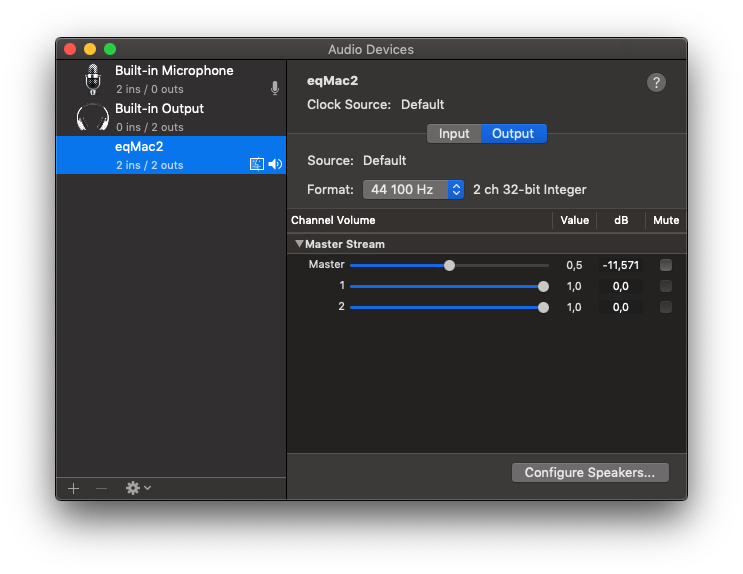
Hope it helps someone!
mantasio
on 5 Dec 2018
I'm having this problem too. eqMac2 simply doesn't show the headphones output in the list. And when I quit eqMac2, I'm still not getting any sound, even when I change the output device. eqMac2 is working over HDMI though. I've tried running the commands @devnulled used, as well as restarting the system and checking the Audio MIDI settings as proposed by @mantasio . eqMac2 have been granted access to both the microphone and accessibility in system preferences.
 theodorjs
on 18 Mar 2019
theodorjs
on 18 Mar 2019
- eqMac2 Build V2.2 2017-12-02
- macOS Mojave 10.14.3
I meet the same problem for every few days. The problem is solved the following commands every time. I want to solve it fundamentally.
sudo killall coreaudiod
open /Applications/eqMac2.app
 taisukenishimori
on 24 Mar 2019
taisukenishimori
on 24 Mar 2019
Will try when I get to work tomorrow and edit this post with results. Although I think I don't need the second command because when I kill coreaudiod, eqMac2 gets killed too automatically.
EDIT:
Had no luck with the shell script that @devnulled has provided but I really appreciate you trying to help. Anyway, I've managed to fix my problem. I've browsed through other issues here and found someone's post about theAudio MIDI Setup. This is a MacOS app that I've never even heard about. Anyway, I've navigated to the eqMac2 section in the app and found out that 2 sliders for both audio channels were for some reason set to 0. I set them all the way up and voila, my audio was back! Here's the screenshot ofAudio MIDI Setup:
Hope it helps someone!
This solution worked perfectly for me. I adjusted the setting for both eqMac2 and my USB device (DAC). As a reminder the "Audio MIDI Setup" is under "/Applications/Utilities".
 mjfajardo
on 23 Apr 2019
mjfajardo
on 23 Apr 2019
I had to do the same thing that @mantasio suggested. (And had to do it again when eqMac2 crashed after I turned off/back on my bluetooth headphones, but that's a separate issue.)
 girtsf
on 14 May 2019
nodeful
on 1 Jun 2019
girtsf
on 14 May 2019
nodeful
on 1 Jun 2019
Hey everyone. Excuse me for the lack of updates. I have been really busy on the new version of eqMac. I am happy to announce an open beta release.
You can download it here: https://eqmac.app
There are a lot of known bugs that I could not fix just yet:
- Driver not installing from the first try. Sometimes need to restart eqMac a couple times.
- Complex Device switching logic is not perfect (for example when switching off the device that's currently playing, plugging in new device etc.)
- UI takes long to load (a lot can be done to improve that)
- UI dimensions are not synching properly
- There's a noticeable audio delay in the playback, so not suitable for video yet (I know where the problem lies just haven't had the time to fix yet)
- Sometimes the playback doesn't start, in that case please try to switch the output to the device you want and eqMac should try and build the audio pipeline again.
So as you can see there's still some work to be done but at least it's a completely modern tech stack that I am fully willing to work on: 100% Swift, User Space driver and a Web UI, instead of C++, Kernel Drivers. As I said, should work on Catalina and should not have any pesky ear drum blasting volume bugs (at least I didn't come across any).
I'm open to feedback and issue reports here: https://github.com/bitgapp/eqmac
That repo will become the main repo for eqMac and this repo will be archived eventually.
And yes it's called just eqMac, not eqMac3 :) And it will stay that way forever.
nodeful
on 8 Jan 2020
Hey everyone 👋
I will be open sourcing the new version of eqMac, therefore, I am closing this issue and repository as I will be transfering nodeful/eqMac2 repo to bitgapp/eqMac
Please bear with me for the next couple of days as I setup that new repo. The eqMac2 code will be living in the old-eqMac2 branch if anyone is interested in referencing it for whatever reason.
Please try out the new version and report bugs to the new repo.
Thanks for using eqMac.
nodeful
on 4 Apr 2020
This made me crazy and been trying to re-install Eqmac2 multiple times to no avail.
But everything changed when I started giving the sliders a nudge (started with the volume boost)... and it worked! (I returned it to 0% afterwards though)
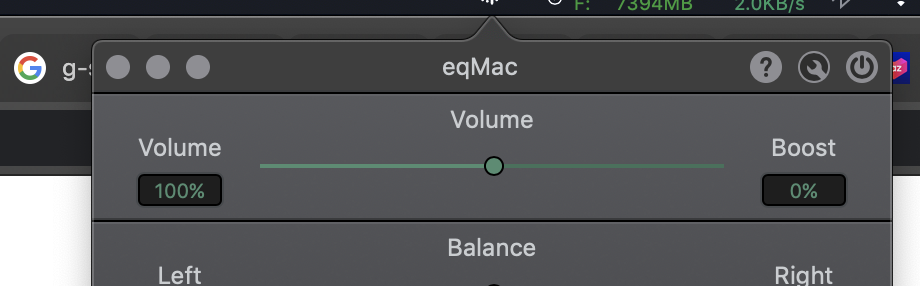
Just leaving this here, in case others have no options left.
 WisdomSky
on 20 Sep 2020
WisdomSky
on 20 Sep 2020
Related issues
 squadgazzz
·
7Comments
squadgazzz
·
7Comments
 Wysie
·
7Comments
Wysie
·
7Comments
 jameyers4
·
5Comments
jameyers4
·
5Comments
 grabowskiw
·
6Comments
grabowskiw
·
6Comments
 lbibass
·
7Comments
lbibass
·
7Comments
Most helpful comment
Everything works for me. Might have to allow microphone use to eqMac2. Go to System Settings > Security & Privacy > Microphone and make sure eqMac2 checkbox is checked.