Eqmac: Volume is extremely low when using eqmac2, even when volume of Mac is at max
No matter what I do, like reinstalling or restarting my Mac or switching audio output, the volume coming out from my headphones are many many times softer with eqmac2 switched on, just happened recently and eqmac2 was working fine a few days ago
 samanthang210
All 24 comments
Are they bluetooth? Check the gui to see if the volume is turned down in the gui.
 lbibass
on 9 Jan 2018
lbibass
on 9 Jan 2018
The headphones are not bluetooth, I have them directly connected to my Mac via the 3.5mm headphone jack.
samanthang210
on 10 Jan 2018
I have the same problem, which also occurred suddenly a few days ago. This is not the normal slight drop in amplitude that occurs whenever EqMac2 is running, but a much more severe drop. Also arguably a dangerous one. If the user has upped the sound volume to something audible, then quits EqMac2, that immediately restores volume back to the now-deafening normal for that setting, with no warning to user.
Probably related: have been experiencing random, 5-10 second spinning wait cursor time-outs when clicking on the EqMac2 icon to access its control screen for some time now, including at least a week before the present problem started occurring.
Suspected the data file containing the EQs I've created had become corrupted. Tried a restore from a pre-problem backup, but no joy. All my EQ entries, including those made after the backup were still showing and problem persists. Not sure even a delete and new install would work. Even if it did, it would be quite tedious to re-create all the EQs I've created to date.
My set-up is quite simple: EqMac2 is only thing running on top of Built-in Output. Passive headphones to phono jack and internal speaker only. No BlueTooth sound installed on my computer. Did have system sound parameters set to 24-bit/96 KHz when problem started, but changing back to 16/44.1 does not help.
If the EQ data file is indeed involved, is it possible for me to access it? Possibly re-create it if in plain text? Possibly forward to Roman for debugging?
 Dale-Cotton
on 10 Jan 2018
Dale-Cotton
on 10 Jan 2018
I installed build 2.2 and can confirm that the volume drop is huge for me too.
 gidztech
on 12 Jan 2018
gidztech
on 12 Jan 2018
Same here. Very low volume on 2.2.
 pedrocorreia
on 8 Feb 2018
pedrocorreia
on 8 Feb 2018
A "workaround" is to just put all of the bands to +20dB and EQ from there. Guessing it's something to do with the preamp having a bad value, since moving them all up doesn't sound bad (based on the MBP speakers at least - there may be weird phasing issues that are only apparent with headphones.)
 widget-
on 2 Apr 2018
widget-
on 2 Apr 2018
I hit on that work-around, too. Originally used 10dB, which kept my usual listening level around the middle of the volume scale. Then switched to 5dB, which gives me just enough loudness at max volume scale setting. I use headphones. Can’t hear any diff between no eqMac and either eqMac with a flat +5 or a flat +10.
Has anyone tried a complete uninstall then reinstall to solve the problem?
I’m fairly new to Mac OS. Given the problem I had installing it in the first place, I’ve been reluctant to try to achieve a complete uninstall followed by a re-install with no guarantee of success but with possible loss of all my input to date.
Dale-Cotton
on 2 Apr 2018
The issue with extremely low volume through eqMac2 has occurred for me as well now. It happened as a consequence of updating to OS X 10.13.4 (17E199). Now eqMac2 is unfortunately unusable.
 nerolite
on 19 Apr 2018
nerolite
on 19 Apr 2018
Yup, volume drop is definitely noticeable. I listen to podcasts a lot, normally at 50% volume slider, but with eqMac2 active sometimes have to crank it up to maximum to be able to understand anything.
The only sound, that plays at the normal volume ist the one that is played when you connect the power cord to the mac. This one does not appear in the sound effects overview and is not covered by the option controlling which device these sounds should be played on. Gave me and some of my colleagues a good scare when I connected power without having headphones plugged in.
But hopefully the new driver that is coming in one of the next versions will fix that.
 darob3rt
on 8 May 2018
darob3rt
on 8 May 2018
In another place Nodeful has stated that he is working on a complete, from-scratch, re-write which he hopes to make public mid-summer. He is clearly not doing further work on the current code. He recommends abandoning eqMac2 until the new version appears if you have the sudden-high-volume problem.
I recently discovered a control point in the MacOS Sound Preferences dialogue that I had been unaware of. There is a selector to switch between Sound Effects | Output | Input at the top of the dialogue window. Select Output, then highlight eqMac2. Now experiment with the position of the Input volume slider. I have found a combination of Input volume, regular (Output) volume, and building EQ curves from a higher flat line (described by Widget above) that minimizes the jump in sound level between eqMac2 running and eqMac2 off.
For me, setting input volume to 60% in combination with a +10dB flat line boost allows me to put the regular volume control at about 50% to achieve roughly the same loudness with eqMac2 running or not. However, I suspect my volume discrepancy problem is not as severe as some of us has, so this may not work in some or most cases.
Dale-Cotton
on 8 May 2018
Thanks for spreading the message @Dale-Cotton
First of all, I would like to apologize for the lack of communication and responses to the current issue and all other issues in general.
I have made a conscious decision to focus most of my free time and focus on developing a more modern and new version of "eqMac". This means that I can't spend too much time looking back at old codebase and trying to make every user happy. This was the main reason I made this repository open-source, in hopes that other developers might help to sort out some issues and iron out all the bugs. Unfortunately, there are very few developers that are proficient in Core Audio and Objective-C or maybe they are just not interested in this repo, which I can understand.
I promise that the next version will be much more polished and I will make some sort of a mainstream system were solving issues will be very easy and quick. Just sit tight and wait for a new release this coming summer.
Thank you to everyone who gave "eqMac2" a try and I hope I won't disappoint you next time :)
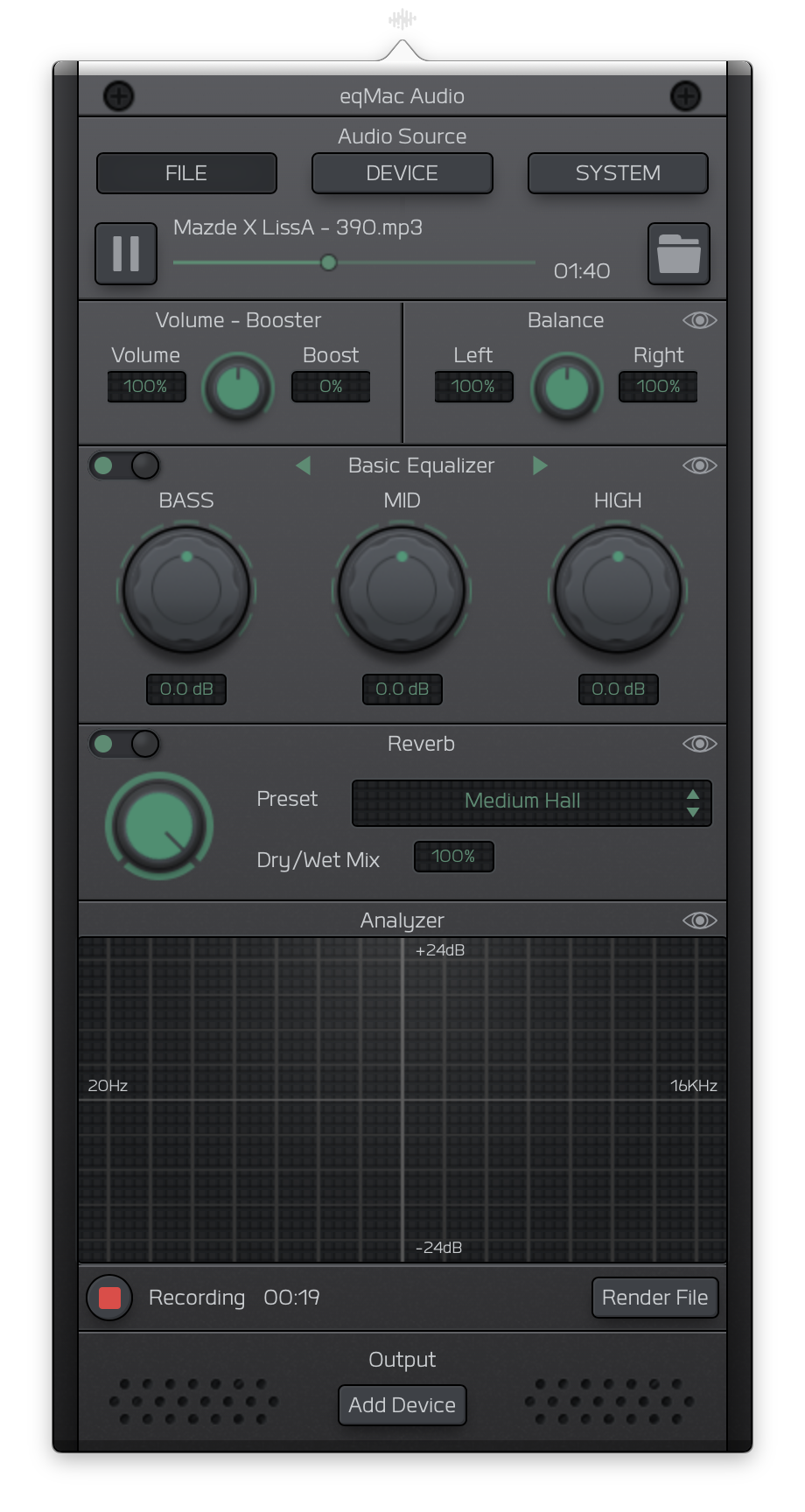
Heres a sneak peak of the UI I am currently working on:
 nodeful
on 8 May 2018
nodeful
on 8 May 2018
Thanks @nodeful. Looking forward to the new UI.
 akhats
on 20 May 2018
akhats
on 20 May 2018
I had the same issue and noticed, that the mac master channels were set to around 50% for left and right output.
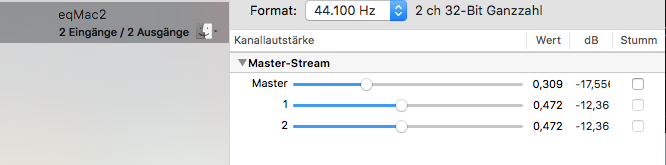
Bringing them back to 100% resolves the issue.
Hope that helps..
 DeadIine
on 25 Jun 2018
DeadIine
on 25 Jun 2018
hey @deadline98 , how'd you get to those settings? I'm running sierra 10.12.6 and can't find those settings in the sound preferences and can't think of where else to check
EDIT: nevermind, found them in the MIDI Audio settings... they were at 100% already for me so no good :( but thanks for sharing anyway
EDIT n.2: I fixed my issue by increasing the _INPUT_ master level which was kind of funky, but it worked! (in Audio MIDI Setup)

 gjim83
on 29 Jun 2018
gjim83
on 29 Jun 2018
@gjim83, you're the man! Can confirm that the midi settings master volume is linked to the system volume of eqMac2, so this value changes whenever you change the system volume with eqMac2 active.
The eqMac2 Input volume is what was really the problem. And now that I think about it, that makes perfect sense, since the program takes the normal system output as input, applies whatever settings you chose to it, and plays it back out over its own eqMac2-output.
So lowering the input volume of eqMac2 (seems every new device starts at 50%) ultimately lowers its output.
Anyways, that did the trick, can now use it again until the new version comes out.
Thanks again to gjim83.
Edit: You don't even need to access the MIDI settings for this, it can be done in
Control Panel > Sound > Input.
darob3rt
on 2 Jul 2018
Did I say "funky"? I meant exactly @darob3rt 's answer of course 😄
Now that you explained it so clearly it makes sense, I didn't think it through so I was at a loss as to why that fixed it.
Glad to have helped!
gjim83
on 2 Jul 2018
@deadline98 & @gjim83 can also confirm this works. Thanks for finding this! Worked perfect!
 myspivey
on 6 Jul 2018
myspivey
on 6 Jul 2018
Great stuff! To summarize what works for me:
_Audio MIDI Setup_:
- Both channels of Built-in Output: max to 1.0 dB
- eqMac2 Input: Master and both channels max to 1.0 dB
- eqMac2 Output: both channels max to 1.0 dB, but Master simply reflects my current loudness choice. (The output master volume is also changeable from, and stays synced to, the eqMac2 interface.)
Not sure I have this right, but I think there's a separate issue to bear in mind in which eqMac2 jumps the system volume to max when it crashes or gets confused. I've had this happen when I switch what's plugged into my MacBook's phono jack, for example. May be a good idea to get in the habit of zeroing the volume/loudness before changing anything configuration-related.
Dale-Cotton
on 9 Jul 2018
I just discovered eqMac2 and definitely love it, but as soon as I started it I noticed the volume drop too.
I found another workaround: switching the bands.
I made a preset using the 10 bands mode, then switched to 31 bands, and the volume is back to normal (made me jump as the volume was all the way up). Switching back to 10 bands, keeps the volume as it should be.
My guess, on initial launch of eqMac, something messes up the input volume, but toggling the bands resets it and the volume is back to what it should be
 yogin
on 25 Jul 2018
yogin
on 25 Jul 2018
Restarting eqMac2 worked for me.
 nakulteke
on 19 Aug 2018
nakulteke
on 19 Aug 2018
Changing the INPUT master level of eqMac2 to 100% fixes the issue as explained by @darob3rt, however, other issues are related to this. From what I have observed, this is what happens (just an educated guess, feel free to correct):
Observations
- Physical speakers (either Built-in output, or bluetooth headphones) don't have a master level, but they have a level for each channel (1: L and 2: R). Changing the volume is done uniformly to the two channels when using the following controls:
- macos status bar > sound icon > volume slider
- keyboard > volume keys
- headphones > volume buttons
For the sake of examples, let's say my speakers/headphones are at 30% volume (0.3)
When selecting eqMac2 as the output, what was coming out to your speakers now goes in the INPUT of eqMac2 and out of the OUTPUT of eqMac2
eqMac2's INPUT levels (master and per channel) will be multiplied with your speakers level: they need to all be at
100%(1.0) at all time or you will obviously reduce the sound that needs to be processed. For example, when the INPUT master level was50%, we had30% x 50% = 15%which explains the lower volumes.eqMac2's OUTPUT then does something interesting: it copies the values of the last used speaker levels to its own master level, and set the speaker levels to
100%(1.0). With the example of the speakers at30%for each channel we had above in [1], that means they are changed to100%instead, and eqMac2 master level will be the one at30%: the final output sound will now be at the same volume _(as long as eqMac2's INPUT levels are all at 100% [3], and the OUTPUT channel levels are at 100% also)_
Issues
- When quitting eqMac, instead of copying its master output level back to the speakers (inverse of 4), it sets the speaker channel levels to 0.01 (1%)
- When starting eqMac2 with the
Audio MIDI Setupopened on the eqMac2 ouput, it copies the output level of the speakers properly (as shown in [4]) but sets the speaker channel levels to 0.01 (1%) instead of 100% - when eqMac2 is selected, trying to select the speakers again causes [4] to happen again: it then copies the
100%level of the speakers to its master level, so we have100% x 100% = 100%instead of100% x 30% = 30%~> ouch! - When eqMac2 is running, changing the volume does not control the same output levels:
- macos status bar > sound icon > volume slider -> eqMac2 master
- keyboard > volume keys -> eqMac2 master
- headphones > volume buttons -> speakers 1&2 channels
- eqMac2 UI > volume slider -> speakers 1&2 channels
Thoughts
- We should have eqMac2 defaults the level of its INPUT (master + 1&2) and OUTPUT 1&2 to
100% - No idea why the
1%(0.01) shows up sometimes, maybe that's a default number when computed volumes are too high or wrong, as a fallback? - No idea why the volume controls affect two different volume levels, but that's a pain
- Ideally, eqmac2 would see when selecting a speaker output if it was already selected, to avoid copying all the volumes to
100%and destroying our hears - I wonder if it would be possible to "ignore" the eqMac2 OUTPUT levels and just keep controlling the speakers instead to avoid having to copy levels
I might look at the code when I get a chance to see if I can confirm those intuitions and find patches.
 agirault
on 22 Aug 2019
agirault
on 22 Aug 2019
Hey everyone. Excuse me for the lack of updates. I have been really busy on the new version of eqMac. I am happy to announce an open beta release.
You can download it here: https://eqmac.app
There are a lot of known bugs that I could not fix just yet:
- Driver not installing from the first try. Sometimes need to restart eqMac a couple times.
- Complex Device switching logic is not perfect (for example when switching off the device that's currently playing, plugging in new device etc.)
- UI takes long to load (a lot can be done to improve that)
- UI dimensions are not synching properly
- There's a noticeable audio delay in the playback, so not suitable for video yet (I know where the problem lies just haven't had the time to fix yet)
- Sometimes the playback doesn't start, in that case please try to switch the output to the device you want and eqMac should try and build the audio pipeline again.
So as you can see there's still some work to be done but at least it's a completely modern tech stack that I am fully willing to work on: 100% Swift, User Space driver and a Web UI, instead of C++, Kernel Drivers. As I said, should work on Catalina and should not have any pesky ear drum blasting volume bugs (at least I didn't come across any).
I'm open to feedback and issue reports here: https://github.com/bitgapp/eqmac
That repo will become the main repo for eqMac and this repo will be archived eventually.
And yes it's called just eqMac, not eqMac3 :) And it will stay that way forever.
nodeful
on 8 Jan 2020
Exciting, thanks @nodeful
agirault
on 9 Jan 2020
Hey everyone 👋
I will be open sourcing the new version of eqMac, therefore, I am closing this issue and repository as I will be transfering nodeful/eqMac2 repo to bitgapp/eqMac
Please bear with me for the next couple of days as I setup that new repo. The eqMac2 code will be living in the old-eqMac2 branch if anyone is interested in referencing it for whatever reason.
Please try out the new version and report bugs to the new repo.
Thanks for using eqMac.
nodeful
on 4 Apr 2020
Related issues
lbibass
·
7Comments
nodeful
·
6Comments
 mwansing
·
3Comments
mwansing
·
3Comments
 marco-brandizi
·
8Comments
marco-brandizi
·
8Comments
 squadgazzz
·
7Comments
squadgazzz
·
7Comments
Most helpful comment
hey @deadline98 , how'd you get to those settings? I'm running sierra 10.12.6 and can't find those settings in the sound preferences and can't think of where else to check
EDIT: nevermind, found them in the MIDI Audio settings... they were at 100% already for me so no good :( but thanks for sharing anyway
EDIT n.2: I fixed my issue by increasing the _INPUT_ master level which was kind of funky, but it worked! (in Audio MIDI Setup)