Eqmac: Crashes on install/launch - macOS 10.13
After running the installer you can see the eqMac2 icon appear in the menu bar then disappear:
CPU Specs:
Model Name: MacBook Pro
Model Identifier: MacBookPro11,3
Processor Name: Intel Core i7
Processor Speed: 2.6 GHz
Number of Processors: 1
Total Number of Cores: 4
L2 Cache (per Core): 256 KB
L3 Cache: 6 MB
Memory: 16 GB
macOS High Sierra 10.13 (17A405)
 mickeydelo
All 19 comments
Most likely your Security settings don't allow non-Appstore apps to be installed with drivers. Try to go to System Preferences => Allow apps downloaded from => and switch to "App Store and identified developers"
 nodeful
on 19 Oct 2017
nodeful
on 19 Oct 2017
I think I can actually fix this programmatically by
sudo spctl --master-disable
#install kext driver
sudo spctl --master-enable
in the install_driver.sh and uninstall_old_install_new.sh scripts. Will look into it. Thanks for providing such good evidence
nodeful
on 19 Oct 2017
Just FYI, I have "App Store and identified developers" toggled in Security & Privacy. Hope that helps debugging.
mickeydelo
on 19 Oct 2017
@mickeydelo Huh, then the problem might be connected with something else. Do you have the ability to download XCode and try to build eqMac2 on your machine? This way you could send me the error that gets thrown in the console log :)
nodeful
on 20 Oct 2017
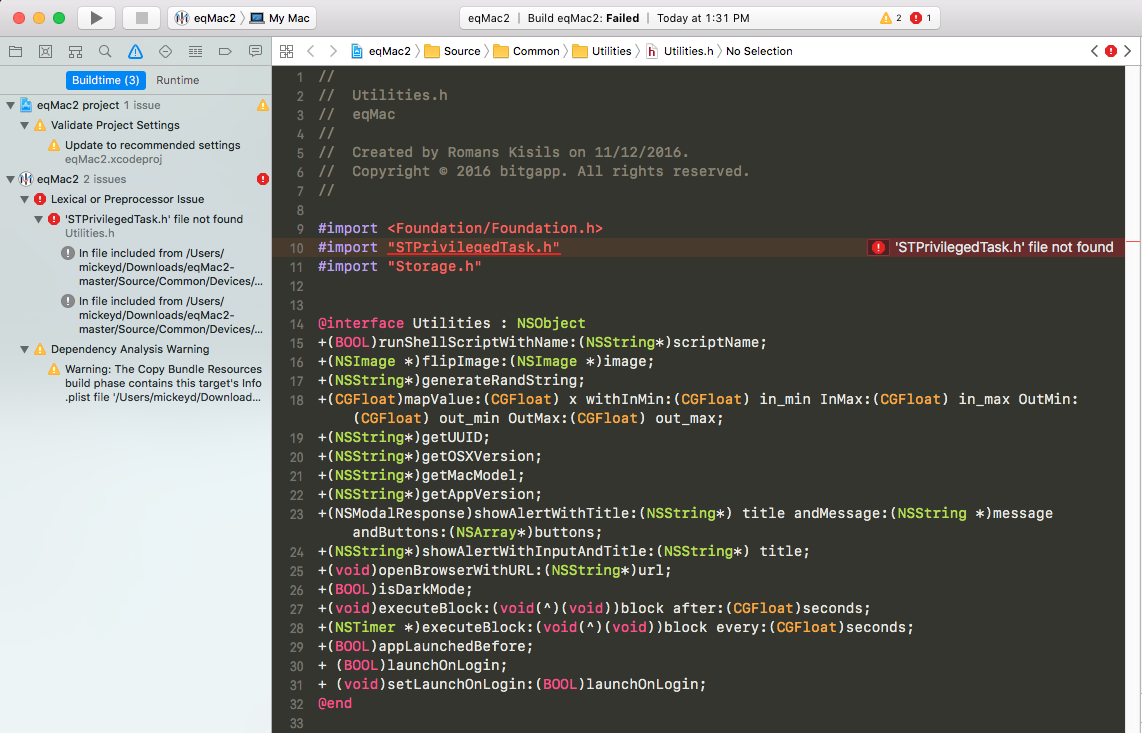
Not sure it it's related, but I do get this error when compiling in Xcode:
mickeydelo
on 20 Oct 2017
@mickeydelo
How to build?
Please install CocoaPods dependency manager on your Mac.
Then in Terminal:
git clone https://github.com/romankisil/eqMac2.git
cd eqMac2/
pod install
open eqMac2.xcworkspace
And then ⌘R
nodeful
on 20 Oct 2017
Full Console Output
2017-10-20 13:46:50.718931-0400 eqMac2[9252:17186028] [AudioHAL_Client] HALC_ProxySystem.cpp:143:GetObjectInfo:  HALC_ProxySystem::GetObjectInfo: got an error from the server, Error: 560947818 (!obj)
2017-10-20 13:46:50.720116-0400 eqMac2[9252:17186028] [AudioHAL_Client] HALC_ShellObject.cpp:219:HasProperty:  HALC_ShellObject::HasProperty: there is no proxy object
2017-10-20 13:46:58.212928-0400 eqMac2[9252:17186028] /Users/mickeyd/Library/Developer/Xcode/DerivedData/eqMac2-dblbvqtkssipscburkwptfvmktbd/Build/Products/Debug/eqMac2.app/Contents/Resources/install_new.sh
Notice: -print-diagnostics (-t) ignored; use kextutil(8) to test kexts.
Requesting load of /System/Library/Extensions/eqMac2Driver.kext.
/System/Library/Extensions/eqMac2Driver.kext failed to load - (libkern/kext) system policy prevents loading; check the system/kernel logs for errors or try kextutil(8).
2017-10-20 13:47:04.655444-0400 eqMac2[9252:17186028] Scheduling the NSURLDownload loader is no longer supported.
2017-10-20 13:47:04.743035-0400 eqMac2[9252:17189350] [BoringSSL] Function boringssl_context_get_peer_sct_list: line 1754 received sct extension length is less than sct data length
2017-10-20 13:47:04.744354-0400 eqMac2[9252:17189350] [BoringSSL] Function boringssl_context_get_peer_sct_list: line 1754 received sct extension length is less than sct data length
2017-10-20 13:47:04.755646-0400 eqMac2[9252:17186747] [BoringSSL] Function boringssl_context_get_peer_sct_list: line 1754 received sct extension length is less than sct data length
EQEngine Error: -10851 ->  /Users/mickeyd/Downloads/eqMac2-master/Source/Common/EQEngine/EQEngine.mm:  251
EQEngine Error: -10851 ->  /Users/mickeyd/Downloads/eqMac2-master/Source/Common/EQEngine/EQEngine.mm:  437
EQEngine Error: -10851 ->  /Users/mickeyd/Downloads/eqMac2-master/Source/Common/EQEngine/EQEngine.mm:  86
EQEngine ERROR: Cannot Init EQEngine
Log where crash occurs:
'EQEngine Error: -10851 -> /Users/mickeyd/Downloads/eqMac2-master/Source/Common/EQEngine/EQEngine.mm: 251
EQEngine Error: -10851 -> /Users/mickeyd/Downloads/eqMac2-master/Source/Common/EQEngine/EQEngine.mm: 437
EQEngine Error: -10851 -> /Users/mickeyd/Downloads/eqMac2-master/Source/Common/EQEngine/EQEngine.mm: 86
EQEngine ERROR: Cannot Init EQEngine'
mickeydelo
on 20 Oct 2017
Heres the same error but formatted in a readable form:
[AudioHAL_Client] HALC_ProxySystem.cpp:143:GetObjectInfo: HALC_ProxySystem::GetObjectInfo: got an error from the server, Error: 560947818 (!obj)
[AudioHAL_Client] HALC_ShellObject.cpp:219:HasProperty: HALC_ShellObject::HasProperty: there is no proxy object
/Users/mickeyd/Library/Developer/Xcode/DerivedData/eqMac2-dblbvqtkssipscburkwptfvmktbd/Build/Products/Debug/eqMac2.app/Contents/Resources/install_new.sh Notice:
-print-diagnostics (-t) ignored; use kextutil(8) to test kexts. Requesting load of /System/Library/Extensions/eqMac2Driver.kext.
/System/Library/Extensions/eqMac2Driver.kext failed to load - (libkern/kext) system policy prevents loading; check the system/kernel logs for errors or try kextutil(8).
Scheduling the NSURLDownload loader is no longer supported.
[BoringSSL] Function boringssl_context_get_peer_sct_list: line 1754 received sct extension length is less than sct data length
[BoringSSL] Function boringssl_context_get_peer_sct_list: line 1754 received sct extension length is less than sct data length
[BoringSSL] Function boringssl_context_get_peer_sct_list: line 1754 received sct extension length is less than sct data length
EQEngine Error: -10851 -> /Users/mickeyd/Downloads/eqMac2-master/Source/Common/EQEngine/EQEngine.mm: 251
EQEngine Error: -10851 -> /Users/mickeyd/Downloads/eqMac2-master/Source/Common/EQEngine/EQEngine.mm: 437
EQEngine Error: -10851 -> /Users/mickeyd/Downloads/eqMac2-master/Source/Common/EQEngine/EQEngine.mm: 86
EQEngine ERROR: Cannot Init EQEngine
The app fails because the driver fails to install, judging by this line:
/System/Library/Extensions/eqMac2Driver.kext failed to load - (libkern/kext) system policy prevents loading; check the system/kernel logs for errors or try kextutil(8).
Another OSX open-source app had a similar issue (basically yay security and yay Apple):
https://github.com/tekezo/Karabiner-Elements/issues/777
I think to install the app, you need to open terminal and:
sudo spctl --master-disable
Then try running eqMac2 and letting it install the driver, then:
sudo spctl --master-enable
and eqMac should run normally from there on
nodeful
on 20 Oct 2017
Hmmm, still no go...
Any other tests I can try out for you?
mickeydelo
on 20 Oct 2017
@mickeydelo if you go (cd in Terminal) to the folder where eqMac2Driver.kext is located in and run
sudo kextutil eqMac2Driver.kext/
It should spit out an arror
nodeful
on 20 Oct 2017
For me it worked to reboot into recovery and run "csrutil disable" before (rebooting into the regular OS again and) installing eqMac2 and then going back to recovery again to run "csrutil enable".Got the idea from the manual installation step required to completely install TotalFinder. Don't know though whether this is the proper way to do it
Never mind.
 jklingst
on 23 Oct 2017
jklingst
on 23 Oct 2017
Well of course this would work because that disables a massive security layer of OSX. My .kext is signed and should install w/o any security issues.
nodeful
on 23 Oct 2017
The error I got when running: sudo kextutil eqMac2Driver.kext/
Untrusted kexts are not allowed
Kext with invalid signature (-67062) denied: /Library/StagedExtensions/System/Library/Extensions/AB9B3E04-FB11-4FE8-900A-F76C6EB238A8.kext
Bundle (/System/Library/Extensions/cpfw.kext) failed to validate, deleting: /Library/StagedExtensions/System/Library/Extensions/AB9B3E04-FB11-4FE8-900A-F76C6EB238A8.kext
Unable to stage kext (/System/Library/Extensions/cpfw.kext) to secure location.
Untrusted kexts are not allowed
Kext with invalid signature (-67062) denied: /Library/StagedExtensions/System/Library/Extensions/6BF6B2B6-19EF-4C22-95FF-B2DC2587F40B.kext
Bundle (/System/Library/Extensions/WavTap.kext) failed to validate, deleting: /Library/StagedExtensions/System/Library/Extensions/6BF6B2B6-19EF-4C22-95FF-B2DC2587F40B.kext
Unable to stage kext (/System/Library/Extensions/WavTap.kext) to secure location.
Kext rejected due to improper filesystem permissions:
Authentication Failures:
File owner/permissions are incorrect (must be root:wheel, nonwritable by group/other):
/Library/StagedExtensions/Users/mickeyd/Downloads/eqMac2-master/eqMac2/Common/Driver/eqMac2Driver.kext
Contents
_CodeSignature
CodeResources
MacOS
eqMac2Driver
Info.plist
mickeydelo
on 24 Oct 2017
@mickeydelo as you can see, a lot of the kexts installed on your machine are not signed, but eqMac2Driver.kext didn't throw that error. So it should install easily when running the app. One thing I can see to be a problem is that you have WavTap.kext installed, which can have conflicts with my driver, as they are both based on SoundFlower.kext. I suggest you to remove WavTap and try to run the app again :)
nodeful
on 24 Oct 2017
I had a similar issue. Although when I tried installing it the first time it gave some error about romaji ending being blocked... Basically you could follow this procedure, that helped me: http://support.displaylink.com/knowledgebase/articles/1188004-macos-high-sierra-video-functionality-not-enabled
Also note that I did use "sudo spctl --master-disable" just in case at the installation, then I enabled it back.
 Montvydas
on 9 Nov 2017
Montvydas
on 9 Nov 2017
Build 2.1 has just been released. You can download it from https://bitgapp.com/eqmac
Could you please update and report if the issue is still relevant. Thanks :)
nodeful
on 26 Nov 2017
After revisiting this (prior to the new version), I was able to install it. I believe it was just a matter of correctly allowing 3rd party access. I'm not sure if it was something missed the first few times or something that some of the workarounds fixed.
mickeydelo
on 27 Nov 2017
Hey everyone. Excuse me for the lack of updates. I have been really busy on the new version of eqMac. I am happy to announce an open beta release.
You can download it here: https://eqmac.app
There are a lot of known bugs that I could not fix just yet:
- Driver not installing from the first try. Sometimes need to restart eqMac a couple times.
- Complex Device switching logic is not perfect (for example when switching off the device that's currently playing, plugging in new device etc.)
- UI takes long to load (a lot can be done to improve that)
- UI dimensions are not synching properly
- There's a noticeable audio delay in the playback, so not suitable for video yet (I know where the problem lies just haven't had the time to fix yet)
- Sometimes the playback doesn't start, in that case please try to switch the output to the device you want and eqMac should try and build the audio pipeline again.
So as you can see there's still some work to be done but at least it's a completely modern tech stack that I am fully willing to work on: 100% Swift, User Space driver and a Web UI, instead of C++, Kernel Drivers. As I said, should work on Catalina and should not have any pesky ear drum blasting volume bugs (at least I didn't come across any).
I'm open to feedback and issue reports here: https://github.com/bitgapp/eqmac
That repo will become the main repo for eqMac and this repo will be archived eventually.
And yes it's called just eqMac, not eqMac3 :) And it will stay that way forever.
nodeful
on 8 Jan 2020
Hey everyone 👋
I will be open sourcing the new version of eqMac, therefore, I am closing this issue and repository as I will be transfering nodeful/eqMac2 repo to bitgapp/eqMac
Please bear with me for the next couple of days as I setup that new repo. The eqMac2 code will be living in the old-eqMac2 branch if anyone is interested in referencing it for whatever reason.
Please try out the new version and report bugs to the new repo.
Thanks for using eqMac.
nodeful
on 4 Apr 2020
Related issues
 squadgazzz
·
7Comments
squadgazzz
·
7Comments
 brian-lamb-software-engineer
·
4Comments
brian-lamb-software-engineer
·
4Comments
 shawnmclean
·
5Comments
shawnmclean
·
5Comments
 jameyers4
·
5Comments
jameyers4
·
5Comments
 mwansing
·
3Comments
mwansing
·
3Comments
Most helpful comment
Most likely your Security settings don't allow non-Appstore apps to be installed with drivers. Try to go to System Preferences => Allow apps downloaded from => and switch to "App Store and identified developers"