Epsilon: Simulator breaks with some unicode char
Describe the bug
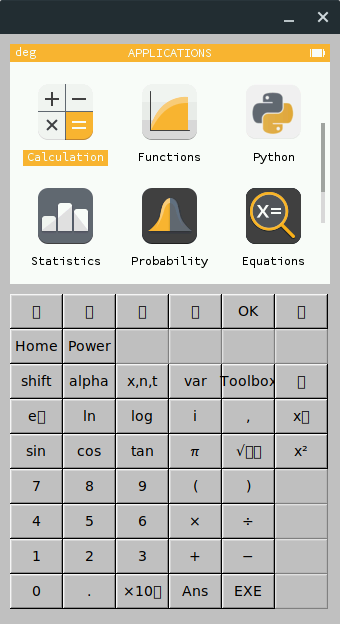
Simulator has some keys with missing text/symbols. This happens to coincide with some random Unicode symbols. After checking which Unicode Char were used in epsilon/ion/src/simulator/keyboard/fltkkbd.cpp I can confirm that my system font has all the symbols needed.
Screenshots
To Reproduce
Steps to reproduce the behavior:
- Build epsilon with
make PLATFORM=simulator - Run
./build/simulator/epsilon.elf
Expected behavior
Arrows and other math symbols are displayed correctly
Environment
Tried both in Manjaro and on an Ubuntu 18:04. Same bug. Commit 23e1e39.
Have a nice day,
Carlo
 CarloMara
All 8 comments
In the quest to debug this problem I tried to compile a small fltk program with a button and some unicode strings.
Lo and behold, it doesn't work.
In case you're wondering this is the program.
#include <FL/Fl.H>
#include <FL/Fl_Window.H>
#include <FL/Fl_Box.H>
#include <FL/Fl_Button.H>

int main(int argc, char **argv) {
    Fl_Window *window = new Fl_Window(340,180);
    Fl_Button *button = new Fl_Button(20,40,300,100,"\u2191");
    window->end();
    window->show(argc, argv);
    return Fl::run();
 }
This is the result on my box
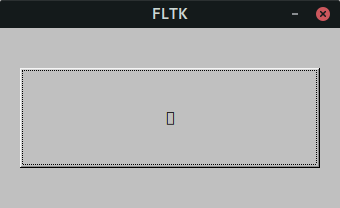
I think something is acting up in how fonts are managed, ether on fltk or on manjaro.
I'll keep you posted, but this looks to be a bug outside epsilon.
Cheers,
Carlo
CarloMara
on 4 Jun 2019
This is clearly a bug outside epsilon, as it's working on macOS
 RemyDCF
on 4 Jun 2019
RemyDCF
on 4 Jun 2019
I've done some further troubleshooting. I'm gonna write the conclusions I reached, later you'll find more details later.
- It appears that the font loaded by default on my system doesn't support Unicode. I tried to understand who or where this font is specified, with no luck. I have the suspicion that it's something hard-coded ether in X or in Xwayland.
To make matter worse, fonts are something that's system dependent because they get loaded at run-time. This complicates the debugging procedure, because as @RemyDCF pointed out, on macOS this works. I have also tried on my mac and I can confirm.
I tried to understand how FLTK loads these mystical creatures, and I have stumbled across Fl::set_fonts(). Unfortunately I couldn't find any mentions of the face table default conditions before Fl::set_fonts() is called, which led me to believe that on my system it was initialized wrongly. - By calling Fl::set_fonts() manually, and assigning a known good font to each button when it's initialized (L62 and L64) via
labelfontI got everything to display properly.
TL;DR, something is broken somewhere, I don't know well enough all the bits and pieces to tell exactly where. I have found a workaround, if the Maintainers want I can make a PR.
Longer story on how I got here, for who's interested.
I went on the epsilon code to see what Unicode chars were used. Copied them from Gnome Fonts and pasted them on the terminal. No problem. I could see the Unicode displayed just fine.
I then asked myself, what font could my terminal be using? Mind you, I love to customize my terminal, change the appearance, and the colors. So I went on the settings and, to my surprise, it was named _Hack_.
So, I tried to get FLTK to load this font instead of the other one, which to this point I don't know where it comes from. This was a three step operation:
- Make FLTK update it's face table with all the fonts present on the system. This is easily done by calling Fl::set_fonts().
- Search the requested font, in this case _Hack_, in the face table. This was somewhat more complex, as the face table is just an array, so the only option is to sweep through it while calling for each element get_font_name() and comparing the result with the name of the requested font. This is not great, as for example my system has more than 600 fonts so this step could be very time consuming. To solve this issue I decided to search the index once and than store it in a global variable. Do you remember the name of the font? Well, IMHO it's pretty fitting.
- Set this as the font used by each widget, in this case each button. This was done by calling labelfont() with the index found in point 2 on every single button. In simpler words, after L62 and L64 I added a call to labelfont() on the newly created button objects.
So, after this work, does it work?
_Sorta_
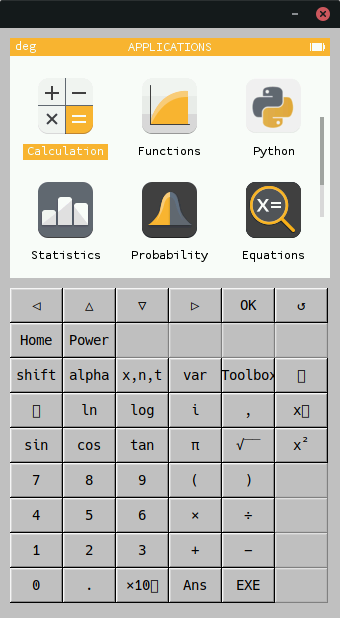
As you can see, some Unicode symbols are now present, but not all of them. I still have to find out why. I don't have any suspects yet, as the font currently loaded support these symbols, but they still don't get displayed properly. If someone with more experience in FLTK wants to suggest something, be my guest.
@RemyDCF Could you please try the code down below and than post here the output?
Suppose that this file is named main_github_issue.cpp, you should be able to compile this via fltk-config --compile main_github_issue.cpp. After you run it, there should be just a button. When you press it, it should first print the default loaded system fonts, then force a load and print the content of the face table again.
#include <FL/Fl.H>
#include <FL/Fl_Window.H>
#include <FL/Fl_Box.H>
#include <FL/Fl_Button.H>
#include <iostream>

void debug_fonts(Fl_Widget* widget, void*){
    for (int i = 0; i < 16; i++)
    {
        std::cout << "Font Index: " << i << " Font Name: "<< Fl::get_font_name(i) << "\n" << std::flush;
    }
    std::cout << "\n\n\n" << std::flush;
    // By calling set_fonts() FLTK will open the display, and add every fonts on the server to the face table
    int font_count = Fl::set_fonts();
    // On my system this led to more than 600 fonts begin added
    for (int i = 0; i < font_count; i++)
    {
        std::cout << "Font Index: " << i << " Font Name: "<< Fl::get_font_name(i) << "\n" << std::flush;
    }
}

int main(int argc, char **argv) {
    Fl_Window *window = new Fl_Window(340,180);
    Fl_Button *button = new Fl_Button(20,40,300,100,"Get Font Data");
    button->callback(debug_fonts);
    window->end();
    window->show(argc, argv);
    return Fl::run();
 }
Thanks everybody,
Carlo
CarloMara
on 4 Jun 2019
Here you go: https://pastebin.com/LskC23TX
RemyDCF
on 5 Jun 2019
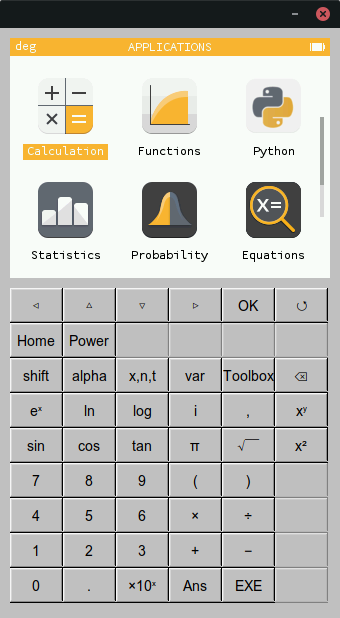
Ok, I've done some further testing, and I could confirm that everything works smoothly if Arial is used as widget font.
I believe that it works by default on macOS because that's the default font for the typeface sans serif, as in both @RemyDCF's mac and mine it is located at index zero of the face table.
I see two solutions to this problem.
- Change the default system font to Arial. As mentioned above I'm not completely clear on how to do this, nor I can tell if this would cause problems to other applications.
- Load manually the font in Epsilon. As far as I can tell this would be the preferred solution, as it will make the application more reliable in case of systems that don't have fonts supporting the Unicode symbols that we need.
I have already written a patch to implement 2. I'd like some guidance by the project maintainers on how to handle a font lookup failure. Should the simulator quit, or do you prefer a simple message stating that the ideal font could not be loaded.
Thanks again for your time,
Carlo
P.S.
CarloMara
on 5 Jun 2019
Hi @CarloMara :) Just a quick note: we'll deprecate the FLTK simulator very soon. We're migrating towards SDL which we're already using on our Android and iOS apps. It already works on Windows and macOS as well, and it should be quite easy to get it to work on Linux too.
The upsides are as follow:
- Far fewer dependencies (and SDL is bundled-in)
- A lot more targets (e.g. iOS and Android)
- Has with a nicer UI
- Same code base for all simulator versions
 Ecco
on 6 Jun 2019
Ecco
on 6 Jun 2019
Hi @Ecco,
we'll deprecate the FLTK simulator very soon.
HURRAY
Do you have an ETA for the Linux migration? Because if it's more than 2 weeks it might make more sense to patch this, as I'd like to start working on some features and having to rebase each time something new is pushed it's a major pain in the neck.
BTW, I case you need some testing to kill FLTK quicker count me in.
Carlo
CarloMara
on 6 Jun 2019
We've moved away from FLTK so this is probably no longer relevant.
Ecco
on 7 Oct 2019
Related issues
 INailedIt
·
4Comments
INailedIt
·
4Comments
 UDXS
·
5Comments
UDXS
·
5Comments
 homeostasie
·
3Comments
homeostasie
·
3Comments
 tjhorner
·
5Comments
tjhorner
·
5Comments
 matheod
·
4Comments
matheod
·
4Comments
Most helpful comment
Ok, I've done some further testing, and I could confirm that everything works smoothly if Arial is used as widget font.
I believe that it works by default on macOS because that's the default font for the typeface
sans serif, as in both @RemyDCF's mac and mine it is located at index zero of the face table.I see two solutions to this problem.
I have already written a patch to implement 2. I'd like some guidance by the project maintainers on how to handle a font lookup failure. Should the simulator quit, or do you prefer a simple message stating that the ideal font could not be loaded.
Thanks again for your time,
Carlo
P.S.
