I implemented Epoxy according to the wiki. But I was never able to run the app because I'm getting an error :
Caused by: java.lang.IllegalStateException: You cannot call requestModelBuild directly. Call setData instead to trigger a model refresh with new data.
I'll post the full code for the epoxy implementation.
EpoxyModelClass(layout = R.layout.header_view)
public abstract class HeaderModel extends EpoxyModelWithHolder<HeaderModel.Holder> {
    @EpoxyAttribute String title;

    @Override
    public void bind(Holder holder) {

        holder.tv.setText(title);
    }

    static class Holder extends EpoxyHolder {
        TextView tv;

        @Override
        protected void bindView(@NonNull View itemView) {
            Log.d("DEBAG", "HeaderModel");
            tv = itemView.findViewById(R.id.name_photo);
        }
    }
}

public class PhotoController  extends Typed2EpoxyController<List<SemiAutomaticWeldingData>, Boolean> {
    @AutoModel HeaderModel_ headerModel;

    @Override
    protected void buildModels(List<SemiAutomaticWeldingData> data1, Boolean data2) {
        headerModel
                .title("Hello Lokki")
                .addTo(this);

        for (SemiAutomaticWeldingData photo : data1) {
            new HeaderModel_()
                    .title(photo.getTitle())
                    .addTo(this);
        }
    }
}

public class Activitys extends AppCompatActivity {
    private EpoxyRecyclerView epoxyRecyclerView;
    private PhotoController photoController;

    @Override
    protected void onCreate(@Nullable Bundle savedInstanceState) {
        super.onCreate(savedInstanceState);
        setContentView(R.layout.epoxy_activity);

        epoxyRecyclerView = findViewById(R.id.epoxy_rv);
        photoController = new PhotoController();

        epoxyRecyclerView.setControllerAndBuildModels(photoController);
        epoxyRecyclerView.requestModelBuild();

    }
}

<LinearLayout xmlns:android="http://schemas.android.com/apk/res/android"
    android:orientation="vertical" android:layout_width="match_parent"
    android:layout_height="match_parent">

    <TextView
        android:id="@+id/name_photo"
        android:layout_width="match_parent"
        android:layout_height="wrap_content" />
</LinearLayout>
I use Studio Android 3.2 Canary 8.
My gradle looks like the following.
apply plugin: 'com.android.application'

apply plugin: 'kotlin-android'

apply plugin: 'kotlin-android-extensions'

android {
    compileSdkVersion 28
    defaultConfig {
        applicationId "ua.com.dynamicrecyclerview.drawingreadingswelder"
        minSdkVersion 19
        targetSdkVersion 28
        versionCode 1
        versionName "1.0"
        testInstrumentationRunner "androidx.test.runner.AndroidJUnitRunner"
    }
    buildTypes {
        release {
            minifyEnabled false
            proguardFiles getDefaultProguardFile('proguard-android.txt'), 'proguard-rules.pro'
        }
    }
//    mvvm этап 1

    dataBinding {
        enabled = true
    }
}

dependencies {
    implementation fileTree(dir: 'libs', include: ['*.jar'])
    implementation"org.jetbrains.kotlin:kotlin-stdlib-jdk7:$kotlin_version"
    implementation 'androidx.appcompat:appcompat:1.0.0-alpha1'
    implementation 'androidx.recyclerview:recyclerview:1.0.0-alpha1'
    implementation 'androidx.cardview:cardview:1.0.0-alpha1'
    implementation 'com.google.android.material:material:1.0.0-beta01'

    implementation 'androidx.constraintlayout:constraintlayout:1.1.2'
    testImplementation 'junit:junit:4.12'
    androidTestImplementation 'androidx.test:runner:1.1.0-alpha3'
    androidTestImplementation 'androidx.test.espresso:espresso-core:3.1.0-alpha3'

    //Glide
    implementation 'com.github.bumptech.glide:glide:4.7.1'
    annotationProcessor 'com.github.bumptech.glide:compiler:4.7.1'

    //Retrofit
    implementation "com.squareup.retrofit2:retrofit:${rootProject.ext.retrofit}"
    implementation "com.squareup.retrofit2:adapter-rxjava2:${rootProject.ext.retrofit}"
    implementation "com.squareup.retrofit2:converter-gson:${rootProject.ext.retrofit}"

    //RxJava2
    implementation 'io.reactivex.rxjava2:rxjava:2.1.5'
    implementation 'io.reactivex.rxjava2:rxandroid:2.0.1'

    //epoxy

    implementation 'com.airbnb.android:epoxy:3.0.0-rc1'
    annotationProcessor 'com.airbnb.android:epoxy-processor:3.0.0-rc1'


}
 Sergiyss
All 6 comments
From the Typed2EpoxyController JavaDoc
/**
 * This is a wrapper around {@link com.airbnb.epoxy.EpoxyController} to simplify how data is
 * accessed. Use this if the data required to build your models is represented by two objects.
 * <p>
 * To use this, create a subclass typed with your data object. Then, call {@link #setData}
 * whenever that data changes. This class will handle calling {@link #buildModels} with the
 * latest data.
 * <p>
 * You should NOT call {@link #requestModelBuild()} directly.
 *
 * @see TypedEpoxyController
 * @see Typed3EpoxyController
 * @see Typed4EpoxyController
 */
public abstract class Typed2EpoxyController<T, U> extends EpoxyController {
As the error says, you shouldn't call requestModelBuild directly on Typed2EpoxyController. Instead call setData and pass your data there.
However, from your flow it seems that you're already building the models by doing setControllerAndBuildModels. Just remove the requestModelBuild and replace it with your own data by calling setData
 ShaishavGandhi
on 8 Sep 2018
ShaishavGandhi
on 8 Sep 2018
I changed the activity
public class Activitys extends AppCompatActivity {
     ...
    @Override
    protected void onCreate(@Nullable Bundle savedInstanceState) {
       ...
        List<SemiAutomaticWeldingData> semi = new ArrayList<SemiAutomaticWeldingData>();

        semi.add(new SemiAutomaticWeldingData("1", "", "", ""));
        semi.add(new SemiAutomaticWeldingData("2", "", "", ""));
        semi.add(new SemiAutomaticWeldingData("3", "", "", ""));

      ...

        epoxyRecyclerView.setController(photoController);
        photoController.setData(semi, true);
    }
}
Now, Epoxy generates only the first item.
                .id(24)
                .title("Hello Lokki")
                .addTo(this);
But I want to display additional data.
for (int i = 0; i < 10; i++) {
            new HeaderModel_()
                    .id(i)
                    .title("Hello ")
                    .addTo(this);

        }
But I don't see them on the list.
public class PhotoController  extends Typed2EpoxyController<List<SemiAutomaticWeldingData>, Boolean> {
    @AutoModel HeaderModel_ headerModel;

    @Override
    protected void buildModels(List<SemiAutomaticWeldingData> data1, Boolean data2) {
        headerModel
                .id(24)
                .title("Hello Lokki")
                .addTo(this);

        for (int i = 0; i < 10; i++) {
            new HeaderModel_()
                    .id(i)
                    .title("Hello ")
                    .addTo(this);

        }
    }
}
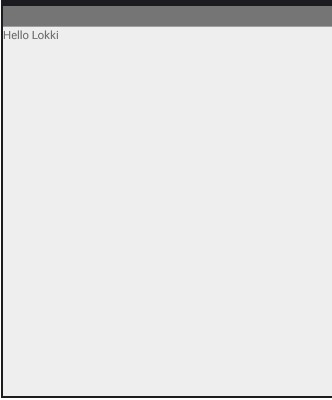
Sergiyss
on 8 Sep 2018
Maybe the size of your header model is match_parent? the code looks right, you should set some breakpoints and debug it on your side
 elihart
on 9 Sep 2018
elihart
on 9 Sep 2018
@shaishavgandhi05 thanks for the good answer 👍
elihart
on 9 Sep 2018
@elihart Thanks. Indeed, match_parent was my problem.
Sergiyss
on 9 Sep 2018
I had the same issue. The documentation used a Typed2EpoxyController in their example and then tells you to call setControllerAndBuildModels() which calls requestModelBuild() on the controller which throws the exception. That call supposedly only works for EpoxyController.
 martymiller
on 12 Jul 2020
martymiller
on 12 Jul 2020
Related issues
 TonnyL
·
5Comments
TonnyL
·
5Comments
 ailuoyi
·
5Comments
ailuoyi
·
5Comments
 atonamy
·
4Comments
atonamy
·
4Comments
 jQrgen
·
5Comments
jQrgen
·
5Comments
 chrisbanes
·
3Comments
chrisbanes
·
3Comments
Most helpful comment
@elihart Thanks. Indeed, match_parent was my problem.