Envoy: tls_context error initializing configuration "invalid path: /etc/..."
Problem
Hi all,
I just want to extend my envoy with the 443 redirect but I fail to get it work.
If I run my code I get

Thank you so much for any help!! :)
Description:
My Setup:
Docker Swarm Node on digitalocean droplet
2 Python Services with 1 Angular Frontend
I Cant get it solved, maybe someone can help me.
1 In the folder "test" I deploy my docker-stack with the file docker-stack.yaml:
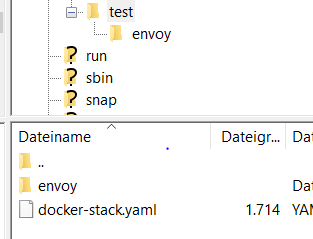
2 in the folder envoy I have the envoy config and the 2 certificates
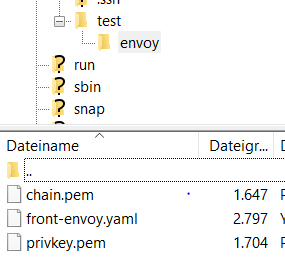
front-envoy.yaml:
static_resources:
  listeners:
  - address:
      socket_address:
        address: 0.0.0.0
        port_value: 443
    filter_chains:
    - filters:
      - name: envoy.http_connection_manager
        config:
          codec_type: auto
          stat_prefix: ingress_http
          route_config:
            name: local_route
            virtual_hosts:
            - name: backend
              domains:
              - "example.de"
              routes:
              - match:
                  prefix: "/api/service1/"
                route:
                  cluster: appone
              - match:
                  prefix: "/api/service2/"
                route:
                  cluster: apptwo
              - match:
                  prefix: "/"
                route:
                  cluster: frontend
          http_filters:
          - name: envoy.router
            config: {}
      tls_context:
        common_tls_context:
          tls_certificates:
            - certificate_chain:
                filename: "/etc/chain.pem"
              private_key:
                filename: "/etc/privkey.pem"

  - address:
      socket_address:
        address: 0.0.0.0
        port_value: 80
    filter_chains:
    - filters:
      - name: envoy.http_connection_manager
        config:
          codec_type: auto
          stat_prefix: ingress_http
          route_config:
            virtual_hosts:
            - name: backend
              domains:
              - "example.de"
              routes:
              - match:
                  prefix: "/"
                redirect:
                  path_redirect: "/"
                  https_redirect: true
          http_filters:
          - name: envoy.router
            config: {}


  clusters:
  - name: appone
    connect_timeout: 0.25s
    type: strict_dns
    lb_policy: round_robin
    http_protocol_options: {}
    hosts:
    - socket_address:
        address: appone
        port_value: 5001
  - name: apptwo
    connect_timeout: 0.25s
    type: strict_dns
    lb_policy: round_robin
    http_protocol_options: {}
    hosts:
    - socket_address:
        address: apptwo
        port_value: 5002
  - name: frontend
    connect_timeout: 0.25s
    type: strict_dns
    lb_policy: round_robin
    http_protocol_options: {}
    hosts:
    - socket_address:
        address: frontend
        port_value: 80

admin:
  access_log_path: "/dev/null"
  address:
    socket_address:
      address: 0.0.0.0
      port_value: 8001
docker-stack.yaml:
version: '3.7'

services:
  front-envoy:
    image: test/envoy:v10
    volumes:
      - ./envoy/front-envoy.yaml:/etc/front-envoy.yaml
    deploy:
      replicas: 1
      restart_policy:
        condition: on-failure
    networks:
      - envoymesh
    ports:
      - "80:80"
      - "8001:8001"

  appone:
    image: test/appone:v10
    deploy:
      endpoint_mode: dnsrr
      replicas: 2
      restart_policy:
        condition: on-failure
    networks:
      default:
      envoymesh:
        aliases:
          - appone
    depends_on:
      - front-envoy
    environment:
      - SERVICE_NAME=appone

  apptwo:
    image: test/apptwo:v10
    deploy:
      endpoint_mode: dnsrr
      replicas: 3
      restart_policy:
        condition: on-failure
    networks:
      envoymesh:
        aliases:
          - apptwo
    depends_on:
      - front-envoy
    environment:
      - SERVICE_NAME=apptwo

  frontend:
    image: test/frontend:v10
    volumes:
      - /app/node_modules
    deploy:
      endpoint_mode: dnsrr
      replicas: 2
      restart_policy:
        condition: on-failure
    networks:
      envoymesh:
        aliases:
          - frontend
    environment:
      - SERVICE_NAME=frontend
    depends_on:
      - appone
      - apptwo
      - front-envoy

networks:
  envoymesh:
    driver: overlay
    attachable: true
 maei1337
All 7 comments
I think you missed to mount the certificate files. You can put smth like
- ./envoy/chain.pem:/etc/chain.pem under volumes in docker-stack.yaml
 yxue
on 23 Jul 2019
yxue
on 23 Jul 2019
@crazyxy thank you very much! this works, but now I get "failed to load privkey"

But thank you again for your help
maei1337
on 23 Jul 2019
You should mount the private key as well.
yxue
on 23 Jul 2019
@crazyxy :) yes I ve done it. but get this error ;)
maei1337
on 23 Jul 2019
Is your private key file valid? I used following cmd to generate cert and private key and it works in my env
openssl req -x509 -newkey rsa:4096 -keyout key.pem -out cert.pem -days 365 -nodes -subj '/CN=localhost'
yxue
on 26 Jul 2019
@crazyxy now evrything works. I created a new key and chain with certbot. Thank you very much for your help !!!
maei1337
on 26 Jul 2019
This issue has been automatically marked as stale because it has not had activity in the last 30 days. It will be closed in the next 7 days unless it is tagged "help wanted" or other activity occurs. Thank you for your contributions.
![stale[bot] picture](https://avatars3.githubusercontent.com/in/1724?v=4&s=40) stale[bot]
on 25 Aug 2019
stale[bot]
on 25 Aug 2019
Related issues
 anatolebeuzon
·
3Comments
anatolebeuzon
·
3Comments
 justConfused
·
3Comments
justConfused
·
3Comments
 phlax
·
3Comments
phlax
·
3Comments
 ghost
·
3Comments
ghost
·
3Comments
 jeremybaumont
·
3Comments
jeremybaumont
·
3Comments
Most helpful comment
Is your private key file valid? I used following cmd to generate cert and private key and it works in my env
openssl req -x509 -newkey rsa:4096 -keyout key.pem -out cert.pem -days 365 -nodes -subj '/CN=localhost'